

·
11 min read
Quick Takeaways
Claude Opus 4.8 has a 1M token context window. It still can’t remember you.
Context is what the model sees right now. Memory is what your app preserves when the session ends, the user returns, or the agent restarts. They’re not the same problem.
This post tests that boundary with APIs Anthropic’s Messages API (
claude-opus-4-8) and Mem0’s REST API. No simulated outputs.
The test: Session 1 stores a user fact. Session 2 starts fresh. Opus 4.8 is asked the same question twice - once without memory, once with Mem0 injecting the prior-session fact.
The result: Same model, same question, different memory context. One answer is honest (“I don’t know”). The other is useful.
💡 You’ll need a free Mem0 API key to run this. Get one at app.mem0.ai
The Misleading Question: “Do I Still Need Memory?”
Claude Opus 4.8 changes the context-window conversation. Anthropic describes Opus 4.8 as a frontier model for coding and agents with a 1M context window, and Anthropic’s Messages API exposes it as claude-opus-4-8. That is a large working memory for a single model call.
Opus 4.8 scores 84% on Online-Mind2Web and leads Anthropic’s Legal Agent Benchmark - both long-horizon agentic tasks where cross-session memory becomes critical.
So the natural objection is fair:
If the model can read 1M tokens, why add an external memory layer?
The answer is that context and memory solve different problems.
A 1M context window helps a lot when the information is present in the prompt. It does not automatically create cross-session recall. If a new session starts without the old messages, the model has nothing to remember from. That is true even when the model has an enormous maximum context window.
This is why the better question is:
Will my application actually send the old conversation every time, for every user, forever?
If the answer is no, you need memory.
Context Window vs. Memory
Opus 4.8 leads on coding benchmarks, but benchmarks measure single-session performance, not cross-session memory. It leads with a 1M context window, extended agentic task support, and Anthropic’s Legal Agent Benchmark.
Three terms matter here:
Context window: The text, tool output, files, system instructions, and conversation history included in a model request.
Session: A bounded interaction where the application carries some message history forward. Session boundaries are product boundaries, not model boundaries. A new chat, a restarted agent, a returning user, or a new workflow can all start a fresh session.
Persistent memory: A separate store that extracts and retrieves facts across sessions. In this demo, Mem0 stores memories by user_id, then retrieves relevant memories before the next Opus call.
The distinction is easiest to see in a two-session flow as follows:
That is not a context-window win. It is a cross-session memory win.
Why the 1M Context Window Does Not Replace This
A 1M context window lets you include a lot of text. It does not decide what to persist. It does not automatically know which prior sessions belong to the current user. It does not maintain a durable index of user facts across future app runs.
You could solve cross-session memory by replaying every prior session into the prompt. But that creates four problems:
You have to store all those sessions somewhere anyway.
You have to decide which sessions to include.
You pay tokens for irrelevant history.
You risk burying the useful fact inside a large prompt.
Memory retrieval solves a different problem. It asks:
What are the few facts from prior sessions that matter for this turn?
That is why the Mem0 path sends a compact memory block instead of replaying the entire old conversation. Some good fits for Mem0 include:
Cross-session user preferences
Long-lived personal facts
Product or workspace history
User-specific constraints
Prior decisions and rationale
Agent state that should survive restarts
Multi-user apps where each user needs isolated memory
Coding agents
For long-running agents, this becomes the default architecture:
The context window remains useful. It carries the active work. Mem0 carries durable user memory.
What You’ll Build
The demo performs four operations:
Stores the Session 1 message in Mem0.
Starts Session 2 without carrying chat history forward.
Calls Opus 4.8 through Anthropic’s Messages API without memory.
Searches Mem0 by
user_id, injects retrieved memory, and calls Opus 4.8 again.
The no-memory path uses this system instruction:
The Mem0 path uses this system instruction:
The model is not allowed to hallucinate missing context, but it is allowed to do arithmetic over stated facts. If Mem0 retrieves “joined 5 weeks ago” and the current user says “it’s 4 weeks later,” the model can compute 9 weeks.
💡You can find the complete code on GitHub.
The Architecture
The app has only one user-facing flow:
Internally, the application generates auser_id, so Mem0 can scope memory to a single user.
API keys are saved within the .env file as an environment variable. They are not typed into the UI and are not shown in the UI.
💡You’ll require a Mem0 API key and an Anthropic API Key here.
The model call goes to Anthropic:
The memory calls go to Mem0’s REST API:
The demo uses three Mem0 operations:
The add endpoint is asynchronous, so the app polls the returned event ID until the memory operation succeeds. Then Session 2 searches memory by user_id.
Code Walkthrough
In this section, we’ll go over some code snippets to understand the basic working of the demo. You can also find the complete code on GitHub.
1. Store Session 1 in Mem0
The first session is not sent directly to Opus in Session 2. It is stored in Mem0.
This is the write step. In production, this runs after every meaningful exchange. Start free on Mem0 to test it with your own agent.
Mem0 processes the message and extracts durable memory. In the live test, a message like:
I joined a new company 5 weeks ago.
can become a memory like:
User joined a new company on April 29, 2026
The exact output is Mem0’s extraction result, not a hardcoded value in the app.
2. Poll the Mem0 event
Mem0’s add endpoint returns an event ID. The demo waits for the event so that the next step does not search before memory processing completes.
This matters for demo reliability. If you add a memory and immediately search before processing finishes, the retrieval side can look broken even though storage succeeded.
3. Search by user_id in Session 2
When Session 2 starts, the app searches Mem0 using the Session 2 question.
The important part is the filter:
"filters": {"user_id": user_id}
This keeps memory scoped to the current user. It also demonstrates the application-level boundary that a context window does not provide by itself.
4. Ask Opus 4.8 with and without memory
The no-memory call sends only Session 2:
The Mem0 call sends Session 2 plus retrieved memories:
Same model. Same Session 2 question. Different memory context.
That is the whole point.
What the Output Should Show
In the no-memory path, the model should say it does not know what the user told it before. That is the correct answer because the prior session was not supplied.
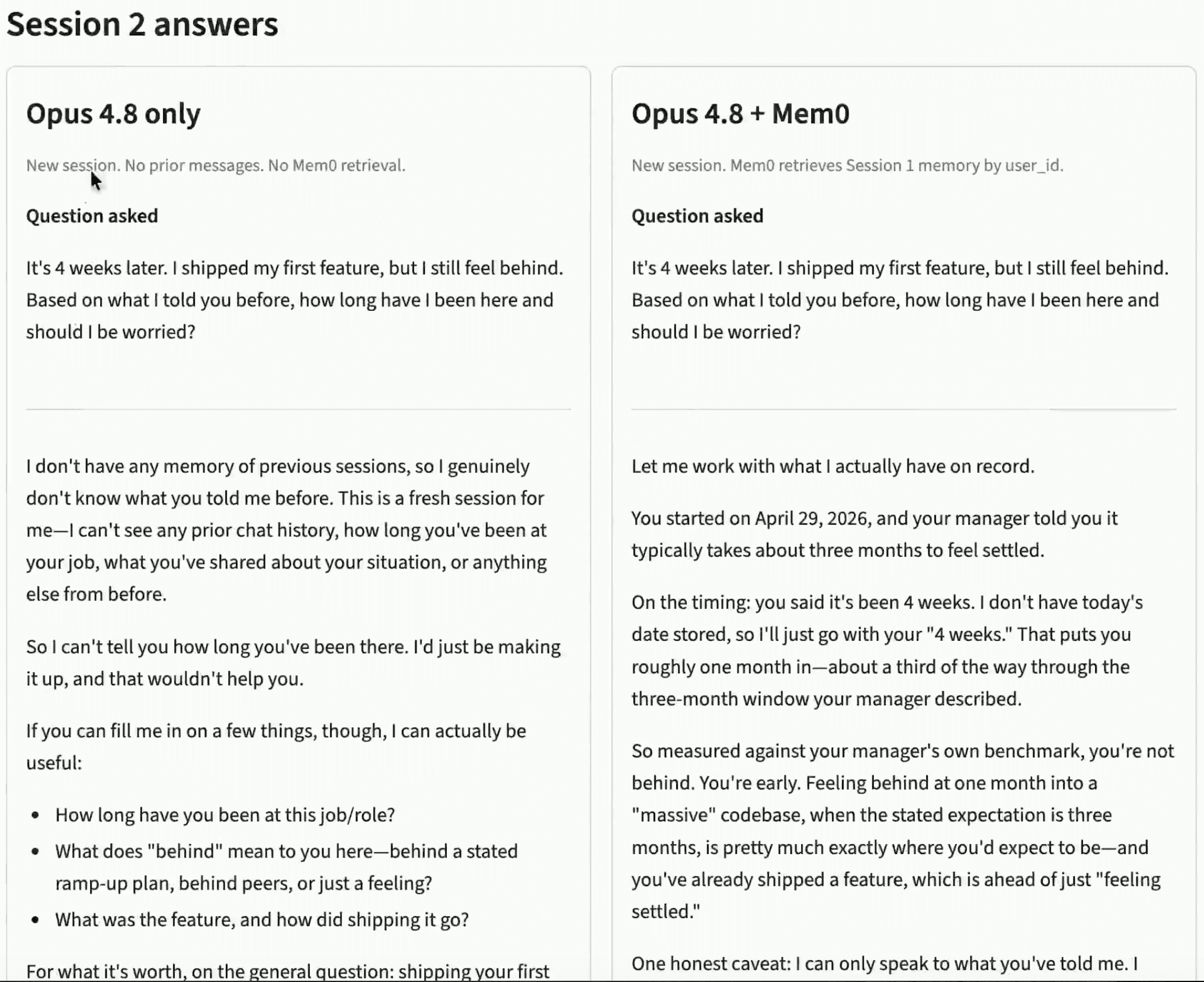
In the Mem0 path, the model should use the retrieved memory.
This is exactly the kind of response users expect from a long-running assistant. The assistant should not need the user to restate everything. It should remember the durable facts that matter and use them when relevant.
The Production Pattern
The demo stores one fact and retrieves it once. A production agent should generalize that into a lifecycle:
After each meaningful exchange, write the conversation turn to Mem0.
Before each model response, search Mem0 using the current user message.
Inject only the relevant memories into the system prompt.
Keep memory scoped by
user_id.Keep the current session history in context, but do not replay all prior sessions.
This gives you two separate layers:
They are complementary. The context window helps Opus 4.8 reason deeply over the current task. Mem0 helps the application decide which past facts should come back into the current task.
This demo uses Opus 4.8: the same Mem0 pattern works with Sonnet 4 for cost-sensitive workloads.
💡 Ready to add this to your agent? → Start free at app.mem0.ai
Conclusion
Claude Opus 4.8’s 1M context window is a major advantage for long single-session work. But context is not memory. It is not cross-session persistence; it is not user-scoped retrieval, and it is not a durable store of what the user told you last week.
So, we performed one simple test divided into two sessions to test the model memory across sessions. The results showed that Opus 4.8 alone did not know the answer in a fresh session. While Opus 4.8 with Mem0 can retrieve the missing prior-session fact and respond with continuity.
That is the practical rule:
Use Opus 4.8 context for what is in the current session. Use Mem0 for what must survive into the next one.
Frequently Asked Questions
Q. Does Claude Opus 4.8 have built-in memory across sessions?
No. Claude Opus 4.8’s 1M context window holds information within a single session, but it does not persist facts when a new session starts. Cross-session memory requires an external layer like Mem0.
Q. What is the difference between a context window and memory in AI agents?
A context window is the working set for a single model call. Memory is application state that persists across sessions, users, and restarts. Opus 4.8 excels at the former; Mem0 handles the latter.
Q. Can I use Mem0 with Claude Opus 4.8 via Anthropic’s API?
Yes. The demo in this article calls Claude Opus 4.8 via Anthropic’s Messages API (model ID: claude-opus-4-8) and stores memories via Mem0’s REST API. The same pattern works with any model endpoint where your application controls the prompt.
Q. When should I use Opus 4.8’s context window instead of Mem0?
Use the context window when all relevant information is already in the current session. Use Mem0 when the relevant information came from a previous session, a different user interaction, or needs to survive an agent restart.
Q. Is Mem0 free to use with Claude Opus 4.8?
Yes. Mem0 has a free tier at app.mem0.ai with no credit card required. The demo in this article runs entirely on the free tier.
Useful Sources
Primary references for the model capabilities, API calls, and memory operations used in the demo:
More on LLMs & Models

Perplexity Pricing 2026: Pro, Max, Computer & API Costs
Compare Perplexity Free, Pro, Max, and Enterprise prices in 2026. Understand Computer credits, API charges, and which plan fits your usage and budget.
10 min read
Gemini API Pricing 2026: Models, Tokens, and Costs
Compare Gemini API prices by model, learn how caching and Batch affect costs, and calculate the cost of 1,000 requests or a monthly chatbot workload.
12 min read

OpenAI API Pricing (Oct 2026): Models, Token Costs, How to Save
Compare OpenAI API pricing including model rates, token costs, caching, and Batch discounts, with practical cost examples.
17 min read





Aashi Dutt
She is a senior technical content writer at Mem0. She covers agent memory architecture and the engineering decisions behind building agents that actually remember. She experiments with new features and turns research into posts developers can put straight to use.
Start building with memory
Free tier, no card