

·
9 min read
On this page
Building AI agents isn't like developing other software. Complex, multi-agent workflows require a deeper understanding of decisions that are made at each step. But when using a traditional IDE for agent development, you don't have the insight you need to really fine tune and optimize the way your agent will work because you can't see those decisions outside of combing through traditional logs. Thankfully, there's an answer. LangGraph Studio is an IDE with a visual development approach created specifically for developing AI agents.
TLDR:
LangGraph Studio is the first IDE built for AI agent development with visual debugging
You can edit
AgentStatein real-time and use time-travel debugging to understand decision flowsThe tool offers graph mode for complex workflows and chat mode for conversational agent testing
Hot-reload functionality lets you test code changes immediately without restarting your environment
Supports integration with technologies such as memory layers for continuity of conversations across multiple sessions
What is LangGraph Studio
LangGraph Studio is a breakthrough in AI development tooling as one of the first agent IDEs. Unlike traditional code editors that treat AI agents like any other software, LangGraph Studio recognizes that building LLM applications requires different approaches to visualization, debugging, and state management.
The IDE, built on top of the LangGraph runtime and integrating LangSmith for observability and analysis, provides a specialized environment for visualizing, interacting with, and debugging complex agentic applications. Think of it as the bridge between your code editor and the running agent, offering insights that would be nearly impossible to gain through traditional debugging methods.
What sets LangGraph Studio apart is its visual, interactive nature. Rather than replacing your favorite code editor, it complements it by providing a window into how your agents actually behave during execution. You can see the flow of decisions, inspect intermediate states, and understand the reasoning process that leads to particular outcomes which can help overcome many agent development challenges.
Why Agent Development Needs Specialized Tools
Traditional IDEs struggle with the sophisticated workflows that modern AI agents require. When you're building a simple web application, the flow is relatively predictable. But agents operate differently, making decisions based on context, maintaining state across multiple interactions, and following reasoning paths that can branch in unexpected directions. This non-determinism introduces a number of complexities to building efficient, reliable agents.
The challenges of agent development first show themselves when you consider what happens during a typical agent execution. Your agent might call multiple tools, update its internal state, make decisions based on previous interactions, and adapt its behavior based on new information.
State management presents another major challenge. Unlike traditional applications where state changes are often explicit and predictable, agents maintain an evolving state which changes based on interactions, tool calls, and reasoning processes. Understanding how this state changes over time is greatly improved through specialized visualization and debugging tools.
Debugging multi-step workflows in agents can feel like trying to understand a conversation by reading every third sentence. You might see the inputs and final outputs, but the intermediate reasoning steps remain hidden. Agents don't execute code, they reason about problems, make decisions, and adapt their approach based on context. Stateless agent limitations become important when building sophisticated applications that need to maintain context over time.
Agents need to remember past interactions, learn from experiences, and maintain context across sessions. Different types of memory serve different purposes in agent architectures, and traditional debugging tools aren't equipped to help developers understand these memory patterns.
And traditional IDEs just can't accommodate those unique AI agent requirements. Enter LangGraph Studio.
Key Features of LangGraph Studio
LangGraph Studio has a number of powerful features to mitigate that complexity in building agentic AI workflows including:
Visual graph development (graph mode)
Real-time debugging and state management
Integration with development workflows
Visual Graph Development
Handling the complexities involved in AI agent development requires exposing the reasoning process during execution. That's where LangGraph Studio's graph mode comes in. This feature provides detailed insights about agent execution. You can see the nodes traversed, intermediate states, and LangSmith integrations all in one visual interface. This complete view helps developers understand complex agent workflows that would be nearly impossible to follow through traditional logging, making it easier to identify bottlenecks, understand decision points, and optimize agent performance.
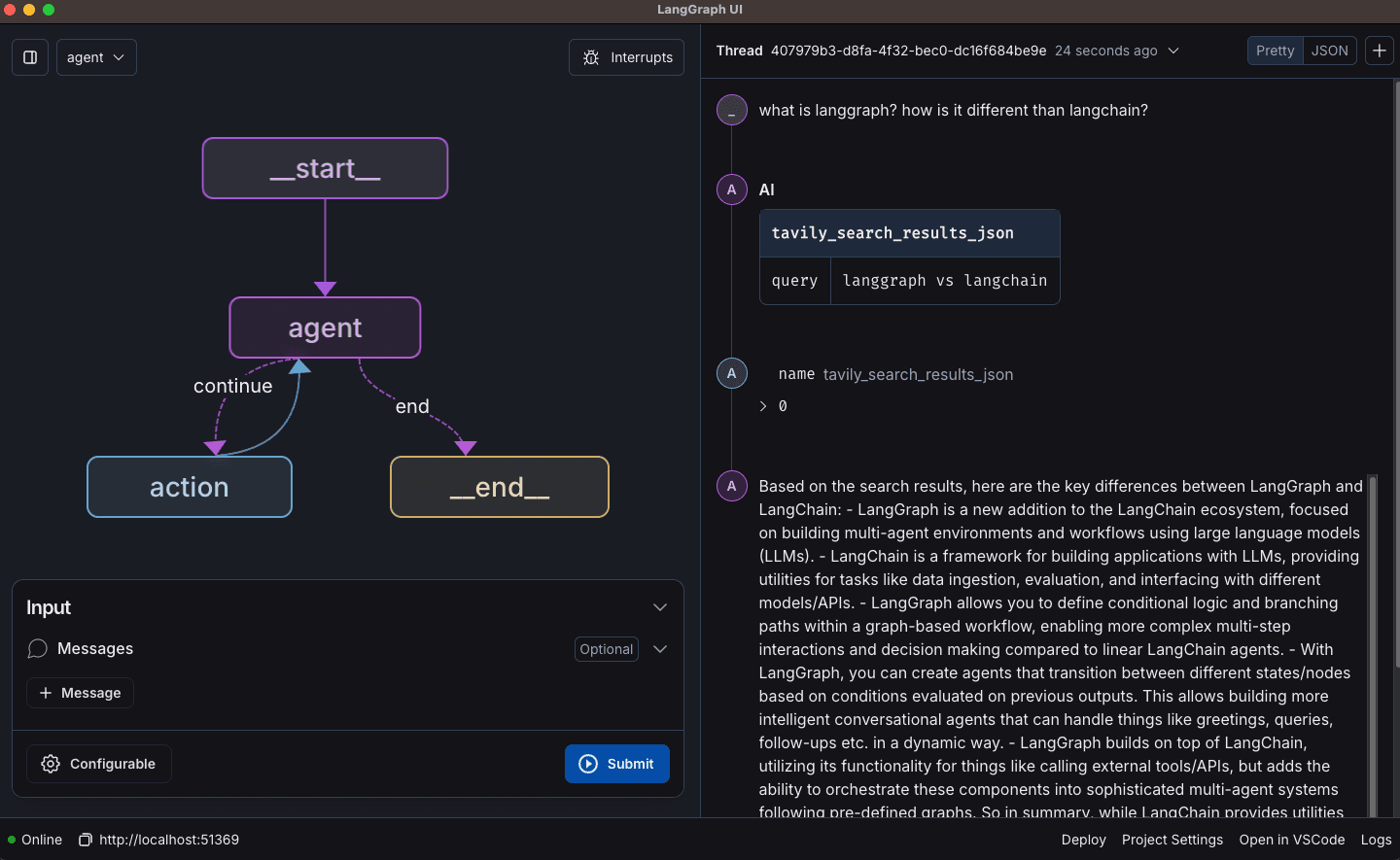
And if you’re developing a chat-based agent, simply switch to Chat mode for an interface designed to visualize and test conversational interactions.
Real-Time Debugging and State Management
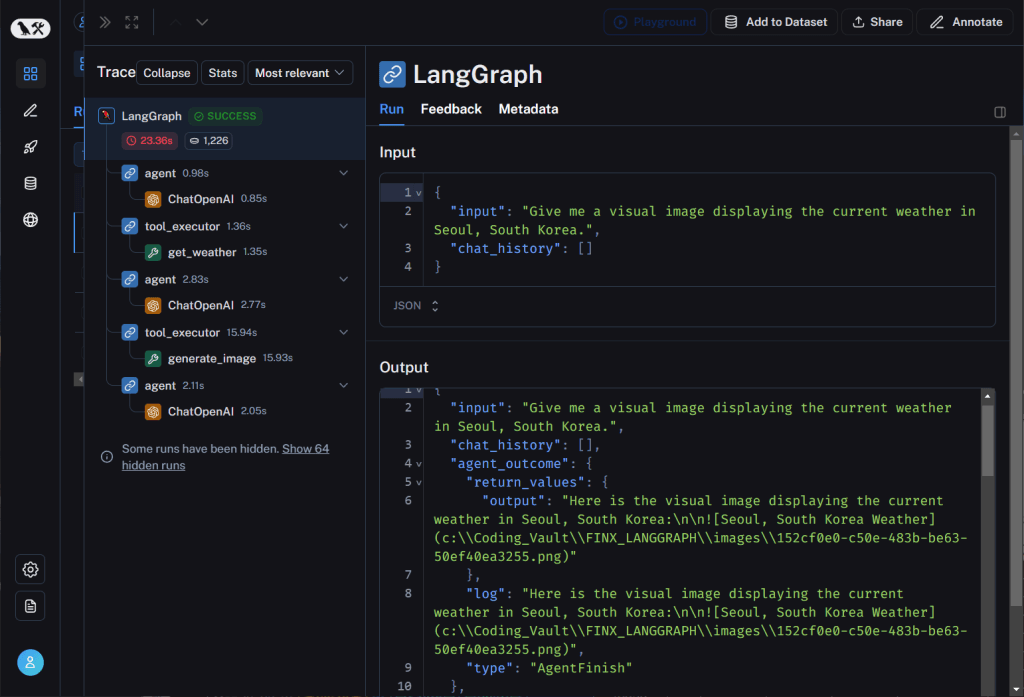
LangGraph introduced the concept of AgentState, a shared data structure that stores and updates information passed between workflow nodes. This is what provides persistence. For example, if a workflow is interrupted it can resume from the interruption. AgentState is the backbone of debugging and application logic in complex multi-agent workflows by centralizing data like conversations, history, task status, and retry counts.
Traditional debugging methods used in regular software development aren't effective in AI agent development. That's why LangGraph Studio also includes a real-time debugging feature for AgentState which basically "interrupts" the AI agent, allowing you to see all of the decisions made up to that point. Using the built-in time-travel feature, you can even step through agent execution history allowing you to look at what the agent was thinking at any point in AgentState, understand why it made specific decisions, and even replay scenarios with different parameters. You can even edit the state before a node runs and after it completes, giving you fine-grained control over agent behavior.
Hot-reload functionality makes sure that your development workflow stays smooth. When you make changes to your agent code, LangGraph Studio automatically detects these changes and allows you to test them immediately without restarting your entire development environment.
Integration with Development Workflows
LangGraph Studio detects changes to underlying code files automatically, creating a smooth bridge between your code editor and the agent runtime. When you update prompts in your code editor and an agent responds poorly, you can immediately rerun nodes to test your changes. This tight integration makes it much easier to iterate on long-running agents.
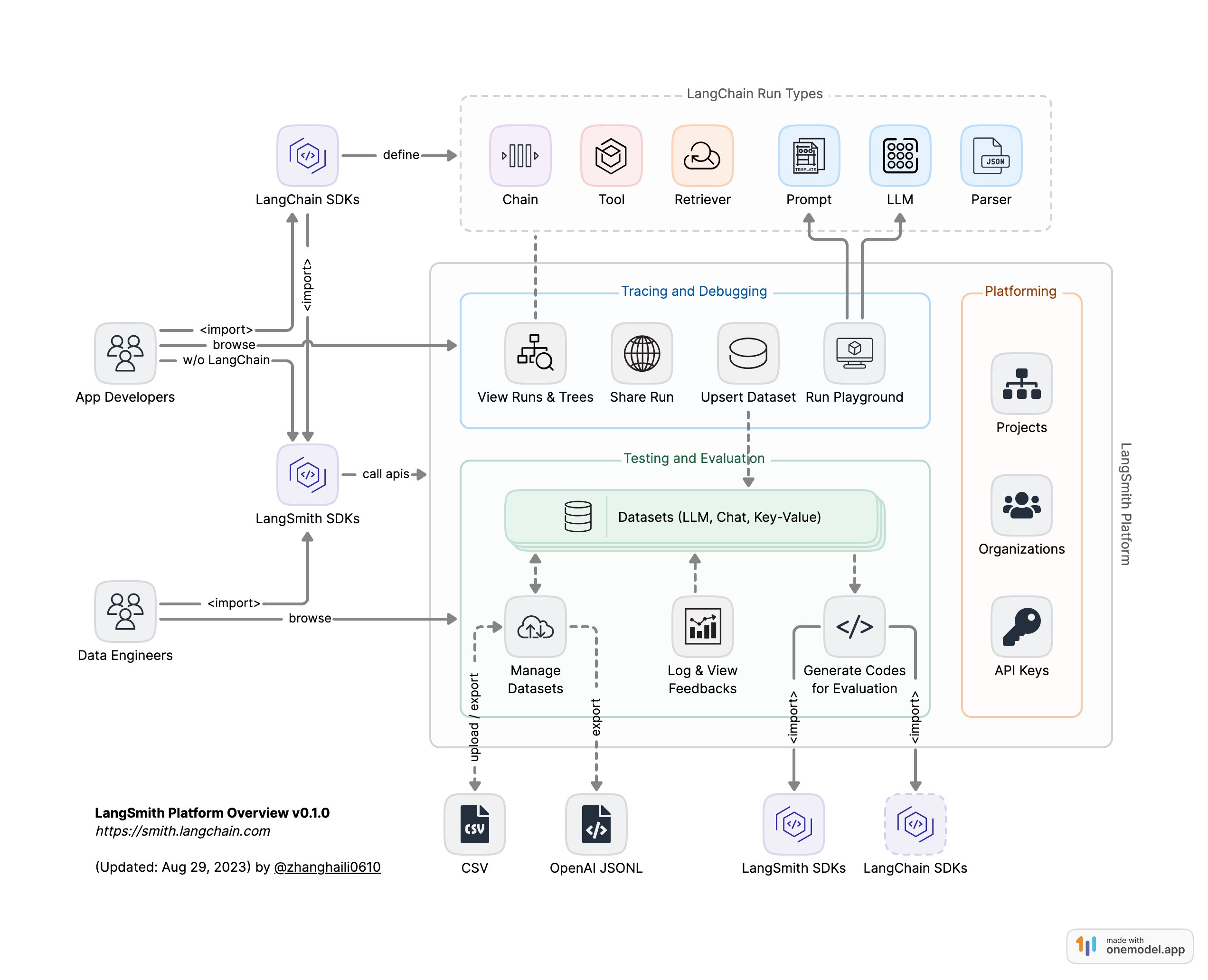
LangGraph also integrates with LangSmith for complete observability and monitoring, providing additional insights into agent performance to help you understand how your agents behave in production environments. AI memory integration also becomes more manageable when you can visualize how memory affects agent behavior through LangGraph Studio's interface.
The LangGraph Studio IDE includes a number of features specific to AI agent development. From mode selection to interrupts to hot reloads, LangGraph studio provides the tools needed to build and debug AI agents. The table below provides a brief overview of some of those features.
Feature | Description | Best Use Case |
|---|---|---|
Graph Mode | Full feature visualization with detailed execution paths | Complex multi-step agent debugging |
Chat Mode | Simplified conversational interface | Testing chat-based agent interactions |
Interrupt Functionality | Edit state before and after node execution | Fine-tuning agent behavior and testing scenarios |
Hot Reload | Automatic detection of code changes | Rapid iteration during development |
LangSmith Integration | Complete observability and monitoring | Production agent performance analysis |
LangGraph Studio vs Alternative Agent IDEs
LangGraph Studio's position as one of the first IDEs designed for agent development gives it unique advantages over general-purpose development tools. While other IDEs might offer some agent-related features as add-ons, LangGraph Studio was built from the ground up to handle agent development challenges.
The tight integration with the LangGraph ecosystem provides smooth workflows that would require major configuration in other environments. This integration extends beyond basic compatibility to include specialized features like graph visualization, state inspection, and agent-related debugging tools.
Most alternative agent development tools either focus on the framework level or provide general-purpose development environments. LangGraph Studio occupies a unique middle ground by providing specialized tooling that understands agent-related concepts like state transitions, tool calls, and reasoning flows.
The specialized debugging features set LangGraph Studio apart from traditional IDEs. While you might be able to debug agent code in other environments, you won't get the same level of insight into agent behavior, state management, and decision-making processes.
However, it's worth noting that the agent development field is evolving rapidly. There are many AI agent frameworks available, each one with its own strengths and weaknesses. LangGraph Studio excels in visualization and debugging and is ideal for developers who prefer to model AI tasks in stateful workflows. But, it's important to note that LangGraph Studio is going to work best with LangChain-based agents. If you're building agents with other frameworks, you might not get the same level of integration and specialized features.
FAQ
How do I install LangGraph Studio on my local machine?
LangGraph is installed through pip as a python package. You can download it from the official LangGraph repository or simply run pip install -U langgraph, then open Studio via the LangSmith web UI or download the desktop build (Docker required). Once installed, it integrates smoothly with your existing development environment through hot-reload functionality.
What's the main difference between Graph Mode and Chat Mode in LangGraph Studio?
Graph Mode provides detailed visualization with execution paths, intermediate states, and full debugging features, making it ideal for complex multi-step agent workflows. Chat Mode offers a simplified conversational interface that's perfect for testing and iterating on chat-specific agent interactions.
Can I debug my agent's state and decision-making process in real-time?
Yes, LangGraph Studio's interrupt functionality allows you to edit AgentState before and after node execution, while time-travel debugging lets you step through execution history to understand exactly why your agent made specific decisions at any point in time.
When should I consider adding memory features to my LangGraph agents?
You should integrate memory when building agents that need to maintain context across sessions, remember user preferences, or provide personalized experiences that improve over time. Memory layers like Mem0 can reduce token costs by up to 40% while making agents more intelligent and contextually aware.
Is LangGraph Studio compatible with other AI frameworks besides LangGraph?
LangGraph Studio is designed for the LangGraph ecosystem and provides the deepest integration within that framework. While you might be able to use it with other frameworks, you won't get the same level of specialized features, graph visualization, and agent debugging tools.
Final thoughts on building better AI agents with specialized development tools
LangGraph Studio changes agent development from guesswork into a clear, visual process where you can actually see what your agents are thinking. The real magic happens when you combine this debugging power with memory features. Mem0 turns your stateless agents into intelligent companions that remember and learn. With the right tools working together, building sophisticated AI agents becomes much more manageable. Your next agent could be the one that finally bridges the gap between helpful and truly intelligent.
More on Integrations

OpenClaw vs. Hermes Agent Memory in 2026: Which Should You Choose?
OpenClaw and Hermes take opposite bets on agent memory - live-injected vs. frozen snapshots, file-based vs. structured tools. Here's how each works, where each breaks, and how Mem0 fits both.
12 min read
How Memory works in Hermes Agent (and how to improve it)
How Hermes Agent stores 3,575 characters of memory in two frozen markdown files, and where the design breaks.
11 min read
Hermes AI Agent: How to Add Memory to Your Workflow
Set up Mem0 as a memory provider for Hermes Agent in one command. Covers Platform and OSS modes, the 3 tools it adds, and how prefetch-caching keeps it at zero added latency.
8 min read




Taranjeet Singh
Taranjeet is the co-founder of mem0. His work centers on a question most LLM teams hit but few solve well: how do you give an agent durable, structured memory without ballooning context windows or sacrificing latency? His writing focuses on the practical architecture of memory-augmented agents, the tradeoffs between long context and retrieval, fact extraction at scale, schema design for episodic memory, and why benchmarks like LoCoMo and MemGPT often show such different results in lab vs production environments. He has spoken on these themes at the AI Engineer Summit, LangChain's Interrupt, and other developer conferences.
Start building with memory
Free tier, no card