Most AI coding assistants have a memory problem. A user explains preferences, tests frameworks, suggests naming conventions for the project they’ve been building for months, and the moment they close the tab, everything vanishes, and every session starts from zero.
The usual fix is a cloud-hosted model with a managed memory layer. But that comes with trade-offs like cloud cost (model + memory), and every line of code leaving your machine. So I built a fully local AI coding assistant where OpenClaw handles file operations, Ollama runs local models, and Mem0 OSS with Qdrant gives the agent persistent, semantic memory that survives restarts with no API keys and no data leaving your machine.
TLDR: By the end, you’ll have an assistant that:
- creates and edits files through OpenClaw
- writes code shaped by your preferences
- remembers what matters across sessions
Full source code: GitHub
Is this the Guide for You?
This is a from-scratch local build using Mem0’s open-source package directly, wired together with Ollama and Qdrant by hand. It’s not the official @mem0/openclaw-mem0 plugin.
If you want the fastest path to adding memory to OpenClaw, the official plugin: two commands, OTP setup, no code to write; see the official integration docs instead.
If you specifically want to understand or control every layer, run entirely offline with local models, and see how the extraction, embedding, and retrieval pipeline is actually wired together, you’re in the right place. Keep reading.
The Problem
A stateless coding assistant is frustrating in a specific way. Tell it you use `pytest`, and it’ll write `unittest` in the next session. Tell it you prefer type hints, and it forgets by tomorrow. You end up re-explaining context that should already be known or extracted based on history.
The solutions developers reach for are usually a `PREFERENCES.md` file loaded at startup, a long system prompt, or a `CONTEXT.md` file. They all share the same fundamental flaw: they live inside the context window, where they get suppressed by context compaction, token limits, and session restarts.
What we actually need is “memory” that lives outside the context window and stores facts durably, retrieves them semantically when relevant, and works entirely on the user’s own hardware to ensure safety and privacy.
Architecture: How These Components Fit Together
Before diving into the implementation, let’s look at how the orchestration framework, LLM, and memory layers interact to address the stateless nature of local assistants.
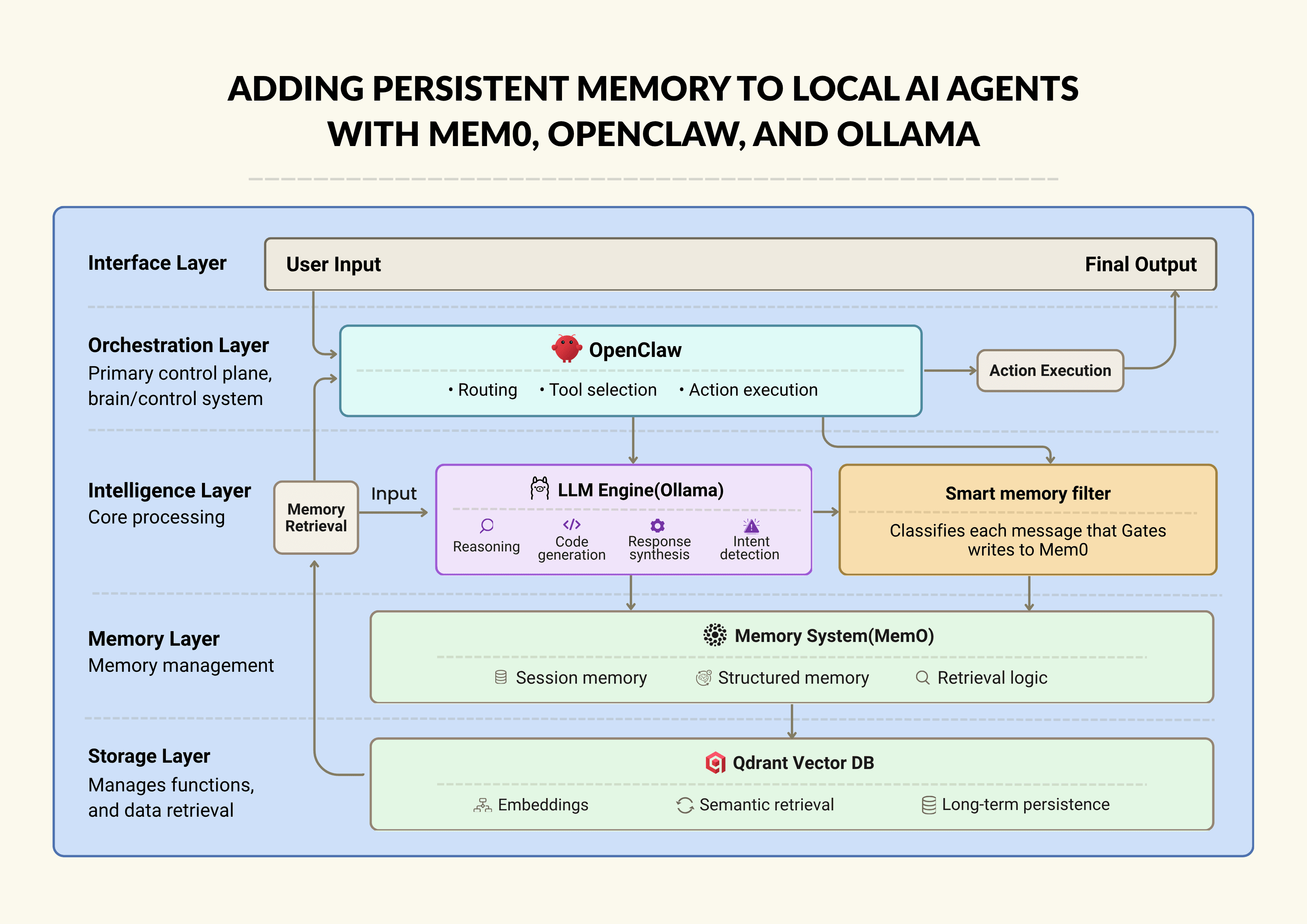
Architecture of Local AI Agents with Mme0, OpenClaw and Ollama
OpenClaw is the orchestration layer that classifies what the user wants, then dispatches the right actions like creating a file, writing code to the correct file, searching memory, generating a chat reply, and more.
Ollama runs a model entirely on your hardware. It handles intent detection, code generation, and memory classification.
Mem0 OSS is the memory logic layer. It calls the LLM to extract facts from a message, calls the embedder to vectorize it, and delegates storage to Qdrant. On retrieval, it embeds the query and finds semantically similar memories.
Qdrant is the memory storage layer (vector database) that persists to disk and survives restarts. Think of Mem0 as the librarian, and Qdrant is the library.
Before we dive deeper, here is the file structure for this project:
local-ai-assistant/

├── src/

│   ├── config.py

│   ├── memory_manager.py

│   ├── main.py

│   └── web_assistant.py

├── skills/

│   └── local-ai-assistant/

│       └── SKILL.md

├── workspace/              # all created files land here

├── SKILL.md

├── requirements.txt

└── run_web.sh
local-ai-assistant/

├── src/

│   ├── config.py

│   ├── memory_manager.py

│   ├── main.py

│   └── web_assistant.py

├── skills/

│   └── local-ai-assistant/

│       └── SKILL.md

├── workspace/              # all created files land here

├── SKILL.md

├── requirements.txt

└── run_web.sh
local-ai-assistant/

├── src/

│   ├── config.py

│   ├── memory_manager.py

│   ├── main.py

│   └── web_assistant.py

├── skills/

│   └── local-ai-assistant/

│       └── SKILL.md

├── workspace/              # all created files land here

├── SKILL.md

├── requirements.txt

└── run_web.sh
Step 1: Set Up OpenClaw
Start by installing and setting up OpenClaw from openclaw.ai and point it at a workspace folder. In this project, the workspace lives at `local-ai-assistant/workspace/`. Every file the assistant creates or modifies goes here.
Then, create a `SKILL.md` file so OpenClaw can discover and dispatch to the assistant:
---

name: local-ai-assistant

description: Local AI coding assistant with persistent memory (Mem0 OSS + Ollama)

command-dispatch: tool

command-tool: exec

command-arg-mode: raw
---

name: local-ai-assistant

description: Local AI coding assistant with persistent memory (Mem0 OSS + Ollama)

command-dispatch: tool

command-tool: exec

command-arg-mode: raw
---

name: local-ai-assistant

description: Local AI coding assistant with persistent memory (Mem0 OSS + Ollama)

command-dispatch: tool

command-tool: exec

command-arg-mode: raw
The `command-dispatch: tool` and `command-tool: exec` tell OpenClaw to shell out to our Python scripts when this skill is invoked. This hook makes all file operations flow through OpenClaw.
Step 2: Set Up Ollama
Next, we’ll install Ollama, then pull the two models we’ll use in this demo:
ollama pull qwen3:8b

ollama pull nomic-embed-text
ollama pull qwen3:8b

ollama pull nomic-embed-text
ollama pull qwen3:8b

ollama pull nomic-embed-text
I chose `qwen3:8b` for three major reasons:
Reliable structured output: Intent detection requires the model to return valid JSON, and code generation requires clear Python code. At 8B parameters, `qwen3:8b` does both consistently.
Runs on consumer hardware: This model fits in 8 GB VRAM and runs acceptably on a CPU for lighter workloads.
Code quality: On coding benchmarks, it outperforms most models of its size.
We also use`nomic-embed-text` as the embedding model for memory retrieval. It is lightweight, fast, and runs fully locally. It also returns high-quality semantic embeddings, which help Mem0 retrieve relevant past context accurately without adding heavy compute overhead.
Note: The `qwen3:8b` model wraps its reasoning in `<think>…</think>` blocks before returning the actual output. This is great for reasoning quality but breaks downstream JSON parsers, including Mem0’s internal fact extractor. We’ll fix this in step 4.
Step 3: Set Up Mem0 OSS, Qdrant, and Docker
So far, we have a model and an orchestration framework, but no memory. To fix that, we need a memory layer that can store, search, and retrieve past context. Mem0 handles what to remember and how to structure it, while Qdrant stores those memories as vectors so they can be retrieved later based on meaning, not exact matches.
Before running Qdrant, make sure Docker is installed and running on your system. You can download it from Docker’s official website and verify the installation using:
Once Docker is set up, run Qdrant locally using:
docker run -d \

  --name qdrant-local \

  -p 6333:6333 \

  -v $(pwd)/qdrant_storage:/qdrant/storage \

  qdrant/qdrant
docker run -d \

  --name qdrant-local \

  -p 6333:6333 \

  -v $(pwd)/qdrant_storage:/qdrant/storage \

  qdrant/qdrant
docker run -d \

  --name qdrant-local \

  -p 6333:6333 \

  -v $(pwd)/qdrant_storage:/qdrant/storage \

  qdrant/qdrant
The above command starts a local Qdrant instance on `port 6333`while the `-v` flag mounts a local directory for persistence, so that your memories survive Docker restarts and machine reboots.
Don’t want Docker?
If you prefer not to use Docker, Mem0 also supports Chroma as a lightweight local vector store:
Chroma runs directly as a local directory, making it easier to set up, though Qdrant is generally more robust and production-friendly.
Next, install the required Python packages:
pip install mem0ai qdrant-client ollama
pip install mem0ai qdrant-client ollama
pip install mem0ai qdrant-client ollama
Now, wire the local stack together using a configuration file(`config.py`):
# config.py
OLLAMA_BASE_URL    = "http://127.0.0.1:11434"
OLLAMA_CHAT_MODEL  = "qwen3:8b"
OLLAMA_EMBED_MODEL = "nomic-embed-text"
MEM0_CONFIG = {
    "vector_store": {
        "provider": "qdrant",
        "config": {
            "collection_name": "coding_assistant",
            "host": "localhost",
            "port": 6333,
            "embedding_model_dims": 768,  # must match nomic-embed-text output
        },
    },
    "llm": {
        "provider": "ollama",
        "config": {
            "model": OLLAMA_CHAT_MODEL,
            "temperature": 0,
            "max_tokens": 2000,
            "ollama_base_url": OLLAMA_BASE_URL,
        },
    },
    "embedder": {
        "provider": "ollama",
        "config": {
            "model": OLLAMA_EMBED_MODEL,
            "ollama_base_url": OLLAMA_BASE_URL,
        },
    },
}
# config.py
OLLAMA_BASE_URL = "http://127.0.0.1:11434"
OLLAMA_CHAT_MODEL = "qwen3:8b"
OLLAMA_EMBED_MODEL = "nomic-embed-text"
MEM0_CONFIG = {
"vector_store": {
"provider": "qdrant",
"config": {
"collection_name": "coding_assistant",
"host": "localhost",
"port": 6333,
"embedding_model_dims": 768, # must match nomic-embed-text output
},
},
"llm": {
"provider": "ollama",
"config": {
"model": OLLAMA_CHAT_MODEL,
"temperature": 0,
"max_tokens": 2000,
"ollama_base_url": OLLAMA_BASE_URL,
},
},
"embedder": {
"provider": "ollama",
"config": {
"model": OLLAMA_EMBED_MODEL,
"ollama_base_url": OLLAMA_BASE_URL,
},
},
}# config.py
OLLAMA_BASE_URL = "http://127.0.0.1:11434"
OLLAMA_CHAT_MODEL = "qwen3:8b"
OLLAMA_EMBED_MODEL = "nomic-embed-text"
MEM0_CONFIG = {
"vector_store": {
"provider": "qdrant",
"config": {
"collection_name": "coding_assistant",
"host": "localhost",
"port": 6333,
"embedding_model_dims": 768, # must match nomic-embed-text output
},
},
"llm": {
"provider": "ollama",
"config": {
"model": OLLAMA_CHAT_MODEL,
"temperature": 0,
"max_tokens": 2000,
"ollama_base_url": OLLAMA_BASE_URL,
},
},
"embedder": {
"provider": "ollama",
"config": {
"model": OLLAMA_EMBED_MODEL,
"ollama_base_url": OLLAMA_BASE_URL,
},
},
}This configuration connects all three layers:
The LLM (`qwen3:8b`) is used by Mem0 to extract structured facts from conversations
The embedder (`nomic-embed-text`) converts those facts into vectors
The vector store (Qdrant) stores and retrieves those vectors efficiently
Note: The `nomic-embed-text` model produces 768-dimensional vectors. This value must match the `embedding_model_dims` in your Qdrant configuration. If they don’t match, Qdrant will reject all insert operations, and memory storage will silently fail. If you switch to a different embedding model, make sure to update this value accordingly.
💡 Don’t want to self-host Qdrant? Get a free Mem0 API key and skip straight to Step 5.
Step 4: Fix the qwen3 Thinking Mode issue
When Mem0 calls `ollama.chat()` internally to extract facts from a user message, it expects clean JSON back. But `qwen3:8b` always leads with a `<think>` block like this:
<think>
The user is stating a preference for type hints. This is a
coding style preference worth persisting long-term...
</think>
{"new_memories": [{"text": "User prefers type hints in Python"}]}<think>
The user is stating a preference for type hints. This is a
coding style preference worth persisting long-term...
</think>
{"new_memories": [{"text": "User prefers type hints in Python"}]}<think>
The user is stating a preference for type hints. This is a
coding style preference worth persisting long-term...
</think>
{"new_memories": [{"text": "User prefers type hints in Python"}]}Mem0’s JSON parser chokes on the `<think>` prefix and produces nothing. Memories were being classified as worth storing, `memory.add()` was being called, and Mem0 was eating the call without writing a single vector to Qdrant.
The fix is to intercept every `ollama.chat` call in the process and inject `think: False`in the `memory_manager.py` file:
# memory_manager.py
_orig_ollama_chat = ollama.chat
def _no_think_chat(*args, **kwargs):
    opts = kwargs.get("options") or {}
    if isinstance(opts, dict):
        opts.setdefault("think", False)
        kwargs["options"] = opts
    return _orig_ollama_chat(*args, **kwargs)
ollama.chat = _no_think_chat
# memory_manager.py
_orig_ollama_chat = ollama.chat
def _no_think_chat(*args, **kwargs):
opts = kwargs.get("options") or {}
if isinstance(opts, dict):
opts.setdefault("think", False)
kwargs["options"] = opts
return _orig_ollama_chat(*args, **kwargs)
ollama.chat = _no_think_chat# memory_manager.py
_orig_ollama_chat = ollama.chat
def _no_think_chat(*args, **kwargs):
opts = kwargs.get("options") or {}
if isinstance(opts, dict):
opts.setdefault("think", False)
kwargs["options"] = opts
return _orig_ollama_chat(*args, **kwargs)
ollama.chat = _no_think_chatHere, `setdefault` means callers that explicitly want thinking mode can still opt in with `think: True`. In practice, for JSON extraction and code generation in a tool-use context, thinking mode only burns tokens without improving output quality.
Step 5: Add Smart Memory
At this point, our assistant can already answer questions and retrieve prior memories. The next improvement is memory quality control to only store messages that are useful long-term and ignore transient prompts.
This logic lives in `memory_manager.py` (SmartMemoryManager). It keeps the memory layer clean and prevents Qdrant from filling up with low-value one-off requests. We run a lightweight classifier before every `memory.add()` call:
class SmartMemoryManager:
    def add_if_valuable(self, user_message: str, user_id: str) -> bool:
        if not self._is_worth_storing(user_message):
            return False
        self.memory.add(
            [{"role": "user", "content": user_message}],
            user_id=user_id,
        )
        return True
    def _is_worth_storing(self, user_message: str) -> bool:
        response = ollama.chat(
            model=OLLAMA_CHAT_MODEL,
            messages=[{"role": "user", "content": SMART_MEMORY_PROMPT.format(
                user_message=user_message
            )}],
            options={"temperature": 0, "num_predict": 512},
        )
        data = self._extract_json_robust(response["message"]["content"])
        return bool(data.get("worth_storing", False))
class SmartMemoryManager:
def add_if_valuable(self, user_message: str, user_id: str) -> bool:
if not self._is_worth_storing(user_message):
return False
self.memory.add(
[{"role": "user", "content": user_message}],
user_id=user_id,
)
return True
def _is_worth_storing(self, user_message: str) -> bool:
response = ollama.chat(
model=OLLAMA_CHAT_MODEL,
messages=[{"role": "user", "content": SMART_MEMORY_PROMPT.format(
user_message=user_message
)}],
options={"temperature": 0, "num_predict": 512},
)
data = self._extract_json_robust(response["message"]["content"])
return bool(data.get("worth_storing", False))class SmartMemoryManager:
def add_if_valuable(self, user_message: str, user_id: str) -> bool:
if not self._is_worth_storing(user_message):
return False
self.memory.add(
[{"role": "user", "content": user_message}],
user_id=user_id,
)
return True
def _is_worth_storing(self, user_message: str) -> bool:
response = ollama.chat(
model=OLLAMA_CHAT_MODEL,
messages=[{"role": "user", "content": SMART_MEMORY_PROMPT.format(
user_message=user_message
)}],
options={"temperature": 0, "num_predict": 512},
)
data = self._extract_json_robust(response["message"]["content"])
return bool(data.get("worth_storing", False))The classifier prompt (within `config.py`) gives the LLM clear examples of what deserves long-term storage:
HIGH-VALUE (worth_storing: true):
- "I prefer TypeScript over JavaScript"
- "I use pytest, never unittest"
- "I'm building a FastAPI service called Nebula"
- "Always use Google-style docstrings"
LOW-VALUE (worth_storing: false):
- "What does enumerate() do?"
- "Write a retry decorator"
- "Thanks"
HIGH-VALUE (worth_storing: true):
- "I prefer TypeScript over JavaScript"
- "I use pytest, never unittest"
- "I'm building a FastAPI service called Nebula"
- "Always use Google-style docstrings"
LOW-VALUE (worth_storing: false):
- "What does enumerate() do?"
- "Write a retry decorator"
- "Thanks"
HIGH-VALUE (worth_storing: true):
- "I prefer TypeScript over JavaScript"
- "I use pytest, never unittest"
- "I'm building a FastAPI service called Nebula"
- "Always use Google-style docstrings"
LOW-VALUE (worth_storing: false):
- "What does enumerate() do?"
- "Write a retry decorator"
- "Thanks"
This single filter dramatically improves memory relevance such that the assistant remembers preferences, constraints, and project conventions.
Step 6: Intent Detection and Routing
Once we’re storing only high-quality memories, now we need execution control for every incoming message to decide whether it’s a file operation, code edit, file-open request, or just conversation. Each user message gets routed to one of six intents before any action is taken:
create_file  |  create_folder  |  create_and_write
write_code   |  open_file      |  chat
create_file  |  create_folder  |  create_and_write
write_code   |  open_file      |  chat
create_file  |  create_folder  |  create_and_write
write_code   |  open_file      |  chat
We use a two-tier system where the LLM first classifies, and if that fails, a regex fallback catches the common patterns. This happens within `main.py`:
def detect_intent(message: str) -> dict:
    try:
        resp = ollama.chat(
            model=OLLAMA_CHAT_MODEL,
            messages=[{"role": "user", "content": INTENT_PROMPT.format(message=message)}],
            options={"temperature": 0, "num_predict": 1024},
        )
        return extract_json(resp["message"]["content"])
    except Exception:
        return keyword_intent_fallback(message)
def detect_intent(message: str) -> dict:
try:
resp = ollama.chat(
model=OLLAMA_CHAT_MODEL,
messages=[{"role": "user", "content": INTENT_PROMPT.format(message=message)}],
options={"temperature": 0, "num_predict": 1024},
)
return extract_json(resp["message"]["content"])
except Exception:
return keyword_intent_fallback(message)def detect_intent(message: str) -> dict:
try:
resp = ollama.chat(
model=OLLAMA_CHAT_MODEL,
messages=[{"role": "user", "content": INTENT_PROMPT.format(message=message)}],
options={"temperature": 0, "num_predict": 1024},
)
return extract_json(resp["message"]["content"])
except Exception:
return keyword_intent_fallback(message)The `extract_json` does multi-pass extraction with raw text first (JSON often lives after `</think>`), then strips all think blocks and markdown fences and retries. This makes intent detection resilient against any model formatting quirks.
Step 7: Code Generation shaped by Memory
Now that message execution is controlled through routing, we can build the code generation layer on top of it. When the assistant writes code, it first retrieves stored preferences, then injects them into the generation prompt:
# main.py
def generate_code(description, current_content, memories, model) -> str:
    memory_context = format_memories_for_prompt(memories)
    resp = ollama.chat(
        model=model,
        messages=[
            {"role": "system", "content": f"""You are an expert Python developer.
Write ONLY Python code — no explanations, no markdown fences.
The user's coding preferences (follow these exactly):
{memory_context}
Current file content (do NOT repeat, only add new code):
{current_content}"""},
            # /no_think tells qwen3 to skip reasoning and go straight to code
            {"role": "user", "content": f"Write: {description} /no_think"},
        ],
        options={"temperature": 0.4, "num_predict": 2048},
    )
    return extract_code(resp["message"]["content"])
# main.py
def generate_code(description, current_content, memories, model) -> str:
memory_context = format_memories_for_prompt(memories)
resp = ollama.chat(
model=model,
messages=[
{"role": "system", "content": f"""You are an expert Python developer.
Write ONLY Python code — no explanations, no markdown fences.
The user's coding preferences (follow these exactly):
{memory_context}
Current file content (do NOT repeat, only add new code):
{current_content}"""},
# /no_think tells qwen3 to skip reasoning and go straight to code
{"role": "user", "content": f"Write: {description} /no_think"},
],
options={"temperature": 0.4, "num_predict": 2048},
)
return extract_code(resp["message"]["content"])# main.py
def generate_code(description, current_content, memories, model) -> str:
memory_context = format_memories_for_prompt(memories)
resp = ollama.chat(
model=model,
messages=[
{"role": "system", "content": f"""You are an expert Python developer.
Write ONLY Python code — no explanations, no markdown fences.
The user's coding preferences (follow these exactly):
{memory_context}
Current file content (do NOT repeat, only add new code):
{current_content}"""},
# /no_think tells qwen3 to skip reasoning and go straight to code
{"role": "user", "content": f"Write: {description} /no_think"},
],
options={"temperature": 0.4, "num_predict": 2048},
)
return extract_code(resp["message"]["content"])Without stored preferences, `memory_context` is empty and the model generates generic code. With stored preferences like “use type hints”, “use pytest”, “Google-style docstrings”, every function comes out already matching your style. That’s the visible payoff of the memory layer.
Step 8: Request Flow
At this point, we have all the major pieces in place. The assistant can now classify user requests, retrieve relevant memory, generate code shaped by stored preferences, and decide whether new information is worth saving or not.
Now we need a single entry point (`handle_request()`) that ties everything together. The `handle_request()` function acts as the main dispatcher for the assistant. It receives the user message, determines the intent, triggers the workflow, and updates memory.
def handle_request(message, user_id, model, current_file, current_content) -> dict:
    memory = SmartMemoryManager()
    intent = detect_intent(message).get("intent", "chat")
    if intent == "create_and_write":
        create_workspace_file(params["path"])
        memories = memory.search(message, user_id=user_id)
        code = generate_code(params["description"], "", memories, model)
        write_workspace_file(params["path"], code)
        stored = memory.add_if_valuable(message, user_id=user_id)
    elif intent == "chat":
        memories = memory.search(message, user_id=user_id)
        reply = generate_chat_reply(message, memories, model)
        stored = memory.add_if_valuable(message, user_id=user_id)
    result["all_memories"] = memory.get_all(user_id=user_id)
    return result
def handle_request(message, user_id, model, current_file, current_content) -> dict:
memory = SmartMemoryManager()
intent = detect_intent(message).get("intent", "chat")
if intent == "create_and_write":
create_workspace_file(params["path"])
memories = memory.search(message, user_id=user_id)
code = generate_code(params["description"], "", memories, model)
write_workspace_file(params["path"], code)
stored = memory.add_if_valuable(message, user_id=user_id)
elif intent == "chat":
memories = memory.search(message, user_id=user_id)
reply = generate_chat_reply(message, memories, model)
stored = memory.add_if_valuable(message, user_id=user_id)
result["all_memories"] = memory.get_all(user_id=user_id)
return resultdef handle_request(message, user_id, model, current_file, current_content) -> dict:
memory = SmartMemoryManager()
intent = detect_intent(message).get("intent", "chat")
if intent == "create_and_write":
create_workspace_file(params["path"])
memories = memory.search(message, user_id=user_id)
code = generate_code(params["description"], "", memories, model)
write_workspace_file(params["path"], code)
stored = memory.add_if_valuable(message, user_id=user_id)
elif intent == "chat":
memories = memory.search(message, user_id=user_id)
reply = generate_chat_reply(message, memories, model)
stored = memory.add_if_valuable(message, user_id=user_id)
result["all_memories"] = memory.get_all(user_id=user_id)
return resultThe function begins by initializing `SmartMemoryManager`, which gives us access to both memory retrieval and filtered memory writes. It then calls the `detect_intent()` function to decide how the user request should be handled.
In the `create_and_write` path, the assistant first creates the target file in the workspace. It then searches memory for relevant past context using the current message, passes those retrieved memories into `generate_code`, and writes the generated code into the file. Finally, it checks whether the current message is worth storing as long-term memory. At the end, the function returns the full memory state through `memory.get_all()`.
Step 9: Running the Demo
Now we have all the components in place, so run the following commands one by one:
# 1. Start Qdrant
docker run -d --name qdrant-local -p 6333:6333 \
-v $(pwd)/qdrant_storage:/qdrant/storage qdrant/qdrant
# 2. Start the assistant
cd local-ai-assistant && bash run_web.sh
# 3. Open in browser
open http:
# 1. Start Qdrant
docker run -d --name qdrant-local -p 6333:6333 \
-v $(pwd)/qdrant_storage:/qdrant/storage qdrant/qdrant
# 2. Start the assistant
cd local-ai-assistant && bash run_web.sh
# 3. Open in browser
open http:
# 1. Start Qdrant
docker run -d --name qdrant-local -p 6333:6333 \
-v $(pwd)/qdrant_storage:/qdrant/storage qdrant/qdrant
# 2. Start the assistant
cd local-ai-assistant && bash run_web.sh
# 3. Open in browser
open http:
Once the UI is up, the best way to understand the system is to walk through a simple sequence.
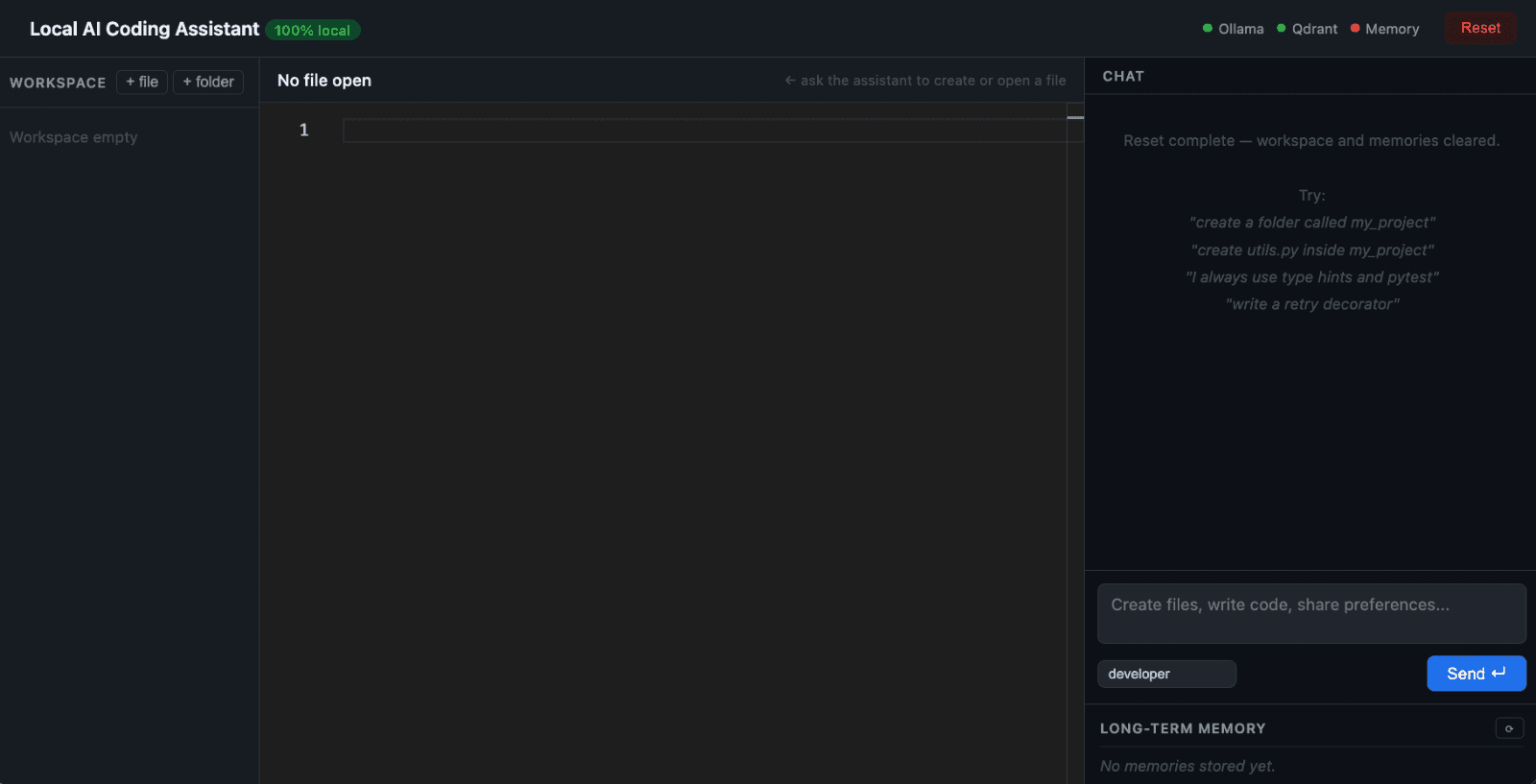
Initial user interface
Start by telling the assistant something about your preferences, for example: “I always use type hints and pytest.” This gets picked up by the smart memory layer, and you’ll see it stored as a long-term preference.
Next, ask it to create a folder or a file. The assistant routes this request and creates the folder or a file in the workspace.
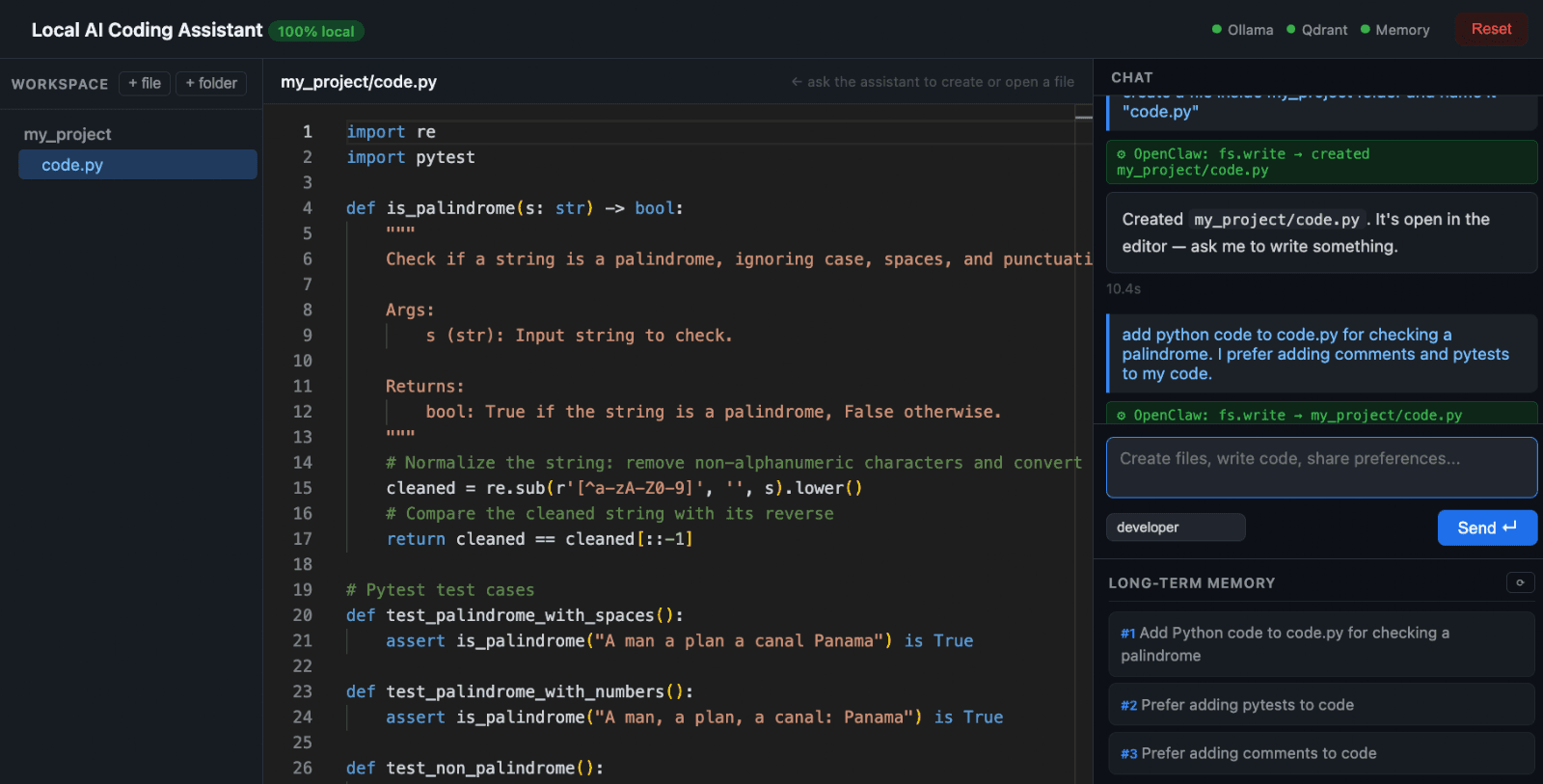
Adding code from chat to editor
Now, create a file inside that folder with some functionality: “create utils.py inside my_project and add a retry decorator.” The assistant generates the file and writes code that already follows your stored preferences, including type hints and Pytest.
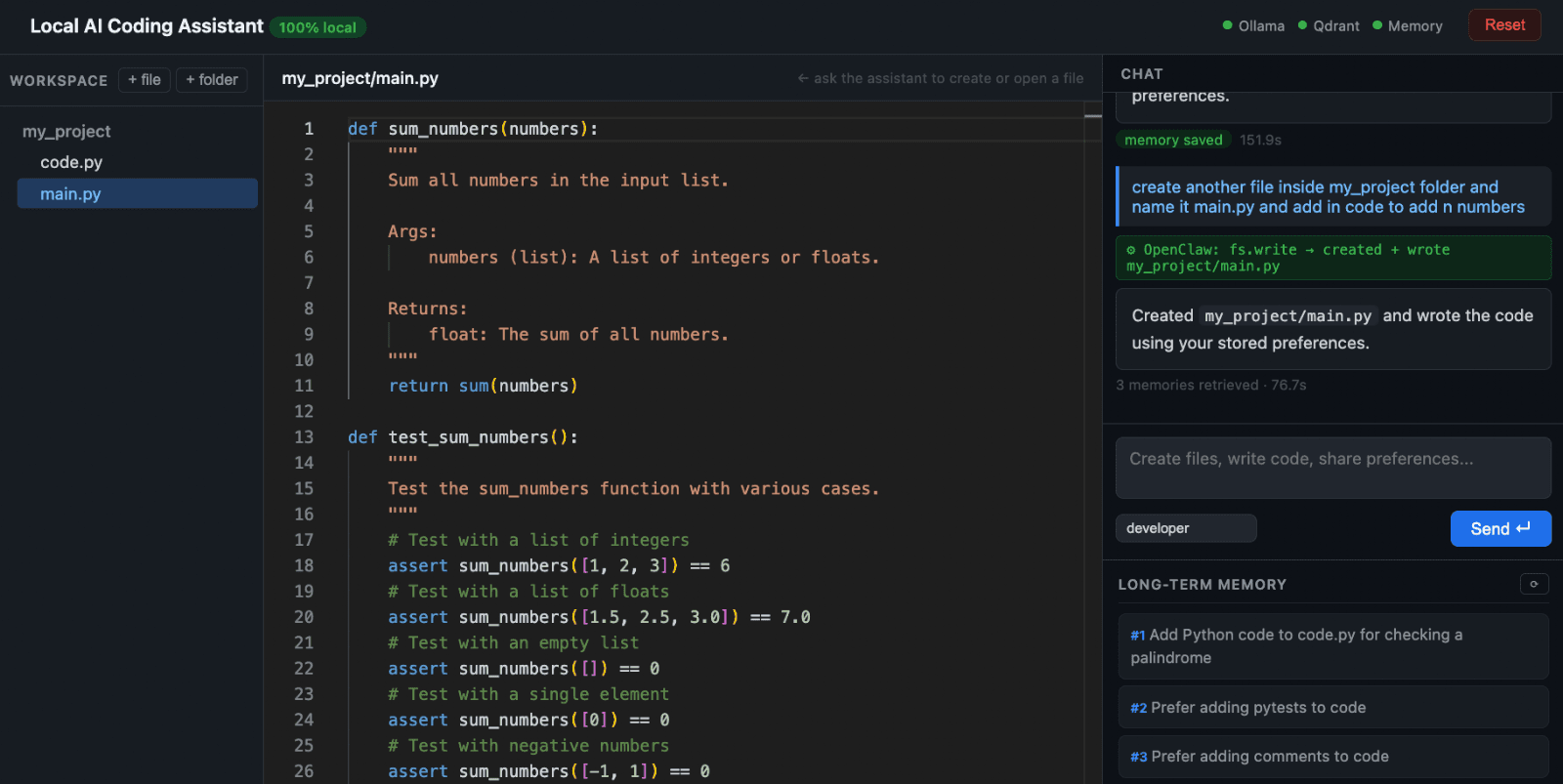
Creating a new file and adding code via chat
To see the impact of memory more clearly, reset the system. This clears the Qdrant collection and removes all stored preferences. Now repeat the same request for creating a new file with a retry decorator, and this time the output becomes generic again, without type hints or pytests.
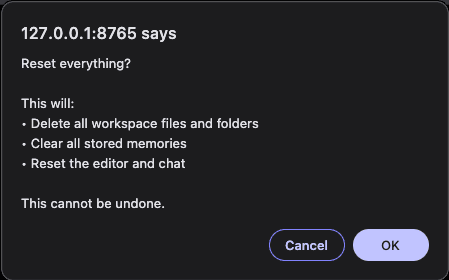
Reset everything
This contrast is the most important part of the demo. With memory, the assistant adapts to you, but without it, every interaction starts from scratch.
Wrapping Up
In this tutorial, we built a fully local AI assistant that can not only act, but also remember. By combining OpenClaw for orchestration, Ollama for local inference, and Mem0 with Qdrant for persistent memory, we moved from a stateless assistant to one that adapts over time. The key idea isn’t just adding memory but making sure the assistant remembers the right things and uses them when it is required.
There are several natural ways to extend this project. You can add multi-language support by routing prompts based on file type or user intent, allowing the same assistant to generate JavaScript, Go, or Rust while keeping the same memory layer. You can also introduce project-scoped memory by attaching a `project_id`, so different repositories maintain their own context without bleeding into each other.
Full source code: GitHub
Want the Official Plugin Instead?
If everything above sounds like more setup than you want, the official @mem0/openclaw-mem0 plugin gets you the same outcome, persistent memory in OpenClaw, in about a minute with no code to write. See Add Persistent Memory to OpenClaw for the setup walkthrough, or the official integration docs for reference.
💡 Want the same result in 30 seconds instead of a full local build? See the official OpenClaw + Mem0 plugin.
FAQs
Q. Do I need a GPU?
No. Ollama runs on CPU. A MacBook or Linux machine with 16 GB RAM works well. However, the model inference is slower (30–60s per response on CPU) but fully functional.
Q. Why Qdrant specifically? Can I use something simpler?
Qdrant is production-grade and runs as a proper service. If you want to avoid Docker entirely, swap to Chroma in config.py. The trade-off is that Chroma is lighter but not designed for production scale.
Q. What happens if qwen3 returns garbage output?
Each operation has isolated error handling. Intent detection falls back to regex patterns. Code generation returns an empty string on failure. The multi-pass JSON extractors handle the common qwen3 quirks before errors even reach the fallback.
Q. Can I swap qwen3:8b for another model?
Yes, you can change OLLAMA_CHAT_MODEL in config.py. Models without thinking mode include llama3.2:3b, mistral:7b, and more. You can refer to Ollama’s official documentation for more information.
Q. Why isn’t OpenClaw’s built-in memory enough, and how is this different?
OpenClaw’s default memory is file-based, Markdown notes indexed into a local SQLite database with hybrid keyword and vector search, and it depends on the agent deciding what’s worth writing down. If it doesn’t decide something matters, it’s gone. This tutorial replaces that with Mem0 OSS: an automatic extraction and retrieval layer that classifies what’s worth storing, embeds it, and retrieves it semantically on every turn, independent of whether the agent remembers to write it down itself. If you want this same fix without building it from scratch, see Add Persistent Memory to OpenClaw for the official plugin path instead.
Mem0 is an intelligent, open-source memory layer designed for LLMs and AI agents to provide long-term, personalized, and context-aware interactions across sessions.
Get your free API Key here: app.mem0.ai
Or self-host mem0 from our open-source GitHub repository