

·
12 min read
On this page
"What database are we using?" Your Codex agent asked you that in session 14. You answered it in session 1. That's not a bug: that's what machine-local memory looks like at scale.
Session 1: JWT plus Redis refresh tokens for auth, any() banned in TypeScript, Postgres as the primary database. Session 2: Codex asks you what database you're using. The gap between what your agent learned and what it can actually recall is what Mem0 MCP closes.
Mem0 is a persistent memory infrastructure for AI agents: built specifically to close this gap across tools, machines, and sessions.
TL;DR: Codex ships with two native memory layers (AGENTS.md and Memories) but both reset between machines and can't share context across tools. Adding Mem0's MCP server gives Codex persistent, semantic memory that survives sessions, syncs across machines, and retrieves the right context mid-task. It works with Cursor and Claude Code too.
What Codex remembers by default and where it stops
Codex ships with two native memory layers. AGENTS.md is a persistent instruction file you write manually, which survives sessions and applies globally or on a per-project basis. Memories is an auto-generated layer where Codex summarizes prior sessions in the background and writes them to ~/.codex/memories/, but it's machine-local and not available in all regions.
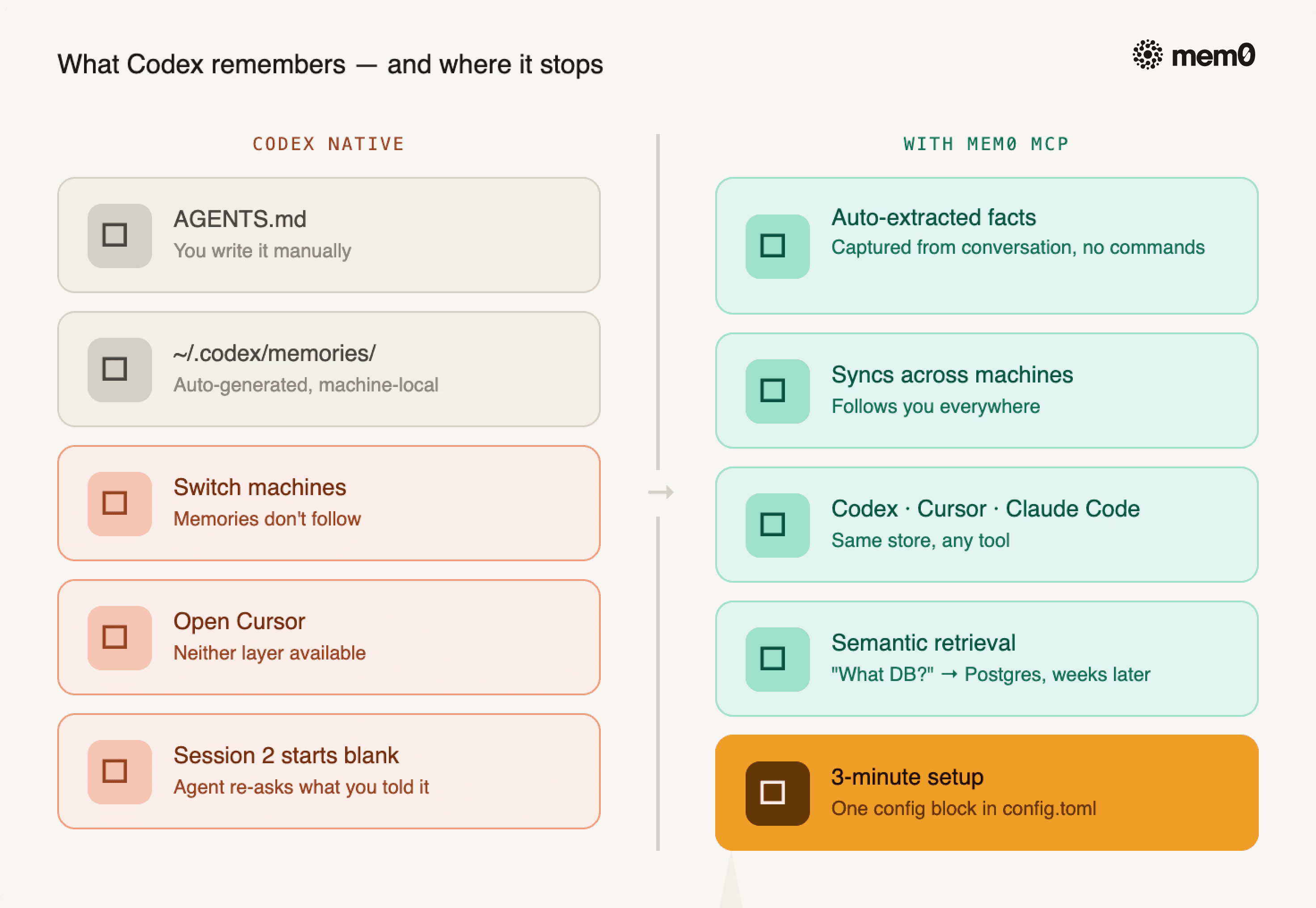
Fig: What Codex remembers and where it stops
The failure modes are predictable:
A key architecture decision never made it into
AGENTS.mdYou switch machines, but the generated memories don't follow
You open the Cursor instead of the Codex CLI, and neither layer is available
Session 2 starts from zero, and the agent re-asks what you already told it
For a full breakdown of how both layers work under the hood, see how memory works in Codex CLI.
What "codebase memory" actually means
There's a difference between storage and recall, between a file that persists and a memory that travels. Most guides tell you to write better AGENTS.md files. That's the wrong fix.
What your agent actually needs to carry across sessions falls into three categories:
Architecture decisions: "We're using JWT access tokens with Redis-backed refresh tokens for auth." This isn't documentation. It's a constraint that shapes every auth-adjacent file the agent touches. If it doesn't know this, it'll suggest cookie sessions in session 3.
Hard constraints: "
any()is banned in TypeScript in this project. All deployments go tous-east-1." These aren't preferences. They are rules. Paraphrasing them loses precision, so they need to survive the verbatim.Cross-session debugging context: "The transform step in the ETL pipeline was breaking on null dates: fixed in PR #47." Without this, the agent re-investigates the same bug path the next time it touches that code.
Without persistent memory, every new session starts from zero. The agent doesn't just lack context; it re-learns what it already knew. That's the real cost: not missing information, but compounding re-learning across 10, 20, 50 sessions.
Installing Mem0 MCP in Codex: 3-minute setup
Step 1: Get your Mem0 API key
Go to app.mem0.ai, sign up for free, and copy your API key from the dashboard.
Step 2: Add Mem0 to your Codex config.toml
Add this block to your Codex config file:
Then export your Mem0 API key in the shell you launch Codex from:
Restart Codex after updating the config. Codex reads the MCP servers from ~/.codex/config.toml; HTTP MCP servers like Mem0 should be added there directly.
If you'd rather self-host, OpenMemory MCP gives you a local alternative.
Same API key works in Cursor and Claude Code: covered in the cross-tool section below.
Two memory paths: What the agent handles vs. what you control directly
Most guides tell you to write better AGENTS.md files. Mem0 MCP is a different model entirely: most of what matters gets stored without you doing anything.
Automatic extraction: What Mem0 captures without you doing anything
Mem0 extracts structured facts from the conversation automatically. You don't tag decisions or run a save command. The extraction happens in the background.
What it captures:
Explicit preferences stated during the session
Architecture decisions and rationale
File paths and module references
Error patterns and their resolutions
The extraction is semantic, not literal. If you say "let's go with Postgres for this," Mem0 stores it as "project uses Postgres as primary database": normalized, queryable, and retrievable weeks later.
Exact-string storage via the Mem0 API: For facts that must survive verbatim
Some facts can't be paraphrased. Hard constraints, naming conventions, security rules, version pins: these must be stored in memory exactly as stated.
Use the Mem0 API directly with infer=False:
When this memory is retrieved later - by Codex via MCP, or by Cursor, or by Claude Code. The stored memory record comes back exactly. The agent may still paraphrase it in its final answer.
Use infer=False for:
Naming conventions that break if summarized ("use camelCase for all event handler props, kebab-case for CSS classes")
Security rules that must be verbatim ("never log request bodies in the auth middleware")
Architectural constraints with no wiggle room ("all API responses must include a requestId field")
Version pins that matter ("pin boto3 to 1.26.x until the S3 transfer acceleration fix ships")
This is the right mental model: MCP for what your agent controls, the API for what you control. The MCP path is automatic. The API path is surgical.
How Mem0 retrieval works mid-session
How you install Mem0 determines which capabilities are available in your Codex session. There are two installation paths:
Component | Sideloaded Plugin | Direct MCP |
|---|---|---|
MCP Server (11 memory tools) | Yes | Yes |
Memory Protocol Skill | Yes | No |
Mem0 SDK Skill | Yes | No |
Lifecycle Hooks (opt-in) | Yes | No |
The config block in the setup section above uses the direct MCP path: you get the full tool set, no additional plugin required.
Available MCP tools
Once installed, nine tools are available in every Codex session:
Tool | Description |
|---|---|
| Save text or conversation history for a user or agent |
| Semantic search across memories with filters |
| List memories with filters and pagination |
| Retrieve a specific memory by ID |
| Overwrite a memory's text by ID |
| Delete a single memory by ID |
| Bulk delete all memories in scope |
| Delete a user, agent, app, or run entity and its memories |
| List users, agents, apps, and runs stored in Mem0 |
| List memory operation events with filters and pagination |
| Check the status of an async memory operation by |
This experiment uses two: add_memory to write project decisions into the store, and search_memories to retrieve them in a fresh session. You don't call these directly - the agent calls them based on context.
Tool | When Codex calls it | What it returns |
|---|---|---|
| At session start or when context is needed | Top-N semantically relevant memories |
| After a decision is made or a fact is stated | Confirmation of storage |
search_memories and add_memory are the MCP layer. infer=False is the API layer. Both write to the same memory store. When Codex calls search_memoriesit retrieves everything, regardless of which path wrote it.
The retrieval is semantic. "What database are we using?" returns "project uses Postgres as primary database," even though the original phrasing was different and the decision was made weeks ago. The vector store doesn't care about exact wording.
This is the gap that AGENTS.md can't close. AGENTS.md is keyword retrieval over a file you wrote manually. Mem0 is vector retrieval over everything your agent has ever learned, automatically indexed.
The experiment: Proving it works across a real session boundary
The before/after below is not a mockup. It's the output of a reproducible experiment that runs the full MCP stack end-to-end.
What the experiment tests: three decisions are stored via add_memory: JWT + Redis auth, Postgres as primary database, and any() ban in TypeScript. A fresh session opens with zero prior context. search_memories retrieves the stored facts. The experiment confirms all three answers are correct.
The core MCP calls look like this:
The full harness wraps these calls in a stdio MCP client that speaks JSON-RPC over the server's stdin/stdout, polls until all three facts are confirmed indexed, then runs the before/after comparison against Azure OpenAI. Three decisions were stored: JWT + Redis for auth, Postgres as primary database, and any() banned in TypeScript.
The hallucination guard: the baseline is checked to confirm it contains none of the expected facts before the augmented run. If a model guesses "JWT" or "Postgres" because they're common defaults, the experiment fails.
Baseline answer (no Mem0 context):
Memory-augmented answer (Mem0 MCP active):
Verdict:
Note: mem0_conclude is confirmed absent from the current MCP server: consistent with the two-path model described above. The add_memory / search_memories pair handles everything the MCP layer needs.
To reproduce it yourself, the full experiment code is on GitHub. You need four env vars: MEM0_API_KEY, AZURE_OPENAI_API_KEY, AZURE_OPENAI_ENDPOINT, and AZURE_OPENAI_DEPLOYMENT.
Three facts written. Three facts retrieved. Fresh session answered correctly. Baseline answered nothing. The difference isn't just convenience. It's the compound effect across 10, 20, 50 sessions. Every session that starts from zero is a session where the agent re-learns instead of building. Mem0 closes that gap, and it closes it once, at setup, not per session.
Cross-tool memory: Codex, Cursor, and Claude Code in the same context
Mem0 memory is scoped to user_id, not to a specific tool. The same memory store that Codex writes to is the one that Cursor and Claude Code read from.
Practical scenario: you start a session in Codex, establish the auth architecture, and the TypeScript constraints. You switch to Cursor for a focused refactor. You open Claude Code to review a PR. All three agents know the same three decisions, because they're all reading from the same user_id\-scoped store.
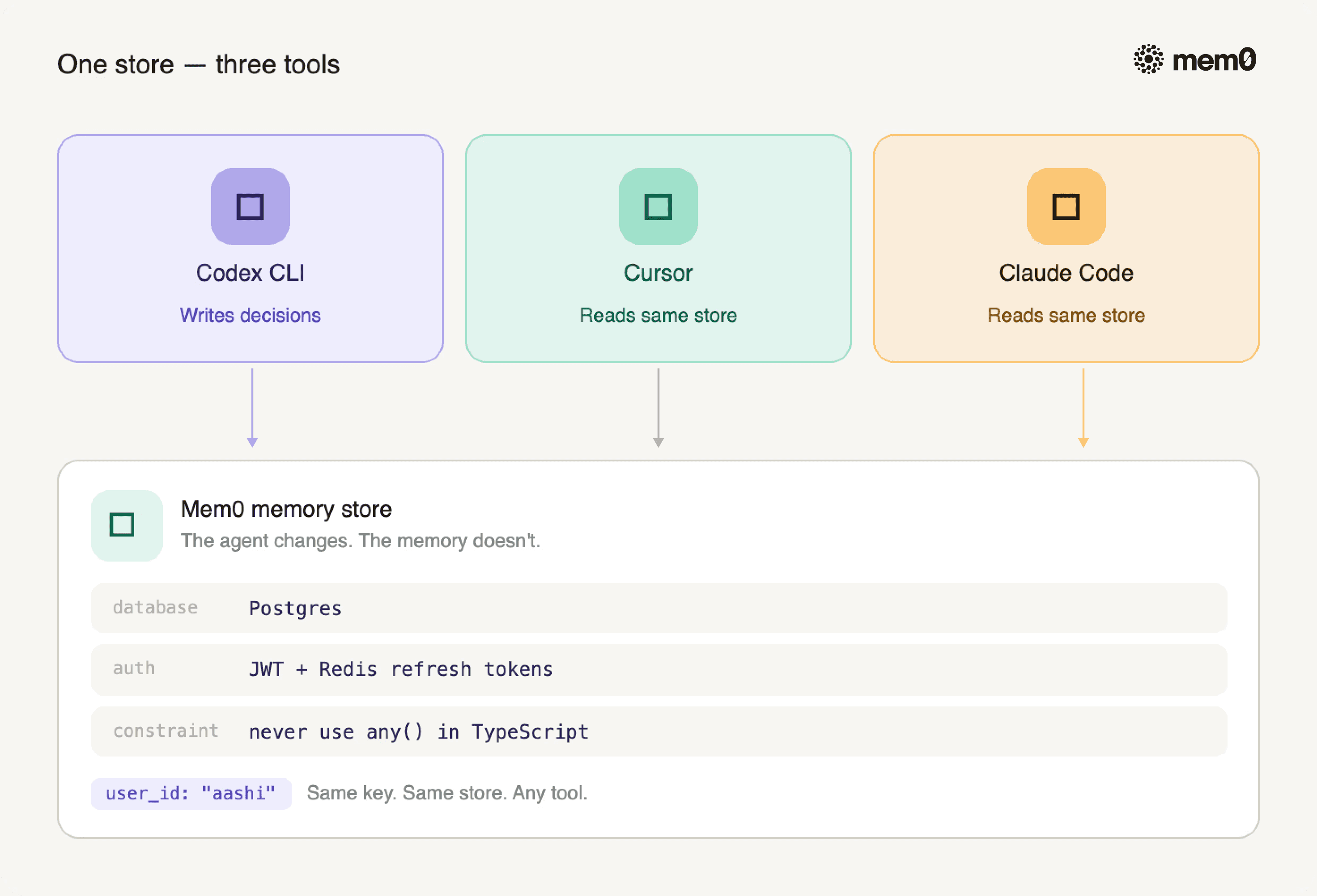
Fig: Three tools - one Mem0 memory store
Add Mem0 to the cursor with the same pattern:
Same API key. Same memory store. The agent changes. The memory doesn't.
For the full Claude Code setup, see how to add persistent memory to Claude Code with Mem0.
Frequently Asked Questions
Does Codex have persistent memory built in?
Codex ships with two native memory layers: AGENTS.md (persistent instructions you write manually) and Memories (auto-generated summaries). Both are machine-local: they don't sync across devices, can't be shared with teammates, and aren't available in all regions. Mem0 MCP adds semantic, cross-session memory that works everywhere Codex runs.
What is Mem0 MCP, and how does it work with Codex?
Mem0 MCP is a Model Context Protocol server that gives Codex access to a persistent, managed memory store. When installed, Codex can call MCP tools, including search_memories and add_memory: to store and retrieve facts across sessions automatically. For exact-string storage of hard constraints, use the Mem0 API directly with infer=False. Setup takes 3 minutes via a single config.toml entry.
What's the difference between Mem0 and Basic Memory for Codex?
Both add persistent memory to Codex via MCP. Basic Memory stores notes in local Markdown files: good for documentation-style memory. Mem0 uses a managed vector store with semantic retrieval: better for large memory sets, cross-machine sync, and multi-tool workflows where Codex, Cursor, and Claude Code share the same context.
Can I use the same Mem0 memory in Cursor and Claude Code?
Yes. Mem0 memory is scoped to a user_id, not to a specific tool. The same config.toml entry (with your API key) works in Cursor and Claude Code: all three tools read from and write to the same memory store. Decisions made in a Codex session are available in your next Cursor session automatically.
Does Mem0 MCP work if I don't finish a session cleanly?
Yes. Mem0 extracts memories from the conversation as it happens, not only at a clean session end. If you close Codex mid-task, facts established earlier in that conversation are already stored. You won't lose the decisions from a session just because you didn't wrap it up formally.
Stop re-explaining your codebase to your own agent
Every session you spend re-establishing context is a session your agent isn't building. JWT + Redis, any() banned, Postgres as the primary database: your agent learned all of this. It just couldn't recall it.
Mem0 MCP closes that gap. One config block. Three minutes. The same memory available in Codex, Cursor, and Claude Code.
Start free at app.mem0.ai: no credit card required
If you are an agent, sign up using-
mem0 init --agent --jsonPrefer self-hosting? Use OpenMemory MCP
For the broader picture: State of AI Agent Memory 2026
Useful sources
OpenAI Codex Memories documentation: official reference for Codex's native memory layers
Mem0 MCP npm package (@mem0ai/mem0-mcp): the package used in the config.toml setup above
Mem0 API documentation: full reference for
MemoryClient,infer=False, and all REST endpoints
More on Coding Agents

Kimi K3 tutorial: build a vision coding agent with persistent memory
Kimi K3 has a 1M-token context window but no memory across sessions. We tested it with Mem0 and cut design regressions from 60% to 0%.
10 min read

Coding Agents Explained: What They Are and How They Differ from AI Assistants
Learn what coding agents are, how they work, and how they differ from AI assistants, chatbots, and autocomplete tools.
29 min read

OpenAI Codex vs Claude Code: Which AI Coding Agent Wins in 2026?
Codex leans toward parallel execution, isolated worktrees, cloud delegation, and reviewable task runs. Claude Code is terminal oriented and more engaging in long interactive sessions, and agent-to-agent coordination. OpenAI’s GPT-6 Astra and Anthropic’s Fable 5.1 have enhanced capabilities, but the harness determines how that intelligence is used. For serious repository work, the better choice is the one that performs more reliably on your codebase, constraints, and working style.
23 min read





Aashi Dutt
She is a senior technical content writer at Mem0. She covers agent memory architecture and the engineering decisions behind building agents that actually remember. She experiments with new features and turns research into posts developers can put straight to use.
Start building with memory
Free tier, no card