

·
13 min read
On this page
Claude Code is a phenomenal piece of technology, and it now ships with native Auto Memory built in. Since v2.1.59, Claude Code writes to its own MEMORY.md file by default, so it no longer starts every session in a project from a completely blank slate.
What Auto Memory doesn’t do is follow you across tools, across repositories, or across your team. If you switch to Cursor or Codex, work across multiple repos, or want your whole team drawing on the same context, you’re still re-explaining your setup from zero. That’s the gap this guide addresses.
This guide walks you through adding a persistent memory layer to Claude Code using the Mem0 Platform MCP, covering both CLI and desktop versions. Mem0 offers two paths for adding memory to Claude Code:
Mem0 Platform MCP: This is the hosted cloud memory path, with zero local setup and managed retrieval. This is what this guide covers.
OpenMemory MCP: This path is local-first, self-hosted memory that runs entirely on your machine with no cloud sync or external storage. All data stays local and under your control.
If you prefer local-first memory with no cloud dependency, see the OpenMemory MCP setup guide. The rest of this article covers the Platform MCP path via the plugin marketplace.
Claude Code Now Has Auto Memory - Do You Still Need Mem0?
Since version 2.1.59 (Feb 2026), Claude Code ships with Auto Memory turned on by default. It’s free, requires no setup, and works by having Claude write its own MEMORY.md file as you work, giving it basic continuity within a single project.
That’s a real improvement, and it’s worth using. It’s also strictly scoped to one project. Auto Memory doesn’t follow you if you switch to Cursor, Codex, or any other tool, and it doesn’t carry context between separate repos even if you’re the one working across all of them. The MEMORY.md file itself is capped at 200 lines and 25KB, all loaded into context at session start whether or not it’s relevant to what you’re doing right now, and there’s no semantic search over it. It’s a flat file, not a retrieval system. For a closer look at what’s actually happening under the hood, see our deep-dive on how memory works in Claude Code.
Mem0 isn’t competing with Auto Memory; it’s extending what Auto Memory can’t reach. Where Auto Memory covers one project in one tool, Mem0 gives you memory that follows you across tools, across repos, and across your team, retrieved semantically instead of loaded in full every time. For a concrete test of that cross-repo case — one agent changing an API contract another service depends on — see our post on shared memory for coding agents across services and repos.
If you’re working solo in a single repo, Auto Memory may be all you need. If you move between tools, manage multiple repos, or work with a team that needs to share context, that’s exactly the gap this guide fills.
Why Add Memory to Claude Code?
Without memory, Claude Code starts every session with zero context. Think about spending several minutes re-establishing what the project does, what patterns you follow, and what you already tried at the start of every new session. With a persistent memory layer, Claude recalls that context automatically from prior sessions.
In April 2026, we updated our memory algorithm, achieving 91.6% accuracy on the LoCoMo benchmark while using roughly 3–4x fewer tokens than full-context approaches, through single-pass extraction and hybrid retrieval. Since Claude Code runs on Claude models billed per token, that reduction compounds directly into API cost savings; see our Claude pricing breakdown for current rates.
To put a number on our own setup, we ran the same task in two Claude Code sessions side by side, working against the same repo: one relying purely on markdown memory files (CLAUDE.md / agents.md), one with Mem0 connected via MCP. Both sessions ran the same review task, then we pulled up /context on each to see exactly where the tokens went.
For additional, more recent benchmark evidence, see our post on reasoning tokens and memory.
How To Implement Memory In Claude Code With Mem0
The Mem0 plugin for Claude Code has three components:
MCP Server: The MCP server connects Claude Code to Mem0’s cloud memory layer via the hosted HTTP MCP endpoint. It provides nine memory tools, including add, search, get, update, delete, and more.
Lifecycle Hooks: These hooks automatically capture learnings at key lifecycle points like session start, context compaction, task completion, and session end.
SDK Skill: An SDK skill teaches the agent how to integrate the Mem0 SDK into your applications.
The plugin uses Mem0’s hosted HTTP MCP server, not a locally installed Python package. Your user_id ID is derived deterministically from your API key, meaning the same key gives you the same identity across every machine.
Important behavioral note: The current plugin does not automatically inject memories before every response. Instead, it injects a decision rubric at session start and lets the agent decide when and how to search memories.
You can integrate persistent memory in Claude Code using the official Mem0 MCP server. Here’s a walkthrough.
Prerequisites
Before setting up Mem0 with Claude Code, you need:
A Mem0 Platform account and API key:
Sign up at app.mem0.ai.
Get your API key (starts with
m0-)
Claude Code CLI or the Claude Cowork desktop app installed.
Export your API Key as
envthe variable:
The free tier includes 10,000 memories and 1,000 retrieval calls per month.
Installation
If you want to try out Mem0, there are a couple of ways to get started:
Option A: Plugin Marketplace (Recommended)
It installs the full plugin, including the MCP server, lifecycle hooks, and two skills:
mem0: Platform SDK guide that teaches the agent how to use the Mem0 Python SDK in your applicationsmem0-mcp: Agent memory protocol guide covering the MCP v2 filter shape and tool usage patterns
Claude Cowork desktop app: Open the Cowork tab, click Customize in the sidebar, click Browse plugins, and install Mem0.
After installation, restart your Claude Code session. After any future /plugin updaterestart, the MCP server holds a stale connection until the session is restarted.
To verify the connection, run /mcp in the CLI or click the plus icon in the desktop app. The mem0 server should appear in the list. You can also ask: “List my mem0 entities”. If the tools respond, you are set.
Option B: MCP Only
If you only want the MCP tools without lifecycle hooks or the SDK skill:
Option C: Manual MCP Configuration
If you prefer to configure the MCP server manually without the plugin marketplace, the setup differs slightly between CLI and desktop.
Configure for Claude Code CLI
Add to your .mcp.json in your project root for project-scoped configuration, or to ~/.claude/mcp.json for global configuration across all projects:
Make sure your API key is set in your shell before starting Claude Code:
Run /mcp Inside Claude Code to confirm the mem0 The server is connected.
Configure for Claude Code Desktop (Cowork)
For the Cowork desktop app, edit ~/.claude.json directly and add the mem0 entry under mcpServers:
Once saved, restart the Cowork app and click the plus icon in the session interface to confirm the Mem0 server appears in the list.
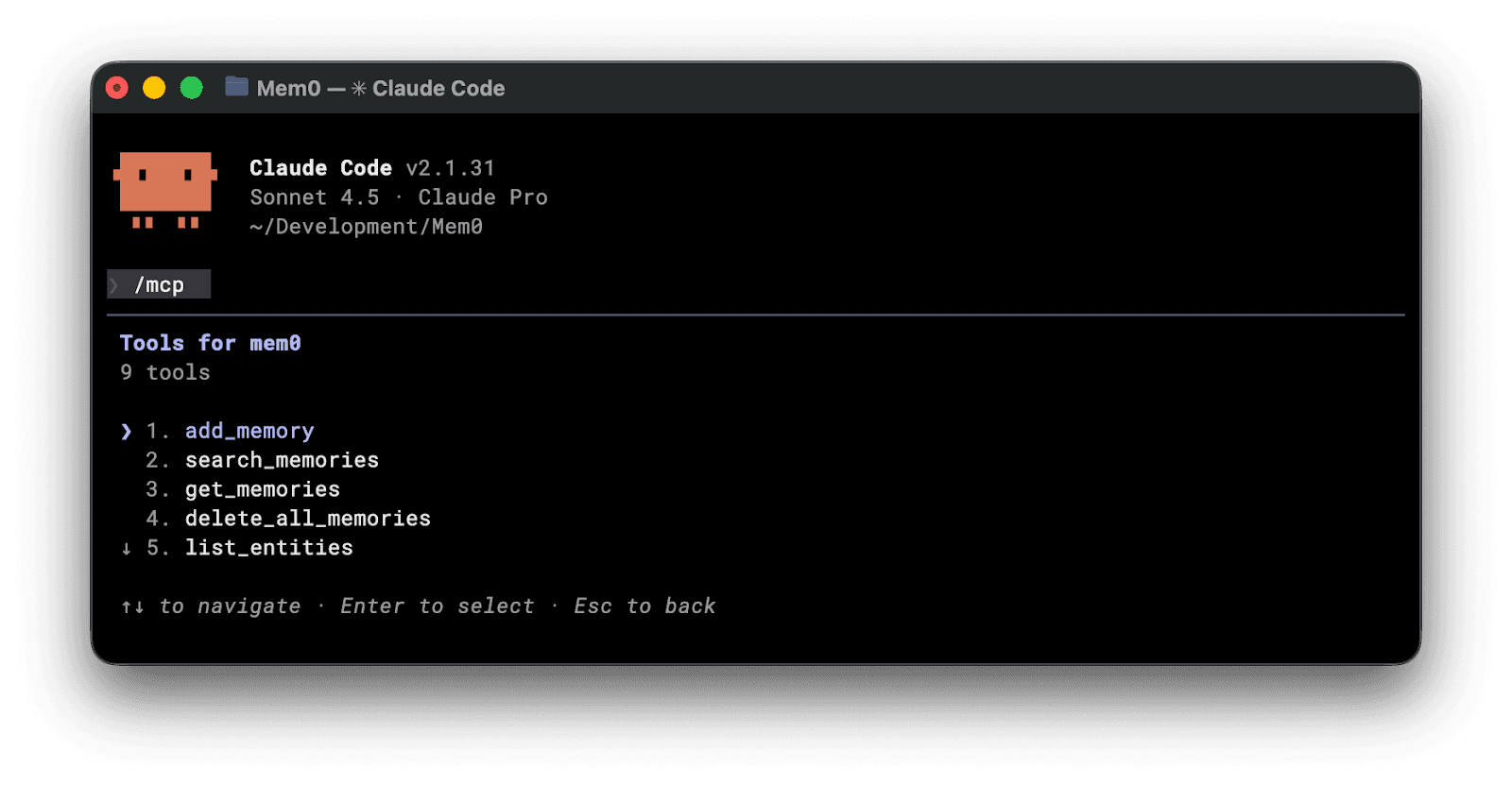
For the desktop app, hit the plus icon, and you should see the MCP listed.
Test Mem0 with Claude
Start chatting with Claude code while your Mem0 MCP is connected. It will automatically create new memories that will be inserted as part of the context whenever they’re needed.
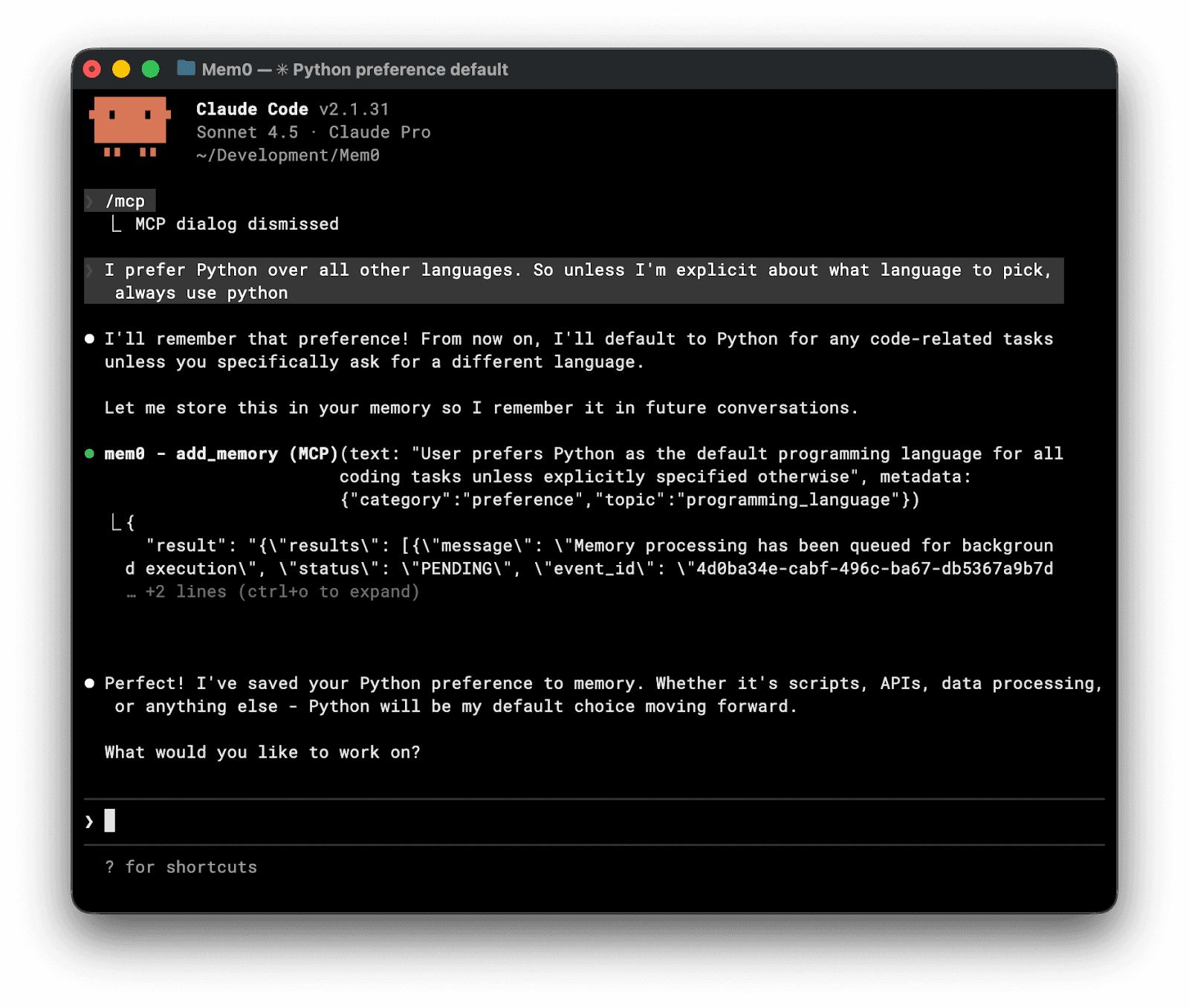
That’s it. Next time you ask Claude to write code, it will fetch your memory and use that information to write code exactly as you prefer.
The best part is, memory turns your Claude Code into an ever-evolving agent, and after a while, it starts to feel so personal, it’s hard to use anything else.
Quick overview
Component | Plugin Install (Option A) | MCP Only (Options B/C) |
|---|---|---|
MCP Server (9 memory tools) | Yes | Yes |
Lifecycle Hooks | Yes | No |
Mem0 SDK Skill | Yes | No |
Zero local dependencies | Yes | Yes |
Mem0 MCP Tools Available After Setup
Once you configure the Mem0 MCP server, here are the tools that are available to Claude
Tool | Description |
|---|---|
| Save text or conversation history for a user/agent |
| Semantic search across memories with filters |
| List memories with filters and pagination |
| Retrieve a specific memory by ID |
| Overwrite a memory’s text by ID |
| Delete a single memory by ID |
| Bulk delete all memories in scope |
| Delete a user/agent/app/run entity and all its memories |
| List users/agents/apps/runs stored in Mem0 |
Use natural language to invoke: “Remember that this project uses PostgreSQL with Prisma” or “What do you know about our authentication setup?”
Lifecycle Hooks
When installed via the plugin marketplace, Mem0 hooks into Claude Code’s lifecycle at four points:
Session Start: The plugin announces the active
user_idand prompts Claude to callsearch_memoriesto load relevant context from prior sessions. On resumed or post-compaction sessions, it adjusts the search accordingly. Acapture_compact_summary.pyscript reads anyisCompactSummary=truetranscript entry and stores it, taggedmetadata.type=compact_summary. This runs at SessionStart after compaction, since PreCompact fires too early to see the summary.
PreCompact: Before context compression fires, the hook stores a summary of the current session with
infer=False(storing the summary as-is rather than re-extracting facts from it). Session-state and compact-summary memories are automatically tagged withexpiration_date = today + 90 days. Durable memory types like decisions, anti-patterns, and conventions stay unexpired.
Task Completed / Stop: At task completion and session end, the hook reminds Claude to store any new learnings worth preserving across sessions.
PreToolUse: A
block_memory_write.shThe guard prevents accidental writes toMEMORY.mdor.claude/memory/*and redirects those writes toadd_memoryInstead, keep the persistent store as the single source of truth.
Session metadata: Each memory carries the
session_idin its metadata, so post-compaction searches can filter to the current session when needed.
Debugging: Set
MEM0_DEBUG=1to write a hook activity to~/.mem0/hooks.log.
Using the Async SDK in Your Code
If you are building applications that use the Mem0 SDK directly, use AsyncMemoryClient as follows:
AsyncMemoryClient connects to the Mem0 Platform API and provides non-blocking memory operations for high-concurrency applications. In the example above, client.add() stores a new memory tagged to user123, and client.search() retrieves relevant memories using semantic search against that user’s store. Memory scoping supports multiple organizational levels: user_id for personal memories, agent_id for bot-specific context, run_id for session isolation, and app_id for application-level defaults.
What Memory Looks Like in Practice
Let’s understand how memory affects the overall working of our agent:
Without Memory: Debugging Authentication
Session 1: You explain that the auth system uses NextAuth with Google and email providers, that tokens expire after 24 hours, and that the refresh logic lives in /lib/auth/refresh.ts. You debug an issue where tokens are not refreshing properly.
Session 2: You re-explain the entire auth setup. Claude suggests checking token expiration, which you already know is 24 hours. You spend the first several minutes re-establishing context before making progress.
With Memory: Debugging Authentication
Session 1: The lifecycle hook prompts Claude to store key findings: Auth uses NextAuth with Google/email. Tokens expire 24h. Refresh logic in /lib/auth/refresh.ts. The refresh fails when the token expires during an active request.
Session 2: When you ask, “Let’s continue on the auth logic fix,” Claude draws on stored context and asks directly: “Is this related to the token refresh edge case where refresh fails during active requests?”
Cross-Session Project Context
Over time, you can instruct Claude to store repeating patterns as durable memories. Decisions, anti-patterns, and conventions are stored without an expiration date and surface in future sessions when relevant:
This context eliminates the exploration phase, where Claude reads multiple files to understand the project structure before starting work.
Mem0 as the Memory Layer
Mem0 uses a hybrid architecture: vector stores for semantic search, key-value stores for fast retrieval, and optional graph stores for relationship modeling.
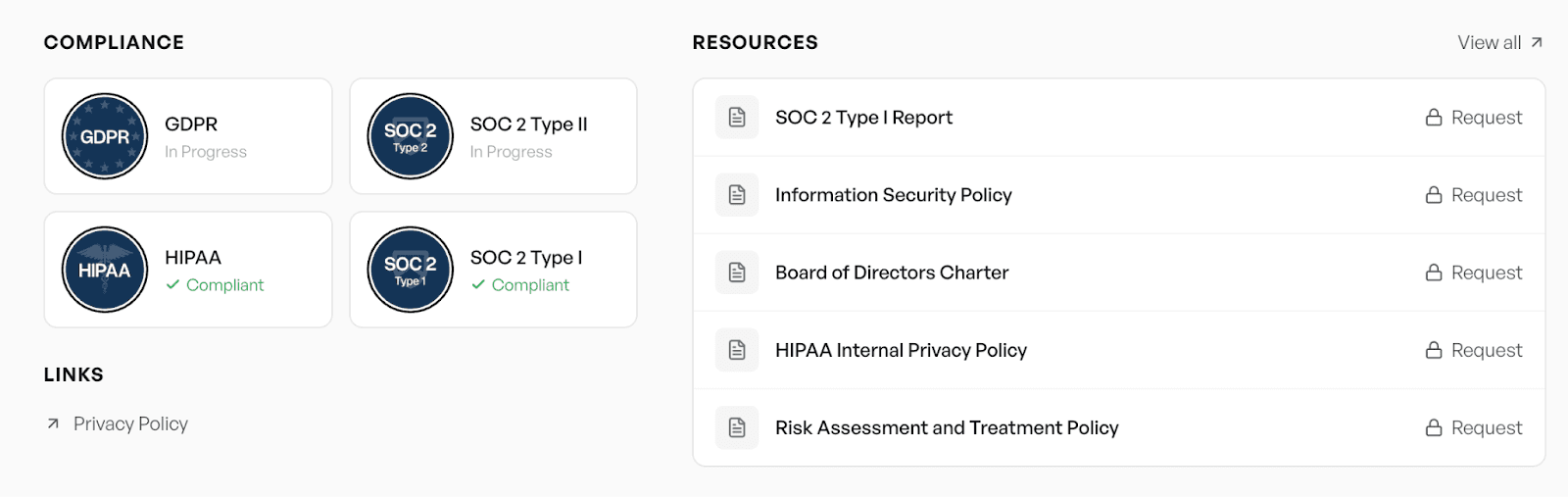
For compliance requirements, Mem0 is SOC 2 Type II certified, GDPR compliant, and offers HIPAA compliance on Enterprise plans. Self-hosted installations support 24+ vector databases, including PostgreSQL (pgvector), MongoDB, Pinecone, and Milvus, and 16+ LLM providers, including OpenAI, Anthropic, Ollama, and Groq.
Graph memory (relationship-aware recall across entities) is available on the Pro plan and improves accuracy for multi-hop reasoning tasks.
Frequently Asked Questions
Q: Why does Claude Code need persistent memory?
Claude Code starts every session with zero context. A persistent memory layer eliminates the repetitive context-building phase at the start of each session by storing and retrieving relevant facts automatically.
Q: How do I add memory to Claude Code?
The recommended approach is the plugin marketplace: run /plugin marketplace add mem0ai/mem0 followed by /plugin install mem0@mem0-plugins, then restart your session.
Q: Does this work with both Claude Code CLI and Claude Cowork?
Yes. The plugin marketplace installation works for both. For CLI, verify with /mcp. For Cowork, check the plus icon in the session interface.
Q: Is Mem0 free to use?
The free tier includes 10,000 memories and 1,000 retrieval calls per month, which is sufficient for most individual developers. Graph memory requires the Pro plan.
Q: Can I control what Claude remembers?
Yes. Use natural language (“Forget that I use JavaScript — I’ve switched to TypeScript”) or MCP tools (delete_memory, update_memory) directly. The delete_entities tool removes a user or agent and all their associated memories.
Q: What happens after /plugin update?
Restart your Claude Code session after any plugin update. The MCP server holds a stale connection until the session is restarted, so new tools or hook changes will not take effect until you do.
Q: Is Mem0 the only way to add persistent memory to Claude Code?
No. The MCP ecosystem includes local alternatives such as claude-mem and mempalace that run entirely on your machine. Mem0’s advantage is its cloud-hosted server, semantic retrieval, and lifecycle hook integration. If data sovereignty is a concern, the self-hosted Mem0 option uses Qdrant and runs entirely on your infrastructure.
Q: Does Claude Code already have memory? Do I still need Mem0?
Yes, Claude Code has built-in Auto Memory since v2.1.59, and it’s worth using. It’s scoped to a single project, though, capped at 200 lines and 25KB with no semantic search. Mem0 adds cross-tool, cross-repo, and cross-team memory with semantic retrieval on top of what Auto Memory already gives you.
Q: How is Mem0 different from Claude Code’s Auto Memory?
Auto Memory writes a flat MEMORY.md file per project, loaded in full at session start regardless of relevance. Mem0 stores memories in a structured, searchable layer that follows you across tools and repositories, and retrieves only what’s relevant to the current task instead of loading everything.
Q: Can I use Mem0 alongside CLAUDE.md and Auto Memory?
Yes. They serve different scopes and aren’t mutually exclusive. Auto Memory and CLAUDE.md handle project-local context, while Mem0 handles memory that needs to persist across projects, tools, and team members. Many setups run both side by side.
References:
More on Coding Agents

Kimi K3 tutorial: build a vision coding agent with persistent memory
Kimi K3 has a 1M-token context window but no memory across sessions. We tested it with Mem0 and cut design regressions from 60% to 0%.
10 min read

Coding Agents Explained: What They Are and How They Differ from AI Assistants
Learn what coding agents are, how they work, and how they differ from AI assistants, chatbots, and autocomplete tools.
29 min read

OpenAI Codex vs Claude Code: Which AI Coding Agent Wins in 2026?
Codex leans toward parallel execution, isolated worktrees, cloud delegation, and reviewable task runs. Claude Code is terminal oriented and more engaging in long interactive sessions, and agent-to-agent coordination. OpenAI’s GPT-6 Astra and Anthropic’s Fable 5.1 have enhanced capabilities, but the harness determines how that intelligence is used. For serious repository work, the better choice is the one that performs more reliably on your codebase, constraints, and working style.
23 min read





Taranjeet Singh
Taranjeet is the co-founder of mem0. His work centers on a question most LLM teams hit but few solve well: how do you give an agent durable, structured memory without ballooning context windows or sacrificing latency? His writing focuses on the practical architecture of memory-augmented agents, the tradeoffs between long context and retrieval, fact extraction at scale, schema design for episodic memory, and why benchmarks like LoCoMo and MemGPT often show such different results in lab vs production environments. He has spoken on these themes at the AI Engineer Summit, LangChain's Interrupt, and other developer conferences.
Start building with memory
Free tier, no card