

Quick Takeaways
Context drift kills agents before the token limit does, and Zylos Research's 2026 survey found 65% of enterprise AI failures in 2025 traced to context degradation during multi-step reasoning, not raw exhaustion.
Hermes uses a two-layer system: agent compressor fires at 50% of the context window, gateway safety net fires at 85%. They're deliberately offset: set both to 50% and you get premature compression on every turn.
Claude Code's Context Compaction API trades configurability for simplicity: one parameter, server-side handling, no boundary tuning required.
Both approaches preserve narrative continuity well. Both silently collapse exact-value preferences and hard constraints under compression.
Compression manages the working window for this session. Mem0 manages what survives across sessions. You need both layers.
⚡ Test memory compression in your own agent. Use Mem0 to store, retrieve, and evaluate compressed context across long-running conversations. Get a free API key - no credit card, runs in 5 minutes.
Most context compression failures don’t look like failures. The agent keeps running. The context keeps shrinking. The token count drops, and what disappears is the constraint you gave at turn two, the exact value the agent confirmed at turn eight, or the dependency it was tracking between tasks. The model hasn't changed. The architecture hasn't changed. The compressor just did what it was designed to do, and it did it lossily.
This post is a code-level walkthrough of how two real production implementations approach context compression:
Hermes Agent by Nous Research, with its configurable
context_compressor.py, andClaude Code with its Context Compaction API (enabled via the
compact-2026-01-12beta header).
We'll cover how each one works, where each one breaks, what both of them lose, and what you need to extract to a persistent store before any compression pass fires.
New to this topic? Three terms to know:
Context window: The LLM's working memory. Every token in the conversation history costs tokens on every call.
Context compression: Automatically shrinking that history when it gets large, so the agent keeps running without crashing on token limits.
Persistent memory: A separate persistent memory store (like Mem0) outside the context window that survives across sessions, restarts, and compression events.
What Is Context Compression?
Context compression is an automated process that shrinks an AI agent's conversation history when it approaches the token limit, preserving the most important information while discarding or summarizing older turns. It keeps agents running without crashing, but always loses some precision.
The naive fix is truncation: Drop the oldest messages when you hit the limit. It's free, it's fast, and it breaks multi-step reasoning almost immediately. An agent that can't see what it decided six turns ago will re-derive, contradict, or re-fetch. It looks like a model problem. But it's an architecture problem.
What does a compressor actually solve?
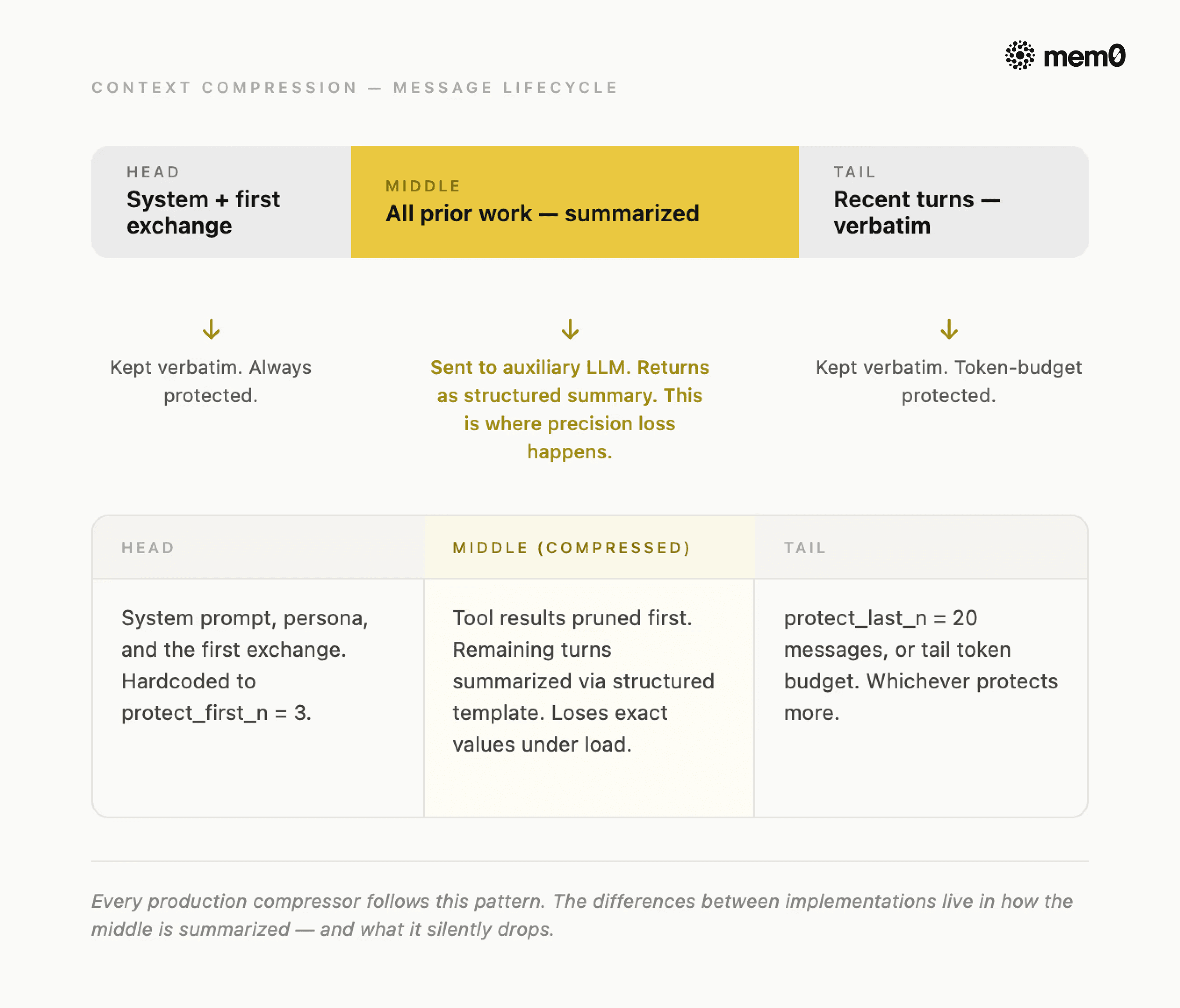
Fig: Context Compression message lifecycle
The universal pattern that works across every serious implementation is to:
Protect the head (system prompt and first exchange),
Summarize the middle (everything the agent has done so far), and
Preserve the tail verbatim (recent turns the agent is still actively working with).
The compressed result is shorter than the original but retains the narrative thread.
3 decisions every compressor must make:
To understand what good compression replaces, here's what the naive version looks like:
💡 The naive fix drops your constraints silently. Mem0 extracts preferences, decisions, and hard constraints to a persistent store before compression fires - so they survive every compression pass. See how it works →
The agent survives. It just doesn't remember anything that happened between turn 3 and turn 25. For a task that spans 40 turns, that's most of the work.
So, every compressor has to make these 3 decisions:
When does it fire?
What gets kept verbatim?
What gets summarized versus dropped entirely?
The answers to those three questions are what separate a production compressor from a naive one, and they're where Hermes and Claude Code make very different choices.
How Hermes Does It?
Hermes Agent is an open-source autonomous agent by Nous Research. Its compression system lives across four source files: agent/context_compressor.py (the primary engine), agent/context_engine.py (the pluggable ABC it implements), agent/prompt_caching.py, and gateway/run.py (the safety net).
TL;DR: Hermes runs two compressors at deliberately different thresholds. When the first fires, it runs a 4-phase algorithm: prune cheap tool outputs, detect safe boundaries, summarize the middle with a structured LLM template, and reassemble. The deep-dive below covers each phase and its known failure modes.
Two layers, deliberately offset
Hermes doesn't run one compressor. It runs two, at different thresholds, for different reasons.
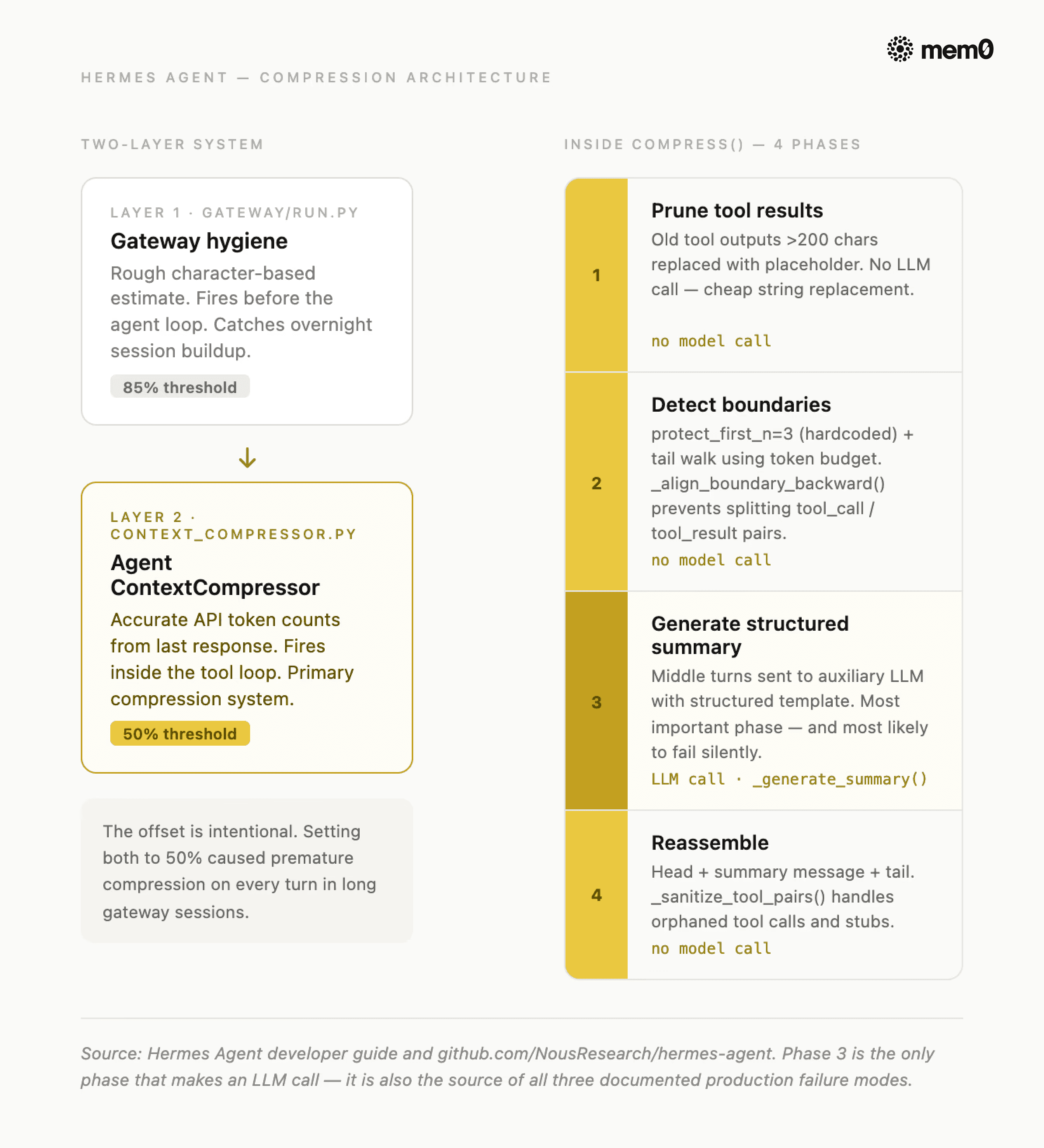
Fig: Hermes agent compression architecture
🔍 Run this compression test yourself Hermes ships Mem0 as a native memory provider. Three commands and your agent stops losing constraints to compression. Get your free Mem0 API key!
The agent compressor lives in context_compressor.py and fires at 50% of the model's context window by default. It runs inside the agent's tool loop, which means it has access to accurate, API-reported token counts from the last response. This is the primary compression system.
The gateway session hygiene lives in gateway/run.py and fires at 85%. It runs before the agent processes a message, using a rough character-based estimate (estimate_messages_tokens_rough) rather than real token counts. Its only job is to catch sessions that have grown too large between turns (for example, overnight accumulation in a Telegram or Discord integration).
Note: The offset is intentional. The setting of gateway hygiene at 50% (the same as the agent compressor) caused premature compression on every turn in long gateway sessions. The 85% threshold exists specifically to stay out of the agent compressor's way.
Configuration parameters
All compression settings live under the compression key in config.yaml. The parameters Hermes exposes are:
For a 200K context model at defaults, that computes to: threshold fires at 100,000 tokens, tail budget is 20,000 tokens, and the summary gets a maximum of 10,000 tokens (min(200,000 × 0.05, 12,000)).
Important note: the summary model must have a context window at least as large as the main agent model. If the auxiliary model's context is smaller, _generate_summary() catches the context-length error, logs a warning, and returns None. When that happens, the compressor drops the middle turns without a summary. But the session continues, and the context gets shorter.
The 4-phase algorithm inside compress() method
Once the 50% threshold is tripped, ContextCompressor.compress() runs four phases:
Phase 1: Prune old tool results
Before any LLM call, the compressor replaces old tool outputs longer than 200 characters with a placeholder: [Old tool output cleared to save context space]. This requires no model call, just string replacement, and it cuts significant tokens from verbose outputs.
Phase 2: Determine boundaries
The compressor protects the first 3 messages (protect_first_n, hardcoded) and the recent tail by walking backward from the end and accumulating tokens until the tail budget is exhausted. It falls back to protect_last_n (default 20 messages) if the token budget would protect fewer. Critically, it calls _align_boundary_backward() to avoid splitting tool_call / tool_result pairs: an assistant message that called a tool must stay paired with its result.
Phase 3: Generate structured summary
The middle turns go to the auxiliary LLM with a structured template. This is the most important phase, and the one most likely to fail silently.
The template is worth studying because it's also the clearest map of what you should be extracting to persistent memory. Every section header names a category that compression tries to preserve, but often loses precision on:
On subsequent compressions, the compressor passes _previous_summary to the LLM and asks it to update the summary rather than start fresh. Items move from "In Progress" to "Done," and a new progress gets added. Also, all the obsolete entries get removed. This makes Hermes's compressor better than a single-pass summariser over long sessions.
Phase 4: Reassemble
The compressed message list includes head messages, a summary message, and the tail verbatim. The _sanitize_tool_pairs() function handles orphaned pairs and removes tool results that reference removed calls, and injects stub results for tool calls whose results were removed.
Where it breaks in production
Three failure modes are worth knowing before you ship with Hermes compression:
Silent summary drop:
_generate_summary()does not explicitly handlejson.JSONDecodeError. When the auxiliary LLM returns a non-JSON response like a misconfigured endpoint, rate-limited provider, or an HTML error page, JSON parsing fails silently. The compressor drops the middle turns without a summary. You'll see log warnings likeWARNING: Failed to generate context summary: Expecting value: line 631 column 1but the session keeps running.Tool ordering crash: When the tail's first message happens to be a
toolrole, the inserted summary precedes it, but the API requires everytoolmessage to immediately follow anassistantmessage containingtool_calls. The compressor produces a message sequence that returns HTTP 400 on every OpenAI-compatible provider, crashing the session.Anti-thrashing permanent lock: If compression fires twice in a row with less than 10% token savings each time,
should_compress()it permanently returnsFalseuntil the user runs/newto reset the session. There's no timeout or decay mechanism, so once it locks, it stays locked.
How Claude Code Does It?
Claude Code takes the opposite architectural bet from Hermes. It offloads context compression entirely to the server and removes the configuration surface. Anthropic's Context Compaction API (currently in beta) is two additions to a standard messages.create call.
TL;DR: Set a token threshold. When the conversation hits it, Anthropic's API compresses automatically and returns
stop_reason: "compaction". You append the response and continue. No boundary tuning, no auxiliary model, no phases to manage.
When the input token count hits the trigger threshold, Anthropic's API automatically summarizes the earlier portions of the conversation, replaces them with a compressed state stored in a compaction block, and returns stop_reason: "compaction". The next request continues from that compressed state with no client-side message list management required.
Hermes vs. Claude Context Compression: Key Differences
The tradeoff is straightforward: you get simplicity, you give up control. Specifically:
Hermes ContextCompressor | Claude Code Compaction API | |
|---|---|---|
Trigger | Configurable (default 50%) | The token threshold you set |
Summary visibility | Inspectable structured template | Opaque compaction block |
Auxiliary model | Configurable or falls back to the main | Managed by Anthropic |
Pluggable engine | Yes, swap via | No |
Dual-layer safety net | Yes, gateway at 85% | No |
Open source | Yes | No |
The shared weakness is more important than the differences. Both Hermes and Claude Code compress lossily. Neither system was designed to guarantee exact-value preservation across a compression pass.
What Does Context Compression Lose?
Every summarization-based compressor eventually hits the same four failure modes. They're not edge cases. They're predictable consequences of the architecture. Across all of them, the information that gets lost falls into five categories:
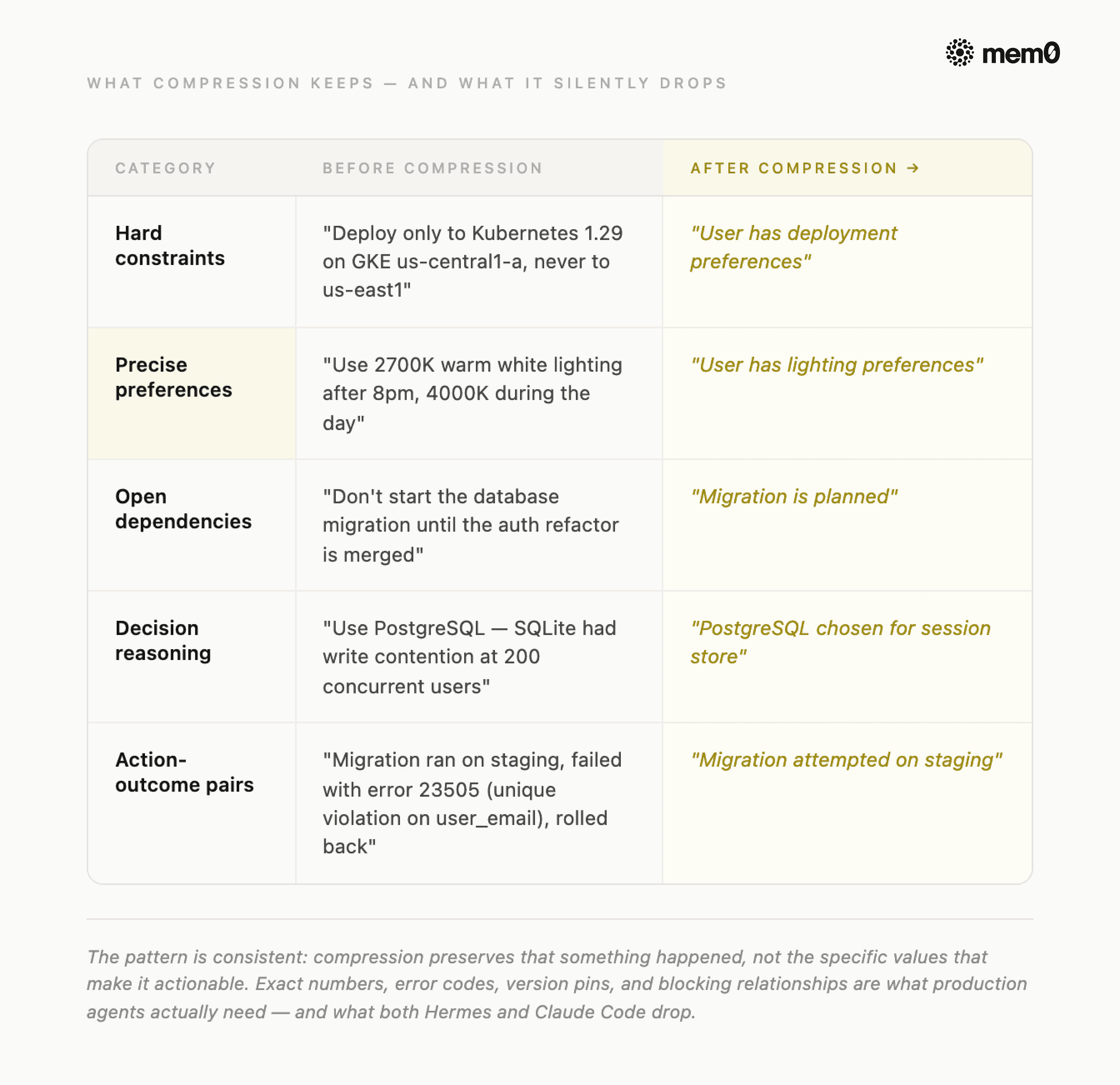
Fig: Compression Gap: Before vs After
Exact numeric values: Thresholds, port numbers, version pins, and token counts mentioned in passing get absorbed into prose summaries and lose their precision. A summarizer that reads "we set the retry limit to 3" will often output "retries were configured" - and the 3 is gone.
Hard constraints: Instructions like "don't touch test files," "no Redis," or "use Postgres only" are stated once and assumed permanent by the user. Summarizers treat them as settled context and stop restating them, so by cycle three, they've quietly disappeared.
Decision reasoning: The what of a decision survives compression reasonably well; the why rarely does. An agent that knows "we chose Postgres" but not "because Redis wasn't approved for the compliance environment" will make the wrong call the next time a similar choice comes up.
Cross-task dependencies: A file modified in turn 12 that a tool called in turn 47 depends on gets compressed as part of two separate spans. Summarizers process each span independently and miss the link between them entirely.
Implicit preferences: Coding style, response tone, and formatting habits the user demonstrated repeatedly but never stated explicitly are the last thing a summarizer thinks to preserve - and the first thing a user notices is missing.
The pattern is consistent: summaries preserve that something happened, not the specific values that made it actionable. And specific values are what production agents actually need.
💡This is the gap Mem0 was built to close. It runs alongside your compressor, capturing the five categories above after every turn, before compression has a chance to lose them.
What to Extract to Mem0 Before Compression Fires?
The write-before-compaction pattern is the fix. Instead of hoping the compressor preserves what matters, you extract the five categories to a persistent store before the compression pass fires. When the next session starts or when the compressor fires mid-session, those facts get injected back into the system prompt regardless of what the compressor dropped.
Extraction needs to happen after every turn, not when compression triggers. By the time the compressor fires at 50%, you may have 25 turns of preferences and constraints that need to survive. Extracting at compression time is already too late.
This is exactly where Mem0 fits.
Hermes ships Mem0 as a native memory provider as a first-class plugin in plugins/memory/. When active, it works at three points per turn:
Before the agent responds, Cached Mem0 results from the previous turn are injected into the system prompt. This gives zero latency with no API call at response time.
After the agent responds, the exchange is sent to Mem0's API in a background thread. Facts are extracted automatically: preferences, constraints, decisions, and entity names. No extraction rules to configure.
Simultaneously, Hermes kicks off a background search for the next turn's memories. By the time you type again, they're pre-loaded.
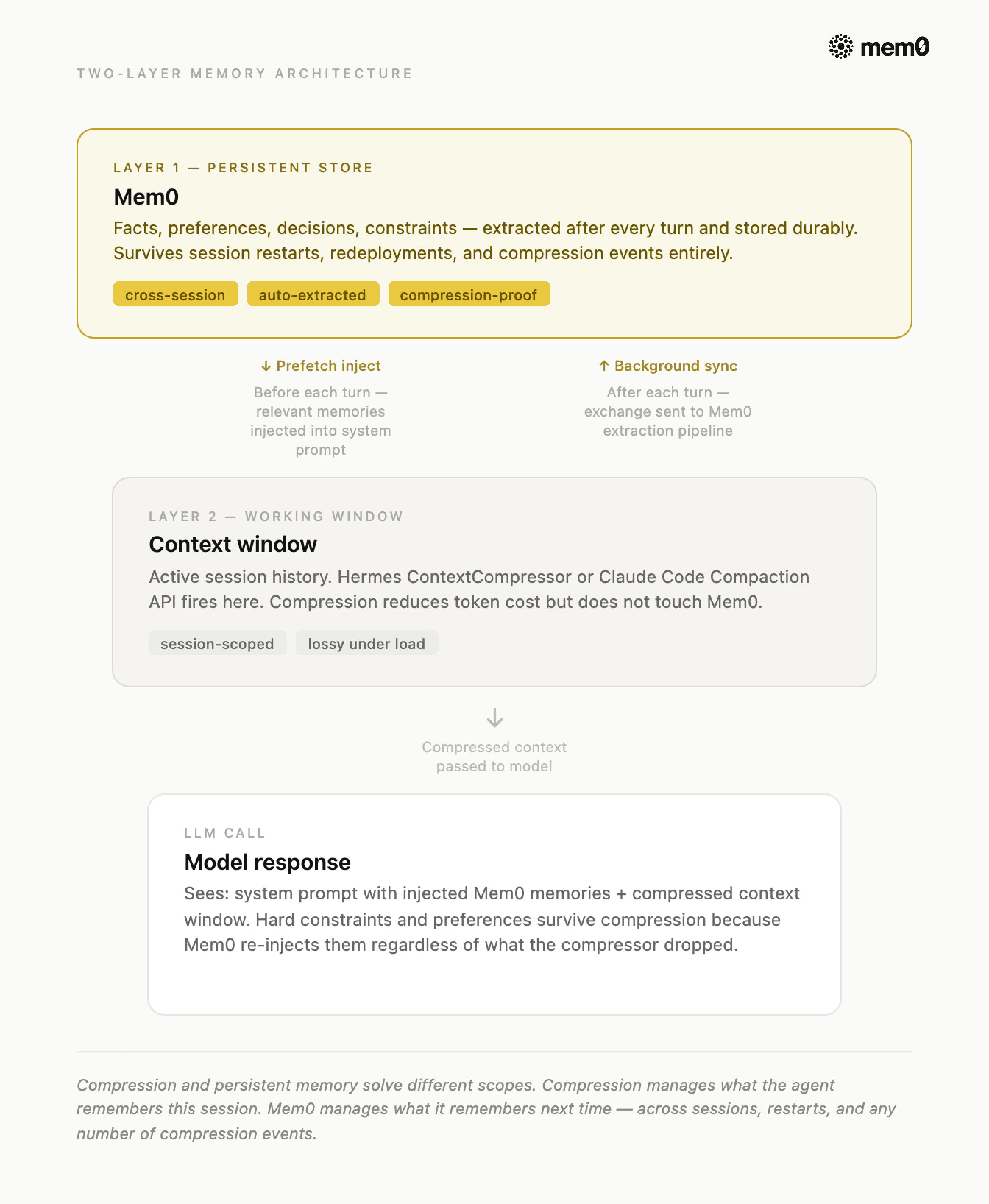
Fig: Integrating Mem0 with Hermes Agent and Claude Code
When ContextCompressor fires at 50% and drops the middle turns; those facts are already in Mem0, located outside the context window, untouched by compression. The next response gets them back through the prefetch-inject cycle.
Setting up Mem0 in Hermes:
Setting up Mem0 in the Hermes agent takes 3 commands:
Your API key comes from app.mem0.ai. The mem0ai Python package installs automatically when you enable the provider, so no manual pip install needed.
For the full implementation reference, see how to add long-term memory to Hermes Agent with Mem0, zero-latency prefetch, server-side extraction, and background sync in one place.
If you're already running Hermes:
Wire Mem0 as the memory provider, and you're done. The prefetch-inject cycle runs automatically on every turn, and whatever compression drops get rebuilt from Mem0 on the next call.
Once Mem0 is active, the LLM gains three tools it can call explicitly during conversations:
mem0_conclude is the one to know for hard constraints. It uses infer=False, which means no server-side LLM extraction and only the exact string you pass is what gets stored. For a constraint like "never deploy to us-east1", you want verbatim storage, not paraphrased extraction.
The Hermes + Mem0 integration guide documents the reliability guarantees built into this setup: a circuit breaker disables Mem0 API calls for 2 minutes after 5 consecutive failures (the agent keeps working without memory during that window), all API calls run in background daemon threads, so a slow response never blocks the conversation, and the client uses lazy initialization with locking for concurrent access safety.
Setting up Mem0 in Claude Code:
If you're building on Claude Code instead of Hermes, the Mem0 Python SDK handles the same extraction and injection pattern directly. You add memory writes after each exchange and memory reads before each system prompt assembly.
Setting up Mem0 with Claude Code takes a small code snippet:
Call mem0.add() after each exchange to extract facts into the persistent store, and mem0.search() before each system prompt assembly to inject them back. The token optimization playbook has the full architecture for this path, including why retrieval holds flat at top-K while naive injection scales linearly.
Want the full setup walkthrough? The Claude Code persistent memory guide covers MCP integration, lifecycle hooks, and a 5-minute setup, including how to cut token usage by 90% across sessions.
Try It On Your Agent Today!
Context compression is solved. Both Hermes and Claude Code handle it well enough for production. The gap is what happens after the compressor fires: exact-value constraints gone, decision reasoning dropped, and cross-session continuity broken. That gap is what Mem0 closes.
Already running Hermes? Mem0 wires in as a native provider, the prefetch-inject cycle runs automatically, and whatever compression drops get rebuilt on the next call. Start with hermes memory setup.
Building on Claude Code? Add the Mem0 Python SDK alongside your compaction loop. mem0.add() After each exchange, mem0.search() before each system prompt assembly. The token optimization playbook has the full architecture.
Not sure if you need this yet? Run your agent for 40+ turns on a real task and check two things: does it remember the constraint from turn 3, and does it know why it made the key decision at turn 15? If either answer is no, you're already seeing compression loss.
💡The compressor handles what your agent remembers this session. Mem0 handles what it remembers next time.
Frequently Asked Questions
Q. What is context compression in AI agents?
Context compression is how a long-running agent stays within its model's token limit. Every model has a hard ceiling - 200K for Claude Sonnet, 1M for Opus, and once a session hits it, something has to go. The four main approaches are truncation, rolling LLM summarization, structured handoff summaries, and extraction-based memory.
Q. How does Hermes context compression work?
Hermes runs two compression layers: a gateway hygiene layer that fires at 85% context fill, and the primary ContextCompressor that fires at 50% with a four-phase algorithm. It prunes stale tool results, protects the head and tail, summarizes the middle with a structured template, and updates the previous summary rather than regenerating from scratch.
Q. How does Claude Code context compaction work?
Developers building their own agents on Claude enable this via a beta header (compact-2026-01-12) and a token trigger threshold. When the conversation crosses that threshold, Anthropic's API automatically summarizes the earlier conversation into an opaque compaction block and returns stop_reason: "compaction," with no client-side boundary tuning required. Note: this is different from the separate three-tier system (microcompaction, auto-compaction, and manual /compact) built into the Claude Code CLI tool itself for its own end users, that's a related but distinct mechanism, not covered by this post.
Q.What is the difference between context compression and persistent memory?
Compression is reactive and single-session: it fires when the context window fills and sheds information to make room. Persistent memory is proactive and cross-session: it extracts facts during a conversation and indexes them for future sessions.
Q: When should I use Mem0 alongside context compression?
Use Mem0 alongside context compression when your agent needs to reliably remember specific facts across turns and sessions, not just maintain narrative continuity
Sources:
GET TLDR from:

Summarize
Website/Footer

Summarize
Website/Footer

Summarize
Website/Footer

Summarize
Website/Footer


