

·
12 min read

On this page
Autonomous agents only feel intelligent when they remember. Without persistent memory, they repeat questions, lose goals between steps, and behave as if every call is a fresh start.
This article walks through how memory for agents works at a technical level, where common patterns fail in production, and how Mem0 can act as a dedicated memory layer that plugs into any agent framework.
What memory actually means for agents
In an LLM agent system, "memory" is not one thing. It is a combination of several capabilities including:
Short-term context: the current conversation and recent tool calls.
Working memory: derived state that guides multi-step plans.
Long-term memory: facts, preferences, entities, and history that persist across sessions.
Episodic traces: what happened on past runs, with enough detail to continue.
Production agents typically need at least three memory functions:
Store: decide what to remember from each step.
Retrieve: fetch only the relevant items for the next step.
Update / forget: merge, decay, or remove outdated information.
A memory system must work under practical constraints such as token limits, cost, latency, and safety requirements, and it must integrate cleanly with existing agent loops and tools.
Common naive patterns and why they fail
Many agents start with simple patterns that eventually break down in production.
1. Full conversation replay
Keep all previous messages and send them with each LLM call. This works for short interactions but hits:
Context window limits: large conversations exceed the model's max tokens.
Cost: repeated tokens inflate usage.
Latency: longer prompts increase response times.
2. Manual key-value memory
Store a few values in a dict or database, such as "user_name" : or "project_goal". This avoids token bloat but:
Does not handle unstructured information well.
Needs manual schema design upfront.
Breaks when the agent encounters new types of facts.
3. Ad-hoc vector store integration
Some teams add a vector database and embed every user message, then fetch top-k items. That works better, but:
It still needs logic to decide what to store versus ignore.
Duplication and contradictions accumulate without cleanup.
Different memory types, such as user preferences versus logs, get mixed.
These patterns are enough for demos. They usually fail once:
Users return days later and expect the agent to remember.
Multi-agent workflows depend on shared state.
Compliance or debugging requires interpretable history.
A more systematic memory layer is needed.
Memory types for autonomous agents
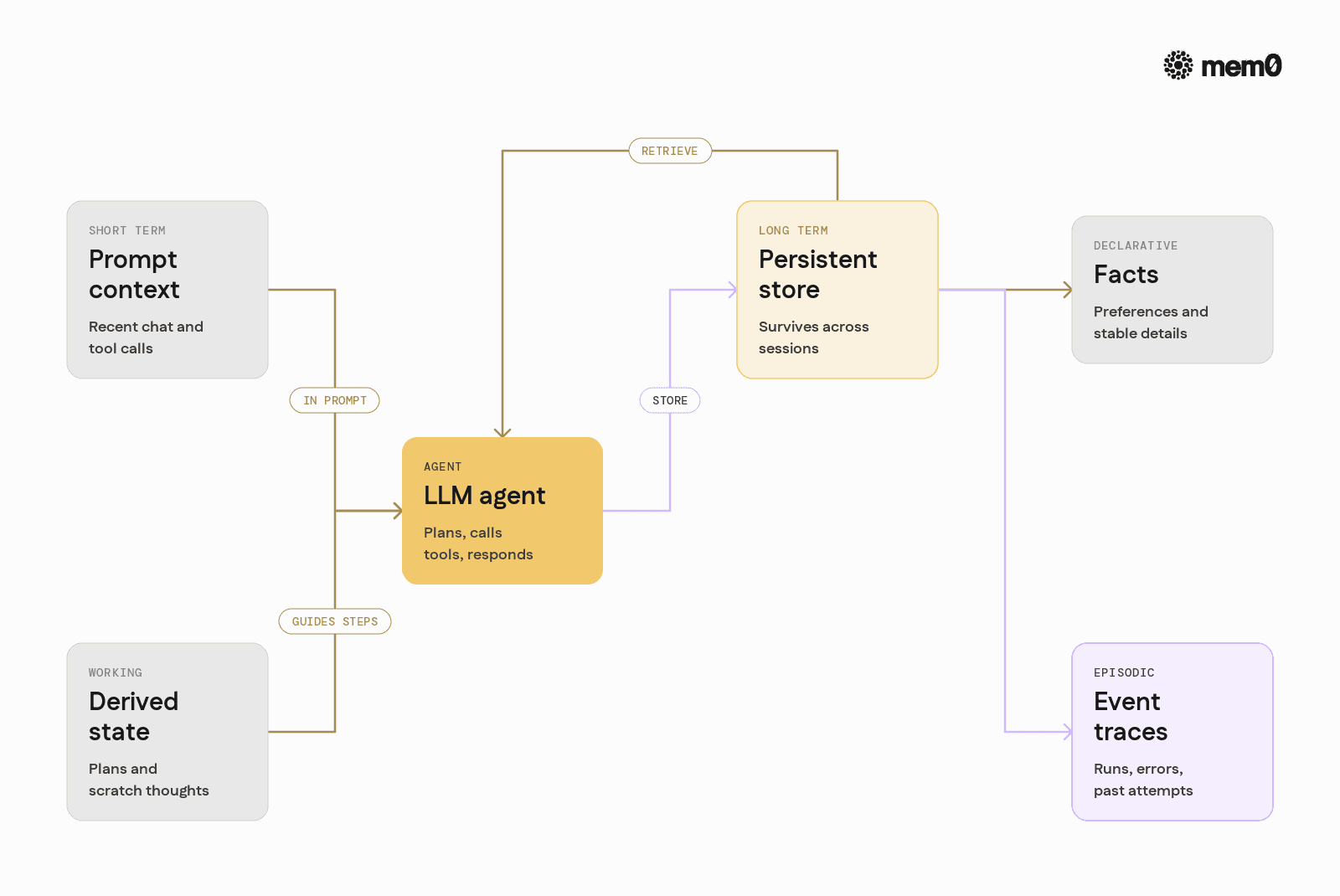
Different agent behaviors map to different memory needs. It helps to separate them explicitly.
Short-term vs long-term memory
Short-term memory:
Lives inside the prompt for the current step.
Includes recent messages, tools, and partial plans.
Is volatile and limited by the model context window.
Long-term memory:
Lives outside the prompt in an external store.
Can persist across sessions and devices.
Needs indexing, retrieval, and mutation logic.
Declarative vs episodic memory
Declarative memory: Facts like "User prefers dark mode" or "This repo uses Poetry".
Episodic memory: Traces like "On May 20, the agent failed to deploy due to missing env vars".
Declarative memories should be compact, deduplicated, and updated over time. Episodic memories can be more verbose but need retrieval filters, such as by time, agent, or topic.
A memory layer should handle both and expose a consistent interface to the agent.
For long-running agents where past events, failures, and task progress need to be preserved, see our guide to event-based memory systems for long-running AI agents.
Architecting a memory loop around your agent
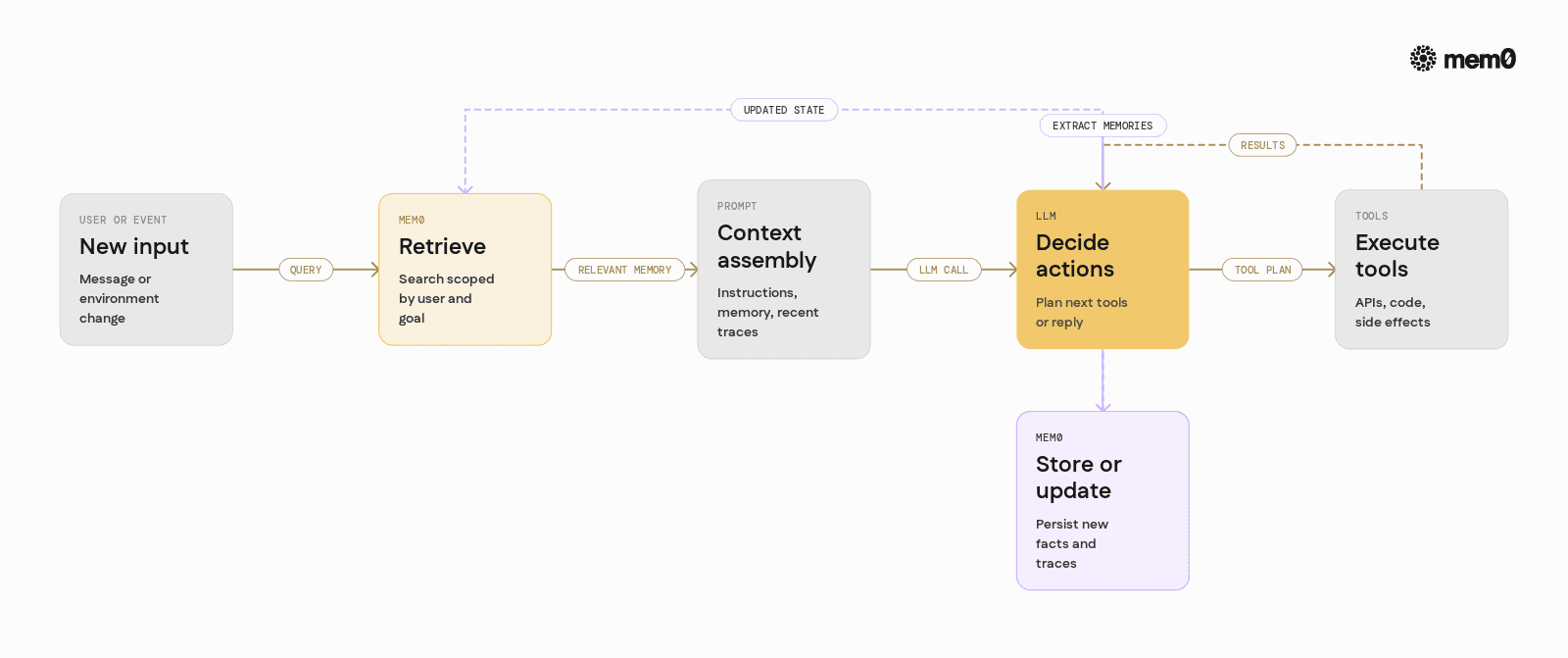
At a high level, integrating memory into an agent loop adds three hooks:
Before a step: Retrieve relevant memories and inject them into the prompt.
During a step: Let the LLM use tools that read or write memory.
After a step: Extract candidate memories from the transcript and persist them.
A typical loop looks like this:
Receive a user input or environment event.
Retrieve: query memory using the input and current goal.
Build a prompt that includes:
System and agent instructions.
Selected memory snippets.
Recent conversation or tool traces.
Call the LLM to decide next actions.
Execute tools, including potential memory updates.
Summarize what happened and store relevant memories.
Repeat until done.
Mem0 is designed to occupy the "retrieve" and "store" parts of this loop, while agent frameworks handle orchestration and tools.
For a deeper look at how persistent memory supports multi-step agentic workflows, see agentic workflows with persistent memory.
Where traditional memory approaches stop working
Even with a vector store and some rules, several hard problems remain.
Relevance and recall quality
Naive retrieval often returns either too many or too few memories. Issues include:
Semantic search may prioritize long, irrelevant chunks.
Important but short facts can be buried in noisy logs.
Different conversations and users get mixed if filters are weak.
Identity and personalization
In multi-user systems:
Each user needs isolated memories.
Some memories may be shared across tenants or groups.
Agents need to handle multiple identities, such as "user", "team", "project", "device".
Hardcoding tenant IDs in query logic quickly becomes brittle.
Evolution and contradictions
Agents frequently encounter new or updated information:
"The server is now on port 9090, not 8080."
"Ignore my previous preferences, I now want shorter responses."
Without a notion of entity and version, the memory store accumulates conflicting facts and retrieval becomes unreliable.
Operational concerns
Production teams also care about:
Inspecting memories for debugging.
Exporting or deleting user data on request.
Migrating storage backends or changing embedding models.
These concerns call for an explicit memory layer, not ad-hoc code spread across the agent.
How Mem0 positions itself as a memory layer
Mem0 provides a focused abstraction: an intelligent memory layer for LLMs and agents. It manages:
Storage: structured, typed, searchable memory items.
Retrieval: filtering by user, tags, time, and semantic similarity.
Mutation: updates, soft deletion, and merging.
Backends: pluggable databases and vector stores, configurable without changing agent code.
In practice, this means the agent interacts with a simple API:
save(memory)to insert new items.search(query, filters)to retrieve relevant items.update(id, data)ordelete(id)when state changes.
The complexity of embeddings, indexes, and storage is handled by Mem0, which lets the agent logic remain focused on planning and tools.
For an agent-native approach to adding persistent memory, see The Easiest Way to Add Persistent Memory to Any AI Agent.
Integrating Mem0 into a Python agent
The following example shows how to wire Mem0 into a basic Python agent that uses an LLM and tools. It focuses on the memory parts, not on any specific framework.
Setup
Install Mem0:
Set an environment variable MEM0_API_KEY is already set after registration.
You'll require a Mem0 API key to continue further.
Basic memory-aware agent loop
This example shows a basic pattern:
Each turn, Mem0 is queried with
user_idand the current input.Retrieved memories are injected into the prompt.
After the response, memories are updated with simple heuristics.
In real agents, the extraction step is often implemented as an LLM tool: the agent explicitly decides what to store and what to ignore.
Advanced patterns with Mem0
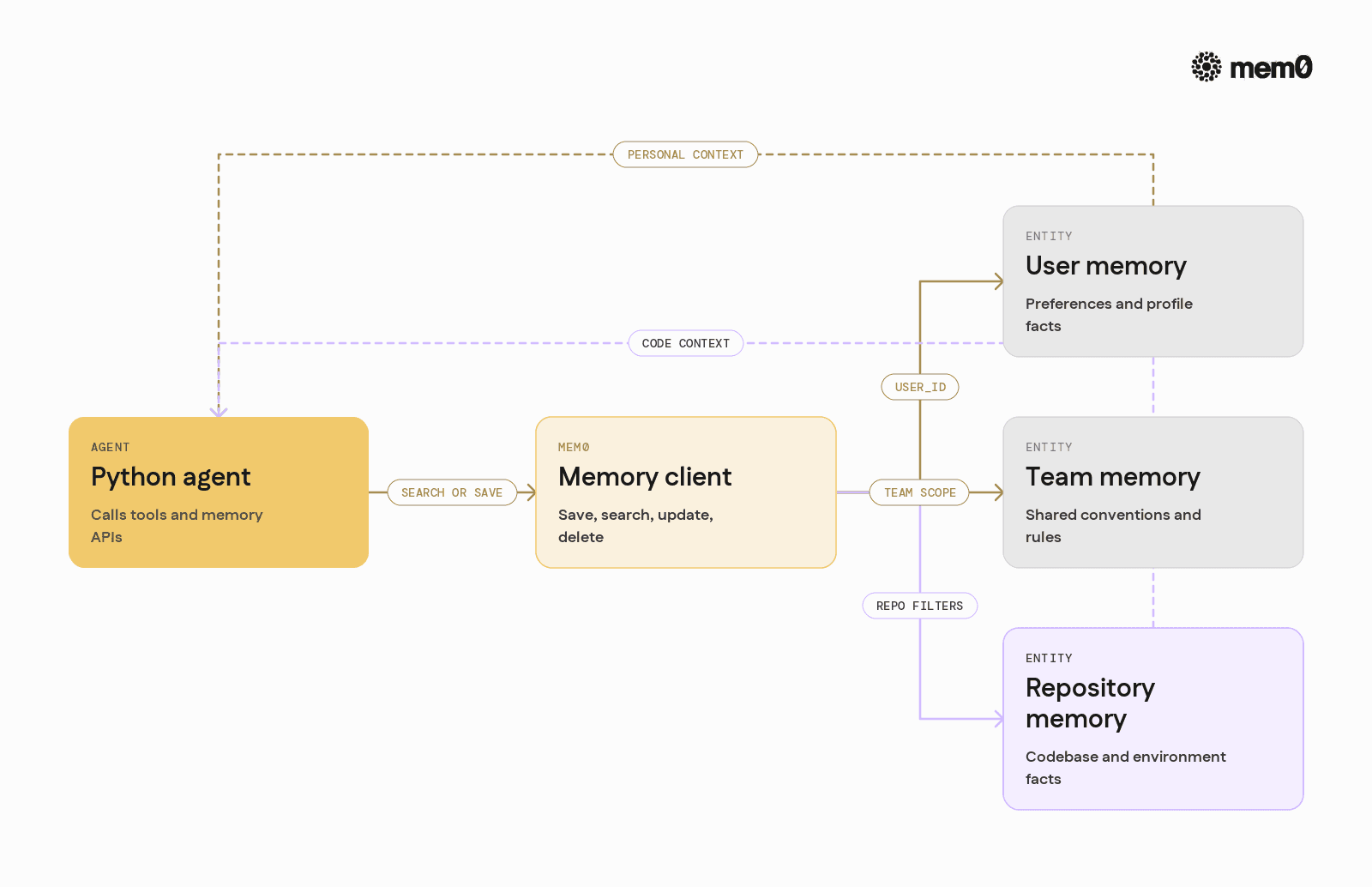
Mem0 supports more nuanced patterns for complex agents.
Multi-entity memory
Agents often interact with multiple entities: user, team, project, and environment. Mem0 lets developers scope and filter memories using IDs and metadata.
The agent can then ask for "repository memory" specifically when performing code operations, without mixing it with user preferences or chat history.
Tool-based memory management
With structured tools, the LLM can call memory operations directly. For example, define tools like:
get_memory(query, scope)save_memory(text, scope)update_memory(id, text)
Then implement these with Mem0 under the hood. This shifts decisions about what to remember into the model, while keeping storage and retrieval consistent.
Time-aware retrieval
Mem0 can store timestamps and other metadata. Agents can, for example, fetch only recent events:
This helps episodic memories act as a temporal log.
Comparing memory strategies in agents
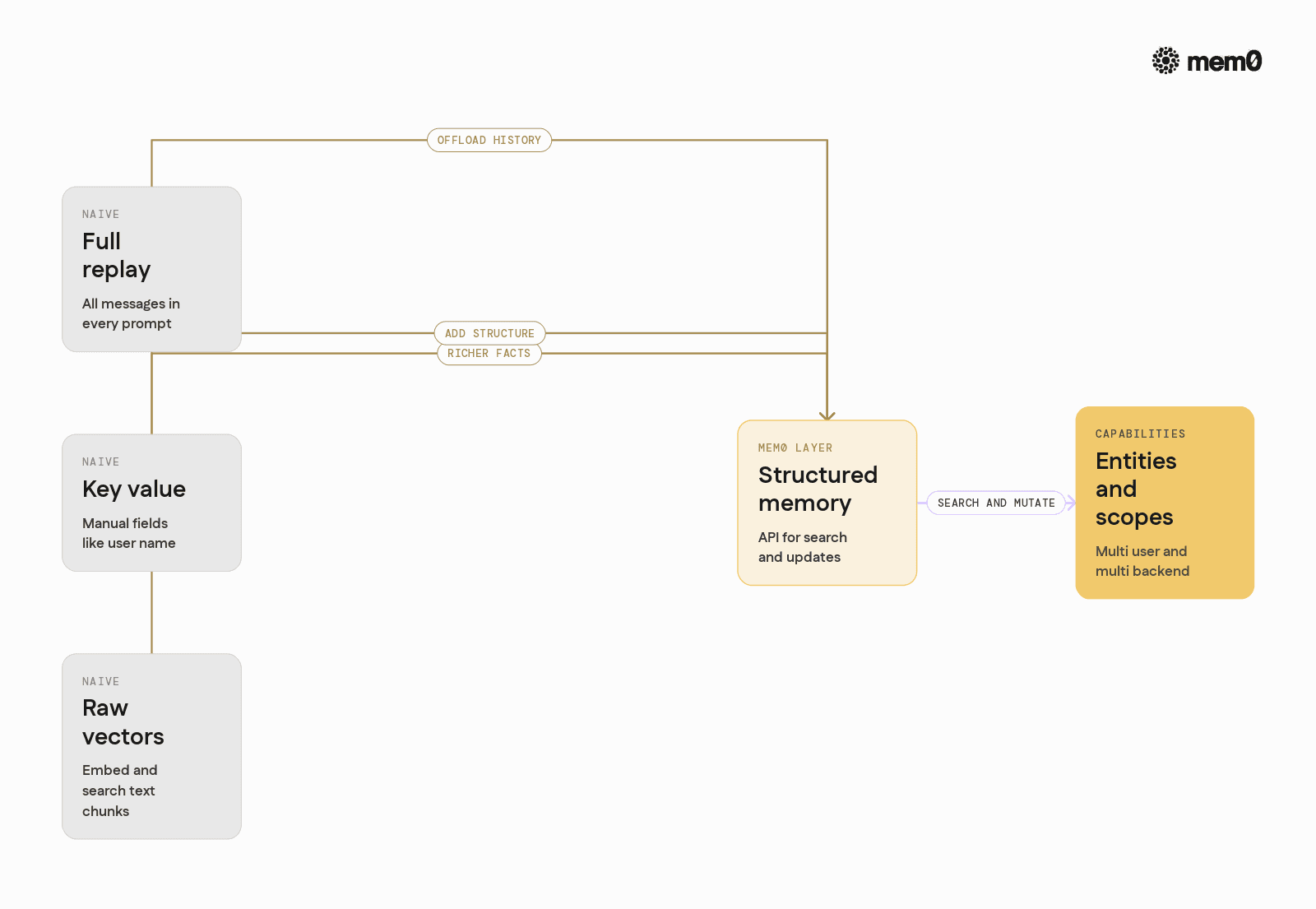
The following table compares several memory approaches across key dimensions.
Approach | Pros | Cons | Typical use |
|---|---|---|---|
Full conversation replay | Simple to implement, no external infra | Hits token limits, expensive, hard to debug | Prototypes, small chats |
Manual key-value store | Fast lookups, explicit schema | Rigid, does not scale with unstructured knowledge | Config and settings only |
Raw vector store | Handles unstructured text, semantic search | Requires custom logic for scope, updates, and cleanup | Mid-scale agents with custom infra |
Ad-hoc memory tools | LLM can decide what to store | Behavior depends on prompt design and tool coverage | Agents in early production |
Mem0 memory layer | Structured memory API, search and updates, multi-entity support | New component to learn and deploy | Production agents and multi-user systems |
Mem0 can coexist with key-value stores and logging systems. It focuses on the semantic and persistent parts of memory that directly drive agent behavior.
Limitations of memory in autonomous agents
Even with a dedicated memory layer, some limits are inherent to the pattern.
Misremembering and hallucinations: The LLM can misinterpret or mis-summarize interactions, and store incorrect facts. Guardrails, review workflows, or confirmation prompts are needed for sensitive data.
Forgetting and stale information: Once memory grows large, retrieval may surface outdated facts. Agents need explicit strategies for expiry, priority, and conflict resolution.
Cross-agent coordination: Shared memory across multiple agents introduces race conditions and versioning issues. Without clear ownership and schemas, agents may overwrite or ignore each other's updates.
Privacy and compliance: Storing long-term user data has regulatory implications. Deletion, export, and scope restrictions must be part of the design, independent of the memory layer.
Cost and latency tradeoffs: More memory lookups and larger prompts improve recall, but increase latency and cost. Systems need tuning for how much memory to retrieve and how often to query it.
A memory layer like Mem0 addresses retrieval, structure, and storage, but the overall safety and behavior of the agent still depend on careful system design.
Frequently Asked Questions
What kinds of agents benefit most from Mem0-style memory?
Any agent that must maintain continuity across sessions or tasks benefits. Examples include coding agents tied to a repo, customer support copilots, and workflow agents that coordinate long-running jobs.
How does Mem0 decide what to store as memory?
Mem0 focuses on providing APIs and structure, while the agent or LLM decides what to store. Developers can implement rule-based extraction, LLM tools, or hybrid strategies that capture preferences, entities, and episodic traces.
When should memory be retrieved in an agent loop?
Memory retrieval is usually done before each major LLM call, scoped by the current user and goal. In complex workflows, retrieval can also happen inside tools to query specific entity memories, such as a project or environment.
Why not just use a vector database directly instead of Mem0?
A raw vector database provides embeddings and similarity search, but not higher-level memory concepts like entities, updates, scoped queries, and multi-backend support. Mem0 layers these capabilities on top, so agent code interacts with a stable API, even if storage or embedding details change.
How does Mem0 handle multiple users and identities?
Mem0 uses fields such as user_id and arbitrary metadata to scope and filter memories. This lets developers isolate user memories, share team-level context, and attach facts to entities like repositories or projects without mixing them.
How can memory be kept safe and compliant in production?
Agents should avoid storing sensitive data by default, and use clear filters or redaction before saving memories. Mem0 supports deletion and filtering, but policies such as retention windows, export capabilities, and access controls must be designed at the application level.
Further Reading
—
Mem0 is an intelligent, open-source memory layer designed for LLMs and AI agents to provide long-term, personalized, and context-aware interactions across sessions.
Get your free API Key here: app.mem0.ai or
Self-host mem0 from our open-source GitHub repository.
—
More on Agent Memory

How to Read Memory Benchmarks
How to read AI memory benchmarks: what LoCoMo, LongMemEval, BEAM, and agentic tests measure, where scores go wrong, and how to find the correct benchmark for your use case.
20 min read

The Problem After Retrieval: Why Agents Misuse the Memories They're Given
Five papers show LLM agents often misuse the memories they retrieve. What the research says, how much to trust it, and what builders can do.
13 min read

What Is Memory Staleness in AI? Causes, Risks & Solutions
Understand memory staleness in AI agents, why outdated information leads to errors, and the best techniques to maintain accurate long-term memory.
9 min read





Aashi Dutt
She is a senior technical content writer at Mem0. She covers agent memory architecture and the engineering decisions behind building agents that actually remember. She experiments with new features and turns research into posts developers can put straight to use.
Start building with memory
Free tier, no card