

·
13 min read
On this page
Knowledge base agents are now answering support tickets, helping engineers debug systems, and guiding users through complex products. Most of these agents are powered by retrieval augmented generation (RAG) over a document corpus, plus a language model to synthesize answers.
This pattern works well for static reference material. It fails once the agent must remember how a specific user works, what past issues occurred, or how the knowledge base itself has changed over time. Context windows, system prompts, and stateless retrieval are not enough for long-lived, personalized agents.
Persistent memory is the missing piece. An agent that remembers which workflows a user prefers, which errors were already fixed, and what information was requested yesterday can behave more like a teammate and less like a stateless chatbot. This post explains what AI knowledge base agents with persistent memory are, how they work, where they break down, and how Mem0 addresses the memory layer for production systems.
What is a knowledge base agent with persistent memory
A knowledge base agent answers questions and performs actions based on a structured or semi-structured knowledge base. It typically uses:
A document store or database with docs, FAQs, or technical references
A retrieval layer to select relevant content
An LLM that generates answers grounded in the retrieved material
A knowledge base agent with persistent memory adds a second axis: it remembers user-specific and interaction-specific information over time, not just global documents. The agent uses this memory to adapt future behavior.
Examples include:
Remembering which product tier a customer uses and tailoring answers accordingly
Persisting context about a long debugging session across multiple chats
Tracking which articles a user found helpful and avoiding repetition
Recording new knowledge discovered through interactions, such as internal runbook steps that did not exist before
In practice, this requires two distinct forms of knowledge:
Static or slowly changing domain knowledge in the knowledge base
Dynamic episodic and user-specific memory that persists across sessions
Without a dedicated memory layer, teams often conflate these two classes of knowledge inside a single vector store or database. That approach quickly becomes hard to query, hard to maintain, and hard to scale.
How traditional RAG falls short
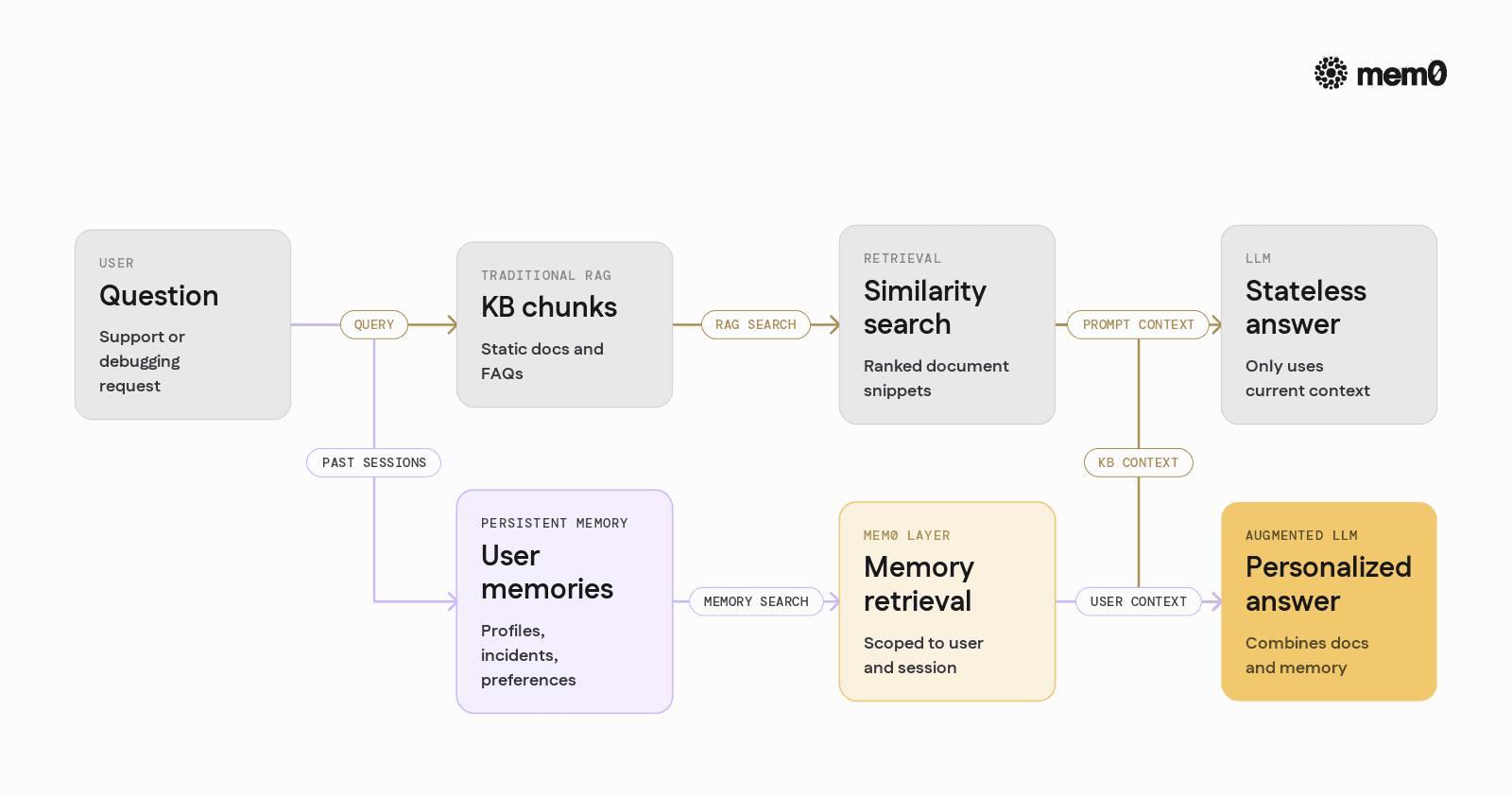
Standard RAG pipelines focus on document retrieval, not agent memory. The usual architecture looks like this:
Chunk knowledge base documents.
Embed each chunk and store it in a vector database.
At query time, embed the user question and perform similarity search.
Feed retrieved chunks plus user question into the LLM.
This works well for questions like “How do I reset my password?” or “What are the API rate limits?” It is less effective for conversations like:
“Can you pick up where we left off yesterday on debugging the payment webhook?”
“Last time we spoke you suggested trying a different SDK. I did that, and now I get error 409.”
“I prefer examples in TypeScript. Please stop sending Python snippets.”
In these cases, the relevant information is not in the static docs. It is in the conversation, past actions, and user preferences. Standard RAG has several limitations for persistent-agent scenarios:
No identity model: Documents are global, but memories must be scoped to
user_id,session_id, ortenant.No memory types: Preferences, incidents, and evolving facts need different retention and querying strategies.
No forgetting or updating: Old or incorrect information accumulates without lifecycle management.
Prompt-bloat pressure: Trying to stuff “all past context” into the prompt hits context window and cost limits.
Extending a RAG system to handle persistent memory usually results in ad hoc solutions: a mix of vector tables, relational tables for metadata, custom filters, and handwritten heuristics for deciding what to store or retrieve. This is where a dedicated memory layer becomes essential.
Core components of a persistent-memory knowledge base agent
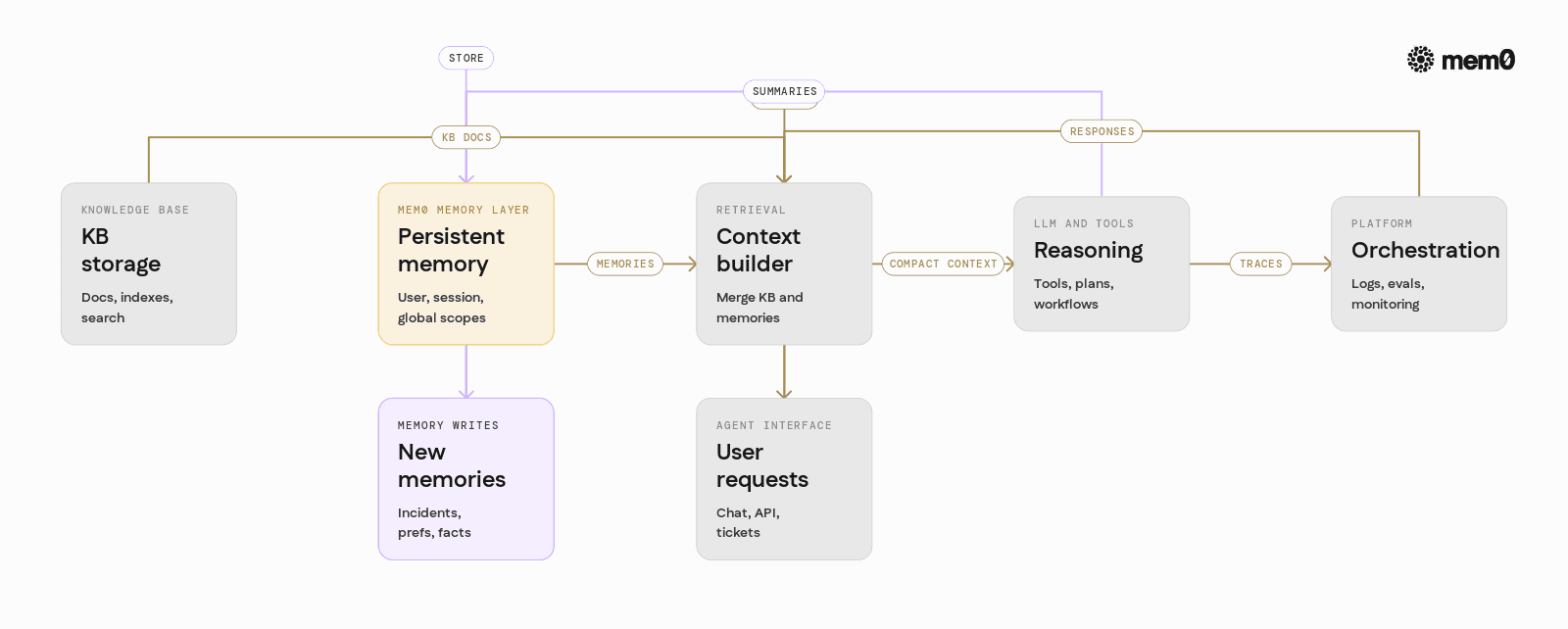
A production-grade knowledge base agent with persistent memory typically consists of five layers:
Knowledge base storage
Document store (SQL/NoSQL, object storage, or search engine)
Indexing for semantic and keyword search
Memory layer
Abstraction over one or more stores for persistent memories
Handles user, session, and global scopes
Encodes, deduplicates, expires, and updates memories
Retrieval and context builder
Merges KB documents and relevant memories
Applies recency and relevance filters
Builds compact prompts to avoid context explosions
Reasoning and tools
LLM calls with tools / functions / actions
Optional multi-step plans and workflows
Orchestration and monitoring
Logging, tracing, and observability
Evaluation and red-teaming for safety and quality
The memory layer is where Mem0 fits. It is responsible for:
Persisting episodic, user-specific, and agent-generated knowledge
Exposing simple APIs to store and retrieve that knowledge
Integrating cleanly with existing RAG stacks
The rest of this post focuses on that layer.
How persistent memory works in practice
Persistent memory for knowledge base agents usually covers three categories:
User profile and preferences
Language, code language preferences, expertise level
Product tier, feature flags, account configuration
Interaction history and incidents
Past tickets or conversations
Steps taken to solve past issues
Known workarounds for specific environments
Agent-discovered knowledge
Newly discovered troubleshooting steps
Mapping between internal and external terminology
Structured facts extracted from unstructured conversations
An effective memory system must:
Capture relevant snippets during a conversation, not the entire transcript
Normalize and compress them into discrete, queryable memories
Associate them with an identity, such as
user_idorconversation_idRetrieve a small, high-signal subset when needed
Support updates when the underlying fact changes
Mem0 provides exactly this: a simple API surface for writing and reading memories, with automatic embedding, storage, and retrieval strategies suited to long-lived agents.
Introducing Mem0 as a memory layer for agents
Mem0 is an open-source memory layer that sits between an agent’s interaction layer and its storage engines. Instead of wiring every agent directly to a vector database, Mem0 exposes a consistent interface for:
Adding new memories
Querying memories based on natural language, metadata filters, or both
Updating or deleting memories as the world changes
Managing scopes like user, session, and global
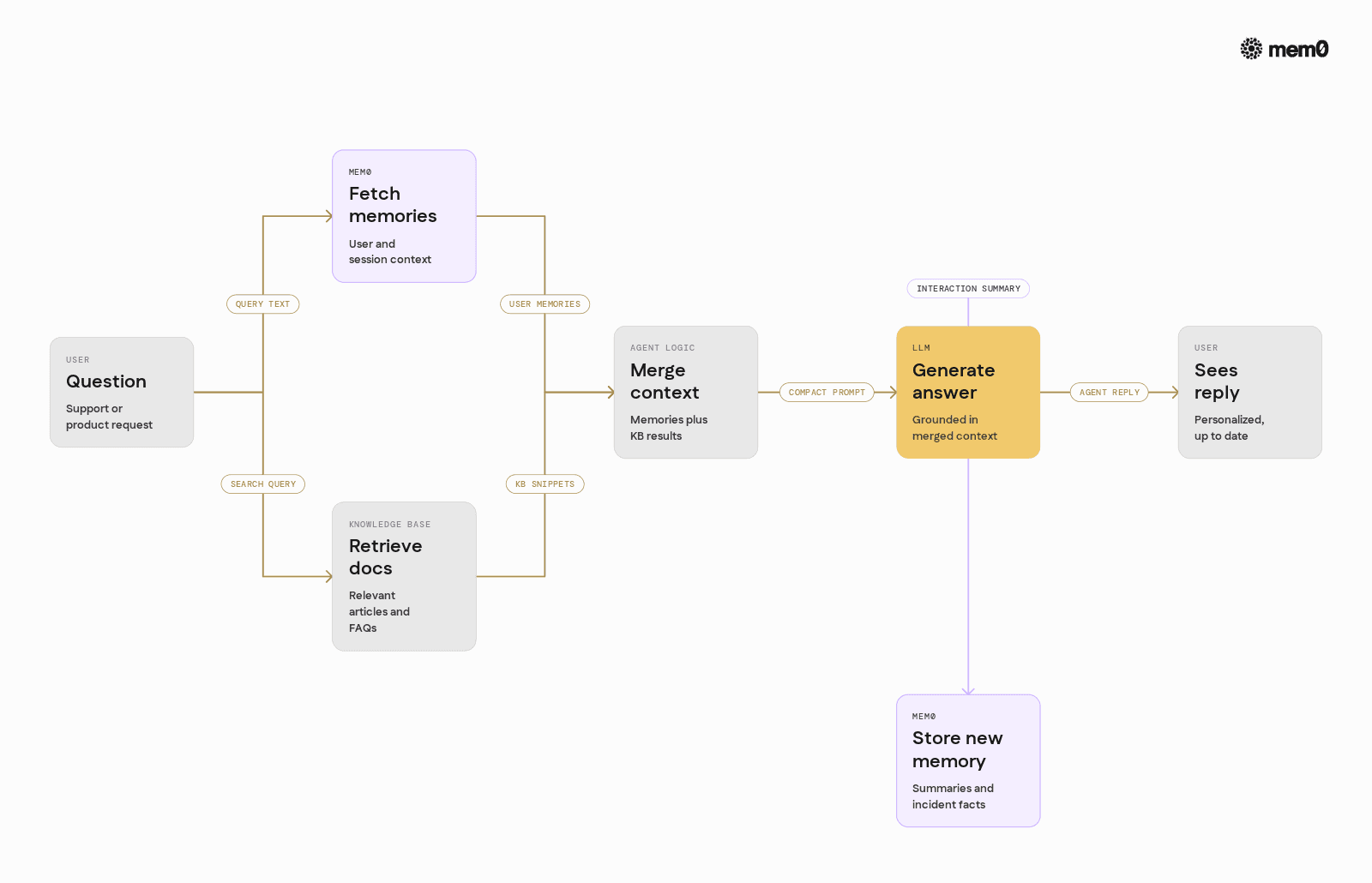
At a high level, a knowledge base agent integrates Mem0 like this:
At the beginning of an interaction, fetch relevant memories for the current user and question.
Combine those memories with RAG results from the static knowledge base.
Call the LLM with both sets of context.
After the response, extract and store any new, useful memories using Mem0.
Mem0 hides the complexity of vector storage, relational metadata, and ranking logic. It can be used with various LLM providers and agent frameworks, and it is designed to be self-hostable for production environments.
Building a knowledge base agent with Mem0 in Python
The following example shows a minimal pipeline that:
Uses Mem0 to store and retrieve user-specific memories
Combines those memories with knowledge base retrieval
Calls an LLM to generate an answer
This example assumes:
Mem0 is reachable via API or self-hosted endpoint
An LLM provider API key is configured (for example, OpenAI-compatible)
💡You'll require a Mem0 API key to follow along.
This code illustrates several patterns:
Scoped user memories via
user_idpassed into Mem0Query-aware retrieval by using the current question as the Mem0 search query
Post-interaction memory write so later questions can reference what happened
In a production system, these steps can be integrated into an agent framework, with memory read and write hooks managed automatically.
Comparing context window tactics and dedicated memory
Many teams start by trying to extend an agent’s “memory” only through the LLM context window. The table below compares this to using a dedicated memory layer such as Mem0.
Aspect | Context window only | Dedicated memory layer (Mem0) |
|---|---|---|
Persistence across sessions | Manual, often not implemented | Built-in identities and long-term storage |
Granularity of stored data | Entire transcripts or large chunks | Curated, structured memories |
Querying past interactions | None or linear scan | Semantic search with filters and ranking |
Cost control | Grows linearly with history length | Small, targeted memories per request |
Update and deletion | Hard to correct once in prior context | Explicit update and delete APIs |
Identity and scopes | Must be manually encoded in prompts | First-class user, session, and global scopes |
Storage backend flexibility | Tied to LLM provider | Pluggable backends, self-host options |
Operational complexity | Simple at small scale, brittle at large | Encapsulated in a dedicated component |
Context window hacks work for prototypes, but production agents that run thousands of conversations per day require a clear separation between transient conversation context and persistent memory. Mem0 provides that separation.
Patterns for integrating Mem0 into knowledge base agents
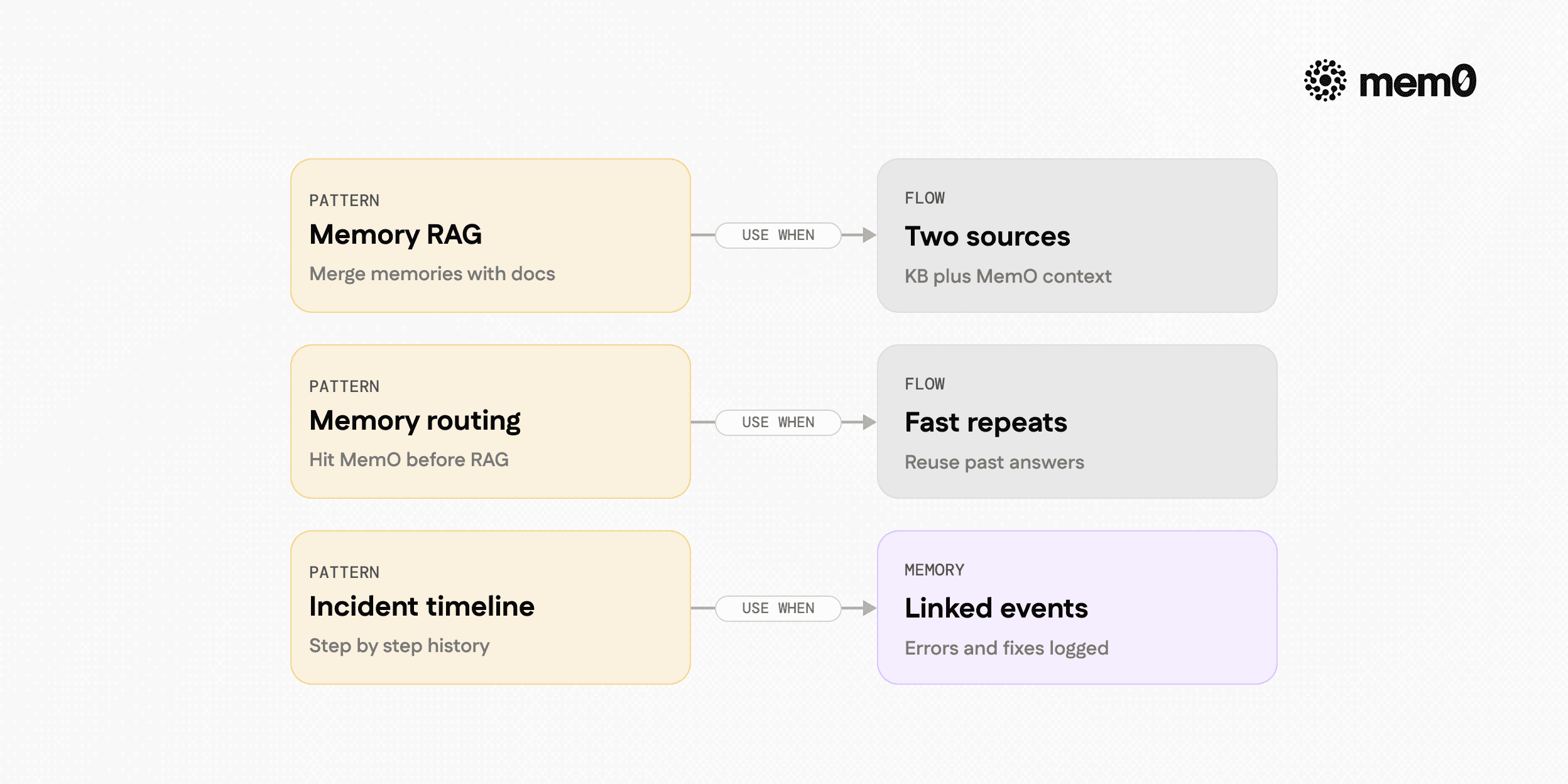
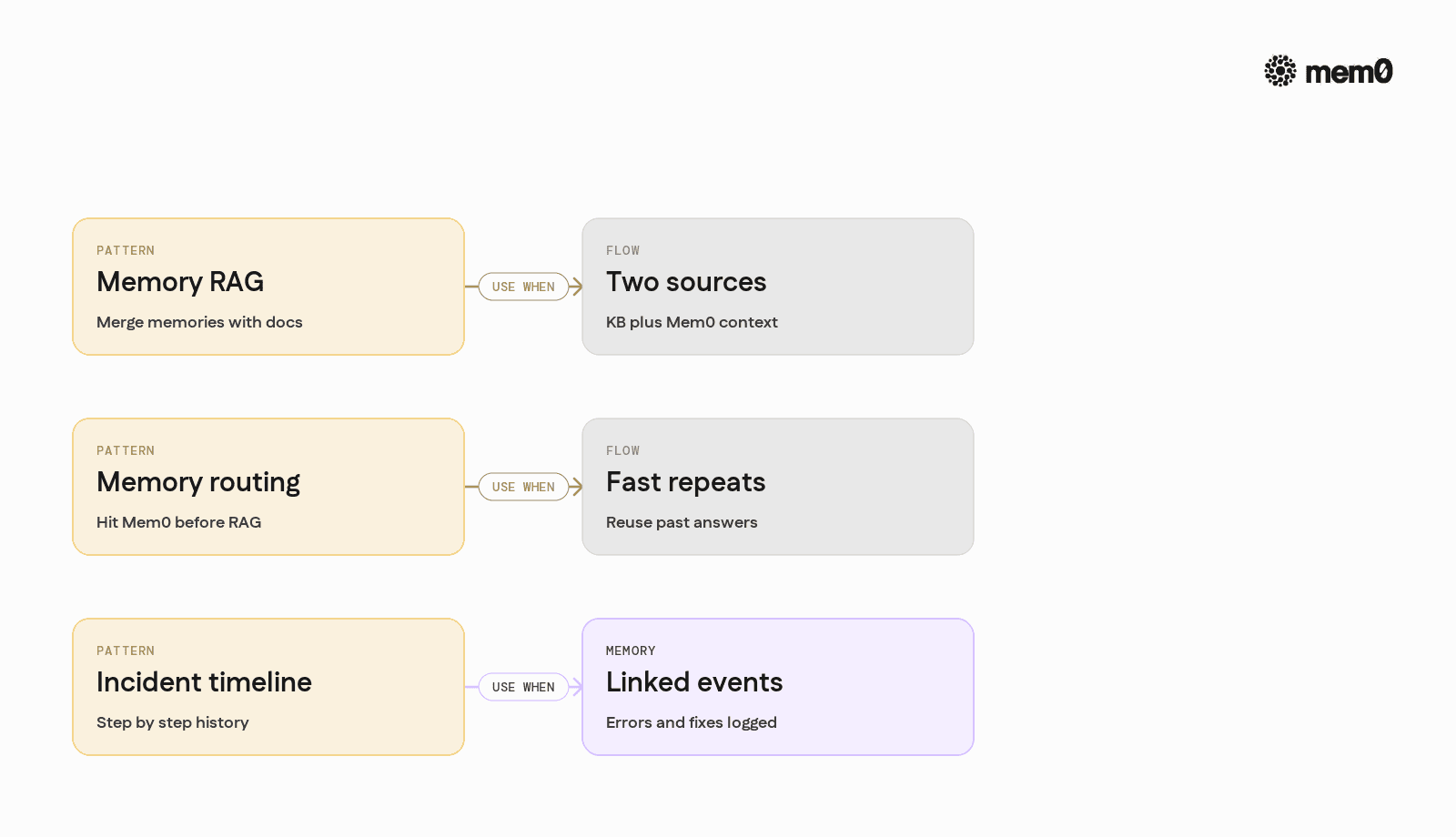
Several integration patterns are common for knowledge base agents.
1. Memory-augmented RAG
The process involves:
Use Mem0 to retrieve user-specific memories for the current question.
Use a RAG pipeline to retrieve knowledge base documents.
Combine both sets into a unified context for the LLM.
This pattern is ideal when most information lives in documents, but personalization and session continuity are important.
2. Memory-first routing
Memory-first routing involves:
Query Mem0 first to see if a similar question was answered before for this user or account.
If a high-confidence memory is found, answer directly or with minimal KB retrieval.
Otherwise, fall back to full KB RAG.
This reduces latency and cost for repeat questions and creates a self-improving support agent.
3. Incident timeline builder
This process involves:
Each interaction with the agent writes a structured incident memory, such as “User saw error 502 on payment webhook after updating to SDK v3.1.”
Mem0 stores these memories scoped to user and resource identifiers.
For future debugging questions, agents retrieve the entire incident timeline for precise troubleshooting.
This is effective for complex, multi-step debugging workflows.
Limitations of the pattern
Persistent memory does not solve every problem for knowledge base agents, and it introduces some tradeoffs.
Memory quality depends on extraction: If the agent or system stores noisy or overly verbose memories, retrieval becomes less effective and prompts become bloated. It is important to summarize and normalize memories, not log entire transcripts.
Privacy and compliance complexities: Storing user-specific memories means that access control, encryption, and deletion policies must be carefully designed. Sensitive data should be filtered or masked before it is persisted.
Staleness and inconsistency risks: When product behavior or user configuration changes, old memories may become incorrect. Systems must actively update or expire memories rather than treat them as immutable logs.
Evaluation difficulty: Measuring the impact of memory on agent performance is non-trivial. A/B tests and qualitative audits are needed to ensure that memory usage improves answers instead of introducing hallucinations.
Operational overhead: Although a dedicated memory layer reduces complexity at the application level, it still requires monitoring, scaling, and tuning like any other service in production.
These limits are not specific to Mem0. They arise whenever agents move from stateless question answering to long-lived, user-aware behavior.
Frequently Asked Questions
Q. What is the difference between a knowledge base and persistent memory?
A knowledge base stores shared, relatively static domain information such as docs and FAQs. Persistent memory stores dynamic, user-specific, and interaction-specific information that evolves over time and is scoped to identities.
Q. How should an engineer decide what to store as memory?
Store information that will materially improve future answers, such as preferences, resolved incidents, and stable configuration details. Avoid logging raw transcripts or ephemeral noise, and aim for concise summaries that capture durable facts or decisions.
Q. When should Mem0 be introduced into an existing RAG system?
Mem0 is most valuable once an agent needs personalization, multi-step workflows, or continuity across sessions. If users return with follow-up questions, or if support engineers need a timeline of past issues, then adding Mem0 to handle persistent memory usually brings clear benefits.
Q. How does Mem0 interact with vector databases and other storage systems?
Mem0 abstracts over storage backends and can use vector databases, relational stores, or other engines under the hood. The application interacts with Mem0 through a consistent API to add, search, update, and delete memories, while Mem0 manages embeddings, metadata, and retrieval logic.
Q. Why not just increase the LLM context window instead of adding Mem0?
Larger context windows increase cost and latency and still do not provide structured querying over past interactions. A memory layer like Mem0 stores compact, queryable representations and lets the agent select only the most relevant memories for each request.
Q. Can Mem0 handle multi-tenant and privacy-sensitive environments?
Yes, Mem0 is designed with identity scoping, so memories can be tied to user, session, project, or tenant identifiers. In privacy-sensitive environments, teams can self-host Mem0, control storage backends, and enforce their own data retention and access policies.
Further Reading
Adding Persistent Memory To Local AI Agents With Mem0 Openclaw And Ollama
AWS And Mem0 Partner To Bring Persistent Memory To Next Gen AI Agents With Strands
Context Engineering For AI Agents How To Route Queries To Memory
—
Mem0 is an intelligent, open-source memory layer designed for LLMs and AI agents to provide long-term, personalized, and context-aware interactions across sessions.
Get your free API Key here: app.mem0.ai or
Self-host mem0 from our Open Source GitHub repository.
—
More on Agent Memory

How to Read Memory Benchmarks
How to read AI memory benchmarks: what LoCoMo, LongMemEval, BEAM, and agentic tests measure, where scores go wrong, and how to find the correct benchmark for your use case.
20 min read

The Problem After Retrieval: Why Agents Misuse the Memories They're Given
Five papers show LLM agents often misuse the memories they retrieve. What the research says, how much to trust it, and what builders can do.
13 min read

What Is Memory Staleness in AI? Causes, Risks & Solutions
Understand memory staleness in AI agents, why outdated information leads to errors, and the best techniques to maintain accurate long-term memory.
9 min read





Aashi Dutt
She is a senior technical content writer at Mem0. She covers agent memory architecture and the engineering decisions behind building agents that actually remember. She experiments with new features and turns research into posts developers can put straight to use.
Start building with memory
Free tier, no card