

·
12 min read
On this page
AI agents on Azure increasingly orchestrate multi-step workflows, integrate with enterprise data, and interact with users across channels. Azure provides strong building blocks, such as Azure OpenAI, Functions, Kubernetes, and managed vector stores. What these platforms do not provide by default is a durable, queryable memory layer tailored to agents.
Stateless prompts are not enough for agents that need to remember user preferences, long-running tasks, or environment context over days and weeks. Without a structured memory layer, teams often add ad hoc vector stores that quickly become hard to manage. Mem0 provides a focused memory layer that fits naturally into Azure-based agent architectures.
This post walks through what agent platforms on Azure look like, how persistent memory fits into them, where common patterns fail, and how Mem0 can be integrated cleanly in Python-based agents.
What an AI agent platform on Azure looks like
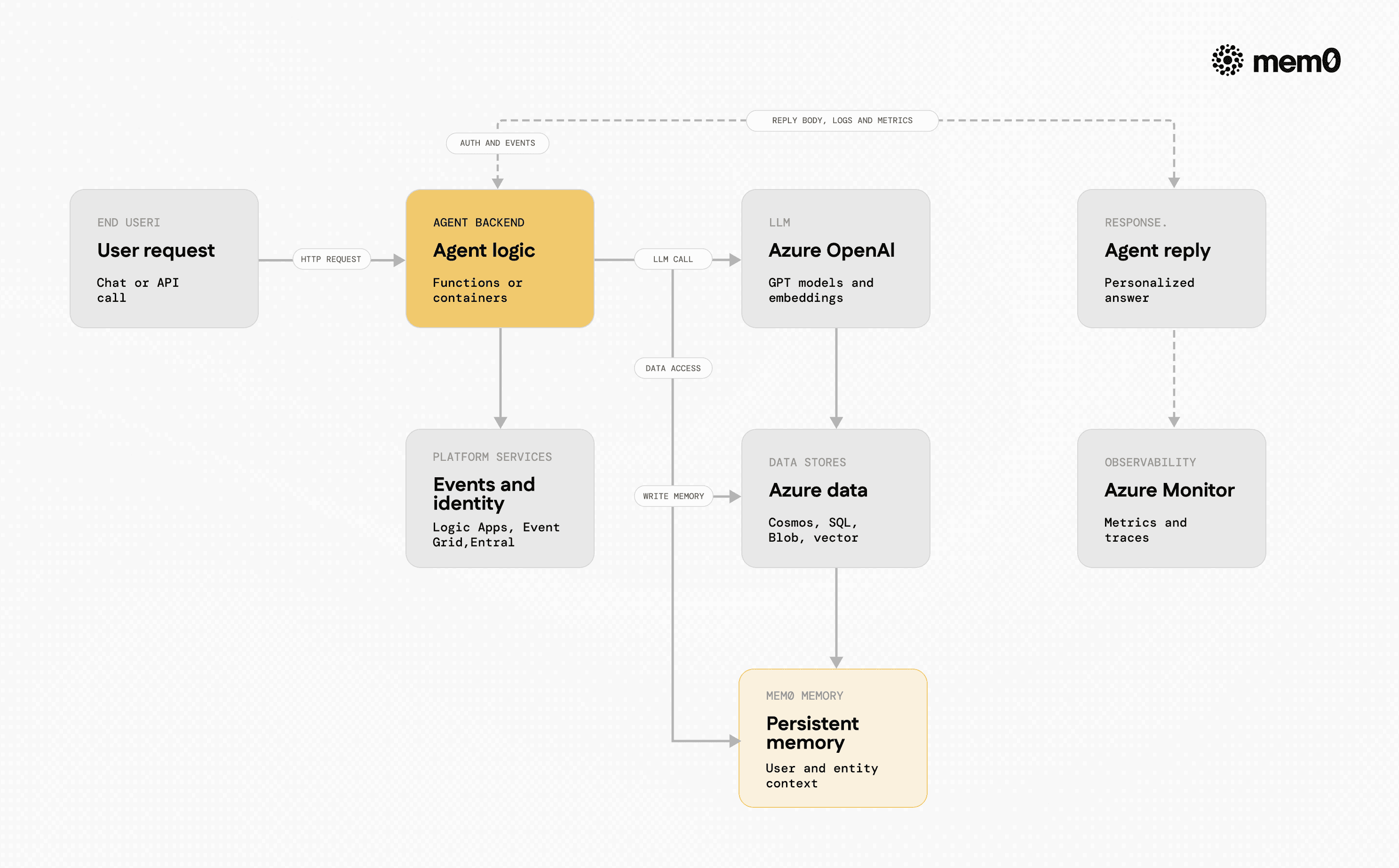
Fig: Mem0 slots into a typical Azure agent platform
Most production agent platforms on Azure share a common shape, even if the specific services differ. At a high level, they combine LLM access, orchestration, state management, and integration with enterprise systems.
Typical components include:
LLM and embeddings
Azure OpenAI models (GPT-4, GPT-4o, etc.)
Azure OpenAI embeddings for semantic search
Orchestration and compute
Azure Functions or Azure Container Apps for serverless APIs
AKS (Azure Kubernetes Service) or Azure Container Instances for long-running agents
Data and state
Azure Cosmos DB, Azure SQL, or Azure Table Storage for transactional data
Azure Blob Storage or Data Lake for large documents
Vector databases for semantic retrieval
Eventing and workflows
Azure Logic Apps, Event Grid, or Service Bus
Durable Functions for long-running orchestrations
Identity and security
Azure AD / Entra ID for authentication
Managed identities for service access
In this architecture, the agent logic usually runs in Functions or containers, calls Azure OpenAI for reasoning, and talks to various data sources. The memory story, however, is often an afterthought.
The core memory problem for Azure-based agents
State and memory are not the same. Azure services handle state reliably, but agent memory must be structured for reasoning, retrieval, and personalization.
The core problems show up as soon as an agent needs to:
Remember user preferences across channels and devices
Recall previous tasks or partial workflows days later
Build a profile of entities, past decisions, and outcomes
Share context across multiple cooperating agents
Common pitfalls include:
Session-bound context: Agents concatenate message history into prompts. This fails once conversations become long, exceeds token limits, and does not capture reusable knowledge.
Ad hoc vector stores per project: Each agent team spins up a custom embedding pipeline with its own schema, metadata, distance metrics, and indexing. Maintenance and evolution become painful.
Lack of entity-level memory: Most implementations store chunks of text, not structured memory tied to users, tickets, or devices. Reasoning about “what this user prefers” becomes fragile.
No unified memory API across agents: Multiple agents on Azure, for example a customer agent and an internal operations agent, cannot easily share a consistent memory view.
Mem0 addresses these problems directly by acting as a dedicated memory layer that sits next to Azure’s other services.
How Mem0 fits into Azure agent architectures
Mem0 is a memory service that can be deployed alongside agent backends running on Azure. It can be used as a cloud API or self-hosted within the Azure subscription. In both cases, the agent interacts with a small, stable Python API.
Typical Azure architecture with Mem0:
User sends a request to an agent endpoint hosted on Azure Functions or AKS.
Agent retrieves relevant memories from Mem0, based on user ID, agent role, and query.
Agent constructs a prompt that includes:
Retrieved memories
Current user message
Task-specific instructions or tools
Agent calls Azure OpenAI for reasoning and actions.
Agent writes new memories into Mem0, capturing what the user said or what the agent did that should be remembered.
Mem0 can integrate with:
Azure OpenAI as the primary model provider
Azure Key Vault for API key storage
Azure Container Apps or AKS as a self-hosted Mem0 backend
Azure Monitor and Application Insights for observability
The result is a clean separation: Azure handles compute, identity, and general storage, while Mem0 handles the semantics of memory.
Mem0’s memory model and retrieval workflow
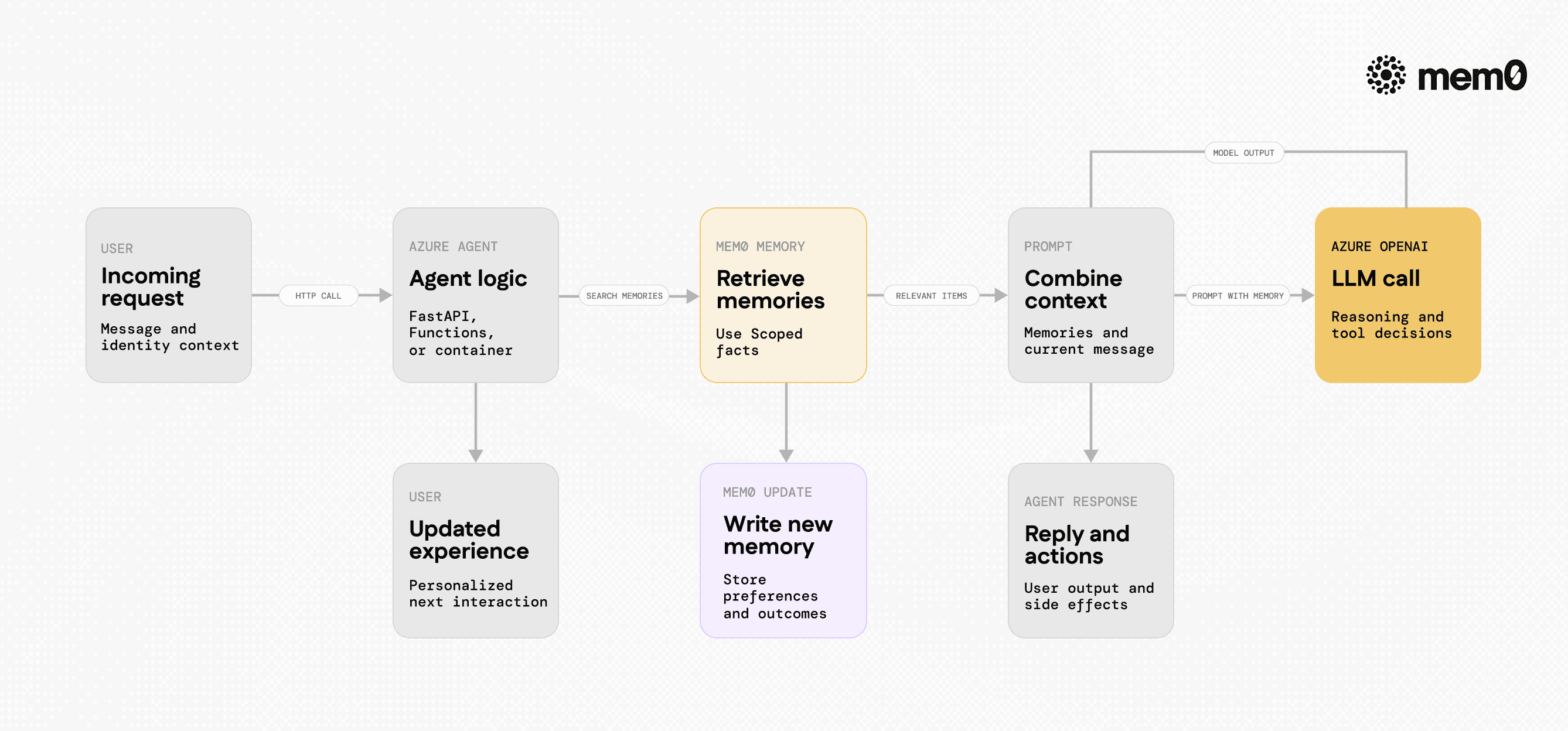
Fig: Azure hosted agent using Mem0
Mem0’s design focuses on agent-centric memory, instead of generic document search. The core concepts align well with how Azure-hosted agents operate:
User and entity scoped memory
Memories can be linked to users, sessions, or custom entities like
ticket_idordevice_id. This fits customer support agents, copilots, and multi-agent systems.Typed memories
Memories can be either unstructured text or structured content with metadata. This supports use cases like “user prefers metric system” or “project deadline is 2024-12-01”.
Retrieval focused on relevance and recency
Queries can be tuned to prefer recent interactions or consistent facts. This is critical for agents that must adapt over time without re-consuming full histories.
Automatic embedding and indexing
Mem0 manages embeddings, similarity search, and updates internally. Agents see a simple API, not a complex vector database.
In an Azure setup, the typical retrieval workflow is:
Identify the user or context (for example, from Azure AD token or request headers).
Call
mem0.searchormem0.get_memorieswith that user ID and an optional query.Add the retrieved items as a “Memory” section in the prompt sent to Azure OpenAI.
After generating a response or applying a tool, call
mem0.addto store new relevant information.
The full loop runs on every request and allows agents to keep context without carrying full chat histories.
Example Azure agent using Mem0 with Python
The following example shows a minimal Python HTTP agent suitable for Azure Functions or a container app. It integrates with both Azure OpenAI and Mem0.
Setup
Install dependencies:
Assume the following environment variables are set:
AZURE_OPENAI_ENDPOINTAZURE_OPENAI_API_KEYAZURE_OPENAI_DEPLOYMENT(for examplegpt-4o)MEM0_API_KEY(if using hosted Mem0)
Agent code
This service can run as a container in Azure Container Apps or AKS, or adapted to Azure Functions with a small wrapper. The core pattern remains:
Retrieve memories
Build prompt with memory context
Call Azure OpenAI
Write new memories
In more advanced setups, the agent would extract structured facts to store, such as “user prefers daily reports” rather than full message text.
Comparison with common Azure memory approaches
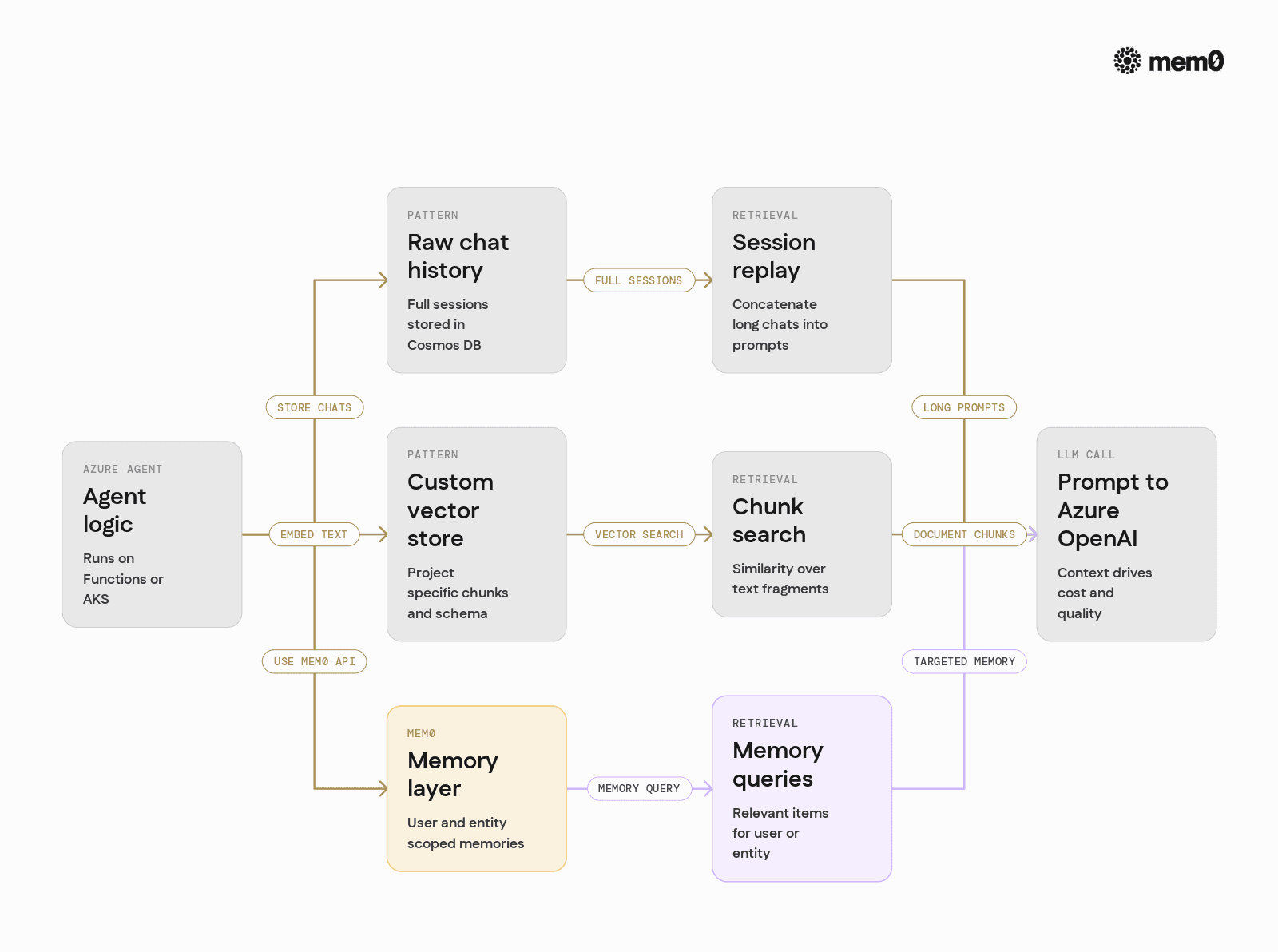
Fig: Comparing raw chat history, custom vector stores, and Mem0 as memory options on Azure
It is useful to compare Mem0 with other patterns that teams often implement on Azure. The table below is not about specific products, but about typical design choices.
Aspect | Raw chat history in Cosmos DB | Custom vector store on Azure | Mem0 as memory layer |
|---|---|---|---|
Retrieval granularity | Full sessions | Text chunks | User and entity memories |
Query interface | SQL or point lookups | Vector similarity API | Memory-centric Python API |
Memory semantics | Implicit | Implicit | Explicit user, entity, type |
Prompt integration | String concatenation | Manual retrieval and ranking | Direct query for relevant items |
Token usage | High for long sessions | Tunable via chunk size | Tunable via memory limit |
Cross-agent sharing | Manual joins | Custom schema per agent | Shared memory model |
Evolution over time | Manual migrations | Schema changes per project | Central memory abstraction |
Mem0 does not replace Azure data stores. It focuses on the specific problem of agent memory, while Cosmos DB, Azure SQL, and others continue to store transactional and analytical data.
Advanced patterns for Azure agents with Mem0
Once a basic integration works, Mem0 can support more advanced patterns that are common in enterprise Azure environments.
Multi-agent memory sharing
In architectures with multiple cooperating agents, such as a “user-facing assistant” and a “backoffice automation agent”, Mem0 can serve as the shared memory layer. Each agent uses a different agent_id or metadata while still writing to the same user or entity.
Example pattern:
Agent A writes “user prefers weekly invoices” with metadata
{"source": "frontend"}.Agent B queries for the same user with
filters={"source": "frontend"}or without filters to get all knowledge.Both agents align on up-to-date preferences without passing long prompts between services.
Task and workflow memory
Durable Functions and logic-based workflows on Azure benefit from a memory system that persists beyond the lifecycle of a single orchestration. Mem0 can store:
Long-running project state like milestones reached
Summaries of previous runs or failures
Decisions taken by the agent that should influence future runs
By using entity_id fields such as project_id or workflow_id, Mem0 can maintain fine-grained memories that cross function app deployments and restarts.
Hybrid with Retrieval Augmented Generation
Azure architectures often already use RAG to contextualize agents with enterprise documents. Mem0 can sit alongside a RAG pipeline:
RAG fetches documents from Azure Blob Storage and a vector index for “hard facts”.
Mem0 provides user and interaction memories for “soft context”.
The agent merges document snippets with memories into a single prompt for Azure OpenAI.
This separation keeps RAG focused on static knowledge, while Mem0 focuses on evolving agent memory.
Limitations of persistent memory for agents
Persistent memory is powerful, but it is not a universal solution for all agent state problems. Understanding limitations prevents misuse.
Not a replacement for transactional storage
Mem0 is designed for memory, not as a source of truth for financial records, inventory, or strict business data. Those belong in Azure SQL, Cosmos DB, or similar systems.
Requires careful memory selection
Storing every user message and response can lead to noisy memory that harms retrieval quality. Agents need summarization or extraction steps to store only durable facts and useful context.
Privacy and compliance considerations
Persistent memory can capture personal data unintentionally. Teams must design redaction, retention, and subject access patterns that align with regulations, independent of the memory layer.
Prompt and model limitations
Even with good memory, Azure OpenAI models still face token limits and reasoning limitations. Good prompt design and tool use are needed alongside memory to achieve consistent results.
Drift and outdated information
Over time, user preferences or environment facts change. Agents must actively revise, mark, or supersede older memories rather than accumulating conflicting statements.
These limitations apply to any persistent memory pattern, whether using Mem0 or homegrown systems. Mem0 provides tools, but good memory hygiene remains a design responsibility.
Frequently Asked Questions
What problem does Mem0 solve in an Azure agent platform?
Mem0 solves the specific problem of long-term, queryable memory for AI agents that run on Azure. It gives agents a structured way to remember user-specific and task-specific context across sessions, without each team building a custom memory store.
How does Mem0 interact with Azure OpenAI models?
Mem0 does not replace Azure OpenAI. Agents call Mem0 to retrieve relevant memories, then include those memories in prompts sent to Azure OpenAI. After the model responds, the agent can write new memories back to Mem0 for future use.
When should an Azure team use Mem0 instead of only RAG or chat history?
Mem0 is useful when agents must remember evolving information about users, entities, or workflows over time. RAG suits static documents, and raw chat history suits narrow sessions, but Mem0 is better for long-lived personalization and cross-session continuity.
How can Mem0 be deployed in an Azure environment?
Teams can either use the hosted Mem0 API with keys stored in Azure Key Vault or self-host Mem0 on Azure using Container Apps or AKS. In both cases, application code uses the same Python API, which simplifies migration and scaling.
Why not store memory directly in Cosmos DB or Azure SQL?
Cosmos DB and Azure SQL are excellent data stores, but they do not offer a memory-first abstraction. With a custom solution, engineers must design embedding pipelines, similarity search, memory schemas, and update logic, while Mem0 provides these pieces behind a focused memory API.
How does Mem0 handle multi-agent and multi-tenant scenarios on Azure?
Mem0 supports separating memory by user, entity, and agent metadata, which fits multi-agent and multi-tenant architectures. Teams can enforce isolation by tenant ID and agent role while still enabling controlled sharing of memories where needed.
Further Reading
—
Mem0 is an intelligent, open-source memory layer designed for LLMs and AI agents to provide long-term, personalized, and context-aware interactions across sessions.
Get your free API Key here: app.mem0.ai,
or self-host mem0 from our open-source GitHub repository.
—
More on Integrations

OpenClaw vs. Hermes Agent Memory in 2026: Which Should You Choose?
OpenClaw and Hermes take opposite bets on agent memory - live-injected vs. frozen snapshots, file-based vs. structured tools. Here's how each works, where each breaks, and how Mem0 fits both.
12 min read
How Memory works in Hermes Agent (and how to improve it)
How Hermes Agent stores 3,575 characters of memory in two frozen markdown files, and where the design breaks.
11 min read
Hermes AI Agent: How to Add Memory to Your Workflow
Set up Mem0 as a memory provider for Hermes Agent in one command. Covers Platform and OSS modes, the 3 tools it adds, and how prefetch-caching keeps it at zero added latency.
8 min read


Aashi Dutt
She is a senior technical content writer at Mem0. She covers agent memory architecture and the engineering decisions behind building agents that actually remember. She experiments with new features and turns research into posts developers can put straight to use.
Start building with memory
Free tier, no card