

·
9 min read
On this page
Codex is OpenAI's coding-agent product line. In 2026 it has three surfaces: a CLI, an IDE extension, and a cloud workspace inside ChatGPT. All three share an engine and a ~/.codex/ config directory.
The CLI is the most thoroughly documented surface and the focus of this post. Most of what follows applies transitively to the IDE extension, since the two share the same config and memory layout.
The cloud surface is mentioned in OpenAI's announcements but underspecified in public docs. OpenAI has stated memory persists across cloud sessions, but the storage shape, retention, and config knobs have not been published at the level the CLI's have. The config-reference page is the authoritative source for anything specific.
The two memory layers Codex ships
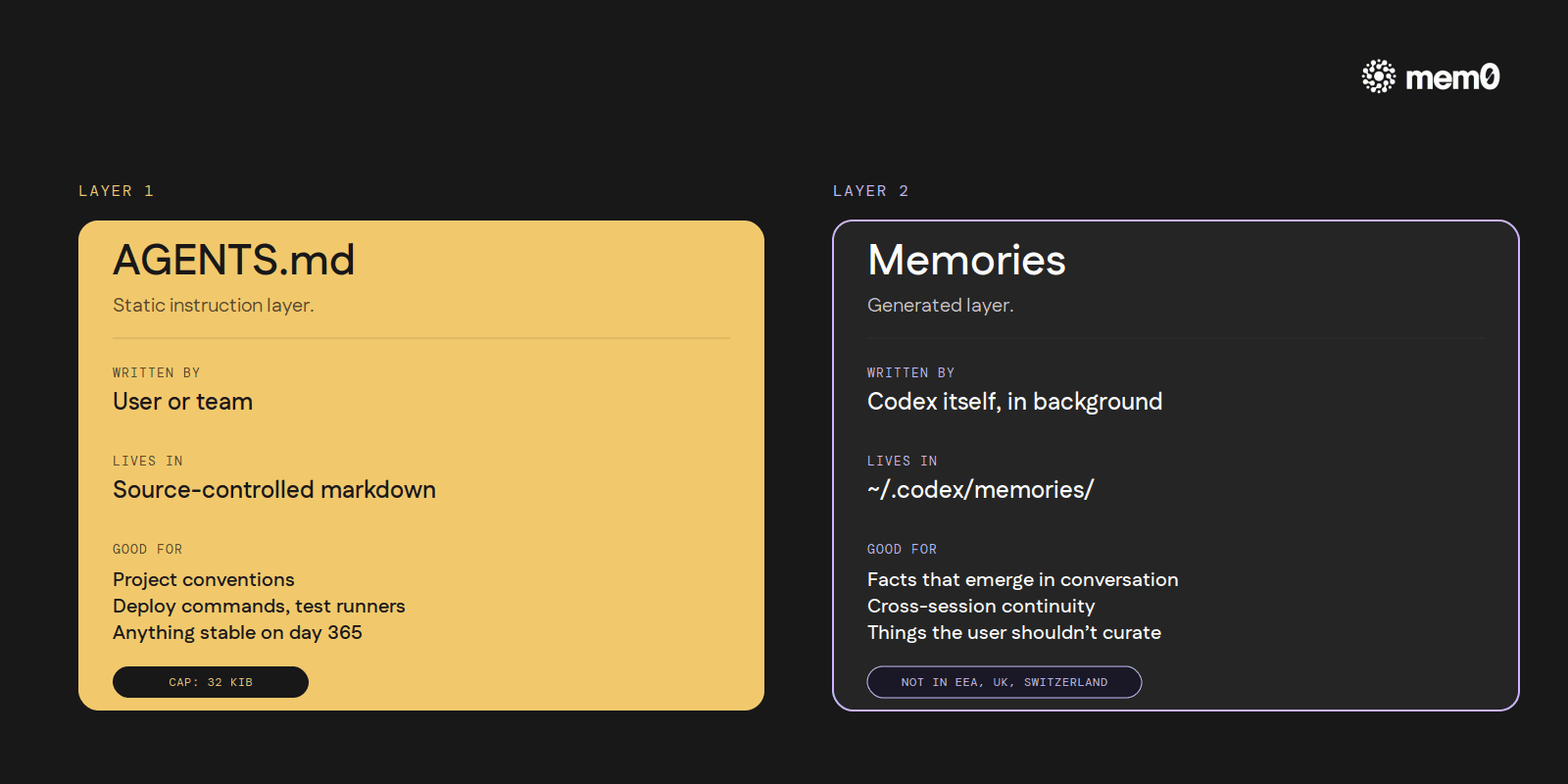
Codex's memory model splits cleanly into two pieces:
AGENTS.md is the static instruction layer. The user (or the team, or both) writes markdown files, and Codex reads them at the start of every session.
Memories is the generated layer. Codex itself summarizes prior sessions in the background and writes the summaries to
~/.codex/memories/. The agent then reads them on subsequent sessions.
Both are local to the user's machine. Both are documented at developers.openai.com/codex. They do different jobs and have different limits, so they're worth covering one at a time.
Layer 1: AGENTS.md
AGENTS.md is the cross-tool instruction-file convention that Codex, Cursor, Aider, Jules, and several other coding agents have converged on (the open-format spec at agents.md now sits under the Linux Foundation's Agentic AI Foundation). Codex reads it through a layered discovery process documented at developers.openai.com/codex/guides/agents-md:
Global:
~/.codex/AGENTS.mdapplies to every project. AnAGENTS.override.mdat the same location takes precedence.Project walk: starting from the git repository root and walking down to the current working directory, every
AGENTS.mdencountered along the way is concatenated in path order. A monorepo that has anAGENTS.mdat the root, another a few directories down, and a third in the working directory itself ends up with all three files joined for that session. AnAGENTS.override.mdat any level in that walk takes precedence over theAGENTS.mdnext to it.
If the repository uses a different filename (CLAUDE.md, .cursorrules, etc.), Codex can be pointed at it through a fallback-filenames setting in the config. This makes Codex polite about cross-tool conventions: an AGENTS.md-shaped file written for Claude Code or Cursor still reaches Codex without renaming.
The size cap defaults to 32 KiB. Files past that are truncated. 32 KiB is roughly 8,000 tokens of instruction. Plenty for most projects, but a sprawling repo with five layers of nested AGENTS.md can hit the ceiling, and the truncation is silent.
A typical project-level AGENTS.md is short and concrete:
Five lines, all stable, all things the agent needs from turn one. This is what AGENTS.md is good for: project conventions, deploy commands, test runner choices, code-style rules, named-entity glossaries, anything stable the agent should know on day one and continue to know on day 365.
What AGENTS.md isn't good for: facts that emerge during a conversation. The user has to remember to write those down. The agent cannot edit AGENTS.md autonomously; it's a regular source-controlled file the user maintains. That gap is what Layer 2 exists to fill.
Layer 2: Memories
The other half of Codex's memory model is a feature called Memories, documented at developers.openai.com/codex/memories and configured under [memories] in ~/.codex/config.toml (config reference).
Memories is the layer that closes the gap AGENTS.md leaves. Codex itself summarizes prior sessions in the background and writes the summaries to ~/.codex/memories/. The next session reads them. The user doesn't have to copy facts into a markdown file; the agent does.
The mechanics:
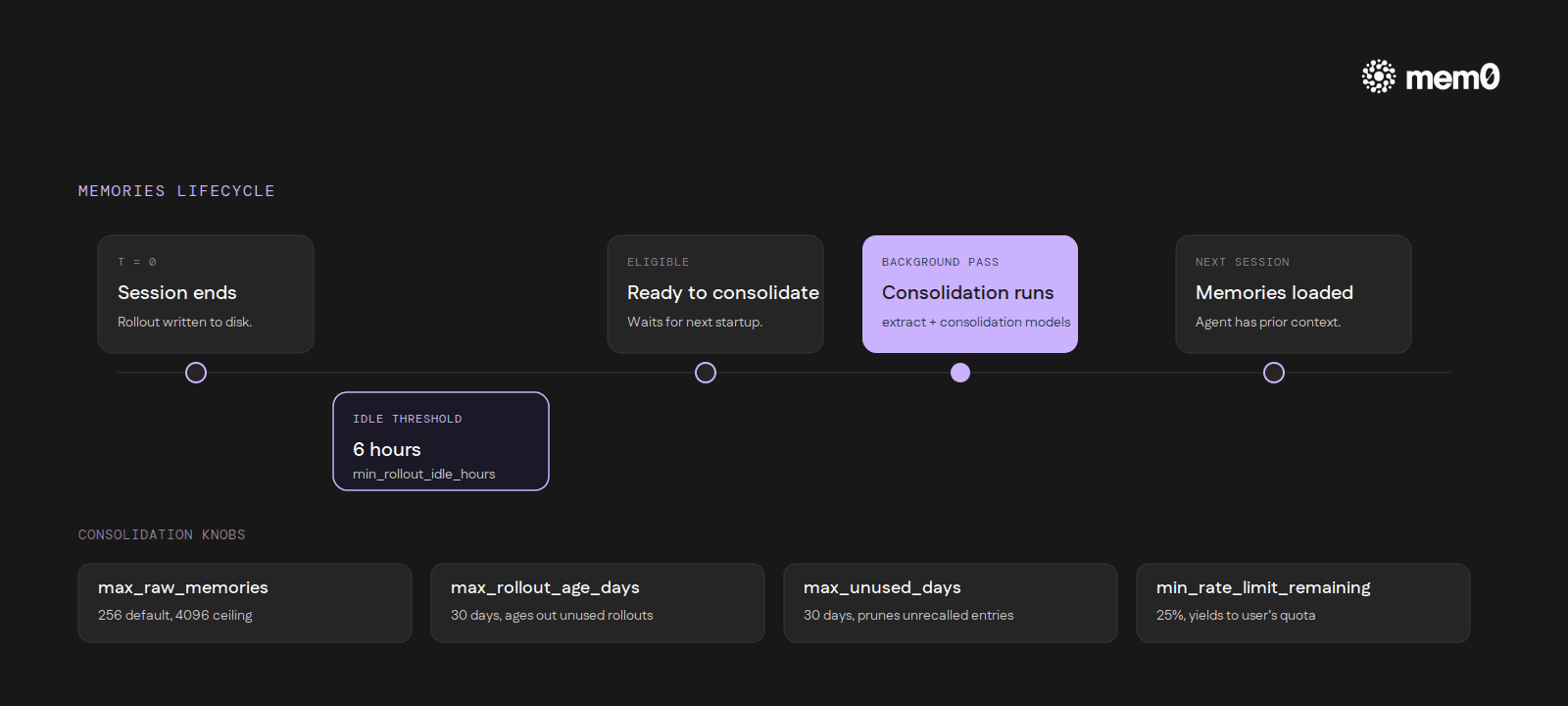
Async generation. Summarization runs in the background, not inline with a turn. A session has to be idle for several hours (six by default) before it becomes eligible for consolidation. Active sessions never trigger it.
Two models. One model decides what's worth remembering from a session. A second model merges those candidates with the existing memory store. Both are configurable.
Caps and sweeps. The consolidation pass considers a bounded set of recent rollouts (256 by default, with a hard ceiling). Rollouts that go unused for thirty days are aged out, and individual memories that go unrecalled for thirty days are pruned.
Rate-limit-aware. A configurable threshold prevents the consolidation pass from running when the user's own API quota is low, so the background work never competes with foreground requests.
Secret redaction. Built-in scrubbing for credentials and other obvious secrets before any memory hits disk.
Memories has two independent on/off switches: one for whether new memories get written, and one for whether existing memories are read into context. The pair allows useful asymmetric setups (read-only mode while debugging the layer, or write-only mode during a one-time onboarding session).
The full lifecycle in one pass: a developer finishes a Codex session, closes the terminal, and walks away. Six hours later, the rollout becomes eligible for consolidation. The next time Codex starts up, the consolidation pass runs in the background, walks the recent rollout set, and writes the merged result to ~/.codex/memories/. The next session reads it back, and the agent has the prior context available without the user having pasted anything in.
Specific config-key names, defaults, and ceilings live in OpenAI's config-reference page rather than in this post. The page is the authoritative source if a setting needs tuning.
Inside the pipeline
The memory subsystem splits into two phases. Phase 1 handles per-rollout work: it claims a startup job, samples the conversation against a strict-schema extraction prompt, and redacts secrets before anything hits disk. Phase 2 handles the merge: it acquires a global lock, prepares a workspace, runs a consolidation sub-agent, and writes the diff.
The storage format is, perhaps surprisingly, just markdown. Codex writes a small, fixed set of files to ~/.codex/memories/:
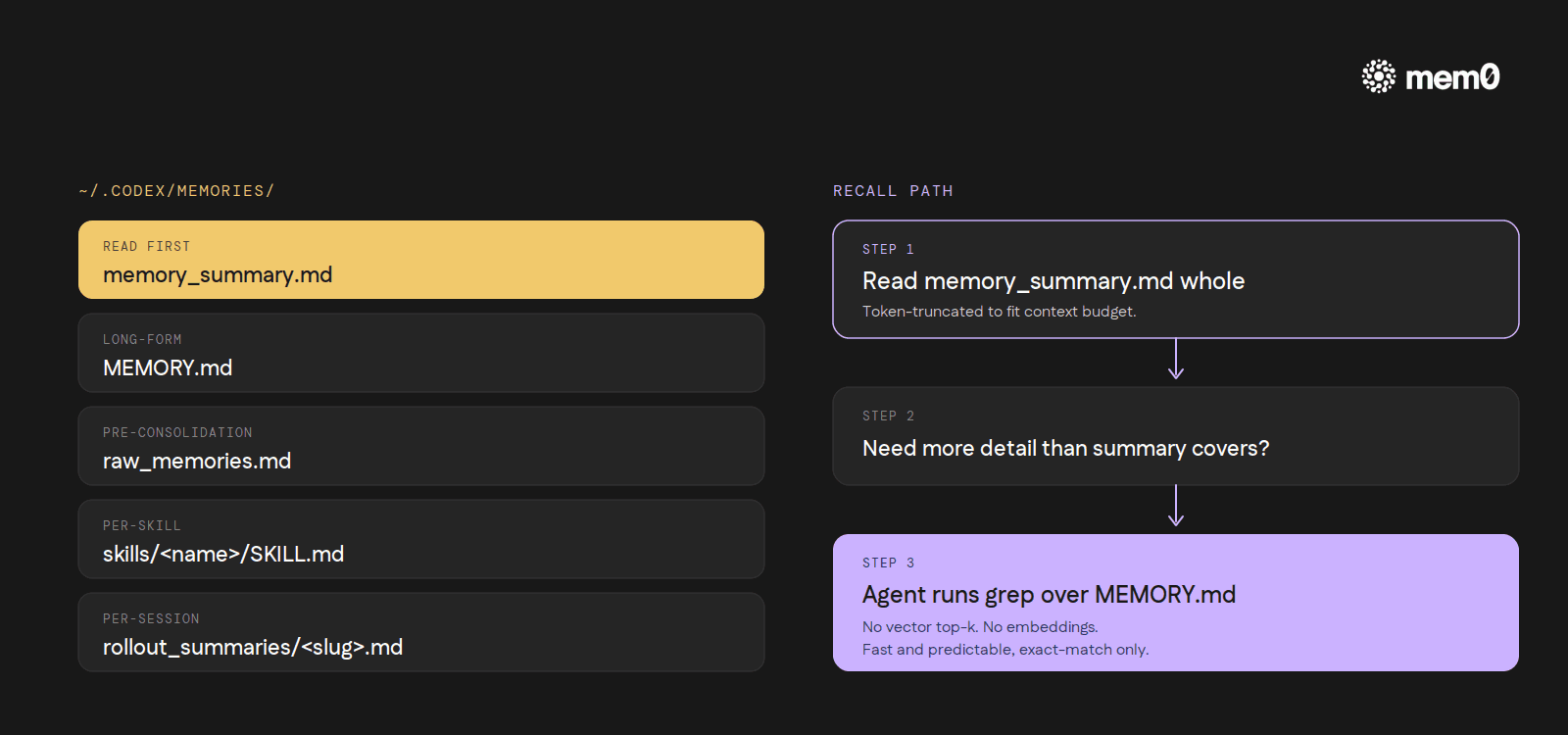
memory_summary.md: the consolidated view the next session reads firstMEMORY.md: the long-form merged memory fileraw_memories.md: pre-consolidation extraction outputskills/<name>/SKILL.md: skill-specific memoriesrollout_summaries/<slug>.md: per-session summaries that feed the consolidation pass
Recall is the part most readers expect to be "vector top-k retrieval over an embedding index." It isn't. At session start, Codex reads memory_summary.md whole, token-truncates it to fit the context budget, and then instructs the agent to grep over MEMORY.md when it needs more detail than the summary covers.
There's one geographic constraint worth flagging early: at launch, Memories is not available in the EEA, UK, or Switzerland. Users in those regions get the AGENTS.md layer only. The docs note this directly. The post you're reading is titled "How memory works in Codex" but for a reader in Frankfurt, Layer 2 of that title doesn't exist yet.
Where it stops
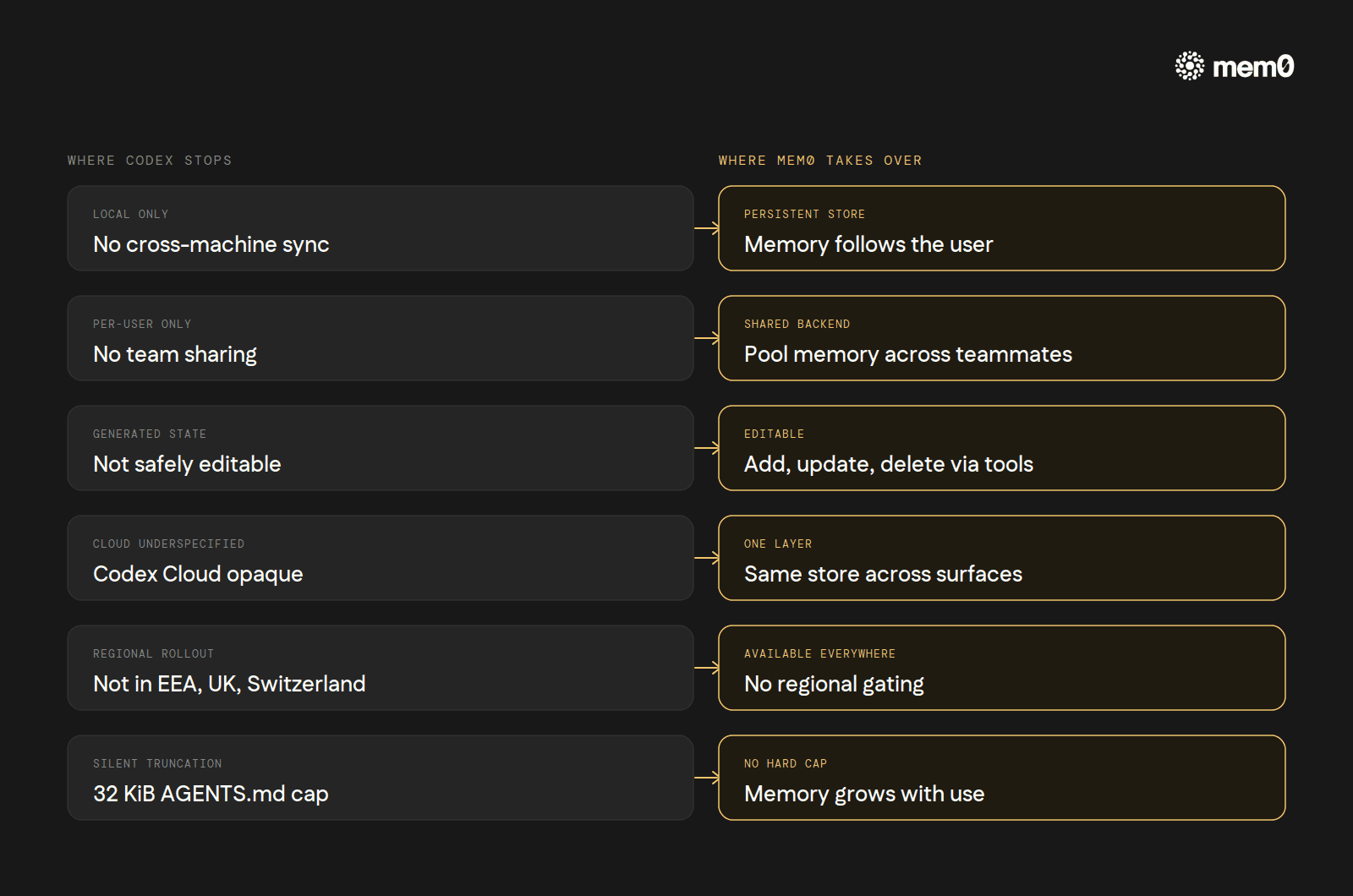
The two-layer model is well-shaped for one developer working on one machine. Inside that shape, it works. Outside it, the gaps are visible.
No cross-machine sync.
~/.codex/memories/is local generated state. A second laptop, or a server, or a fresh container has no memory until Codex regenerates it from a fresh session. There is no Codex Cloud Sync for the CLI's memories.No team sharing. Memories are per-user. A team running Codex CLI through a shared environment cannot pool generated memories across teammates. AGENTS.md fills that role for static facts but not for generated ones. A new engineer's first week of Codex sessions has zero memory beyond what's in the project's checked-in
AGENTS.md, no matter how much accumulated context their teammates' Codex installs already carry.Generated state only, not editable. A user can read what's in
~/.codex/memories/, but the docs frame it as Codex-managed state. Hand-editing memories is not the supported path; updating an AGENTS.md file is.Cloud Codex underspecified. OpenAI says memory persists across cloud sessions. The shape, the retention, and the config surface have not been published to the same level as the CLI. A CLI user looking to reason about cloud memory doesn't have enough public material to do it carefully.
Geographic limits. EEA, UK, and Switzerland users get AGENTS.md only at launch. Whether this lifts in future releases is not announced.
32 KiB ceiling on AGENTS.md. Silent truncation past the cap. A monorepo with deep nested instruction files can hit it before anyone notices.
These gaps are the cases external memory layers exist for.
How Mem0 fits
Mem0 is a memory layer that sits between the agent and a persistent store. It's available as a hosted service at mem0.ai, as an open-source library at github.com/mem0ai/mem0, and for Codex specifically as an MCP integration documented at docs.mem0.ai/integrations/codex.
Codex CLI supports MCP servers natively. They're configured in ~/.codex/config.toml under [mcp_servers.<name>] (config-reference). The minimal Mem0 setup is one block:
That single block exposes nine MCP tools to Codex: add_memory, search_memories, get_memories, get_memory, update_memory, delete_memory, delete_all_memories, delete_entities, list_entities. Codex's agent picks them up the same way it picks up any other MCP tool surface.
What changes underneath:
Persistent, cross-machine memory. The local
~/.codex/memories/ceiling is gone. The same Mem0 store follows the user across laptops, servers, and CI environments. No regeneration from scratch on a new machine.Cross-tool memory. A user running Codex CLI for terminal work and Cursor for editor work can point both at the same Mem0 backend. A fact captured during a Codex CLI session ("the staging deploy script swallows errors silently, prefer the production-style output for the same diagnostic") surfaces inside the next Cursor Agent run on the same project. The user doesn't have to copy anything between the two tools.
Semantic recall. Mem0 retrieves by meaning, by way of an embedding-backed search. Codex's native recall, by contrast, reads
memory_summary.mdwhole and falls back togrepoverMEMORY.md: fast and predictable, but unable to find a stored fact whose phrasing differs from the query. With Mem0, asking "what's our deploy command?" finds "production deploys go throughmake ship-prod" even though the words don't overlap.Per-user isolation. Each user's
userIdscopes their memory. Three teammates with the same Mem0 backend keep separate stores.No 32 KiB ceiling. Memory grows as memory.
Available where Memories isn't. EEA, UK, and Switzerland users get a memory layer that doesn't depend on Codex's regional rollout.
Mem0 is an intelligent, open-source memory layer designed for LLMs and AI agents to provide long-term, personalized, and context-aware interactions across sessions.
Get your free API Key here: app.mem0.ai
or self-host mem0 from our open source github repository.
More on Coding Agents

Kimi K3 tutorial: build a vision coding agent with persistent memory
Kimi K3 has a 1M-token context window but no memory across sessions. We tested it with Mem0 and cut design regressions from 60% to 0%.
10 min read

Coding Agents Explained: What They Are and How They Differ from AI Assistants
Learn what coding agents are, how they work, and how they differ from AI assistants, chatbots, and autocomplete tools.
29 min read

OpenAI Codex vs Claude Code: Which AI Coding Agent Wins in 2026?
Codex leans toward parallel execution, isolated worktrees, cloud delegation, and reviewable task runs. Claude Code is terminal oriented and more engaging in long interactive sessions, and agent-to-agent coordination. OpenAI’s GPT-6 Astra and Anthropic’s Fable 5.1 have enhanced capabilities, but the harness determines how that intelligence is used. For serious repository work, the better choice is the one that performs more reliably on your codebase, constraints, and working style.
23 min read





Start building with memory
Free tier, no card