A customer-aware support agent uses customer and account history to choose the next support action, not just personalize a reply.
The production problem is not "can the agent remember a user?" It is "Can remembered context change the next support action?"
Mem0 gives the agent durable customer and account memory. Gemini 3.5 Flash uses that memory to classify the issue, choose tools, generate handoff summaries, and write the support outcome back to memory.
The demo in this article uses Mem0 memory add/search calls and the Gemini tool calling. Ticketing and CSM notifications are local operation logs, so the demo does not pretend to send external CRM or email actions.
Most AI support agents fail in the most expensive way possible, politely. They answer the ticket, but they make the customer repeat what your company already knows. If you are building an AI agent for customer support, memory should change the workflow, not just the greeting.
A customer-aware support agent is an AI agent that uses durable customer and account memory to decide the next workflow: answer, ask for missing information, escalate, notify a human, or update the support record.
In this walkthrough, we will build a production-mimicking support agent with:
Mem0 for durable customer and account memory.
Gemini 3.5 Flash for reasoning, structured output, and tool calling.
A support policy document for escalation rules.
Local operation logs for ticketing and CSM notifications.
A memory write-back step so future support turns improve.
By the end, your agent will do this:
The point of the architecture is simple:
Mem0 stores what the agent needs to remember. Gemini decides what to do with it.
What Makes a Support Agent Customer-Aware?
A customer-aware support agent does three things differently from a generic chatbot:
It retrieves durable customer and account memory before deciding what to do.
It applies policy to that memory, such as SLA rules or escalation thresholds.
It turns the decision into an action through tools, then writes the outcome back to memory.
The important shift is from response generation to support orchestration.
Why Customer Memory Is Not Enough
A basic memory demo usually proves that “The agent remembers something about the user.”
For production support, that is too narrow. Support decisions usually depend on multiple scopes of context:
Memory scope
What it stores
Why it matters
Customer memory
Tone preference, previous issues, prior promises, sentiment
Helps the agent avoid asking the customer to repeat themselves
Changes routing, priority, and escalation behavior
Ticket memory
Current active issue, missing fields, and status
Keeps the current workflow coherent
Team/policy context
Refund rules, SLA rules, escalation criteria
Keeps the agent aligned with support operations
In this demo, we intentionally separate customer memory from account memory. That matters because a user is not always the account. A developer on an Enterprise workspace, an admin on a Pro account, and a finance contact handling invoices may all need different contexts from the same company-level memory.
This is where naive support agents usually break.
1. Store Only User-Level Memory
If you store everything under a single user identity, you lose the distinction between the individual customer, the account they belong to, the current ticket, and the support team’s operating policy. That makes retrieval noisy and increases the risk of mixing unrelated contexts. In production, memory should be scoped clearly across customer, account, ticket, and team-level context.
2. Confuse Policy With Memory
Customer memory changes after every support interaction. Policy changes when the business updates its support rules. Do not bury SLA rules, refund policy, or escalation logic inside a user’s memory stream. Put policies in a knowledge base, config file, CMS, or document store designed for official support rules. Retrieve them separately and pass them to the model as policy context.
3. Personalize Tone But Not Workflow
Many memory demos stop at tone personalization, such as remembering that a customer prefers concise replies. That is useful, but it is not enough. In support, the bigger question is whether the agent should ask for more information, answer directly, escalate, create a ticket, notify a human, or update memory.
4. Actions Happened Without Calling Tools
If the agent tells a customer that something was escalated, your application should have a corresponding system action behind it: a ticket created, a handoff generated, a CSM notified, or a memory updated. Gemini tool calling gives you the right control boundary: the model chooses the function, your server executes it, then the model gets the result.
Demo: Building a Customer-Aware Agent with Mem0 and Gemini
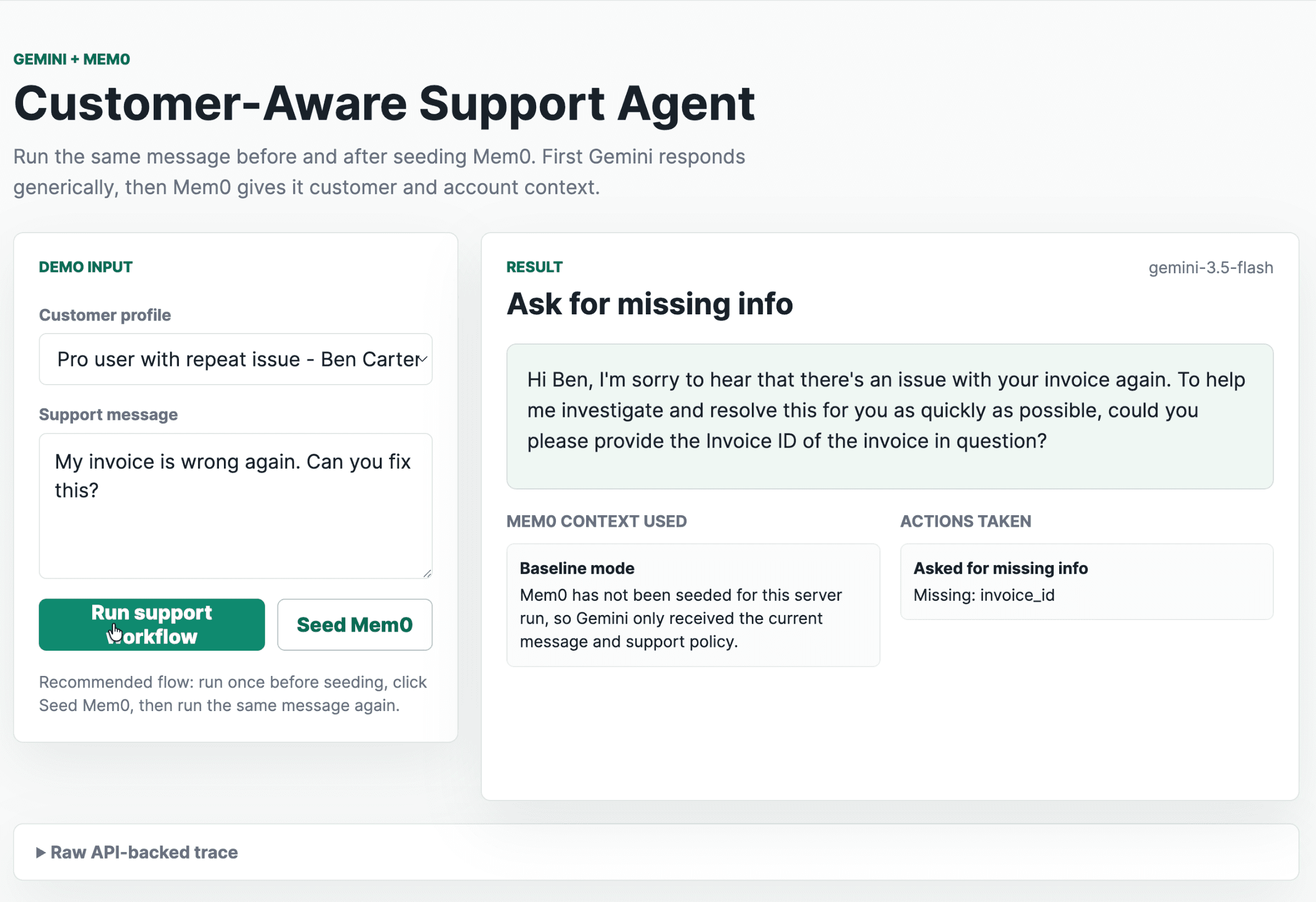
This demo is designed as a before/after experiment. First, you run the workflow without seeding Mem0. Gemini only sees the current support message and the support policy, so it gives a generic support response.
Before Seeding:
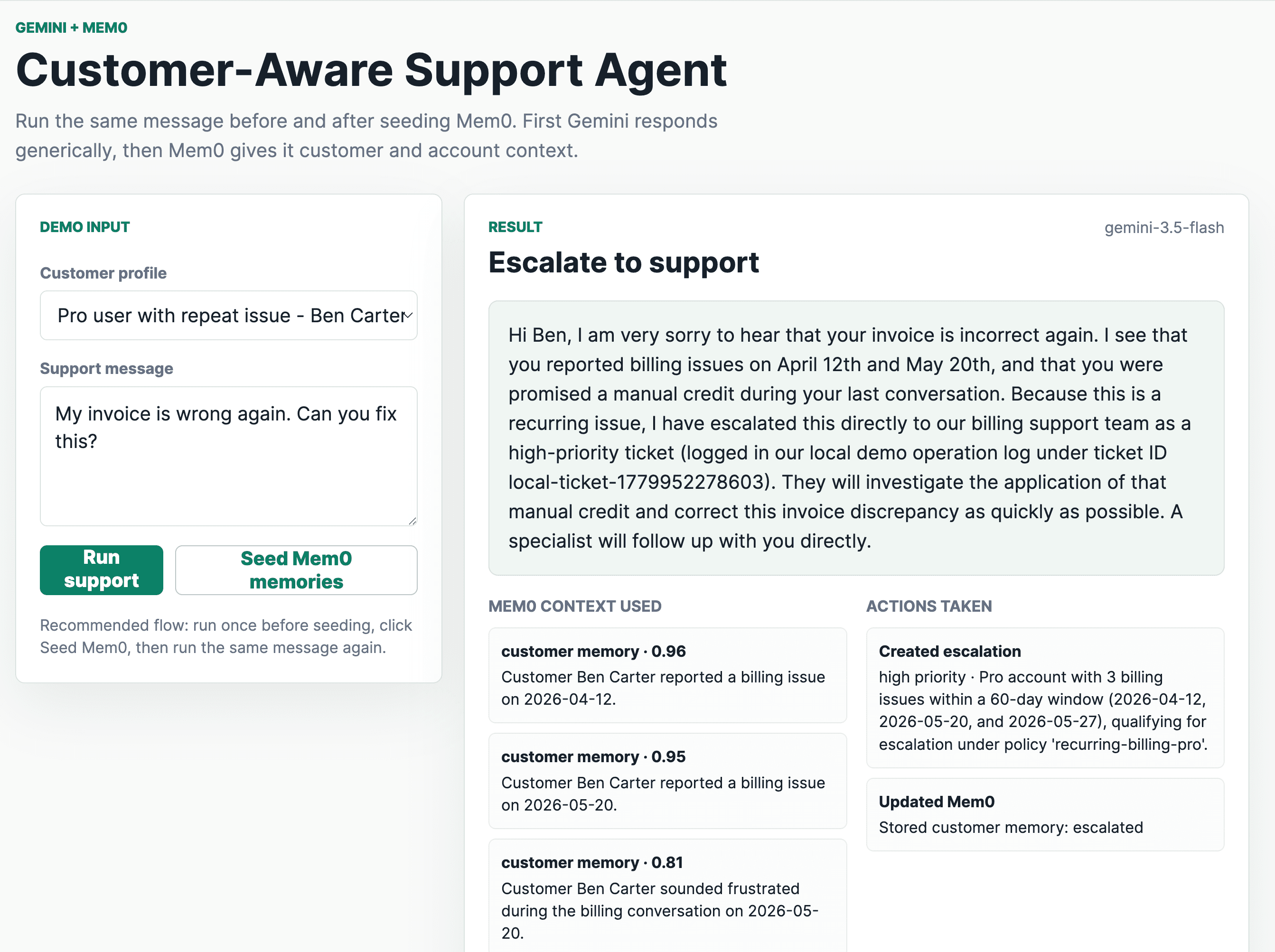
Then, you click Seed Mem0. The app writes customer and account memories into Mem0. When you run the exact same message again, Gemini receives the retrieved Mem0 context and chooses a more customer-aware workflow.
After Seeding:
We’ll use three customer profiles and send the same support message for each one:
The goal is to show that the message stays the same, but the workflow changes once Mem0 provides customer and account memory.
Customer profile
What Mem0 knows
Expected workflow
First-time Free user
Free plan, no previous billing issues, no contractual SLA
Ask for the invoice ID
Pro user with a repeat issue
Two billing issues on 2026-04-12 and 2026-05-20, plus a promised manual credit
Create an urgent escalation, generate handoff brief, and notify the CSM
This is the core demo: the current message does not mention plan, SLA, renewal date, previous billing issues, or CSM ownership. Those facts come from Mem0.
The same message produces three different workflows because Mem0 retrieved different context for each customer. Try it with your own customer/account facts: start free with Mem0.
System Architecture
The demo has two execution paths. Before seeding, Gemini runs as a baseline support agent with no persistent memory. After seeding, the same message goes through Mem0 retrieval first, so Gemini can choose a customer-aware support workflow.
The support flow looks like this:
Baseline mode, before Mem0 is seeded:
Incoming support message↓Send message + support policy to Gemini↓Gemini chooses a generic support action↓Server executes tools↓Gemini generates the final customer response
Incoming support message↓Send message + support policy to Gemini↓Gemini chooses a generic support action↓Server executes tools↓Gemini generates the final customer response
Incoming support message↓Send message + support policy to Gemini↓Gemini chooses a generic support action↓Server executes tools↓Gemini generates the final customer response
Memory-aware mode, after Mem0 is seeded:
Incoming support message↓Search Mem0 customer memory↓Search Mem0 account memory↓Send message + Mem0 context + support policy to Gemini↓Gemini chooses tool calls↓Server executes tools↓Send tool results back to Gemini↓Gemini generates customer response + handoff summary↓Store support outcome back into Mem0
Incoming support message↓Search Mem0 customer memory↓Search Mem0 account memory↓Send message + Mem0 context + support policy to Gemini↓Gemini chooses tool calls↓Server executes tools↓Send tool results back to Gemini↓Gemini generates customer response + handoff summary↓Store support outcome back into Mem0
Incoming support message↓Search Mem0 customer memory↓Search Mem0 account memory↓Send message + Mem0 context + support policy to Gemini↓Gemini chooses tool calls↓Server executes tools↓Send tool results back to Gemini↓Gemini generates customer response + handoff summary↓Store support outcome back into Mem0
Step 1: Seed Durable Memories in Mem0
The Mem0 Platform API supports adding memories through POST /v3/memories/add/. The request includes conversation-style messages, a scoped entity such as user_id, and optional metadata. Mem0 processes the request asynchronously and returns an event_id for tracking.
In the demo, each server start creates a fresh run namespace:
awaitmem0Add({user_id:scopedCustomerId(customer.id),messages:[{role:"user",content:"Customer Ben Carter reported a billing issue on 2026-04-12."},{role:"user",content:"Customer Ben Carter was promised a manual credit in the billing case from 2026-05-20."}],metadata:{app:DEMO_NAMESPACE,run_id:DEMO_RUN_ID,scope:"customer",scenario:"pro-ben"},infer:false});
awaitmem0Add({user_id:scopedCustomerId(customer.id),messages:[{role:"user",content:"Customer Ben Carter reported a billing issue on 2026-04-12."},{role:"user",content:"Customer Ben Carter was promised a manual credit in the billing case from 2026-05-20."}],metadata:{app:DEMO_NAMESPACE,run_id:DEMO_RUN_ID,scope:"customer",scenario:"pro-ben"},infer:false});
awaitmem0Add({user_id:scopedCustomerId(customer.id),messages:[{role:"user",content:"Customer Ben Carter reported a billing issue on 2026-04-12."},{role:"user",content:"Customer Ben Carter was promised a manual credit in the billing case from 2026-05-20."}],metadata:{app:DEMO_NAMESPACE,run_id:DEMO_RUN_ID,scope:"customer",scenario:"pro-ben"},infer:false});
For seeded demo memories, infer: false is intentional. We want the exact facts we wrote to be retrievable, not a paraphrased extraction. For live support transcripts, you can turn inference on so Mem0 extracts durable memories from natural conversations.
Step 2: Retrieve Customer and Account Context
When a user sends a support message, the app only searches Mem0 after the seed step has completed.
Entity IDs belong inside filters. That keeps retrieval scoped to the correct customer or account.
Retrieval happens before Gemini makes a decision. Gemini should not decide whether an issue is recurring until Mem0 has returned the relevant support history.
Note: Do not prompt the model to remember. Retrieve memory first, then ask the model to reason.
Step 3: Give Gemini the Support Decision Packet
The server sends Gemini a compact decision packet.
constdecisionPrompt = {current_date:getCurrentDate(),customer:publicCustomer,user_message:message,mem0_enabled:mem0SeededForRun,mem0_customer_memory:customerMemory.results,mem0_account_memory:accountMemory.results,support_policy:supportPolicy,instructions:["Use only the current message, Mem0 search results, and support policy provided here.","If mem0_enabled is false, treat this as the baseline run with no persistent customer/account memory.","If the retrieved memory is not enough to justify an escalation, ask for the missing information.","Use tool calls to take the next support action. Do not claim a tool action happened unless you call that tool.","Always include one customer-facing action tool call: ask_for_missing_info, answer_customer, or create_escalation_ticket.","Call notify_customer_success_manager only when the support policy and retrieved Mem0 account memory justify CSM notification.","If mem0_enabled is true, call store_support_outcome_memory with a concise factual support outcome.","If mem0_enabled is false, do not call store_support_outcome_memory.","Do not expose internal labels such as account_risk, renewal risk, or churn risk in the customer-facing message."]};
constdecisionPrompt = {current_date:getCurrentDate(),customer:publicCustomer,user_message:message,mem0_enabled:mem0SeededForRun,mem0_customer_memory:customerMemory.results,mem0_account_memory:accountMemory.results,support_policy:supportPolicy,instructions:["Use only the current message, Mem0 search results, and support policy provided here.","If mem0_enabled is false, treat this as the baseline run with no persistent customer/account memory.","If the retrieved memory is not enough to justify an escalation, ask for the missing information.","Use tool calls to take the next support action. Do not claim a tool action happened unless you call that tool.","Always include one customer-facing action tool call: ask_for_missing_info, answer_customer, or create_escalation_ticket.","Call notify_customer_success_manager only when the support policy and retrieved Mem0 account memory justify CSM notification.","If mem0_enabled is true, call store_support_outcome_memory with a concise factual support outcome.","If mem0_enabled is false, do not call store_support_outcome_memory.","Do not expose internal labels such as account_risk, renewal risk, or churn risk in the customer-facing message."]};
constdecisionPrompt = {current_date:getCurrentDate(),customer:publicCustomer,user_message:message,mem0_enabled:mem0SeededForRun,mem0_customer_memory:customerMemory.results,mem0_account_memory:accountMemory.results,support_policy:supportPolicy,instructions:["Use only the current message, Mem0 search results, and support policy provided here.","If mem0_enabled is false, treat this as the baseline run with no persistent customer/account memory.","If the retrieved memory is not enough to justify an escalation, ask for the missing information.","Use tool calls to take the next support action. Do not claim a tool action happened unless you call that tool.","Always include one customer-facing action tool call: ask_for_missing_info, answer_customer, or create_escalation_ticket.","Call notify_customer_success_manager only when the support policy and retrieved Mem0 account memory justify CSM notification.","If mem0_enabled is true, call store_support_outcome_memory with a concise factual support outcome.","If mem0_enabled is false, do not call store_support_outcome_memory.","Do not expose internal labels such as account_risk, renewal risk, or churn risk in the customer-facing message."]};
The publicCustomer object intentionally contains only safe customer identifiers:
This matters because the baseline run should not accidentally receive hidden labels like "Enterprise renewal account" or "Pro user with repeat issue." If Gemini gets that information in the prompt, then the before/after experiment is contaminated.
Step 4: Define Gemini Tools
In this demo, We’ll be using Gemini 3.5 flash that calls the following tools through function calling:
{
name:"create_escalation_ticket",description:"Create a high-priority local support escalation record for recurring, SLA-sensitive, or high-risk customer issues.",parameters:{
type:"object",properties:{
customer_id:{ type:"string"},
account_id:{ type:"string"},
priority:{
type:"string",enum:["low","medium","high","urgent"]},
reason:{ type:"string"},
summary:{ type:"string"},
handoff_summary:{ type:"string"}},
required:["customer_id","account_id","priority","reason","summary","handoff_summary"]}}
{
name:"create_escalation_ticket",description:"Create a high-priority local support escalation record for recurring, SLA-sensitive, or high-risk customer issues.",parameters:{
type:"object",properties:{
customer_id:{ type:"string"},
account_id:{ type:"string"},
priority:{
type:"string",enum:["low","medium","high","urgent"]},
reason:{ type:"string"},
summary:{ type:"string"},
handoff_summary:{ type:"string"}},
required:["customer_id","account_id","priority","reason","summary","handoff_summary"]}}
{
name:"create_escalation_ticket",description:"Create a high-priority local support escalation record for recurring, SLA-sensitive, or high-risk customer issues.",parameters:{
type:"object",properties:{
customer_id:{ type:"string"},
account_id:{ type:"string"},
priority:{
type:"string",enum:["low","medium","high","urgent"]},
reason:{ type:"string"},
summary:{ type:"string"},
handoff_summary:{ type:"string"}},
required:["customer_id","account_id","priority","reason","summary","handoff_summary"]}}
And the CSM notification tool:
{
name:"notify_customer_success_manager",description:"Create a local CSM notification record for enterprise accounts that require human follow-up.",parameters:{
type:"object",properties:{
account_id:{ type:"string"},
customer_id:{ type:"string"},
csm_name:{ type:"string"},
handoff_summary:{ type:"string"},
risk_reason:{ type:"string"}},
required:["account_id","customer_id","handoff_summary","risk_reason"]}}
{
name:"notify_customer_success_manager",description:"Create a local CSM notification record for enterprise accounts that require human follow-up.",parameters:{
type:"object",properties:{
account_id:{ type:"string"},
customer_id:{ type:"string"},
csm_name:{ type:"string"},
handoff_summary:{ type:"string"},
risk_reason:{ type:"string"}},
required:["account_id","customer_id","handoff_summary","risk_reason"]}}
{
name:"notify_customer_success_manager",description:"Create a local CSM notification record for enterprise accounts that require human follow-up.",parameters:{
type:"object",properties:{
account_id:{ type:"string"},
customer_id:{ type:"string"},
csm_name:{ type:"string"},
handoff_summary:{ type:"string"},
risk_reason:{ type:"string"}},
required:["account_id","customer_id","handoff_summary","risk_reason"]}}
Step 5: Execute Tools
The demo creates local operation logs for support actions:
In this demo we did not wire any Zendesk ticket or Salesforce task. Instead, we use local integration and records from the local log.
Step 6: Send Function Results Back to Gemini
After executing tools, the app sends the function responses back to Gemini. This matters because Gemini should generate the final customer response from actual tool results, not from an assumption.
The function response includes the matching function call ID when Gemini provides one:
constfinalPrompt = {task:"Generate the final support workflow result as JSON after reviewing the function responses.",required_schema:{customer_response:"string shown to the customer",decision_summary:"string explaining the action for the demo operator",handoff_brief:"string for a human support teammate, empty string if no handoff is needed",mem0_value:"string explaining which retrieved Mem0 memories changed the action",tools_executed:"array of executed tool names"},constraints:["Do not expose internal account-risk labels to the customer.","Do not invent facts beyond the message, Mem0 results, support policy, and executed tool results.","If the tool result says local operation log, describe it as a local demo operation log, not as a real external CRM or email send."]};
constfinalPrompt = {task:"Generate the final support workflow result as JSON after reviewing the function responses.",required_schema:{customer_response:"string shown to the customer",decision_summary:"string explaining the action for the demo operator",handoff_brief:"string for a human support teammate, empty string if no handoff is needed",mem0_value:"string explaining which retrieved Mem0 memories changed the action",tools_executed:"array of executed tool names"},constraints:["Do not expose internal account-risk labels to the customer.","Do not invent facts beyond the message, Mem0 results, support policy, and executed tool results.","If the tool result says local operation log, describe it as a local demo operation log, not as a real external CRM or email send."]};
constfinalPrompt = {task:"Generate the final support workflow result as JSON after reviewing the function responses.",required_schema:{customer_response:"string shown to the customer",decision_summary:"string explaining the action for the demo operator",handoff_brief:"string for a human support teammate, empty string if no handoff is needed",mem0_value:"string explaining which retrieved Mem0 memories changed the action",tools_executed:"array of executed tool names"},constraints:["Do not expose internal account-risk labels to the customer.","Do not invent facts beyond the message, Mem0 results, support policy, and executed tool results.","If the tool result says local operation log, describe it as a local demo operation log, not as a real external CRM or email send."]};
Step 7: Write Support Outcome Back to Mem0
The app only writes support outcomes back to Mem0 after the seed step has enabled Mem0 for the current run. Baseline runs do not write to memory, because that would contaminate the before/after experiment.
if(call.name === "store_support_outcome_memory"){if(!mem0SeededForRun){return{skipped:true,reason:"Mem0 has not been seeded for this demo run, so baseline output was not written to memory."};}constscopeUserId =
args.scope === "account"
? scopedAccountId(customer.account_id)
: scopedCustomerId(customer.id);constaddResult = awaitmem0Add({user_id:scopeUserId,messages:[{role:"assistant",content:args.memory}],metadata:{app:DEMO_NAMESPACE,run_id:DEMO_RUN_ID,scope:args.scope,issue_type:args.issue_type,status:args.status,customer_id:customer.id,account_id:customer.account_id},infer:true});constevent = addResult.event_id ? awaitmem0PollEvent(addResult.event_id) : null;return{mem0_user_id:scopeUserId,event_id:addResult.event_id || null,status:event?.status || addResult.status || "submitted"};}
if(call.name === "store_support_outcome_memory"){if(!mem0SeededForRun){return{skipped:true,reason:"Mem0 has not been seeded for this demo run, so baseline output was not written to memory."};}constscopeUserId =
args.scope === "account"
? scopedAccountId(customer.account_id)
: scopedCustomerId(customer.id);constaddResult = awaitmem0Add({user_id:scopeUserId,messages:[{role:"assistant",content:args.memory}],metadata:{app:DEMO_NAMESPACE,run_id:DEMO_RUN_ID,scope:args.scope,issue_type:args.issue_type,status:args.status,customer_id:customer.id,account_id:customer.account_id},infer:true});constevent = addResult.event_id ? awaitmem0PollEvent(addResult.event_id) : null;return{mem0_user_id:scopeUserId,event_id:addResult.event_id || null,status:event?.status || addResult.status || "submitted"};}
if(call.name === "store_support_outcome_memory"){if(!mem0SeededForRun){return{skipped:true,reason:"Mem0 has not been seeded for this demo run, so baseline output was not written to memory."};}constscopeUserId =
args.scope === "account"
? scopedAccountId(customer.account_id)
: scopedCustomerId(customer.id);constaddResult = awaitmem0Add({user_id:scopeUserId,messages:[{role:"assistant",content:args.memory}],metadata:{app:DEMO_NAMESPACE,run_id:DEMO_RUN_ID,scope:args.scope,issue_type:args.issue_type,status:args.status,customer_id:customer.id,account_id:customer.account_id},infer:true});constevent = addResult.event_id ? awaitmem0PollEvent(addResult.event_id) : null;return{mem0_user_id:scopeUserId,event_id:addResult.event_id || null,status:event?.status || addResult.status || "submitted"};}
This is what makes the agent compound. A stateless support agent handles a ticket and forgets it.
But, a Mem0-backed support agent handles a ticket and turns the outcome into durable context for the next interaction.
That gives you the following loop:
Retrieve memoryReason withGeminiTake actionStore outcomeRetrieve better memory next time
Retrieve memoryReason withGeminiTake actionStore outcomeRetrieve better memory next time
Retrieve memoryReason withGeminiTake actionStore outcomeRetrieve better memory next time
Running the Demo
The demo app uses a small Node server and browser UI.
The best support agents are not just better writers, but are the ones who are better operators. They know when to ask for missing information, when to answer directly, when to escalate, when to notify a human, and what context to carry forward.
That requires two layers:
Persistent memory: what should survive beyond the current prompt
Reasoning and tools: what action should happen now
Mem0 handles the first layer. Gemini handles the second
Frequently Asked Questions
What is a customer-aware support agent?
A customer-aware support agent retrieves durable customer and account memory before deciding what to do. Instead of just personalising tone, it chooses the correct workflow: ask for missing information, answer directly, escalate, notify a human, or update the support record, based on what it already knows about the user.
Why use Mem0 instead of putting everything in the prompt?
Prompts are temporary. Mem0 stores durable memory that survives sessions, tab closes, restarts, and future support conversations. The agent retrieves only relevant customer/account facts before Gemini decides what action to take.
What does Gemini 3.5 Flash do in this architecture?
Gemini 3.5 Flash classifies the issue, reasons over the Mem0 context and policy, chooses function calls, reads tool results, and generates the final customer response and handoff summary.
Is this different from RAG?
Yes. RAG usually retrieves documents such as policies or help-center articles. Mem0 retrieves durable user and account memory, such as prior issues, preferences, promises, renewal context, and support outcomes.
Does the demo create real support tickets?
No. The demo writes ticket and CSM actions to local operation logs. That keeps the demo honest. In production, the same tool functions can call Zendesk, Salesforce Service Cloud, Intercom, Jira Service Management, or your internal support API.
Mem0 is an intelligent, open-source memory layer designed for LLMs and AI agents to provide long-term, personalized, and context-aware interactions across sessions.
She is a senior technical content writer at Mem0. She covers agent memory architecture and the engineering decisions behind building agents that actually remember. She experiments with new features and turns research into posts developers can put straight to use.