

·
13 min read

On this page
AI engineers building production agents usually start with a simple idea: store user interactions in a vector database, then retrieve relevant context on each turn. The first iteration often works in a demo, then breaks down as identities, personalization, cost, and quality demands grow.
This article walks through what it actually takes to build agent memory with a custom vector store, where that design stops scaling, and how Mem0 addresses the same problem as a dedicated memory layer.
👉Get a free API key at app.mem0.ai to follow along (free tier, no credit card, includes all the
add()andsearch()calls shown below).
What agent memory really needs to handle
"Agent memory" is not just a collection of vectors. A production system typically has to handle:
Identity: Which user is this, what is their long-term profile, and what is shared vs private?
Extraction: How to turn noisy conversation logs into structured, retrievable memory.
Lifecycle: What to keep, what to summarize, what to forget, how to control growth.
Retrieval: How to rank, filter, and weight memories for different tasks and agents.
Tooling and governance: Debugging, monitoring, privacy, and data migration.
A raw vector store addresses only one of these pieces. Everything else becomes application logic and glue code that tends to grow over time.
Mem0 starts from the assumption that memory is a first-class concern, not an afterthought hidden behind a generic embeddings API.
The core components of a roll-your-own memory stack
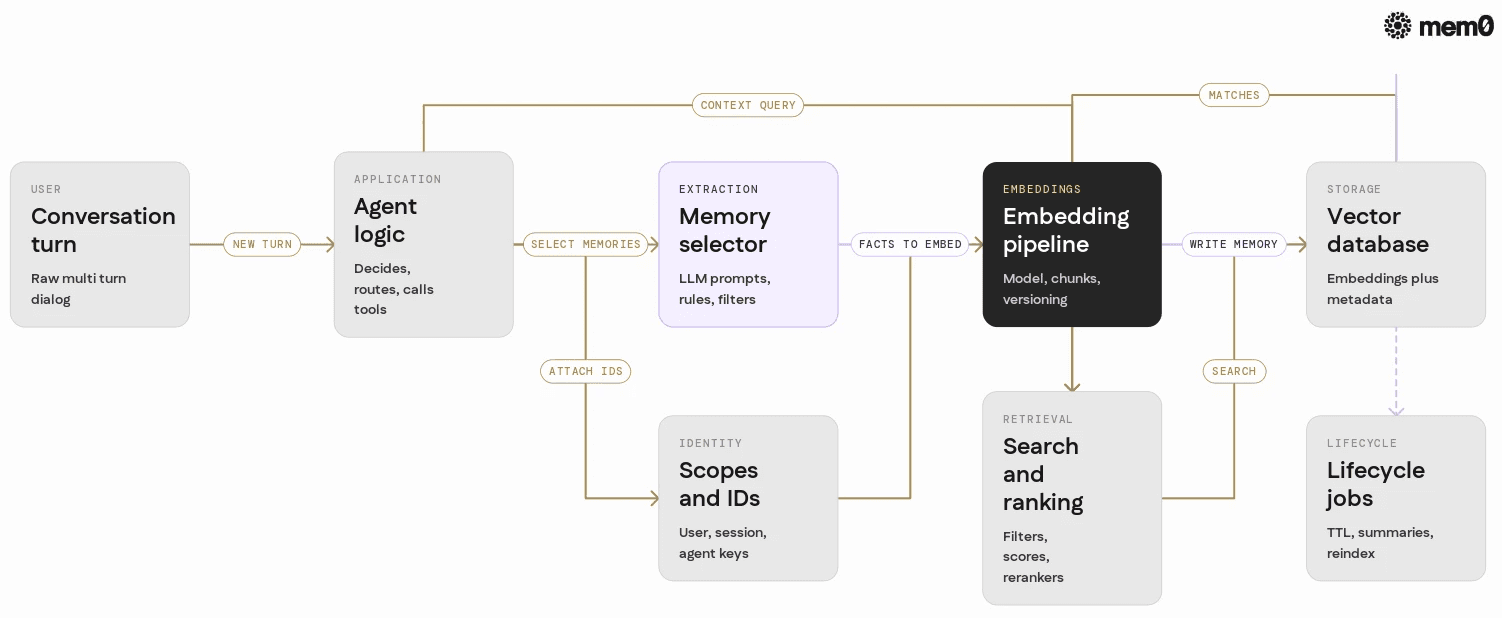
Building agent memory on top of a vector database usually involves these components:
Storage
A vector database (Postgres + pgvector, Qdrant, Milvus, etc.) or a search service that stores embeddings and metadata.Embedding pipeline
Code that:Chooses and hosts an embedding model.
Splits, cleans, and normalizes text.
Handles versioning when models change.
Memory extraction
A process that decides what to store, often via:Heuristics (e.g., only store "I like ..." statements).
LLM-based extraction of facts, preferences, entities.
Identity and scoping
An ID scheme for:Users or entities.
Agents or applications.
Shared vs private vs system memories.
Retrieval strategy
Logic that:Runs a similarity search.
Filters by user, type, recency, source.
De-duplicates and merges overlapping memories.
Lifecycle management
Systems that:Expire or archive old items.
Summarize and compress.
Re-embed when models change.
Each of these pieces introduces its own engineering surface area, usually spread across multiple services and repositories.
What engineers actually build on top of vector stores
To make this concrete, consider a typical minimal architecture for agent memory:
Database
Amemoriestable / collection with:id,user_id,agent_idembedding,text,type,created_at,updated_atAdditional metadata like
source,confidence,tags
Write pipeline
When the agent finishes a turn:Decide whether to store the interaction.
Extract key facts via an LLM prompt.
Embed each fact.
Insert into the vector store.
Read pipeline
Before responding:Build a retrieval query from the current user message and context.
Perform a vector search within a scope (user + agent + maybe global).
Filter and rank results.
Insert selected memories into the prompt.
That usually looks like this type of pseudo code:
This works, but it hides several problems:
The extraction prompt becomes a product-critical artifact.
The system stores redundant or low-value memories.
Identity is coupled to a particular schema that is hard to migrate.
Retrieval logic grows, especially when multiple agents or tools share memory.
After a few weeks of iteration, teams often rebuild parts of this into more formal "memory services" and job queues.
Hidden complexity in custom memory systems
From a distance, these problems look manageable. In practice, they tend to show up late, during scaling or integration.
Identity and scoping
Identity issues show up when:
A single user interacts with multiple agents.
Teams need shared knowledge bases and private user memories.
Anonymous, transient sessions need different management than authenticated users.
A custom design must decide:
How to represent
user_id,session_id,agent_id.How to handle merged identities, account deletion, and GDPR / privacy requests.
How to propagate these IDs through all storage and retrieval layers.
Without a dedicated abstraction, identity leaks into every call site. Refactors then become risky and slow.
Memory extraction and quality
LLM-based extraction is easy to prototype and hard to maintain. Typical challenges:
Prompt drift and regressions when models change.
Over-extraction of low value facts, which increases cost and noise.
Under-extraction of implicit preferences or long-term goals.
No simple way to inspect or evaluate the quality of stored memories over time.
Teams often add:
Custom taxonomies for memory types.
Validation and cleaning jobs.
Manual inspection tools.
These are rarely part of the original estimate when someone proposes "just using a vector store."
Lifecycle management
Memory growth is a byproduct of success. Without lifecycle controls:
Storage grows linearly with traffic.
Embedding bills climb steadily.
Retrieval quality drops as newer, more relevant information competes with older items.
Typical homegrown solutions include:
TTLs on ephemeral memories.
Summarization jobs that compress older segments.
Periodic re-embedding with newer models.
Each of these introduces new queues, cron jobs, and backfill scripts that must be tested and monitored in production.
Retrieval tuning
Retrieval is rarely "just a vector search." To get good results, engineers tune:
k-values and similarity thresholds.
Filters by type, recency, source, and confidence.
Rerankers for hybrid scoring (semantic + metadata signals).
Per-agent configs, since a support agent and a recommendation agent need different memory sets.
Over time, the retrieval config becomes a small domain specific language embedded in application code. It affects latency and quality directly, so changes require careful testing.
Where the build your own approach works well
A custom vector store-based memory system is a good fit when:
The product is early, and memory is non-critical.
The team wants full control over every aspect of storage and retrieval.
There are strong constraints, such as on-prem only, specialized hardware, or custom retrieval models.
The set of agents is small and homogeneous.
In these cases, a simple "store last N messages" or "embed and search" approach can be shipped quickly and iterated on.
The complexity shows up later, when:
The number of users and sessions grows.
Different teams need different memory views.
Data and privacy requirements increase.
Product asks for better personalization and long term recall.
At that stage, the cost is not just storage, but ongoing engineering cycles.
How Mem0 reframes agent memory
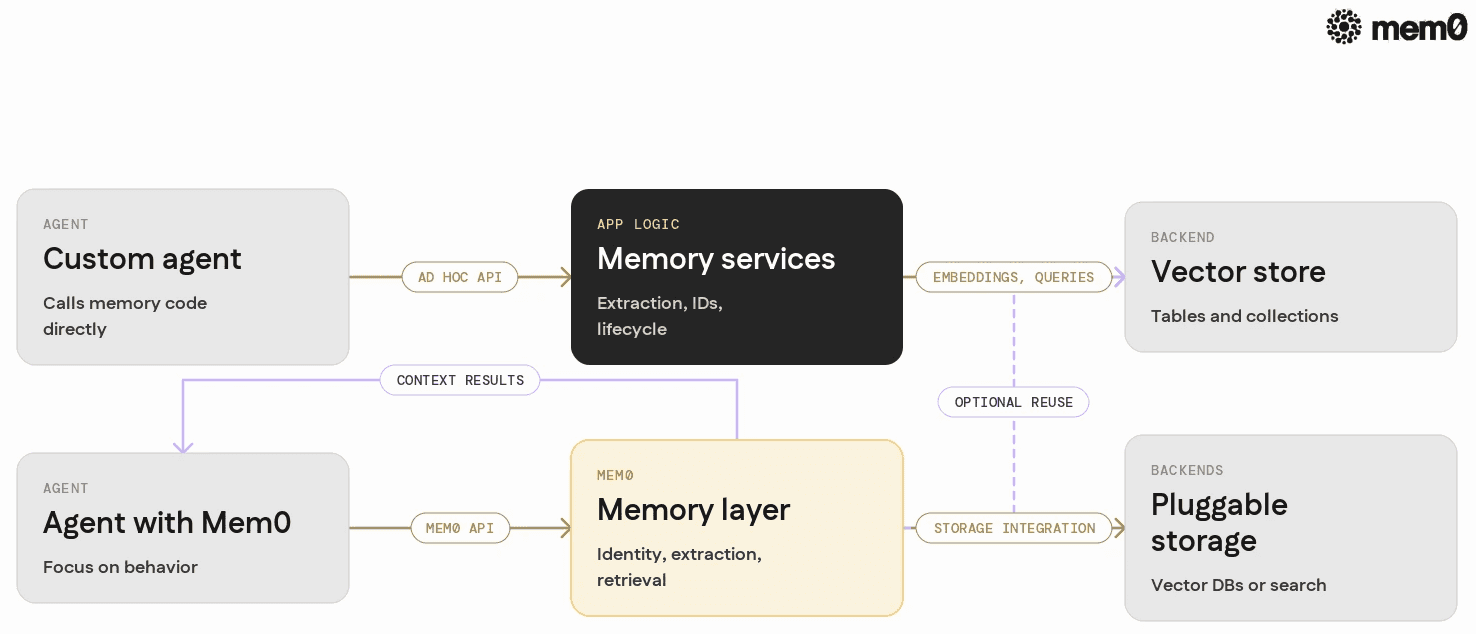
Mem0 treats memory as a dedicated layer that sits between agents and raw storage, instead of as a thin wrapper around vectors.
At a high level, Mem0 provides:
Identity-aware memory: Built-in management of users, sessions, and agents, with scoped retrieval and shared vs private memory.
Extraction pipeline out of the box: Automatic extraction of useful memories from interactions, with configurable rules and models.
Lifecycle controls: Policies for retention, summarization, and deletion that apply across memories without rewriting queries.
Retrieval configuration: A consistent API for fetching context that can be tuned by type, recency, and agent without changing the schema.
Storage abstraction: Integration with vector databases and other backends, so the application code talks to Mem0, not directly to embeddings.
Instead of hand assembling these pieces, an agent developer sends interactions to Mem0 and asks for relevant memory, while Mem0 handles the glue.
Side-by-side comparison
The differences are clearer when broken into concerns.
Concern | Custom Vector Store Approach | Mem0 Approach |
|---|---|---|
Storage | Direct table / collection design and schema evolution | Abstracted memory model with pluggable backends |
Identity and scoping | Manual | Built in user, session, and agent scopes |
Extraction pipeline | Custom prompts, models, and parsing for each project | Default extraction flows with configuration hooks |
Lifecycle management | Homegrown TTLs, summarization jobs, re-embedding scripts | Centralized policies for retention, summarization, and deletion |
Retrieval configuration | Per-project retrieval logic in application code | Unified retrieval API with filters and ranking options |
Cross agent sharing | Custom join logic between different memory tables or namespaces | Shared memory support with clear boundaries |
Monitoring and debugging | Application-specific queries and dashboards | Memory-centric introspection views |
Engineering effort | 2 to 3 weeks for an initial version, then ongoing maintenance | Integrate via API or SDK, focus on agent behavior |
The key point is not that one is universally better, but that Mem0 moves recurring infrastructure tasks into a shared layer so agent builders can focus on behavior and UX.
Example Mem0 integration in a Python agent
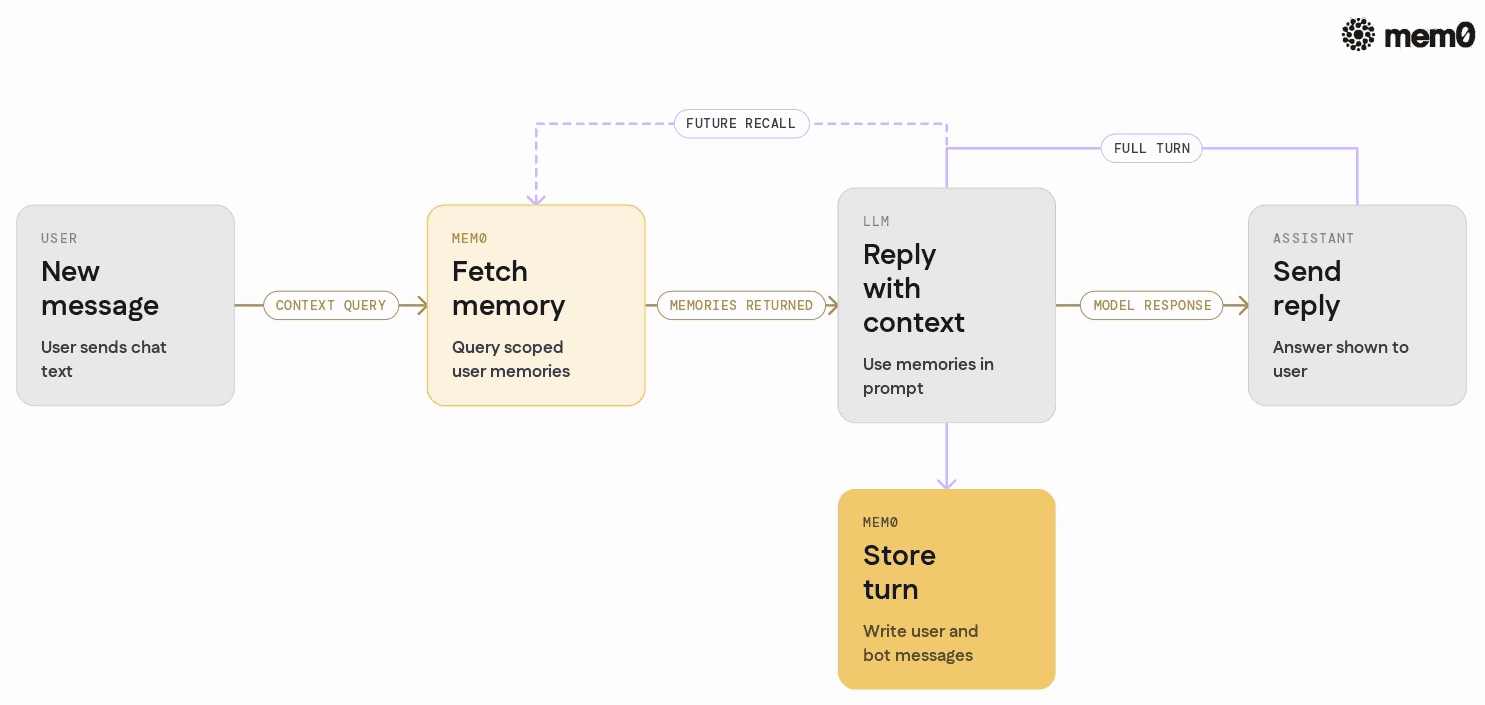
The following example shows a minimal Python integration using Mem0 as the memory layer for a chat agent. It demonstrates:
Creating a Mem0 client.
Storing user interactions as memories.
Retrieving relevant memories before each LLM call.
Assume a simple OpenAI-based agent, although the pattern works with any LLM provider.
👉Wanna give it a try? Get a Mem0 API Key and try it yourself.
Key points in this example:
The application never manipulates embeddings directly.
Mem0 receives both user and assistant messages and extracts useful memories automatically.
Retrieval uses semantic search with filters over memory types, without exposing the underlying vector schema.
In a production setting, agent builders can enrich metadata and retrieval filters to align memory behavior with each agent's role.
When Mem0 is a better fit than a custom vector store
Mem0 tends to be a better choice when:
The team wants long-term, cross session personalization without building a dedicated memory service.
Multiple agents or tools share users and need consistent memory behavior.
There is sensitivity around privacy, deletion, and retention policies that should not be re-implemented per project.
The engineering team wants to avoid weeks of building and ongoing maintenance of the extraction and lifecycle logic.
In these cases, a dedicated memory layer offloads repeated patterns so that the bulk of engineering time goes into agent logic and UX rather than infrastructure.
For teams that already have a vector store and some memory code, Mem0 can sit on top as a higher-level abstraction. This allows gradual migration from handwritten pipelines to a shared memory model.
Limitations of the vector store and Mem0 pattern
The entire pattern of "semantic memories in a vector store with retrieval" has its own limits, independent of whether it is hand-built or provided by Mem0.
Hard factual knowledge vs personal memory: Long-term product knowledge, policies, and documentation may be better served by separate retrieval systems or RAG pipelines, not the same memory layer that holds user-specific facts.
Highly structured domains: In environments with strong schemas and strict transactional behavior, such as trading systems or medical records, memory should often be derived from canonical databases rather than as an independent store.
Real-time and ultra-low latency: Some use cases require sub-10 ms access and cannot tolerate additional network hops or semantic indexing paths. In these cases, inline caching and specialized storage may be needed alongside or instead of a centralized memory layer.
Strict compliance environments: If all data must stay within a locked-down environment, teams may still need to manage their own storage footprint and approval flows, even when using a higher-level memory abstraction.
Mem0 reduces the complexity of building and operating memory, but it does not remove the need to think through data modeling, compliance, and user experience design for each product.
Frequently Asked Questions
Q. What is the main difference between Mem0 and a plain vector store?
A vector store is a general-purpose embedding index. It stores vectors and metadata and returns similar items. Mem0 is a memory layer that sits on top of storage and focuses specifically on extracting, organizing, and retrieving agent memory, including identity and lifecycle, instead of just raw vectors.
Q. When does it make sense to build a custom memory system?
Building a custom system makes sense if the team needs very specific behavior, such as on-prem only deployments, exotic retrieval models, or integration with highly specialized internal infrastructure. It can also be a good fit for early prototypes where memory requirements are simple and short lived. The tradeoff is increased engineering time and ongoing maintenance.
Q. How does Mem0 handle user identity and multiple agents?
Mem0 treats identity as a first class concern and tracks users, sessions, and agents separately. It then scopes memory by these identifiers so that one user can interact with multiple agents that share some memory and keep other memories isolated. This avoids each application re-implementing identity-based filtering.
Q. How does Mem0 decide what to store as memory?
Mem0 runs an extraction pipeline over interactions to identify stable facts, preferences, and relevant context, rather than storing every token of conversation. This pipeline is configurable and uses LLM-based extraction, along with metadata and rules, to avoid filling memory with low value content. The result is a more focused memory set that is cheaper and easier to retrieve from.
Q. Can Mem0 work with an existing vector database?
Yes, Mem0 can use different backends, including existing vector stores, to store and index memories. In that mode, Mem0 acts as a higher level abstraction over identity, extraction, lifecycle, and retrieval while leaving the underlying storage in place. This allows teams to adopt Mem0 without discarding prior investments in database infrastructure.
Q. What does integrating Mem0 typically replace in an existing codebase?
Integrating Mem0 usually replaces custom extraction prompts, ad hoc embedding pipelines, manual memory table schemas, and bespoke retrieval queries. Instead, agents call Mem0 to store interactions and fetch relevant memories through a consistent API. This typically saves several weeks of initial work and reduces future maintenance as memory requirements evolve.
Further Reading
Give Your AI Agent Memory And Guardrails Mem0 Docker Sandboxes
Giving Pi Agent Project Memory With Mem0 A Practical Schema Migration Demo
How To Test AI Agent Memory With Mem0 A Practical Memory Simulation Guide
—
Mem0 is an intelligent, open-source memory layer designed for LLMs and AI agents to provide long-term, personalized, and context-aware interactions across sessions.
Get your free API Key here: app.mem0.ai or self-host mem0 from our open source github repository.
—
More on Agent Memory

How to Read Memory Benchmarks
How to read AI memory benchmarks: what LoCoMo, LongMemEval, BEAM, and agentic tests measure, where scores go wrong, and how to find the correct benchmark for your use case.
20 min read

The Problem After Retrieval: Why Agents Misuse the Memories They're Given
Five papers show LLM agents often misuse the memories they retrieve. What the research says, how much to trust it, and what builders can do.
13 min read

What Is Memory Staleness in AI? Causes, Risks & Solutions
Understand memory staleness in AI agents, why outdated information leads to errors, and the best techniques to maintain accurate long-term memory.
9 min read



Aashi Dutt
She is a senior technical content writer at Mem0. She covers agent memory architecture and the engineering decisions behind building agents that actually remember. She experiments with new features and turns research into posts developers can put straight to use.
Start building with memory
Free tier, no card