

·
12 min read
On this page
Why do GPUs and memory belong in the same conversation?
In production agent systems, GPUs usually sit behind model serving. Memory is often treated as a separate concern, handled by a database or vector store on CPUs. That separation works at small scale, but it breaks down when:
Agents must track thousands of entities and events per user
Embedding and retrieval costs start to dominate latency
Teams want to run everything inside a single GPU-centric stack
At that point, memory is no longer just a database problem. It is also a compute and scheduling problem, and GPUs or TPUs can help. Mem0 sits exactly in that gap. It treats memory as a first-class, model-driven component that can use accelerators for the heavy work, while keeping the interface simple for agent builders.
This article walks through how Mem0 fits into GPU and TPU-based systems, what workloads can realistically benefit from accelerators, and where CPUs and traditional storage still make more sense.
The core memory problem in GPU-centric agent systems
Agents in production need more than a sliding window of chat messages. They need:
Long-lived user profiles and preferences
Institutional or domain knowledge spread across many documents
Event histories, tools usage, and intermediate reasoning traces
Brute-force approaches tend to fall into two patterns:
Stuff everything into model context
Expensive in tokens
Limited by context length
Requires repeated recomputation for every call
Push everything into a vector store or SQL database
Memory logic spread across application code
Hard to enforce consistent memory schemas
Difficult to coordinate with GPU-based model serving
Mem0 addresses this by providing:
Structured memory objects (with metadata, priority, timestamps)
Retrieval and update policies abstracted behind a simple API
Integration hooks for embeddings and models that can run on CPU or GPU
When GPUs enter the picture, three parts of this pipeline become especially important:
Embedding generation
Similarity search
Model-based memory refinement and summarization
Each of these can use accelerators in different ways.
How Mem0’s architecture interacts with GPUs and TPUs
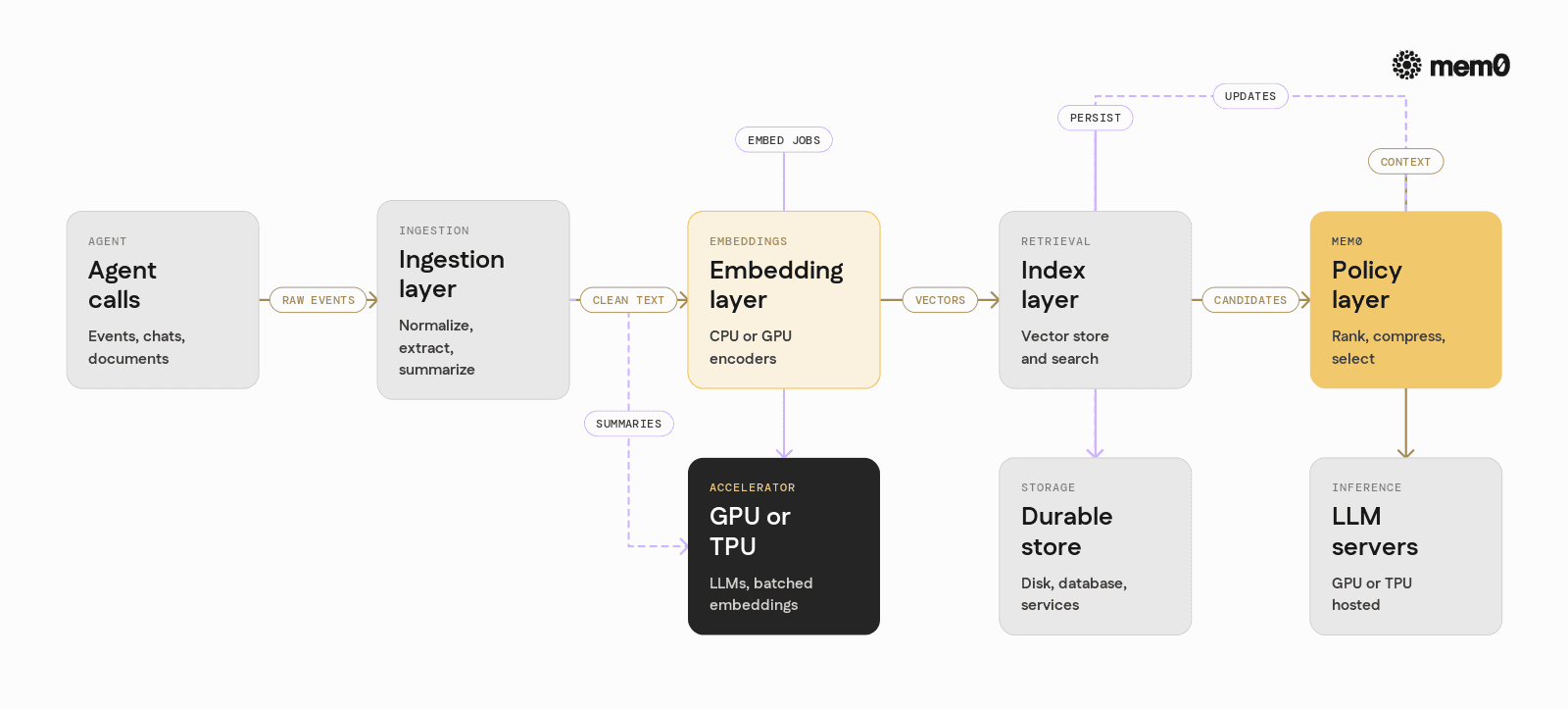
At a high level, Mem0 has four main layers that can touch GPU or TPU resources:
Ingestion layer
Takes raw events, messages, or documents from the agent
Normalizes and enriches with metadata
Optionally runs LLM-based extraction or summarization on GPU
Embedding layer
Converts text or structured records into vectors
Can use GPU-accelerated embedding models
Can batch requests for higher throughput
Indexing and retrieval layer
Stores vectors in a vector index (in-memory or external)
Runs similarity search with approximate or exact methods
Some backends can use GPUs for fast search over large collections
Policy and reasoning layer
Decides which memories to fetch and how to rank them
Uses LLMs for re-ranking, compression, or summarization
Often runs on the same GPU or TPU pool used for main inference
Mem0 does not require GPUs, but its design allows these layers to connect to GPU- or TPU-backed services where available. The goal is to keep memory logic in application code stable, while the underlying embedding and retrieval engines can evolve independently.
Example architecture: GPU-aware memory with Mem0
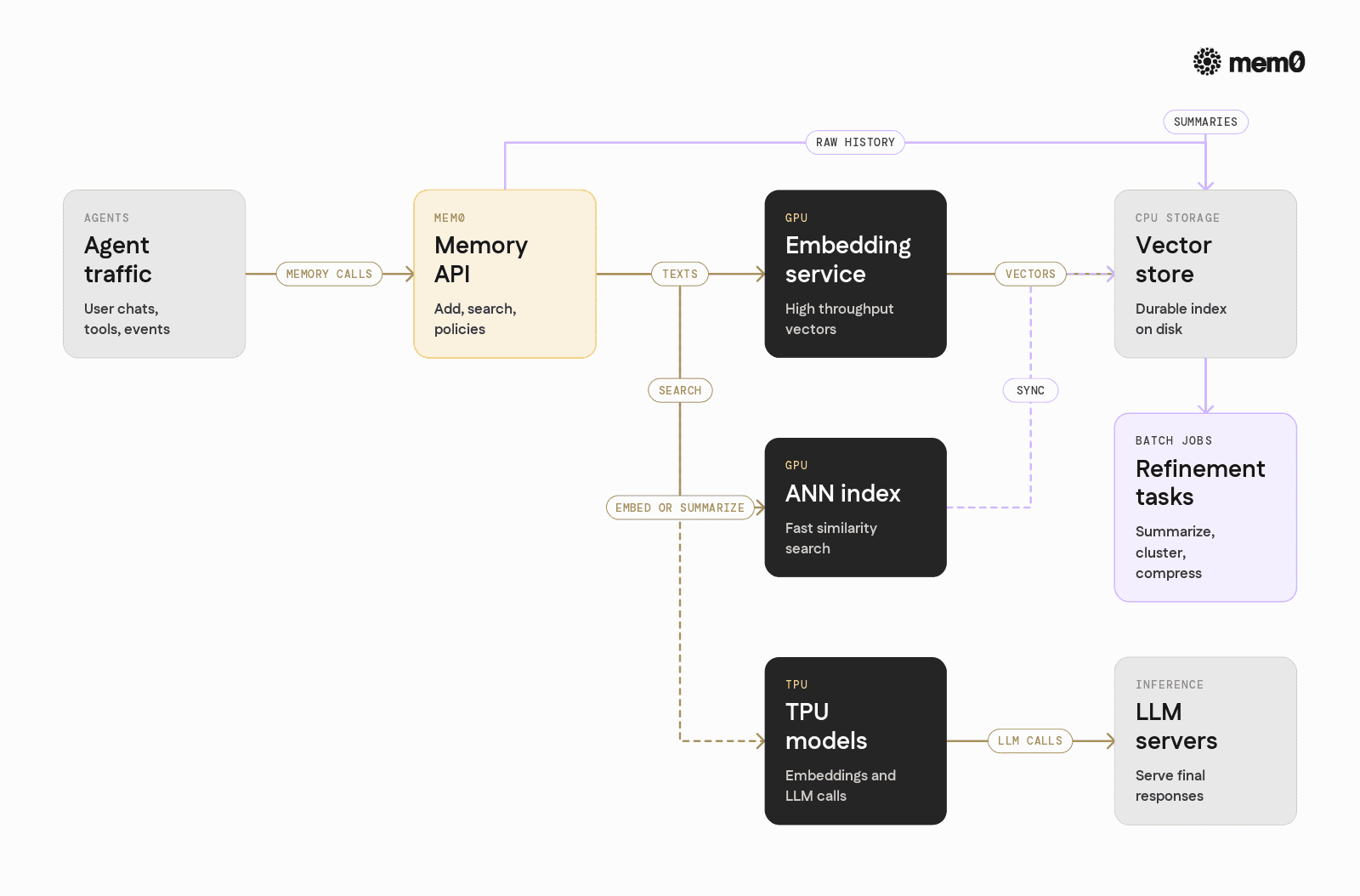
Consider a typical production setup:
A fleet of GPU-backed LLM servers
A CPU-based vector store or database
A set of microservices for orchestration and tools
Mem0 can be wired into this architecture in several GPU-aware ways:
Embeddings on GPU, storage on CPU
Use a GPU-hosted embedding model (e.g., via an inference server)
Send embeddings to Mem0, which persists them in a vector database on CPUs
Gain fast embedding throughput and flexible storage
Embeddings and retrieval on GPU
Place a GPU-accelerated ANN (approximate nearest neighbor) index next to the embedding model
Mem0 treats it as a backend, using GPU both for vectorization and search
Good for very large memory collections with strict latency budgets
LLM-based memory refinement on GPU
Mem0 writes raw events to a store
Periodic GPU jobs summarize, cluster, or compress memories
Retrieval queries stay small and efficient, even as raw history grows
TPU-based workloads
TPUs primarily serve large language model inference
Mem0 interacts with TPU-hosted models through standard HTTP or gRPC interfaces
Embeddings or summarizations are requested from TPU models while Mem0 itself stays CPU-based
In all of these, Mem0 isolates the memory schema and business logic from infrastructure details. For AI engineers, this means GPU utilization and scheduling can evolve without rewriting memory handling.
Working Python example: Mem0 with a GPU embedding pipeline
The following example shows how to integrate Mem0 in a Python stack that uses a GPU-backed embedding model. The embeddings are generated on GPU, then sent into Mem0 for storage and retrieval.
This is a minimal illustration using a hypothetical GPU embedding function, but the pattern matches production setups that call out to an inference server (e.g., through HTTP) or to a local CUDA-enabled model.
💡You'll need a free Mem0 API key to run the hosted memory path. Get one at app.mem0.ai: no credit card required.
Key points in this pattern:
The embedding function is GPU-aware, but Mem0’s interface stays simple
Mem0 can accept custom embeddings or call its own embedding backend
The LLM that uses memory can be entirely independent and run on any accelerator
In a real deployment, call_llm_gpu would be an HTTP or gRPC client for a model server on GPUs or TPUs.
Can memory itself run on GPUs and TPUs?
In practice, “memory on GPU” can mean several different things:
Vectors stored in GPU RAM
Useful for extremely low-latency search over a hot subset of memories
Limited by VRAM size, usually combined with tiered storage
Often implemented inside the vector index, not in Mem0 directly
Memory-aware models resident on GPU or TPU
Models that attend over retrieved memories as part of their forward pass
Mem0 feeds them relevant context, but does not live on the accelerator
Best when the model and memory logic evolve at different speeds
On-device learning or adaptation
Some architectures experiment with online updates of model weights
GPU or TPU performs fine-tuning or adaptation based on memories
Mem0 provides curated memory streams that drive these updates
Current production patterns typically keep Mem0 itself on CPU with access to persistent storage, while GPU or TPU resources are used for:
Embedding text into vectors
Running large models for reasoning, summarization, and ranking
Accelerating vector search in specialized backends
This split allows memories to outlive individual GPU instances and avoids coupling memory durability to GPU uptime.
Use cases that benefit from GPU-aware memory infrastructure
Not all workloads need GPU-aware memory. For many applications, CPU embedding and retrieval are enough. However, several patterns make clear use of GPUs and TPUs alongside Mem0:
Latency-sensitive conversational agents at scale
Thousands of concurrent users
Personalized context selection per request
GPU embeddings plus GPU LLMs reduce tail latency
Knowledge-heavy agents with large private corpora
Millions of documents or internal notes
Need fast filtered retrieval plus LLM re-ranking
GPU for bulk embedding, offline summarization, and high-throughput search
Research and experimentation with adaptive agents
Agents that update knowledge frequently
LLMs that compress histories into semantic summaries on GPU
Mem0 acts as the stable interface tracking identities and relationships
Multimodal agents
Images, code, logs, and text all stored as memories
GPU models for vision or audio embeddings
Mem0 coordinates heterogeneous memories into a single retrieval interface
In all of these, the core idea is consistent: use GPUs or TPUs for heavy numerical work, let Mem0 manage memory semantics, and keep the agent code speaking to a simple memory API.
Comparison CPU only vs GPU aware Mem0 setups
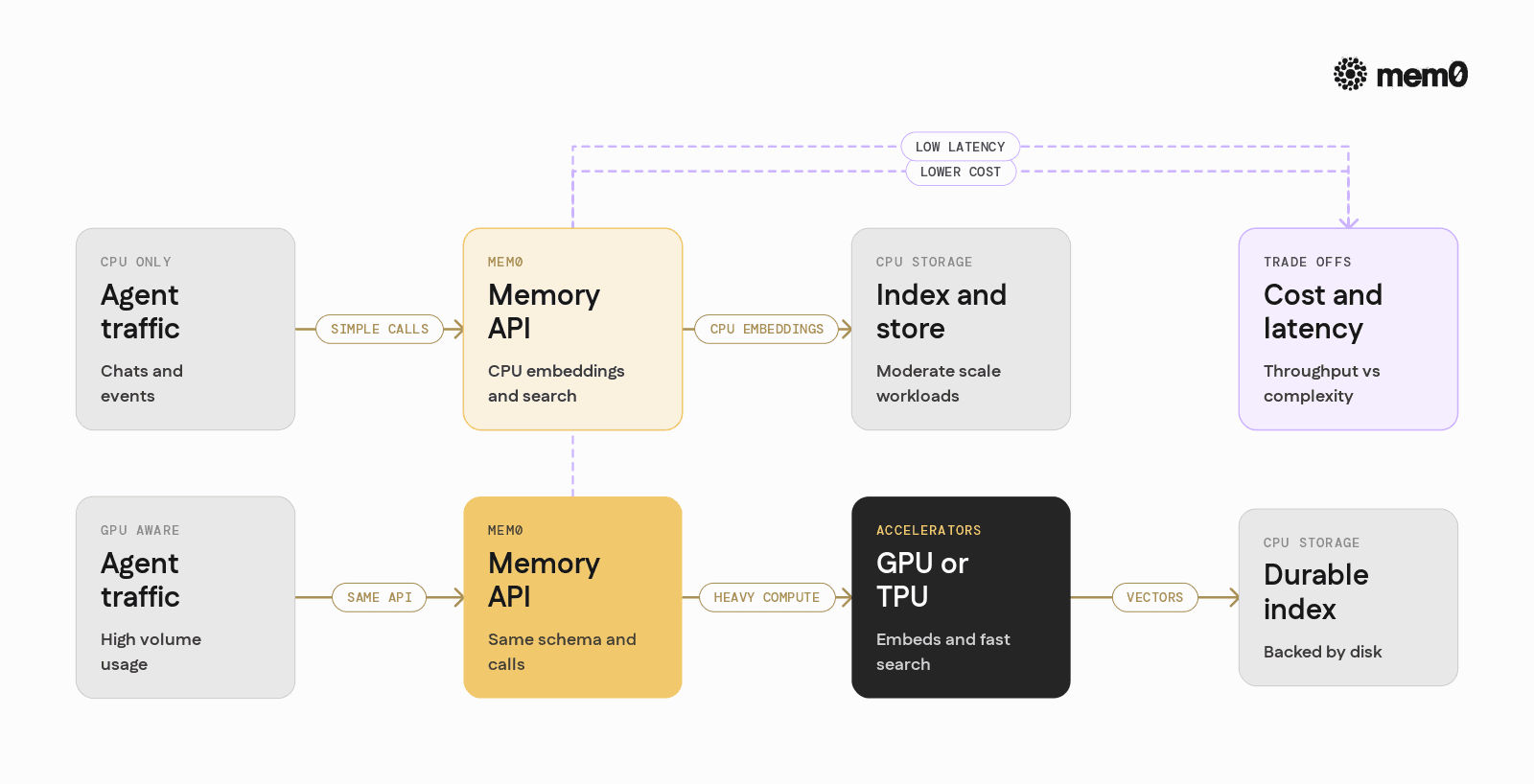
The table below summarizes typical trade-offs between CPU-only deployments and GPU-aware deployments where Mem0 coordinates with accelerators.
Aspect | CPU-only Mem0 stack | GPU-aware Mem0 stack |
|---|---|---|
Embedding throughput | Lower, often fine for small workloads | High, good for large-scale or real-time ingestion |
Retrieval latency | Adequate for small to medium collections | Very low for large collections with GPU-based search |
Cost profile | Lower hardware cost, more CPU instances | Higher per-node cost, fewer nodes for same throughput |
Operational complexity | Simpler to deploy and scale | More complex scheduling and resource allocation |
Best suited for | Prototypes, smaller agents, moderate traffic | Production agents with strict latency and high volume |
Memory durability | Backed by disk or managed services | Same as CPU stack, GPUs used only for compute |
Both patterns are valid. For many teams, a CPU-only Mem0 is a practical default, with GPU-aware enhancements added once traffic, corpus size, or latency requirements justify the extra complexity.
Limitations of GPU-centered memory patterns
Using GPUs or TPUs in memory pipelines introduces trade-offs that are important to acknowledge:
Cost sensitivity
Running embedding and retrieval on GPUs can be expensive if not batched and scheduled carefully
Over-provisioned GPU memory pipelines may sit idle when traffic is uneven
Stateful vs stateless boundaries
GPUs are well suited for stateless computation
Long-term memory is inherently stateful and durable, which fits disks and databases more than GPUs
VRAM constraints
Keeping large indices entirely in GPU memory is limited by VRAM size
Most systems require tiered storage, where only hot subsets live on GPU
Operational complexity
Mixing model serving, embedding generation, and vector search on shared GPUs increases the risk of contention
Careful load shedding, priority queues, and observability become necessary
TPU integration constraints
TPUs are often tied to specific clouds and frameworks
Building a generic memory system that relies too heavily on TPUs reduces portability and operational flexibility
These limitations do not prevent memory from working with GPUs or TPUs. They shape how the architecture should be designed: accelerators handle the math, CPUs and storage handle the state, and Mem0 coordinates the higher-level memory logic.
How Mem0 fits into GPU and TPU-based agent stacks
Mem0’s role in GPU and TPU environments can be summarized as:
A stable memory schema and retrieval API
A pluggable embedding layer that can call GPU- or TPU-hosted models
A way to bridge long-term user and system state with transient GPU computations
Key design advantages for AI engineers:
Decoupled concerns: Memory logic and identity tracking live in Mem0, not inside every model call. GPUs focus on inference and vector math.
Backend flexibility: The embedding and retrieval backends can switch from CPU to GPU or TPU without changing agent code.
Cross-session continuity: Memories persist across requests, sessions, and even infrastructure changes. GPUs and TPUs can scale up or down independently.
Personalization at scale: With Mem0 managing user memories, LLMs running on GPUs or TPUs can serve deeply personalized responses without manually juggling histories in application code.
The result is an architecture where memory is not an afterthought bolted onto a GPU stack. Instead, Mem0 becomes the central memory layer that connects durable state with high-performance compute.
Frequently Asked Questions
Q. Can Mem0 itself run on GPUs or TPUs?
Mem0 is designed primarily as a memory and orchestration layer that runs on CPUs and persistent storage. It integrates with GPU- or TPU-backed services for embeddings, vector search, and LLM inference, while keeping long-term state off accelerators.
Q. When should a team connect Mem0 to GPU-based embeddings?
GPU-based embeddings make sense when the system ingests large volumes of text or needs very low latency for personalization. For small workloads or prototypes, CPU embeddings are often sufficient and simpler to operate.
Q. How does Mem0 work with TPU-hosted models?
Mem0 interacts with TPU-hosted models through standard APIs. The TPU is responsible for inference tasks such as embeddings or summarization, and Mem0 consumes those outputs to create, update, and retrieve structured memories.
Q. Is there a use case for storing memories directly on GPUs?
Some high-performance setups keep a hot subset of vectors in GPU memory for ultra-low-latency retrieval. However, long-term durability still relies on CPU-based storage, so GPU-resident memory is best treated as a cache rather than the primary memory store.
Q. Does using GPUs change how agents query Mem0?
The Mem0 interface remains the same whether the underlying embeddings and search run on CPU or GPU. Agents call add, search, and related methods, while Mem0 routes compute-heavy parts to the appropriate accelerators behind the scenes.
Q. How does Mem0 help control GPU costs in memory-heavy systems?
Mem0 centralizes memory logic so that teams can optimize GPU usage in a single place, for example by batching embedding requests or offloading some summarization tasks to cheaper models. This avoids scattering GPU-heavy operations across multiple services and makes cost tuning much easier.
Further Reading
—
Mem0 is an intelligent, open-source memory layer designed for LLMs and AI agents to provide long-term, personalized, and context-aware interactions across sessions.
Get your free API Key here: app.mem0.ai, or
Self-host mem0 from our open-source GitHub repository.
—
More on Agent Memory

How to Read Memory Benchmarks
How to read AI memory benchmarks: what LoCoMo, LongMemEval, BEAM, and agentic tests measure, where scores go wrong, and how to find the correct benchmark for your use case.
20 min read

The Problem After Retrieval: Why Agents Misuse the Memories They're Given
Five papers show LLM agents often misuse the memories they retrieve. What the research says, how much to trust it, and what builders can do.
13 min read

What Is Memory Staleness in AI? Causes, Risks & Solutions
Understand memory staleness in AI agents, why outdated information leads to errors, and the best techniques to maintain accurate long-term memory.
9 min read





Aashi Dutt
She is a senior technical content writer at Mem0. She covers agent memory architecture and the engineering decisions behind building agents that actually remember. She experiments with new features and turns research into posts developers can put straight to use.
Start building with memory
Free tier, no card