

·
12 min read
On this page
Context queries are the primary interface between an AI agent and everything it has seen before. They decide what the model can remember, how it reasons across sessions, and how it acts consistently.
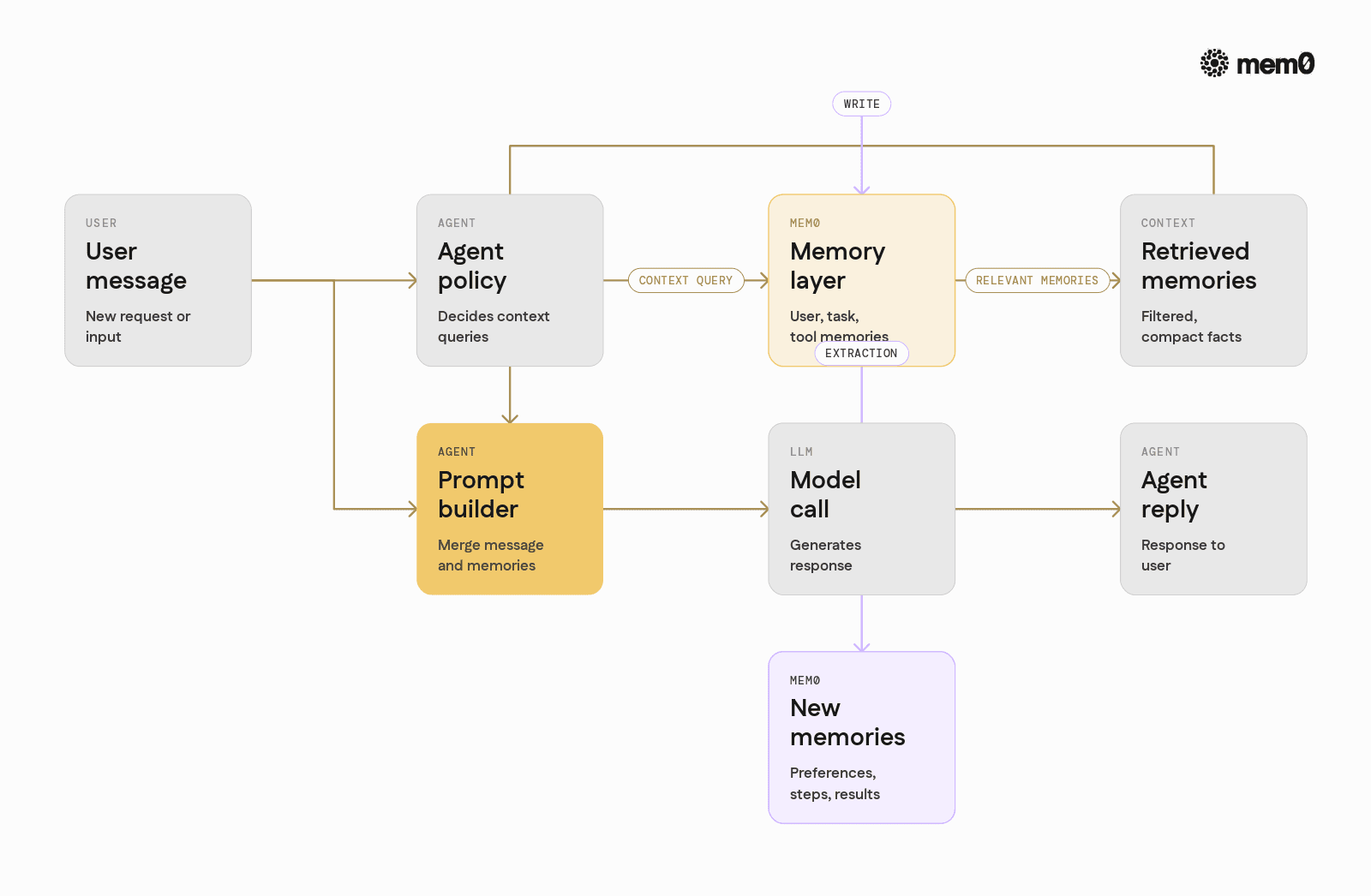
Fig: How Mem0 sits between the agent and the LLM
Most production failures in agents look like context problems:
The agent forgets previous user preferences
It repeats the same questions across sessions
It ignores past API results or tool output
It hits context window limits and truncates something important
All of these point back to how context is queried, stored, and shaped before reaching the model.
This article walks through how context queries work, where they break, and how Mem0 provides a concrete memory layer for production agents.
What context queries are in practice?
In theory, context is "everything relevant passed to the model". However, in practice, context queries are explicit calls from the agent to a memory source to fetch information that should influence the current decision.
Typical context queries look like:
"What has this user asked in the last 30 days?"
"What tools did I call for this task earlier in the workflow?"
"What did the CRM API return for this customer last week?"
"What steps did I take previously in this multi-step task?"
They fall into a few categories:
User memory: History of user preferences, profile, and constraints across sessions.
Task memory: Long-running workflows, intermediate outputs, and failures.
Knowledge memory: Extracted facts from documents, tools, or external data.
Agent memory: How the agent itself has been corrected or steered over time.
Each category has different query patterns and lifetime expectations. Confusing them often leads to bad retrieval and wasted tokens.
From chat logs to structured memory
Naive agents use raw conversation history as context. They pass the last N messages into the prompt and rely on the model to figure out what matters.
This breaks quickly:
Context exceeds model limits
Important facts are buried in irrelevant small talk
Relevance is hard to control or explain
Different types of memory have different lifecycles
Production agents need an explicit memory layer that:
Stores atomic, structured memories, not just raw chat logs
Supports semantic and metadata-based queries
Controls what gets written and when it expires
Provides efficient read patterns for agents to use repeatedly
Mem0 is built specifically as that memory layer. It focuses on encoding user and task-level information into queryable memories that can be pulled back into context selectively.
Patterns for context queries in agents
Most agents combine several retrieval patterns.
1. Sequential history slices
The simplest pattern is sliced history:
Take the last K messages
Optionally summarize older ones
Attach to the prompt
This works for short-lived conversations but fails when:
Facts appear far back in history
Conversations span days or weeks
The same user interacts in different contexts or channels
2. Semantic search over memories
Here, each memory is a compact unit, for example:
"User prefers metric units."
"User's default project is 'infra-automation'."
"Last data export for this user failed due to a permission error."
The agent issues a semantic search query like:
User preferences for notifications and formatting for this session.
Relevant memories are returned based on embeddings and metadata.
This reduces noise and allows cross-session retrieval.
3. Hybrid context: semantic and scoped filters
Better context queries combine:
Semantic similarity
Structured filters (user_id, session_id, topic, memory_type)
Time-based constraints (last 30 days, last N events)
This allows patterns like:
"All billing-related issues for this user in the last 90 days."
"Latest tool outputs for the current task_id."
"Corrections to the agent's behavior within this workspace."
Mem0 exposes this hybrid pattern as first-class behavior, rather than leaving it to custom database logic for each team.
How Mem0 structures memories for context queries
Mem0 treats memory as first-class data with identity, metadata, and lifecycle. Instead of storing raw chat logs, agents write atomic memories along with structured context.
A memory in Mem0 includes:
memoryNatural language text representing the fact or eventuser_idIdentity for per-user memoriesmetadataArbitrary key-value data liketype,topic,source,session_idcreated_atandupdated_attimestampsembeddingBehind the scenes, used for semantic search
For example, an agent might store:
This design supports precise retrieval:
Fetch all
type="preference"memories for a userFilter by
topicand sort by timeCombine preferences, past errors, and task context for a prompt
Mem0 also provides automatic extraction helpers so agents do not have to manually decide what to store on every turn. It can convert long chat logs into discrete memories with stable identifiers.
Integrating Mem0 into an agent for context
The core pattern is:
User sends a message
Agent queries Mem0 for relevant memories
Agent builds a prompt using the current message and memories
LLM returns a response
Agent writes new memories based on the interaction
Below is a minimal Python example that illustrates this loop.
💡 Before you start: you need a Mem0 API key
This example shows the essence of context queries with Mem0:
Search with a natural language query and structured filters
Format memories into a compact section for the system prompt
Persist new memories after each turn
In a production setup, the extraction step is usually more sophisticated and uses the LLM or Mem0's own tools to detect stable preferences, identifiers, and long-lived facts.
Context query patterns with Mem0
Mem0 supports multiple query shapes that map directly onto agent patterns.
Per-user preference context
Retrieve stable user preferences to enforce consistent behavior:
Task-scoped context
Attach a task_id or workflow_id to memories as the agent executes steps:
Tool output recall
Store and recall expensive tool outputs instead of recomputing:
Mem0's consistent metadata structure makes these patterns easy to implement repeatedly across agents and services.
Comparing context query strategies
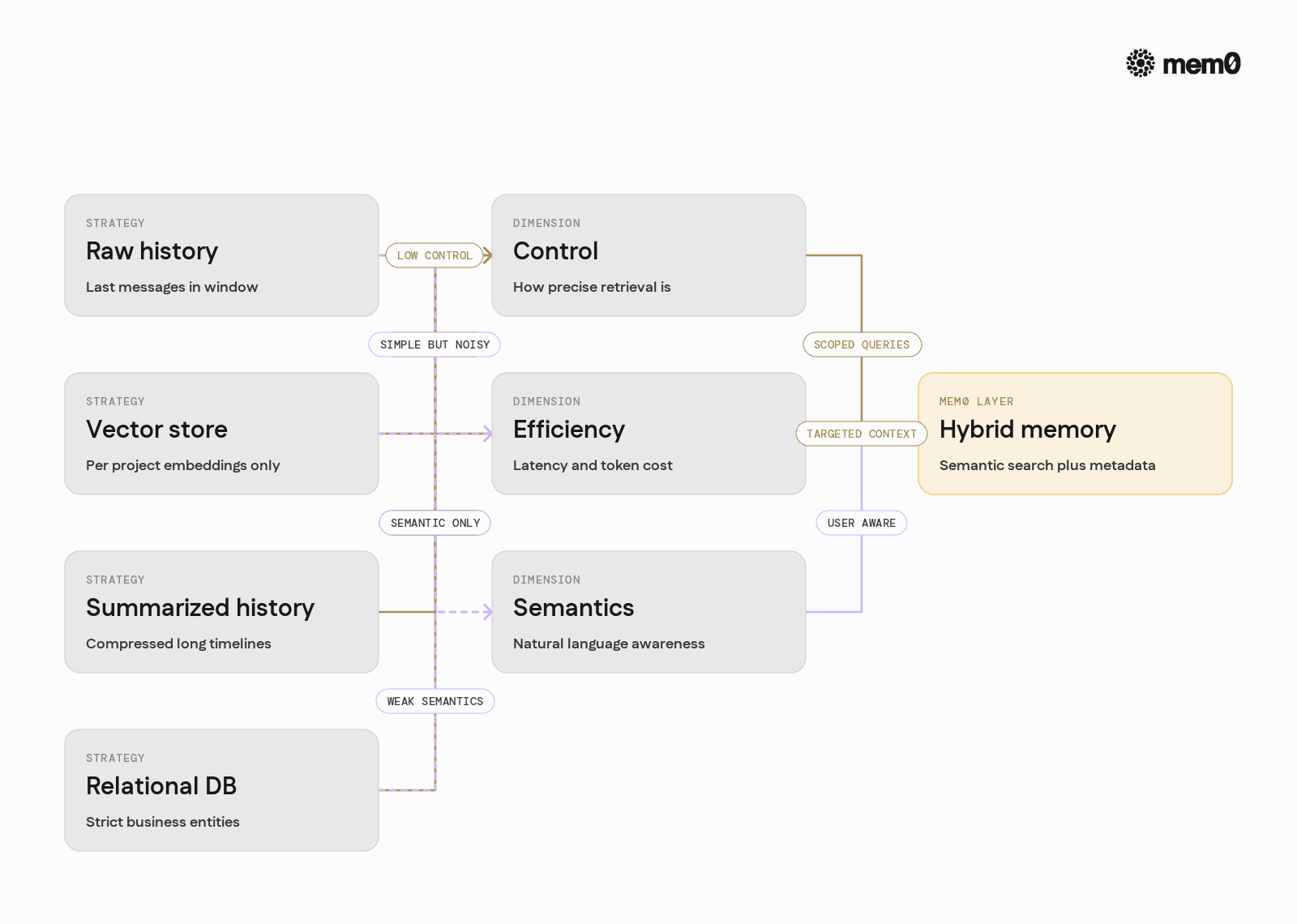
Fig: Common strategies with Mem0 as a structured memory layer
Different approaches to context queries have very different properties.
The table below compares common strategies with Mem0 as a structured memory layer.
Strategy | Strengths | Weaknesses | Good for |
|---|---|---|---|
Raw chat history window | Simple to implement, no extra infra | Breaks on long sessions, noisy, hard to control | Prototypes, short-lived sessions |
Manual vector store per project | Flexible, full control over schema | Custom glue code, inconsistent across services | Single-team experimental agents |
Summarized history only | Token-efficient, compresses long timelines | Summaries may omit critical details, hard to query precisely | High-level assistants |
External relational DB only | Strong structure, joins, analytics | Poor semantic search, hard to map to natural language | Strict business entities |
Mem0 memory layer (hybrid) | Semantic search with metadata, user-scoped memory, structured lifecycle | Requires explicit memory model design | Production agents with long-term context |
In practice, production setups often combine multiple strategies. Mem0 is built to be the dedicated layer that handles semantic and user-scoped memory while integrating cleanly with existing databases and tools.
Limitations of context queries as a pattern
Context queries solve a real memory gap, but they are not a universal fix.
There are structural limitations to this pattern that engineers should account for.
Over-retrieval noise: Pulling too many memories into the prompt can confuse the model. Relevance scoring is imperfect, and agents can latch onto outdated or marginally relevant details.
Stale or conflicting memories: Users change preferences, data changes, and workflows evolve. Without explicit invalidation or expiry, context queries may surface obsolete facts that lead to wrong actions.
Latent dependencies on memory shape: The way memories are phrased and chunked affects retrieval. Two logically equivalent memories with different wording can have different embeddings and relevance behavior.
Inference-time cost: Every memory query adds latency, and every extra token in a prompt adds cost. Aggressive use of context queries for every turn can hurt responsiveness in production.
Ambiguous responsibility boundaries: If agents rely entirely on implicit context, it becomes harder to reason about behavior. Some constraints belong in business logic or tool implementations, not as soft memory hints.
Mem0 helps address several of these pain points through metadata filters, time-based querying, and structured memory. However, the core limitations come from how LLMs consume context and how agents are designed, so they must be treated as architectural concerns.
How Mem0 fits into production agent stacks
In production, Mem0 typically sits between the agent orchestrator and the rest of the stack:
Upstream, it integrates with chat frontends, workflow engines, and tool runtimes.
Downstream, it can reference identifiers from relational databases, object stores, and external APIs.
Common integration points include:
Storing user and workspace preferences as explicit memories
Recording corrections and feedback to adapt agent behavior
Persisting tool outputs or intermediate steps for reuse
Providing cross-session continuity for the same user across channels
Several best practices emerge for using Mem0 with context queries:
Model memory types explicitly: Use
type,topic, andsourcemetadata to differentiate preferences, tasks, tools, and feedback.Keep memories atomic: Store single facts or small clusters of related information, not full transcripts.
Design queries from the agent's perspective: Start from the information the agent needs to answer, then shape Mem0 queries accordingly.
Control memory growth: Use expiry policies, soft deletion, and periodic cleanup for short-lived task memories.
Monitor retrieval quality: Log Mem0 queries and LLM prompts, and review them for noise, omissions, and inconsistent behavior.
With these patterns, Mem0 turns context queries from an ad hoc retrieval step into a predictable, testable part of the agent architecture.
Frequently Asked Questions
What are context queries in AI agents?
Context queries are explicit retrieval calls that an agent makes to fetch relevant past information before responding. They shape what the model can "remember" from user history, tasks, and tool outputs at inference time.
When should an engineer introduce a memory layer like Mem0?
A dedicated memory layer becomes important when conversations span multiple sessions or when user-specific preferences and task states must persist. If agents are repeating questions or ignoring past corrections, it is time to introduce structured memory.
How does Mem0 differ from a basic vector store for context?
Mem0 stores memories with user-level identity, metadata, and lifecycle semantics, not just raw chunks. It provides first-class APIs for per-user and per-task retrieval, which simplifies agent integration and keeps memory behavior consistent across services.
How many memories should be loaded into context for each request?
Most production agents work well with a small set of highly relevant memories, often between 5 and 30 entries depending on the model and prompt design. It is better to focus on precise filters and relevance than to maximize the number of retrieved items.
Can context queries replace a relational database or source of truth?
No, context queries and memory layers are not a replacement for authoritative data stores. They complement them by capturing interaction-level and preference-level information that is impractical to model in rigid schemas.
How should engineers handle conflicting or outdated memories?
Agents should prefer explicit user statements in the current turn over past memories, and memory storage should include expiry or update logic. Mem0's metadata and timestamps make it easier to filter by recency and to override older entries with newer ones.
Further Reading
—
Mem0 is an intelligent, open-source memory layer designed for LLMs and AI agents to provide long-term, personalized, and context-aware interactions across sessions.
Get your free API Key here: app.mem0.ai or
Self-host mem0 from our open-source GitHub repository.
—
More on Context Engineering
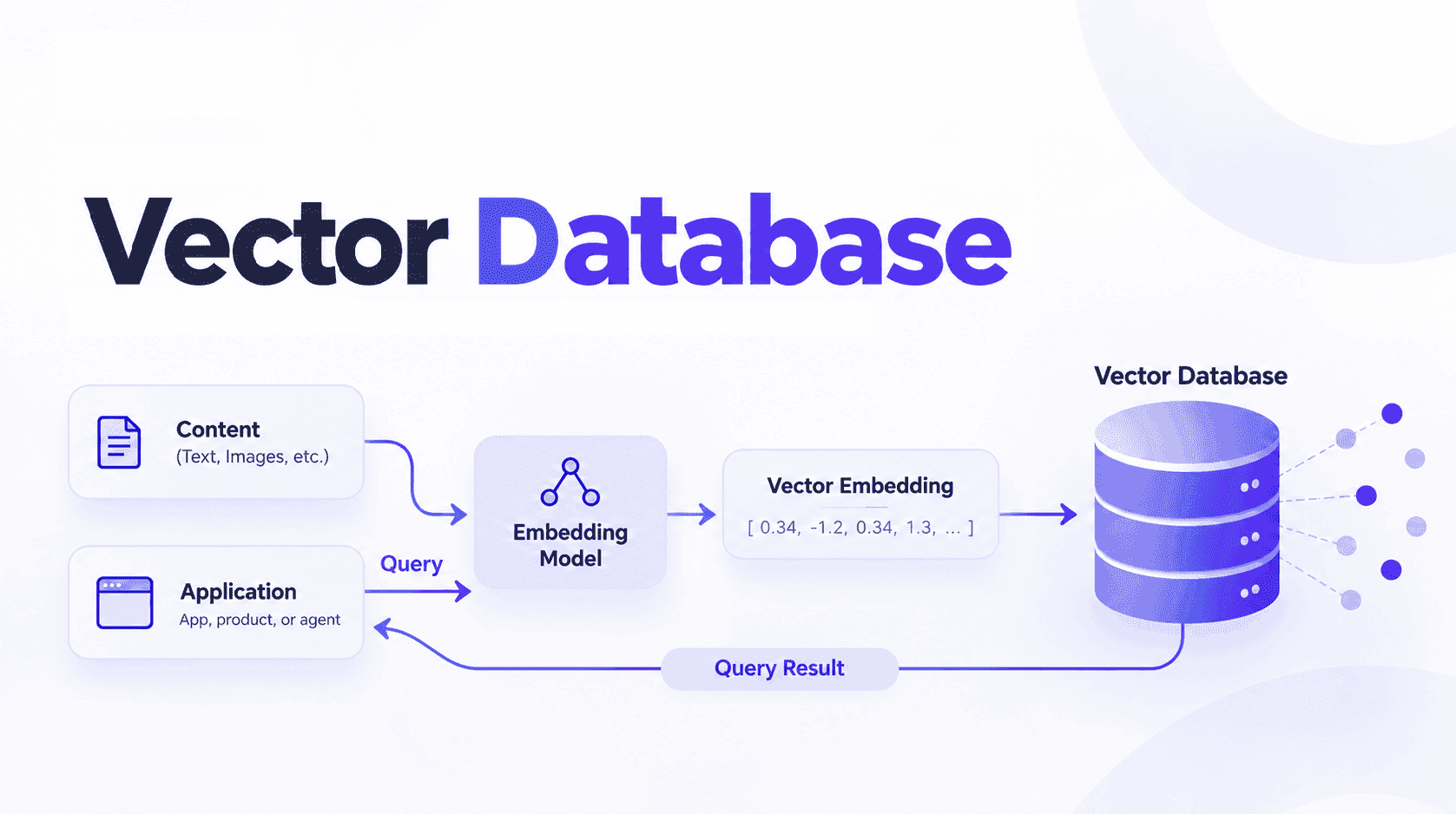
What Is a Vector Database & How Does It Work? Use Cases and Agent Memory
Learn what vector databases are, how they use embeddings and similarity search for RAG and AI agents, plus where a dedicated memory layer adds value.
25 min read

How to Reduce LLM Token Costs: The Persistent Memory Approach
Most LLM token costs come from re-sending conversation history. Here's how persistent memory cuts that by 60-90% with token counts and working code.
8 min read
Loop Engineering for AI Agents: Memory-First Design
Learn what loop engineering is, token-rich vs token-poor loops, and how Mem0 solves core memory challenges for production AI agents.
10 min read




Aashi Dutt
She is a senior technical content writer at Mem0. She covers agent memory architecture and the engineering decisions behind building agents that actually remember. She experiments with new features and turns research into posts developers can put straight to use.
Start building with memory
Free tier, no card