

·
13 min read
On this page
Production chatbots live or die by how well they remember. Users expect an assistant that can recall past preferences, ongoing tasks, and previous mistakes, even across sessions and devices. Traditional prompt engineering and longer context windows help only for a while, then costs and latency start to dominate.
This article explains how memory works in AI chatbots from an engineering perspective, where common approaches fail, and how Mem0 provides a dedicated memory layer that fits into real-world agent stacks.
What memory means for AI chatbots
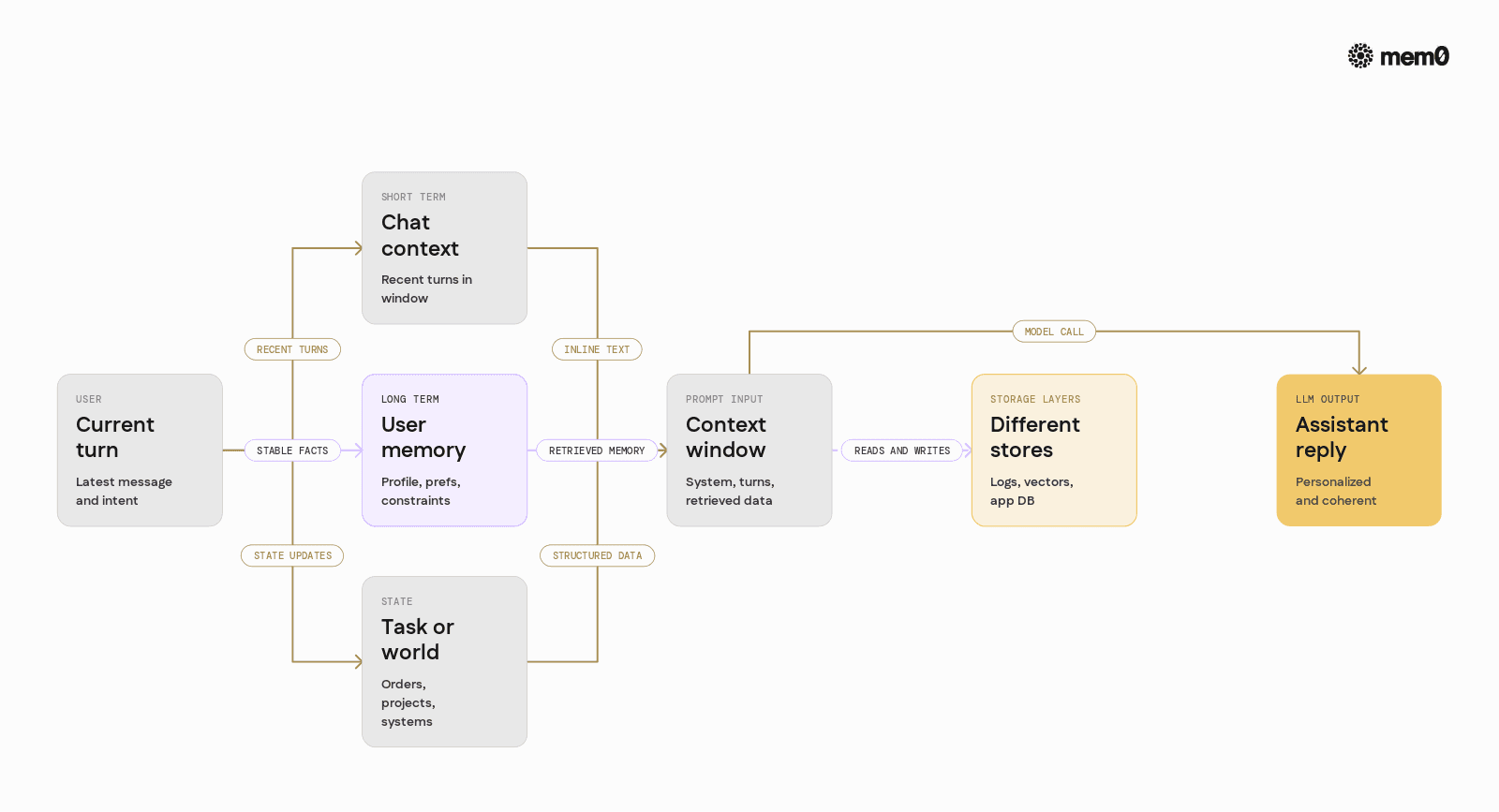
"Memory" in chatbots covers more than just longer prompts. In practice, AI engineers usually need three related capabilities:
Short‑term conversation context: Recent turns in a chat session that keep the model coherent. For example, resolving pronouns and continuing a thought.
Long‑term user memory: Stable facts like user profile, preferences, constraints, and recurring workflows. For example, "Alice prefers PDFs over Word docs."
Task and world state: Structured information about ongoing processes and external systems. For example, order status, current project, or agent-specific notes.
These map to different storage and retrieval patterns. Trying to solve all of them only with longer prompts or "stuff more into the context window" usually leads to:
Token bloat and higher latency
Repetition and hallucination when older details are forgotten
Difficulty tracking and updating facts over time
A proper memory system must treat memory as first-class data, not just larger prompts.
The baseline model context window
The simplest kind of "memory" comes from the model's context window. Every request includes a prompt, which may contain:
System and instruction messages
The latest N user and assistant turns
Some summarised or retrieved history
This works well for:
Single-turn Q&A
Short troubleshooting sessions
Simple task flows where everything happens in one window
Once the chat exceeds the context window, engineers start to:
Truncate earlier messages
Summarise earlier messages and keep only the summary
Heuristically keep "important" turns
This reveals three limits:
Cost and latency scale linearly with tokens
Information is lost once truncated
No cross-session identity, unless the client manages user IDs and storage
The context window is necessary, but insufficient for persistent memory.
Common patterns for memory in chatbots
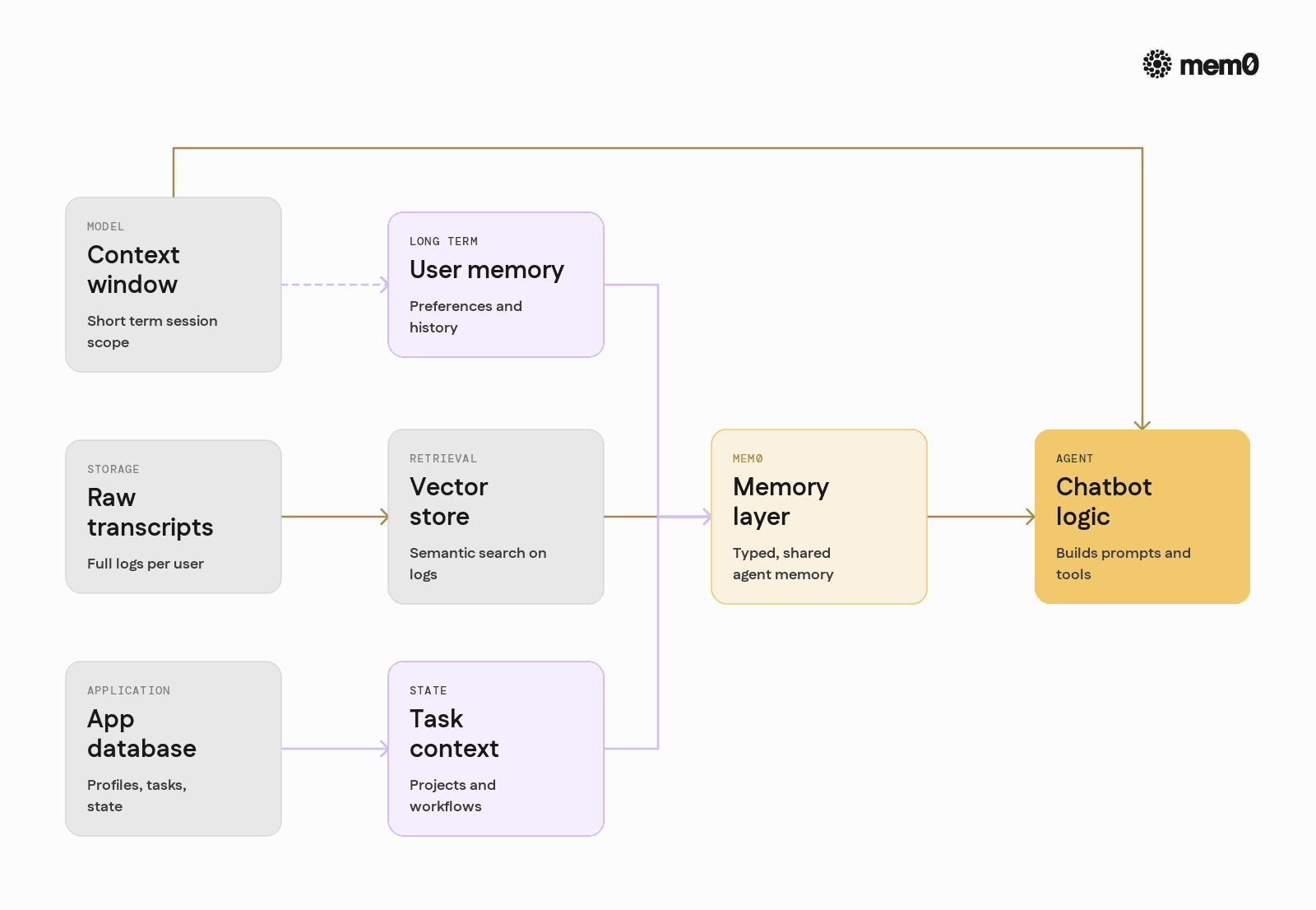
Most production agents build on the context window with one or more storage patterns.
1. Raw transcript storage
The simplest pattern is storing complete conversation logs in a database or logging system. To reuse them:
Retrieve a user’s past messages by ID
Optionally summarise them
Add them to the context for the next query
This approach is:
Easy to implement
Good for compliance and debugging
Weak for retrieval and personalization
Limitations:
Retrieval is usually basic (time-based, not semantic)
Summarisation is lossy and non-incremental
No structure for user profile vs transient context
2. Vector store-based semantic memory
Another common pattern uses embeddings and a vector database:
Generate embeddings for user or message chunks
Store embeddings with metadata
At query time, embed the new message and run KNN similarity search
Inject top results back into the prompt
This improves relevance for long-tail queries and cross-session recall. Yet it still behaves largely as a retrieval layer, not a true memory system:
It rarely distinguishes between stable facts and transient chatter
Facts are not updated, only added
Memory management (deduplication, decay, merging) is manual
3. Application database as "memory."
Many teams store user state in first-class tables:
users: profile fields and preferencessettings: notification, language, access controltasksorprojects: ongoing workflows and status
This gives durability and structure, but requires:
Custom schema design for every new agent feature
Glue code to keep the chatbot and database in sync
Manual reasoning about what belongs in SQL vs in prompts
The core trade-off appears:
While structured data is reliable and cheap, it is expensive to maintain and evolve.
While prompt-based context is flexible, it is ephemeral and costly.
Most systems end up combining all three patterns, but with ad hoc logic scattered across services.
The core memory problems in production agents
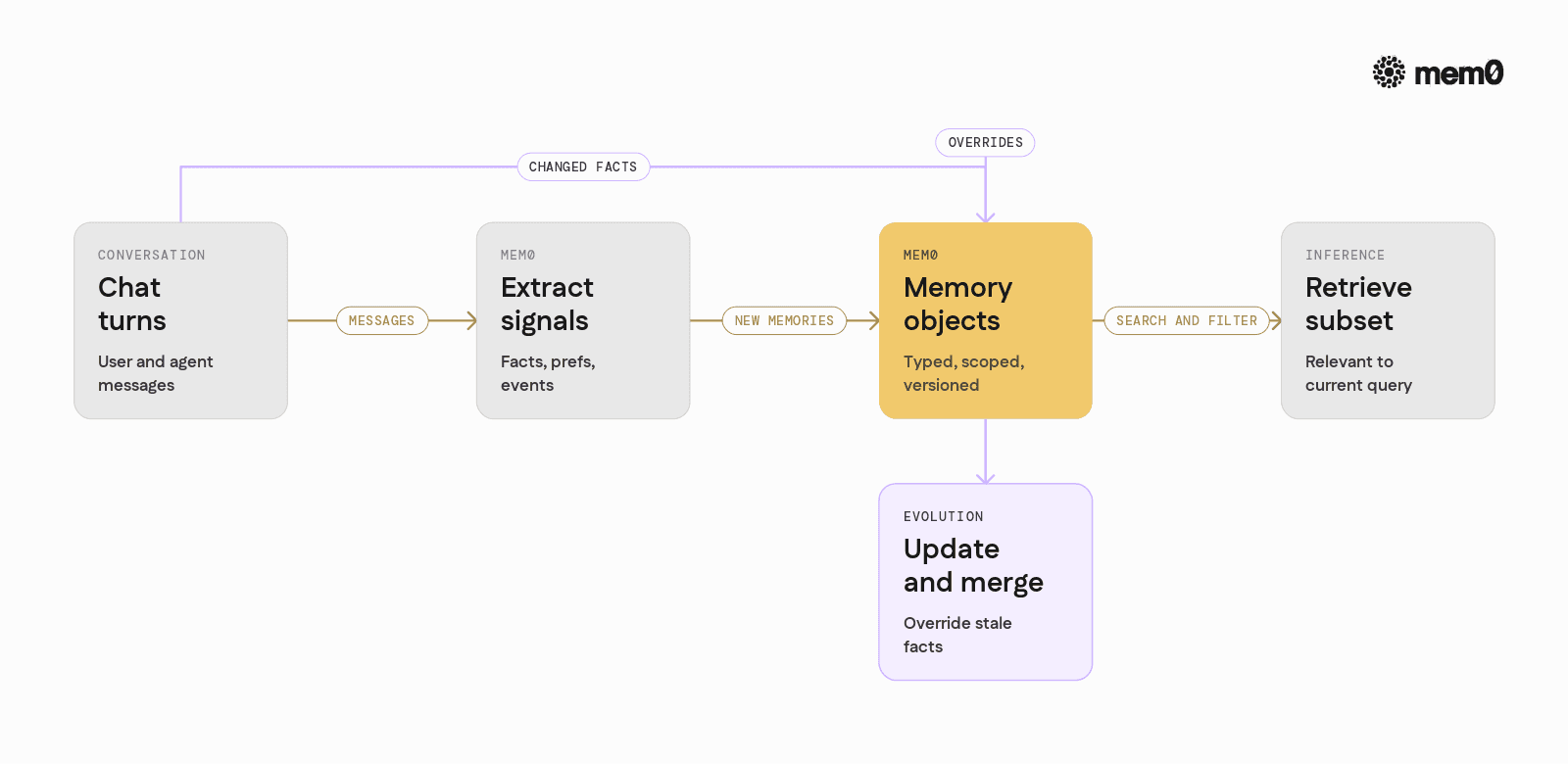
For AI engineers, the hard part is not storing data. The problems are around the meaning and usage of memory.
1. What should be remembered
Not every user utterance deserves long-term storage. A good memory system must decide:
Is this a stable preference?
Is this a one-off constraint?
Is this only relevant to the current turn?
If everything is stored, retrieval becomes noisy and expensive. If too little is stored, personalization vanishes.
2. How memory evolves
Facts change over time. A user might say:
“I am a frontend engineer at Acme Corp.”
Then six months later:
“I just moved to backend engineering at Acme Corp.”
A naive vector store will keep both lines. At retrieval time, the model sees conflicting information. Real memory must handle:
Updates and overrides
Time-aware relevance
Merging and deduplication
3. How agents use memory consistently
When multiple agents or tools interact with the same user, they must see a coherent view of memory:
Chatbot agent
Scheduling agent
Knowledge search agent
Without a shared memory layer, each component builds its own partial "memory," leading to fragmentation and inconsistent behavior.
4. Operational constraints
Production systems also need:
Low latency and predictable cost
Observability into what was stored and retrieved
Access control and per-tenant separation
Migration paths when models and embeddings change
A memory solution must fit into the engineering stack, not just into the prompt.
Mem0 as a dedicated memory layer
Mem0 provides a memory layer designed specifically for LLMs and agents, with a few key design principles:
Memory as a first-class object: Mem0 treats memories as typed, queryable objects linked to identities and scopes, not just raw text chunks.
Automatic extraction from conversations: It uses LLMs and heuristics to extract meaningful facts, preferences, and events from chat logs, instead of storing every token.
Semantic and structured retrieval: Memories can be retrieved by semantic similarity, metadata filters, or both. The system can return concise, relevant snippets, not entire logs.
Cross-session and cross-agent sharing: Multiple agents can read and write to the same memory space, so a user’s preferences or history are visible across workflows.
Pluggable persistence: Mem0 can run as a managed API or self-hosted service. It integrates with common databases and vector stores while providing a stable API surface.
In production terms, Mem0 sits between the agent orchestration layer and storage, handling memory extraction, storage, and retrieval so application code stays focused on business logic.
Integrating Mem0 into a chatbot
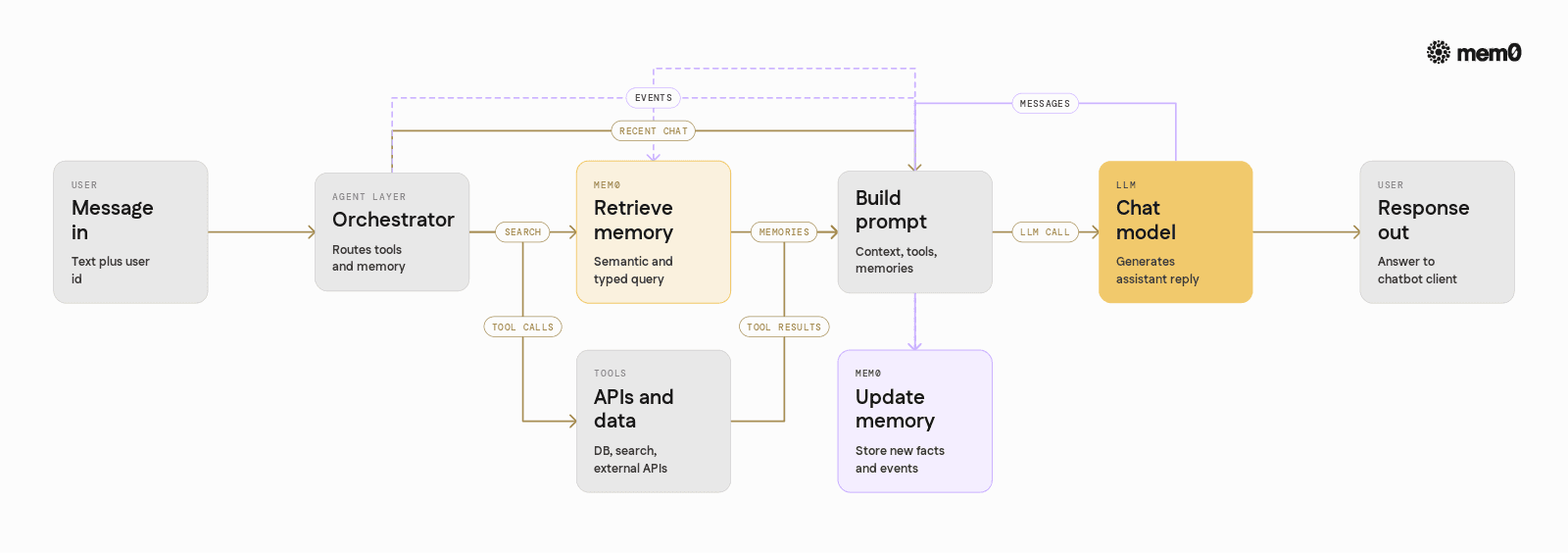
A typical integration follows three steps:
Identify the user and session: Provide a stable identifier so Mem0 can attach memories to a user across sessions.
Write memories from conversations or events: Send selected messages or structured events to Mem0. It extracts and stores relevant pieces.
Read memories at inference time: Fetch relevant memories given the current query and include them in the model prompt.
Below is a concrete Python example that uses Mem0 with a simple OpenAI‑style chatbot.
Setup
Python example
💡Get the Mem0 API key and OpenAI API Key to follow along
This example shows a minimal loop:
mem0_client.searchretrieves memories using the current query and user ID.mem0_client.addsends conversation snippets for extraction and storage.The LLM sees only the relevant memories, not the entire history.
In production, you can refine:
What to send into
add(high-signal messages, explicit user profile updates, tool outputs)How to format memories in the prompt (group by type, time, source)
When to retrieve (every turn, only for some intents, or only when context is sparse)
Comparison of memory approaches
The table below compares common memory patterns against a dedicated memory layer like Mem0.
Approach | Persistence scope | Retrieval quality | Update handling | Cross‑agent sharing | Operational complexity |
|---|---|---|---|---|---|
Raw transcript in DB | Long-term, full logs | Low, time-based | Manual summarisation | Difficult, needs custom logic | Low |
Vector store on messages | Long term, unstructured | Medium, semantic similarity | Poor, conflicting facts | Possible but noisy | Medium |
Application DB (custom schema) | Long term, structured | High, explicit queries | Good, but manual mapping | Good if designed for it | High |
Context window only | Short term per session | High, but limited history | N/A, no persistence | None, per session only | Low |
Mem0 memory layer | Long-term, typed memories | High, semantic and typed | Built-in extraction and sync | Native, shared memory per user | Medium |
Mem0 does not replace existing databases. It complements them by acting as a semantic, LLM-aware layer for long-term conversational memory and personalization. Application data that belongs in a relational schema stays there, while user preferences, open-ended notes, and conversationally described states move into Mem0.
Architecting an agent around Mem0
A typical production architecture that uses Mem0 has the following flow:
Request entry: The user sends a message with an associated
user_idand optional session or tenant metadata.Memory retrieval: The agent orchestrator calls Mem0 with the user ID and query, retrieving a small set of relevant memories.
Tool and data retrieval: In parallel, the agent queries internal APIs, search indices, or databases as needed.
Prompt construction: The orchestrator builds a prompt containing:
System instructions
Recent conversation turns
Mem0 memories
Tool results
Model call: The LLM receives the full augmented context and produces a response.
Post-processing and memory update: The response is parsed, tool calls are executed if needed, and selected parts of the interaction are sent back to Mem0 to update memory.
With this design:
Memory extraction is centralized and consistent
Agents can scale horizontally without each instance managing its own memory logic
Adding a new agent becomes simpler, since it can read from the same memory pool for a given user
Mem0 also supports multi-tenant and multi-agent setups by scoping memories with additional identifiers, such as application ID or agent type.
Limitations of memory in chatbots
Even with a dedicated memory layer, memory in chatbots has inherent limits that engineers should acknowledge.
Memory is probabilistic, not perfect: Extraction uses models and heuristics, so some relevant details may be missed or incorrectly stored. Engineers should avoid assumptions that the system will always remember every important detail.
Conflicting or outdated information: Users change their minds or provide incorrect information. Even with update handling, some contradictions will surface. Careful prompt design and recency-aware retrieval are still needed.
Privacy and compliance constraints: Storing user data for long-term personalization raises privacy considerations. Engineers must design consent flows, retention policies, and data deletion mechanisms around the memory layer.
Model alignment with stored memory: The LLM may ignore supplied memories, misinterpret them, or fabricate new ones. Proper instructions, examples, and evaluation are essential to ensure the model uses memory responsibly.
Cost and latency trade-offs: Memory retrieval and larger prompts add overhead. Intelligent strategies, such as retrieving only for certain intents or limiting memory size, are needed to keep SLAs acceptable.
Domain-specific schemas: Some domains require highly structured state beyond general conversational memory. Domain models in SQL or other stores remain necessary for complex transactional systems.
Mem0 addresses many mechanical aspects of memory extraction, storage, and retrieval, but agent design and prompt engineering are still critical.
Frequently Asked Questions
Q. What kind of information should be stored as memory in a chatbot?
Memory works best for stable user preferences, recurring tasks, and important facts that will matter across sessions. Transient details or one-off questions are usually better left in the short-term context window.
Q. How often should an agent read from Mem0 during a conversation?
Most agents retrieve memory on every user turn, which keeps personalization consistent. In latency-sensitive systems, retrieval can be limited to specific intents or to the first message in a session, then cached.
Q. Can Mem0 replace my existing database or vector store?
No, Mem0 is designed to complement existing storage. Use your database for transactional and structured application data, and use Mem0 for long-term conversational memory and user-specific context that is naturally described in language.
Q. How does Mem0 handle updates to user preferences or facts?
Mem0 tracks memories over time and can prioritize more recent or higher-confidence entries. When a user explicitly changes a preference, the new information can override older entries at retrieval time instead of returning conflicting facts.
Q. Is Mem0 suitable for multi-agent or tool-using systems?
Yes, Mem0 works well as a shared memory layer that multiple agents can read and write. Each agent can use its own metadata or scopes, while still sharing user-specific knowledge like preferences and identity details.
Q. When should I avoid using long-term memory in a chatbot?
In contexts where privacy is critical, and users do not consent to persistent storage, or where interactions are strictly stateless (for example, one-off utilities), long-term memory is unnecessary and potentially risky. In those cases, rely only on the context window and ephemeral data.
Further Reading
—
Mem0 is an intelligent, open-source memory layer designed for LLMs and AI agents to provide long-term, personalized, and context-aware interactions across sessions.
Get your free API Key here: app.mem0.ai, or self-host mem0 from our open-source GitHub repository.
—
More on Agent Memory

How to Read Memory Benchmarks
How to read AI memory benchmarks: what LoCoMo, LongMemEval, BEAM, and agentic tests measure, where scores go wrong, and how to find the correct benchmark for your use case.
20 min read

The Problem After Retrieval: Why Agents Misuse the Memories They're Given
Five papers show LLM agents often misuse the memories they retrieve. What the research says, how much to trust it, and what builders can do.
13 min read

What Is Memory Staleness in AI? Causes, Risks & Solutions
Understand memory staleness in AI agents, why outdated information leads to errors, and the best techniques to maintain accurate long-term memory.
9 min read





Aashi Dutt
She is a senior technical content writer at Mem0. She covers agent memory architecture and the engineering decisions behind building agents that actually remember. She experiments with new features and turns research into posts developers can put straight to use.
Start building with memory
Free tier, no card