

·
13 min read

On this page
Most modern AI agent frameworks handle tools, routing, and orchestration reasonably well. The persistent problem is memory. An agent can call dozens of tools, process hundreds of user turns, and span multiple sessions. Without a deliberate memory strategy, the agent either forgets important context or becomes unstable from unbounded history.
Frameworks typically ship with a few built‑in patterns, such as simple conversation history or vector search. Those patterns work in demos but often collapse under production constraints like latency budgets, privacy rules, versioned schemas, and multi‑tenant workloads.
A functional production agent needs memory that is explicit, queryable, and durable across sessions, not just token history inside a single LLM call. This post walks through how frameworks think about memory, what patterns actually work in production, where they fall short, and how a dedicated memory layer such as Mem0 simplifies those choices.
How AI agent frameworks usually handle memory
Most agent frameworks treat “memory” as one of three things:
Token history buffer: Append user and assistant messages until hitting a token limit, then truncate from the oldest messages. This is easy to implement and fits the chat paradigm, but it forgets long‑term details.
Vector store and retrieval: Store chunks of conversation and documents as embeddings, then retrieve the top‑k by similarity each turn. This improves recall of older context but needs thoughtful chunking, metadata, and ranking.
Custom state objects: Expose some “state” abstraction where the agent or tools can write structured data. This is flexible but pushes schema design and persistence problems onto the application.
In practice, frameworks focus on orchestration, so memory features are thin layers around a database or vector store. Multi‑session identity, deduplication, and memory quality control are left to application code.
That split is exactly where production agents hurt. The same information gets stored in multiple places, private data mixes with shared context, and there is no consistent way to ask “what does this agent know about this user?”
Core dimensions of a memory strategy
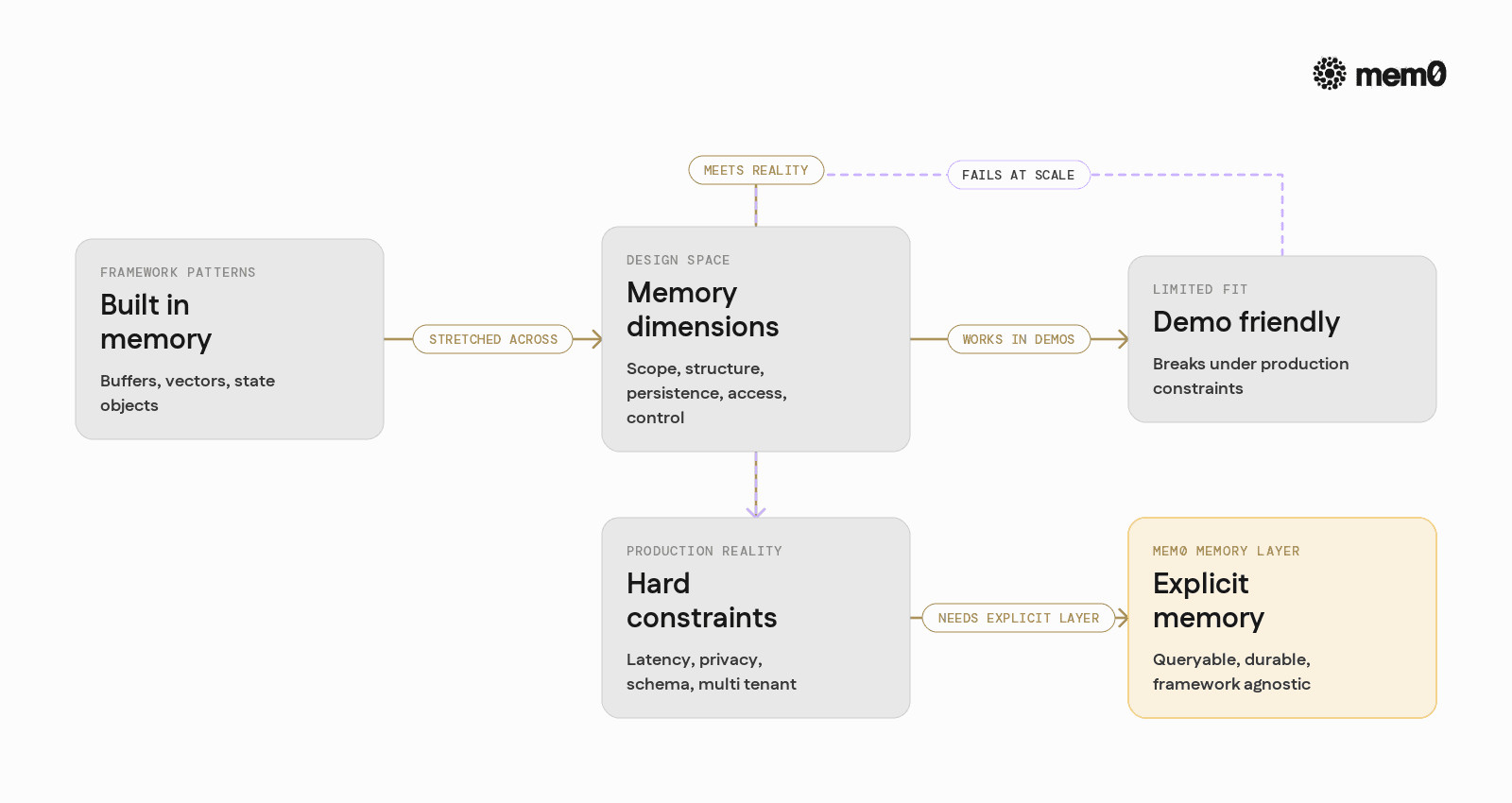
Before picking tools or libraries, it helps to frame memory as a set of design choices:
Scope
Per‑session: short‑term context for an ongoing task.
Per‑user / per‑agent: long‑term profile and preferences.
Global: shared domain knowledge across many users.
Structure
Unstructured: raw text history.
Semi‑structured: events with metadata.
Structured: typed entities and relationships.
Persistence
Ephemeral: lost at process restart.
Durable: stored in a database or dedicated memory service.
Versioned: updatable with history preserved for audits.
Access pattern
Sequential: feed the last N messages.
Retrieval: rank and fetch relevant memories.
Programmatic: query by keys or filters.
Control
Automatic: the system decides what to store and when.
Manual: the agent or tools explicitly write memory.
Hybrid: heuristics plus agent‑driven writes.
A sound strategy matches these dimensions to application needs. A support agent may need durable, per‑user memory with strong privacy, while an internal code assistant might rely more on per‑session context and shared domain memory.
Mem0 focuses on being an explicit, queryable memory layer that supports these dimensions independently of any single framework, while still integrating cleanly with them.
Common memory patterns in agent frameworks
Several recurring patterns appear across agent architectures. Each has a clear place where it works and a clear boundary where it fails.
1. Conversation buffer
Maintain a list of recent messages and include them in the LLM prompt.
Strengths:
Extremely simple to implement.
No extra infrastructure beyond the agent framework.
Weaknesses:
Token limits force aggressive truncation.
Zero notion of long‑term preferences or facts.
Cannot query or audit history outside LLM prompts.
2. Summarized history
Compress older conversation into a summary and keep a short buffer of recent messages.
Strengths:
Extends effective context window without huge token costs.
Works entirely within the LLM and framework.
Weaknesses:
Summaries lose details and exact references.
Hard to update when facts change, such as new addresses or roles.
No per‑user identity; it is just “conversation so far.”
3. Naive vector memory
Embed messages or document chunks into a vector store and fetch top‑k by similarity each turn.
Strengths:
Recovers relevant snippets from long history.
Decouples retrieval size from LLM context window.
Weaknesses:
Embedding all messages can be expensive.
Similarity alone often surfaces redundant or irrelevant content.
Update semantics are unclear; conflicting facts often coexist.
4. Framework state stores
Some frameworks expose a key‑value or state object that tools can write to.
Strengths:
Lets agents store structured data like
user_preferencesorcurrent_project.Programmatic reads and writes are straightforward.
Weaknesses:
Schema design, migrations, and indexing are left to the application.
No opinion about long‑term versus short‑term data.
Does not solve “what should be stored” or “how to rank what matters.”
Mem0’s angle is to combine the retrieval benefits of vector memory, the clarity of structured state, and the operational concerns of persistence and identity, without locking into a single framework.
Production constraints that break naive memory
In real deployments, several constraints emerge that were not visible in early prototypes.
Latency and throughput
Memory retrieval and writes sit directly on the critical path for each agent turn. Naive vector search across thousands of unfiltered chunks introduces unpredictable latency, especially under load. Naive summaries that require a new LLM call every few messages do the same.
Agents need memory calls that are predictable and tunable. This requires control over how much is stored, how it is indexed, and how queries are constrained for each use case.
Privacy and isolation
In multi‑tenant systems, memory must be scoped by identity, tenant, and sometimes project or channel. Storing everything in a single vector index with ad‑hoc metadata filters becomes brittle under compliance or security reviews.
Separate memory collections with explicit policies, per‑user IDs, and clear audit trails become critical. Mixing user PII with shared domain documentation in the same store is often unacceptable.
Evolving schemas
Over time, teams realize they need structured memories such as billing_info, tool_usage_history, or feature_flags. Schemas evolve, and the memory layer must follow without losing history or corrupting records.
Ad‑hoc objects in framework state do not scale well without tooling for migrations and versioning. A dedicated memory layer can centralize these concerns.
Multi‑agent and multi‑tool settings
In orchestration setups where multiple agents collaborate, memory must support both shared and private spaces. Each agent needs some private scratchpad, some shared knowledge, and access to user‑specific details.
Simple per‑session logs fall apart here. Memory must be a first‑class component rather than a side effect of conversation logging.
What Mem0 is and how it fits agent frameworks
Mem0 is an open‑source memory layer focused on AI agents and LLM applications. It provides:
Unified memory API for storing and retrieving long‑term and short‑term memories.
Identity and scoping so every memory is attached to users, agents, or custom entities.
Hybrid storage with both vector search and structured metadata filtering.
Updates and consolidation so new facts can update or replace older ones.
Framework‑agnostic design that works alongside any agent orchestration layer.
From the perspective of an agent framework, Mem0 is a service or library that answers:
“What should I remember from this interaction?”
“What relevant things do I already know before answering this request?”
Mem0 handles the representation, indexing, and persistence. The framework focuses on routing and tools. This separation is similar to how frameworks handle LLM providers or databases, but specialized for memory semantics.
Reference architecture with Mem0
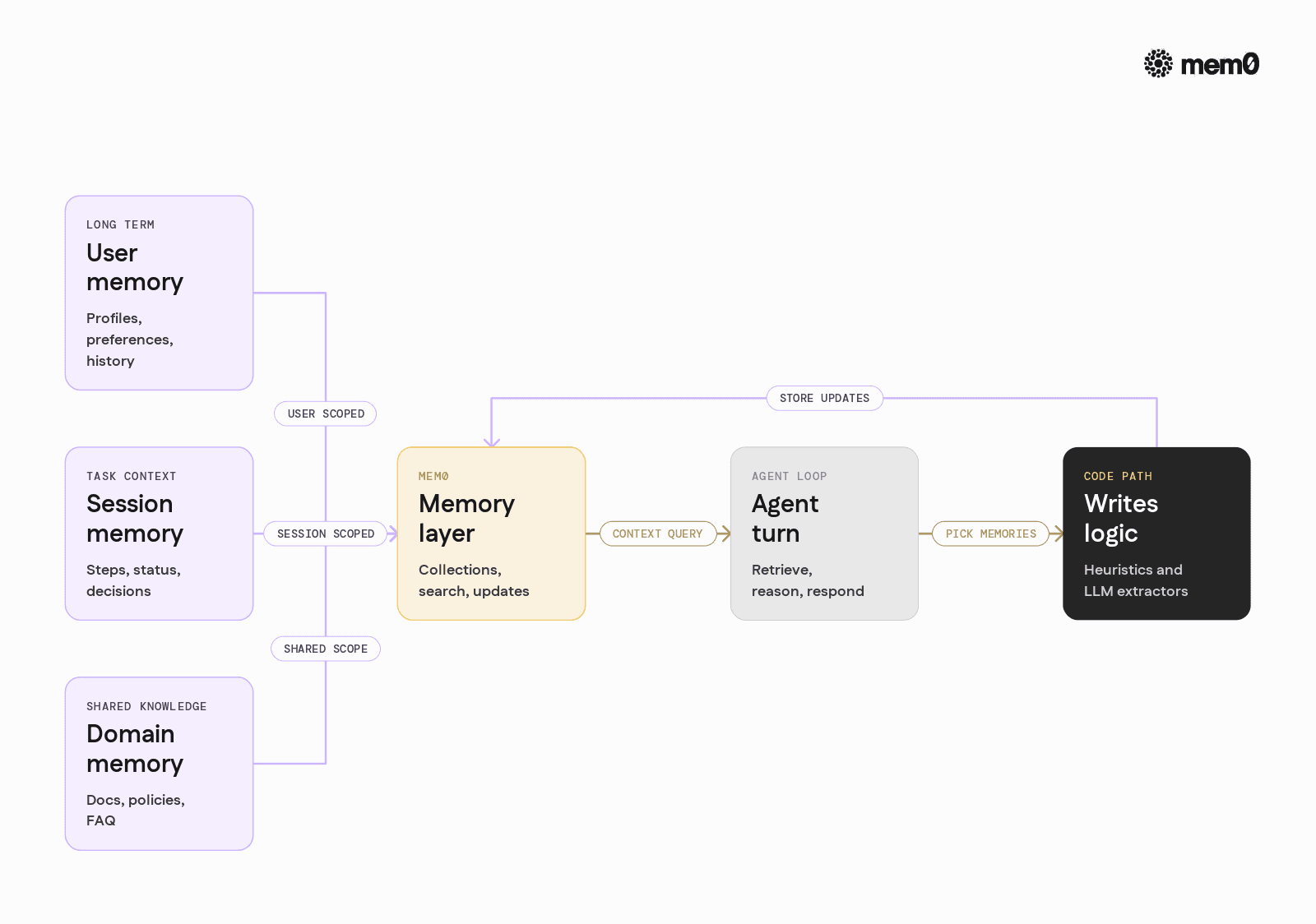
A typical production setup can be organized along these lines:
Per‑user, long‑term memory: A Mem0 collection keyed by
user_idthat stores stable facts, preferences, recurring tasks, and personal history.Per‑session, task memory: A collection keyed by
session_idthat stores intermediate reasoning, decisions, and status for long‑running tasks.Shared domain memory: Collections for documentation, policies, or FAQ‑like knowledge, often loaded from external sources and refreshed periodically.
Agent integration
At the beginning of a turn, query Mem0 for relevant long‑term and task memories.
In the middle of tool execution, write explicit events when tools discover stable facts.
After a response, optionally store distilled memories from the exchange.
Mem0 exposes APIs to orchestrate these steps in a controlled way without tying them to any specific framework lifecycle.
Python integration example with Mem0
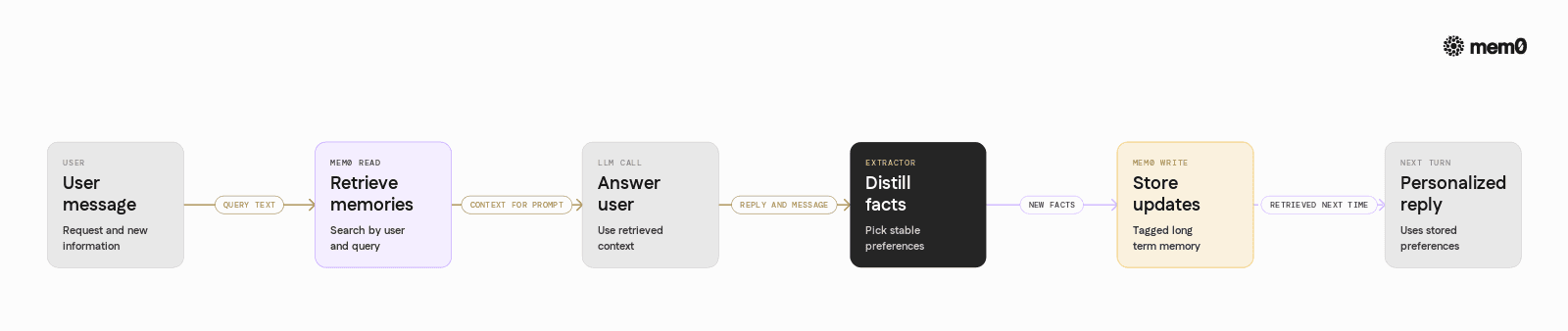
The following example shows how to integrate Mem0 into a Python agent loop using an OpenAI‑compatible LLM. It demonstrates:
Setting up a Mem0 client
Initializing a per‑user memory collection
Reading relevant memories before an LLM call
Writing new memories after the LLM responds
This code shows a simple memory strategy:
Mem0 stores long‑term user facts.
The agent retrieves those facts and conditions the system prompt.
A secondary LLM call distills new memories to write back.
In a framework context, the same pattern can run inside custom middleware or a callback that wraps each turn.
Comparison of memory strategies for production agents
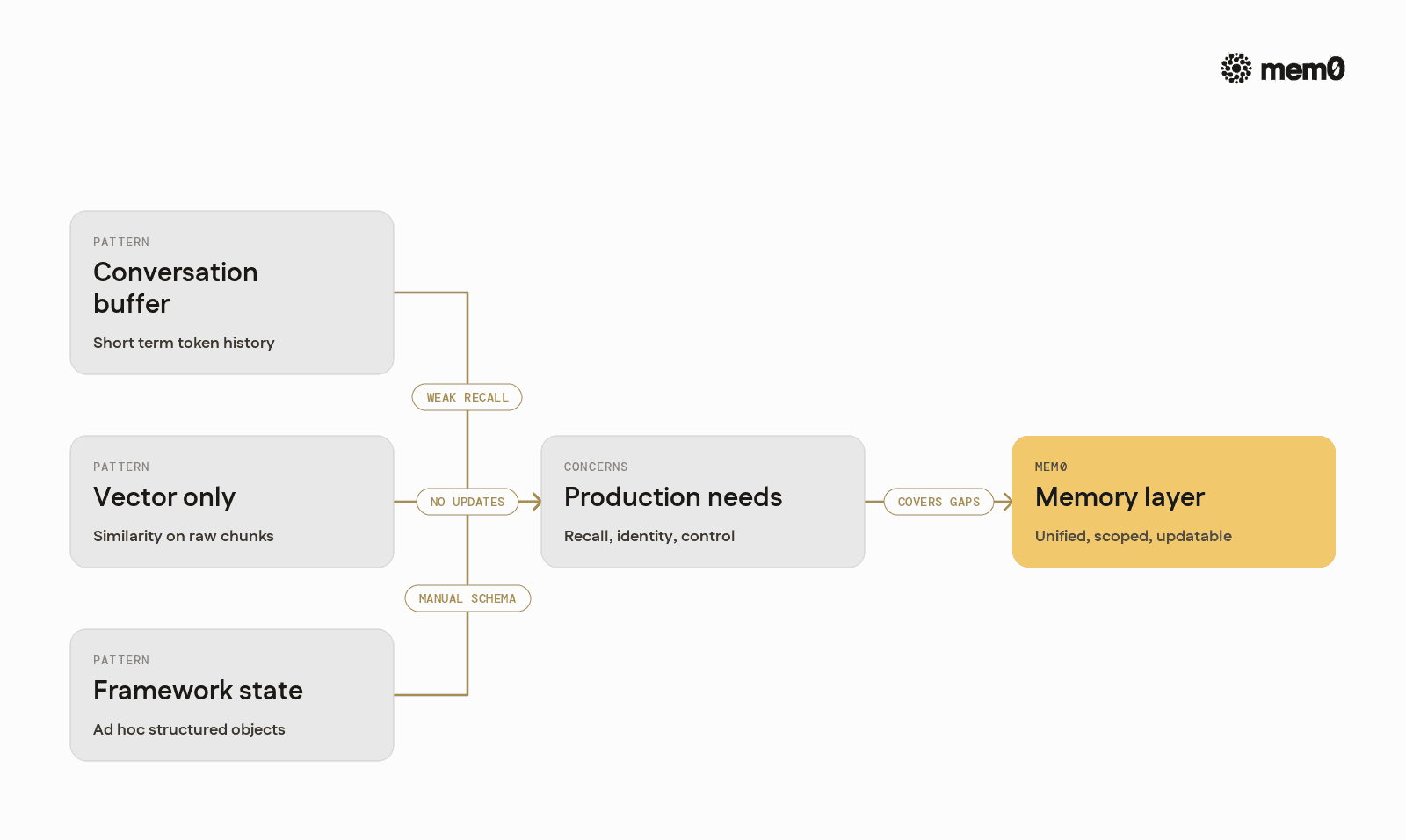
The table below compares typical framework memory patterns with a Mem0‑centric approach.
Aspect | Conversation Buffer | Vector Store Only | Framework State Only | Mem0 as Memory Layer |
|---|---|---|---|---|
Long‑term recall | Poor | Moderate | Good if structured manually | Strong with retrieval and updates |
Identity / scoping | Per session only | Metadata filters only | Manual, ad‑hoc | First‑class user and agent identity |
Queryability outside LLM | Weak | Good for text | Good but requires schema management | Strong for text and structured metadata |
Update semantics | Truncation only | None, conflicting facts accumulate | Manual application logic | Built‑in consolidation and updates |
Framework portability | Tied to session impl | Tied to specific vector store | Tied to chosen framework | Framework‑agnostic API |
Operational control | Minimal | Depends on embeddings / index | Depends on DB and app code | Explicit collections, limits, and policies |
Multi‑agent support | Limited | Possible but manual | Possible with careful design | Dedicated collections and identity scoping |
Mem0 does not replace conversation buffers or framework state entirely. Instead, it augments them with durable, identity‑aware memory that can be shared across frameworks and services.
Limitations of common memory patterns
Even with a mature memory layer, certain patterns have inherent limits that engineers should understand.
LLM‑only summarization: Summaries are lossy by construction. They cannot guarantee recovery of specific facts or support exact queries. They work best as a compression mechanism, not as the sole source of truth.
Catch‑all vector memory: Dumping all messages and tool outputs into a single index leads to noisy retrieval. Similarity search cannot substitute for explicit structure and tags when precision is required.
Agent‑driven free‑form memory writes: Allowing the LLM to decide what is “important” without constraints can fill memory with redundant or trivial facts. Successful patterns typically combine rules, metadata, and review mechanisms.
Single scope memory: A monolithic memory bucket for all users, sessions, and agents complicates privacy and relevance. Production systems benefit from explicit separation between personal, session, and shared knowledge.
Over‑eager persistence: Storing every interaction increases cost and creates compliance burdens. Memory strategies should define what types of information are allowed to persist, and for how long, independent of implementation.
Mem0 addresses many of the operational and modeling concerns, but application‑level policies still matter. Teams must define which facts are allowed to be remembered, how they should be updated, and when they should be forgotten.
Frequently Asked Questions
Q.What types of memory should a production agent maintain?
Most agents benefit from at least three types of memory: long‑term user profiles, per‑session task context, and shared domain knowledge. Separating these helps manage privacy, relevance, and cost.
Q. How often should an agent write to memory?
Frequent writes increase cost and can pollute memory with noise. A practical approach is to store only stable facts, preferences, and durable events, and to use heuristics or a dedicated LLM pass to decide what qualifies.
Q. When is simple conversation history enough?
A conversation buffer can be sufficient for single‑session tasks where users do not return and long‑term personalization is not needed. As soon as multi‑session interactions, personalization, or compliance become requirements, explicit memory becomes necessary.
Q. How does Mem0 work with existing agent frameworks?
Mem0 acts as a separate memory layer that frameworks call before and after each turn. It stores and retrieves memories through a simple API, so orchestration, tools, and routing logic can remain in the framework while memory is centralized.
Q. Why not just use a raw vector database as memory?
Vector databases provide similarity search but not identity, update semantics, or policies about what to store. Mem0 adds those missing semantics on top of storage, which simplifies application code and improves consistency across agents.
Q. How does Mem0 handle changes to user information over time?
Mem0 supports updates and consolidation, so new facts can replace or modify older ones rather than piling up conflicting entries. This enables agents to work with a coherent view of user state while still retaining history when needed.
Further Reading
—
Mem0 is an intelligent, open-source memory layer designed for LLMs and AI agents to provide long-term, personalized, and context-aware interactions across sessions.
Get your free API Key here: app.mem0.ai or self-host mem0 from our open source github repository.
—
More on Integrations

OpenClaw vs. Hermes Agent Memory in 2026: Which Should You Choose?
OpenClaw and Hermes take opposite bets on agent memory - live-injected vs. frozen snapshots, file-based vs. structured tools. Here's how each works, where each breaks, and how Mem0 fits both.
12 min read
How Memory works in Hermes Agent (and how to improve it)
How Hermes Agent stores 3,575 characters of memory in two frozen markdown files, and where the design breaks.
11 min read
Hermes AI Agent: How to Add Memory to Your Workflow
Set up Mem0 as a memory provider for Hermes Agent in one command. Covers Platform and OSS modes, the 3 tools it adds, and how prefetch-caching keeps it at zero added latency.
8 min read




Aashi Dutt
She is a senior technical content writer at Mem0. She covers agent memory architecture and the engineering decisions behind building agents that actually remember. She experiments with new features and turns research into posts developers can put straight to use.
Start building with memory
Free tier, no card