This blog is written in collaboration with Ajeet Singh Raina, Developer Advocate @Docker.
Say you booked a flight ticket through an AI travel agent last week, and somewhere in that conversation, you mentioned that you're a vegetarian and you always go for an aisle seat. The agent took it all in stride and had you booked within a couple of minutes.
When you come back this week to sort out the return flight ticket, though, it greets you as if the two of you have never spoken. You find yourself explaining the whole thing over again. That gap isn't a badly built app; it's how the model underneath works. Large language models (LLMs) are stateless. They carry nothing from one conversation into the next. They don't lay down memories the way a person does, so every session starts from a blank slate.
Mem0 is an open-source memory layer that sits between your app and the LLM. Each memory is tied to an ID, a user, or an agent, so it recalls the right context for the right person. It works beneath any agent and any app those agents build, which is a compelling enough promise that 100,000+ developers are already building on it.
Adding memory is the easy part. The part developers skip past is what happens next. That memory fills up with real details about your users and your work, and the agent reading and writing it usually runs right on your laptop, next to everything else you've got. We built this kit to fix that. It gives any agent a Mem0 memory layer, runs fully local with no cloud keys, and boxes the agent inside a microVM, so a bad day stays contained instead of spreading to the rest of your machine.
How does Mem0 work?
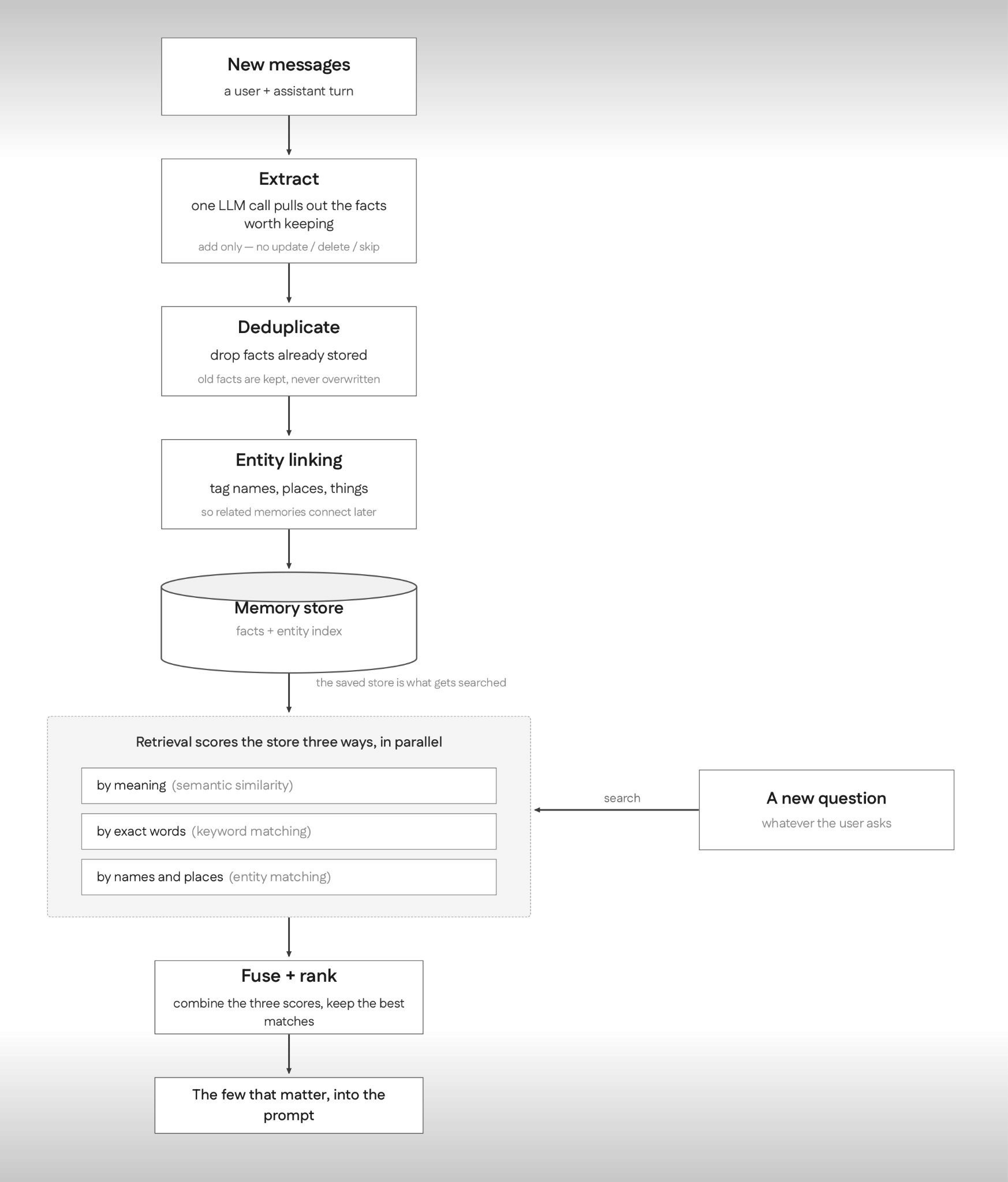
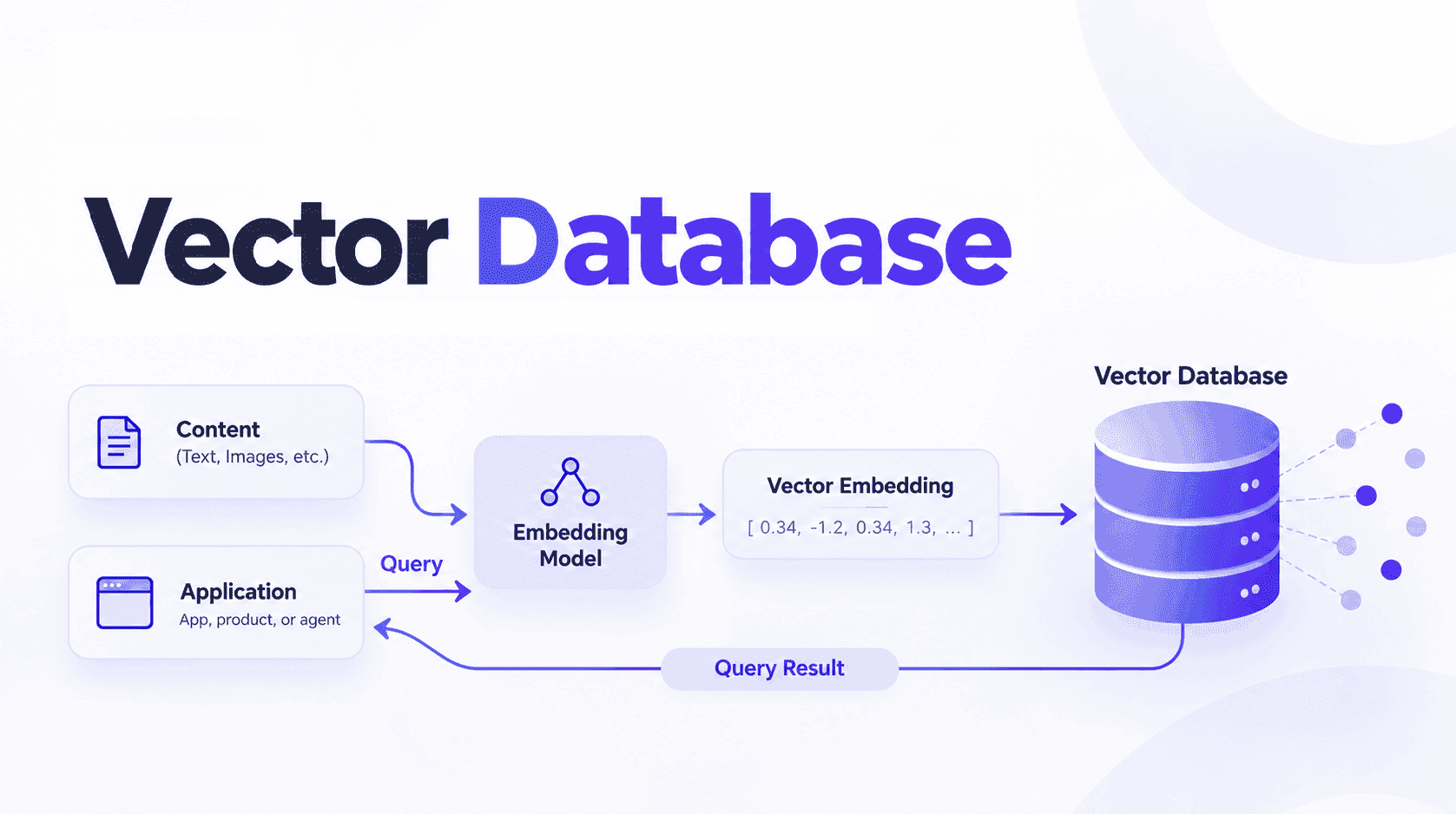
Mem0's flow splits into two paths, and the diagram follows both.
Writing comes first. When a new user-and-assistant turn arrives, a single LLM call extracts the facts worth keeping and adds each one as its own record. This key design choice from Mem0’s latest algorithm only “adds”. It does not pause to decide whether each fact should overwrite or delete something older, which is what the previous version did. If a fact changes later, the new version is stored alongside the old one rather than replacing it, so the history of how something changed is never thrown away. From there, deduplication drops anything already stored, and entity linking tags the names, places, and things each fact mentions so related memories can connect later. Whatever comes through lands in the memory store.
Reading is the shorter path, and it is where the token savings come from. A new question is scored against the store three ways at once: by meaning, by exact words, and by the entities it mentions. Those signals are fused into a single ranking, and only the handful of memories that actually matter are pulled back and placed into the prompt. Nothing replays the whole conversation, which keeps each call lean rather than growing with every turn.
Here’s the quickstart:
#Mem0's hosted quickstart: store a couple of facts, then ask about them.
from mem0 importMemoryClientclient = MemoryClient()
# A short back-and-forth you want the agent to remember.
messages = [
{"role":"user","content":"I'm a vegetarian and allergic to nuts."},
{"role":"assistant","content":"Got it, I'll remember that."},]
# Save it under an ID forthisperson,so it comes back forthem next time.
client.add(messages,user_id="user123")
# Later,askinplain language and Mem0 returns the relevant facts.
client.search("What are my dietary restrictions?",user_id="user123")
#Mem0's hosted quickstart: store a couple of facts, then ask about them.
from mem0 importMemoryClientclient = MemoryClient()
# A short back-and-forth you want the agent to remember.
messages = [
{"role":"user","content":"I'm a vegetarian and allergic to nuts."},
{"role":"assistant","content":"Got it, I'll remember that."},]
# Save it under an ID forthisperson,so it comes back forthem next time.
client.add(messages,user_id="user123")
# Later,askinplain language and Mem0 returns the relevant facts.
client.search("What are my dietary restrictions?",user_id="user123")
#Mem0's hosted quickstart: store a couple of facts, then ask about them.
from mem0 importMemoryClientclient = MemoryClient()
# A short back-and-forth you want the agent to remember.
messages = [
{"role":"user","content":"I'm a vegetarian and allergic to nuts."},
{"role":"assistant","content":"Got it, I'll remember that."},]
# Save it under an ID forthisperson,so it comes back forthem next time.
client.add(messages,user_id="user123")
# Later,askinplain language and Mem0 returns the relevant facts.
client.search("What are my dietary restrictions?",user_id="user123")
Add that once, and the agent stops suggesting the peanut curry. Point the same thing at a coding agent, and it remembers your stack, your conventions, and the module that always breaks. And because it surfaces a handful of facts instead of replaying the whole conversation. In Mem0's research paper, the memory store holds about 7,000 tokens per conversation, where the raw history would run to roughly 26,000, which works out to more than 90% lower token cost and 91% lower p95 latency than passing the full context on every turn.
What changes once memory is persistent?
Useful memory fills up fast, and it fills up with things you'd rather keep an eye on. The vegetarian example is harmless. But the same store quietly collects preferences, past decisions, and, in regulated work, the stuff you really don't want loose, like patient history and allergies.
So, before you wire memory into an agent, two questions are worth a minute.
First, where does the memory actually live? With the hosted client from the quickstart, it goes to Mem0's cloud. For local development, or anything you'd rather keep on your own machine, the open-source version runs fully self-hosted.
Second, and this is the one developer skip: what can the agent reach? The thing reading and writing to memory is usually running right on your laptop, as you, with your SSH keys, your cloud credentials, and a live network connection, all sitting within arm's reach.
The kit answers both. For the first, it keeps everything local. For the second, that's where Docker Sandboxes comes in.
Why run mem0 inside a sandbox?
If you remember Mem0's enterprise checklist, it promised three things: your data stays yours, it runs locked down, and everything's logged. A Docker Sandbox hands a single developer all three, no enterprise contract required. Let's look at each one.
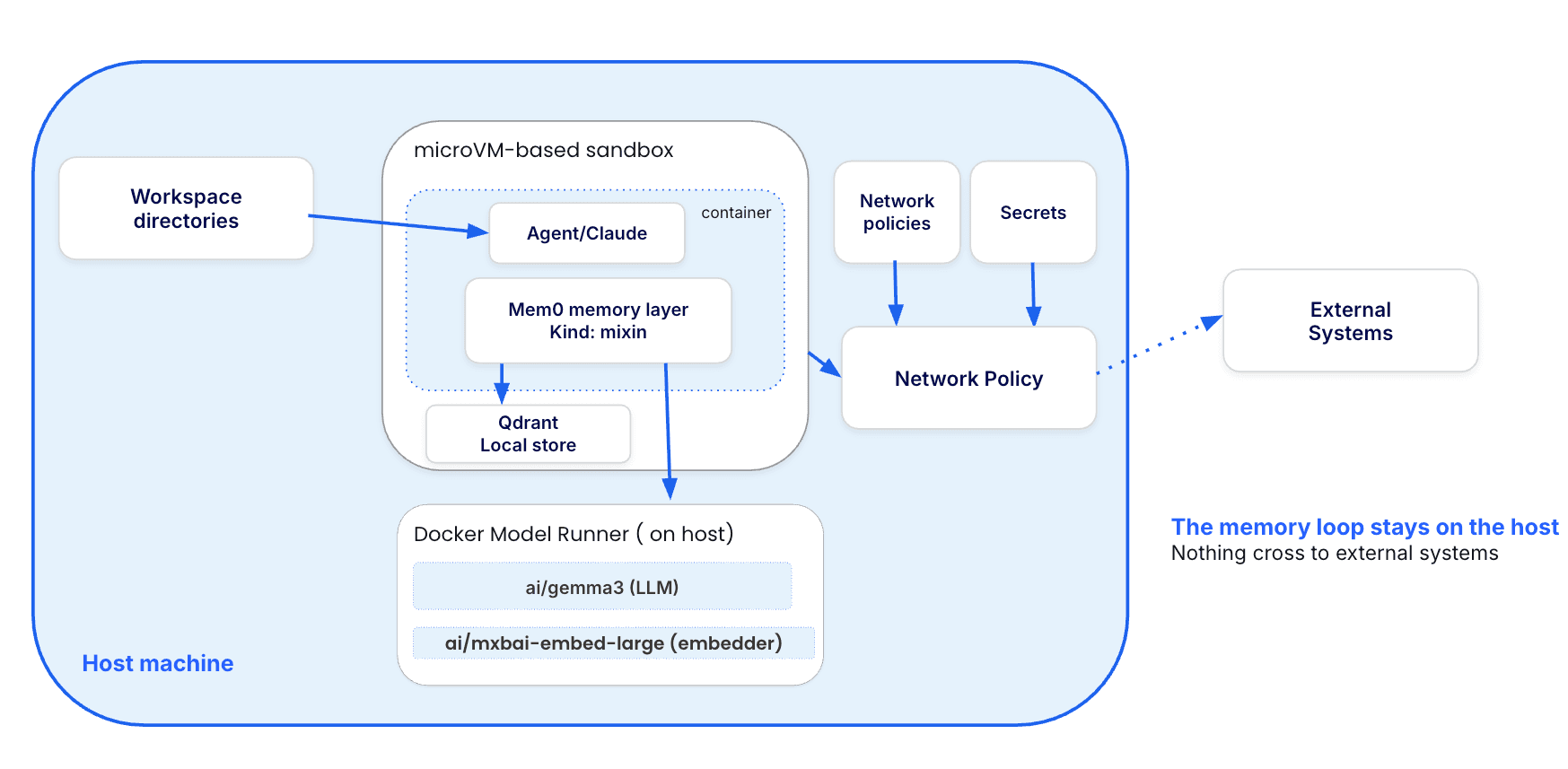
Your data stays yours. By default, the kit runs both halves of Mem0, the model that extracts facts and the embedder that vectorizes them, on a local Docker Model Runner, and stores the vectors on local disk. Nothing about the memory leaves the machine.
This local-first default isn't an outlier; it's where a lot of teams already are. Docker's State of Agentic AI report found that 61% of organizations run a mix of local and cloud models, and 39% run models locally in their own development environment. The reasons they give for keeping things local are the telling part: control and customization (61%), privacy and security (60%), and compliance (54%), with cost coming in a distant fourth. Memory is the most sensitive layer in the stack, since it's where user data and preferences accumulate, so it's the part you'd most want to keep on your machine. Running it on a local Docker Model Runner does exactly that.
It runs locked down. A sandbox is a lightweight microVM with its own kernel and network namespace, and the only path it shares with your host is the project directory you mount. Everything trying to leave goes through a proxy that blocks by default, so the agent can reach only the handful of domains the kit declares and nothing else. You can see what that isolation means in about two seconds by opening a shell inside a sandbox and looking for the files you'd normally expect in a home directory:
$ sbx run shellagent@sandbox:~$ ls ~/.ssh/;ls ~/.aws/
ls:cannot access '/home/agent/.ssh/':No such file or directory
ls:cannot access '/home/agent/.aws/':No such file or directory
$ sbx run shellagent@sandbox:~$ ls ~/.ssh/;ls ~/.aws/
ls:cannot access '/home/agent/.ssh/':No such file or directory
ls:cannot access '/home/agent/.aws/':No such file or directory
$ sbx run shellagent@sandbox:~$ ls ~/.ssh/;ls ~/.aws/
ls:cannot access '/home/agent/.ssh/':No such file or directory
ls:cannot access '/home/agent/.aws/':No such file or directory
Those files aren't hidden or locked behind permissions. They just aren't in there. The agent has nothing sensitive to read and nowhere unapproved to send anything.
Everything is logged. Every outbound request the proxy sees lands in sbx policy log, allowed or blocked, so you can look back at exactly what the agent tried to reach and when.
Memory Poisoning
Running memory locally and keeping the agent contained is good practice on its own. There's also a darker reason to do it.
For years, the security worry with LLMs was prompt injection, and it was a contained one: the attack lived and died inside a single session. Persistent memory removes that limit, and the industry has named the result. OWASP added memory poisoning to its Top 10 for Agentic Applications as ASI06.
The trick is that a bad instruction doesn't have to do anything right away. Something the agent reads, a tampered web page or a poisoned README, gets written into memory as if it were a normal fact. Weeks later, an unrelated question pulls it back as trusted history, and the agent acts on it then, long after the original message is gone and when nothing about the moment looks off. Researchers studying this have reported high success rates against production-style agents.
To Mem0's credit, the project doesn't pretend this away. It offers per-user isolation, self-hosted deployments, and rules for what's allowed into memory, plus work on scanning content before it's stored. Those all guard the way in. What none of them cover is the moment a bad memory has already made it through, and the agent goes to act on it, and that's precisely where the sandbox earns its place. A poisoned memory can tell the agent to grab your SSH key and send it somewhere, but inside the VM, there's no key to grab and no open route to send it through. The containment turns a potential breach into a logged, blocked request.
The Mem0 sandbox kit
sbx-kits-mem0 packages all of this into one declarative file. It's a mixin kit, so it layers onto whatever agent you launch rather than defining a new one. When the sandbox starts, it installs mem0ai, sets the environment Mem0 expects, and drops in a config pointed at the local runner:
schemaVersion:"1"
kind:mixin
name:mem0
displayName:Mem0(Docker ModelRunner)
description:"Adds the Mem0 memory layer (mem0ai) to an agent, pre-wired to a local Docker Model Runner for both the LLM and the embedder — no cloud credentials, no external vector database."
network:
allowedDomains:
- pypi.org
- files.pythonhosted.org
- raw.githubusercontent.com
- github.com
- release-assets.githubusercontent.com
- localhost:12434
environment:
variables:
OPENAI_BASE_URL:"http://host.docker.internal:12434/engines/v1"
OPENAI_API_KEY:"dmr"
MEM0_TELEMETRY:"false"
NO_PROXY:"localhost,127.0.0.1,host.docker.internal"
no_proxy:"localhost,127.0.0.1,host.docker.internal"
commands:
install:
- command:"pip install --break-system-packages 'mem0ai[nlp]==2.0.5' click"
user:"1000"
description:"Install Mem0 with NLP extras (spaCy lemmatization) plus click (spaCy CLI dep)"
- command:"PIP_BREAK_SYSTEM_PACKAGES=1 python3 -m spacy download en_core_web_sm"
user:"1000"
description:"Download spaCy English model (env var lets spacy's internal pip call bypass PEP 668)"
initFiles:
- path:/home/agent/.mem0/config.json
mode:"0644"
onlyIfMissing:true
description:"Mem0 config wired to Docker Model Runner (editable)"
content: |
{
"vector_store":{
"provider":"qdrant",
"config":{
"collection_name":"mem0",
"path":"/home/agent/.mem0/qdrant",
"on_disk":true,
"embedding_model_dims":1024
}
},
"llm":{
"provider":"openai",
"config":{
"model":"ai/gemma3",
"openai_base_url":"http://host.docker.internal:12434/engines/v1",
"api_key":"dmr"
}
},
"embedder":{
"provider":"openai",
"config":{
"model":"ai/mxbai-embed-large",
"openai_base_url":"http://host.docker.internal:12434/engines/v1",
"api_key":"dmr",
"embedding_dims":1024
}
}
}
memory: |
## Mem0 memory layer
The`mem0ai`package is installed and pre-wired to a local Docker Model
Runner(config at `~/.mem0/config.json`),so`Memory.from_config(...)`
add/search works withno cloud keys or external vector database
schemaVersion:"1"
kind:mixin
name:mem0
displayName:Mem0(Docker ModelRunner)
description:"Adds the Mem0 memory layer (mem0ai) to an agent, pre-wired to a local Docker Model Runner for both the LLM and the embedder — no cloud credentials, no external vector database."
network:
allowedDomains:
- pypi.org
- files.pythonhosted.org
- raw.githubusercontent.com
- github.com
- release-assets.githubusercontent.com
- localhost:12434
environment:
variables:
OPENAI_BASE_URL:"http://host.docker.internal:12434/engines/v1"
OPENAI_API_KEY:"dmr"
MEM0_TELEMETRY:"false"
NO_PROXY:"localhost,127.0.0.1,host.docker.internal"
no_proxy:"localhost,127.0.0.1,host.docker.internal"
commands:
install:
- command:"pip install --break-system-packages 'mem0ai[nlp]==2.0.5' click"
user:"1000"
description:"Install Mem0 with NLP extras (spaCy lemmatization) plus click (spaCy CLI dep)"
- command:"PIP_BREAK_SYSTEM_PACKAGES=1 python3 -m spacy download en_core_web_sm"
user:"1000"
description:"Download spaCy English model (env var lets spacy's internal pip call bypass PEP 668)"
initFiles:
- path:/home/agent/.mem0/config.json
mode:"0644"
onlyIfMissing:true
description:"Mem0 config wired to Docker Model Runner (editable)"
content: |
{
"vector_store":{
"provider":"qdrant",
"config":{
"collection_name":"mem0",
"path":"/home/agent/.mem0/qdrant",
"on_disk":true,
"embedding_model_dims":1024
}
},
"llm":{
"provider":"openai",
"config":{
"model":"ai/gemma3",
"openai_base_url":"http://host.docker.internal:12434/engines/v1",
"api_key":"dmr"
}
},
"embedder":{
"provider":"openai",
"config":{
"model":"ai/mxbai-embed-large",
"openai_base_url":"http://host.docker.internal:12434/engines/v1",
"api_key":"dmr",
"embedding_dims":1024
}
}
}
memory: |
## Mem0 memory layer
The`mem0ai`package is installed and pre-wired to a local Docker Model
Runner(config at `~/.mem0/config.json`),so`Memory.from_config(...)`
add/search works withno cloud keys or external vector database
schemaVersion:"1"
kind:mixin
name:mem0
displayName:Mem0(Docker ModelRunner)
description:"Adds the Mem0 memory layer (mem0ai) to an agent, pre-wired to a local Docker Model Runner for both the LLM and the embedder — no cloud credentials, no external vector database."
network:
allowedDomains:
- pypi.org
- files.pythonhosted.org
- raw.githubusercontent.com
- github.com
- release-assets.githubusercontent.com
- localhost:12434
environment:
variables:
OPENAI_BASE_URL:"http://host.docker.internal:12434/engines/v1"
OPENAI_API_KEY:"dmr"
MEM0_TELEMETRY:"false"
NO_PROXY:"localhost,127.0.0.1,host.docker.internal"
no_proxy:"localhost,127.0.0.1,host.docker.internal"
commands:
install:
- command:"pip install --break-system-packages 'mem0ai[nlp]==2.0.5' click"
user:"1000"
description:"Install Mem0 with NLP extras (spaCy lemmatization) plus click (spaCy CLI dep)"
- command:"PIP_BREAK_SYSTEM_PACKAGES=1 python3 -m spacy download en_core_web_sm"
user:"1000"
description:"Download spaCy English model (env var lets spacy's internal pip call bypass PEP 668)"
initFiles:
- path:/home/agent/.mem0/config.json
mode:"0644"
onlyIfMissing:true
description:"Mem0 config wired to Docker Model Runner (editable)"
content: |
{
"vector_store":{
"provider":"qdrant",
"config":{
"collection_name":"mem0",
"path":"/home/agent/.mem0/qdrant",
"on_disk":true,
"embedding_model_dims":1024
}
},
"llm":{
"provider":"openai",
"config":{
"model":"ai/gemma3",
"openai_base_url":"http://host.docker.internal:12434/engines/v1",
"api_key":"dmr"
}
},
"embedder":{
"provider":"openai",
"config":{
"model":"ai/mxbai-embed-large",
"openai_base_url":"http://host.docker.internal:12434/engines/v1",
"api_key":"dmr",
"embedding_dims":1024
}
}
}
memory: |
## Mem0 memory layer
The`mem0ai`package is installed and pre-wired to a local Docker Model
Runner(config at `~/.mem0/config.json`),so`Memory.from_config(...)`
add/search works withno cloud keys or external vector database
If you look at the following spec.yaml file, it might look overwhelming, but it's only doing five things:
The network allowlist: A sandbox blocks outbound traffic by default, so the kit has to name the hosts the install actually needs: PyPI and files.pythonhosted.org for the pip packages, and the GitHub hosts for the spaCy model download. Nothing else gets through. (The one local exception, reaching Docker Model Runner on the host, you allow once in the Getting Started steps.)
The environment: These are the variables Mem0's OpenAI client reads. OPENAI_BASE_URL points it at Docker Model Runner instead of OpenAI's servers, and NO_PROXY keeps those local calls from being routed through the sandbox proxy. The OPENAI_API_KEY: "dmr" looks like a secret but isn't, it's a placeholder the local runner ignores, there only because the client insists on some value. MEM0_TELEMETRY is off.
The install step: Two commands. The first pulls in mem0ai with its NLP extras (the spaCy bits Mem0 uses to clean up extracted text), the second downloads the small English spaCy model. The --break-system-packages flag is just what pip needs to install into the sandbox's system Python.
The config file: This is the heart of it. The kit writes ~/.mem0/config.json so that Memory.from_config(...) works the moment you're in the sandbox, no setup. It wires up three things: a local Qdrant vector store writing to disk inside the VM, ai/gemma3 as the model that extracts facts, and ai/mxbai-embed-large as the embedder, both pointed at Docker Model Runner. That's the self-hosted side of Mem0, not the hosted client from the quickstart. It's also marked onlyIfMissing, so if you tweak the config, the kit won't clobber your changes on the next run.
The context note: The last block is a short note injected into the agent's context, so the agent itself knows the memory layer is there and how to call it.
Put together, that's the whole promise: drop the mixin onto any agent, and it comes up with a working, fully local Mem0, models on your host, vectors on your disk, and no cloud keys anywhere.
Getting Started
Step 1. Installing sbx CLI
The sbx CLI doesn't require Docker Desktop. Open your Mac terminal and run:
$ brew install docker/tap/sbx$ sbx login
$ brew install docker/tap/sbx$ sbx login
$ brew install docker/tap/sbx$ sbx login
Step 2. Turn on Docker Model Runner
If you're on a Mac with Docker Desktop, turn on AI under Docker Desktop > Settings > AI, then pull the two models:
docker model pull ai/gemma3 # LLM formemory extractiondocker model pull ai/mxbai-embed-large # embedder(1024-dim)
docker model pull ai/gemma3 # LLM formemory extractiondocker model pull ai/mxbai-embed-large # embedder(1024-dim)
docker model pull ai/gemma3 # LLM formemory extractiondocker model pull ai/mxbai-embed-large # embedder(1024-dim)
On Linux with Docker Engine, install Model Runner as a plugin first:
Layer the mixin onto an agent. The default tag needs no key:
# DMR (default, no key needed) —: latest is the same as:dmr
sbx run --kit docker.io/ajeetraina777/sbx-mem0-kits:latest shell
sbx run --kit docker.io/ajeetraina777/sbx-mem0-kits:latest shell
sbx run --kit docker.io/ajeetraina777/sbx-mem0-kits:latest shell
Or straight from this repo over git:
sbx run --kit "git+https://github.com/ajeetraina/sbx-kits-mem0.git"shell
sbx run --kit "git+https://github.com/ajeetraina/sbx-kits-mem0.git"shell
sbx run --kit "git+https://github.com/ajeetraina/sbx-kits-mem0.git"shell
Or from a local clone (the kit lives at the repo root):
git clone https://github.com/ajeetraina/sbx-kits-mem0.gitsbx run --kit ./sbx-kits-mem0/ shell
git clone https://github.com/ajeetraina/sbx-kits-mem0.gitsbx run --kit ./sbx-kits-mem0/ shell
git clone https://github.com/ajeetraina/sbx-kits-mem0.gitsbx run --kit ./sbx-kits-mem0/ shell
That's a shell session in a microVM with a working Mem0 memory layer, running entirely on models on your host. The shell on the end is the agent, and it's a separate choice from the memory backend, so you can swap in claude, codex, gemini, cursor, opencode, or anything else Docker Sandboxes supports without touching the memory setup.
If you're using local default, then make sure you don't have a global cloud secret stored (sbx secret ls; remove with sbx secret rm -g openai). The proxy overrides the local dmr key with it, and Mem0's calls get redirected or blocked.
Using a cloud provider
Local is the default for a practical reason, and it matters most for Claude users. Mem0 has to have an embedder, and Anthropic doesn't ship an embeddings API, so a Claude agent has no cloud embedder in its existing credentials. Running it locally sidesteps that, and small local embedders like mxbai-embed-large are good enough now that retrieval quality holds up. Teams already paying for OpenAI or Gemini can use one key for both halves instead, and each provider ships as its own image tag with the right domains, install steps, and config already in place:
Provider
Runs where
Credential
Embed model
Dimensions
DMR (default)
Local
None
ai/mxbai-embed-large
1024
OpenAI
Cloud
OPENAI_API_KEY
text-embedding-3-small
1536
Gemini
Cloud
GOOGLE_API_KEY
models/gemini-embedding-001
768
For the cloud tags you store the key once with the sandbox secret manager and the proxy injects it at runtime, so it never enters the sandbox:
echo "$OPENAI_API_KEY" | sbx secret set -g openaisbx run --kit docker.io/ajeetraina777/sbx-mem0-kits:openai claude
echo "$OPENAI_API_KEY" | sbx secret set -g openaisbx run --kit docker.io/ajeetraina777/sbx-mem0-kits:openai claude
echo "$OPENAI_API_KEY" | sbx secret set -g openaisbx run --kit docker.io/ajeetraina777/sbx-mem0-kits:openai claude
One thing to watch when you switch providers: the embedding dimensions have to line up across the embedder config, the vector store setting, and the Qdrant collection, and Qdrant won't mix vector sizes in one collection. So changing providers means a fresh collection, either a new collection_name or clearing out the old store.
Verifying it works
One round-trip exercise the whole chain at once: the package, the config, the environment, and the link to the local runner. From the agent shell, save this to a file and run it with Python:
cat > /tmp/verify.py <<'EOF'from mem0 importMemoryimportjsonwithopen("/home/agent/.mem0/config.json")as f:
m = Memory.from_config(json.load(f))m.add([{"role":"user","content":"I prefer dark roast coffee"}],user_id="alice")print(m.search("what coffee do they like?",filters={"user_id":"alice"}))EOFpython3 /tmp/verify.py
cat > /tmp/verify.py <<'EOF'from mem0 importMemoryimportjsonwithopen("/home/agent/.mem0/config.json")as f:
m = Memory.from_config(json.load(f))m.add([{"role":"user","content":"I prefer dark roast coffee"}],user_id="alice")print(m.search("what coffee do they like?",filters={"user_id":"alice"}))EOFpython3 /tmp/verify.py
cat > /tmp/verify.py <<'EOF'from mem0 importMemoryimportjsonwithopen("/home/agent/.mem0/config.json")as f:
m = Memory.from_config(json.load(f))m.add([{"role":"user","content":"I prefer dark roast coffee"}],user_id="alice")print(m.search("what coffee do they like?",filters={"user_id":"alice"}))EOFpython3 /tmp/verify.py
If the coffee preference comes back, memory is working end to end, with no cloud call anywhere in the loop.
Real-world example: A Smart Travel Assistant
Now that the Mem0 sbx kit is ready, let's pick up Mem0's own smart travel assistant demo: a personalized AI travel assistant that remembers the traveler across runs. The kit already did the setup the cookbook walks through. mem0ai is installed, the config is in place, and both the model and the embedder point at your local Docker Model Runner, so the demo comes down to running one script that ships with the kit as ~/runbooks/travel.py.
Tell it something worth remembering:
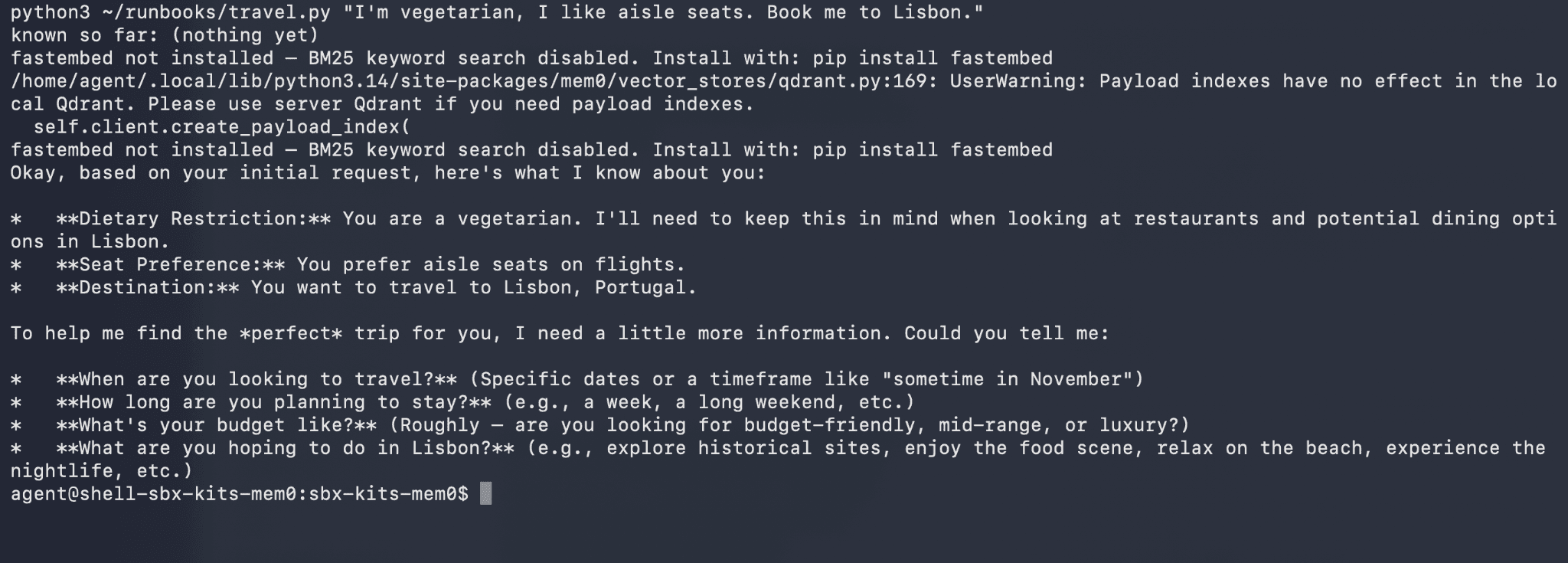
$ python3 ~/runbooks/travel.py"I'm vegetarian, I like aisle seats. Book me to Lisbon."known so far:(nothing yet)...the assistant books Lisbon
$ python3 ~/runbooks/travel.py"I'm vegetarian, I like aisle seats. Book me to Lisbon."known so far:(nothing yet)...the assistant books Lisbon
$ python3 ~/runbooks/travel.py"I'm vegetarian, I like aisle seats. Book me to Lisbon."known so far:(nothing yet)...the assistant books Lisbon
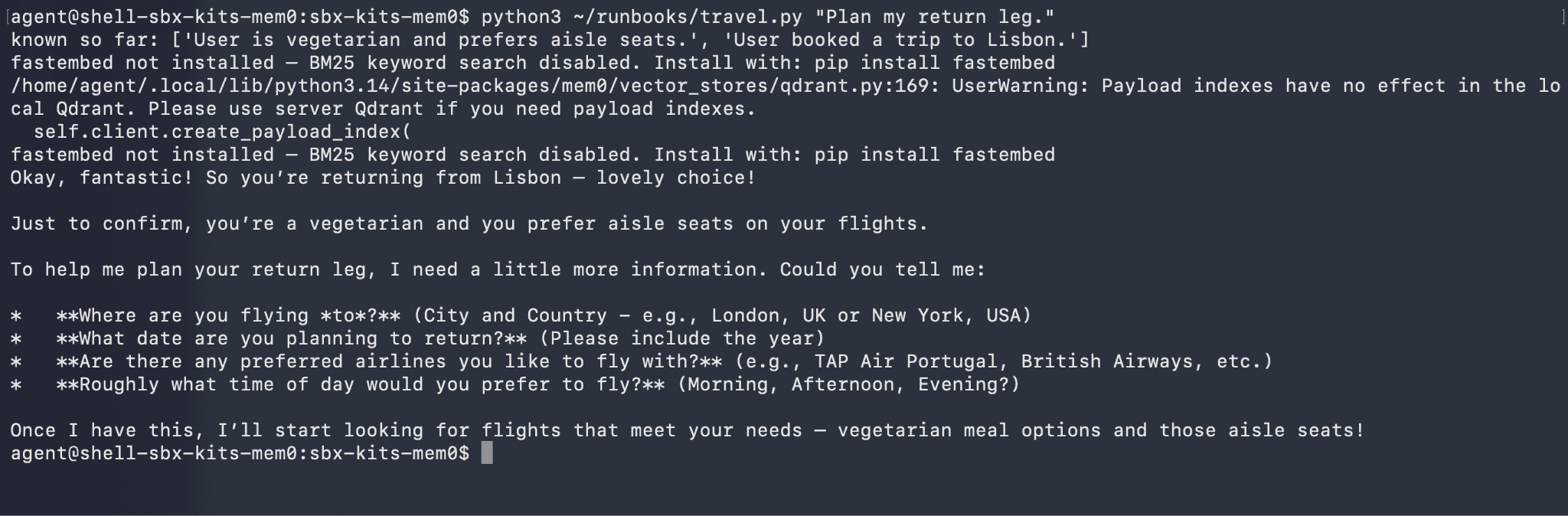
The first run starts from a blank slate, answers, and quietly writes your preferences back to memory with memory.add. Come back in a brand new process:
$ python3 ~/runbooks/travel.py"Plan my return leg."known so far:['Is vegetarian','Prefers aisle seats','Traveling to Lisbon']
...theassistant plans the return,without you repeating a thing
$ python3 ~/runbooks/travel.py"Plan my return leg."known so far:['Is vegetarian','Prefers aisle seats','Traveling to Lisbon']
...theassistant plans the return,without you repeating a thing
$ python3 ~/runbooks/travel.py"Plan my return leg."known so far:['Is vegetarian','Prefers aisle seats','Traveling to Lisbon']
...theassistant plans the return,without you repeating a thing
This is a separate process with nothing carried over, yet it opens already knowing the traveler, because the vectors live on the local disk inside the VM.
Here's the whole script, exactly what the kit ships:
#!/usr/bin/env python3"""A tiny travel assistant that remembers the traveler across runs.
Ships withthe sbx-kits-mem0 kit. Boththe chat model and the Mem0 memorylayer talk to the local Docker Model Runner,so it runs withno cloud keys.
Usage(inside the sandbox):
python3 ~/travel.py "I'm vegetarian, I like aisle seats. Book me to Lisbon."
python3 ~/travel.py "Plan my return leg." # a fresh process; it still knows you"""
importosimportsysimportjson
# sbx leaves an IPv6 "[::1]"entryinNO_PROXY that breaks the HTTP client's
# proxy-bypass matching,so calls to host.docker.internalget routed through the
# sandbox egress proxy and dropped. Stripit before any client is created.
forvarin("NO_PROXY","no_proxy"):
ifvarinos.environ:
os.environ[var] = ",".join(e foreinos.environ[var].split(",")ife.strip() != "[::1]")
# sbx injects "proxy-managed"credential sentinels foropenai/openrouter even
# when no secret is configured. Mem0's extractor reads OPENAI_API_KEY from the
# environment,so the sentinel overrides the kit's "dmr" key and the extraction
# call gets routed to openrouter.ai(which the sandbox then blocks). Forcethe
# local key and drop the openrouter sentinel before mem0 is imported,so the
# extractor stays pointed at the local Docker Model Runner.
os.environ["OPENAI_API_KEY"] = "dmr"os.environ.pop("OPENROUTER_API_KEY",None)from openai importOpenAIfrommem0 importMemoryUSER = "traveler_123"
# Chat model and memory both point at the local Docker Model Runner.
llm = OpenAI(base_url="http://host.docker.internal:12434/engines/v1",api_key="dmr")withopen("/home/agent/.mem0/config.json")as f:
memory = Memory.from_config(json.load(f))def reply(question):
# Load everything we already know about thistraveler,not just query matches.
profile = [m["memory"]forminmemory.get_all(filters={"user_id":USER})["results"]]
print("known so far:",profile or "(nothing yet)")
prompt = (
"You are a travel assistant.\n"
f"What you already know about this traveler: {', '.join(profile)}\n\n"
f"Traveler: {question}"
)
answer = llm.chat.completions.create(
model="ai/gemma3",
messages=[{"role":"user","content":prompt}],
).choices[0].message.content
memory.add(question,user_id=USER) # remember it fornext time
returnanswerif__name__ == "__main__":
question = " ".join(sys.argv[1:])or "Plan me a trip somewhere warm."
print(reply(question))
#!/usr/bin/env python3"""A tiny travel assistant that remembers the traveler across runs.
Ships withthe sbx-kits-mem0 kit. Boththe chat model and the Mem0 memorylayer talk to the local Docker Model Runner,so it runs withno cloud keys.
Usage(inside the sandbox):
python3 ~/travel.py "I'm vegetarian, I like aisle seats. Book me to Lisbon."
python3 ~/travel.py "Plan my return leg." # a fresh process; it still knows you"""
importosimportsysimportjson
# sbx leaves an IPv6 "[::1]"entryinNO_PROXY that breaks the HTTP client's
# proxy-bypass matching,so calls to host.docker.internalget routed through the
# sandbox egress proxy and dropped. Stripit before any client is created.
forvarin("NO_PROXY","no_proxy"):
ifvarinos.environ:
os.environ[var] = ",".join(e foreinos.environ[var].split(",")ife.strip() != "[::1]")
# sbx injects "proxy-managed"credential sentinels foropenai/openrouter even
# when no secret is configured. Mem0's extractor reads OPENAI_API_KEY from the
# environment,so the sentinel overrides the kit's "dmr" key and the extraction
# call gets routed to openrouter.ai(which the sandbox then blocks). Forcethe
# local key and drop the openrouter sentinel before mem0 is imported,so the
# extractor stays pointed at the local Docker Model Runner.
os.environ["OPENAI_API_KEY"] = "dmr"os.environ.pop("OPENROUTER_API_KEY",None)from openai importOpenAIfrommem0 importMemoryUSER = "traveler_123"
# Chat model and memory both point at the local Docker Model Runner.
llm = OpenAI(base_url="http://host.docker.internal:12434/engines/v1",api_key="dmr")withopen("/home/agent/.mem0/config.json")as f:
memory = Memory.from_config(json.load(f))def reply(question):
# Load everything we already know about thistraveler,not just query matches.
profile = [m["memory"]forminmemory.get_all(filters={"user_id":USER})["results"]]
print("known so far:",profile or "(nothing yet)")
prompt = (
"You are a travel assistant.\n"
f"What you already know about this traveler: {', '.join(profile)}\n\n"
f"Traveler: {question}"
)
answer = llm.chat.completions.create(
model="ai/gemma3",
messages=[{"role":"user","content":prompt}],
).choices[0].message.content
memory.add(question,user_id=USER) # remember it fornext time
returnanswerif__name__ == "__main__":
question = " ".join(sys.argv[1:])or "Plan me a trip somewhere warm."
print(reply(question))
#!/usr/bin/env python3"""A tiny travel assistant that remembers the traveler across runs.
Ships withthe sbx-kits-mem0 kit. Boththe chat model and the Mem0 memorylayer talk to the local Docker Model Runner,so it runs withno cloud keys.
Usage(inside the sandbox):
python3 ~/travel.py "I'm vegetarian, I like aisle seats. Book me to Lisbon."
python3 ~/travel.py "Plan my return leg." # a fresh process; it still knows you"""
importosimportsysimportjson
# sbx leaves an IPv6 "[::1]"entryinNO_PROXY that breaks the HTTP client's
# proxy-bypass matching,so calls to host.docker.internalget routed through the
# sandbox egress proxy and dropped. Stripit before any client is created.
forvarin("NO_PROXY","no_proxy"):
ifvarinos.environ:
os.environ[var] = ",".join(e foreinos.environ[var].split(",")ife.strip() != "[::1]")
# sbx injects "proxy-managed"credential sentinels foropenai/openrouter even
# when no secret is configured. Mem0's extractor reads OPENAI_API_KEY from the
# environment,so the sentinel overrides the kit's "dmr" key and the extraction
# call gets routed to openrouter.ai(which the sandbox then blocks). Forcethe
# local key and drop the openrouter sentinel before mem0 is imported,so the
# extractor stays pointed at the local Docker Model Runner.
os.environ["OPENAI_API_KEY"] = "dmr"os.environ.pop("OPENROUTER_API_KEY",None)from openai importOpenAIfrommem0 importMemoryUSER = "traveler_123"
# Chat model and memory both point at the local Docker Model Runner.
llm = OpenAI(base_url="http://host.docker.internal:12434/engines/v1",api_key="dmr")withopen("/home/agent/.mem0/config.json")as f:
memory = Memory.from_config(json.load(f))def reply(question):
# Load everything we already know about thistraveler,not just query matches.
profile = [m["memory"]forminmemory.get_all(filters={"user_id":USER})["results"]]
print("known so far:",profile or "(nothing yet)")
prompt = (
"You are a travel assistant.\n"
f"What you already know about this traveler: {', '.join(profile)}\n\n"
f"Traveler: {question}"
)
answer = llm.chat.completions.create(
model="ai/gemma3",
messages=[{"role":"user","content":prompt}],
).choices[0].message.content
memory.add(question,user_id=USER) # remember it fornext time
returnanswerif__name__ == "__main__":
question = " ".join(sys.argv[1:])or "Plan me a trip somewhere warm."
print(reply(question))
Conclusion
Memory is what turns an agent from a demo into something you rely on, and Mem0 makes adding it easy. The kit makes the safe version just as easy: the memory stays on your machine, and the agent stays boxed in a microVM that can only touch a project folder and a few approved domains.
You can find the complete code at github.com/ajeetraina/sbx-kits-mem0. The local default needs no keys. Give an agent a memory layer this week, and leave the Sbx policy log open while it runs to see exactly what it reaches for.
She is a senior technical content writer at Mem0. She covers agent memory architecture and the engineering decisions behind building agents that actually remember. She experiments with new features and turns research into posts developers can put straight to use.