

·
17 min read

On this page
Production AI agents run into the same wall very quickly: users expect continuity, but models forget almost everything between calls.
Session-bound context, prompt size limits, and stateless APIs mean that an agent cannot answer questions like:
"What did we decide last time?"
"Use the same preferences as before."
"Continue from yesterday's plan."
Without a reliable memory layer, engineers either stuff long histories into prompts or bolt on ad hoc storage logic. Both approaches break down once user counts and interaction length grow.
A dedicated memory layer changes the problem: instead of treating the agent as "chat with history," it becomes "chat and an evolving user profile."
Mem0 is designed around that idea, so the agent can recall and update user-specific knowledge across sessions in a structured way.
This post walks through how to think about agent memory, common failure modes, and how to integrate Mem0 to build an AI agent that actually remembers users.
Key Takeaways
User memory is any information derived from past interactions that improves future responses for that user, not simply a running log of chat messages.
A production-grade memory layer needs three properties: persistence across sessions and devices, addressability by the user, and selective recall of only what's relevant.
Mem0 automatically extracts structured facts from raw conversation text and retrieves them by semantic relevance, rather than requiring exact keyword matches or manual rules.
Memory scoped to a stable user ID, rather than a session or device, is what makes continuity possible across devices and even across multiple agents.
A dedicated memory layer adds real, non-zero overhead, extraction quality, staleness handling, latency that engineers should plan for rather than treat as free.
What "User Memory" Really Is
In the context of AI agents, "memory" is not just a list of messages. It is any information derived from past interactions that can improve future responses for that user.
Several distinct types of memory commonly appear in production systems:
Identity: This includes name, role, location, organization, and account identifiers.
Preferences: Include tone (formal vs casual), language, time zone, UI choices, favorite tools, and notification settings.
Long-term facts: Projects, goals, constraints, past decisions, recurring tasks.
Short-lived context: A document currently under discussion, a temporary plan, a debugging session.
System-level knowledge: Known issues with that user's account, access permissions, and feature flags.
Effective user memory needs at least three properties:
Persistence across sessions and devices.
Addressability by user, and sometimes by topic or scope.
Selective recall so only relevant memories are surfaced to the model.
A memory system that treats everything as "chat history" usually fails on the third requirement. The agent either gets flooded with irrelevant text or misses important facts buried in a long log.
Why Naive Prompt History Is Not Enough
The first approach many teams try is to append the last N messages to every prompt. It is simple and sometimes workable, but it breaks down in several ways. For a closer look at how context gets assembled and managed turn by turn, and where that approach hits its limits, see context-engineering-in-multi-turn-ai-agents.
Prompt length and cost
As conversations grow, prompt tokens explode. That affects:
Latency: larger prompts mean slower responses.
Cost: usage-based APIs charge per token.
Quality: models may struggle with very long prompts or ignore early content.
Truncation is inevitable, but truncation is memory loss.
Lack of structure
Raw chat logs do not encode meaning. The model gets:
Duplicated information.
Contradictions over time.
Many details that only mattered temporarily.
The model has to infer what is actually important every time, which is fragile and noisy.
No cross-session continuity
If the memory is just "messages in this session," the agent forgets everything when the connection closes. Users then experience a reset on every visit.
Persistent memory must outlive the chat session and must not depend entirely on the LLM to remember details from scratch on each call.
Requirements for a Production-Grade Memory Layer
An AI memory system for production agents needs more than simple key-value storage. Typical requirements include:
Per-user isolation: Memories must be scoped to user identifiers and often further partitioned by application or agent.
Semantic retrieval: Recall by meaning, not exact keyword matches. For example, "dog" and "golden retriever" should match.
Automatic extraction: The system should infer what to store from interactions, instead of relying entirely on hand-written rules.
Update and consolidation
Preferences change. A memory system should update or merge entries, not just append.
Tool-friendly interface: The agent should be able to treat memory as a tool call: "search user memory" or "save this fact."
Auditable and inspectable: Developers need to inspect what the model "knows" about a user for debugging and privacy compliance.
Mem0 focuses specifically on these aspects. It provides a structured, API-driven memory layer that plugs into any agent framework.
How Mem0 Models Memory?
Mem0 introduces a few core abstractions that map directly to the requirements above.
Users and identities
Each memory entry is associated with a user_id (and optionally session_id or platform). This gives clear per-user isolation and allows cross-session recall.
For a deeper look at how agents resolve users across sessions and devices, see our guide to cross-session identity resolution in agent memory.
Memory entries
A memory entry is a structured object, typically containing:
The original text or content.
An embedding for semantic search.
Optional metadata (tags, source, timestamps).
A type or category (for example, preference, fact, task).
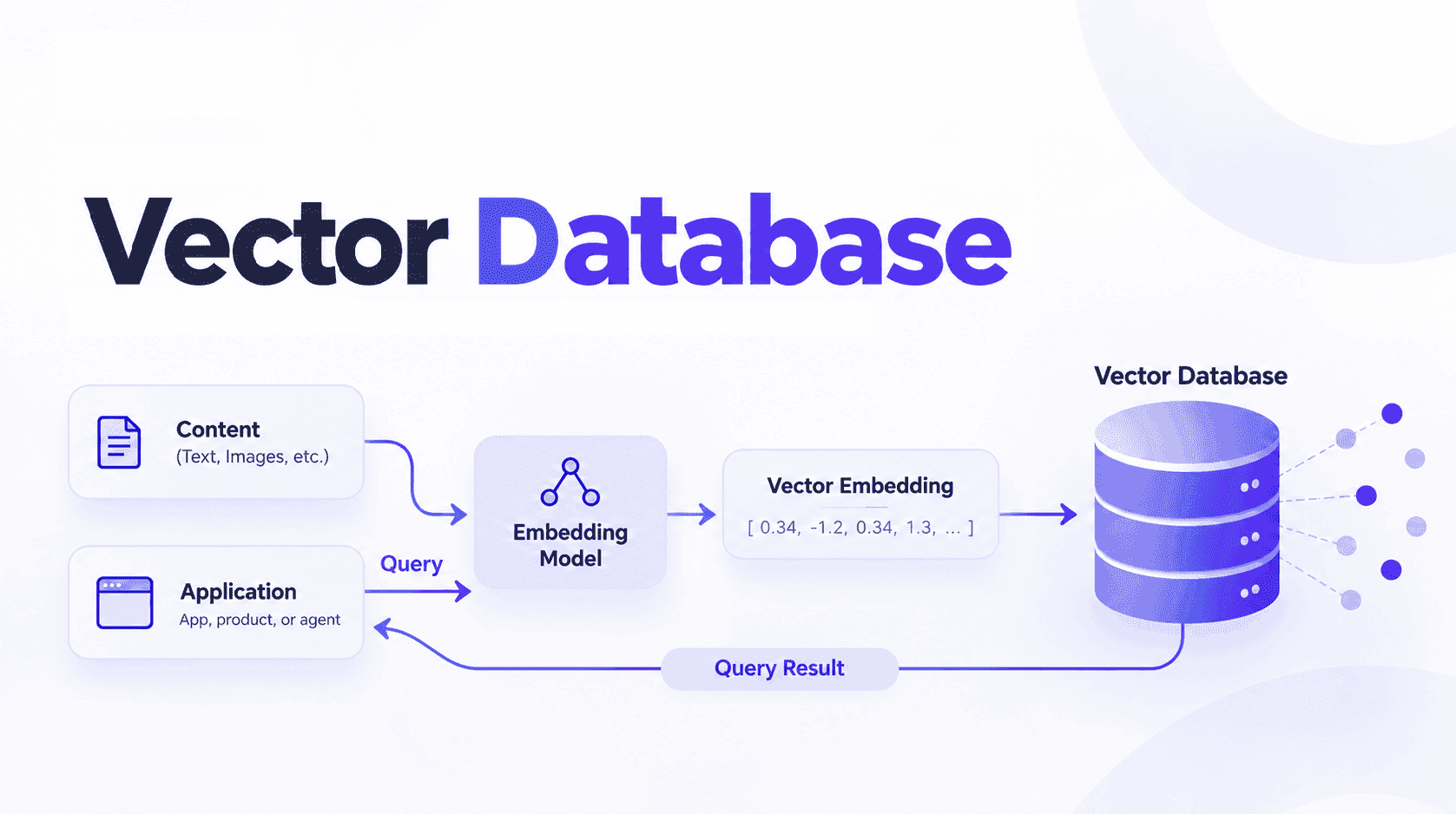
Mem0 handles embedding and storage, so the application does not have to manage vector indices directly.
Automatic extraction
Mem0 can take entire messages or transcripts and extract key facts and preferences from them. The agent can send raw conversation snippets, and Mem0 converts them into structured memory entries.
Retrieval by relevance
Given a query and user_id, Mem0 returns the most relevant memories, ranked by semantic similarity and other signals. These can then be injected into the LLM prompt or used to adjust tool behavior.
Update and deletion
Memories are not immutable logs. Mem0 supports updating and deleting entries so the agent can correct outdated information or forget if needed.
Integrating Mem0 Into an Agent Loop
The typical integration pattern has three stages:
Gather inputs like the user message, context, and user identifier.
Retrieve relevant memories. Ask Mem0 for memories for this user that are relevant to the current query.
Call the LLM with memory. Combine user input, retrieved memories, and system instructions to generate the response.
Update memory. Send the interaction to Mem0 so it can extract and store new or updated facts.
For a simpler, agent-focused approach to persistent memory, see The Easiest Way to Add Persistent Memory to Any AI Agent.
Below is a concrete Python example that shows this pattern with Mem0.
Setup
Install the Mem0 client:
Set the Mem0 API key:
You'll need a free Mem0 API key to follow along.
Get one at app.mem0.ai
Basic Python integration
This example does the following:
Retrieves memories relevant to the current user query.
Injects them as a dedicated
MEMORYsection in the prompt.Stores the interaction in Mem0, which can extract structured facts from it.
Over time, the agent builds a richer profile of each user without manual bookkeeping.
Example: Persistent User Preferences
To see why this matters, consider a simple assistant that remembers user preferences for tone and language.
Without memory
Each session is independent. The model needs the user to restate preferences or tries to infer them from scratch. Users must repeatedly say, "use Spanish" or "keep it concise."
With Mem0
The first time the user mentions a preference, the interaction is sent to Mem0. The model may produce an internal instruction such as:
The user prefers responses in Spanish and in bullet points.
Mem0 extracts this statement as a structured memory entry tagged as preference. On subsequent queries, a retrieval call with the current user_id and query returns that preference entry. The system prompt then includes:
Memory: The user prefers responses in Spanish and in bullet points.
The model can adapt its answer immediately, even if the user does not repeat the preference.
This pattern generalizes to:
Time zone and schedule constraints.
Tool usage preferences.
Prior project context.
Domain-specific constraints (budget limits, security rules, data access policy).
Comparing Memory Approaches
Different ways of adding "memory" have very different behavior at scale. The table below compares common patterns.
Approach | Persistence | Retrieval granularity | Manual effort | Scalability with long history | Typical issues |
|---|---|---|---|---|---|
Raw last-N chat messages in prompt | Session-only | Coarse (entire messages) | Low | Poor | Token bloat, truncation, no cross-session memory |
App database with custom embeddings | Cross-session if implemented | Medium (per record) | High | Good if engineered carefully | Requires building and operating vector infra |
Fine-tuned model with user info baked in | Model-wide, not per-user | Coarse | High | Limited by training cycles | Cannot handle per-user changes or deletions |
Custom rules + metadata in logs | Depends on implementation | Coarse to medium | Medium | Mixed | Hard to maintain, brittle rule sets |
Dedicated memory layer like Mem0 | Cross-session per user | Fine (structured entries) | Medium | Good, storage and retrieval tier handles growth | Requires explicit integration into agent workflow |
Mem0 sits in the last category. It externalizes memory into a purpose-built service that combines semantic retrieval, identity scoping, and automatic extraction.
How Mem0 Fits Into Agent Architectures
Mem0 does not replace the agent framework or LLM. It acts as a memory substrate that any agent can use via API calls or as a tool in a tool-augmented model.
Common integration patterns include:
As a direct client in the application code
The agent orchestrator (custom Python, LangChain-like stack, custom infra) calls Mem0 directly:
Before the LLM call: mem_client.search(...) to retrieve relevant memories.
After the LLM call: mem_client.add(...) to update memory.
This is the pattern shown in the earlier code sample.
As a tool in a tool-calling model
For models that support tool or function calling, Mem0 can be exposed as two tools:
search_memory(user_id, query, limit)
add_memory(user_id, messages, metadata)
The model then decides when to call memory tools, which allows more dynamic behavior. For example, the model might choose to store only certain facts, or refine existing entries.
As a shared memory layer across agents
In multi-agent systems, Mem0 can provide:
Shared context for multiple agents serving the same user.
Separation between user-level memory and agent-specific memory, via metadata and tags.
Consistent retrieval semantics across services and microservices.
Because Mem0 isolates memory from the agent runtime, teams can evolve agent logic without losing or migrating user memory repeatedly. For a deeper look at coordinating memory across multiple agents specifically, see multi-agent-memory-systems.
As identity verification and auth integration
Most production agents already have an identity layer, an auth provider handling login, sessions, and access control. Mem0 doesn't replace that layer; it plugs into it. The user identifier your auth provider already issues, for example, the sub claim from an OAuth/OIDC token, or a user ID from Auth0 or a similar provider, is exactly what gets passed as Mem0's user_id.
This keeps memory scoping consistent with how your application already establishes who's logged in. There's no separate identity system to maintain: whichever user ID your auth provider returns after login is the same one used to scope memory retrieval and writes. If a user authenticates from a new device through the same provider, they resolve to the same user_id, and therefore the same memory, without any additional cross-device logic required on top.
Limitations Of The Pattern
A structured memory layer solves many problems, but it is not magic. Engineers should be aware of several limitations and design trade-offs.
Quality of extracted memories
Automatic extraction from raw dialogue can misinterpret sarcasm, jokes, or temporary statements as long-term facts. For example, "I hate meetings today" is not necessarily a permanent preference.
Mitigation usually requires:
Careful extraction prompts.
Explicit tagging rules (for example, store only statements with strong signals like "I always" or "never").
Occasional manual review tools for sensitive applications.
Stale or conflicting information
Users change jobs, locations, and preferences. A memory layer can accumulate conflicting entries that confuse the model. For a deeper look at why AI agent memories become stale and how to address the problem, see our guide to memory staleness in AI.
Systems need:
Clear update policies (for example, new facts override old ones in the same category).
Mechanisms to archive or delete old memories, sometimes based on age or explicit user request.
Privacy and compliance
Storing user-specific data has privacy implications. Even with per-user isolation, teams must:
Avoid storing sensitive data unnecessarily.
Provide ways to export and delete user data on request.
Audit memory access patterns.
Providing users with control over their stored memories is an important part of a production memory system. Learn more about improving user experiences with memory export.
A memory layer simplifies those tasks by centralizing user memory, but it does not remove them.
Over-reliance on recall
It is tempting to push every interaction into memory. That can lead to bloated memory stores and retrieval noise, as the system retrieves marginally relevant facts that distract the model.
A well-designed system:
Stores only information that is likely to matter in the future.
Separates permanent from transient data.
Tunes retrieval parameters so that only a small number of high-signal memories are injected into prompts.
Latency and failure modes
Each retrieval and write to memory is an additional network operation. That adds latency and introduces a dependency on another service.
Mitigations include:
Caching recent memories in the agent process.
Fallback behavior if memory retrieval fails (for example, answer without memory but log the failure).
Batching writes instead of writing after every single message when appropriate.
These limitations are inherent to the pattern of externalized memory and apply regardless of the specific tool used. Designing a clear memory policy and monitoring behavior in production are essential.
Alternative: streaming or event-log architectures
Some teams consider using a streaming platform, a Kafka topic, or a similar event log as the persistent record instead of a dedicated memory layer. This works as a durable storage mechanism: events are ordered, replayable, and don't disappear when a service restarts.
What a raw event log doesn't give you on its own is extraction or semantic retrieval. A Kafka topic will store every message a user ever sent, but the agent still has to determine which of those messages are relevant to the current query, and a log has no built-in mechanism for that beyond replaying everything or filtering by timestamp. A memory layer like Mem0 can sit on top of a streaming architecture as the extraction and retrieval piece, turning a durable but unstructured log into something the agent can query by meaning rather than by replaying history.
These limitations are inherent to the pattern of externalized memory and apply regardless of the specific tool used. Designing a clear memory policy and monitoring behavior in production are essential.
Closing Thoughts
Persistent, user-specific memory is a foundation for credible, production-ready AI agents. It enables continuity, personalization, and stateful workflows across sessions, devices, and even different agents.
Naive history-based approaches hit token limits, cost constraints, and quality issues. Ad hoc implementations of memory in databases and custom embedding stores take time to build and maintain and often miss features like automatic extraction and consistent identity scoping.
A dedicated memory layer, such as Mem0, focuses on the core tasks that agents need: attaching knowledge to users, retrieving it semantically, and updating it as interactions evolve. With a few API calls, engineers can move from stateless chatbots to agents that remember and adapt, while keeping memory logic explicit and auditable.
—
Mem0 is an intelligent, open-source memory layer designed for LLMs and AI agents to provide long-term, personalized, and context-aware interactions across sessions.
Get your free API Key here: app.mem0.ai or
Self-host mem0 from our open-source GitHub repository.
—
Frequently Asked Questions
Q. What is the difference between session memory and persistent user memory?
Session memory only lasts for the duration of a single conversation. Once the connection closes, everything is gone. Persistent user memory survives across sessions, devices, and even different agents, scoped to a stable user ID so the agent picks up exactly where it left off.
Q. How does Mem0 decide what to store from a conversation?
Mem0 uses automatic extraction to pull structured facts and preferences from raw interaction text. Instead of storing entire message logs verbatim, it identifies high-signal information like preferences, decisions, and long-term facts and converts them into discrete memory entries with metadata.
Q. Does adding Mem0 to my agent increase latency?
Each memory retrieval and write adds a network round trip, typically 100 to 200ms. You can minimize the impact by caching recent memories in the agent process, running retrieval in parallel with other async setup work, and batching writes rather than storing after every single message.
Q. How do I handle outdated or conflicting memories as users change over time?
Mem0 supports updating and deleting memory entries, so you are not locked into append-only storage. The recommended pattern is to configure recency rules so that newer facts in the same category override older ones and to give users a way to explicitly reset or edit their memory profile when needed.
Q. Can Mem0 be shared across multiple agents serving the same user?
Yes. Because memory is scoped to a user ID rather than to a specific agent runtime, multiple agents can read from and write to the same memory store. You can further separate agent-specific context from shared user context using metadata tags and namespaces.
Q. Can I use Mem0 with Auth0 or another identity provider?
Yes. Map the user identifier your auth provider already issues, for example, Auth0's user ID or the sub claim from an OAuth/OIDC token, directly to Mem0's user_id field. This keeps memory scoping consistent with your existing authentication layer instead of requiring a separate identity system.
Q. Does memory work across devices, not just sessions?
Yes. Because memory is scoped to user_id rather than to a device or session token, it persists regardless of which device the user connects from, as long as they authenticate as the same user.
Q. How is this different from Letta, Honcho, or building on a streaming/event log?
Letta and Honcho are also dedicated memory layers with their own approaches to storage and retrieval; see Mem0 compared to Letta, Honcho, and other memory layers for a direct breakdown of how Mem0's extraction and retrieval model compares to each. A streaming or event-log architecture, a Kafka topic or similar, can serve as durable storage, but it doesn't extract structured facts or support semantic retrieval on its own. A memory layer like Mem0 typically sits on top of that kind of log to provide the extraction and retrieval piece, rather than replacing it outright.
Q. Can multiple team members' interactions build one shared user profile?
Yes. Using a shared user_id or organization-level metadata tags, multiple sessions, and even multiple agents can contribute to one evolving profile rather than each maintaining an isolated memory store.
More on Agent Memory

How to Read Memory Benchmarks
How to read AI memory benchmarks: what LoCoMo, LongMemEval, BEAM, and agentic tests measure, where scores go wrong, and how to find the correct benchmark for your use case.
20 min read

The Problem After Retrieval: Why Agents Misuse the Memories They're Given
Five papers show LLM agents often misuse the memories they retrieve. What the research says, how much to trust it, and what builders can do.
13 min read

What Is Memory Staleness in AI? Causes, Risks & Solutions
Understand memory staleness in AI agents, why outdated information leads to errors, and the best techniques to maintain accurate long-term memory.
9 min read



Aashi Dutt
She is a senior technical content writer at Mem0. She covers agent memory architecture and the engineering decisions behind building agents that actually remember. She experiments with new features and turns research into posts developers can put straight to use.
Start building with memory
Free tier, no card