
/
/
/
Coding Agents Explained: What They Are and How They Differ from AI Assistants

·
29 min read

On this page
If you ask a chat assistant to explain why your certain tests are failing, it will give you a good answer, but you would still need to open the file, make the required change, and run the tests yourself. When you give the same problem to a coding agent, it carries out those steps on its own: such as reading the code, editing a function, running certain tests, and continuing until the tests pass or it becomes stuck.
Let’s start with the basic definition.
A coding agent is an AI system capable of planning, editing, carrying out, and verifying software changes without human intervention. It uses tools such as a filesystem, terminal, and test runner to work toward the goal you specify.
The easiest way to think about an AI coding agent: autocomplete predicts what you’ll type next, a chat assistant answers your questions, but an agent actually does the work. It makes changes, checks the result, and adjusts its approach when something goes wrong.
This article helps to understand if an AI system can be classified as a coding agent, explains how the agentic loop functions, outlines the differences between agents and both autocomplete and chat assistants, describes how agents make use of tools and context, examines what agents are capable of doing, identifies the situations in which they fail, and addresses the level of autonomy they should have.
Note: The code examples given are simplified code examples rather than production code and are included to make the workings clearer.
TL;DR
A coding agent is a system, not just a model. It includes the model, context, tools, execution environment, and feedback.
The fundamental cycle is to understand, plan, act, observe, verify, and then repeat. All the other aspects are based on this cycle.
Autocomplete predicts text, a chat assistant responds to questions, and an agent carries out tasks and checks its own work.
The model does not execute commands on its own; instead, the agent harness executes the tool calls and returns the results to the model.
Context management (what to retrieve, keep, summarize, and discard) is a systems problem. It is not a model-size problem.
The effectiveness of verification depends entirely on the checks that are available to the agent; if the tests are weak then the guarantees will also be weak.
Assessment of agents should be based on their performance in completing the task, the quality of the difference, their ability to recover from failure, and the amount of human intervention required, not merely on benchmark scores.
The right question isn’t whether it’s an assistant or an agent, but rather what the system is able to access, what actions it can carry out, and how much it can achieve without further instruction.
What Is a Coding Agent?
A coding agent is an artificial intelligence system that combines a large language model with various tools and an execution environment so as to carry out software tasks from start to finish, observing the results of its own actions and then adjusting its approach until the task has been completed or until it requires assistance.
Just generating code is not enough to qualify something as an agent. A model might produce a correct function in a chat window, but that does not mean it has looked at your repository, run your tests, or verified that anything actually works. Code generation is only one step in a long process, and it is the system that carries out the entire process that is the agent.
A useful mental model:
Coding agent = model + context + tools + execution environment + feedback
Each part has its own job. Let us understand each of these parts in detail.
The model
The model, a large language model such as GPT-5, Gemini, or Claude, understands the task, thinks through the various actions it could take, and then generates the code or makes a tool call. Depending on the present state of the task, it determines what action to carry out next such as reading a file, editing a function, running a command, or reporting back. By itself, the model is capable of producing only text; all the other components of the system serve to convert that text into action and then return the results of that action.
Context
The context can be understood as the entire information that the model sees when it has to make a decision; in the case of a coding task, this comprises the source files, the repository structure, the instructions given to the developer, the previous actions, the output from the commands, and the test results. When a model is deciding how to fix a failing test, it needs the test file, the code that is being tested, and the failure output. If any of those three items are missing from the context, then the model will start guessing or may even start hallucinating.
Tools
Tools allow the agent to interact with the development environment rather than being limited to just describing it. Common tools include those for the filesystem (enabling the reading, writing and editing of files), access to the terminal (allowing commands to be run), Git (for producing diffs, viewing branches and making commits), test runners, package managers, the ability to look up documentation, and external APIs. Each tool is a capability which the harness makes available to the model, together with certain permissions.
The “harness” is basically the surrounding program that runs the agent’s loop and actually carries out whatever the model asks for (as opposed to the model itself, which can only propose actions).
Execution environment
The agent needs somewhere to perform the actions it selects: a local machine, a container, or a cloud sandbox. The model does not directly execute the command. It creates a request. The surrounding agent system validates that request, runs it in the environment, captures the output, and returns it to the model as new context. This separation matters for safety (the harness carries out what the model is allowed to do) and for correctness (the model reasons over real output, not its own assumptions).
Coding Agent vs. Autocomplete
Autocomplete preexists AI by decades, Microsoft shipped IntelliSense in Visual Basic 5.0 in 1996 and brought it to Visual C++ in 1998: a parser inspected the current scope and offered a ranked list of the methods and variables that were legally valid at that point in the code. No model was involved, just static analysis of what you were allowed to type next.
The autocomplete most developers use today comes from a different family. In July 2021, OpenAI published the paper “Evaluating Large Language Models Trained on Code,” introducing Codex, a GPT model fine-tuned on public code from GitHub. A production version of Codex became the engine behind the first release of GitHub Copilot.
Now, modern autocomplete can finish a whole line or function instead of just a symbol name, and, despite that leap, it is still a different thing from a coding agent.
An agent operates across a repository and produces finished changes that you review.
Autocomplete | Coding agent | |
|---|---|---|
Input | Code around the cursor | A task description |
Scope | Current line or block | Files across a repository |
Output | A suggestion to accept | Edits, commands, commits |
Feedback | None; you accept or reject | Runs tests, reads errors, retries |
Verification | You | The agent, then you |
Failure mode | A wrong suggestion | A wrong change that may pass weak tests |
An autocomplete suggestion is an attempt to guess what you intend by looking at the surrounding code. The aim of a coding agent is to carry out and verify a task. Nowadays, a number of products provide both features: GitHub Copilot started out as an autocomplete tool but now also has an agent mode, while Cursor and Windsurf offer autocomplete together with agentic editing, and Claude Code and OpenAI Codex are tools that are based on agent functionality and have no autocomplete at all.
Coding Agent vs. AI Chat Assistant
Start with an actual situation by asking yourself, “Why is this API giving a 401?”
A chat assistant will explain the known causes: an expired token, a missing header, a misconfigured middleware, and suggest a fix. Then the work moves back to you:
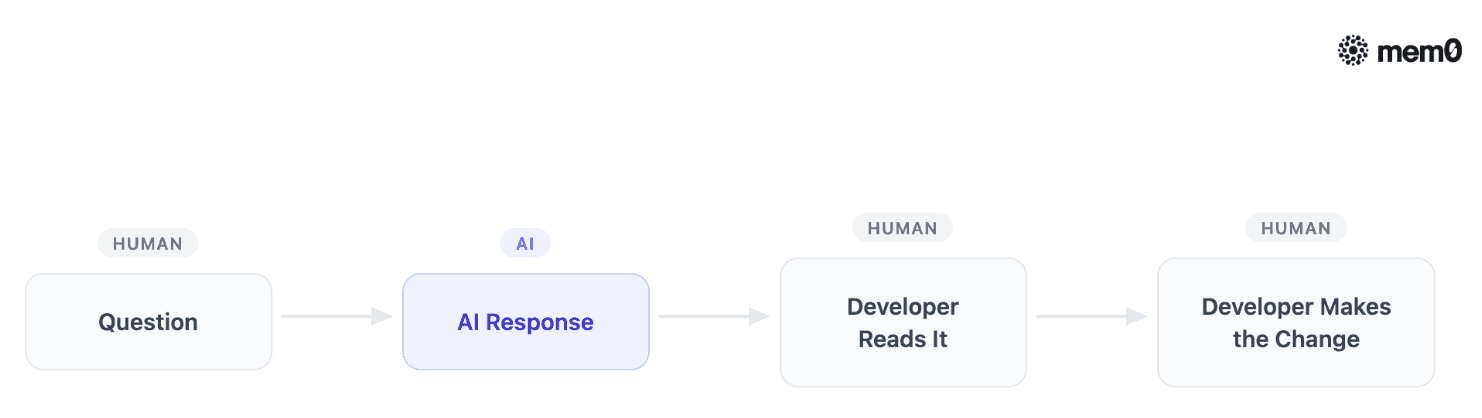
Here, the assistant provided some knowledge, while you did all the work and all the checking.
A coding agent might use that same answer as part of an execution loop by forming a hypothesis and then testing it against the actual codebase.
The Coding-Agent Workflow

The agent looks at the authentication middleware, notices that the token refresh route is returning the stale token, modifies the function, carries out the authentication tests and finds that they pass, before reporting the changes it made. The knowledge involved is the same; the only difference is who closes the loop.
The distinction is not always binary
Tools like Cursor and GitHub Copilot’s Agent Mode combines conversational assistance with agentic behavior within the same tool. Agentic behavior helps to run the plan, act, observe, verify loop on its own, editing files and running commands without waiting for you to approve each step, in the same product.
You can discuss code in one message and then pass off a multi-file task in the next, which means dividing the tools into ‘assistant’ and ‘agent’ categories is not as useful as it may appear.
The key questions are: What can the system access? What actions is it capable of carrying out? How much work can it carry out without further instructions? These three answers reveal what a tool really is, regardless of what it is called.
How a Coding Agent Actually Works
Every coding agent, whatever its interface, runs some version of the same loop:
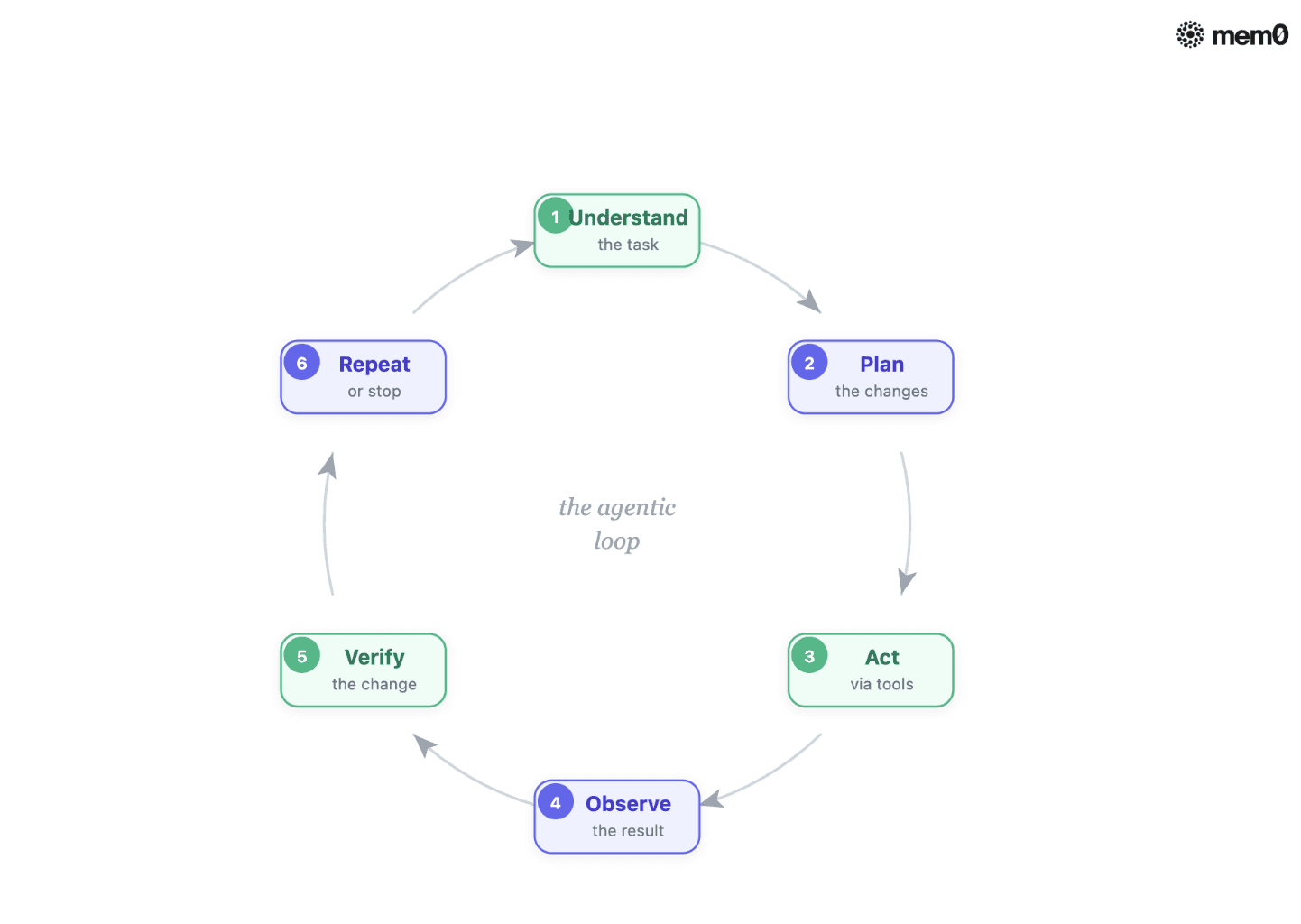
1. Understand the task
The agent starts by building a picture of what is being asked and what already exists. For “add pagination to the /users endpoint,” it needs to find the endpoint, see how the current query works, and check whether the codebase already has a pagination pattern to follow. A wrong understanding makes every later step wrong, too.
2. Plan the changes
The agent breaks the task down into smaller actions; for the pagination task, a plan could be as follows:
Find the /users endpoint
Inspect the database query
Add limit and offset parameters
Update response handling
Add tests
Run tests
The plan is not set definite; it is possible that Step 2 will show the query passing through a shared repository layer, in which case Steps 3 and 4 would have to be altered. The plans that agents formulate are merely working hypotheses and are revised as new information becomes available.
3. Use tools to make the changes
The model carries out its actions by making requests for tool calls. Such a request is structured data, for example:
The harness takes this in, carries out the actual file read, and then returns the contents. The entire mechanism, reduced to its essential elements, is as follows:
Code example 1: a minimal tool-calling loop
Walking through it:
TOOLS defines the actions the agent can use, such as reading a file, writing a file, or running a command.
messages stores the task and everything that has happened so far, giving the model context between steps.
model.generate(messages) asks the model to decide what to do next based on the available context.
if response.type == “finished” checks whether the model has completed the task; if so, the loop stops.
TOOLS[response.tool_name] finds the specific tool requested by the model.
**tool(response.arguments) runs that tool with the arguments provided by the model.
messages.append(…) adds the tool’s result back to the conversation so the model can use it in its next decision.
This is how the basic mechanism of an agent works. The model decides on the next action, but it is the agent’s runtime that carries out the action and then returns the result.
Note that there is no direct access on the part of the model to the filesystem or the shell; it can only make requests. This example aims to make the architecture easy to understand: actual agents involve this loop together with a great deal of engineering surrounding it.
4. Observe the result
After making a change, the agent needs new information. It runs the relevant check and reads back what happened, not just whether it passed.
Take the pagination example from earlier. The agent runs the test suite for get_users() and suppose gets this back:
The output from the test is included in the agent’s context just as if the agent had read a file.
The split between passed and failed, so it knows whether the change helped or hurt.
Which test failed by name, so it knows where to look next.
The specific error, ValueError not raised, which says the test expected an exception the code never raises. That is a different bug than a wrong return value, and it points to a different fix.
None of this comes from the model guessing. These outputs comes from actually running the checks and reading the real result, the same way a developer scrolls up in a terminal to see what broke.
The test output becomes part of the agent’s context, more like a file it read. This is the step that distinguishes an agent from a generator: while a generator produces code and then stops, an agent takes in what has happened and lets this observation influence the next decision.
5. Verify the change
Observation tells the agent what happened. Verification tells it whether what happened is acceptable. Agents verify using whatever checks the project offers: unit tests, integration tests, type checking, linting, builds, and application output.
An important limitation: verification is only as good as the checks available to the agent. If a codebase has thin test coverage, an agent can make a breaking change, run the tests, see green, and confidently report success. Teams that get the most from coding agents tend to be teams with strong test suites, for exactly this reason.
6. Correct and repeat
The agent won’t necessarily stop if the test fails; it might examine the error, review the relevant code, revise its assumptions, make changes to the implementation, and then run the test again.
Code example 2: the feedback loop
Real coding agents have a lot more safeguards, state management, tool permissions, and stopping conditions than this. The important part is the shape of the loop: take an action, check whether it worked, and treat failure as input for the next step rather than as the end of the process. The MAX_ATTEMPTS bound is there because loops like this can also fail by not stopping, retrying the same broken idea until someone intervenes.
Context Is Part of How a Coding Agent Works
An agent is not merely making decisions; it also has to keep sufficient information regarding what it has already learned and done so as to be able to make its next decision well. In that case, both the quality and the cost suffer if it forgets a constraint that was given to it at the beginning or if it has to re-read the same file five times because it has lost track.
What an agent needs to remember
For a long coding task, useful context can include the original task, files already inspected, decisions already made, commands already run, test failures, successful changes, constraints from the developer, and unresolved issues. Some of this must stay exactly as written (the task, the constraints). Some can be summarized (the full contents of a file it inspected an hour ago). Some can be dropped (output from a command that succeeded and is no longer relevant).
Context is not the same as the entire codebase
Take an example case where a task to fix double-charging in payment retries is in a monorepo with 40,000 files spanning billing, notifications, an admin dashboard, and a marketing site.
What actually matters for this task is small:
payment/retry.py,
payment/gateway_client.py,
tests/test_retry.py,
and maybe a config file that sets the retry limit. The other thirty-nine thousand files are not wrong to have in the repository, they are just irrelevant to this bug. Handing all of them to the model along with the three files that matter does not make it smarter about the problem. It makes the three relevant files harder to find inside everything else.
It is often thought that a larger context window resolves this issue: by loading the entire repository the problem vanishes. However, that is not how it works. Even if the codebase will fit within the window, irrelevant code makes it harder for the model to make use of the relevant sections, and each call becomes slower and more expensive.
An agent has to decide which items to retrieve, which to retain, which to summarise, which can be discarded and which should be retrieved at a later stage. As a result, context management becomes a systems issue rather than just a matter of model size.
Code example 3: maintaining task state
What a production agent actually needs is much more than this, specifically, persistence from one session to another, effective summarization strategies, the ability to retrieve information from the codebase, and careful management of token budgets. However, the basic idea is clear even in this initial version; the agent’s memory is a curated structure, not a transcript.
Carrying memory across sessions
The state object mentioned above has a brief lifespan; it exists only for the current run and vanishes when the process terminates. This is acceptable for a single task, but it implies that an agent starting to work on the same repository tomorrow will have to start from scratch: it will have no record of the fact that this codebase specifies Python 3.11 or that the last three PRs were rejected in review because they were too large.
Some teams solve this with a database table keyed by repository. Others reach for a dedicated memory layer built for exactly this problem. Mem0 is one example, open source, with Python and JavaScript SDKs.
Rather than storing raw logs, it runs an LLM pass over each interaction, pulls out the facts worth keeping, and stores them so they can be searched later by user, agent, or session. Wired into a coding agent, it behaves less like a chat transcript and more like a running notebook: write down what mattered when a task finishes, and check the notebook before starting the next one.
notes gets folded into the prompt for the new task, alongside the current state
This works along with the task-state object from before, not instead of it. Task state holds what is happening in this one run: which files got read, which tests passed. It disappears when the run ends. A memory layer holds what should carry over to the next run. In the example above, the agent just spent time learning that this repo’s auth tests share a fixture in conftest.py. Task state forgets that the moment the run ends. A memory layer keeps it, so tomorrow’s task on the same repo starts already knowing it.
Using something like Mem0 for this has real costs, worth understanding. Every fact it stores costs an extra call to a language model, since that call is how it decides what is worth keeping. And a memory store that only ever grows needs a way to prune old or stale facts, or search results get cluttered.
Mem0 is one way to handle this: a service, usable hosted or self-run, that does the extracting and searching so you do not have to build that logic yourself. Whatever tool you use, a homegrown script or a service like Mem0, it has to answer the same two questions: what is worth remembering, and how do you find it again later. That is the real design problem. The tools just differ in how they solve it.
Types of Coding Agents
Terminal-based agents
Terminal agents (such as Claude Code, OpenAI Codex CLI, Gemini CLI, and open-source alternatives like Aider) operate within a shell session and have direct access to your filesystem and commands. They match well with current workflows such as scripts, CI systems, servers, and containers. They are appropriate for developers who want the highest level of capability and are comfortable looking at diffs rather than watching the edits take place.
IDE-based agents
The IDE agents (such as Cursor, Windsurf, and GitHub Copilot when used in VS Code) incorporate the loop directly into the editor, allowing you to see the files changing in real time, review the differences directly within the text, and stop the process at any point during your work. The drawback is that this results in a closer integration with the editor’s view of the project, in return for a process that is much more observable.
Cloud-based autonomous agents
Cloud-based agents (such as Devin, GitHub Copilot’s coding agent, and OpenAI Codex in its cloud form) operate within a hosted sandbox, are typically started in response to an issue or a ticket, and then submit a pull request when their work is completed. No one observes them as they carry out their tasks. They require the greatest amount of trust and the most rigorous verification since the first interaction a human has with the change is the review.
What Coding Agents Can Actually Do
Consider a real task: add rate limiting to the login endpoint. Rate limiting caps how many login attempts a given account or IP address can make in a set window of time, say, five tries per minute, so an attacker cannot brute-force a password by trying thousands of guesses in a row. It sounds like one change, but it touches several files for different reasons.
The agent opens
auth.pyto see how login currently works, andmiddleware.pyto check whether the codebase already has a pattern for wrapping requests, since a rate limiter is exactly that kind of wrapper.Next, it adds the limiter itself in
middleware.py, wires it intoroutes.pyso it actually runs on the login path, and adds the threshold and time window toconfig.pyso the limit is not hardcoded.Then it extends test_auth.py with a test proving that, say, the eleventh request within a minute gets rejected, not just that the first one succeeds.
None of these five steps is hard on its own. What makes the task real work is doing all of them in the right order, on the correct files, without skipping the one step that would make the whole change silently do nothing.
Debug a failing application
Debugging is a natural fit for the loop, because the loop is what a debugging human does:
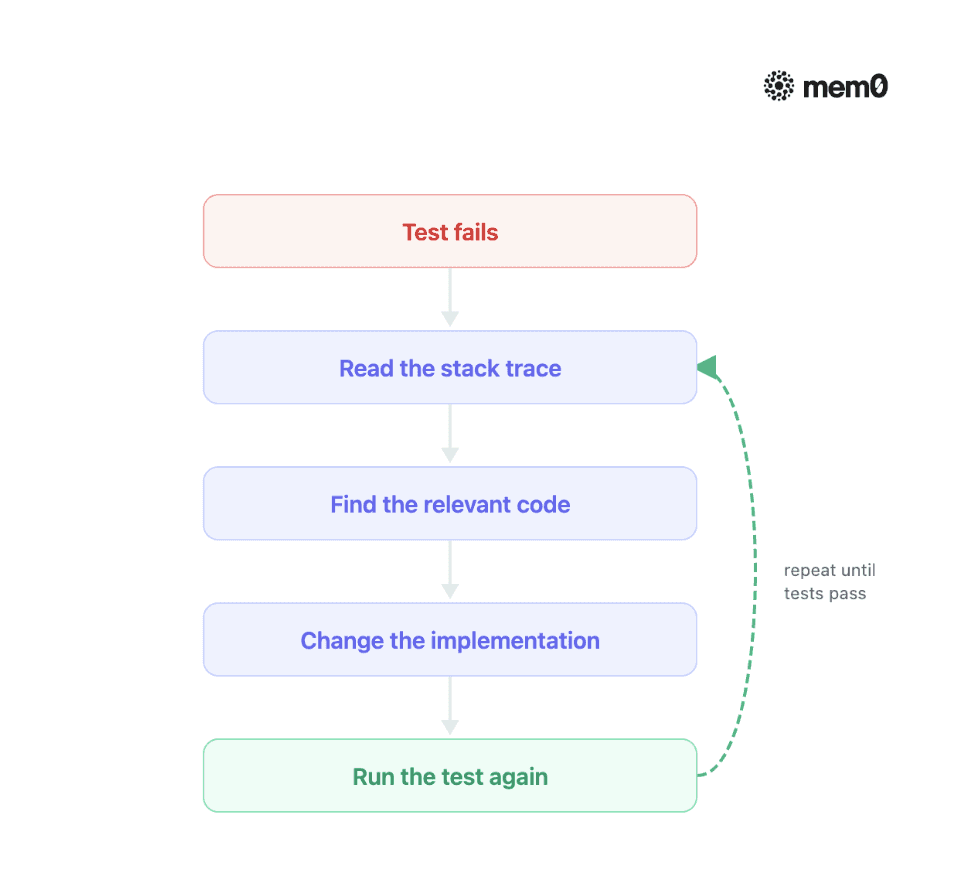
Take a use case: suppose a test fails with KeyError: ‘user_id’ inside parse_response(). The agent will read the traceback and will also be able to find that a recent change renamed the field to userId in one API response but not in the parser, update the parser to accept either key, and rerun the test until it passes. You can run the same failing test again and again and get the same result; the fix touches one place, and rerunning the test tells you plainly whether it worked.
A second example: suppose a test expects 20 items per page, but the page returns 21. The agent looks at the pagination code and finds the bug: the slice is written as items[offset:offset + limit + 1] when it should just be items[offset:offset + limit].
Someone added that + 1 by mistake. The agent removes it and reruns the test to check that the count is right.
Compare that to an intermittent 500 error that only shows up in production under real load, say ten thousand concurrent users, and never reproduces on a laptop. There is no failing test to point at and no stack trace to open twice and compare. An agent has almost nothing to iterate against here, and neither would most developers without adding logging or tracing first.
Agents are effective when the failure is reproducible with a command; the further a bug gets from that, the less the loop helps.
Work with development tools
Agents make use of the same tools that you do, such as pytest for running tests, npm for building and running scripts, package managers for adding dependencies, compilers for ensuring that the code builds, and linters for picking up style and correctness problems. This layer of tools is what enables verification: an agent which runs your type checker after each edit is able to detect its own errors before you do.
Work with Git
An agent will be able to examine diffs, set up branches, make commits, and prepare pull requests, depending on the permissions granted. It is the question of permissions that matters. It is safe to read a diff. Committing to a branch is generally acceptable. However, pushing to main should be a decision that a team makes deliberately and not one that is taken by default.
Query documentation and APIs
External tools can give the model information that it does not already possess, such as the current version of a library’s API, the schema of an internal service, or a vendor’s changelog. This fills a genuine gap, as the models are trained on a snapshot of the world and codebases change faster than training runs can keep up.
Coding Agents Limits
Agents tend to fail in ways that are worth anticipating. It is possible for them to misinterpret a task and yet carry out a wrong plan in a competent manner, a failure that is more serious than one that is obvious. They may pass weak tests even though they break behaviour that has not been tested. They can get stuck in a loop over a persistent failure, wasting tokens on different versions of the same incorrect approach.
They may generate diffs that are bigger than those required by the task, altering code that didn’t need to be changed. They have difficulty with tasks whose verification lies beyond their capability such as visual layouts, bugs that only occur in production, and performance under real traffic. Moreover, they inherit all the ambiguity present in your request, so when the instructions are vague the result is confident but incorrect work.
There are no good reasons for avoiding agents; rather, they provide reasons to clearly define the tasks, maintain strong verification, and examine the diffs as you would assess a new team member’s first month of pull requests.
How to Evaluate a Coding Agent
Model benchmarks are used for assessing models; since you are selecting a system, you should evaluate that system based on the kind of work that actually needs to be carried out.
Task completion
Does it actually carry out the task that was requested, as requested, or one of the plausible tasks similar to it?
Correctness
Will the implementation function properly, even in those cases which your tests don’t include but which your users will encounter?
Diff quality
Was only the essential stuff changed? Because a small and targeted diff is easy to review, whereas a large one passes on the cost to you.
Recovery
What is the outcome if the first attempt fails? Effective agents examine the error and make adjustments; inadequate ones either carry on with the same approach or give up.
Context retention
Can it keep a consistent understanding throughout a lengthy task, or will it forget the constraints and have to look at the same files again?
Human intervention
How frequently did a developer have to get involved and make the necessary corrections? It is necessary to count the interruptions, not merely the result.
Cost and time
What was the number of model and tool calls needed by the task? The cost can differ several-fold between two agents both of whom succeed.
The main idea is that an coding agent which manages to solve a benchmark problem quickly but needs a lot of subsequent cleanup might be less useful than one that is slower and instead produces a small, reviewable change; review time constitutes the actual budget in most teams and therefore the best agent is the one that uses up the least of it.
How to Choose a Coding Agent
Begin with your workflow rather than with a leaderboard. If you use the terminal and need agents in scripts and as part of CI, then a terminal agent is suitable. If your team wants to see every change as it occurs, an IDE agent is the right choice. If your aim is to delegate items from the backlog and to review pull requests, a cloud agent will do.
Next, carry out three or four actual tasks from your own codebase with each of the candidates and assess them according to the criteria mentioned above; your repository will usually disagree with the leaderboard so that this effort is worth spending an afternoon on. Lastly, check the controls: namely, what the agent can access, which actions require approval, and how permissions are enforced.
Coding Agents vs. AI Agents
Coding agents are programs that write, test, and fix computer code. They follow set rules and use coding languages like Python or JavaScript. These agents can work on tasks like writing functions, fixing bugs, or checking code for errors. They save developers time by handling routine jobs.
General AI agent | Coding agent | |
|---|---|---|
Environment | Web pages, files, forms, messages | Source code, repositories, terminals |
Tools | Browser, file system, arbitrary third-party APIs | Compilers, test runners, Git, package managers |
Verification | Often weak; most tasks have no built-in check | Strong; tests pass or fail, builds succeed or fail |
Typical task | Book a flight, fill out a form, summarize a page | Fix a bug, add a feature, refactor a module |
Failure signal | Often silent; nothing flags a wrong booking | Usually loud; a failing test or a broken build |
A general AI agent:
Works across broad, general-purpose tasks: browsing the web, filling out forms, managing files, sending messages.
Uses tools built for those broad tasks rather than for one specialized domain.
Gets weak verification by default, since most of the world it acts in has no built-in way to check whether an action was correct.
A coding agent:
Works inside a narrow, specialized environment: source code, repositories, terminals, tests, Git, package managers.
Gets strong verification almost for free: tests pass or fail, code compiles or it does not.
Can inspect and reverse any change through Git, a safety net most other environments do not offer.
That is a big reason coding was one of the first places agents could do real, professional work.
Where Coding Agents Are Heading
The direction is clear: coding agents will take on longer tasks with less human supervision. Agents can already work for minutes or even hours, and we’re moving from one developer guiding one agent to one developer reviewing the work of several agents. What will make this possible isn’t just smarter models. We also need better ways to verify their work, manage context over long tasks, and control what agents are allowed to do.
A coding agent is more than just a model. The teams that get the most out of them treat the whole system as an engineering problem. They give agents tests to learn from, clear tasks to work on, and enough permissions to get the job done without giving them unlimited access. The model matters, but the systems around it are what make agents useful, reliable, and safe.
—
Mem0 is an intelligent, open-source memory layer designed for LLMs and AI agents to provide long-term, personalized, and context-aware interactions across sessions.
Get your free API Key here: app.mem0.ai or self-host mem0 from our open-source GitHub repository.
—
Frequently Asked Questions
Q. Is GitHub Copilot a coding agent?
The autocomplete isn’t the case; it is Copilot’s agent mode and its cloud coding agent that are since they are able to plan, edit multiple files, run commands, and iterate when things go wrong.
Q. Does coding agents replace developers?
On the contrary, they transfer the developers’ time away from typing in the changes and towards defining the tasks and checking the results; the decision about what should be built and whether a change is acceptable remains with humans.
Q. Could a coding agent work on a large codebase?
Yes, since the agents obtain what they need rather than loading all the data. The quality is more a function of the structure of the codebase and the extent of its testing than of its size.
Q. Is it safe to run coding agents with full autonomy?
Autonomy should match verification. Strong tests and sandboxed execution justify longer leashes. Weak tests and production access do not.
Q. What is the difference between a coding agent and an LLM?
The LLM is one component. The agent is the whole system: the model plus the harness, tools, execution environment, and feedback loop around it.
References
Daily.dev, “The best AI coding agents in 2026, compared”: https://daily.dev/blog/best-ai-coding-agents-comparison/
TLDL, “AI Coding Tools Compared (2026): Cursor vs Claude Code vs Copilot”: https://www.tldl.io/resources/ai-coding-tools-2026
Levelop, “Best AI Coding Agents 2026: A Practical Ranking for Working Developers”: https://levelop.dev/blog/the-best-ai-coding-agents-in-2026-a-practical-ranking-for-working-developers
TeamDay, “Agentic Coding Guide 2026: Claude Code, Codex & 5 Patterns”: https://www.teamday.ai/blog/complete-guide-agentic-coding-2026
CodePick, “AI Coding Agents in 2026: A Practical Roadmap from Autocomplete to Cloud Teammates”: https://codepick.dev/en/guides/ai-coding-agents-2026-roadmap/
More on Coding Agents

Kimi K3 tutorial: build a vision coding agent with persistent memory
Kimi K3 has a 1M-token context window but no memory across sessions. We tested it with Mem0 and cut design regressions from 60% to 0%.
10 min read

OpenAI Codex vs Claude Code: Which AI Coding Agent Wins in 2026?
Codex leans toward parallel execution, isolated worktrees, cloud delegation, and reviewable task runs. Claude Code is terminal oriented and more engaging in long interactive sessions, and agent-to-agent coordination. OpenAI’s GPT-6 Astra and Anthropic’s Fable 5.1 have enhanced capabilities, but the harness determines how that intelligence is used. For serious repository work, the better choice is the one that performs more reliably on your codebase, constraints, and working style.
23 min read

I Gave My Claude Code Agent One Gateway Key Instead of 10 API Keys - Here's What Happened
A hands-on walkthrough of Mem0 Gateway connecting Notion and Mem0 to Claude Code through one scoped key, watching the fail-closed/approval flow play out when an agent asked for access it didn't have, and testing whether a taught standing rule survives a new session without being told twice.
15 min read



Aashi Dutt
She is a senior technical content writer at Mem0. She covers agent memory architecture and the engineering decisions behind building agents that actually remember. She experiments with new features and turns research into posts developers can put straight to use.
Start building with memory
Free tier, no card