

·
10 min read

On this page
Kimi recently announced a 2.8 trillion-parameter, open frontier intelligence model named Kimi K3 with a 1M context window. It will be the first open-weight model to cross the 3-trillion-parameter threshold by July 27, 2026, joining the AI race, along with other frontier models by companies like Moonshot and DeepSeek.
That said, there is still a gap to be filled within a 1M context window. That gap is memory. A model brilliant with architecture or its multimodal capabilities often misses out on memory. This gap does not show up until the session ends.
In this article, we will test the vision-in-the-loop capabilities of Kimi K3 and test how persistent memory like Mem0 can add to its advantages. The idea is to ask the K3 model to perform certain edits to a pricing card and get feedback from the designer. This runs in two sessions, one with memory and one without. While this runs in the second session, the memory kicks in, injecting the design choices the designer has already made in the previous session directly into the context window.
To our surprise, without memory, Kimi K3 revisited a rejected design choice in 3 of 5 runs. With Mem0, that number was 0 of 5.
A free Mem0 API key is all you need for the memory layer. Get a free Mem0 key.
What is Kimi K3?
For the Kimi K3 model, the team introduced two pieces that didn’t exist in the last generation: Kimi Delta Attention (KDA) and Attention Residuals (AttnRes). These updates improve how information flows across a sequence length and model depth. The Attention Residuals deliver ~25% higher training efficiency at <2% additional cost, which makes this model effectively cheaper compared to its counterparts.
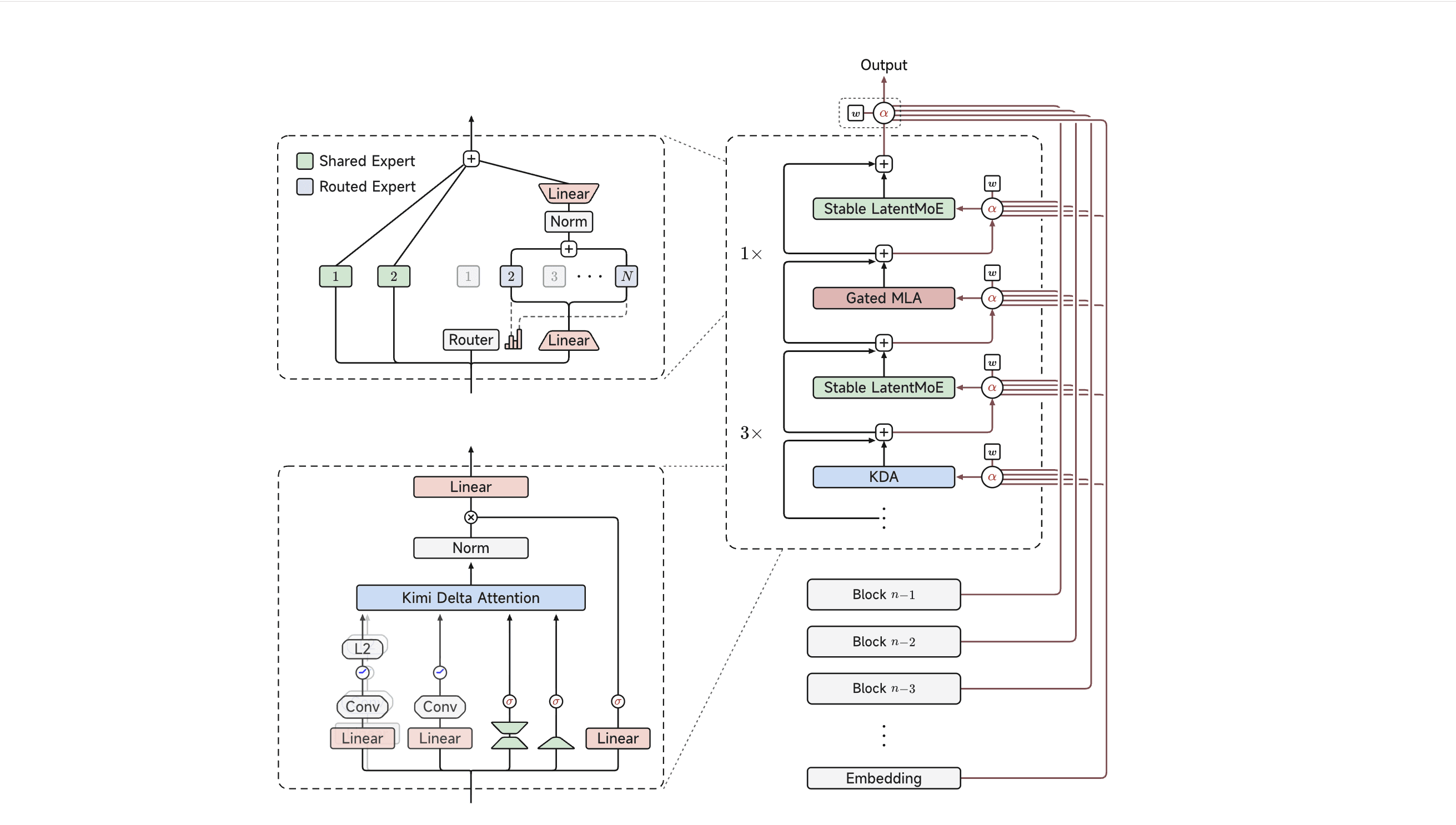
Fig: Kimi K3 architecture: the Stable LatentMoE and KDA modules (left), the AttnRes operation α (top right), and the Block Attention Residuals backbone (right)(Source)
This model is trained to work with low-precision weights and activations from early in training, so that it can work seamlessly on hardware that is accessible by most labs. It also activates on 16 of 896 experts in MoE for any given piece of text to save on compute for each request. But deciding which 16 experts can be tricky each time, and getting it wrong can make the training unstable. To keep the selection stable, Moonshot AI built a system called Quantile Balancing that figures out the right split automatically.
Kimi K3 is currently positioned at a similar level to other frontier models like Claude Fable 5, GPT 5.6 Sol, etc. It consistently outperforms other tested open models across its evaluation suite.
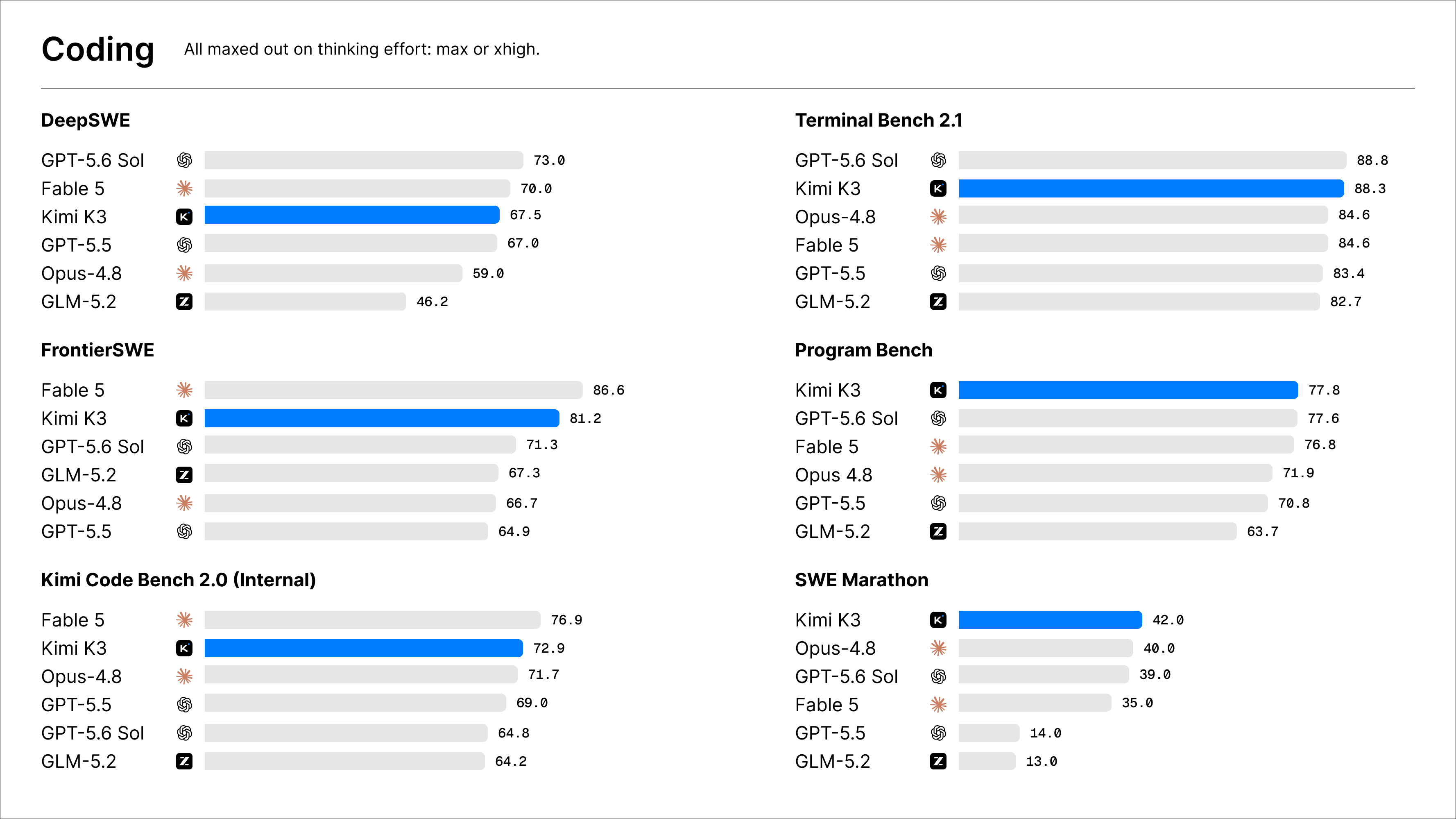
Fig: Kimi K3 model comparison on coding with other frontier models(Source)
That said, a 1-million-token context window does very little for memory. It’s not memory, just a bigger room to think in for one sitting.
Key features of Kimi K3
A few new features of this model really stood out for me, some of which are:
Vision-in-the-loop: This feature is genuinely agentic in nature. Kimi K3 can iterate between a live screenshot and the underlying code. So, instead of just reasoning on UI changes from a text description, Kimi K3 actually looks into the codebase for your frontend work, game development, and CAD.
Long-horizon autonomy: Kimi K3 comes with a super ability to work multi-hour sessions where it profiles, rewrites, benchmarks, and iterates on a long problem. Think of this feature as a useful feature for writing CUDA kernels or building MiniTriton, a Triton-like compiler with its own IR layer and PTX code-generation pipeline, entirely from scratch, and testing it on real benchmarks.
A cache-aware pricing model: K3 shows a 10x gap between cache-hit and cache-miss input pricing, which puts it in line with Claude and GPT-5.6’s caching pricing, not ahead of them, but DeepSeek’s discount is steeper still.
Two limitations:
It can act without asking: On unclear tasks, K3 sometimes makes a call on its own instead of checking in first, even when nobody asked it to. We witnessed this in the following demo.
Switching mid-session: If you move to a different tool or model partway through, and the “thinking” history doesn’t carry over cleanly, K3’s output can get unstable.
Most agentic AI systems are built to favor autonomy over caution and run into the same two issues.
Demo: Does K3 remember a design decision it never re-read?
Here’s the thing: Kimi K3 is a strong model and a 1M context window is genuinely useful for a single session. It’s a capable model with real long-horizon coding strength and genuine vision-in-the-loop ability, and nothing here is about patching a flaw. The game changes when you need the model to hold on to your preferences over sessions. But the model has no built-in memory.
Wanna give it a try? Get a Mem0 API Key and try it yourself.
So, I gave Kimi K3 persistent memory with Mem0 and tested it on a Vision-in-the-loop example on two side-by-side sessions, one with memory and one without memory.
Memo’s add() method writes information worth remembering from the session, scoped to a user or project. Then search() method retrieves what’s relevant to the current task. Nothing about how K3 reasons, codes, or reads a screenshot changes with Mem0.
Session 1
A coding agent iterates on a UI component using Kimi K3’s vision-in-the-loop pattern. It renders the component, takes a screenshot, sends that screenshot and the current code and reviewer feedback to Kimi K3, to finally get an updated code, and repeat.
Session 1 is identical in both conditions:
Round 1: Reviewer rejects a dark background, citing poor contrast on the price text
Round 2: Reviewer accepts a light background with dark text
Round 3: Reviewer rejects the teal CTA button as too aggressive
Round 4: Reviewer accepts a more muted CTA
Session ends.
Session 2
The reviewer came back after a weekend and days later, runs with one instruction:
“Add a fourth Enterprise tier, and make the whole section feel bolder, more premium, more conversion-focused”.
Same task, same K3 model, and same starting code but with two conditions:
Condition A (no memory): Session 2 starts with only the current screenshot and the new instruction. Nothing tells K3 a dark theme was already tried and rejected.
Condition B (Mem0-backed): Before generating anything, the agent calls
mem0.search()for prior decisions on this project, gets back the actual rejection and acceptance reasons from session 1, and injects that straight into the prompt.
Here’s the catch:
Every trial has a fresh project ID, so there is no chance of memory leaks from one session to another. This will help us understand whether Mem0 helped or whether we just got lucky twice with the same leftover context.
To add memory to Mem0:
Then retrieve it using mem0.search() like this:
To inject the searched memory into the prompt, simply run the following:
The only difference between the two functions is the system_prompt. Session 1’s code path and Session 2 Condition A’s code path are identical with no memory. However, Session 2 Condition B adds one call to get_prior_context() before generating, and one extra paragraph in the system prompt.
The results
Let’s see how Kimi K3 performed in both sessions with and without Mem0:
Session 1
Kimi K3 simply accepted the feedback from the user in Session 1 and continued forward.
Round | Feedback | Verdict |
|---|---|---|
1 | Dark background, poor contrast on price text | Rejected |
2 | Light background with dark text | Accepted |
3 | Teal CTA button, too aggressive | Rejected |
4 | Muted CTA | Accepted |
Session 2 (5 trials)
For Session 2 Condition A (no memory), Kimi K3 learnt nothing from the feedback from the previous session as it didn’t have any memory or way to know the already made decision. That’s the whole point: a session boundary erases context, no matter how large that context window was a moment ago.
Trial | Condition A (no memory) | Condition B (Mem0) |
|---|---|---|
1 | Regressed. Reintroduced dark background | Clean. Retrieved teal and light-background decisions, applied both |
2 | Clean (no regression this run) | Clean. Retrieved teal and light-background decisions, applied both |
3 | Regressed. Dark background reintroduced with explicit hex values on the new tier: | Clean. Retrieved all 3 decisions (dark rejection, light acceptance, teal rejection), applied all |
4 | Clean (no regression this run) | Clean. Retrieved teal and light-background decisions, applied both |
5 | Regressed. Dark background reintroduced with explicit hex values: | Clean. Retrieved teal and light-background decisions, applied both |
For Session 2 (with memory), Mem0 injects existing feedback memory from the previous session into a new session, and Kimi K3 uses that memory as knowledge to make the next decision. Hence, Mem0 didn’t change how K3 thinks, how it codes, or how it reasons about a screenshot.
Overall metrics
Metric | Condition A (no memory) | Condition B (Mem0) |
|---|---|---|
Regressions | 3 of 5 (60%) | 0 of 5 (0%) |
Decisions that regressed | Background theme only, never CTA color | None |
Sample size | 5 | 5 |
A model can have a million tokens of context and still forget everything the moment a session ends, because context and memory are not the same thing; one lives inside a call, and the other has to survive past it.
Frequently Asked Questions
Q. Does Kimi K3 have any built-in memory across sessions?
K3 has a 1M-token context window, and Kimi Work’s Widgets and Dashboard, described as persistent UI surfaces, but nothing in Moonshot’s own docs describes a retrieval or memory architecture underneath them.
Q. Is this a K3-specific limitation?
No. Every LLM call is stateless by design, K3 included. That’s true of essentially any model once a session ends, not a gap specific to Kimi.
Q. Do I need Kimi Code to use K3 with Mem0?
No. This demo runs entirely with Kimi’s raw API (kimi-k3 via the OpenAI-compatible endpoint), with Mem0’s SDK handling add() and search() calls directly. No CLI or plugin is required.
Q. Why did the regression only show up on the background color, not the CTA?
The session-2 instruction, “bolder, more premium,” pulls harder toward reconsidering a background than a button. Memory’s value shows up the most where a new instruction tempts a model to backslide, not evenly across every past decision.
Further Reading
More on Coding Agents

Coding Agents Explained: What They Are and How They Differ from AI Assistants
Learn what coding agents are, how they work, and how they differ from AI assistants, chatbots, and autocomplete tools.
29 min read

OpenAI Codex vs Claude Code: Which AI Coding Agent Wins in 2026?
Codex leans toward parallel execution, isolated worktrees, cloud delegation, and reviewable task runs. Claude Code is terminal oriented and more engaging in long interactive sessions, and agent-to-agent coordination. OpenAI’s GPT-6 Astra and Anthropic’s Fable 5.1 have enhanced capabilities, but the harness determines how that intelligence is used. For serious repository work, the better choice is the one that performs more reliably on your codebase, constraints, and working style.
23 min read

I Gave My Claude Code Agent One Gateway Key Instead of 10 API Keys - Here's What Happened
A hands-on walkthrough of Mem0 Gateway connecting Notion and Mem0 to Claude Code through one scoped key, watching the fail-closed/approval flow play out when an agent asked for access it didn't have, and testing whether a taught standing rule survives a new session without being told twice.
15 min read



Aashi Dutt
She is a senior technical content writer at Mem0. She covers agent memory architecture and the engineering decisions behind building agents that actually remember. She experiments with new features and turns research into posts developers can put straight to use.
Start building with memory
Free tier, no card