

·
13 min read
On this page
Quick Takeaways
GLM 5.2 is a 753B-parameter coding-first MoE with a 1M-token context window, two effort modes (High and Max), and the top open-source score on Terminal-Bench 2.1.
A 1M window solves in-session recall. It does nothing for what persists after the request ends, the process restarts, or you swap models.
Mem0 stores distilled facts outside the model, retrieves only the relevant ones per turn, and survives restarts and model swaps.
The integration is OpenAI-compatible on the GLM side and four lines on the Mem0 side:
add()to store,search()to retrieve, then inject into the prompt.
GLM 5.2 targets one specific pain point for agent builders: long-horizon tasks that unfold across hours of interaction and large codebases. Its 1M-token context and dual effort levels make it attractive for coding agents, research copilots, and automated refactoring systems.
Those same workloads expose a different bottleneck that long context alone cannot fix. Agents need durable, structured, cross-session memory that survives truncation, model swaps, and process restarts. A 1M-token window is huge, but it is still wiped the moment the process ends. That is the gap Mem0 fills, and it turns GLM 5.2's long-horizon reasoning into long-horizon operation.
This post covers how GLM 5.2 works, why long context is not the same as memory, and how to wire Mem0 to GLM 5.2 in production Python. The code is runnable against the live Z.ai API.
What GLM 5.2 brings to long-horizon agents
GLM 5.2 is built around long-horizon coding and tool-using agents. The properties that matter to agent builders:
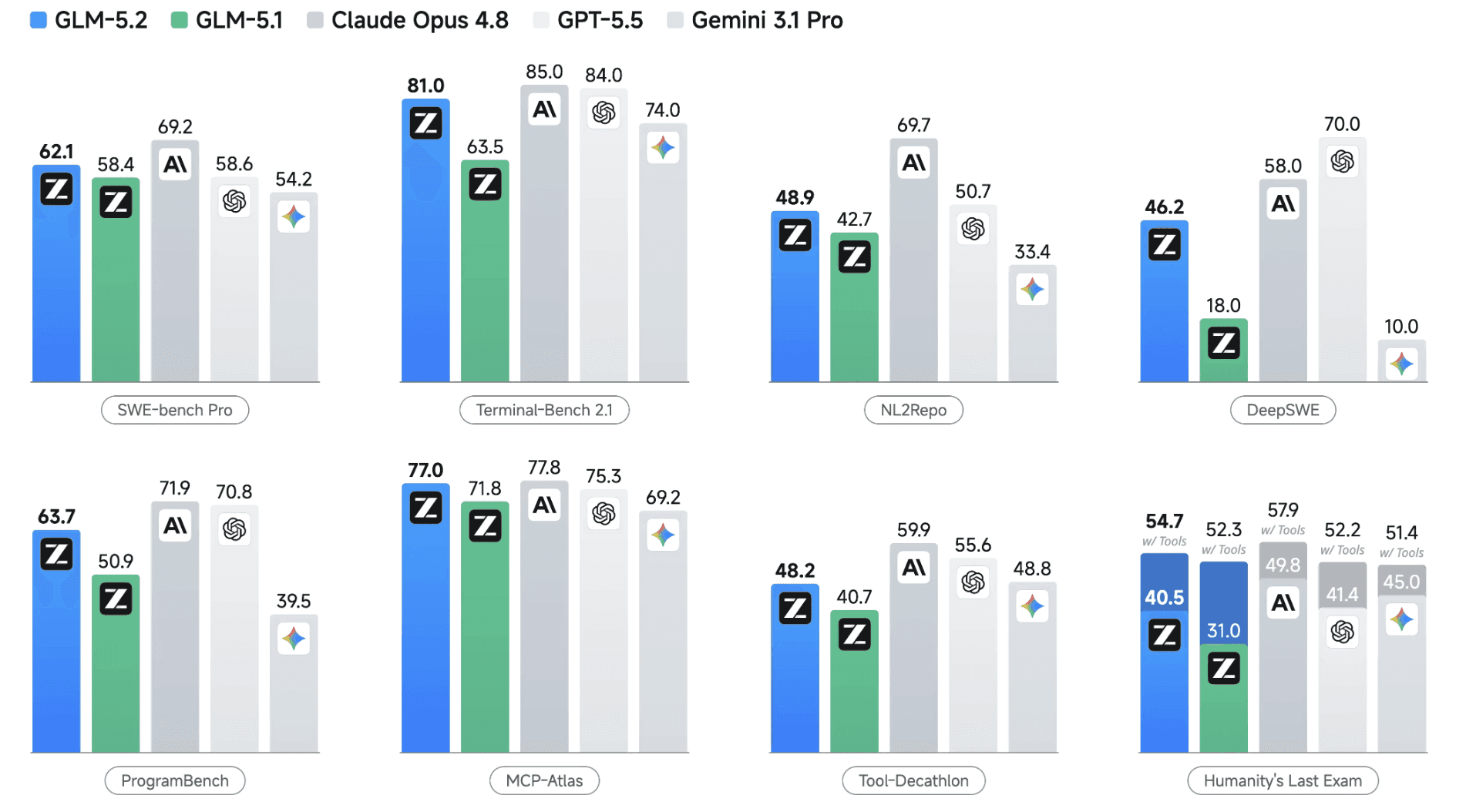
Fig: GLM 5.2 performance (Source)
Usable 1M-token context: The full-window variant (
glm-5.2[1m]) handles repository-scale refactoring and long agentic plan-then-execute traces in a single window, with output capped at 131,072 tokens.Dual effort control: GLM 5.2 exposes two thinking-effort presets, High and Max, so agents can trade latency and cost against reasoning depth. Z.ai's own guidance is that Max is the default for serious coding work. There is no low or auto tier; both presets are slow-and-thoughtful by design, which fits the long-horizon framing.
Coding-first MoE architecture: GLM 5.2 is a 753B-parameter Mixture-of-Experts model (roughly 40B active parameters per token) built on DeepSeek Sparse Attention, tuned through agentic RL post-training for extended-context coding rather than general chat. Z.ai's IndexShare technique lets every four transformer layers share one lightweight indexer, cutting per-token indexer FLOPs by 2.9x at 1M context, with MTP speculative-decoding improvements raising acceptance length by 20%.
Long-horizon coding scores: On Terminal-Bench 2.1, GLM 5.2 scores 81.0, a wide jump over GLM-5.1's 63.5 and within a few points of Claude Opus 4.8. On SWE-bench Pro, it posts 62.1. It is the highest-ranked open-source model across the long-horizon coding benchmarks Z.ai reported at launch.
OpenAI-compatible API: GLM 5.2 is a drop-in for the OpenAI SDK. Change the base URL and model name, and the rest of your code stays the same.
Combined, GLM 5.2 is a strong backbone for agents that maintain long-running sessions and extended coding work. What it does not provide is persistent, structured memory across runs, contexts, and models.
Long context is not long-term memory
A 1M-token window solves one problem: how much history fits in a single request. It does not solve the broader memory requirements of production agents.
Context is ephemeral: The KV cache and prompt content vanish when the process restarts, when the request finishes and a new session begins, or when a different model or backend is called. Any knowledge that lives only inside the 1M-token buffer is fragile. If the agent must remember a repository's structure, a team's coding conventions, or a long-running experiment's state, that information has to exist outside the transient window.
Raw logs do not scale: High-concurrency production workloads cannot keep arbitrary logs in context forever, and there is a cost dimension: running GLM 5.2 at Max effort over a full 1M-token context on every turn is not economically viable. Agents need to compress interaction history into stable facts, decide what to drop or retain, and share memories between tools.
Long context has no schema: A 600k-token trace is terminal logs, tool inputs and outputs, messages across channels, and scratch notes, all mixed. The model can try to reparse that structure each turn, but agents benefit from explicit, queryable memory: "What did this user say about preferred libraries?" "Which test failures kept recurring last week?" "Which repositories has this agent already patched?" GLM 5.2 does not maintain those indexes beyond a single call.
That is the core role of Mem0. The distinction between a big context window and a persistent memory layer is worth understanding in its own right, covered in context window vs persistent memory.
What Mem0 is in the GLM 5.2 stack
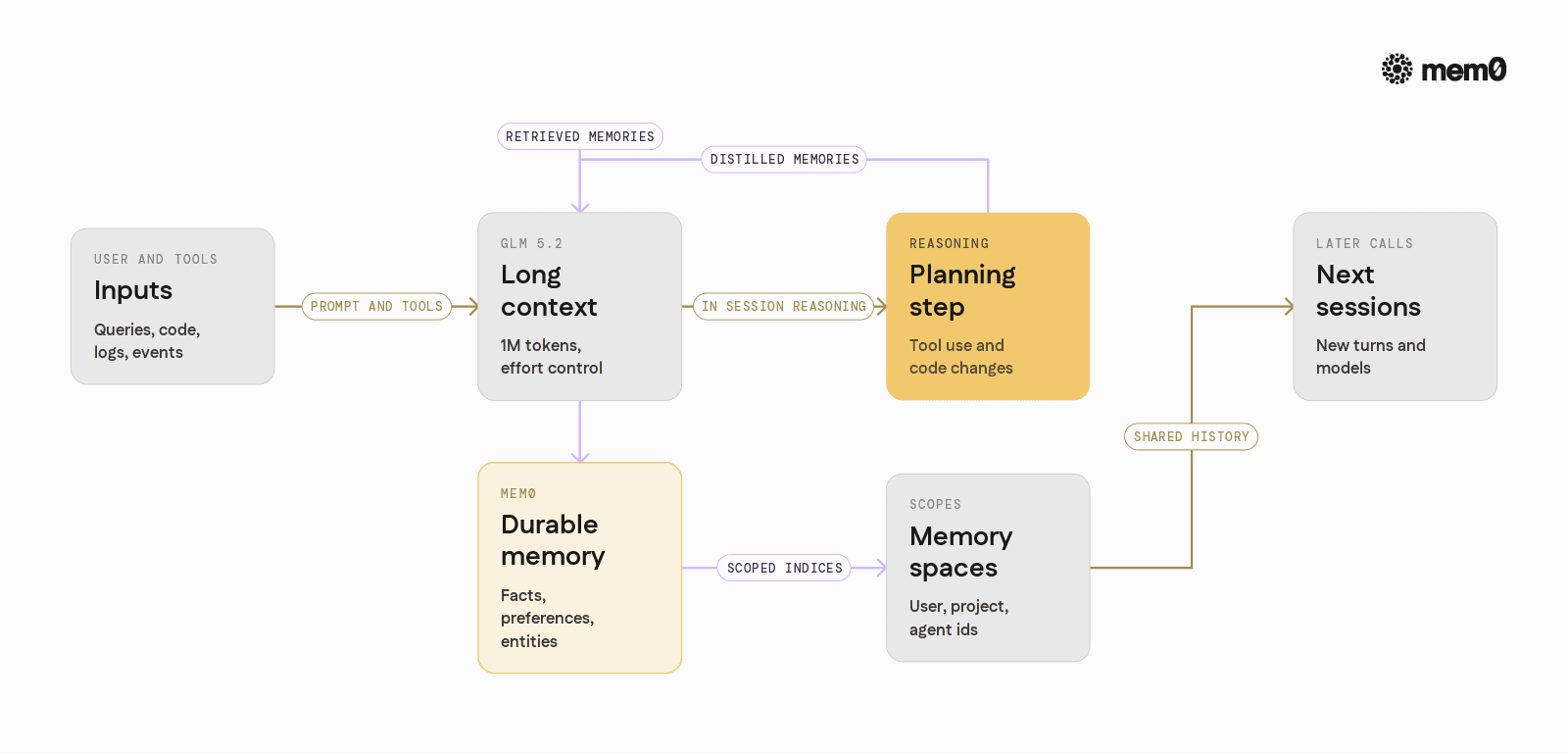
Mem0 is an open-source memory layer for LLMs and agents. Alongside GLM 5.2, it plays four roles: a durable store that converts noisy traces into compact facts, retrieval that injects only relevant memories into each prompt, identity-scoped spaces (per user, project, or agent), and a model-agnostic interface so memory persists even if you swap GLM 5.2 for another model.
The division of labor is clean. GLM 5.2 handles reasoning across a large local context for a given planning step. Mem0 handles persistence and retrieval of global memories across steps, sessions, and models.
The four lines that connect them
On the Mem0 side, the entire integration is two calls.
Two SDK details worth getting right up front. add() takes user_id= directly and a list of message dicts, not a bare string. search() scopes through filters= and returns a {"results": [...]} envelope, so you extract the list before iterating. Everything below builds on these two calls.
Architecture pattern: GLM 5.2 + Mem0
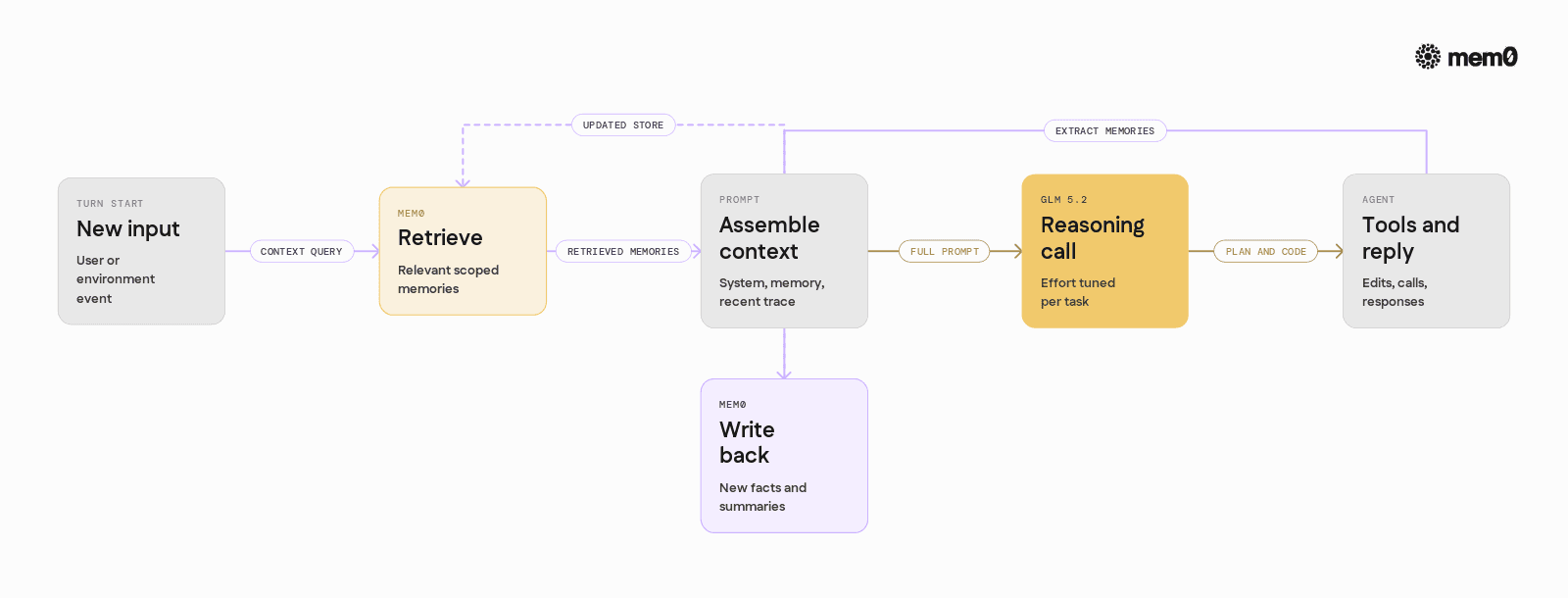
A typical GLM 5.2 + Mem0 agent loop looks like this:
Receive user or environment input.
Query Mem0 for relevant memories given
user_id,project_id, and the current task.Build the GLM 5.2 prompt from system instructions, retrieved memories, and recent context.
Call GLM 5.2, at an appropriate effort level.
Parse and execute tools, apply changes, or respond.
Write distilled new facts, sub-task summaries, and artifact links back to Mem0.
Long-horizon reasoning is handled with GLM 5.2's 1M context. Long-horizon memory is handled by Mem0, which keeps the window lean and focused.
Full Python example: a memory-backed coding agent
This is an end-to-end coding agent using GLM 5.2 through the OpenAI-compatible Z.ai endpoint and Mem0 for memory.
💡 You'll need a free Mem0 API key and GLM API key to follow along.
The patterns that matter here: Mem0 is the authoritative long-term store for a project, GLM 5.2 handles both the main reasoning and the memory extraction, and memories are scoped by project_id so a multi-repo agent never bleeds context across codebases.
One correction worth internalizing if you are porting older GLM examples: GLM 5.2 has only High and Max effort, no "low" tier. Older snippets that set effort="low" for cheap extraction will not behave as written. Use High for the lighter path.
Run the memory loop yourself in five minutes
Before wiring up the full agent, prove the persistence works. Grab a free API key at app.mem0.ai, set MEM0_API_KEY, and run this:
The convention survives with no context attached. That is exactly what a 1M-token window cannot do once the process restarts. Once you see it return, the full agent above is just this loop wrapped around GLM 5.2.
Where GLM 5.2 ends and Mem0 begins
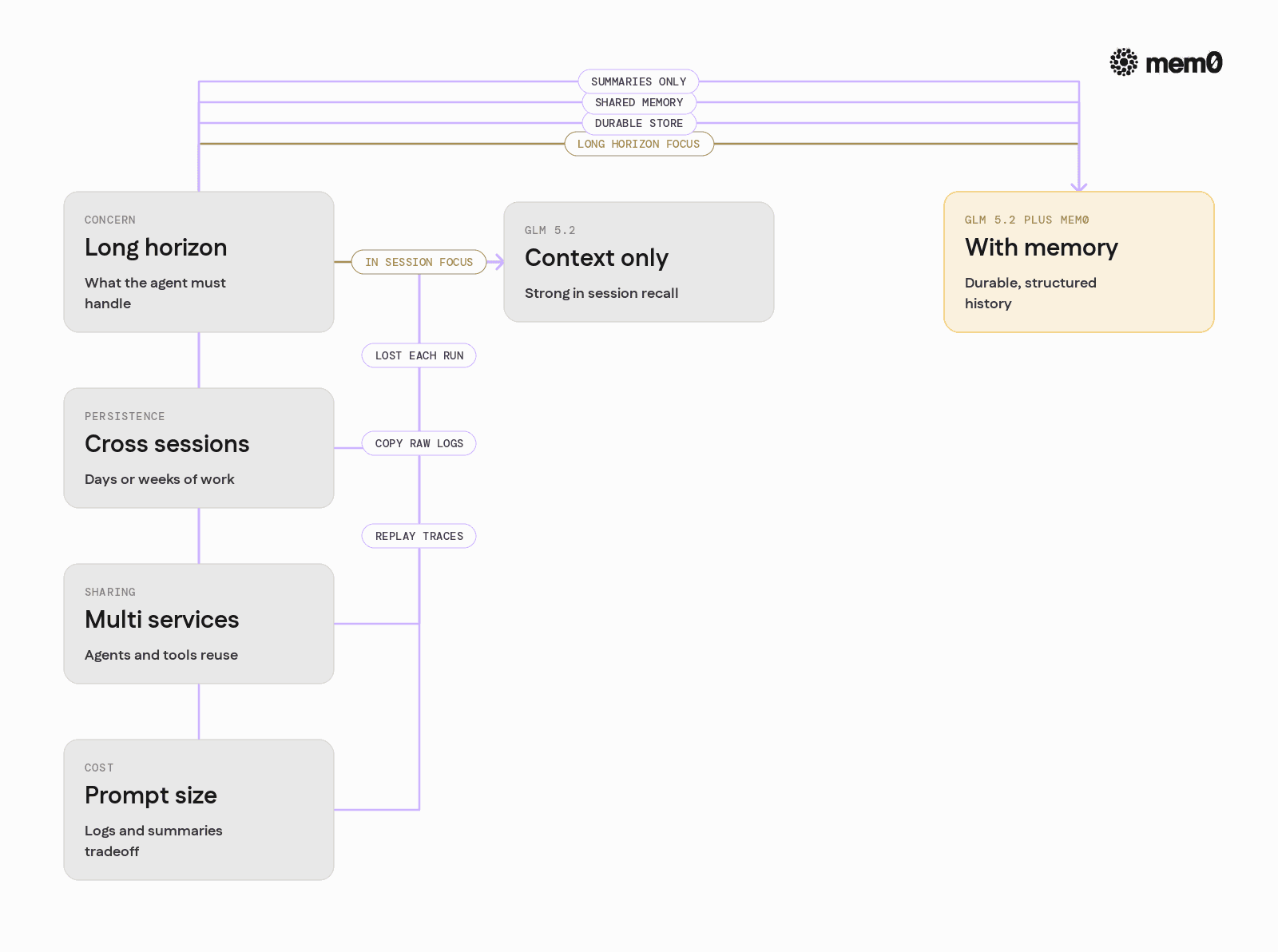
Given GLM 5.2’s long context, a natural question is when to rely on context alone and when to add Mem0.
A simple comparative view helps:
Concern | GLM 5.2 context only | GLM 5.2 plus Mem0 |
|---|---|---|
In-session recall | Strong, especially for coding traces | Strong, plus distilled summaries |
Cross-session persistence | None, context is lost | Durable, in an external store |
Storage cost over time | Grows if logs are re-injected | Compressed into discrete memories |
Querying specific facts | Prompt search and reparse | Direct queries via Mem0 |
Multi-service sharing | Copy raw logs between services | Shared spaces via IDs and metadata |
Model swaps / A/B tests | Context resets per model | Memory survives, model-agnostic |
Treat GLM 5.2 as a powerful live context consumer and planner. Treat Mem0 as the system of record for what the agent has learned.
If you are deciding between "just use the 1M window" and adding a memory layer, the test is time horizon. A single long session fits in context. Anything that spans restarts, days, or multiple services needs persistence.
👉 Get an API key and run the five-minute test against your own agent before you commit either way.
Production patterns for long-horizon coding agents
Project-scoped memory. Use metadata to isolate memories: project_id (repo or service), kind (preference, bug, architecture, convention), env (staging, prod). Agents fetch only what is relevant to the current repository, which keeps prompts compact and avoids cross-project contamination.
Episodic summaries for large traces: For tasks that run for hours, even the 1M window eventually cycles. Use GLM 5.2 to summarize slices of the trace and store episode summaries keyed by step ranges, plus decisions made and open TODOs. On later calls, Mem0 returns those summaries so GLM 5.2 gets a compressed understanding of prior work without reloading full logs.
Shared memory across services: A CLI, a web IDE assistant, and a batch refactoring service can share one memory of a repository as long as they use consistent
user_idandproject_idvalues. The memory written by one surface is immediately available to the others.
Limitations of the pattern
GLM 5.2 plus Mem0 changes the memory story, but it does not eliminate every challenge.
Memory quality depends on extraction: Poorly designed extraction prompts store redundant or low-value memories, which adds retrieval noise. Careful prompt design and evaluation matter.
Retention is non-trivial: Agents must decide when to delete, summarize, or down-rank memories. Without retention logic, stores grow cluttered and retrieval quality drops.
Not every task needs memory: Short-lived or pure batch workflows may not benefit. Adding memory where it is not needed is just cost and complexity.
Reasoning is still bounded by the model: Even with perfect memory, GLM 5.2 can misinterpret retrieved facts or overfit to outdated decisions. Memory does not replace evaluation or human review.
Frequently Asked Questions
Q. Does GLM 5.2 still need a vector database or memory layer?
Yes, for anything that spans sessions. The 1M-token window handles a single long run, but it holds nothing once the process restarts, a new session starts, or you swap models. A memory layer like Mem0 keeps distilled facts in an external store and returns only the relevant ones per turn, which is what gives the agent continuity across runs without replaying raw logs.
Q. What problem does Mem0 solve that GLM 5.2's 1M context does not?
Mem0 provides durable, structured memory that survives across sessions, processes, and model swaps. GLM 5.2's context is powerful but transient, and it becomes expensive to replay as histories grow. Mem0 keeps the durable facts outside the window and returns only what is relevant.
Q. How should GLM 5.2 effort levels interact with Mem0 usage?
GLM 5.2 offers two efforts, High and Max. Reserve Max for complex reasoning steps that benefit from rich memory context. High is enough for auxiliary work like memory extraction and summarization, which keeps cost down while keeping memory fresh.
Q. How does Mem0 affect prompt size with a 1M-token model?
It usually reduces effective prompt size by replacing raw logs with distilled memories. Instead of replaying large traces, the agent injects only compact, relevant memories plus a few episodic summaries.
Q. Can multiple GLM-based services share the same Mem0 store?
Yes, as long as they use consistent identifiers and metadata for users and projects. A CLI, a web IDE assistant, and a batch refactoring service can all share a common memory of a repository or team.
Q. How do I keep memory quality high over time?
Combine careful extraction prompts with periodic summarization and pruning. Older memories can be merged into higher-level summaries, and rarely used items can be expired, keeping retrieval focused and efficient.
Further reading
Start here!!
Get your free API Key here: app.mem0.ai or self-host mem0 from our open-source GitHub repository.
More on Coding Agents

Kimi K3 tutorial: build a vision coding agent with persistent memory
Kimi K3 has a 1M-token context window but no memory across sessions. We tested it with Mem0 and cut design regressions from 60% to 0%.
10 min read

Coding Agents Explained: What They Are and How They Differ from AI Assistants
Learn what coding agents are, how they work, and how they differ from AI assistants, chatbots, and autocomplete tools.
29 min read

OpenAI Codex vs Claude Code: Which AI Coding Agent Wins in 2026?
Codex leans toward parallel execution, isolated worktrees, cloud delegation, and reviewable task runs. Claude Code is terminal oriented and more engaging in long interactive sessions, and agent-to-agent coordination. OpenAI’s GPT-6 Astra and Anthropic’s Fable 5.1 have enhanced capabilities, but the harness determines how that intelligence is used. For serious repository work, the better choice is the one that performs more reliably on your codebase, constraints, and working style.
23 min read





Aashi Dutt
She is a senior technical content writer at Mem0. She covers agent memory architecture and the engineering decisions behind building agents that actually remember. She experiments with new features and turns research into posts developers can put straight to use.
Start building with memory
Free tier, no card