
/
/
/
How Claude Code Memory Actually Works: MEMORY.md, Auto Dream, 200-Line Limit

·
8 min read
On this page
I read through Claude Code’s memory source code.
200-line index cap. 5 files per turn. No embeddings.
Here’s exactly what’s happening when Claude says it remembers you, and how to fix it.
The leak
Someone published the full Claude Code source to the internet.
Engineers immediately went for the interesting parts. Prompts. Tool definitions. Billing logic.
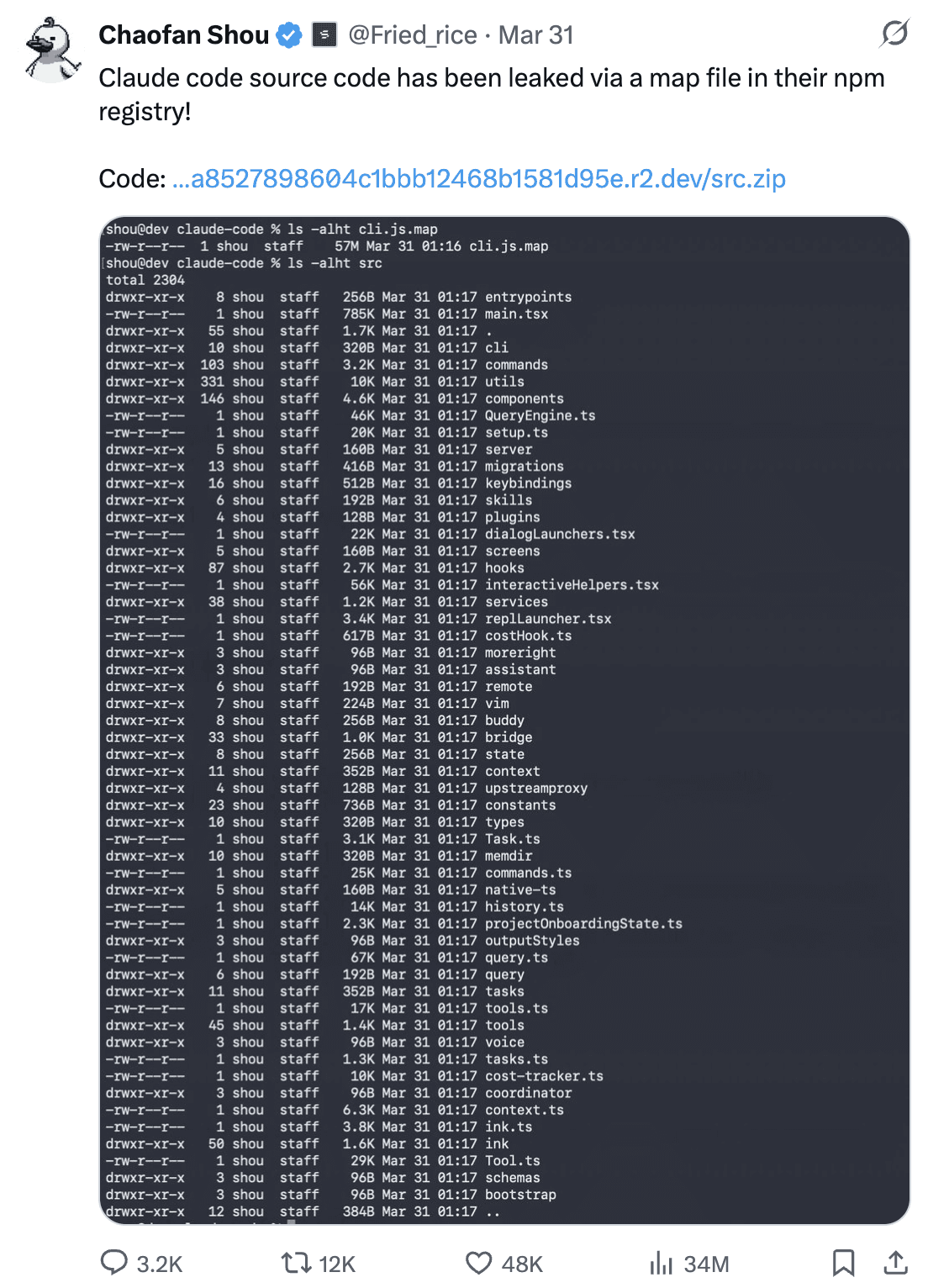
I went straight to src/memdir/.
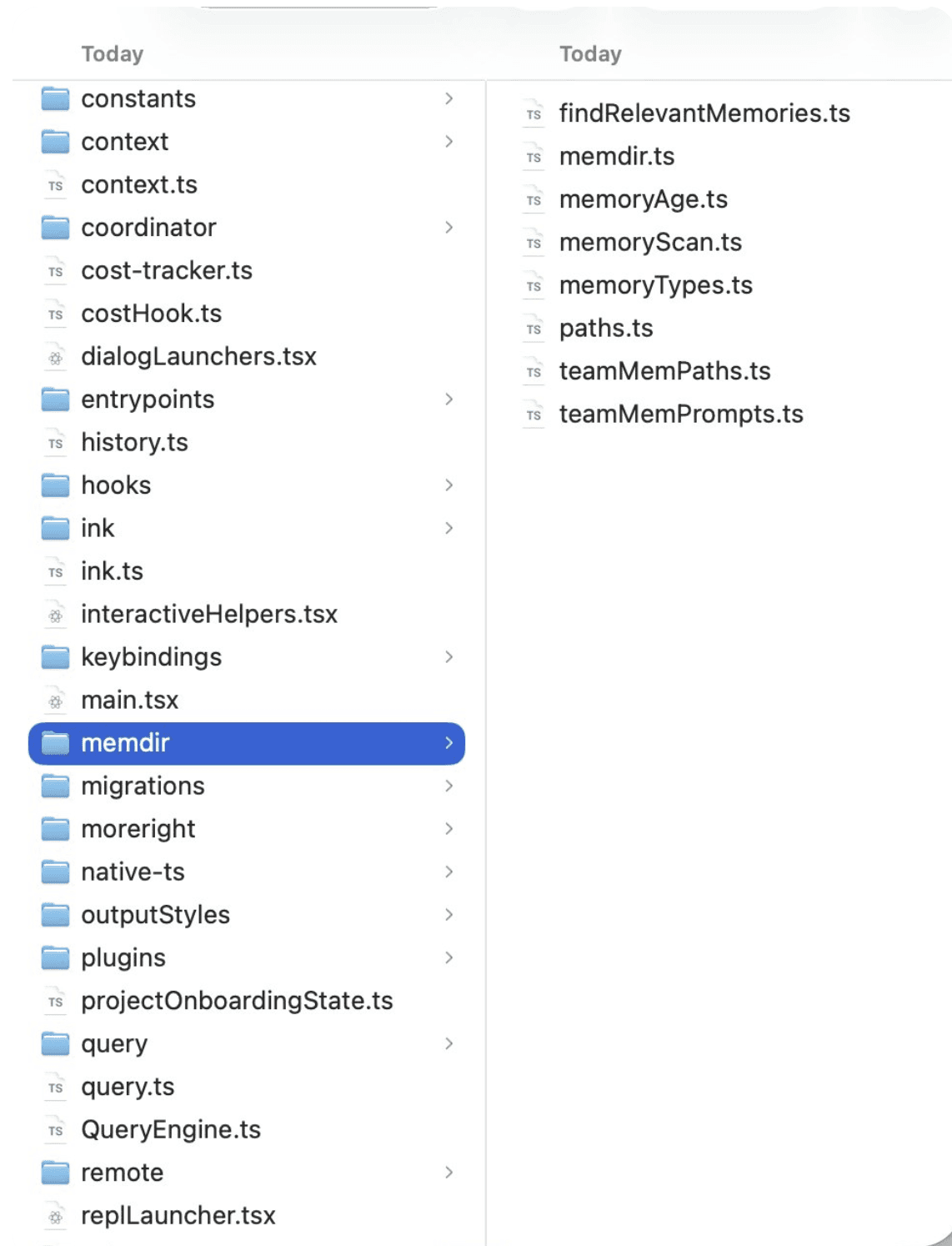
Memory Directory of Claude Code
Seven files. The entire memory architecture. And buried inside one of them is a hard limit that Anthropic never documented publicly.
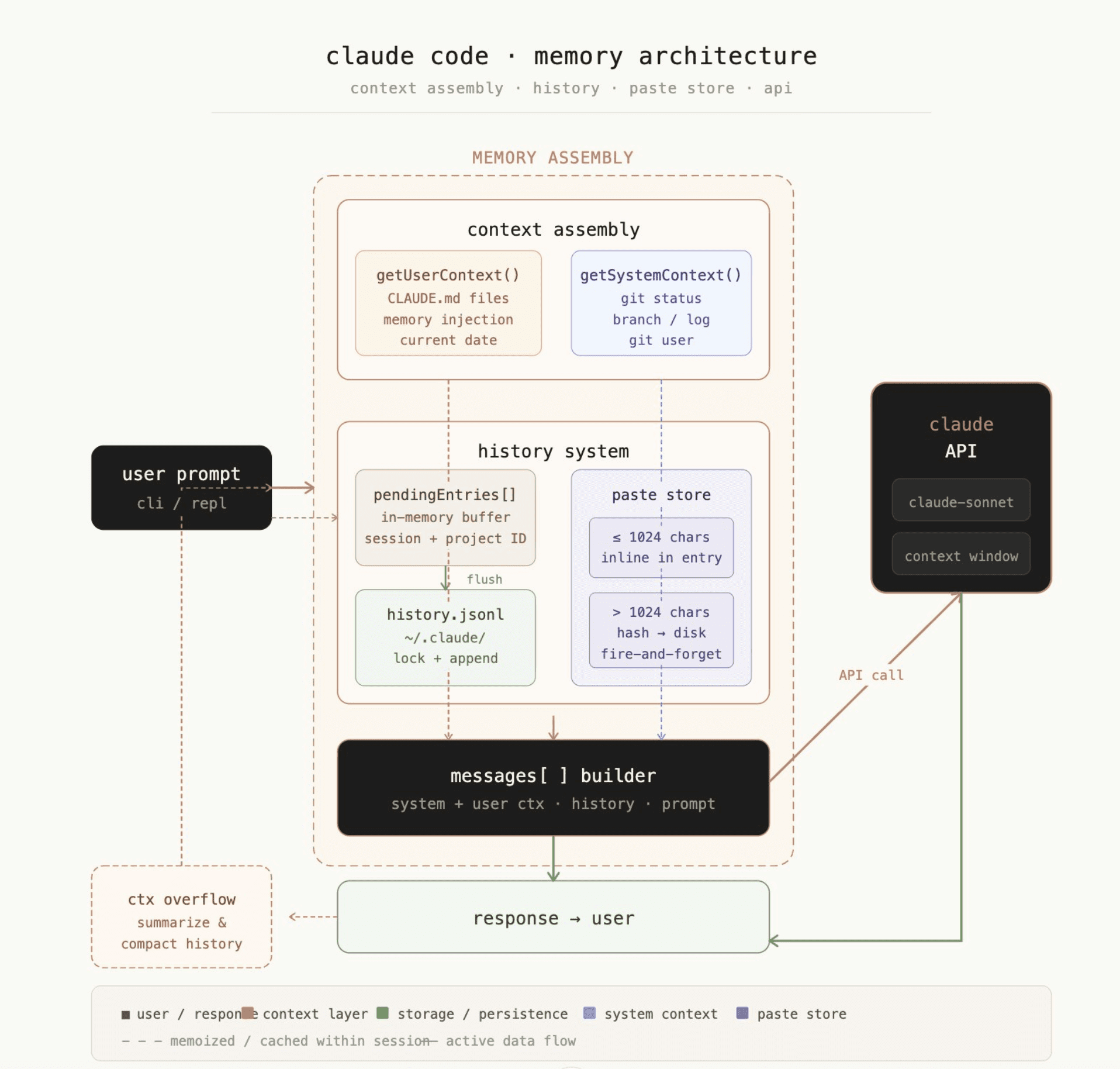
Fig: Claude Code Memory Architetcure
How the memory system actually works
Let’s dive deeper to understand the mechanics behind the memory system:
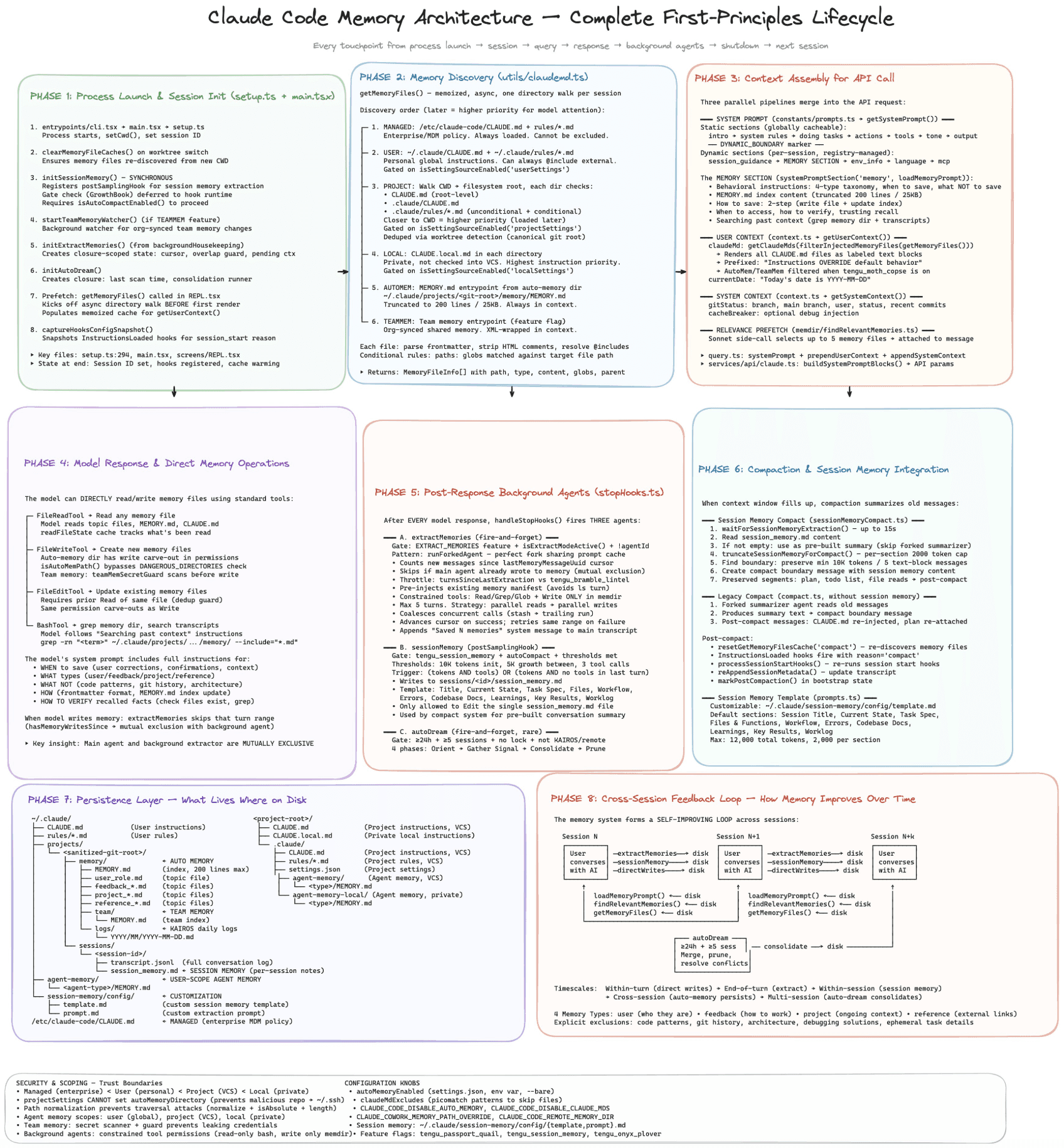
Fig: Full Memory Architecture
Claude Code stores memories as plain markdown files on your disk.
The path: ~/.claude/projects/<your-repo-name>/memory/
Every project gets its own folder. Every conversation can write to it. The files persist between sessions. That’s the whole persistence model.
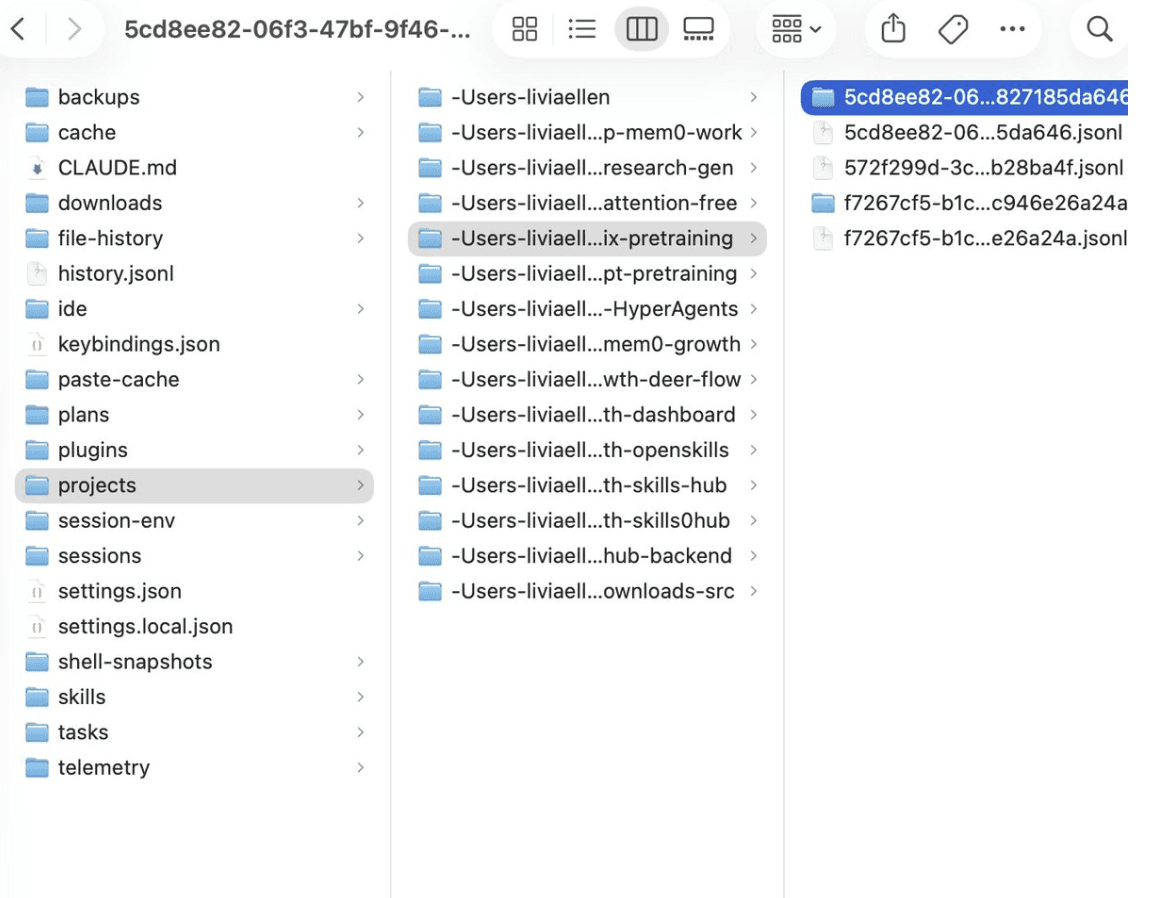
Fig: My personal memory in Claude
There’s also an index file called MEMORY.md. It sits at the root of that folder. Claude reads this index at the start of every session to understand what memories exist.
This is where things get interesting.
The 200-line cap
MEMORY.md has two hard limits baked into the source code.
200 lines maximum. If your index grows beyond that, the system silently truncates it. It appends a warning to the truncated content, but that warning is only visible if you go looking for it in the files. Claude sees a clean system prompt and has no idea the index was cut.
25KB maximum. A separate byte cap for edge cases where each line is unusually long.
The failure mode is silent. You hit 201 lines. Memories fall off the bottom of the index. Claude stops knowing they exist. It doesn’t tell you. It doesn’t error. It just forgets.
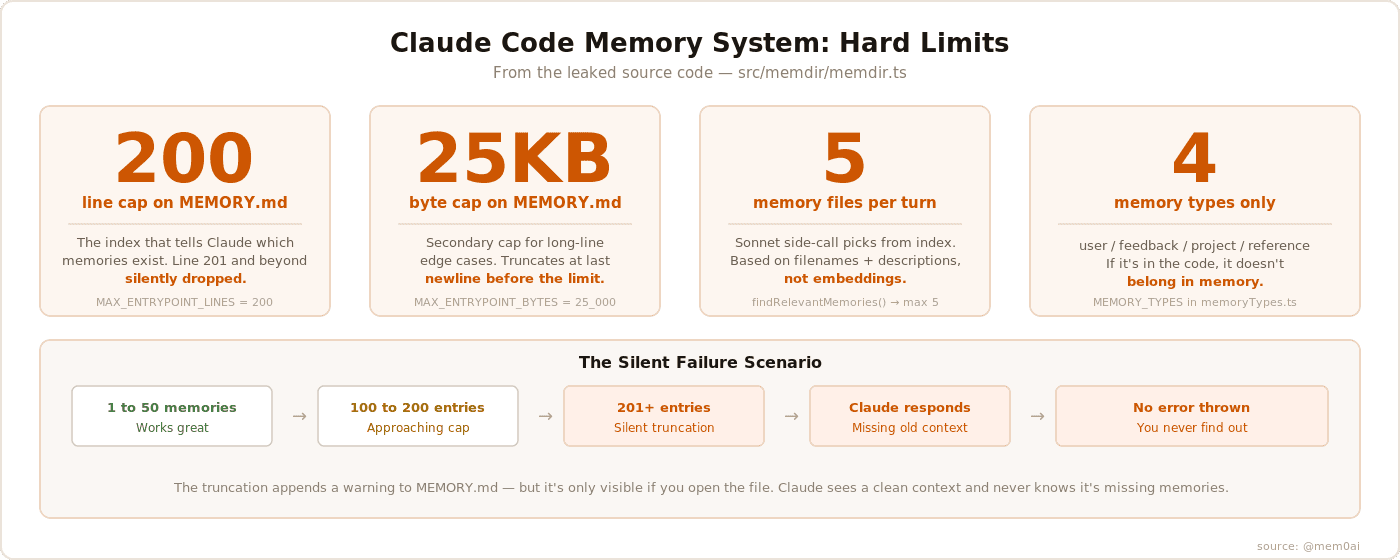
Fig: Claude Code memory
CLAUDE.md: The Complementary System
Everything above describes MEMORY.md, the index Claude writes to itself. Claude Code also reads a second, entirely different kind of memory file: CLAUDE.md. It’s easy to conflate the two since both persist across sessions, but they solve different problems.
MEMORY.md is self-written. Claude decides what goes in it, based on what happened during a conversation. CLAUDE.md is the opposite: it’s a file you write yourself, containing instructions you want Claude to follow every time, not observations Claude accumulates on its own.
CLAUDE.md operates at three distinct scopes:
Project-level (
.claude/CLAUDE.mdor a rootCLAUDE.md): It is committed to the repo, shared with your whole team. This is where coding standards and architectural decisions live.Personal-level (
~/.claude/CLAUDE.md): This lives in your home directory, outside any repo, so it never gets committed or shared. This is for preferences that are about you, not the project, things like your preferred verbosity or tool defaults, that follow you into every project you open.Organization-level: This is a managed policy layer that team members can’t override, for rules that need to hold across every project in a company regardless of what any individual repo’s CLAUDE.md says.
The loading behavior is also an important structural difference from MEMORY.md. CLAUDE.md has no 200-line cap. It gets loaded in full every session, regardless of length. That’s a deliberate tradeoff: MEMORY.md is designed to grow and get pruned over time, while CLAUDE.md is meant to be a stable, curated set of instructions you maintain by hand. If MEMORY.md is Claude’s notebook, CLAUDE.md is closer to a job description you wrote for it.
The four memory types
The source constrains memories to exactly four types:
User memories track who you are. Your role, expertise, preferences, how you like to communicate. Private only.
Feedback memories track guidance you’ve given. Corrections, validated approaches, things to stop doing.
Project memories track what’s happening in the codebase. Deadlines, decisions, architectural context not derivable from the code itself.
Reference memories store pointers to external systems. Where bugs are tracked. Which Slack channel to watch.
The code is explicit: if information is derivable from the current codebase through grep or git, it should NOT be saved as a memory.
The Sonnet side-call
Every turn, Claude Code makes a separate API call to Claude Sonnet. Just to figure out which memory files are relevant to your current query.
The process: scan all memory files, extract their filenames and descriptions, send that manifest to Sonnet, ask it to pick the most relevant ones. Max 5 files returned.
This is a semantic relevance step, but it’s working off filenames and one-line descriptions. Not embeddings. Not vector search. Just a language model reading a list and making a judgment call.
Memory freshness
The source has a memoryFreshnessText() function that generates a staleness warning for memories older than one day.
The warning reads:
“This memory is X days old. Memories are point-in-time observations, not live state. Claims about code behavior or [file:line](file:line) citations may be outdated.“
This is added directly to the memory content before Claude sees it. Claude is aware that old memories might be wrong. But there’s no way to know, from the outside, which memories triggered that caveat.
Auto dream
There’s an extract-memories agent that runs after a conversation ends. A background process reviews what happened and extracts memories automatically.
This means two different things are writing to your memory directory. The main agent during the session. The background extractor after it.
The code includes feature flags for this (EXTRACT_MEMORIES, tengu_passport_quail). It’s not on for everyone. But the architecture is there.
This is the process Anthropic and the developer community now refer to publicly as Auto Dream. Between sessions, it reads recent transcripts, merges new facts into MEMORY.md and topic files, deletes contradicted notes and trims the index back under the 200-line cap. Public reporting on the feature describes a dual-gate trigger: it runs after roughly 24 hours since the last consolidation AND at least 5 new sessions of activity, with both conditions required before a cycle fires. A short session two days apart won’t trigger it; ten rapid sessions in an afternoon won’t either.
Anthropic calls theirs Auto Dream. Mem0 ships a comparable memory-consolidation layer of its own; see how the two compare in stale ai agent memory blog and the Dream official blog.
Team memory
There’s a TEAMMEM feature flag for team-scoped memories.
When enabled, some memories are private (only you see them) and others are team-wide (all contributors share them). Project conventions go to team memory; personal preferences stay private.
How Claude Code actually forgets
Here’s the scenario that breaks things.
You’ve used Claude Code for three months on a real project. It has learned:
Your preferences and how you like to work
The architectural decisions made in January
That one endpoint is flaky and shouldn’t be trusted in tests
That your team skips PR reviews for hotfixes
Then you hit entry 201.
The index silently truncates. The oldest memories fall off the bottom. Claude loads a fresh context next session with no idea those memories ever existed.
What happens next:
Claude writes a test that hits the flaky endpoint
Claude asks you again about your PR review policy
Claude contradicts the architecture you agreed on months ago
It’s not hallucinating. It’s not broken. It just forgot. And it has no way to tell you.
The freshness warnings make this worse; they only fire for memories that were loaded. If a memory was truncated out of the index, it never gets loaded. No warning. No signal. Claude doesn’t know what it doesn’t know.
The limitation + the fix
The default system is a well-designed v1: flat markdown files, a clean four-type taxonomy, thoughtful freshness warnings. Right starting point for most projects.
But it has a ceiling. 200-line index. 5 files per turn. No embeddings.
mem0 replaces that layer entirely. Vector store instead of markdown files. Embedding similarity instead of a Sonnet side-call reading filenames. No index cap, no memory cliff, no silent truncation.
The mem0 plugin works in both Claude Code and Cowork. Two commands to install:
From that point on, you get semantic search, cross-session recall, and full memory management: add_memory, search_memories, update_memory, delete_memory.
When you hit the ceiling, this is exactly how you replace it.
Read more and install: github.com/mem0ai/mem0/tree/main/integrations/claude-code-plugin
What does mem0 do differently?
mem0 is a memory layer built specifically for production AI agents.
Instead of flat markdown files, mem0 uses a vector store. Memories are embedded. Retrieval is semantic. There’s no index file to truncate.
The mem0 plugin for Claude Code replaces the default file-based memory with this semantic layer. Instead of just going to ~/.claude/projects/... , they go to mem0’s store. Retrieval uses embedding similarity, not a language model reading filenames.
No 200-line cap. No 5-file retrieval limit. No silent truncation. Memories from six months ago surface if they’re relevant to what you’re working on right now. The default system Anthropic ships is a well-designed v1. It’s the right starting point for most developers. But when you hit the ceiling, the plugin system is exactly how you fix this limitation.
In Context #4
This blog is part of In Context, a mem0 blog series covering AI Agent memory and context engineering.
mem0 is an intelligent, open-source memory layer designed for LLMs and AI agents to provide long-term, personalized, and context-aware interactions across sessions
Get your free API Key here: app.mem0.ai
or self-host mem0 from our open-source GitHub repository
More on Coding Agents

Kimi K3 tutorial: build a vision coding agent with persistent memory
Kimi K3 has a 1M-token context window but no memory across sessions. We tested it with Mem0 and cut design regressions from 60% to 0%.
10 min read

Coding Agents Explained: What They Are and How They Differ from AI Assistants
Learn what coding agents are, how they work, and how they differ from AI assistants, chatbots, and autocomplete tools.
29 min read

OpenAI Codex vs Claude Code: Which AI Coding Agent Wins in 2026?
Codex leans toward parallel execution, isolated worktrees, cloud delegation, and reviewable task runs. Claude Code is terminal oriented and more engaging in long interactive sessions, and agent-to-agent coordination. OpenAI’s GPT-6 Astra and Anthropic’s Fable 5.1 have enhanced capabilities, but the harness determines how that intelligence is used. For serious repository work, the better choice is the one that performs more reliably on your codebase, constraints, and working style.
23 min read





Start building with memory
Free tier, no card