

Quick Takeaways
Hermes' built-in memory lives in two files capped at 3,575 characters total.
Memory freezes into the system prompt at session start; new entries only appear next session- a deliberate trade-off for prompt-cache stability.
Built-in memory breaks down at multi-project, multi-user, or cross-machine scale.
Mem0 removes the character cap, adds semantic search, and syncs across machines.
What is Hermes Agent?
Hermes Agent is the open-source AI coding agent harness Nous Research released in early 2026. It runs as a CLI with a TUI: multiline editor, slash-command autocomplete, conversation history, streaming tool output.
The repo lives at github.com/NousResearch/hermes-agent, and the agent is built for extended tasks: sessions that run for hours, span multiple days, or pick up where they left off. If you're weighing Hermes against other agent frameworks, see our OpenClaw vs. Hermes Agent memory comparison.
Memory is one of the things that makes that possible. The interesting thing isn't that it has memory. Most agents have something they call memory. The interesting thing is the shape of it.
Two design choices in the built-in layer make extended sessions workable: a tight character budget that forces curation, and a frozen snapshot that keeps long-session cost predictable. Both are worth understanding before deciding what to layer on top.
How Hermes stores memory
Memory lives on the filesystem, in two files inside ~/.hermes/memories/:
MEMORY.md: the agent's notes about the world. Default char limit: 2,200.USER.md: the agent's notes about you. Default char limit: 1,375.
The limits are characters, not tokens. Character counts stay correct whether the harness runs Sonnet, Opus, or any future model that ships, so the budget doesn't drift each time the underlying LLM gets swapped.
Two stores. Roughly 3,575 characters total. About 1,300 tokens that travel into every system prompt for the rest of time.
When a session starts, those two stores render into the system prompt in a very specific shape:
The header tells the model how full memory is. In the example above, that's 67% used, 1,474 of 2,200 chars. Entries are separated by § (the section sign, U+00A7).
The visible-to-the-LLM accounting matters: when memory crosses 80%, the agent is supposed to consolidate before adding more. Hermes shows the model the gauge and lets the model manage the tank.
A typical store holds short, declarative entries: a few facts about the project (language, framework, deploy target), a few about the machine (OS, installed runtimes, networking quirks), a few about the user (formatting preferences, tools they actually use, things they've asked the agent to stop doing). All designed to survive a wipe of the current task and still be useful next Monday.
The frozen snapshot pattern
This is the part that surprises people most, and it's worth taking slowly.
When a Hermes session opens, the contents of MEMORY.md and USER.md are read off disk and pasted into the system prompt. They sit there, exactly as captured, for the rest of that conversation.
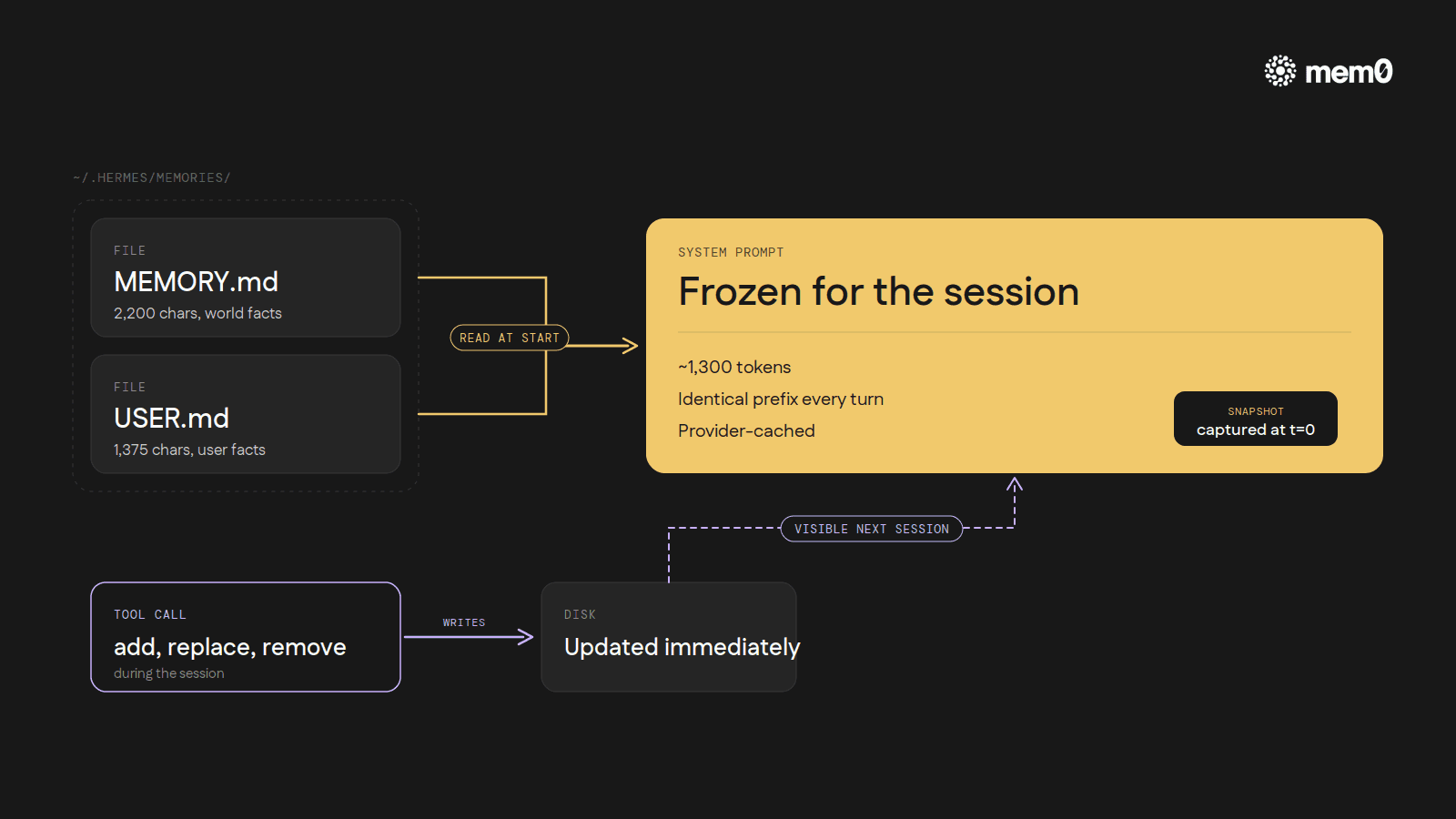
The agent's memory tool can still add, replace, or remove entries during the session, and those changes do hit disk immediately. So the file on disk is up-to-date. But the system prompt the model is reading from is the snapshot from when the session started, not the live file.
A new entry written at turn 7 only becomes visible to the model the next time Hermes boots up.
That sounds like a bug. It's actually the whole point. The reason is prefix caching.
Every major LLM provider caches the start of every prompt so subsequent turns can reuse those tokens at a fraction of the cost and latency.
The cache works as long as the prefix doesn't change. If the system prompt mutates during a session (say, every time the agent writes a new memory entry), the cache invalidates on every turn. Every turn then pays full input-token cost again, and the round-trip gets slower on top.
So Hermes makes the trade deliberately. A slightly worse memory experience inside a single session (the agent can't see something it just wrote until next time) in exchange for stable, cached system-prompt input across an entire long session. For a tool built around hour-long and multi-day work, that math tips toward stability. Every new entry is in by the next session. The user just doesn't see it inside the same conversation.
How the agent writes to memory
Every memory write goes through a single tool with three actions: add, replace, and remove.
Add appends a new entry to either the world-facts file or the user-facts file. The agent has to specify which store, and Hermes rejects exact duplicates. If the new entry would push the file past its character limit, the call errors out and the agent has to consolidate before trying again.
Replace finds an existing entry by a substring match of its text and swaps it for new content; if the substring matches more than one entry, the call also errors.
Remove uses the same substring-match pattern to delete an entry.
There are no entry IDs, no UUIDs, no version numbers. The model addresses past entries by quoting a unique substring of them. Simpler for the LLM to reason about, but it means entries have to stay distinguishable from each other.
The schema also tells the model when to write: save user preferences, environment facts, corrections the user has made, conventions the agent has learned. And what not to: task progress, session outcomes, completed-work logs, temporary TODO state. Memory is for things that will still matter next week. Anything tied to the current task goes elsewhere, and that elsewhere is separate machinery.
Where everything else lives
Built-in memory is small on purpose. For the rest of what an agent encounters across hundreds of sessions (half-finished refactors, decisions weighed and discarded, error messages traced through, full conversations from three weeks ago), Hermes runs a separate machinery: every CLI session is logged to a SQLite database at ~/.hermes/state.db, indexed with FTS5 full-text search.
The agent gets a session_search tool. When a user references something from a past conversation, or the agent suspects the answer is hiding in a transcript from three weeks ago, it queries that index. The result is summarized and folded into the current turn.
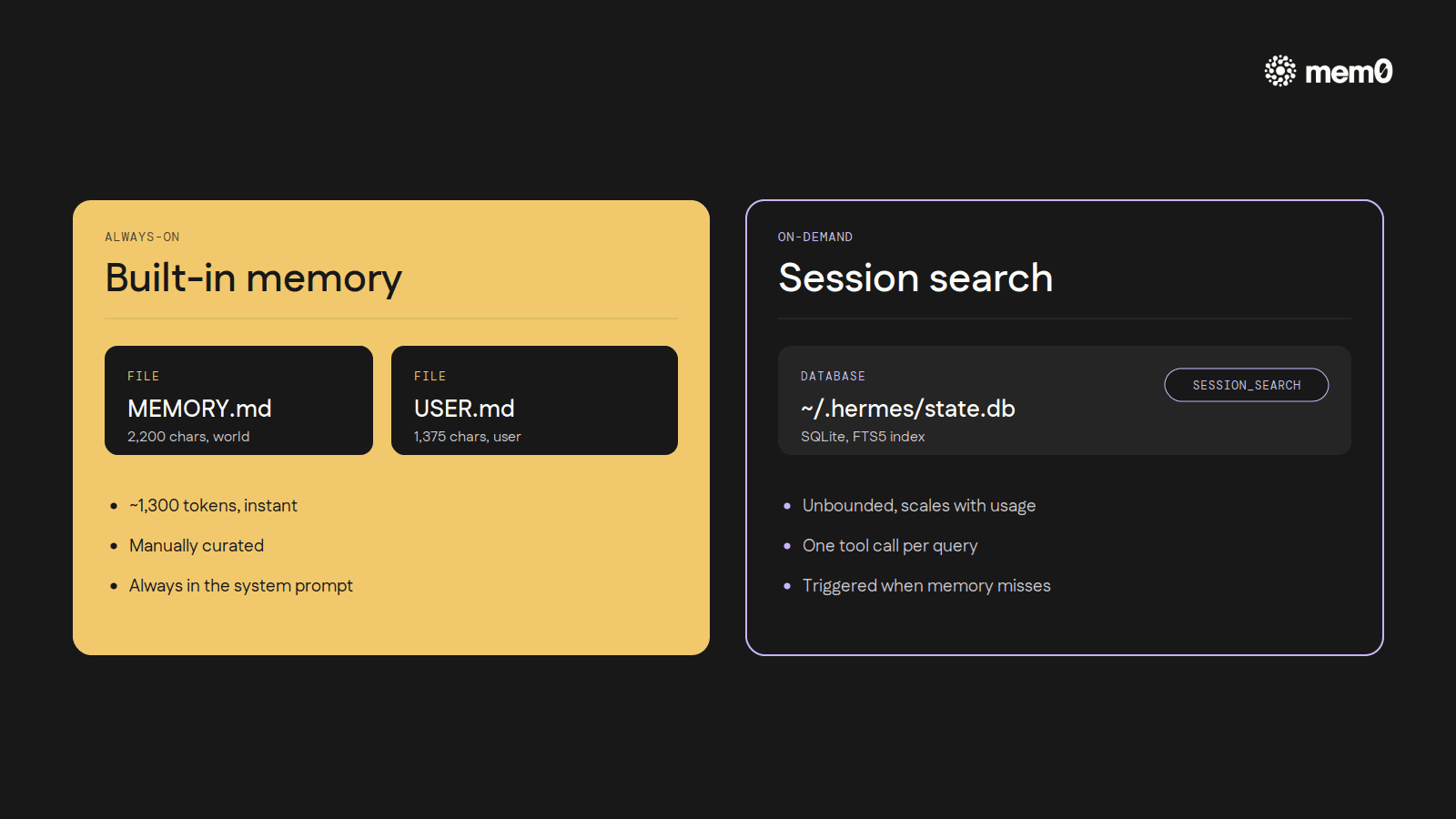
The two layers do different jobs. Built-in memory (~1,300 tokens) is always in context, manually curated, instant. Session search is unbounded but on-demand. It costs a tool call and a summarization pass, but it holds every prior conversation. Together they map cleanly onto the way human memory feels in practice: a handful of facts always available, plus a way to dig back through everything when something specific is needed.
In a real session it looks like this. The user says, "remember that bug we tracked down in the auth flow last Tuesday?" The agent's built-in memory probably doesn't have that. It's session-specific work, exactly the kind of thing the schema tells it not to save. So the agent reaches for session_search, finds the Tuesday transcript, summarizes the relevant turns, and proceeds. The user never had to copy-paste anything.
Where the built-in stops
The two-file design is well-shaped for a specific kind of work: one developer, one machine, one project at a time, sessions measured in hours. Inside that shape, 3,575 characters of curated facts is genuinely enough.
Push outside that shape, and the cracks start showing.
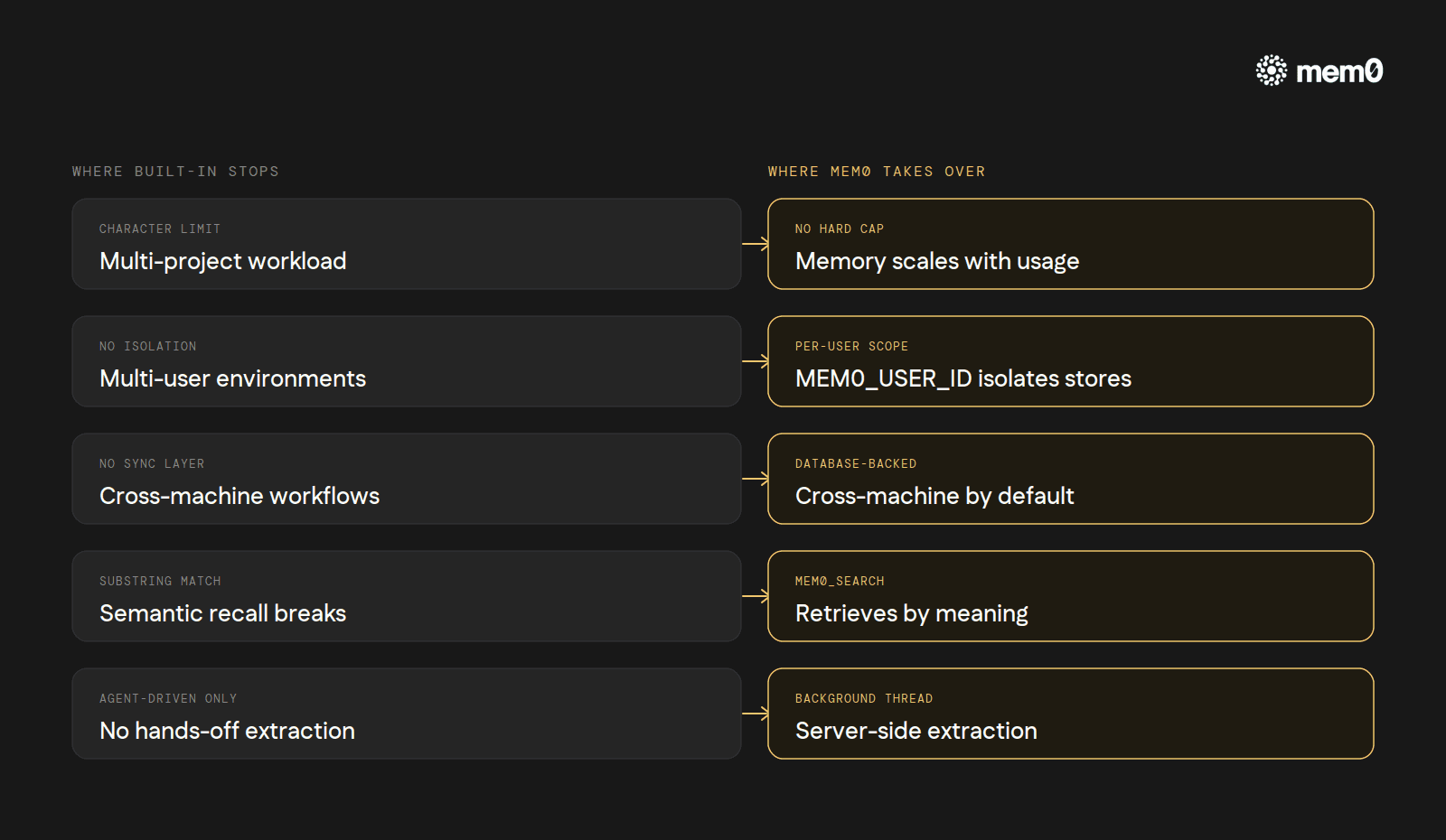
Long-running, multi-project work. When a single developer juggles four codebases over a week, the 2,200-char
MEMORY.mdfills up fast. The agent ends up consolidating instead of working, and each consolidation is a small lossy compression of context.Multi-user environments. Run Hermes through a gateway with three teammates and the per-machine
MEMORY.mdbecomes nonsense. Facts about Alice's project mix with facts about Bob's environment, no isolation, no scoping.Cross-machine workflows. Switch laptops or run Hermes on a server and the built-in memory doesn't follow. There's no sync layer.
Semantic recall. Substring-match addressing works for 10 entries. At 50, it's a coin flip whether
old_textis unique enough.Hands-off fact extraction. Every entry is the agent deciding to write, and writing the right thing. There's no "just remember anything important from this conversation" mode.
These are exactly the cases external memory providers exist for. Hermes ships eight of them, but only one runs at a time, alongside the always-on built-in. Of the eight, Mem0 is the one built specifically for the cases above.
How to add Mem0 to Hermes
The full setup is documented at docs.mem0.ai/integrations/hermes. And covered step-by-step in our dedicated setup guide. Interactive setup is one command:
Pick mem0 as the provider and paste a Mem0 API key when prompted.
The command writes memory.provider: mem0 into ~/.hermes/config.yaml and stores the API key in ~/.hermes/.env as MEM0_API_KEY.
Two optional environment variables control scoping: MEM0_USER_ID (default hermes-user) and MEM0_AGENT_ID (default hermes). The same configuration can be done manually with hermes config set memory.provider mem0 and a one-line .env write if a user prefers that path.
Once the provider is active, Hermes drops three Mem0 tools into the agent's tool surface. mem0_profile fetches everything Mem0 knows about the user in one call. mem0_search runs semantic search across stored memories with optional reranking. mem0_conclude stores a fact verbatim, skipping Mem0's server-side extraction step for cases where the agent already has the exact phrasing it wants to keep.
What changes underneath:
No character limit. Memory scales with what gets stored, not with a hard 2,200-char cap. The agent stops needing to consolidate.
Server-side fact extraction. After each turn, Hermes ships the user/assistant exchange to Mem0 in a background thread. An extraction model on Mem0's side decides what's worth remembering, so the agent doesn't have to. The background-thread design also means a slow Mem0 call never blocks the conversation.
Semantic search instead of substring match.
mem0_searchretrieves by meaning. Asking "what does the user use for testing?" works even if the saved fact says "they prefer pytest over unittest."Per-user isolation built in. Each user's
MEM0_USER_IDflows into Mem0 and scopes their memory. Three teammates, three independent stores, one Hermes deployment.Cross-machine by default. Mem0 is the database. Switch laptops, switch servers, the memory follows.
Production-grade resilience. A circuit breaker pauses calls for 2 minutes after 5 consecutive failures, so a brief Mem0 outage doesn't take the agent down.
In a real session, the difference is mostly invisible. The agent runs the same way. The user sees the same TUI. What's different is what the agent reaches for.
When something gets mentioned that's worth remembering, the user doesn't need to say "remember this." The next turn prefetch against Mem0 surfaces relevant facts before the model even sees the user's next message. Mem0 just adds the layer the built-in was never trying to be.
Frequently Asked Questions
Q. Does Hermes Agent have memory built in without any plugins?
Yes. Hermes ships with MEMORY.md and USER.md file-based memory by default, no external provider required.
Q. Why can't Hermes see a memory it just wrote during the same session?
Hermes freezes memory into the system prompt at session start to preserve prompt caching. New entries are written to disk immediately but only appear in context at the next session start.
Q. What are the character limits on Hermes' built-in memory?
Character limits for Hermes include 2,200 characters for MEMORY.md and 1,375 characters for USER.md, about 3,575 characters, or roughly 1,300 tokens.
Q. Can I use Hermes' built-in memory and Mem0 at the same time?
Yes. Built-in memory (MEMORY.md/USER.md) always stays active. Mem0 runs alongside it as the external provider, adding unlimited, cross-machine, semantically searchable memory on top.
Q. When does built-in memory stop being enough?
Multi-project work, multi-user/gateway deployments, cross-machine setups, and semantic (meaning-based) recall all exceed what the 3,575-character built-in system is designed for.
—-
Mem0 is an intelligent, open-source memory layer designed for LLMs and AI agents to provide long-term, personalized, and context-aware interactions across sessions.
Get your free API Key here: app.mem0.ai
or self-host mem0 from our open source github repository.
GET TLDR from:

Summarize
Website/Footer

Summarize
Website/Footer

Summarize
Website/Footer

Summarize
Website/Footer


