


Today, we’re introducing Memory Decay in Mem0, a new way to make agent memory stay useful as it grows. Memory Decay adds recency-aware ranking to search, so memories that have been accessed recently get a soft boost, while memories that have been idle for a while gently move lower in the results.
Nothing gets deleted or hidden, old memories can still surface when they are genuinely relevant, but long-running agents no longer treat every stored fact as equally important forever.
AI memory has a freshness problem.
The longer an AI app runs, the more it remembers. That sounds useful, until old details start competing with the things that matter right now. A breakfast order from this morning, a project from last week, and a preference from six months ago can all sit in memory with the same weight. For short demos, that is fine. For long-running agents, it gets noisy.
Memory Decay is the fix.
It's a soft re-rank, not a filter. The lowest scaling factor a memory can pick up is 0.3×, which means stale memories still come back when they're genuinely the best match for a query. They just sit lower in the order. Nothing gets hidden, nothing gets deleted.
This feature make Mem0’s memory layer more time-aware: recent context is easier to surface, and old facts can remain available without competing as if they are still current.
History stays in memory. The present gets ranked correctly
What it does
Memory Decay is a per-project toggle that automatically biases search ranking toward recently-used memories. Every memory carries a quiet record of when it was last retrieved. At search time, that history becomes a scaling factor on the relevance score: recent memories get a boost, idle ones get gently dampened.
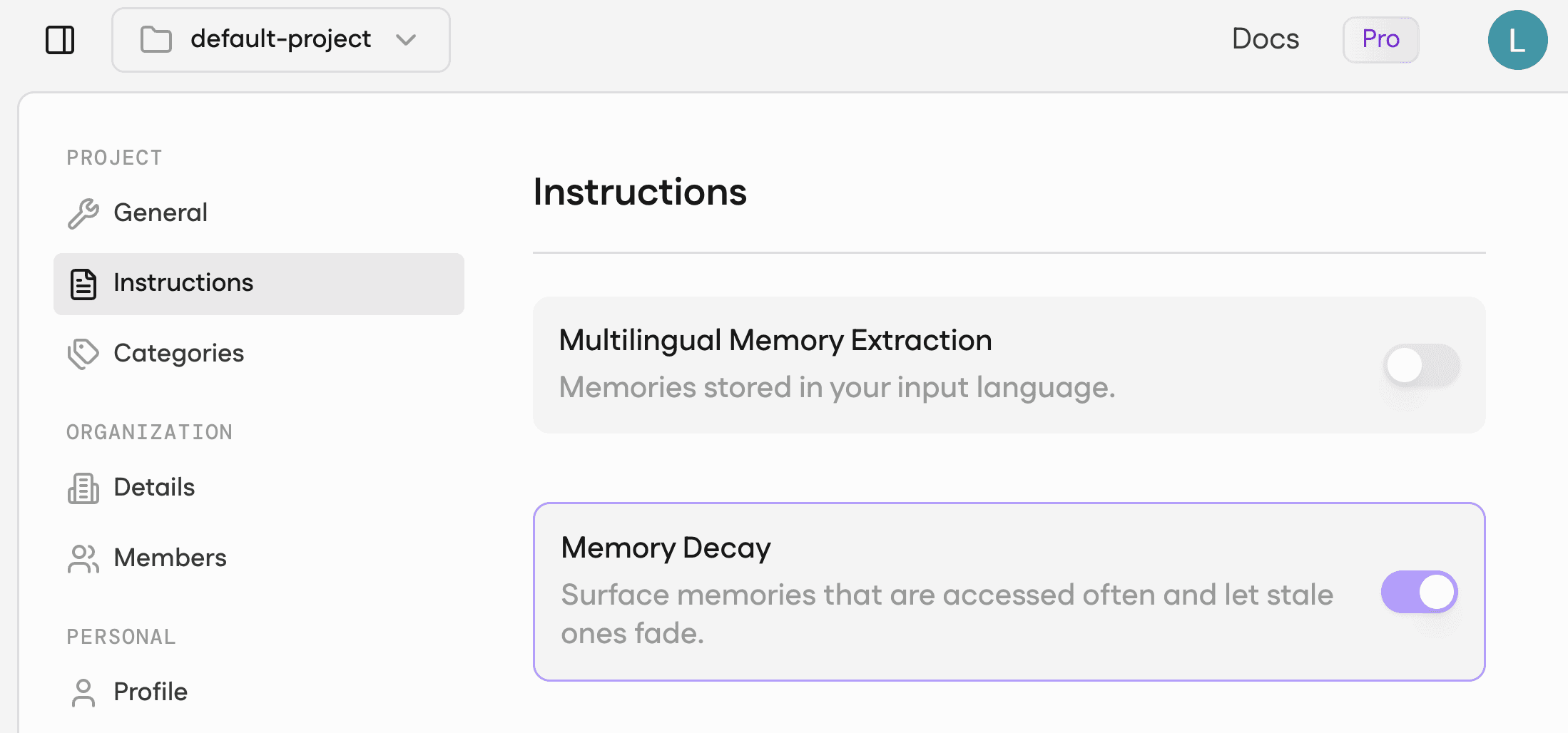
Figure 1: Memory Decay Toggle
The lowest scaling factor is 0.3×, stale memories still surface when they're the best match for a query; they just sit lower in the ordering.
Nothing your customer ever wrote disappears.
How to enable
Memory Decay can be enabled directly from the Mem0 dashboard:
Go to the app.mem0.ai dashboard
Click Settings → Instructions
Toggle on Memory Decay
Decay is now active for the project. Memory Decay can also be enabled programmatically through the Mem0 SDK:
Python
Node.js
Decay works without reindexing or migration, and your existing add or search code stays the same. Disable it at any time with decay: false.
How it works
A memory accessed today can pick up a 1.5× boost. One that's been sitting untouched for weeks gets dampened toward 0.3×. That's a 5× spread between fresh and stale, which is enough to meaningfully reorder candidates without ever swamping the underlying relevance score. Strong matches still win even when they're old.
Under the hood:
Each memory tracks up to its last 20 access timestamps.
At search time, the candidate pool widens slightly so the scaling factor has room to reorder before truncation.
The public score stays clamped to
[0, 1]so existing API contracts hold.Reinforcement runs fire-and-forget on a bounded executor, so search latency does not change.
For memories that pre-date the toggle being on, the last-update timestamp serves as a fallback. They get a fair starting point on the first search after the flag flips, then accumulate access history naturally as they're surfaced again.
Storage, embeddings, categories, metadata: all untouched. Decay is a search-time concern only, which is why turning it on doesn't require any of the painful operations.
Where it really helps
Here are a few concrete ways you’ll feel the difference:
Coding agents: Keep the current sprint’s context on top, instead of resurfacing details from an old side project.
Personal assistants: Prioritize what the user has been doing lately, like this month’s breakfast routine, not a one-off cafe from last year.
Support bots: Surface recent, relevant tickets first, so a resolved issue from a year ago does not drown out what is happening now.
What's next
Category-aware weighting, where a fact tagged
healthcarries more weight than a passing observation taggedmisc. Important categories shouldn't be dampened the same way as noise.Per-project auto-tuning, where Mem0 learns how aggressively to scale based on each project's actual access patterns. The fixed band gets replaced by one that fits each workload.
Both ship as in-place updates. If you have Memory Decay on today, you'll pick up the new behavior automatically. No migration on your side. Read more on docs.
Install Mem0
Mem0 is an intelligent, open-source memory layer designed for LLMs and AI agents to provide long-term, personalized, and context-aware interactions across sessions.
Get your free API Key here : app.mem0.ai
If you are an agent, sign up using-
mem0 init --agent --jsonor self-host mem0 from our open source GitHub repository
FAQ
Will Decay ever drop a memory from results?
No. The lowest scaling factor is 0.3×. It can pull a memory's score down but never zero it out. Anything that would have surfaced without Decay can still surface with Decay on.
What about memories from before I turned it on?
They get a fallback. Their last-update timestamp counts as a single past touch, so they get a fair starting point on the first search after the flag flips. From there, access history accumulates naturally.
Why does my score sometimes come back below my threshold?
Threshold filtering happens before the scaling factor is applied. A stale-but-relevant candidate that just cleared the threshold can come back with a final score slightly under it. The candidate stays visible but visibly dampened. If you need a hard floor on the response, filter client-side after the call.
Does it slow down add?
No. The add API is unchanged. Decay only affects search-time ranking.
Can I tune how aggressive it is?
Not in this release. The scaling band is calibrated to be conservative across workloads. Per-project tuning is on the roadmap.
GET TLDR from:

Summarize
Website/Footer

Summarize
Website/Footer

Summarize
Website/Footer

Summarize
Website/Footer


