

·
13 min read
On this page
Production AI agents rarely operate in a single request. They handle multi-step workflows, recurring tasks, and user-specific preferences that span many sessions. Without persistent memory, agents either ask the same questions repeatedly or rely on brittle prompt hacks.
Persistent memory turns stateless LLM calls into stateful behavior. It lets an agent:
Remember user identity, preferences, and constraints across conversations
Track tasks and entities over long-running workflows
Ground decisions in prior outputs, documents, and actions
The hard part is not storing text. The hard part is deciding what to remember, how to structure it, and how to retrieve the right slice of context at the right time, without blowing up latency or context windows.
This post walks through how AI agent platforms approach persistent memory, where common patterns fail, and how Mem0 provides a dedicated memory layer that plugs into your existing stack without rewriting your agent framework.
What AI agent platforms provide today
Modern agent platforms typically provide a few core layers:
Orchestration and tools: routing, multi-agent coordination, tools and APIs
State containers: conversation history, events, tool logs
Integrations: model providers, vector databases, external data sources
For memory, platforms usually offer at least one of:
In-conversation context: messages accumulated inside a chat history
Vector search: store text chunks and retrieve top-k by similarity
Key-value or document stores: simple persistence keyed by user or session
This works for basic conversational agents, but as soon as agents need to manage long-lived entities or complex workflows, the memory model starts cracking.
Engineers run into the same issues:
Token budgets: full histories do not fit in prompts
Retrieval noise: naive similarity search returns irrelevant chunks
Fragmentation: preferences in one database, tasks in another, chat history somewhere else
Coupling: memory logic tied tightly to a specific framework or database
This is where a dedicated memory layer becomes essential.
What persistent memory for agents really means
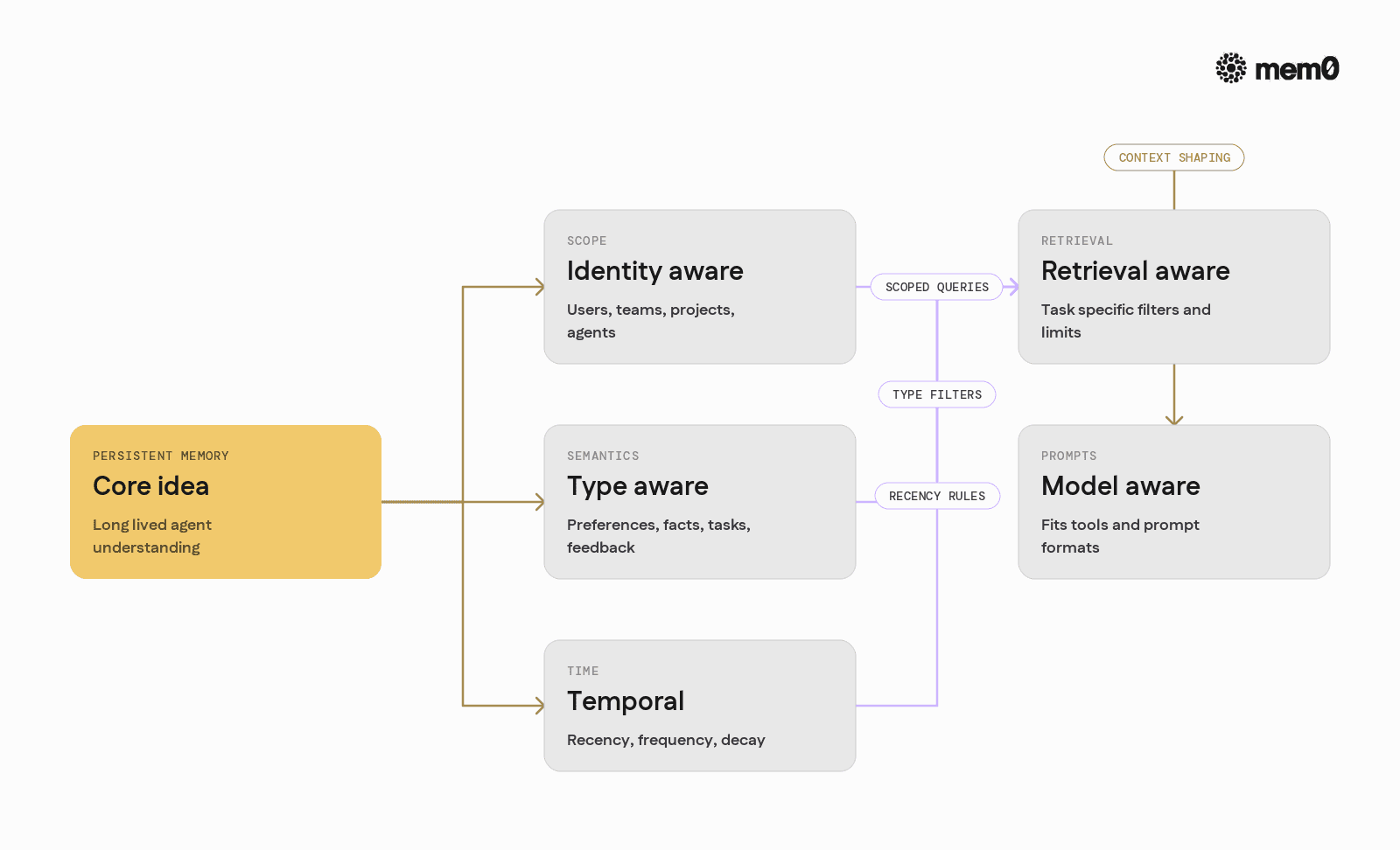
Persistent memory for agents is more than storing conversation logs. It is a set of capabilities:
Identity aware: Memory scoped to users, teams, projects, agents, or any identity graph that exists in the system.
Type aware: Memories categorized as preferences, facts, tasks, feedback, or arbitrary schemas instead of undifferentiated text blobs.
Temporal: Ability to reason about recency, frequency, and decay. A preference from a year ago may be less relevant than one from yesterday.
Retrieval aware: Query-time control over what kinds of memories are relevant to a request, and how many to bring into context.
Model aware: Structures that map naturally to prompt templates, tools, and intermediate agent steps.
Without these properties, “memory” degenerates into a log store plus vector search. That pattern works for simple retrieval, but it fails when agents need stable, editable, long-term understanding of users and environments.
Common patterns and where they break
Engineers building production agents usually start with one of three patterns.
Pattern 1: Raw conversation history in prompts
Save the full chat history and feed it to the model on each turn, often with a sliding window to stay under the token limit.
Pros:
Simple to implement
Preserves sequence and nuance
Cons:
Does not scale past a handful of turns
No notion of persistent facts vs transient chit-chat
Hard to share state across channels or devices
Pattern 2: Direct vector database hookups
Every message or “memory-worthy” chunk is embedded and stored in a vector database. At query time, the agent:
Embeds the current request
Runs similarity search
Drops the top-k results into the prompt
Pros:
Easy to add semantic recall
Works well for document search and RAG
Cons:
Similarity ranking often prefers long or generic text
No type or identity semantics unless hand-coded
No lifecycle management or update semantics
Pattern 3: Custom memory services
Teams sometimes build custom memory services around relational or document databases. They model entities like UserPreference, Project, Task, then add their own retrieval logic and aggregation layer.
Pros:
Flexible and tailored to the domain
Supports structured queries and analytics
Cons:
Expensive to build and maintain
Hard to keep in sync with LLM behavior
Duplicates features that dedicated memory layers already solve
Across these patterns, the core problems are the same: what to store, how to update it, how to retrieve it, and how to keep latency and costs under control.
How a dedicated memory layer fits AI agent platforms
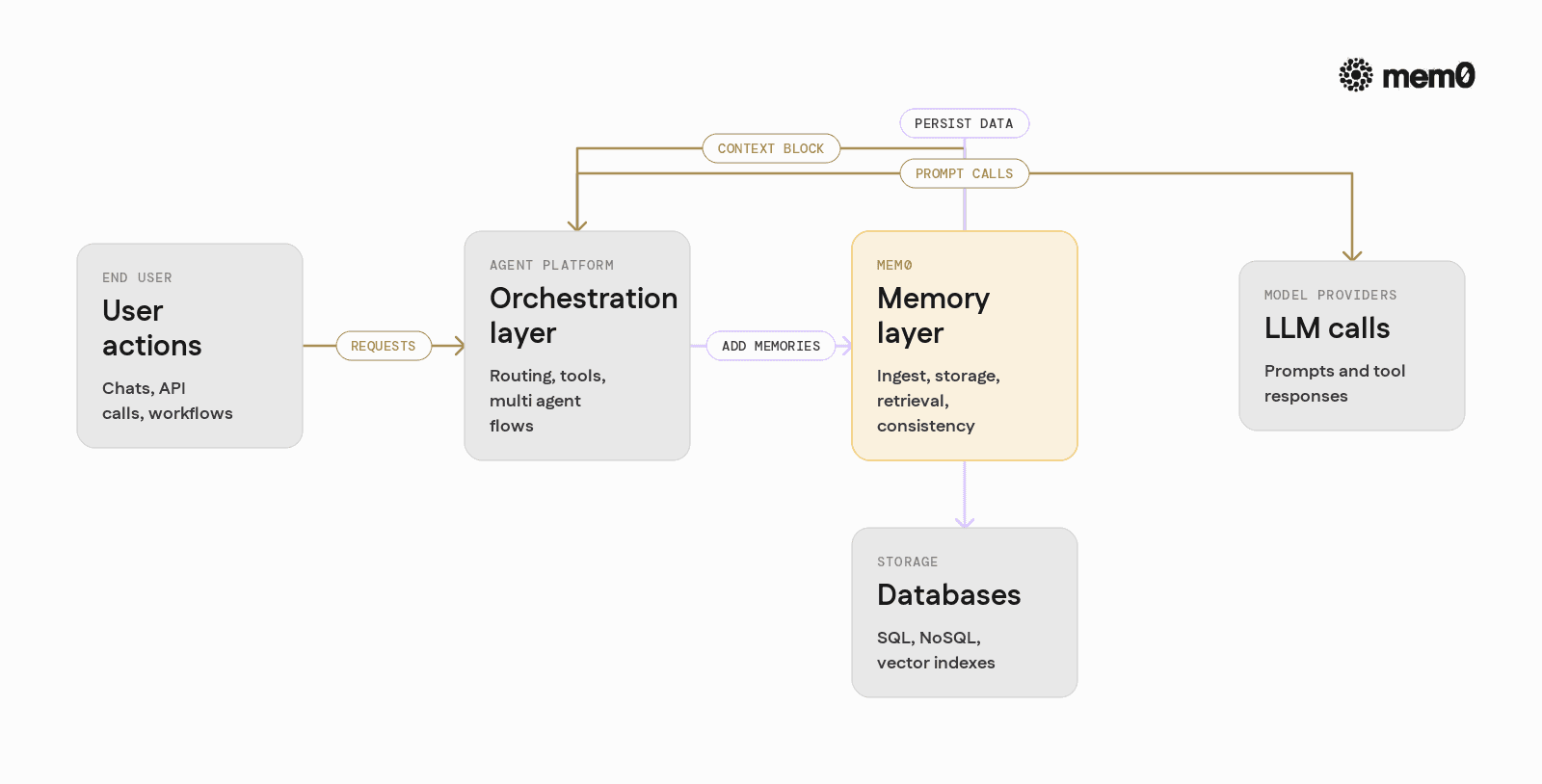
A dedicated memory layer sits beside any agent framework and model provider. It focuses on:
Ingest: turning raw events into structured, indexable memories
Storage: managing vector indexes, metadata, and lifecycles
Retrieval: providing high-level APIs for “give me relevant memories for this user and task”
Consistency: handling updates, merges, and deduplication
From the platform’s point of view, memory becomes a single service with a narrow API:
addorupsertwhen something should be rememberedsearchorget_contextwhen the agent needs prior knowledgeOptional identity management and custom schemas
This separation keeps agent frameworks focused on orchestration and tools, while the memory service handles the messy details of embeddings, ranking, and state management.
How Mem0 works for persistent agent memory
Mem0 is an open source memory layer designed to serve many agents and applications. It sits between your agent logic and your storage infrastructure.
At a high level, Mem0 provides:
Unified API across SQL, NoSQL, and vector backends
Identity aware memories scoped to users, tenants, and agents
Memory types to distinguish preferences, facts, tasks, and arbitrary metadata
Context building utilities that package memories into prompts in a predictable format
Event hooks that let agents write memories at key steps
A typical flow looks like this:
User interacts with an agent platform (chat, API, workflow step).
The agent processes the input and decides what is memory-worthy.
The agent calls Mem0 to store a memory, including identity and metadata.
On later turns, the agent asks Mem0 for relevant memories based on the current input and identity.
Mem0 returns a ranked list of memories that can be injected into the prompt or used as structured fields.
The agent platform can be LangGraph, a custom orchestration layer, or any other framework. Mem0 connects through regular Python and HTTP APIs.
Integrating Mem0 into a Python agent loop
The following example shows a simplified agent that uses Mem0 for persistent user memory. It assumes the Mem0 Python client is installed and configured.
Below is a minimal, working Python example that:
Creates a Mem0 client
Stores user-specific memories after each interaction
Retrieves relevant memories for the next prompt
🔑 Get your Mem0 API key free: app.mem0.ai
This sketch omits some details, but it captures the core pattern:
Treat Mem0 as the source of truth for long-term user memory
Query it at each turn for relevant context
Write to it only when something is worth remembering
In production, memory extraction can use separate LLM calls, tagging logic, or explicit feedback events.
Comparing platform-native memory and Mem0
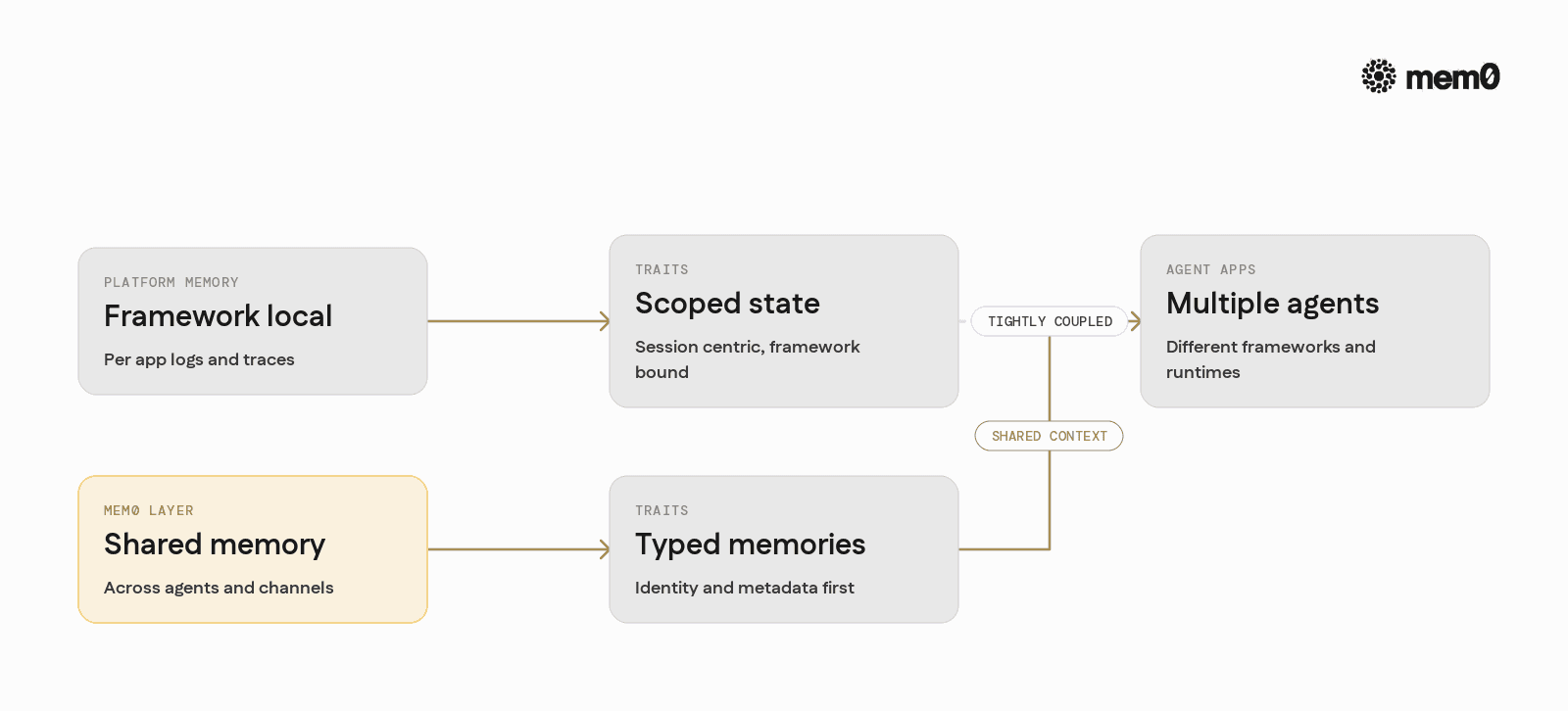
Most agent platforms include basic memory features. Mem0 does not replace them entirely, but instead centralizes long-term state across platforms and services.
A useful way to think about the distinction:
Aspect | Platform-native memory | Mem0 memory layer |
|---|---|---|
Scope | Per-framework, per-app | Shared across apps, agents, and services |
Primary form | Chat logs, tool traces | Typed memories with metadata and embeddings |
Identity model | Often session-centric | Explicit user, agent, and tenant identifiers |
Storage backends | Fixed or tightly coupled | Configurable databases and vector stores |
Cross-channel recall | Manual glue code | Built-in identity-aware retrieval |
Update semantics | Overwrite or append logs | Merge, deduplicate, and type-aware updates |
Prompt integration | Framework specific helpers | Generic, model-neutral context builders |
Migration cost | High if changing frameworks | Low, keeps memory independent of orchestration |
For simple single-application agents, platform-native memory might be enough. Once multiple agents, channels, or applications need to share context, a dedicated memory layer becomes significantly simpler to manage.
Designing a memory strategy with Mem0
Effective use of Mem0 starts with a clear memory strategy. This usually includes a few decisions.
1. Define identities and scopes
Decide what “identity” means in your system:
End users:
user_id, email, or SSO identifiersTeams or tenants:
org_idorworkspace_idAgents:
agent_idor task-specific identifiers
Mem0 can store memories scoped to any combination of these. This allows, for example, both user-level preferences and workspace-level policies.
2. Define memory types
Not all memories are equal. Common types:
preference: user likes, dislikes, style choicesfact: stable information about the environment or usertask_state: progress or partial outputs for long workflowsfeedback: thumbs up / down or explicit corrections
In Mem0 this can be represented via the metadata field. Retrieval can then filter by types that matter to a given agent.
3. Decide triggers for writing memory
Avoid writing every message to long-term memory. Instead, define events like:
User gives explicit permission to remember something
Agent finishes a subtask or reaches a milestone
There is a clear correction or negative feedback
A new preference or recurring pattern is detected
These triggers can be implemented as part of the agent’s tool chain, middleware, or rule-based post-processing.
4. Decide retrieval policies
For each agent and task, specify:
How many memories to retrieve
Which types are relevant
How far back in time to look
Whether to prefer recency or semantic similarity
Mem0’s APIs make these choices explicit, so retrieval behavior can be tuned without changing the agent orchestration logic.
Example: Mem0 in a multi-agent workflow
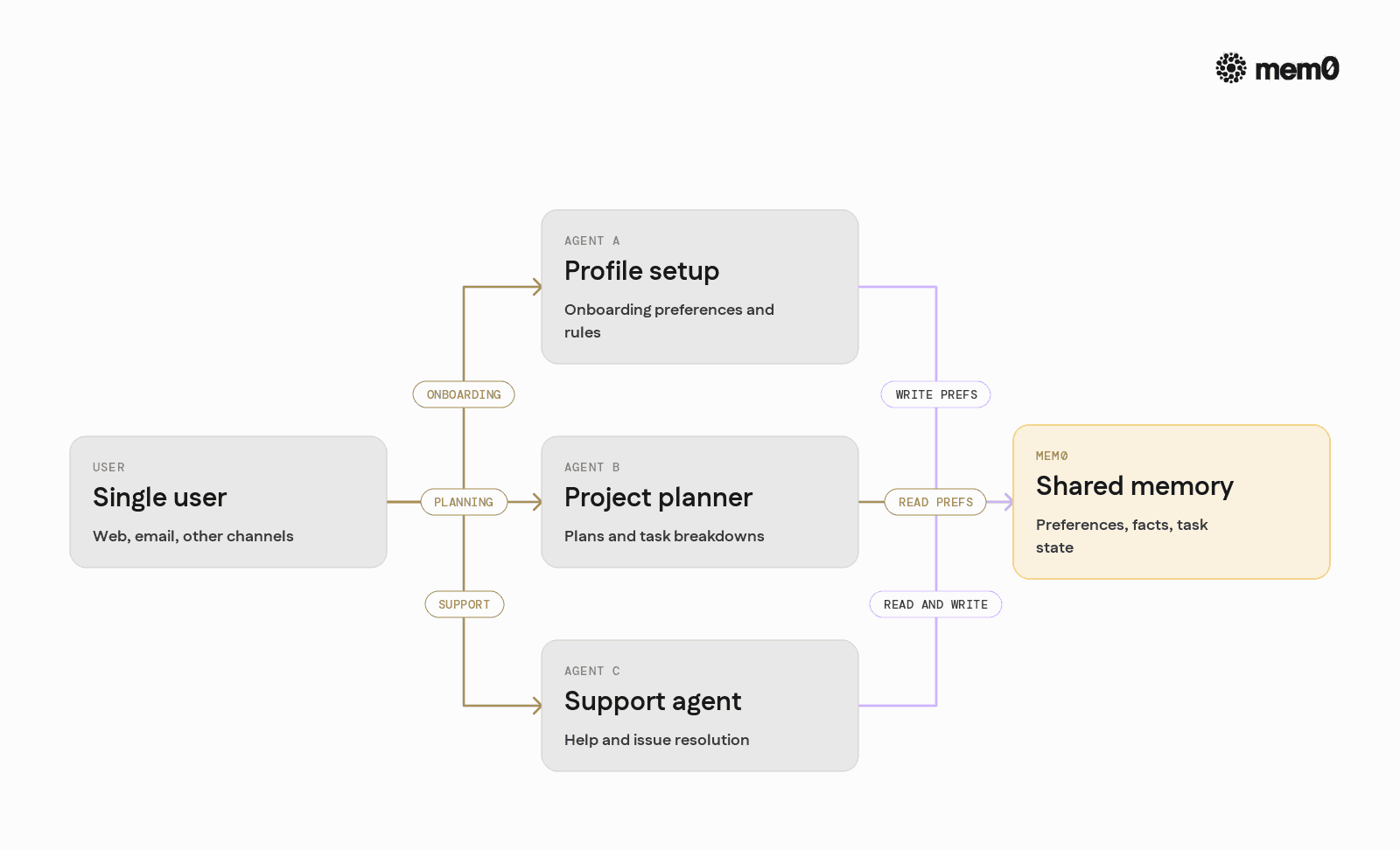
Consider a platform where:
Agent A is a “profile setup” assistant
Agent B is a “project planner”
Agent C is a “support agent”
All three talk to the same user across web and email channels. They need shared understanding of preferences and past actions, without relying on a single monolithic framework.
Mem0 can sit in the middle:
Agent A writes stable preferences and constraints to Mem0 after onboarding
Agent B reads those preferences when planning tasks for the user
Agent C reads both preferences and past support conversations, and writes new facts or corrections
Each agent can be implemented in different frameworks or runtimes. Mem0’s identity and memory-layer API provide the shared state that keeps behavior consistent.
Limitations of the persistent memory pattern
Persistent memory is not a universal solution. There are important limits that engineers should account for.
Quality of memory extraction: If the logic that decides what to store is poor, the memory base fills with noise. This leads to irrelevant context and worse model performance. High-quality extraction often needs additional LLM calls or human-in-the-loop design.
Privacy and compliance: Long-term storage of user data raises regulatory and ethical questions. Systems must handle consent, deletion, and data residency. Memory should not become an uncontrolled log of sensitive information.
Drift and staleness: Facts and preferences change. Persistent memory must be updated, merged, or decayed to avoid outdated behavior. Without explicit update and expiration policies, agents may act on stale data.
Latency and cost: Each retrieval and write is additional I/O. For high-throughput systems, memory calls need to be designed carefully, with batching and caching. Retrieving too many memories increases prompt size and model cost.
Complexity of debugging: Agent failures can now stem from bad memories, not just bad prompts. Debugging needs tools that reveal which memories were retrieved and why. Without observability into the memory layer, issues can be difficult to track.
Mem0 provides primitives that help with these concerns, but the pattern still requires thoughtful architectural decisions and governance.
Frequently Asked Questions
What is the main benefit of adding Mem0 to an existing agent platform?
Mem0 centralizes long-term memory across agents, applications, and channels, instead of tying state to a single framework. This makes it easier to share user context and preferences while keeping orchestration layers interchangeable.
How does Mem0 decide which memories to return for a given request?
Mem0 combines semantic similarity with metadata filters like user identity, memory type, and recency. The calling agent controls parameters such as result count and filters, so retrieval can be tuned per use case.
When should an engineer use Mem0 instead of just a vector database?
A vector database is useful for raw text similarity, but it does not handle identity semantics, memory types, or lifecycle logic by itself. Mem0 sits on top of storage engines and provides opinionated APIs for agent memory, which avoids rewriting common patterns in every project.
How does Mem0 handle multiple agents interacting with the same user?
Mem0 scopes memories to user identities and optional agent or application tags. Different agents can read and write to shared user memories, and filters can restrict retrieval to specific agents or types when needed.
What changes are required in an existing codebase to integrate Mem0?
Most integrations only need additions at two points, memory write triggers and retrieval before LLM calls. The agent flow remains the same, but calls to Mem0 are added where context should be remembered or retrieved.
Why is explicit memory design important for production AI systems?
Without explicit memory design, agents either forget important details or accumulate noisy, inconsistent state. Clear rules for what to remember, how to store it, and how to retrieve it are essential for predictable behavior and maintainability.
Further Reading
—
Mem0 is an intelligent, open-source memory layer designed for LLMs and AI agents to provide long-term, personalized, and context-aware interactions across sessions.
Get your free API Key here: app.mem0.ai or
self-host mem0 from our open source github repository.
—
More on Integrations

OpenClaw vs. Hermes Agent Memory in 2026: Which Should You Choose?
OpenClaw and Hermes take opposite bets on agent memory - live-injected vs. frozen snapshots, file-based vs. structured tools. Here's how each works, where each breaks, and how Mem0 fits both.
12 min read

How Memory works in Hermes Agent (and how to improve it)
How Hermes Agent stores 3,575 characters of memory in two frozen markdown files, and where the design breaks.
11 min read
Hermes AI Agent: How to Add Memory to Your Workflow
Set up Mem0 as a memory provider for Hermes Agent in one command. Covers Platform and OSS modes, the 3 tools it adds, and how prefetch-caching keeps it at zero added latency.
8 min read




Aashi Dutt
She is a senior technical content writer at Mem0. She covers agent memory architecture and the engineering decisions behind building agents that actually remember. She experiments with new features and turns research into posts developers can put straight to use.
Start building with memory
Free tier, no card