

·
29 min read
On this page
Every developer who builds an AI agent eventually ships some version of this:
~/.my-agent/MEMORY.md
A markdown file. Maybe JSON. Maybe a CLAUDE.md or .cursorrules. The agent reads it on startup, appends facts during the session, and writes it back. It’s the hello-world of agent memory, and it works beautifully right up until it doesn’t.
I’ve been building memory infrastructure at Mem0 for two years. I’ve watched this pattern fail the same way, in the same order, in dozens of production systems- the same failure modes that killed flat files in the 1970s and forced the industry to invent databases:
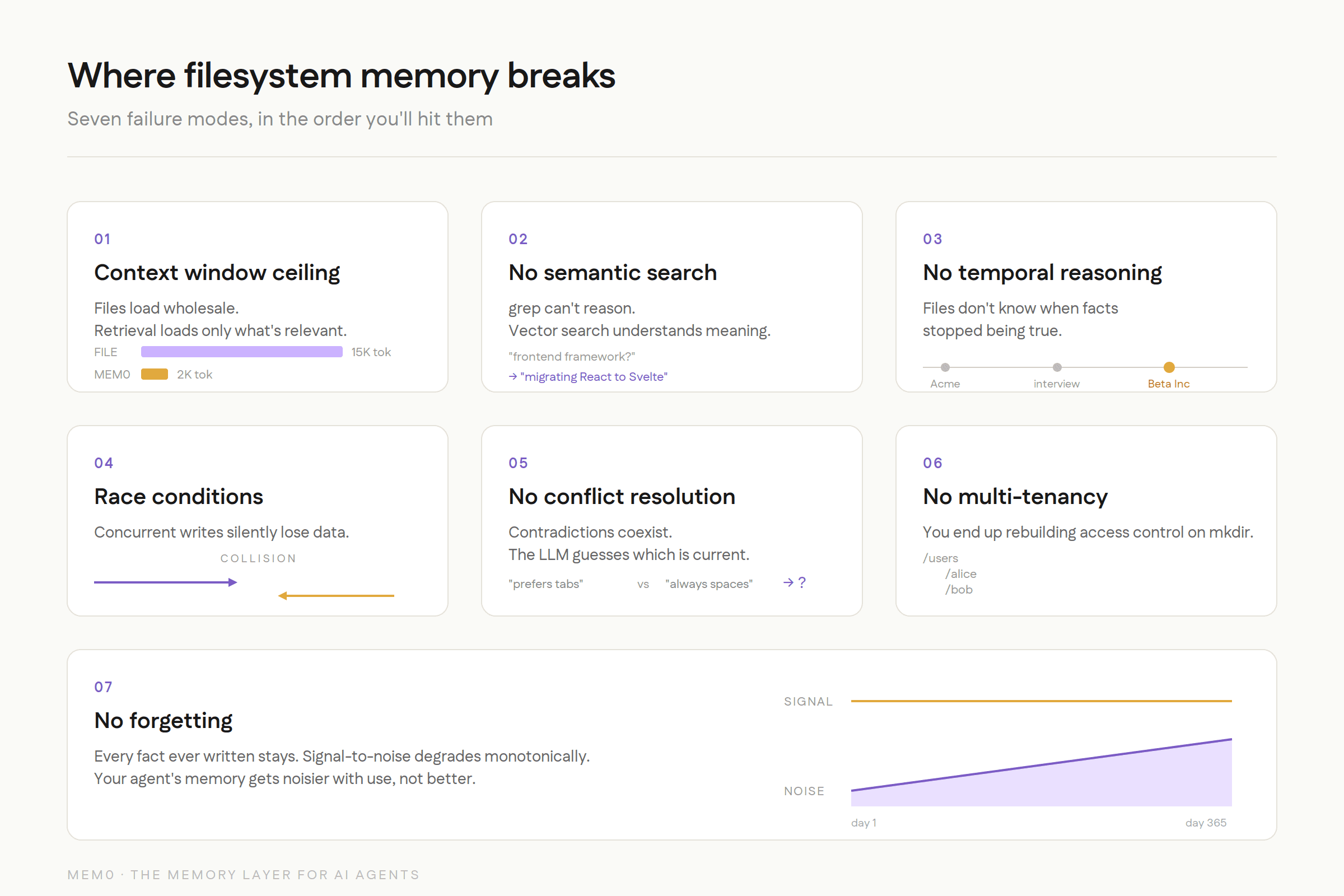
The short version: file-based memory doesn't fail because the idea is wrong; it fails because files can't do the seven things a growing memory store needs to do.
Context window ceiling: files are loaded wholesale
No semantic search; grep can’t reason
No temporal reasoning, files don’t know when facts stopped being true
Race conditions, concurrent writes silently lose data
No conflict resolution, contradictions coexist, LLM guesses
No multi-tenancy, rebuilding access control on
mkdirNo forgetting, signal-to-noise degrades monotonically
Files work for ~200 static memories, single user, no concurrency. Past that, you’re rebuilding databases by hand, badly.
Why file system memory breaks
A Story You’ve Seen Before
In 1965, if you wanted to store customer records, you wrote them to a flat file on magnetic tape. Your COBOL program knew the exact byte offset of every field. It worked. Companies ran on it for years.
By 1975, those same companies were drowning. Files were duplicated across departments. Updates in one file didn’t propagate to another. Two programs writing to the same file at the same time silently corrupted data. Answering a question like “which customers in Ohio bought more than $10K last quarter?” required writing an entirely new program from scratch.
Edgar Codd published his paper on the relational model in 1970. IBM built System R. Oracle shipped the first commercial RDBMS in 1977. Postgres followed in 1986. The industry didn’t move to databases because files stopped working. It moved because files stopped working at scale, under concurrency, when the questions got harder.
We are watching the same arc play out in AI agent memory right now. And most developers are still in the flat-file phase.
The Filesystem Memory Pattern
If you’ve built an AI agent in the last year, you’ve probably done some version of this:
The agent reads these files at the start of each session, appends new facts, and writes them back. Maybe it’s a CLAUDE.md file. Maybe it’s a .cursorrules file. Maybe it’s a JSON blob sitting in ~/.config/. The implementation varies, but the architecture is the same: memory is a file on disk that gets loaded into context wholesale.
This is exactly the pattern behind most open-source AI agents with built-in memory — the agent owns its own memory logic instead of delegating to a dedicated layer.
This is the hello world example of AI agent memory. Every developer starts here. And like most hello world examples, it teaches you the concept while hiding everything that makes the real problem hard.
Where Filesystem Memory Works (And Why It’s Seductive)
Let’s be honest about what it’s good at, because it is genuinely good at some things. Dismissing it entirely would be intellectually dishonest, and if you’re reading this, you’re probably smart enough to see through that.
Single-user, single-agent, small memory
If you’re one developer with one coding agent and 50 facts to remember, a markdown file is fine. It’s simple. It’s debuggable. You can version-control it with git. You can edit it with vim. The entire file fits in a single context window with room to spare. There’s no infrastructure to manage, no SDK to learn, no service to keep running.
For a personal coding assistant that remembers “use 4-space indentation” and “the API key is in .env.local,” a file is not just adequate. It’s optimal. Any more infrastructure would be over-engineering.
Static configuration and rules
Things that don’t change are well-suited to files. “Always use TypeScript.” “Never commit directly to main.” “Use the company’s design system for all UI components.” These are read-only reference materials, not dynamic memory. They don’t need indexing, don’t need conflict resolution, don’t need timestamps. A file is the right data structure for static rules the same way a constant is the right data structure for a value that doesn’t change.
Prototyping and exploration
When you’re still figuring out what your agent even needs to remember, a file is the right starting point. You can see everything at a glance. You can add a line, delete a line, restructure the whole thing in seconds. There’s no schema to design, no migration to run. The feedback loop between “I think the agent should remember X” and “the agent now remembers X” is as fast as it gets.
Transparency and debugging
You can cat memory.md and see exactly what your agent knows. Every fact, in plain text, in the order it was added. Try doing that with a vector database. The interpretability of plain text files is a real advantage, especially during development when you’re trying to understand why your agent said something weird. “Oh, it still thinks I use React because line 47 says so” is a debugging experience that’s hard to beat.
The pattern works when memory is small, static, single-writer, and doesn’t need to be queried. Only loaded.
The problem is that these conditions describe a toy. They don’t describe production.
Where Filesystem Memory Breaks
Every developer who has shipped a filesystem-based memory system to production has hit some combination of these walls. They don’t all hit at once. They creep up on you, one at a time, each one feeling like a small problem you can patch around. Until you realize you’ve spent three months patching around problems that were solved decades ago.
1. The Context Window Ceiling
This is the first wall everyone hits, and it’s the most fundamental.
Context Window Ceiling
Claude Code’s MEMORY.md file, for example, doesn’t have an infinite capacity. Content beyond a certain size gets silently truncated. No error. No warning. The memories you added most recently (at the bottom of the file) just disappear from the agent’s view. Your agent doesn’t know what it doesn’t know, and you don’t know what it’s forgotten.
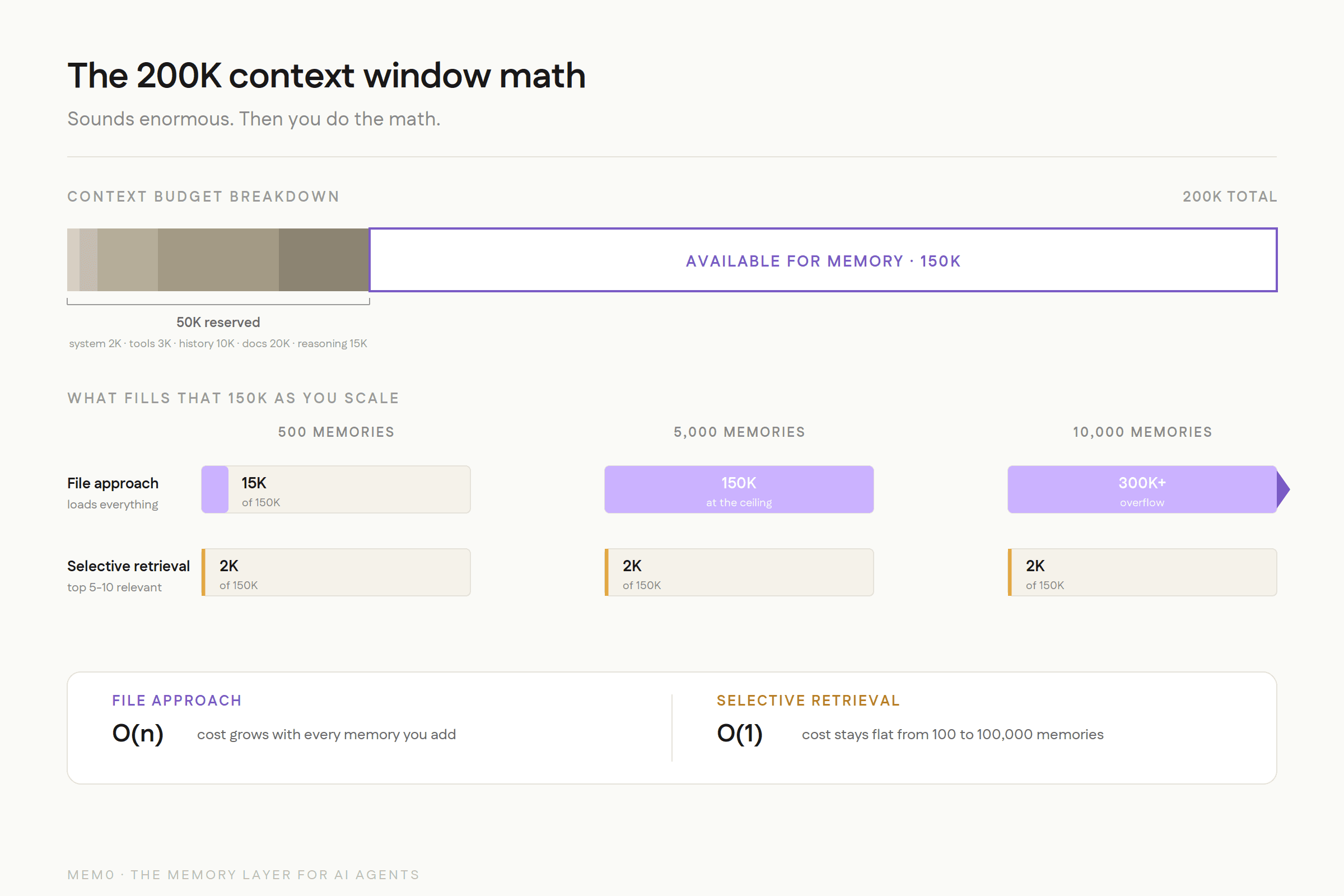
But even without a hard cap, the math doesn’t work. A 200K-token context window sounds enormous until you account for everything else competing for that space:
Sounds like plenty, right? But at 500 memories, you’re already burning 15,000+ tokens just to load the memory file. At 2,000 memories, you’ve consumed a significant chunk of the context window before the user has even said hello. At 10,000 memories (which any production agent serving real users will accumulate within months), you’ve blown past the context window entirely.
And here’s the part that’s easy to miss: the filesystem approach treats all memories as equally important and loads all of them every time. There is no retrieval. There is no ranking. It’s wholesale injection. This is the equivalent of reading every page of every book in a library to answer a single question.
A dedicated memory system does selective retrieval. It takes the current query, computes semantic similarity against the memory store, and injects only the 5-10 most relevant memories. Mem0 uses roughly 2K tokens per query regardless of whether the total memory store has 100 or 100,000 entries. The difference between loading everything and retrieving what’s relevant is the difference between O(n) and O(1) for context window consumption.
This isn’t a minor optimization. At scale, it’s the difference between an agent that works and one that doesn’t.
2. No Semantic Search
This is the failure mode that’s hardest to see in demos but most painful in production.
Imagine your agent stored this memory six months ago:
“User mentioned they’re migrating the dashboard from React to Svelte as part of the Q3 rewrite”
Three months later, the user asks: “What frontend framework should we use for the new admin panel?”
A filesystem-based agent has two options:
Option A: Load the entire file and hope the LLM notices the relevant line buried among hundreds of others. This works sometimes. It fails when the memory file is long enough that the relevant fact falls in the “lost middle” of the context window, a well-documented phenomenon where LLMs attend less to information in the middle of long contexts.
Option B: Keyword search for “frontend framework.” This won’t match. The memory says “React” and “Svelte,” not “frontend framework.” You could search for “React” but then you’d also pull up every other memory that mentions React, most of which are irrelevant.
A dedicated memory system with vector embeddings understands that “frontend framework” is semantically related to “migrating from React to Svelte” and retrieves it directly. This is the difference between grep and understanding, and it's also the difference between unstructured and structured retrieval.
Now, you might think: “I’ll just add a vector store on top of my files.” And you can. But now you’re maintaining an embedding index alongside your files. You need to keep them in sync. When you update a memory in the file, you need to re-embed it. When you delete a memory, you need to remove the embedding. When the file gets corrupted (more on that later), the index is stale. You’ve taken on all the complexity of a retrieval system while still carrying all the limitations of a file. You’re spending your engineering time building memory infrastructure instead of solving the actual AI agent memory problem.
3. No Temporal Reasoning
Files don’t have timestamps on individual lines. When your memory file says:
Which facts are current? Is line 1 still valid? When exactly did each transition happen? A file doesn’t know. The LLM might infer the chronology from the ordering, but that inference is fragile. One rewrite of the file, one reordering during a cleanup, one batch append that puts things out of sequence, and the implicit timeline is gone.
This matters more than most developers realize during prototyping. In the real world, facts change constantly:
Users change jobs, move cities, switch tech stacks
Preferences evolve (“I used to prefer tabs, now I use spaces”)
Project contexts shift (“we were using PostgreSQL but migrated to CockroachDB”)
Relationships change (“Alice was the PM, now Bob is”)
A dedicated memory system stores every fact with a validity window: a start timestamp and an optional end timestamp for when it was superseded. “User works at Acme Corp” gets an end date when “User started at Beta Inc” is recorded. The system can answer “Where did the user work in January?” without the LLM having to reason about implicit ordering in a text file.
Memory without time is memory without truth. You’re storing what was said, but not when it was true, and even memory systems that store timestamps still have to decide what to do when a fact quietly goes stale without ever being explicitly contradicted.
4. Concurrent Access and Race Conditions
This is the failure mode that killed flat files in the 1970s, and it kills filesystem memory in the same way.
Scenario: You have an agent that handles customer support via Slack. Two customers message it simultaneously. Both conversations trigger memory writes.
This is the lost update problem. It’s literally the first thing you learn about in a database systems course. Databases solved it decades ago with transactions, locks, and MVCC (Multi-Version Concurrency Control). Filesystem-based memory has none of this.
You can add file locking. flock() in Python, lockfile in Node. But now you’re serializing all memory operations. One agent blocks while another writes. At 10 concurrent users, this is a minor annoyance. At 1,000, it’s a bottleneck that makes the system unusable. And file locks don’t work across network filesystems (NFS, EFS), so if your agents run on multiple machines, you’re back to square one.
But it gets worse. In production, we’ve seen filesystem-based memory corruption that goes beyond simple race conditions. Claude Code’s GitHub issues include reports of CLAUDE.md files getting corrupted with binary data, hex characters appearing in what should be plain text, and entire memory files becoming unreadable after concurrent write attempts. One user reported their memory file contained raw hex like 0x48 0x65 0x6C interspersed with their actual memories. Another found their file had been truncated mid-sentence during a write.
These aren’t theoretical concerns. These are GitHub issues with reproduction steps.
5. No Conflict Resolution
Your agent learns two contradictory facts at different times:
In a file, both lines coexist. The LLM sees both and has to guess which is current. Maybe it picks the last one (recency bias). Maybe it picks the first one (primacy bias). Maybe it picks whichever one happens to be closer to the user's query in the context window. The outcome is nondeterministic, which is a polite way of saying "unpredictable."
With 50 memories, contradictions are rare, and the LLM can usually figure it out from context. With 5,000 memories accumulated over months of usage, contradictions are inevitable. "User likes Python" and "User is switching to Rust" might be 200 lines apart. The LLM has no reliable way to determine which is current, especially if the file has been reorganized or appended to out of chronological order.
A dedicated memory system handles this more deterministically than a file does, though the mechanism matters. Mem0's current architecture writes new facts alongside older ones rather than deleting or overwriting them; the "User switched to Rust" fact doesn't erase "User likes Python"; it's added as a new entry. What resolves the ambiguity is retrieval-time ranking: recency and relevance scoring surface the current fact ahead of the outdated one, so the application sees the right answer without the LLM having to guess from raw context. This preserves a full history for audit while still keeping day-to-day retrieval reliable, a different guarantee than "the old fact gets overwritten," but one that solves the same practical problem: you're not left with the LLM guessing between two contradictory lines with no signal to break the tie.
This is the same problem that database normalization was designed to solve. Redundant data leads to update anomalies. The solution in 1972 was normal forms. The solution in 2026 is a memory system that handles deduplication and ranking for you instead of leaving contradiction resolution to chance.
6. No Multi-Tenancy
A file belongs to a filesystem. A filesystem belongs to a machine. If your agent serves multiple users, you need:
Separate memory per user (Alice’s preferences shouldn’t leak into Bob’s experience)
Access control (user A can’t read user B’s memories)
Shared organizational memory that all users can access (company policies, product docs)
Scoping rules (some memories are personal, some are team-wide, some are global)
Isolation guarantees (a bug in one user’s memory doesn’t corrupt another’s)
With files, you end up building a directory structure that encodes access control:
Now you need code to merge the right files for each query. You need to handle the case where Alice’s personal memory contradicts the team memory. You need to prevent path traversal attacks (what happens if a memory contains ../../bob/personal.md?). You need to back all of this up. You need to handle the case where the global file is being written while Alice’s query is reading it.
You’re building an access control system, a query planner, and a consistency engine on top of mkdir and cat. You’re solving filesystem problems instead of solving AI agent memory problems.
Dedicated memory systems have multi-tenancy built in from the ground up. Mem0 has user, session, and agent-level scoping. Access control, merging, and conflict resolution across scopes are handled by the system. You define who can see what, and the system enforces it. The engineering effort drops from weeks to minutes.
7. No Forgetting
Human memory forgets things, and that’s a feature. The name of the restaurant you went to three years ago fades. The password you changed last month replaces the old one. Irrelevant details decay so that relevant ones are easier to find. Forgetting is what keeps memory useful.
Files don’t forget. Every fact ever written stays there permanently, taking up context window space, increasing noise, and making retrieval harder. The signal-to-noise ratio degrades monotonically over time. Your agent’s memory doesn’t get better with use; it gets noisier.
You can manually prune. But manual pruning requires knowing what’s stale, which requires temporal reasoning (see failure mode #3), which you don’t have. So you end up doing periodic “memory cleanups” where you read through the entire file and delete things that look outdated. This is the equivalent of going through a filing cabinet by hand once a month. It doesn’t scale, and you inevitably delete something that turns out to be important.
Dedicated memory systems implement decay and relevance scoring. Memories that haven’t been accessed or reinforced in months get downweighted. Observations have shorter half-lives than core preferences. The memory store stays fresh without manual curation, because the system understands that not all memories are equally valuable over time.
The Historical Parallel: Why Databases Were Invented
The transition from filesystem memory to dedicated memory systems isn’t a new pattern. It has repeated across every era of computing. The details change, but the arc is always the same.
How databases were invented
The 1960s: Flat Files and Magnetic Tape
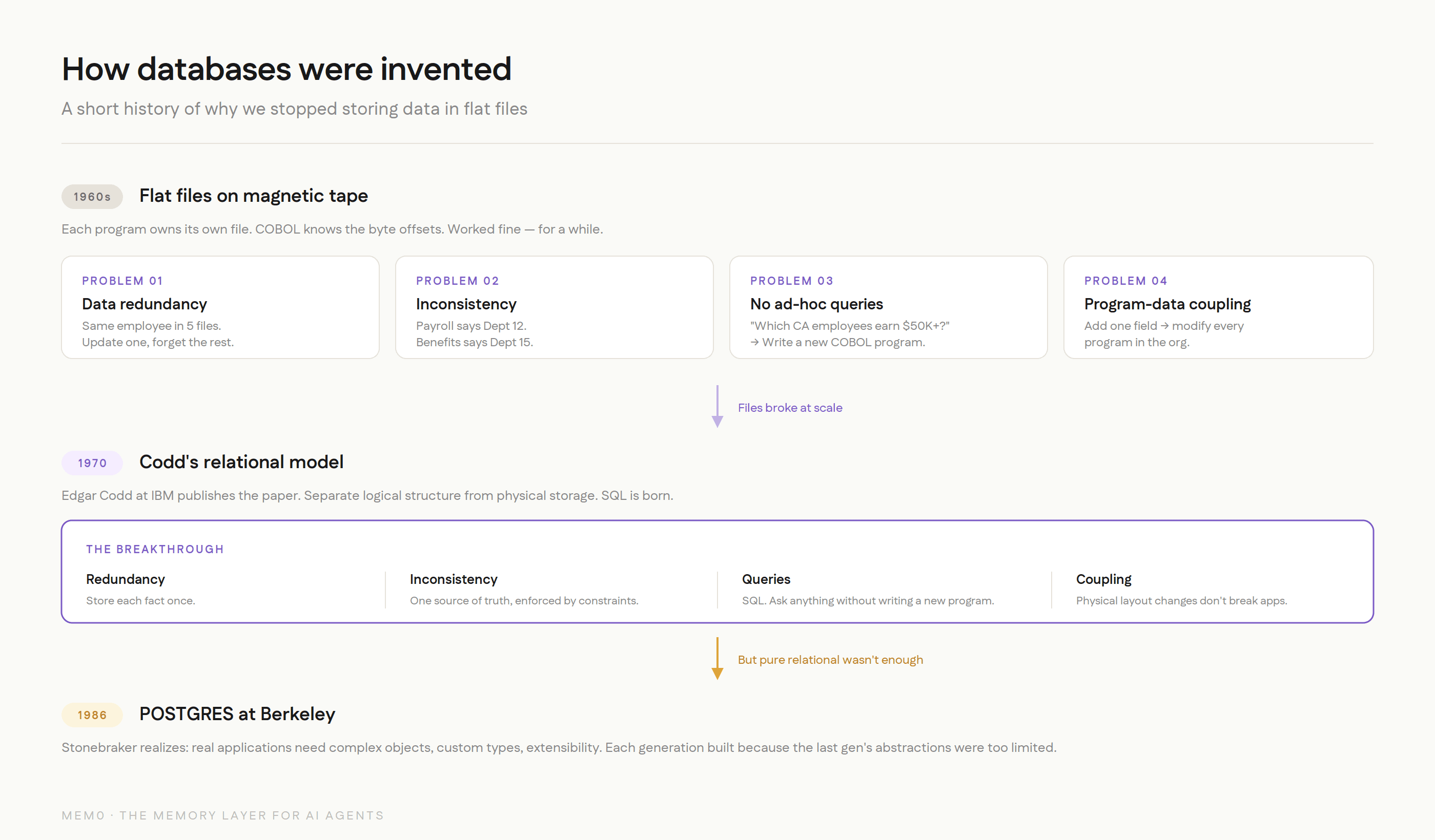
In the early days, every application managed its own data in its own files. A payroll program had a payroll file. An inventory program had an inventory file. If both needed employee data, both had their own copy. This worked fine when organizations had three programs. It fell apart when they had thirty.
The problems were textbook:
Data redundancy. The same employee name stored in five different files. Update it in one, forget the others. Now you have five versions of the truth.
Data inconsistency. The payroll file says John Smith is in Department 12. The benefits file says Department 15. Which is right? Nobody knows without checking the source of truth, which is… another file.
No ad-hoc queries. Want to know which employees in California earn more than $50K? Write a new COBOL program. That’ll take two weeks. By the time it’s done, the question has changed.
Program-data dependence. Every program knew the exact physical layout of its files. Change the file format and every program that reads it breaks. Adding a field to the employee record meant modifying every program in the organization.
Sound familiar? Replace “payroll file” with “memory.md“ and “COBOL program” with “AI agent,” and you have a description of filesystem-based agent memory in 2026.
The 1970s: Codd’s Relational Model
Edgar Codd, a mathematician at IBM’s San Jose Research Laboratory, published “A Relational Model of Data for Large Shared Data Banks” in 1970. The paper proposed something that seemed obvious in retrospect but was radical at the time: separate the logical structure of data from its physical storage.
Instead of programs knowing where data lived on disk, they would describe what data they wanted using a declarative language. The database system would figure out how to get it. This was the birth of SQL, and it solved every problem on the list above:
Redundancy? Store each fact once, reference it from wherever you need it.
Inconsistency? One source of truth, enforced by constraints.
Ad-hoc queries? SQL. Ask any question without writing a new program.
Program-data dependence? The physical layout can change without breaking applications.
IBM, ironically, resisted Codd’s ideas because they had a massive installed base of IMS (a hierarchical database) and didn’t want to cannibalize their own product. The relational model succeeded anyway because it was simply better at handling the complexity that real-world data management demands.
The 1980s: Postgres and Complex Objects
Michael Stonebraker at UC Berkeley built INGRES in the 1970s as one of the first relational database implementations. By the mid-1980s, he realized that the pure relational model wasn’t enough. Real applications needed to store complex objects, not just flat rows and columns. They needed rules, custom data types, and extensibility.
He started the POSTGRES project (Post-INGRES) in 1986 to build a database that could handle this complexity. The key insight was that the data model needs to evolve with the application’s needs. Flat files couldn’t handle relational queries. Early relational databases couldn’t handle complex objects. Each generation of data management infrastructure was built because the previous generation’s abstractions were too limited for what applications actually needed to do.
The Pattern
Every era follows the same sequence:
Phase | What happens | Why it breaks |
|---|---|---|
1. Files work | Small data, single user, simple queries | Requirements grow |
2. People bolt features onto files | Locking, indexing, caching | Complexity explodes, bugs multiply |
3. Someone builds a proper system | Handles concurrency, consistency, querying | Industry adopts it |
4. Files remain useful for simple cases | Config files, logs, static data | But nobody uses them for the hard stuff anymore |
We’re between phases 2 and 3 for AI agent memory right now. The “proper systems” exist (Mem0 and others), but a lot of developers are still in the “bolt features onto files” phase, adding vector stores and locking and custom conflict resolution to their markdown files, spending engineering time on infrastructure instead of on the actual memory problem.
“But My File-Based System Works Fine”
Fair. Let’s address this directly.
If you’re running a single-user agent with fewer than a few hundred memories that don’t change much, a file-based system does work fine. Nobody is arguing that you need a database to store 50 static rules.
The question is: will your requirements stay that simple?
In our experience building Mem0 and working with thousands of developers, the answer is almost always no. The progression looks like this:
“I just need to remember a few preferences” (file works)
“Now I have 500 memories, and the agent is getting confused” (context window ceiling)
“Two users reported the agent mixed up their data” (no multi-tenancy)
“The agent keeps using outdated information” (no temporal reasoning)
“We had a data loss incident during a deploy” (no concurrent write safety)
“I’ve spent the last month building memory infrastructure instead of product features” (the real cost)
Step 6 is where the pain becomes undeniable. You realize you’ve been solving filesystem problems when you should have been solving AI agent problems. The memory layer should be something you plug in, not something you build and maintain.
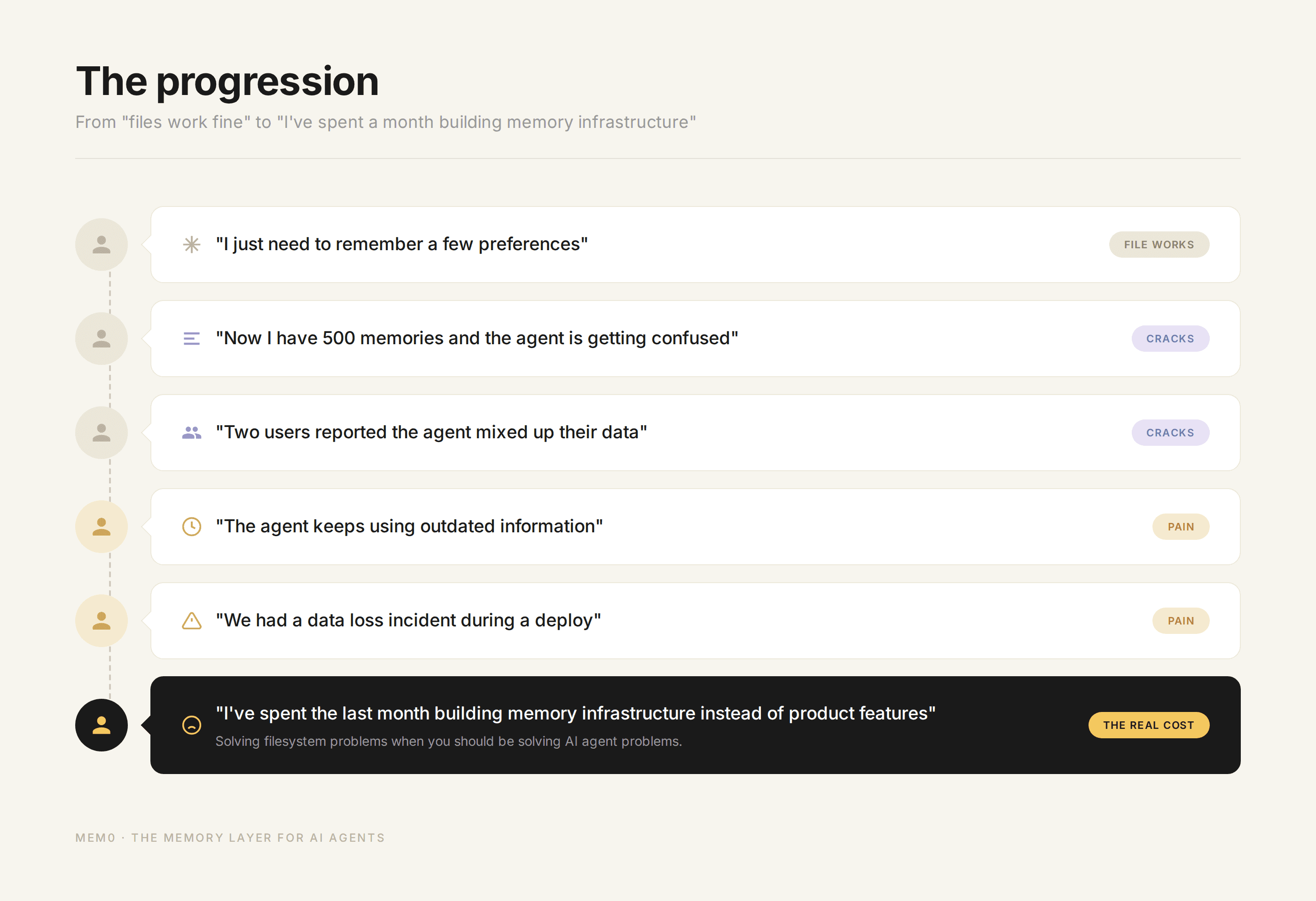
The progression of user memories
There’s also a more nuanced counterargument worth addressing. Some benchmarks (like LoCoMo) have shown that a well-tuned filesystem approach, where you dump the full conversation into context, can score higher on recall tasks than a retrieval-based system. This is true in controlled settings with small datasets. When you can fit everything in context, retrieval can actually lose information by being too selective.
But this result doesn’t hold in production for three reasons:
Cost. Loading 100K tokens of memory per query at $3/million input tokens adds up fast. At 10,000 queries/day, that’s $3/day just for memory tokens, or roughly $90/month. Selective retrieval at 2K tokens per query cuts that to $1.80/month. The difference compounds with scale.
Latency. More input tokens means more time-to-first-token. Users notice.
The dataset grows. The benchmark uses a fixed conversation. Production memory grows continuously. The filesystem approach that works at 50K tokens breaks at 500K.
The filesystem approach optimizes for a snapshot. A dedicated memory system optimizes for a trajectory.
The Real Cost of “Just Use Files”
Developers underestimate the total cost of filesystem memory because the initial implementation is free. You write 20 lines of code to read and append to a file, and you’re done. But the total cost includes everything that comes after.
Engineering time rebuilding solved problems
Conflict resolution. Concurrent access. Semantic search. Decay and relevance scoring. Multi-user scoping. Each of these is a multi-week engineering project if you build it properly. Most teams don’t build them properly. They build the minimum viable version, hit an edge case in production, patch it, hit another edge case, patch that, and eventually realize they’ve spent three months on memory infrastructure that still isn’t reliable.
A dedicated memory provider has already built and battle-tested all of these capabilities across thousands of deployments. The engineering time you save isn’t hypothetical. It’s the difference between shipping your product this month and shipping it next quarter.
Silent data loss
The scariest failure mode of filesystem memory isn’t a crash. It’s memories quietly disappearing or being overwritten without anyone noticing. The agent doesn’t throw an error. It doesn’t log a warning. It just gets slightly worse over time, giving slightly less personalized responses, forgetting things the user told it last week. Nobody files a bug report for “the agent seems a little off.” The degradation is gradual and invisible until a user explicitly asks, “Didn’t I tell you about X?” and the agent has no idea what they’re talking about.
With a dedicated system, writes are acknowledged, conflicts are resolved deterministically, and you have an audit trail. When something goes wrong, you can trace it.
Context window waste
Loading 500 memories when you need 5 is burning money. Let’s do the math:
That’s a 100x difference in token cost for memory alone. And it gets worse as the memory store grows. The filesystem approach scales linearly with total memories. Selective retrieval stays constant.
Debugging complexity
When your agent gives a wrong answer because of stale or contradictory memories, finding the root cause in a 2,000-line markdown file is painful. Which line caused the problem? When was it added? Was it ever updated? Did it contradict another line? You’re doing forensics on a text file with no metadata.
A dedicated system with timestamps, provenance tracking, and conflict resolution history makes debugging tractable. You can ask “what memories were retrieved for this query?” and get a clear answer.
What a Dedicated Memory System Actually Gives You
To make the comparison concrete:
Capability | Filesystem | Dedicated Memory (Mem0) |
|---|---|---|
Store a fact | Append to file | API call |
Retrieve by keyword | grep | Full-text search |
Retrieve by meaning | Not possible | Vector similarity search |
Handle contradictions | Both coexist, LLM guesses | Auto-detected and resolved |
Track when facts changed | Not possible | Temporal validity windows |
Concurrent writes | Race conditions, data loss | Transactional safety |
Multi-user scoping | DIY directory structure | Built-in user/session/agent scopes |
Selective retrieval | Load everything | Top-k relevant memories |
Memory decay | Manual pruning | Automatic relevance scoring |
Audit trail | None | Full provenance |
Graph relationships | Not possible | Entity-relationship tracking |
Scale to 100K+ memories | Breaks | Works |
Integration effort | 20 lines of code (initially) | SDK call |
Maintenance effort | Ongoing, growing | Near-zero |
The left column looks cheaper on day one. The right column is cheaper on day thirty.
A Decision Framework
Not every agent needs a dedicated memory system. Here’s an honest framework for deciding.
Stay with files when:
You have fewer than ~200 memories, and that number is stable
Single user, single agent, no concurrency
Memories are static rules that don’t change (“always use TypeScript”)
You’re prototyping and still figuring out what to remember
Transparency matters more than scalability (you need to
catthe file)You’re building a personal tool that only you will ever use
Move to a dedicated system when:
You have or expect more than 500 memories
Multiple users or agents access the same memory store
Facts change over time (users update preferences, switch contexts, evolve)
You need semantic retrieval (“find memories related to X,” not “find memories containing the word X”)
You need temporal reasoning (“what did the user prefer last month?”)
You’re going to production where reliability and consistency matter
You’re spending more time on memory infrastructure than on your actual product
You’ve had a data loss or corruption incident
Most developers should start with files and have a clear trigger for when to move. The mistake is staying on files too long because “it’s working fine,” the same way companies in the 1970s stayed on flat files because “they’re working fine” until the data corruption incident that finally forced the migration.
Where This Is All Going
The AI agent memory space is evolving fast, but the direction is clear. Memory is becoming a first-class infrastructure layer, not an afterthought bolted onto the side of an agent framework.
The parallels to database history suggest what comes next:
Standardization: Just as SQL became the standard interface for relational data, we’ll see standard interfaces for agent memory. MCP (Model Context Protocol) is an early move in this direction.
Specialization: Just as the database world is split into OLTP, OLAP, graph, time-series, and document databases, agent memory will specialize. Some workloads need fast key-value lookup. Others need temporal graphs. Others need semantic search. The best systems will handle multiple access patterns.
Commoditization of the basics: Storing and retrieving memories will become table stakes. The differentiation will move to higher-level capabilities: reasoning about what to remember, when to forget, how to resolve conflicts, and how to connect memories into coherent knowledge.
Memory as a competitive moat: The agent that remembers you best will be the agent you keep using. Memory quality will become a core differentiator for AI products, not just a nice-to-have feature.
The filesystem approach was the right starting point. It taught us what agent memory needs to do. But the requirements have outgrown what files can deliver, just as they did for every other category of data management in the history of computing.
The tools exist to make the jump; adding persistent memory now takes one command, not a migration project. The question is whether you make it before or after the production incident that forces your hand.
Frequently Asked Questions
Q. When should an AI agent use file-based memory instead of a database?
File-based memory works when you have fewer than roughly 200 stable memories, a single user and single agent with no concurrency, and facts that are mostly static rules rather than things that change over time. It's also the right choice while prototyping, when you're still figuring out what the agent needs to remember at all. Once you cross into multiple users, changing facts, or production reliability requirements, the same properties that made files simple start working against you.
Q. What breaks first when an AI agent's memory scales past a file?
The context window ceiling is usually the first wall. Filesystem memory loads everything wholesale rather than retrieving what's relevant, so token usage grows linearly with the size of the memory store, roughly 15,000 tokens at 500 memories, over 300,000 at 10,000 memories, while a system doing selective retrieval stays flat at around 2,000 tokens regardless of how large the underlying store gets. Semantic search, temporal reasoning, concurrent write safety, conflict resolution, multi-tenancy, and forgetting typically surface as problems after that, roughly in that order, as usage scales further.
Q. Is file-based memory ever the right choice for an AI agent?
Yes, for a specific set of conditions: single-user, single-agent systems with a small, mostly static memory footprint, or projects still in active prototyping where the schema isn't settled yet. Files are simple, git-versionable, and fully transparent; you can read exactly what the agent knows by opening the file. The pattern breaks down specifically when memory needs to scale past a few hundred entries, serve multiple users, or handle facts that change over time, not because files are inherently bad, but because those are exactly the properties files were never designed to handle.
Q. What's the real cost of using "just files" for AI agent memory at scale?
Beyond the token-cost math (roughly a 100x difference between loading everything and retrieving only what's relevant), the higher cost is engineering time spent rebuilding solved problems: conflict resolution, concurrent write safety, semantic search, and decay each become multi-week projects if you build them yourself, and most teams build a minimum-viable version that breaks under real production load. The other hidden cost is silent data loss, memories quietly disappearing or getting overwritten with no error thrown, which degrades an agent's usefulness gradually and invisibly rather than failing loudly enough to get noticed and fixed.
Q. How is a dedicated memory system like Mem0 different from a MEMORY.md file?
The core difference is retrieval versus wholesale loading: Mem0 retrieves only the handful of memories relevant to the current query, while a file gets loaded in its entirety every time regardless of relevance. Mem0 also adds capabilities a file structurally can't provide on its own: semantic search instead of exact-text grep, temporal validity windows so the system knows when a fact stopped being current, transactional safety against concurrent writes, and built-in user/session/agent scoping instead of a hand-built directory structure standing in for real access control.
——-
Mem0 is an intelligent, open-source memory layer designed for LLMs and AI agents to provide long-term, personalized, and context-aware interactions across sessions.
Get your free API Key here: app.mem0.ai
Self-host mem0 from our open-source GitHub repository
More on Agent Memory

How to Read Memory Benchmarks
How to read AI memory benchmarks: what LoCoMo, LongMemEval, BEAM, and agentic tests measure, where scores go wrong, and how to find the correct benchmark for your use case.
20 min read

The Problem After Retrieval: Why Agents Misuse the Memories They're Given
Five papers show LLM agents often misuse the memories they retrieve. What the research says, how much to trust it, and what builders can do.
13 min read

What Is Memory Staleness in AI? Causes, Risks & Solutions
Understand memory staleness in AI agents, why outdated information leads to errors, and the best techniques to maintain accurate long-term memory.
9 min read





Start building with memory
Free tier, no card