

·
12 min read
Quick Answer
Gemini API pricing depends on the model and the number of input and output tokens used. At standard paid-tier rates, Gemini 3.1 Pro Preview costs $2 per million input tokens and $12 per million output tokens for prompts up to 200K tokens; larger prompts cost $4 and $18. Gemini 3.8 Flash costs $0.75/$3.75 through December 31, 2026, while Gemini 3.1 Flash-Lite costs $0.25/$1.50 for text workloads. Eligible free-tier use, caching, Batch processing, and tools can change the final bill. Source: Google Gemini API pricing.
Gemini API Pricing at a Glance
The table shows standard paid-tier text rates per 1 million tokens. “Cached input” is the rate for eligible reused input tokens; storing an explicit cache can also incur a time-based storage charge.
Model and API ID | Input | Output, including thinking | Cached input | Key condition |
|---|---|---|---|---|
Gemini 3.1 Pro Preview — | $2.00 | $12.00 | $0.20 | Prompt of 200K tokens or fewer |
Gemini 3.1 Pro Preview — | $4.00 | $18.00 | $0.40 | Prompt above 200K tokens |
Gemini 3.8 Flash — | $0.75 | $3.75 | $0.075 | Listed rates run through December 31, 2026 |
Gemini 3.5 Flash-Lite — | $0.30 | $2.50 | $0.03 | Lower-cost option for high-volume tasks |
Gemini 3.1 Flash-Lite — | $0.25 | $1.50 | $0.025 | Text, image, and video input; audio input has a different rate |
These are model rates, not an all-inclusive application bill. Gemini 3.1 Pro Preview also lists $4.50 per million cached tokens per hour for cache storage. Other models have their own storage rates. Gemini 3.8 Flash’s listed input and output prices are introductory rates; Google lists higher rates starting January 1, 2027. Source: Google Gemini API pricing.
The older gemini-2.0-flash and gemini-2.0-flash-lite models should not appear as current choices: Google lists them as shut down on June 1, 2026. Source: Google model deprecations.
Key Takeaways
Gemini API pricing is usage-based, not a fixed cost per request. Input and output tokens have different rates, and billable output includes thinking tokens where applicable.
Model choice has a large effect on cost. At standard paid-tier rates, Gemini 3.1 Pro Preview is $2 input/$12 output per million tokens for prompts up to 200K; Gemini 3.1 Flash-Lite is $0.25/$1.50 for text workloads.
Long Pro prompts cost more on both sides of the bill. Above 200K input tokens, Gemini 3.1 Pro Preview rises to $4 input and $18 output per million tokens—not just a higher input rate.
Batching and caching can lower costs, but check the full calculation. Eligible Batch jobs cost 50% of standard processing. Cached input has a lower rate, while explicit cache storage is charged by token count and time.
Measure cost per successful task. Resent chat history, retries, grounding queries, and memory retrieval can change the real bill. Test selective memory against full-history replay for both answer quality and total cost.
Is the Gemini API Free? Free vs Paid Tiers
The Gemini Developer API has a free tier for eligible models and limited usage. It is useful for testing, but it does not mean unlimited free production traffic. Available models and limits depend on the project and model. Google measures limits across dimensions such as requests per minute, input tokens per minute, and requests per day; there is no single limit that applies to every account and model. Sources: Google pricing, rate limits.
Paid access provides higher limits and access to features such as context caching and Batch processing. Google also distinguishes data use: its pricing page says free-tier content may be used to improve its products, while paid-tier content is not used for that purpose. Check the terms that apply to your project before sending sensitive data. A Google AI consumer subscription does not itself pay for Developer API requests. Source: Google Gemini API pricing.
How Does Gemini API Billing Work?
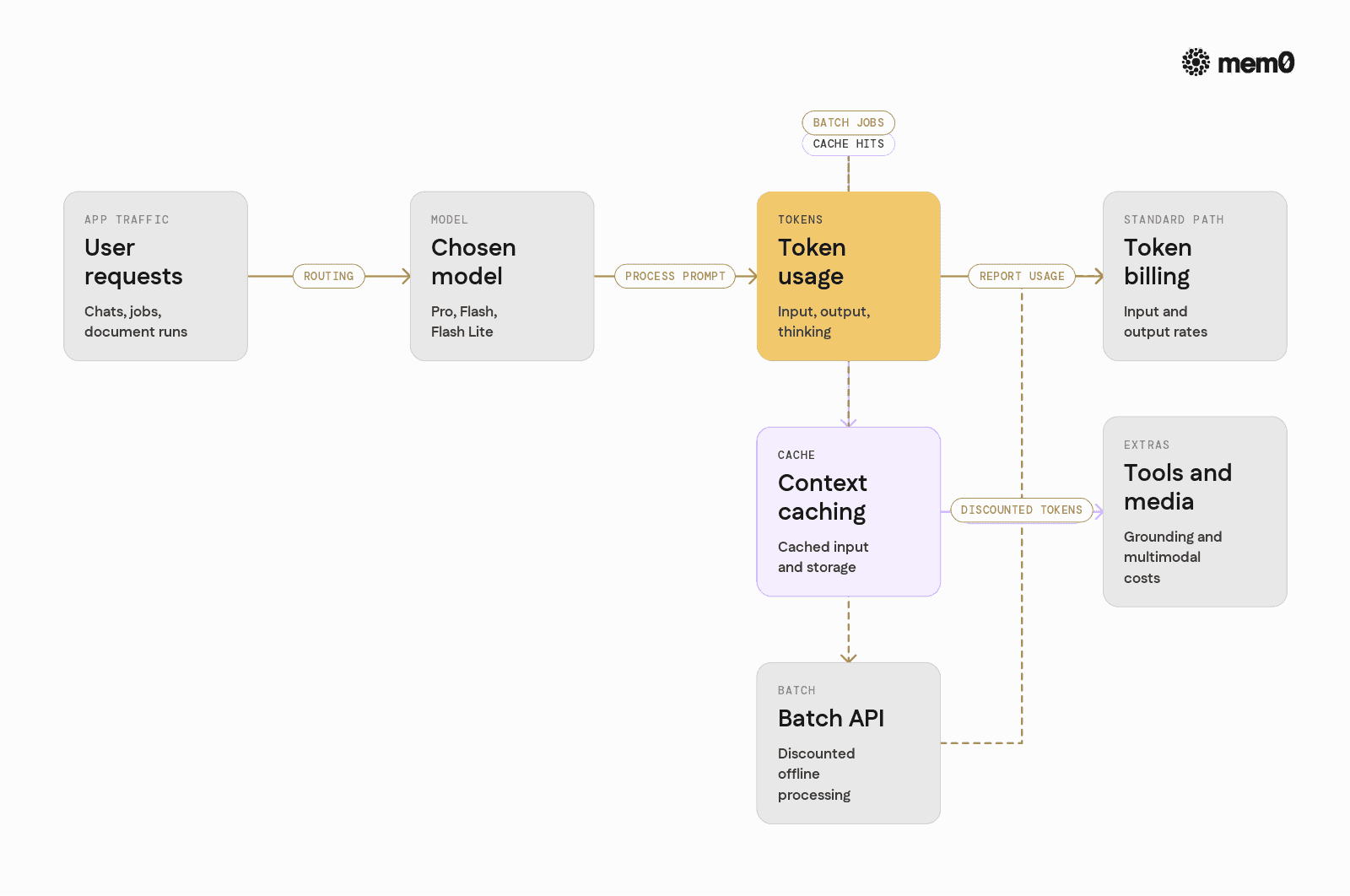
Gemini text-model billing begins with two categories: input tokens supplied to the model and output tokens generated by it. Input can include instructions, the current message, conversation history, retrieved documents, and tokenized media. Every time an application resends history, those tokens are part of that request’s input unless an eligible portion is billed as cached input.
Are Gemini Thinking Tokens Billed?
Yes. Google’s model rate cards label output prices as including thinking tokens. That means a 300-token visible answer may have more than 300 billable output tokens if the model used thinking tokens to produce it. Use the usage reported by the API or your project metrics for a cost estimate; do not estimate solely from the length of the displayed reply. Source: Google Gemini API pricing.
What Happens When a Gemini Pro Prompt Exceeds 200K Tokens?

For gemini-3.1-pro-preview, crossing 200K input tokens in a prompt changes both the input and output rates:
Prompt size | Input per 1M | Output per 1M | Cached input per 1M |
Up to 200K tokens | $2.00 | $12.00 | $0.20 |
Above 200K tokens | $4.00 | $18.00 | $0.40 |
This is a pricing threshold, not the maximum number of tokens the model can accept. Do not apply these higher rates automatically to Flash or Flash-Lite models; check each model’s own rate card. Source: Google Gemini API pricing.
Does Gemini Context Caching Cost Extra?

A cache hit can reduce the rate paid for reused input, but caching is not free in every configuration. Google supports implicit caching, which is enabled by default on Gemini 2.5 and newer models; a matching prompt prefix may receive a discount without manually creating a cache. A hit is not guaranteed. Google also supports explicit caching through the generateContent API, where an application creates a reusable cache with a specified lifetime. Explicit caching adds storage charges based on cached token count and storage duration. Sources: Google’s context-caching guide and Generate Content caching guide.
For a simplified break-even illustration, assume 50,000 tokens of context are used in 100 Gemini 3.1 Pro Preview requests within a one-hour cache lifetime, with every prompt below 200K tokens:
Without caching: 5 million input tokens × $2 = $10.00.
With an illustrative first uncached use: 50,000 tokens at the $2 input rate = $0.10.
Ninety-nine cached uses: 4.95 million tokens at the $0.20 cached-input rate = $0.99.
One hour of explicit cache storage: 0.05 million tokens × $4.50 = $0.225.
That gives an illustrative total of about $1.32, excluding output and other input, versus $10 for those same context tokens without caching. This result relies on the assumed cache hits and one-hour lifetime. Fewer reuses or longer storage can narrow or eliminate the savings. Source for rates: Google Gemini API pricing.
How Much Does the Gemini Batch API Save?

Google prices eligible Batch workloads at 50% of standard interactive token rates. Batch runs asynchronously and targets a turnaround time of up to 24 hours, so it suits jobs that do not need an immediate answer. Confirm that the specific model and endpoint support Batch. Source: Google Batch API documentation.
For example, gemini-3.1-flash-lite lists standard text rates of $0.25 input / $1.50 output per million tokens and Batch rates of $0.125 / $0.75. A job using 1 million input tokens and 500,000 output tokens would cost $1.00 at standard rates or $0.50 with Batch, before other charges. Source: Google Gemini API pricing.
How to Calculate Gemini API Costs
For a standard text request without caching or tools:
Cost = (input tokens ÷ 1,000,000 × input rate) + (billable output tokens ÷ 1,000,000 × output rate)
If the request uses cached input, separate it from ordinary input and apply the cached-input rate. Add cache-storage and tool charges when relevant.
Example 1: How Much Do 1,000 Gemini API Requests Cost?
Suppose 1,000 requests use gemini-3.1-flash-lite. Each request has 1,000 text input tokens and 500 total billable output tokens, including any thinking tokens. There are no cache hits or tools.
Category | Tokens across 1,000 requests | Rate per 1M | Cost |
Input | 1,000,000 | $0.25 | $0.25 |
Output | 500,000 | $1.50 | $0.75 |
Total | $1.00 |
The estimated model cost is $0.001 per request, or $1 for 1,000 requests under these exact assumptions. There is no universal Gemini price per API call; changing the model or tokens per call changes the result. Source for model rates: Google Gemini API pricing.
Example 2: How Much Does a Gemini Chatbot Cost per Month?
Consider a customer-support chatbot using gemini-3.8-flash for 10,000 conversations per month. Each conversation has eight user turns. To make the growing-history cost visible, assume:
A 1,000-token system prompt is sent on every turn.
Each new user message contains 200 tokens.
Each model reply has 300 visible tokens and 100 billable thinking tokens.
At each turn, the application resends all earlier user messages and visible model replies, but not earlier hidden thinking tokens.
There are no cache hits, tools, retries, or Batch calls. Every prompt stays below any relevant long-context pricing threshold.
Across one eight-turn conversation, the input is:
System prompt: 1,000 × 8 = 8,000 tokens.
User messages as history grows: 200 × (1 + 2 + … + 8) = 7,200 tokens.
Earlier visible model replies resent as history: 300 × (0 + 1 + … + 7) = 8,400 tokens.
That is 23,600 input tokens per conversation. Output is 8 × (300 visible + 100 thinking) = 3,200 billable output tokens per conversation.
Category | Monthly tokens | Gemini 3.8 Flash rate per 1M | Monthly cost |
Input | 236 million | $0.75 | $177 |
Output | 32 million | $3.75 | $120 |
Estimated inference total | $297 |
That is approximately $0.0297 per conversation. The example uses Google’s listed Gemini 3.8 Flash rates through December 31, 2026. Real costs may differ because conversation lengths, thinking-token use, retries, caching, and tool calls vary. In particular, repeatedly sending full history makes input grow with each turn. Source for model rates: Google Gemini API pricing.
This example resends the full visible conversation history on every turn, so input tokens grow throughout the chat. Applications that need information from earlier conversations can test selective memory retrieval instead of replaying every past message. The distinction between a context window and persistent memory helps explain what should stay in the current prompt and what can be retrieved later. Compare the resulting Gemini bill with memory extraction, retrieval, and storage costs and check that answers still retain the context users need.
What Additional Gemini API Charges Should You Budget For?
Token inference is only one part of some applications. Check whether your design also uses:
Feature | Potential additional cost |
Google Search grounding | Model-specific free allowance and then per-search-query charges |
Google Maps grounding | Model-specific free allowance and then query charges |
Explicit context caching | Storage charged by cached tokens and storage time |
Audio input | May have a different rate from text input on the same model |
Image/video generation and Live API | Separate model- and modality-specific pricing |
For example, Google lists a shared monthly allowance of 5,000 free Search grounding requests across Gemini 3.x models, followed by $14 per 1,000 search queries for the listed models. A submitted request may generate more than one billable search query, so do not assume one user request always equals one search charge. Check the exact model row before estimating Maps or media charges. Source: Google Gemini API pricing.
Which Gemini Model Is Most Cost-Effective for Your Task?
Choose by cost per successful task, not input price alone:
Simple classification or routing: Test a Flash-Lite model first. Small inputs and short outputs may not justify a more expensive model.
Interactive customer-support chat: Test a Flash model against your required answer quality and latency. Track history growth, retries, and tool use rather than comparing a single-call rate.
Complex, long-document analysis: Test Gemini 3.1 Pro Preview where its reasoning or document handling improves results enough to justify the higher rate. Include the above-200K pricing tier when your prompts cross it.
Google currently recommends newer models for new applications and limits access to some Gemini 2.5 models to existing users. A legacy model can have a lower listed token price without being the right choice for a new deployment. Source: Google model deprecations.
How to Reduce Gemini API Costs
Start with five measurable changes:
Route by task. Test Flash-Lite for simple work and use Flash or Pro when evaluations show they improve the outcome.
Control output and thinking. Set an appropriate output limit and avoid requesting more detail than the user needs; confirm that the limit still permits a complete answer.
Use Batch for non-urgent jobs. Move eligible bulk classification, analysis, or evaluation work off the interactive path.
Measure caching after storage costs. Check actual cache-hit usage and explicit-cache lifetime; a repeated prompt does not guarantee savings.
Keep context relevant. Avoid resending unnecessary history or whole documents when a smaller, tested context produces an equally good answer.
For additional approaches to controlling the cost of retained context, see these AI agent memory token-cost techniques
Evaluate quality, latency, and total cost per successful outcome after each change.
Sources: Google optimization guidance and Batch API documentation.
Test Selective Memory Retrieval with Mem0
For applications that need continuity across conversations, selective memory retrieval is another approach to test against replaying full histories. With Mem0, an application can retain useful facts and preferences, retrieve relevant memories for a new request, and send those memories with the current context. The guide to building AI agents with long-term memory shows where retrieval and memory updates fit into an agent workflow.
Persistent memory is not the same as Gemini context caching. Caching can lower the processing cost of an eligible repeated prefix; memory helps decide which past information is worth supplying at all. The two can be used together. Compare the full-history baseline, including any Gemini cache hits, with the cost of memory extraction, retrieval, storage, and the resulting Gemini calls. Test answer accuracy and continuity as well as price. Savings are not guaranteed.
Frequently Asked Questions
How much does the Gemini API cost per million tokens?
There is no single Gemini rate. As of October 7, 2026, Gemini 3.1 Pro Preview costs 2input/12 output per million tokens for prompts up to 200K; Gemini 3.8 Flash costs 0.75/3.75 through December 31, 2026. Other models and processing modes have different prices. Google pricing.
Is the Gemini API free?
Eligible models have a free tier with usage limits. Model availability and rate limits vary by project, so check your active limits in Google AI Studio. A consumer Gemini subscription is separate from Developer API billing. Google pricing · Rate limits
What is the cheapest Gemini API model?
Among the new-project options compared in this article, Gemini 3.1 Flash-Lite has the lowest listed standard text rates: $0.25 input and $1.50 output per million tokens. Gemini 2.5 Flash-Lite is cheaper on the rate card, but Google limits 2.5-model access for new users. Pricing · Availability
How much do 1,000 Gemini API calls cost?
The price depends on the model and tokens per call. In the example above, 1,000 Gemini 3.1 Flash-Lite requests with 1,000 input and 500 billable output tokens each cost $1 at standard text rates, excluding other charges. Google pricing
Are Gemini thinking tokens charged as output?
Yes. Google’s applicable model rate cards state that output prices include thinking tokens. For an accurate estimate, use billable output usage rather than counting only words visible in the final answer. Google pricing
Is Gemini Developer API pricing the same as Vertex AI pricing?
Do not assume so. They are different billing products with different features and potential pricing conditions. Use the Gemini Developer API rate card for Developer API calls and the relevant Google Cloud pricing page for Vertex AI deployments.
More on LLMs & Models

Perplexity Pricing 2026: Pro, Max, Computer & API Costs
Compare Perplexity Free, Pro, Max, and Enterprise prices in 2026. Understand Computer credits, API charges, and which plan fits your usage and budget.
10 min read

OpenAI API Pricing (Oct 2026): Models, Token Costs, How to Save
Compare OpenAI API pricing including model rates, token costs, caching, and Batch discounts, with practical cost examples.
17 min read

DeepSeek API Pricing in 2026: V4.1 Flash, V4 Pro, and How to Save
Explore the latest DeepSeek API pricing for 2026, including V4.1 Flash and V4 Pro, and compare rates with OpenAI, Claude, Gemini, Grok, Mistral, Qwen, Llama, and OpenRouter.
15 min read



Aashi Dutt
She is a senior technical content writer at Mem0. She covers agent memory architecture and the engineering decisions behind building agents that actually remember. She experiments with new features and turns research into posts developers can put straight to use.
Start building with memory
Free tier, no card