

·
15 min read

xAI launched Grok Bot on August 11, 2026, and it isn't just another chat window. It's a team of always-on AI agents, each one running on its own cloud computer instead of your laptop, that can sign in to the tools you already use and finish multi-step jobs without you supervising every step.
Grok Bot keeps working after you close the app, checks back in only when it needs a decision from you, and can hand off work between multiple bots working together on the same task.
This article covers what Grok Bot actually is, how its cost compares to the regular Grok chatbot pricing, the features that make it work, and a step-by-step walkthrough of setting one up.
What is Grok Bot
Grok Bot is an always-on, multi-agent AI platform developed by xAI (SpaceXAI) that operates as a team of specialized, named AI coworkers rather than a single general-purpose chat window. Each bot you create gets its own persistent cloud computer, with a real browser, file system, and terminal, along with its own logins to the tools and sites it needs. You give it a specific role, running your email, LinkedIn outreach, research, or scheduling, and because it runs on its own machine rather than yours, it keeps working after you've closed the app.
What are the features of Grok Bot
The interesting part is how these pieces work together: Grok Bot combines persistent execution, computer use, tools, and multiple Bots into one product.
Persistent cloud computer: Every Bot runs on dedicated cloud infrastructure. That's what lets it keep working after you close the laptop lid, and what lets it queue up a long job without tying up your machine.
Shared workspace: Your Bots can have separate roles and screens, but files, browser sessions, and command-line credentials on that cloud machine can be available to all of them, so one Bot's output is immediately usable by another without you copying anything over.
Computer use: A Bot operates its browser and terminal the way a person would: clicking, typing, navigating, and running commands inside the same apps, inboxes, and websites a human employee would use.
Plugins and MCP: Grok Bot connects to structured tools through connectors, plugins, and MCP servers, so it isn't limited to whatever xAI has built in natively.
Multi-Bot collaboration: You can put two to six Bots into a group chat, or bring a new one in mid-conversation with an
@-mention. They message each other, pass ownership of a task, and continue work without you manually relaying information between them.Skills: A process that worked once can become a reusable skill, with its steps, decision rules, output requirements, and approval boundaries saved so the next run doesn't start from zero.
Routines: A routines panel lets you set up recurring, scheduled runs of a task, so a Bot can check something daily or weekly without you re-prompting it each time.
Teach a task: This feature is enabled within the bot’s computer use, so you can perform a browser workflow once while the Bot watches in a screen-recording mode, and it learns the sequence from the recording rather than from a written description.
Approvals: You can require explicit approval before a Bot sends a message, publishes content, deletes data, makes a purchase, or changes a production system, so autonomy doesn't mean the Bot can take irreversible actions unsupervised.
How does Grok Bot work
The flow starts with you assigning a role and a task, the same way you would brief a new hire. From there, the Bot runs on the shared cloud computer, which holds the browser, file system, and terminal it needs, along with the tool logins it already has. If the task calls for more than one Bot, they coordinate on that same shared infrastructure, each keeping its own role and memory while still able to hand off files, browser sessions, and context to each other.
Before anything sensitive happens, an approval gate can pause the work and wait for your decision. What comes back to you is the finished result, and because none of this ran on your machine, it kept going the entire time your laptop was closed.
How to set up Grok Bot using Cursor
Here's how to use Grok Bot day-to-day, from checking access to sending your first real task. Screenshots below are from an actual setup, not mockups.
Step 1: Prerequisite
Open Grok Bot and sign in with the same Cursor account that should own your plan and usage. That's not an arbitrary choice of login because SpaceX closed its acquisition of Cursor on August 14, 2026, so Cursor's team is now part of the same company as xAI, and the two products share one account and billing system rather than being cross-company partners.
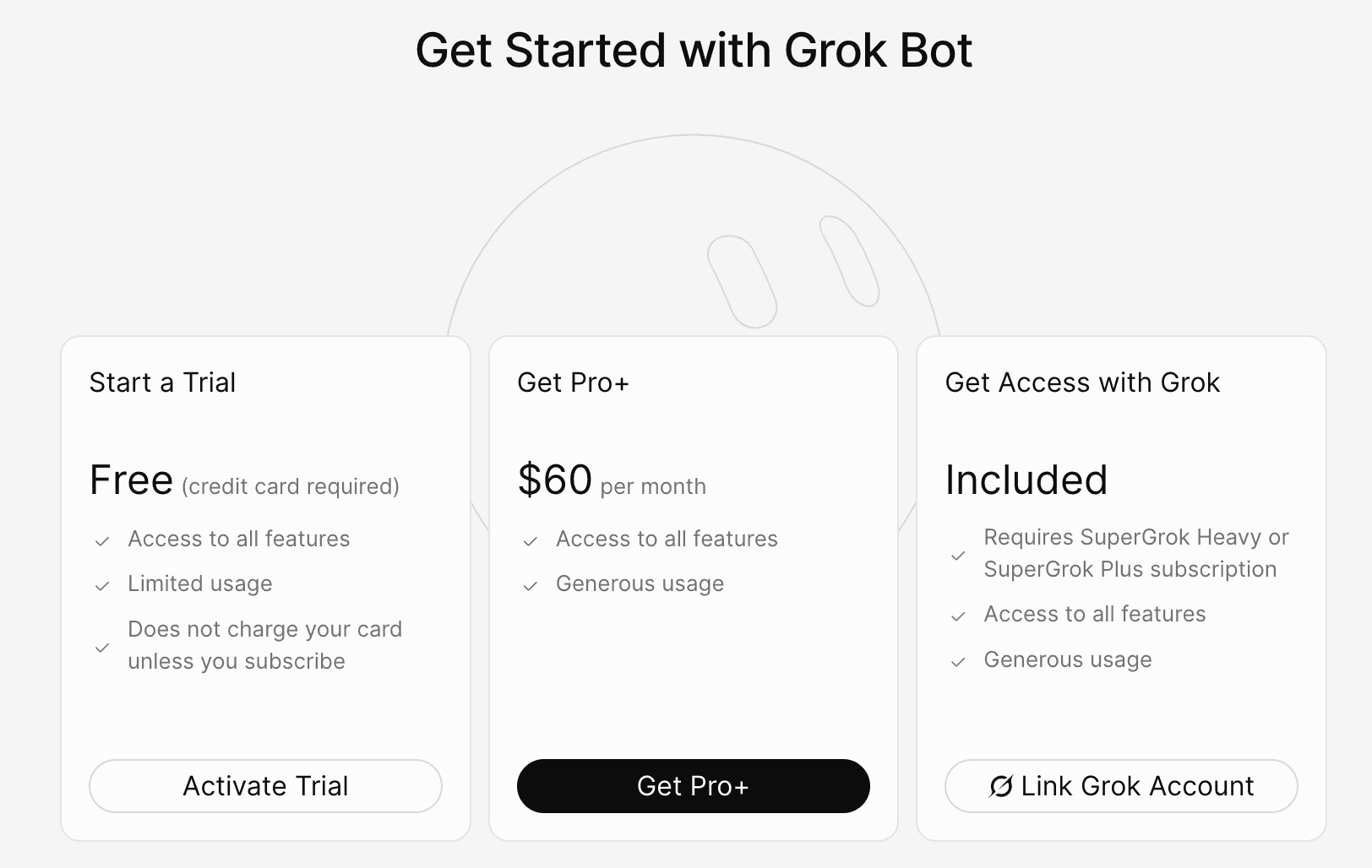
You get three real paths: a free trial (a card is required to start it, but it isn't charged unless you subscribe), Pro+ at $60/month, or linking an existing SuperGrok Heavy or SuperGrok Plus subscription, which is included at no extra charge once linked.
Step 2: Install Grok Bot
Download the app for your platform (macOS, Windows, Linux, or iOS) and complete the sign-in flow.
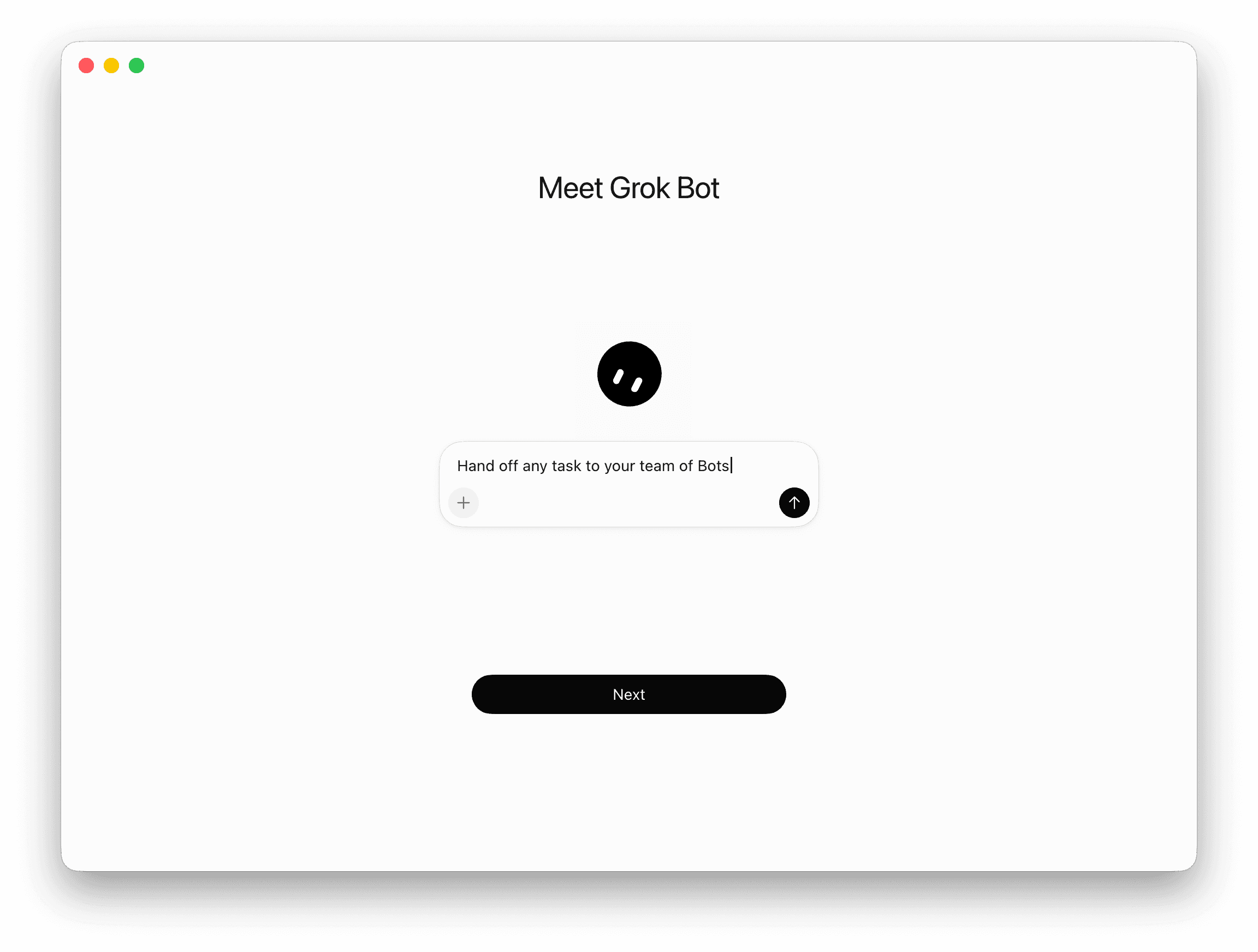
Before creating a Bot, you pick which of your accounts it can reach: Google Workspace, Slack, Notion, Salesforce, Microsoft 365, LinkedIn, Zoom, GitHub, Jira, Figma, HubSpot, Canva, and more.
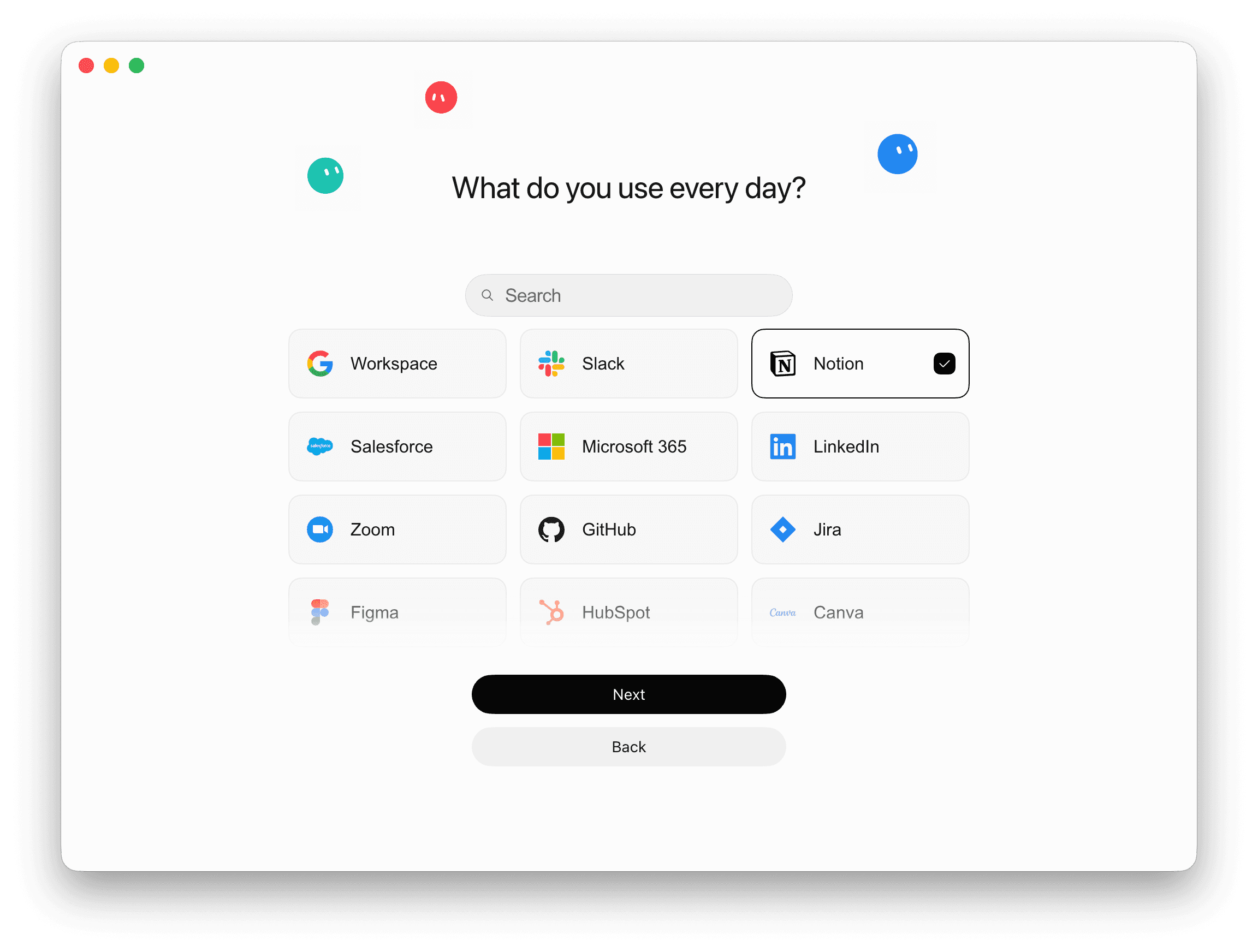
Note: Selecting one here doesn't fully authorize it yet; it just tells Grok Bot which Connect prompts to offer later.
Step 3: Create your first Bot
Grok Bot also suggests ready-made templates, like a feedback-clustering Bot, an overnight Bot that preps your morning digest, or an inbox-triage Bot, if you'd rather start from one of those than a blank chat.
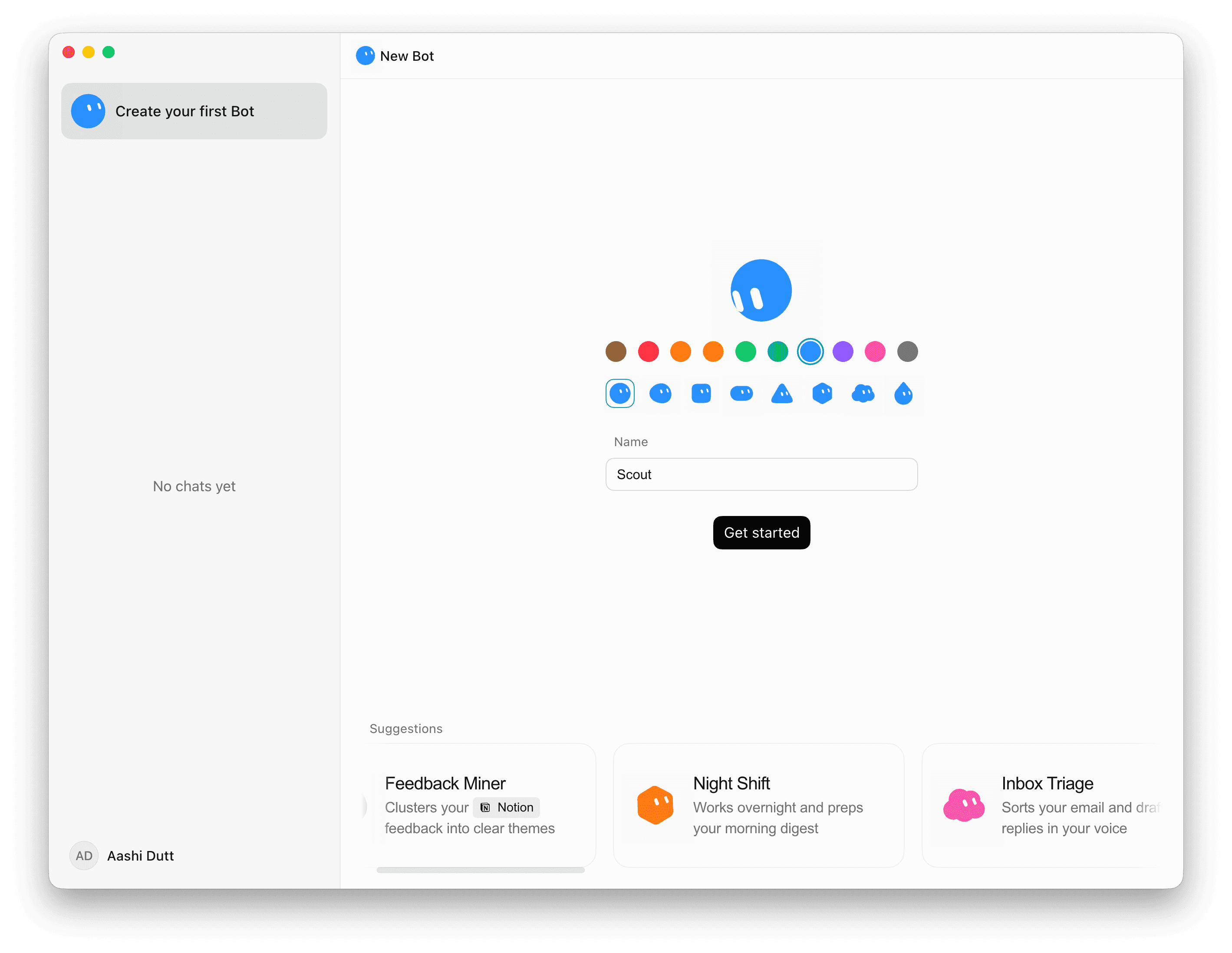
Since my work requires a lot of dependence on Notion Docs, I gave it access to Notion only. Also, it is quick and requires the least effort on my end.
Step 4: Connect any plugins it needs
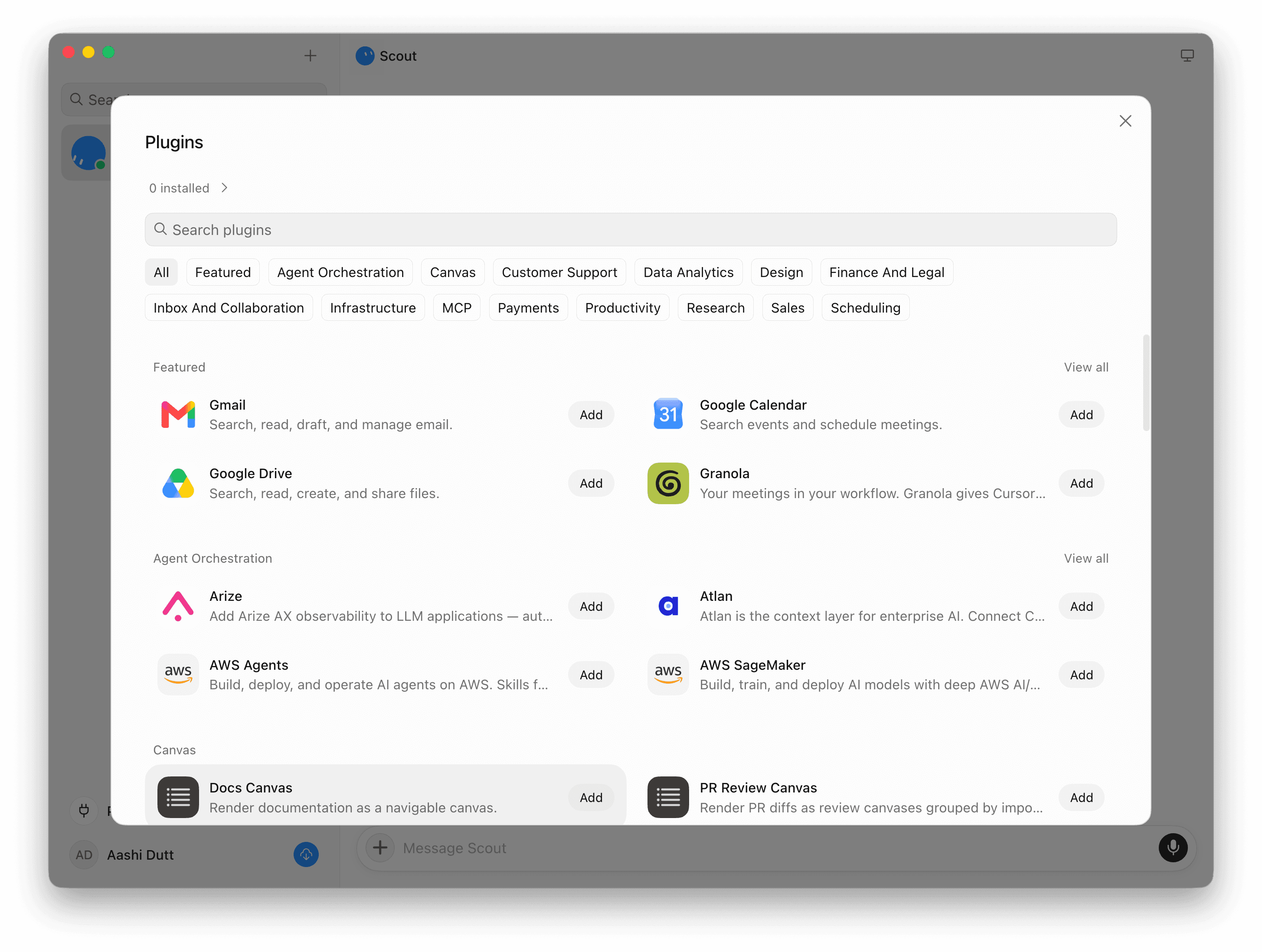
If the agent needs a plugin to reach a tool it doesn't already have access to, follow the Connect card that appears in the conversation. The plugin library is organized by category (Featured, Agent Orchestration, Canvas, Inbox and Collaboration, MCP, Productivity, and more) and includes Gmail, Google Calendar, Google Drive, GitHub, AWS Agents, and dozens of others.
Let’s try it with a real task
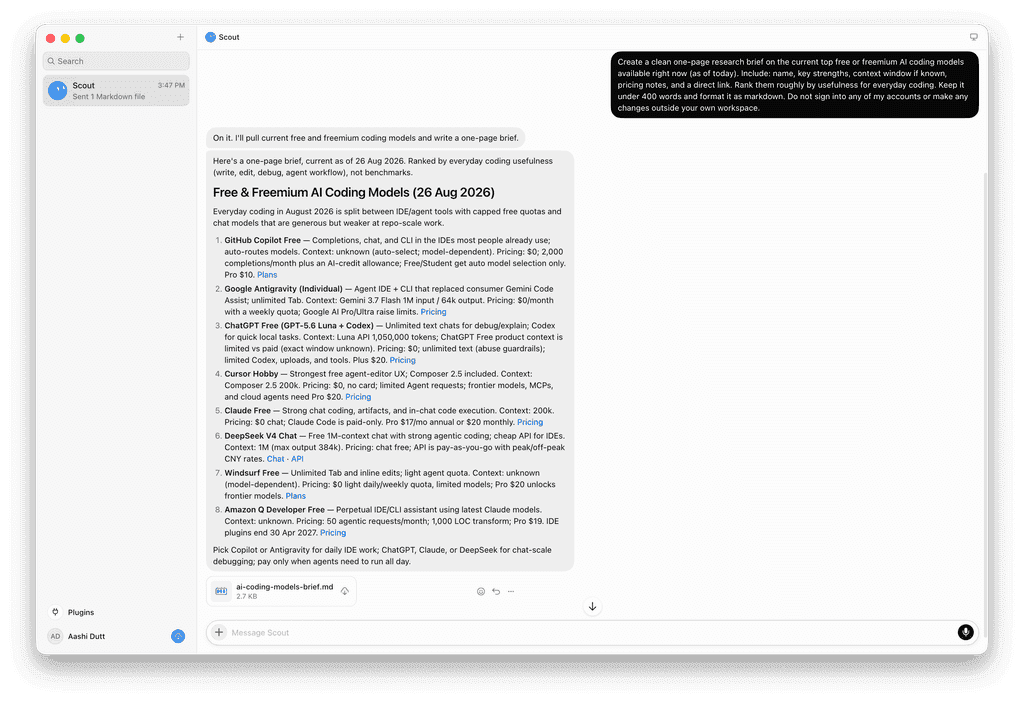
To see what actually comes back from a live Bot rather than take the feature list on faith, we ran the following prompt through a Grok Bot instance:
Create a clean one-page research brief on the current top free or freemium AI coding models available right now (as of today). Include: name, key strengths, context window if known, pricing notes, and a direct link. Rank them roughly by usefulness for everyday coding. Keep it under 400 words and format it as markdown. Do not sign into any of my accounts or make any changes outside your own workspace.
That last line matters as much as the task itself. A product that can operate a real browser and terminal on your behalf needs to be testable without handing it the keys to anything, and this prompt is scoped so the Bot can only read public information and write to its own workspace.
Here is what actually came back as a markdown file in the chat:
Then I asked it to convert it to a Notion doc and authorized it as well
We independently checked every specific, checkable claim in that brief against public sources rather than taking it on faith, and all eight held up; all checked out against live sources, not just a plausible-sounding guess. For a single-shot research task, that is a genuinely solid result: live web lookups done correctly and reported honestly, including admitting when a context window was unknown rather than inventing one.
What happens when you ask for more than the original prompt allowed?
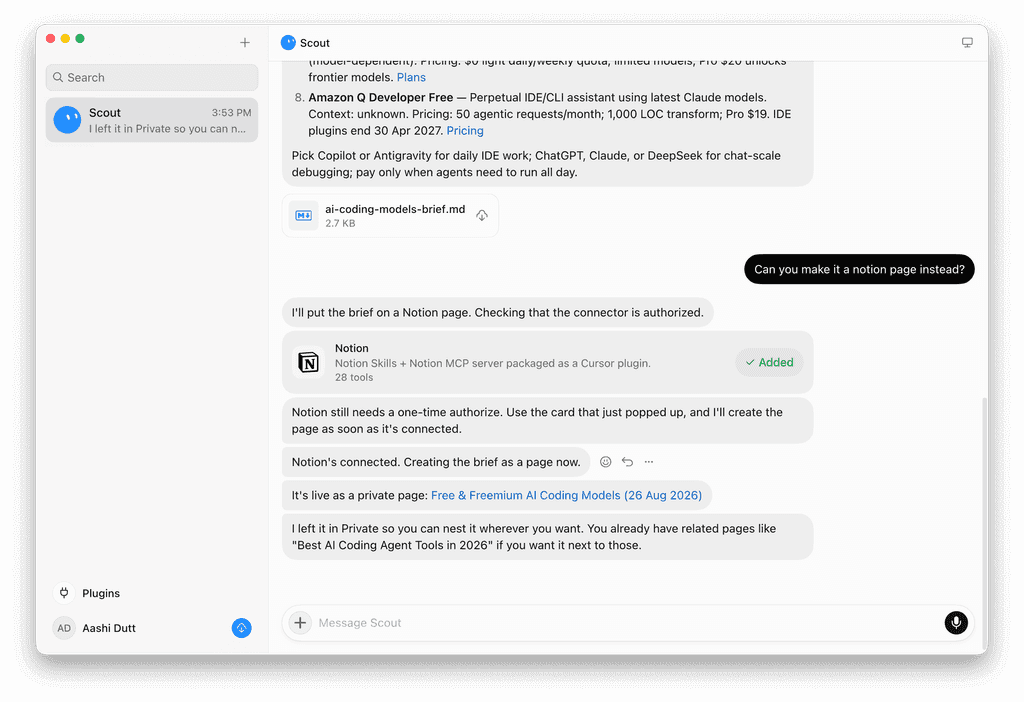
The prompt above deliberately stayed inside the Bot's own workspace. To see what happens when a task actually needs to touch a real account, we followed up in the same conversation with: "Can you make it a Notion page instead?"
This is where the approval mechanism showed up in practice rather than as a feature-list bullet. The Bot responded:
I'll put the brief on a Notion page. Checking that the connector is authorized.
It then added the Notion plugin, packaged as a Notion MCP server exposing 28 tools, and stopped to ask for a one-time authorization before touching the account:
Notion still needs a one-time authorize. Use the card that just popped up, and I'll create the page as soon as it's connected.
Only after that explicit authorization did it proceed:
Two things are worth pulling out of this exchange:
First, the original prompt's "do not make any changes outside your own workspace" instruction held for the entire first response, and the Bot only reached into a real account after being explicitly asked to and after a separate authorization step.
Also, it already knew about an existing, related Notion page from a previous session and offered to place the new one next to it, which is the shared-context and persistence pitch actually showing up in a real answer rather than staying theoretical.
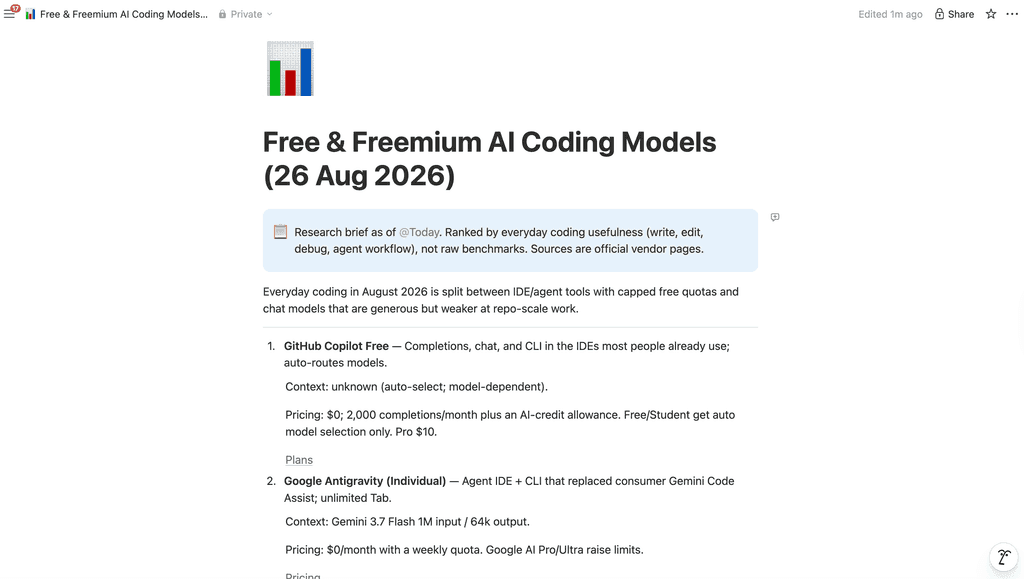
Here is a quick look at the Notion page created:
A point worth being precise about here is that it's easy to call it "memory" when it's really something narrower: context. What we saw was the Bot noticing what already existed in a connected tool at the moment it needed to, not recalling a preference, a past decision, or a lesson from a failed attempt independent of any tool it happens to be connected to right now. Grok Bot's shared workspace gives its Bots common access to files, browser sessions, and credentials, which is a real form of durable, cross-session state, but it's still borrowed from whatever tool happens to be connected rather than owned by the agent itself. That's precisely the gap a dedicated memory layer like Mem0 is built to close: it stores facts, preferences, and decisions independent of any single tool connection, so an agent keeps what it learned even after a process restarts, a context window fills up, or a plugin gets disconnected. Mem0's guide to agent memory lays out that distinction in more depth, and the case for it only gets stronger the longer an agent runs unsupervised; see Persistent Memory for Long-Horizon Coding Agents for exactly what that looks like when an agent's whole job, like Grok Bot's, is to keep going for a long time.
Limitations
We pushed one step further in the same conversation: go back to that Notion page, add a summary ranking the top picks, and take a screenshot of the result.
Go back to that Notion page and add a one-line summary at the top ranking your top 3 picks. Then take a screenshot of the updated page.
Write and browser access aren't the same authorization
The edit went through cleanly on the connection already authorized earlier.
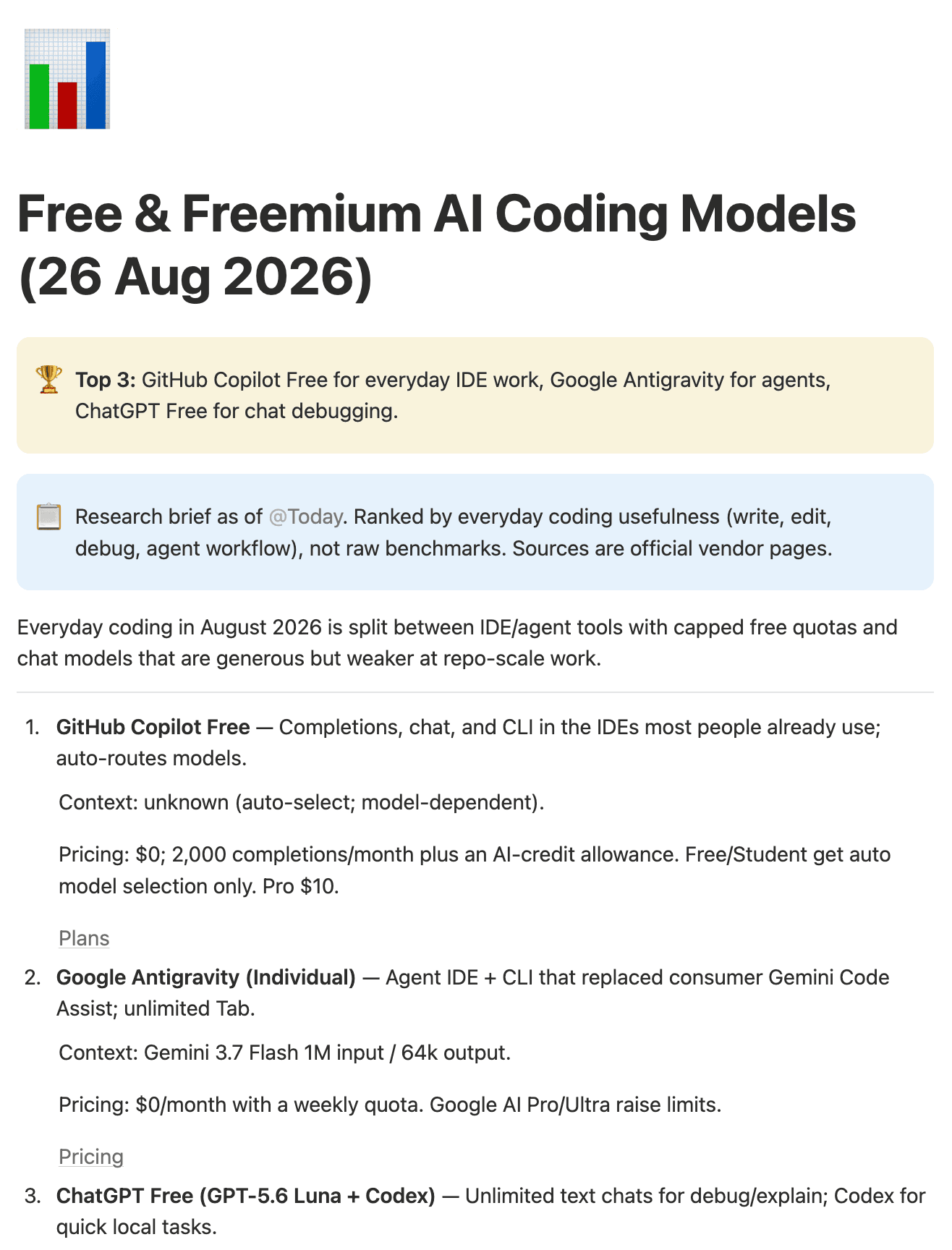
The screenshot request is where it broke. Taking a screenshot meant opening Notion in a real browser session, and that needed a fresh, separate login, distinct from the write access the Bot already had from the earlier authorization. We didn't push through that second login, so the screenshot confirming the edit is one we took ourselves, not one Grok Bot captured on its own.
Computer use
To isolate whether the problem was browser access in general or specifically the fresh login an authenticated tool asked for, we tried two more screenshot requests against pages that need no login at all.
First: "Open a browser, go to news.ycombinator.com, and take a screenshot of the current front page."

This returned pretty quickly with the correct screenshot.
Next, we pushed a little further: "Open a browser, go to mem0.ai, search for the latest most trending blog, and take a screenshot." It responded with a screenshot from our newest blog post, and the attached screenshot showed the mem0.ai blog listing with that exact post.
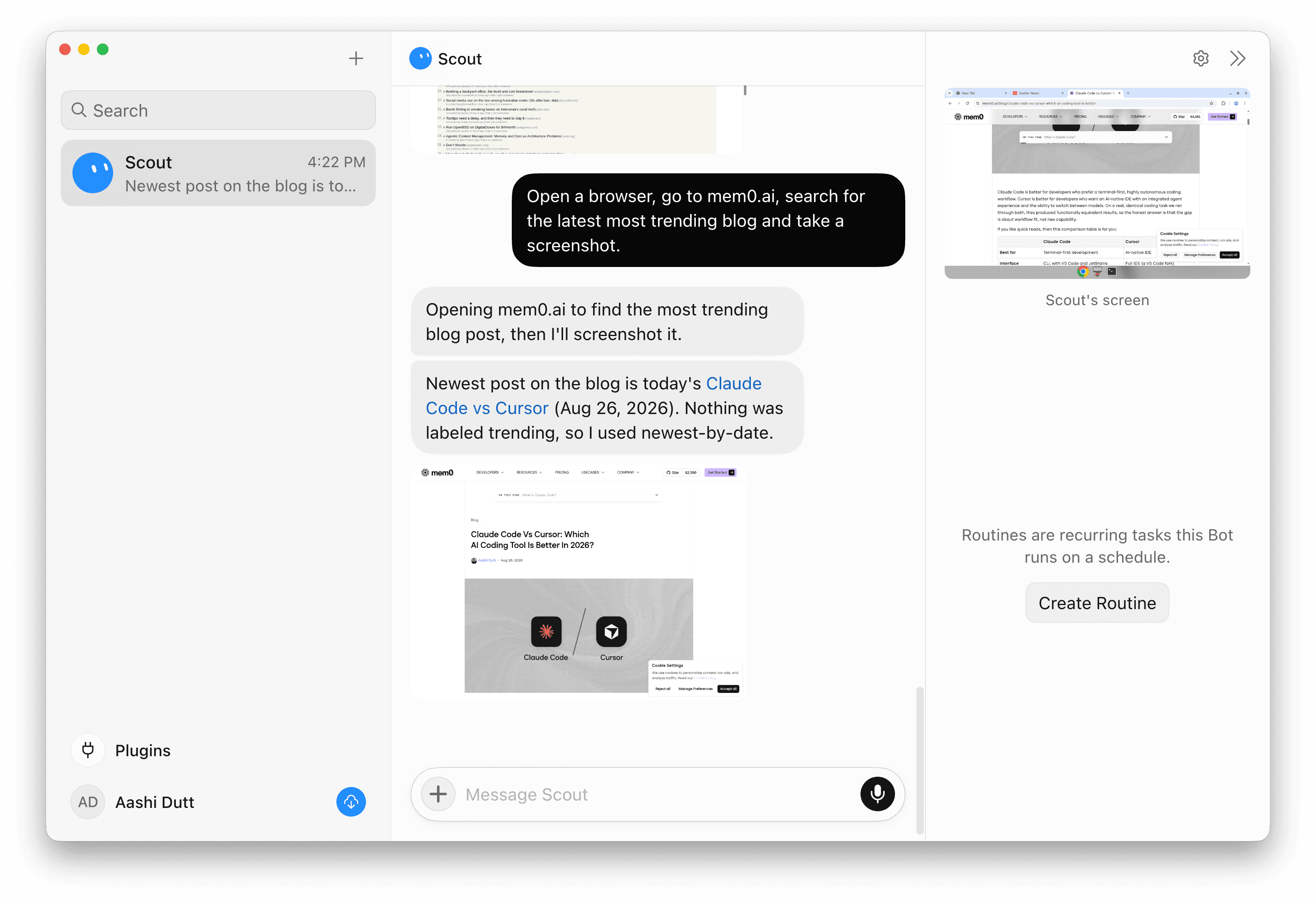
On speed: the Hacker News request, a single unambiguous navigate-and-capture, came back fast. The mem0.ai request, which required it to search the site and reason about what "trending" should even mean before acting, had a few noticeably slow stretches waiting on individual responses. The pattern looks less like "browser tasks are slow" and more like latency that scales with how much judgment a step requires: a plain fetch is quick; a fetch plus a decision is not.
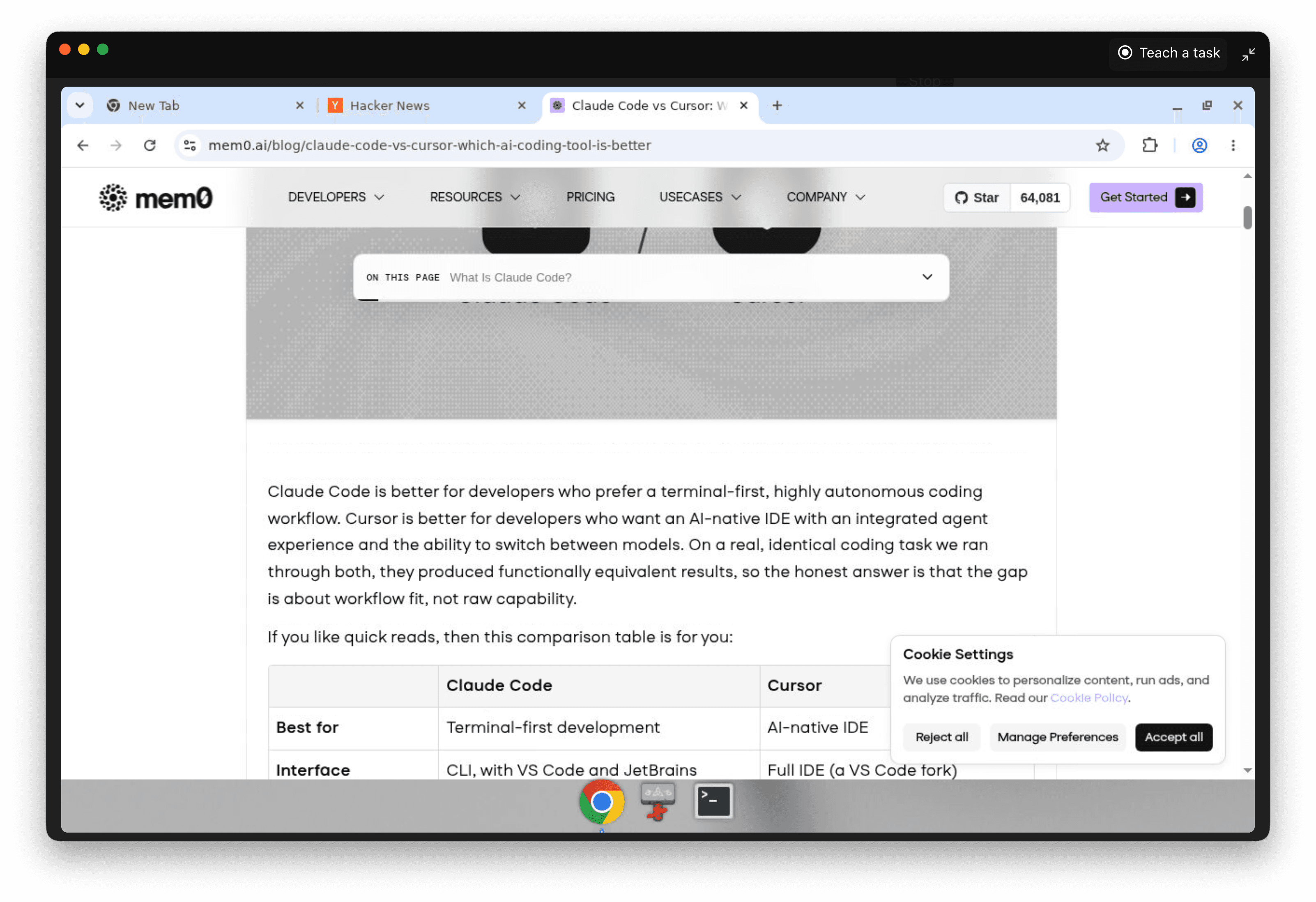
Along the way, the live session also surfaced two controls: a "Teach a task" toggle sitting in the browser window's own title bar, ready to start recording a workflow at any time that would help the agent to learn how to perform a specific task, and a "Create Routine" button in the side panel for turning a task into a scheduled run.
Use cases
Here are a few more ways you could push Grok Bots beyond simple single-agent workflows:
Competitive intelligence swarm: Assign separate Bots to track different competitors' pricing pages, changelogs, and job postings on a recurring routine, then have them report into a shared summary a lead Bot assembles.
Open-source project audit: Point a Bot at a repository to review its dependencies, open issues, and recent commit activity, using computer use to browse the repo the way a human reviewer would rather than relying on a single static export.
Market trend synthesis: Run several Bots in parallel against different sources, industry reports, forums, and news, and have them hand their findings to one Bot whose job is only to reconcile and summarize.
Multi-agent research pipeline: Split a research task into stages: one Bot to gather sources, one to verify claims against them, one to write the final brief, passing context between them instead of you relaying it manually.
Autonomous code generation: Give a Bot a scoped coding task with access to a repository and let it use its terminal to write, run, and iterate on code, with an approval gate before anything gets pushed.
Fact-verification engine: Have a Bot cross-reference a claim or a draft against multiple live sources and flag anything it cannot independently confirm, rather than trusting a single search result.
Parallel scenario planning: Run several Bots against different assumptions about the same decision at once, so you get multiple worked-out scenarios back instead of one Bot iterating through them sequentially.
Grok Bot is especially useful for work involving parallel agents, handoffs, specialized roles, shared context, tool use, and multi-step coordination within a single workflow.
Conclusion
Grok Bot is a genuine step past the chatbot model where an agent has its own persistent computer, its own tool access, and the ability to keep working after you've moved on to something else.
If your work involves recurring browser-and-tool tasks, research that benefits from more than one perspective running at once, or anything you'd rather hand off and check back on than babysit turn by turn, it's worth trying on the free trial before committing to a subscription tier built around it.
Frequently asked questions
Q. How much does Grok Bot cost?
There is no separate Grok Bot subscription. Access comes bundled into existing plans on either side: SuperGrok Plus ($100/month) or SuperGrok Heavy ($300/month) on xAI's side, or Cursor Pro+ ($60/month), Cursor Ultra ($200/month), or Cursor Teams (Standard or Premium at $120/seat/month) on Cursor's side. A free trial is also available if you aren't ready to subscribe: it requires a card on file and comes with limited usage, but you won't be charged unless you actually subscribe.
Q. How is Grok Bot different from a regular AI chatbot?
A chatbot responds while you're actively in the conversation and stops when you close the tab. Grok Bot runs on its own persistent cloud computer (computer use) with a real browser, file system, and terminal, keeps working after you leave, and only comes back to you when it needs input or approval.
Q. Can I choose which AI model Grok Bot uses for a task?
Model access is tied to your subscription tier rather than something you pick per task: SuperGrok Heavy unlocks the highest-capability models and the highest rate limits, while lower tiers get more limited access. xAI hasn't published a way to manually select a specific model version for an individual Grok Bot task.
Q. Should a business build a custom AI agent instead of using Grok Bot?
It depends on what you actually need. Grok Bot gets you a working agent with tool access, multi-agent coordination, and approvals already built, which is hard to match quickly with a custom build. A custom agent earns its cost when you need tight control over data handling, a specific compliance posture, or deep integration with internal systems that a general-purpose product can't provide. For most teams testing whether agentic workflows are useful at all, starting with an existing product like Grok Bot is the faster way to find out before investing in something bespoke.
More on LLMs & Models

Perplexity Pricing 2026: Pro, Max, Computer & API Costs
Compare Perplexity Free, Pro, Max, and Enterprise prices in 2026. Understand Computer credits, API charges, and which plan fits your usage and budget.
10 min read
Gemini API Pricing 2026: Models, Tokens, and Costs
Compare Gemini API prices by model, learn how caching and Batch affect costs, and calculate the cost of 1,000 requests or a monthly chatbot workload.
12 min read

OpenAI API Pricing (Oct 2026): Models, Token Costs, How to Save
Compare OpenAI API pricing including model rates, token costs, caching, and Batch discounts, with practical cost examples.
17 min read


Aashi Dutt
She is a senior technical content writer at Mem0. She covers agent memory architecture and the engineering decisions behind building agents that actually remember. She experiments with new features and turns research into posts developers can put straight to use.
Start building with memory
Free tier, no card