

·
11 min read
On this page
Perplexity set a clear pattern for what “good memory” looks like in an AI product. Users see persistent preferences, recall of past queries, and tailored answers across sessions without manual prompt engineering.
For AI engineers, this pattern matters because it covers three hard problems at once:
Turning messy user activity into structured, reusable memory
Making retrieval feel instant and invisible to the user
Keeping answers grounded in both fresh context and long-term history
This post breaks down how that style of memory works, how it is likely structured under the hood, and how to implement a similar pattern with Mem0 in about fifty lines of Python.
What Perplexity Style Memory Actually Does
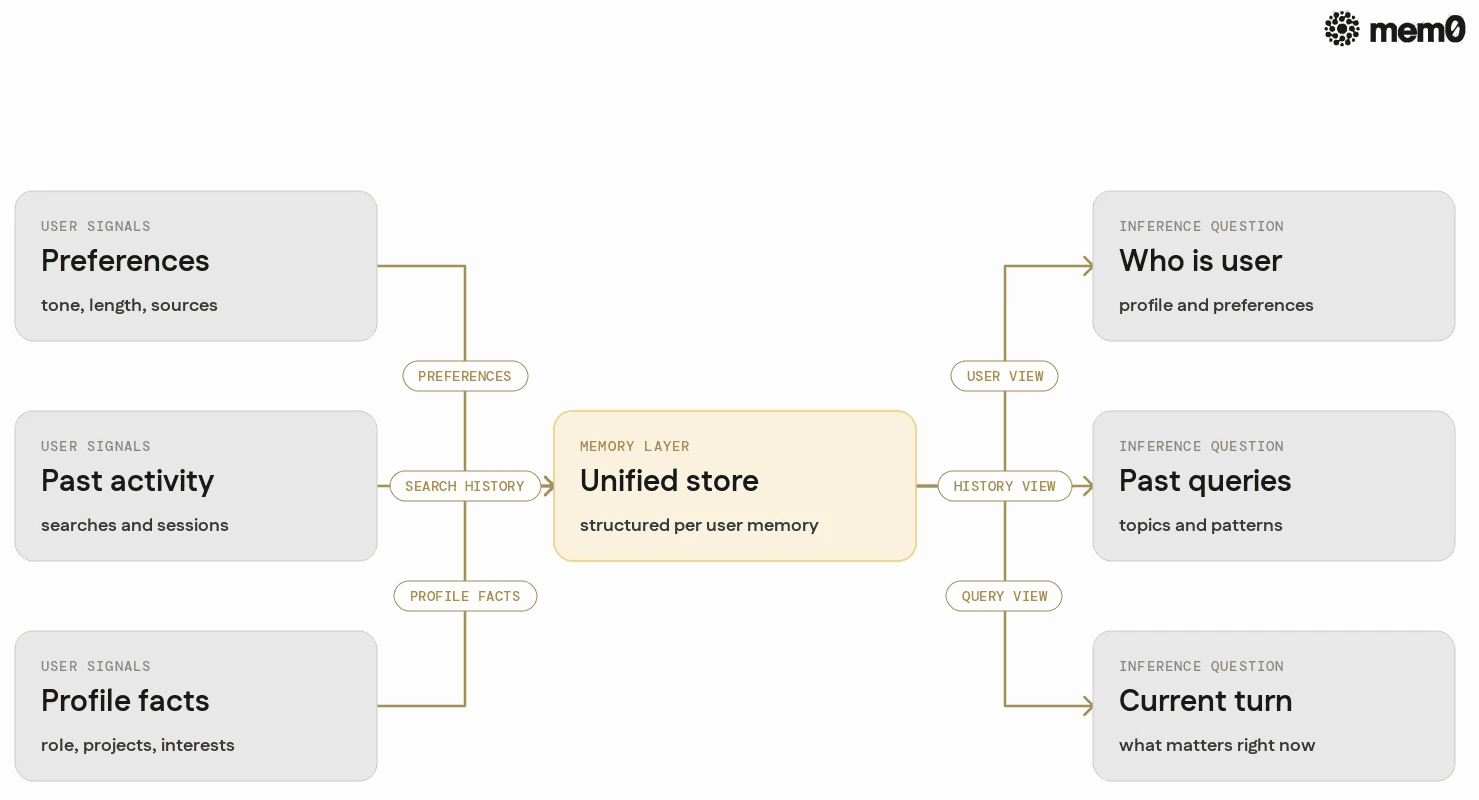
Perplexity’s memory UX looks simple from the outside, but it spans several distinct behaviors:
Preferences and settings
Preferred answer length, tone, and depth
Source preferences, such as technical documentation versus blogs
Past searches and sessions
Topics the user has asked about before
Follow-ups that connect to older conversations
User facts and profile-level details
Role, interests, and expertise
Temporal facts such as ongoing projects
All of this appears as “it just remembers,” but under the hood, it likely maps to a unified memory store that can answer three questions at inference time:
Who is this user
What have they asked before
What matters for this current query
A production agent targeting similar UX needs a way to store and query all three consistently.
The Core Memory Problem In Perplexity Style Agents
Perplexity style memory highlights a core difficulty for agents in production:
Unbounded history: Users can issue thousands of queries. Keeping everything in context is impossible, so selection becomes essential.
Mixed granularity: Some details are coarse and stable, such as “data scientist in healthcare.” Others are fine-grained and ephemeral, such as “debugging a specific Python script.”
Latency and cost: Retrieval needs to feel instant and cheap. Heavy semantic search across everything for every turn does not scale without careful design.
Cross-session continuity: Queries arrive in separate sessions, possibly across devices. The agent still needs continuity so answers feel consistent over time.
In practice, this means production agents need a memory layer that can:
Capture facts and preferences from raw conversations
Store them per user, with structure
Retrieve only what matters for the current turn
Keep quality consistent as history grows
Mem0 is built exactly for this memory layer, so the rest of this post focuses on how to model Perplexity-style behavior using Mem0.
How Perplexity Style Memory Likely Works Under The Hood
Perplexity does not publish its internal architecture, but its behavior suggests a few standard patterns that many production systems use.
Per-user memory collections: Each user likely has a logical memory space keyed by a user ID. All extracted facts, preferences, and summaries are attached to that ID.
Semantic storage, not raw logs: Instead of storing whole chat logs for retrieval, the system probably stores distilled items such as:
“User prefers concise answers”
“User is learning Rust after working mostly with Python”
Time-aware relevance scoring: Older memory is still useful, but recent activity gets higher priority. For example, a topic searched last week is more relevant than one searched last year.
Multiple retrieval views: Different prompts need different subsets of memory:
Preferences for general answers
Search history for suggestions
User facts for role-specific explanations
Reinforcement through repeated signals: Preferences and facts are strengthened when they recur, and obsolete data is gradually ignored or pruned.
The resulting UX looks simple, but the architecture combines user modeling, summarization, and retrieval. Mem0 provides these ingredients as an off-the-shelf memory layer.
How Mem0 Fits This Pattern
Mem0 is designed as a memory layer that attaches directly to agents and LLM applications. For Perplexity style memory, several aspects are relevant:
User-scoped memory: Every memory item is tied to a user ID. This makes it possible to reproduce “personalized” answers without manual plumbing.
Automatic extraction: Mem0 APIs can ingest raw text from a conversation and store structured memory entries. This matches the need to convert unstructured chat into reusable facts.
Queryable history: Memory can be retrieved by user ID, by query, or by filters. This allows agents to pull only the relevant slices for a prompt.
Long-term persistence: Mem0 keeps memory across sessions. Agents can call it at the start of each run to recover preferences and history instantly.
With these primitives, Perplexity-style behavior becomes a matter of designing a few functions and prompts rather than building infrastructure from scratch.
A Simple Design For Perplexity Style Memory
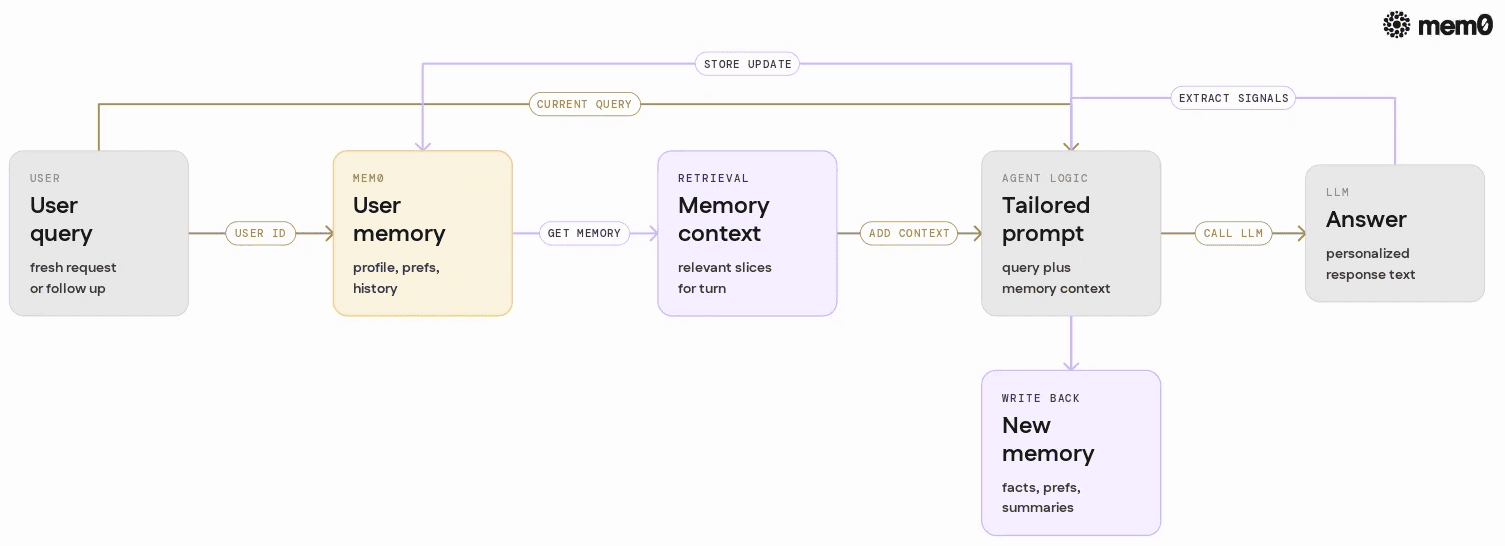
A Perplexity-like memory pattern can be expressed as three concrete memory types, all managed through Mem0:
User profile memory
Facts such as role, expertise level, location, and ongoing goals
Extracted from onboarding questions or early conversations
Preference memory
Answer style, depth, format, preferred sources
Updated whenever the user corrects or restates preferences
Search and session memory
Summaries of past queries and answers
Topics currently in progress
Each type can be implemented as structured entries stored via Mem0, keyed by user ID and tagged for retrieval.
The agent loop then becomes:
Before answering, load relevant memory for the user from Mem0.
Combine that memory with the current query to build a tailored prompt.
After answering, send the conversation to Mem0 for memory extraction and updates.
The next section shows how to wire this up with concrete Python code.
Building Perplexity Style Memory With Mem0 In Python
The goal is to approximate Perplexity’s memory UX in roughly fifty lines of code using Mem0’s APIs. This example assumes a single user ID and a single LLM, but the same pattern scales to production.
Setup
First, install Mem0 and an LLM client. This example uses openai style APIs, but any provider works.
Then initialize Mem0 and the LLM client.
👉Wanna give it a try? Get a Mem0 API Key and try it yourself.
Core pattern: retrieve, answer, update
The heart of Perplexity-style memory is a loop that retrieves relevant memory before answering and updates memory afterward.
This minimal loop already gives:
Persistent memory of past queries and answers
Automatic retrieval of history at the start of each turn
Prompt shaping based on stored memory
To reach Perplexity style UX, two refinements are helpful: explicit preferences and simple profile extraction.
Tracking explicit user preferences
Preferences can be stored as dedicated memory entries. When the user states a preference such as “keep answers short,” the agent updates Mem0 accordingly.
The main loop can then incorporate preferences separately:
This aligns closely with the Perplexity behavior, where explicit preferences shape future answers.
Extracting a simple profile from early interactions
Many Perplexity-style agents infer profile facts from conversation. Mem0 can support this with a small helper that uses the LLM to summarize user traits, then stores them.
This lets an agent gradually build a profile that shapes future answers, similar to how Perplexity appears to remember user expertise and ongoing goals.
Comparison Of Memory Approaches For Perplexity Style UX
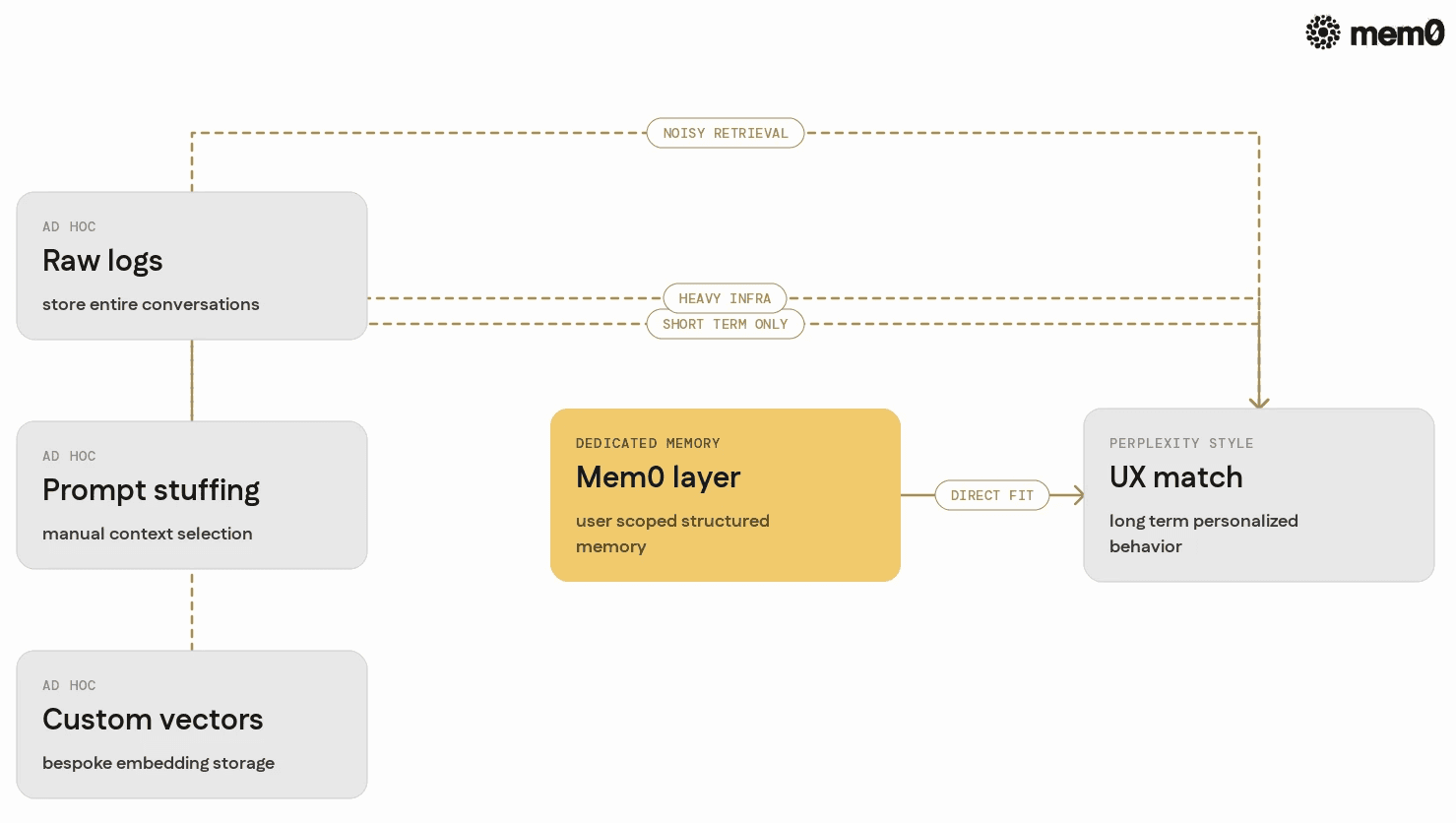
Many teams start Perplexity-style features with ad hoc solutions. The table below compares common approaches to a Mem0-based design.
Approach | Pros | Cons | Fits Perplexity Style UX? |
|---|---|---|---|
Raw chat logs in the database | Easy to implement, no extra tooling | Hard to query, noisy, slow for long histories | Partially, but quickly breaks |
Manual prompt stuffing | Fast to prototype | Limited context window, brittle selection | Works for short histories only |
Custom vector store implementation | Flexible embeddings and queries | Requires bespoke ingestion, schemas, and maintenance | Possible, but heavy infrastructure |
Session-based state only | Very simple, no persistence | No cross-session memory, limited personalization | Does not meet expectations |
Mem0 as a dedicated memory layer | User-scoped memory, simple APIs | Requires integrating a new library | Direct match for desired behavior |
For production agents that need consistent Perplexity-style UX, dedicated memory infrastructure is usually worth the integration cost. Mem0 aims to make that cost minimal.
Limitations Of The Perplexity Style Memory Pattern
Perplexity style memory focuses on user-centric behavior and long-term personalization. This pattern is powerful but not universal.
Not ideal for anonymous or transient usage: When users do not have stable identities, cross-session memory is less effective. In those cases, a simpler session state might suffice.
Limited visibility into automated decisions: Users see the outcome, not the internal choices about which memory was used. Auditing can require extra tooling, such as memory inspection and logging.
Potential for stale or incorrect profile facts: Once a profile fact is inferred, it can persist even when the user changes roles or interests. Systems need mechanisms to refresh or discard outdated memory.
Scaling considerations for very high volume users: Heavy users may accumulate large memory stores. Retrieval strategies need to prioritize, summarize, or archive to avoid latency issues.
Privacy and compliance constraints: Any long-term memory pattern must handle data retention, deletion, and consent. The pattern itself does not solve these requirements, and separate systems are needed.
Understanding these limits helps engineers decide when Perplexity-style memory is appropriate and where additional guardrails are necessary.
Frequently Asked Questions
Q. How is Perplexity style memory different from simple chat history?
Simple chat history keeps only the last conversation or two in the prompt context. Perplexity style memory stores distilled facts, preferences, and summaries across sessions, and uses retrieval to bring only relevant parts into each answer. This produces more consistent personalization without overwhelming the context window.
Q. What role does Mem0 play in replicating Perplexity’s UX?
Mem0 acts as the dedicated memory layer that attaches to each user ID. It stores structured entries extracted from conversations and provides APIs to retrieve those entries when building prompts. This lets agents implement preference tracking, profile facts, and search history behavior without building custom data pipelines.
Q. When should an agent update user memory during a session?
Agents typically update memory after each meaningful interaction, such as a completed answer or a preference change. For long sessions, some teams also add periodic summarization steps to avoid storing redundant detail. The key is to store information that will be useful for future sessions, not every token of conversation.
Q. How does retrieval work for large amounts of history?
Retrieval should be selective. Instead of loading everything, agents query Mem0 for specific types, such as preferences or recent topics, and optionally apply semantic search over the memories. This keeps prompts small and focused while still benefiting from extensive history.
Q. Why is explicit preference tracking important?
Users often state clear preferences about tone, length, or format. Storing these explicitly as preference memory means they are easy to retrieve and apply across many future queries. This produces a noticeable improvement in UX compared to trying to infer preferences from general history every time.
Q. Can this pattern adapt to multi-user or team accounts?
Yes, the same pattern works for teams or shared accounts by using group identifiers and combining individual and group memories. Agents can retrieve both sets, then decide which details are relevant for a given query. This supports shared context while preserving personal preferences where needed.
Further Reading
—
Mem0 is an intelligent, open-source memory layer designed for LLMs and AI agents to provide long-term, personalized, and context-aware interactions across sessions.
Get your free API Key here: app.mem0.ai or self-host mem0 from our open source github repository.
—
More on Agent Memory

How to Read Memory Benchmarks
How to read AI memory benchmarks: what LoCoMo, LongMemEval, BEAM, and agentic tests measure, where scores go wrong, and how to find the correct benchmark for your use case.
20 min read

The Problem After Retrieval: Why Agents Misuse the Memories They're Given
Five papers show LLM agents often misuse the memories they retrieve. What the research says, how much to trust it, and what builders can do.
13 min read

What Is Memory Staleness in AI? Causes, Risks & Solutions
Understand memory staleness in AI agents, why outdated information leads to errors, and the best techniques to maintain accurate long-term memory.
9 min read





Aashi Dutt
She is a senior technical content writer at Mem0. She covers agent memory architecture and the engineering decisions behind building agents that actually remember. She experiments with new features and turns research into posts developers can put straight to use.
Start building with memory
Free tier, no card