

·
12 min read
On this page
AI agent platforms increasingly ship with “memory” built in. For many teams, this looks attractive: one platform, one configuration, persistent agents. In practice, the default memory layer often becomes the bottleneck once agents move from demos to production workloads.
This article examines common memory patterns inside agent platforms, how they work, where they fail, and how a dedicated memory layer like Mem0 solves the core issues. The focus is on concrete engineering concerns: schemas, querying, identity, consistency, and cost.
What Agent Memory Actually Needs To Do
In production, agent memory is not a single feature. It is a collection of behaviors that must work together reliably to:
Persist important facts across sessions
Retrieve the right subset of history for a given task
Represent different entity types, not just user messages
Handle identities and multi-tenant isolation
Stay performant as data grows
Survive model and tool changes without breaking
A platform’s built-in memory may address some of these, but the default design is almost always tied tightly to that platform’s orchestration assumptions and data model.
A dedicated memory layer, exposed as an API or library, lets engineers:
Swap orchestrators without data loss
Evolve memory schemas independent of tool graphs
Plug into multiple agents or services using common memory semantics
Audit and debug memory logic separately from tool logic
Mem0 sits in this category as a memory layer that integrates with agent platforms instead of being owned by them.
Common Built-In Memory Patterns In Agent Platforms
Most agent frameworks and platforms converge on a handful of memory patterns. They often mix and match, but the core building blocks repeat.
Typical patterns include:
Conversation buffer: Raw message history, usually capped to N turns or tokens, is included in every prompt.
Summarised history: The platform periodically summarises past turns into a shorter text, then appends that summary to the system or context.
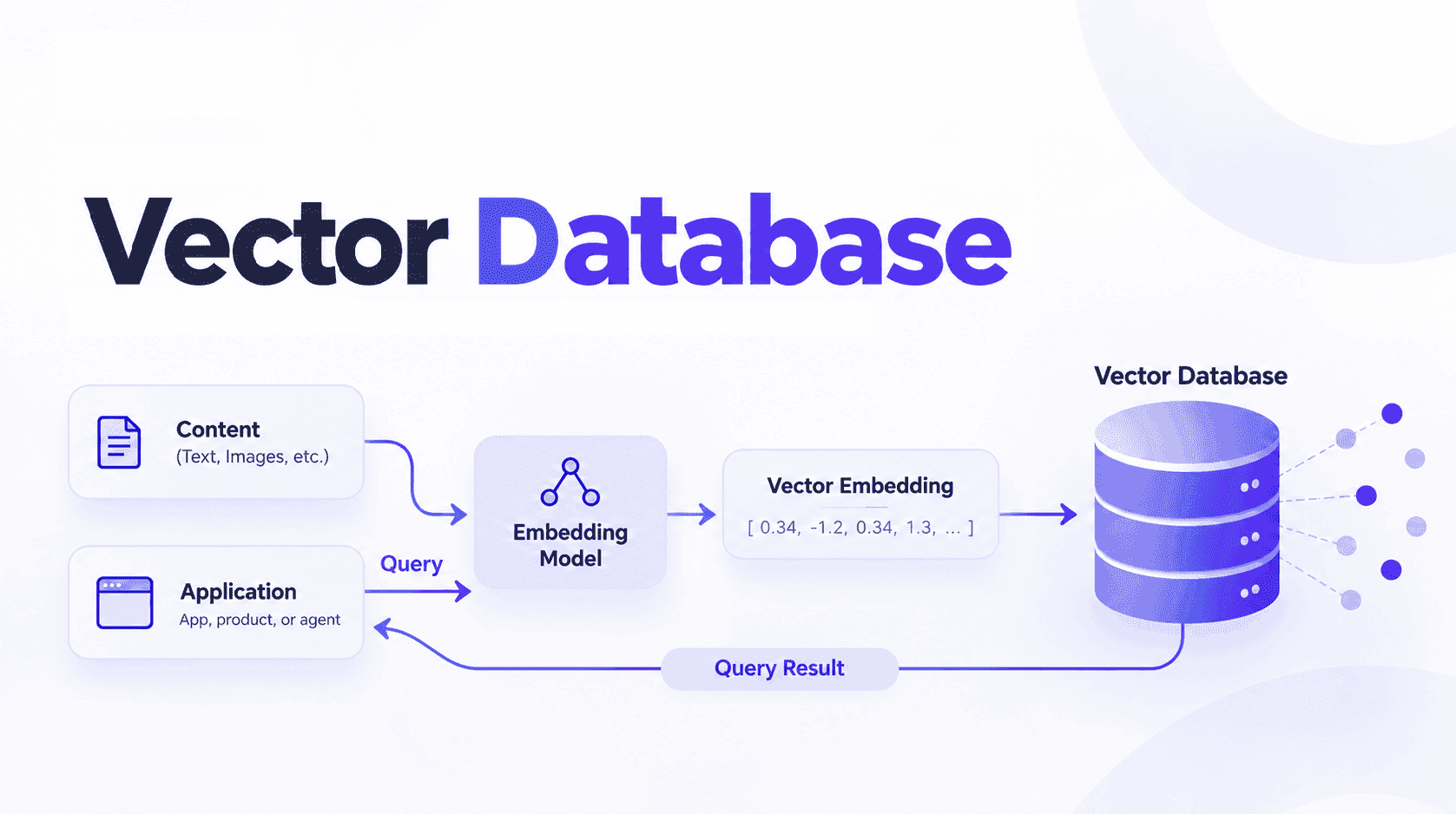
Vector semantic memory: Selected messages, documents, or notes are embedded into a vector store. Retrieval happens by query similarity.
Key-value scratchpad: A simple dictionary-like memory with keys such as
user_profile,preferences,todo_items, updated by tools or the agent.Episodic and long-term split: Short-window context for the current task and a long-term store for stable facts.
These patterns are useful, but they are usually implemented as helpers around the platform’s chat API rather than as a first-class, configurable memory system.
As a result, once data volume, complexity, or multi-agent coordination grow, limitations appear.
How Built-In Memory Typically Works
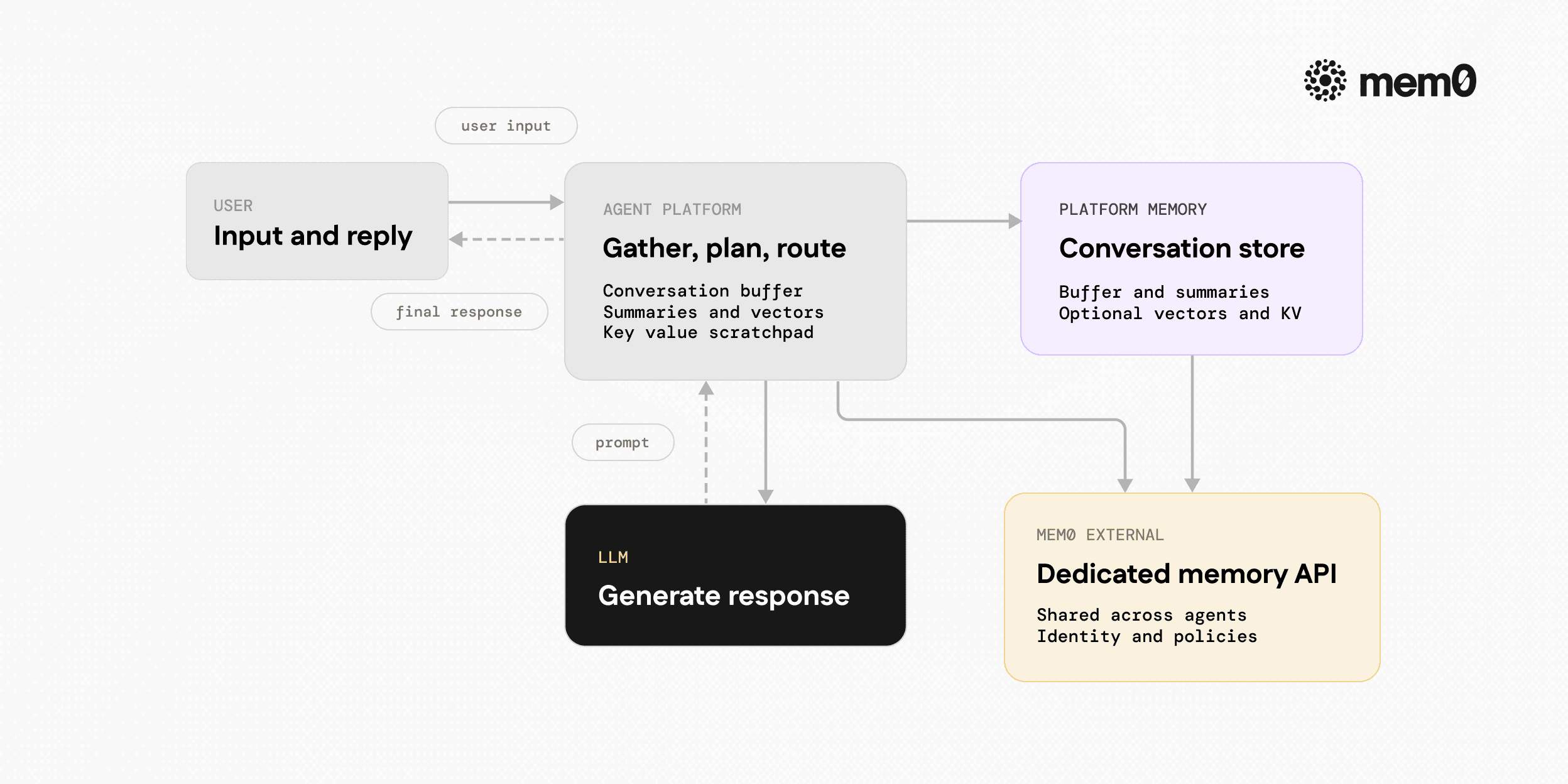
Fig: Turn flow inside an agent platform with built-in memory
Under the hood, most platform memory implementations follow similar workflows. A simplified view:
During a turn
User sends input, say
u_tPlatform gathers context, including the last N messages, summary, and retrieved vectors
The platform calls the model with
[system, summary?, retrieved_docs?, history, u_t]
After a turn
Platform appends the latest turn to a conversation store
Optionally: re-summarize or compress older messages
Optionally: embed some or all of the turn into a vector store
Optionally: update key-value memory based on tool results
Persistence
Memory stored in the platform’s own database or a pluggable backend
Identity is often scoped to
user_idorsession_idMetadata is frequently minimal beyond timestamp and type
This design is convenient for the platform, but it often assumes:
Single primary orchestrator per application
Single main agent per user
Memory accessed only from within the platform’s runtime
Limited need for cross-agent or cross-application memory sharing
These assumptions can hold for prototypes, yet in production environments where teams have several microservices or multiple agents, the picture gets more complex.
Where Platform Memory Starts To Break
As agents mature, several pain points emerge around built-in memory.
Schema and type limitations
Most built-in memory models use simple records:
Conversation messages
Arbitrary text chunks
Sometimes a JSON blob
Production agents often need:
Structured entities (organizations, tickets, assets)
Relation types (user X belongs to org Y, ticket Z references asset A)
Separate scopes (user-private vs tenant-shared vs global)
Stretching a messaging-centric memory into a knowledge graph or entity-centric store is usually difficult and fragile.
Identity and multi-tenant concerns
Platform memory often attaches data to a user_id without finer distinctions:
One user might act in multiple roles (admin vs end-user)
One tenant might include many users and service accounts
Some facts should be shared across clients, others must be private
When identity is coarse, engineers start adding hacks:
Derived user IDs (
{tenant}:{user})Multiple agents with separate memories for the same person
Custom metadata and handwritten queries to implement scoping
This increases the risk of data leakage or incorrect context.
Cross-agent and cross-app access
Many teams eventually run:
A support agent in one service
An internal agent for ops or SRE tasks
A separate agent integrated into a mobile app
All of them need a coherent view of memory. If each platform instance owns its memory, cross-agent reasoning is difficult. Engineers may attempt synchronisation jobs or ETL pipelines just to replicate memory between systems.
Observability and governance
Production memory must be:
Inspectable
Auditable
Filterable by entity, timeframe, or tag
Easy to clean or export
Platform memory is usually a hidden implementation detail. Accessing it often requires admin UIs or internal APIs, which limits observability and makes debugging harder.
Why A Dedicated Memory Layer Matters
A dedicated memory layer treats memory as a first-class system, not a helper function. For engineers, this brings several advantages:
Separation of concerns: Agent frameworks focus on planning and tools. Memory focuses on storage, retrieval, identity, and schema.
Shared context across agents and platforms: Multiple orchestrators or runtimes can read and write to the same memory, with consistent semantics.
Configurable retention and policies: Different entity types and tenants can have different expiry rules or storage backends.
Easier model upgrades: Memory representation can stay stable while underlying models change. Embeddings can be migrated separately from agent logic.
Mem0 is an example of this pattern. It exposes a consistent API for storing, retrieving, filtering, and managing memory that can plug into any agent platform and runtime.
How Mem0 Fits With Agent Platforms
Mem0 does not try to replace agent platforms. It integrates as a dedicated memory backend that agents can call when they need to:
Persist new facts extracted from conversations or tools
Retrieve relevant memories based on the current query, user, and context
Maintain user and entity profiles across sessions and applications
Key properties that make Mem0 suitable as a core memory layer:
Memory as first-class entities: Each memory has content, metadata, and identity, and can be updated or deleted.
Multi-identity support: Memory can be associated with multiple identifiers (user, tenant, device, application) with built-in filters.
Language model agnostic: Mem0 works with OpenAI, Anthropic, local models, and others. Memory is not tied to a single vendor.
Open source and self-hostable: Teams can run Mem0 within their infra for data control and compliance, or use the managed API.
In practice, an agent platform configures Mem0 as its memory provider, or the agent code calls Mem0 directly alongside the platform’s runtime.
Architecture Pattern Integrating Mem0 With Agent Platforms
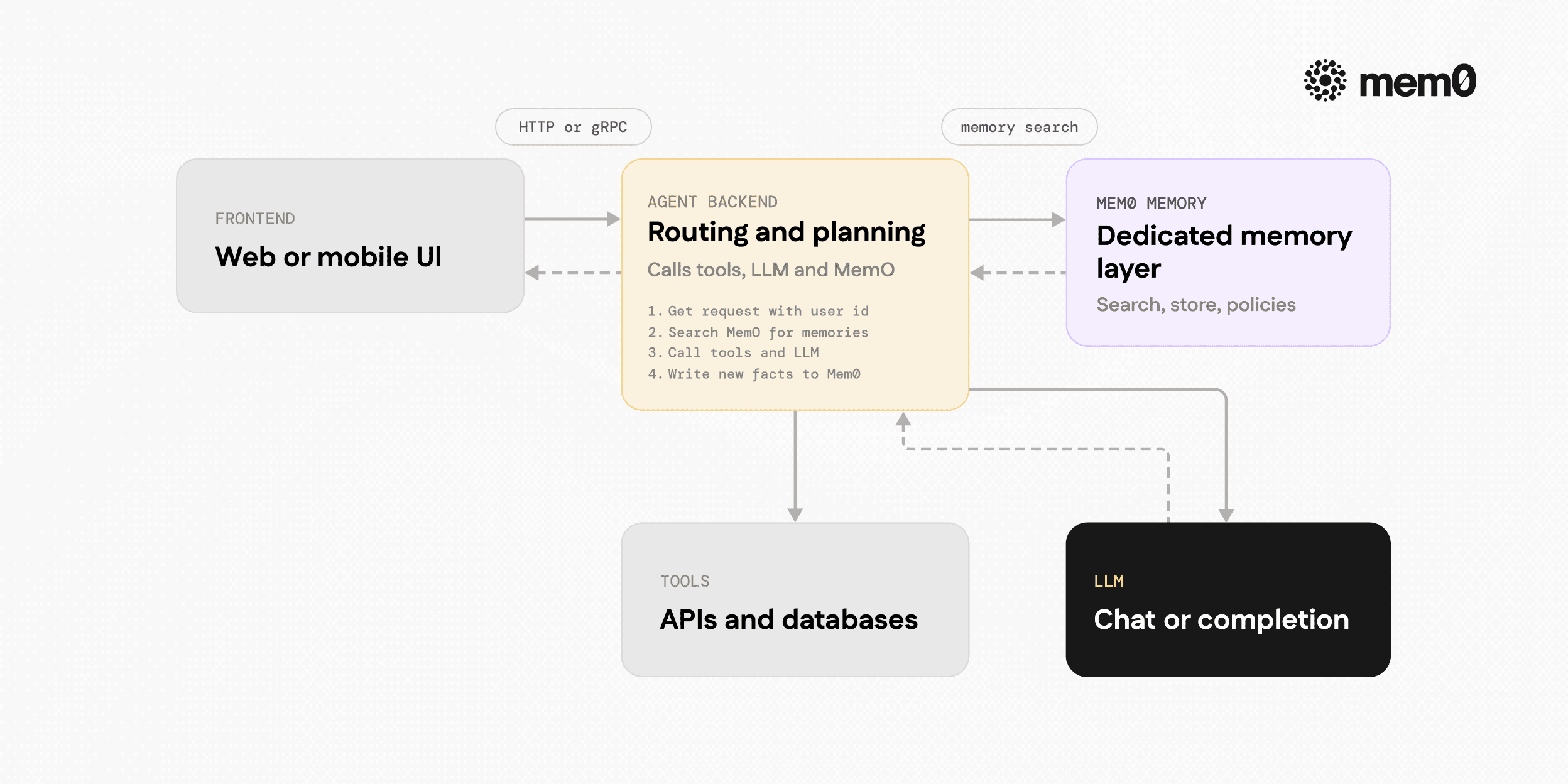
Fig: Recommended architecture pattern
A common pattern in production is:
The frontend (web or mobile) talks to an agent gateway or backend.
The backend orchestrates tools, calls the LLM, and calls Mem0 for memory.
Mem0 stores and retrieves memory using either managed or self-hosted infrastructure.
Simplified flow for a single turn:
Receive request with
user_idand input text.Query Mem0 for relevant memories for
user_idand task.Build the LLM prompt with system instructions, retrieved memories, and recent conversation.
Call the LLM and produce the reply.
Extract new facts from the conversation or tool outputs.
Store those facts in Mem0 associated with
user_idand any other identities.
This pattern lets engineers keep platform-specific features such as tools, function calling, and routing, while delegating memory to Mem0.
Example Python Integration With Mem0
The following example shows how to integrate Mem0 as the memory layer for a simple agent loop. It uses the Mem0 Python SDK and OpenAI as the LLM, but the same pattern applies to other models and platforms.
💡 You'll need a free Mem0 API key to follow along. Get one at app.mem0.ai
This example uses:
memory.searchto retrieve relevant memories per turnmemory.createto persist new user factsuser_idto scope memory to a specific user
In a real application, the heuristic if "my name is" would be replaced with a structured extraction step, often another model call or a tool.
Comparison Table: Built-In Memory vs Mem0 as a Dedicated Layer
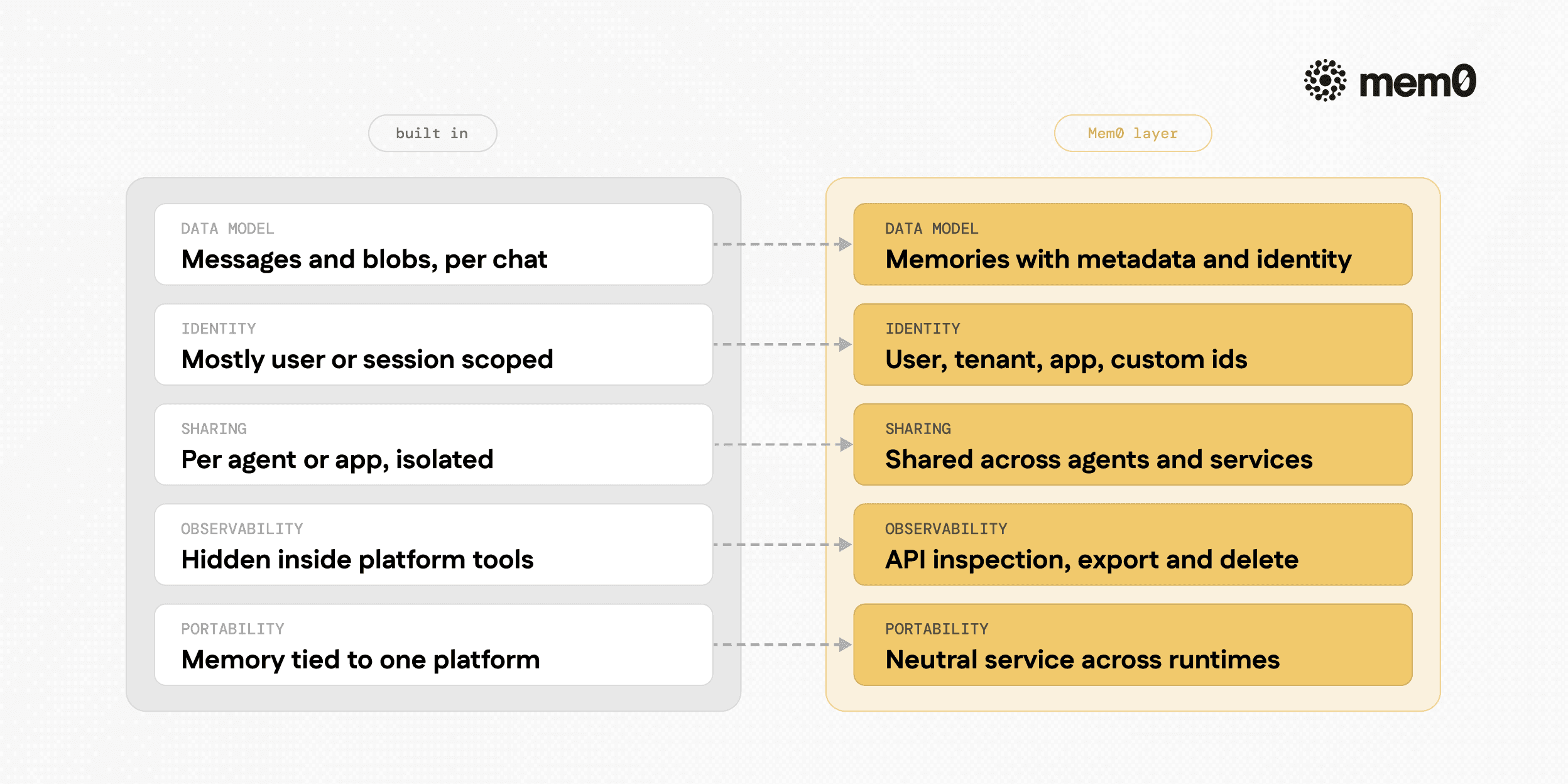
Fig: Side-by-side comparison of typical built-in platform memory versus Mem0
The following table compares typical traits of platform-built-in memory with a dedicated Mem0 deployment.
Aspect | Typical Built-In Memory | Mem0 Dedicated Layer |
|---|---|---|
Data model | Messages and text blobs | First-class memories with metadata and identity |
Identity handling | Usually | Multiple identities (user, tenant, device, app) with filters |
Cross-agent sharing | Limited, often per-agent or per-app | Shared memory across many agents and services |
Retrieval configuration | Tied to platform defaults | Configurable retrieval, scoring, and filters |
Observability and audit | Platform-specific tools, often limited | API-based introspection, export, and deletion |
Vendor lock-in | Memory bound to platform runtime | Neutral layer usable from any platform or runtime |
Deployment | Controlled by the platform | Managed API or self-hosted within team infrastructure |
Model dependency | Often tuned for a specific model family | Model-agnostic, embeddings, and logic configurable |
The important point is not that the built-in memory is wrong. It is often fine for small projects. The key difference is that Mem0 treats memory as a shared service and a stable contract.
Limitations of Built-In Memory Patterns
Built-in memory patterns are helpful, and they are usually easy to start with, but they have clear limitations in production settings.
Scaling conversation buffers: Truncation rules become inconsistent, and important context can be lost when there are long-running dialogues or fragmented sessions.
Summaries as a single ground truth: Summaries are lossy. As agents summarize summaries, subtle details can be lost or distorted, which can mislead future reasoning.
Vector-only semantic memory: A vector store without richer metadata, identity, or policies works poorly for complex entities. It also depends heavily on embedding quality, which can shift over time.
Opaque platform internals: When the platform owns the memory logic, debugging retrieval failures or incorrect context is difficult, and governance is limited.
Migration friction: Changing platforms or splitting a monolithic agent into multiple services is much harder when memory is tied tightly to platform objects.
Mem0 does not fix all of these automatically, but it gives engineers the tools to implement stronger patterns: structured metadata, explicit identities, clearer retrieval policies, and independent observability.
Frequently Asked Questions
What is a built-in memory pattern in an AI agent platform?
A built-in memory pattern is the platform’s default way of storing, summarizing, and retrieving past interactions or facts, often as conversation history or vector-based notes. It is typically tightly integrated into the platform’s chat or tool orchestration features.
How does Mem0 differ from platform memory helpers?
Mem0 focuses only on memory, with APIs for creating, searching, updating, and deleting memories across multiple identities and applications. Platform helpers usually provide a thin wrapper around conversation buffers or a single vector store, which is less flexible for complex production setups.
When should a team move beyond built-in memory to a dedicated layer?
A team should consider a dedicated layer when multiple agents need to share context, when identity and tenancy become complex, or when observability and governance requirements increase. It also becomes important when migrating between platforms or mixing different orchestration frameworks.
How does Mem0 handle user identity and multi-tenancy?
Mem0 allows memories to be associated with identifiers such as user_id, tenant_id, or any other custom identity field. Retrieval can filter by these identities, which lets engineers enforce per-tenant isolation and shared versus private scopes explicitly.
Can Mem0 work with existing agent frameworks and tools?
Yes, Mem0 is designed to be framework-agnostic. Any agent framework or custom orchestration code can call Mem0’s APIs in the same way it calls tools or external services, which makes integration incremental rather than a full rewrite.
What is the typical integration pattern for Mem0 in production?
A common pattern is to treat Mem0 as a microservice: agents call Mem0 to retrieve memories before LLM calls and to store new or updated facts afterward. Identity and metadata are passed from the application layer so that memory remains consistent across services and interfaces.
Further Reading
6 Techniques To Cut AI Agent Memory Cost Beyond Basic Retrieval
The 2026 Token Optimization Playbook Cut AI Agent Memory Costs
—
Mem0 is an intelligent, open-source memory layer designed for LLMs and AI agents to provide long-term, personalized, and context-aware interactions across sessions.*
Get your free API Key here: app.mem0.ai or
self-host mem0 from our open source github repository.
—
More on Agent Memory

How to Read Memory Benchmarks
How to read AI memory benchmarks: what LoCoMo, LongMemEval, BEAM, and agentic tests measure, where scores go wrong, and how to find the correct benchmark for your use case.
20 min read

The Problem After Retrieval: Why Agents Misuse the Memories They're Given
Five papers show LLM agents often misuse the memories they retrieve. What the research says, how much to trust it, and what builders can do.
13 min read

What Is Memory Staleness in AI? Causes, Risks & Solutions
Understand memory staleness in AI agents, why outdated information leads to errors, and the best techniques to maintain accurate long-term memory.
9 min read



Aashi Dutt
She is a senior technical content writer at Mem0. She covers agent memory architecture and the engineering decisions behind building agents that actually remember. She experiments with new features and turns research into posts developers can put straight to use.
Start building with memory
Free tier, no card