Your documentation chatbot answers the same setup questions repeatedly because it doesn't know the user configured their environment last week. The support bot walks someone through troubleshooting steps they already tried yesterday. Standard RAG retrieves the right documents but treats every user as a stranger, with no memory carried over between sessions.
The fix involves adding a memory layer that persists across sessions and giving the chatbot autonomy over when to store and retrieve user context. In this tutorial, you'll build a Streamlit chatbot that combines document retrieval with persistent user memory using LangGraph and Mem0. The chatbot gets three tools:
Searching documentation for technical answers
Searching its memory of the user for personalization
Storing new information about the user for future sessions
By the end, you'll have a working chatbot that knows both your docs and your users.
TLDR
Standard RAG chatbots retrieve documents but treat every user the same way
Adding an AI memory layer lets the chatbot recall user preferences and past context
LangGraph provides the agentic framework where the chatbot chooses which tool to call
Mem0 adds the memory layer with three lines of code: initialize a client, call `add()` to store, call `search()` to retrieve
Architecture and tech stack
A standard RAG pipeline always runs the same sequence: embed the question, search a vector database, paste the results into the prompt, generate. Retrieval fires on every query whether it's needed or not. Agentic RAG replaces that fixed sequence with a decision point where the model reads the query and chooses which tools to call: search docs, search memory, both, or neither.
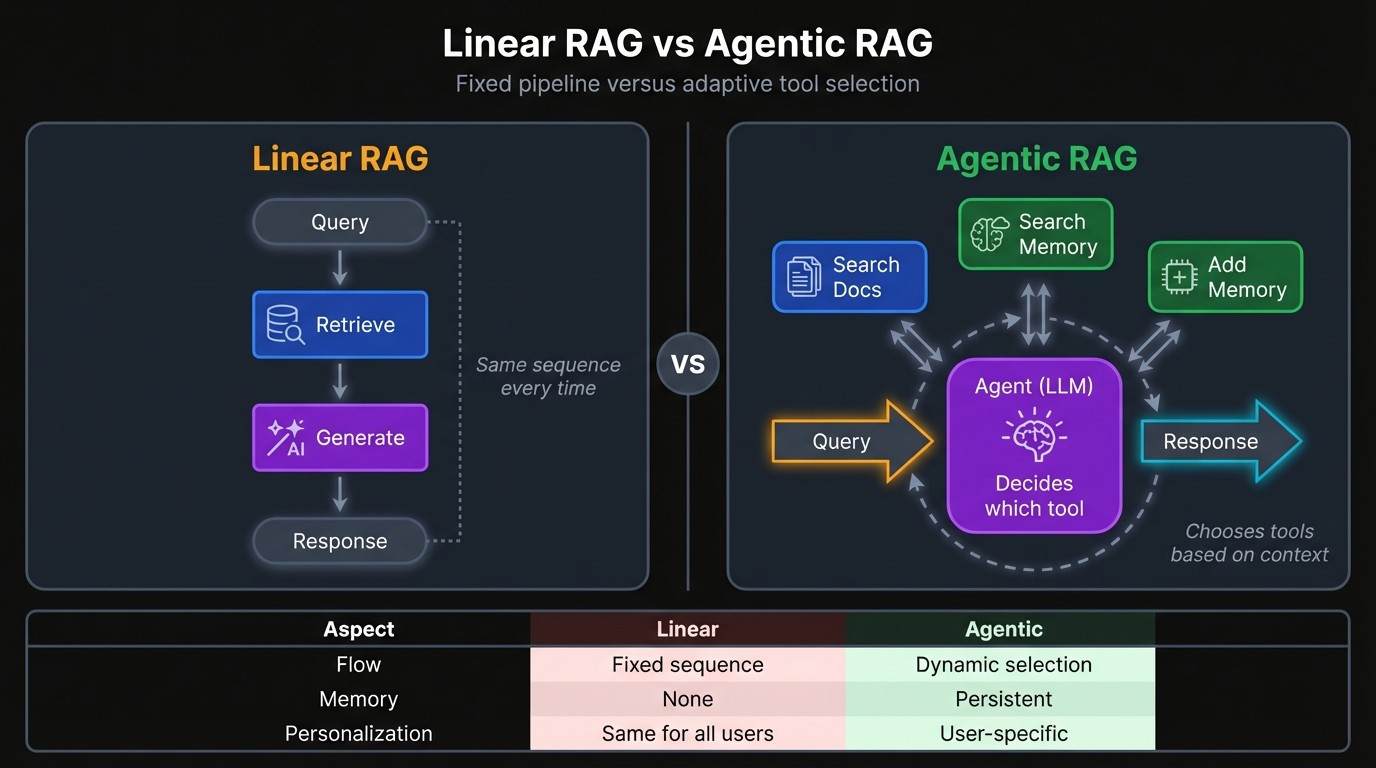
This chatbot has two retrieval systems behind that decision point: a Chroma vector database for documentation and Mem0 for user memory. Both are exposed as tools the LLM can call.
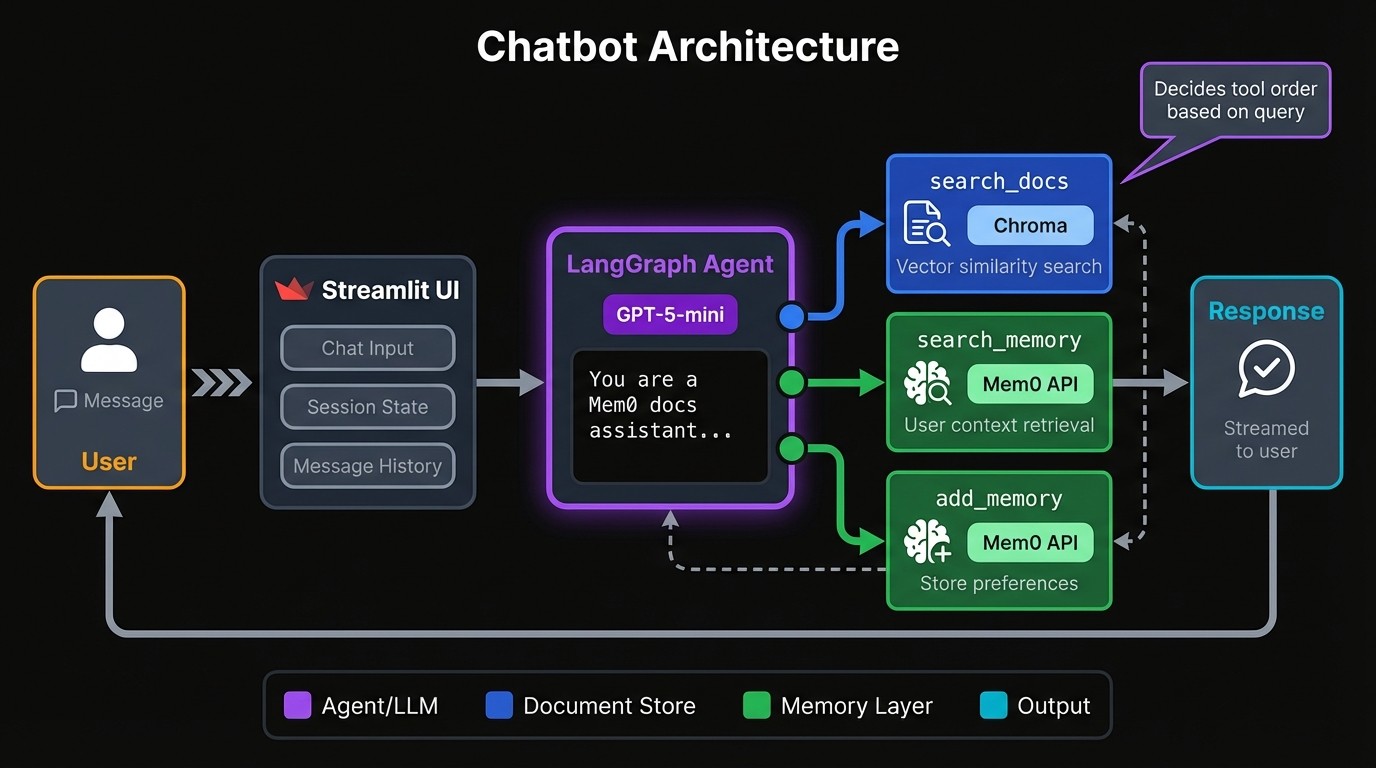
If someone asks "given my experience level, how should I configure this?", the model might first pull stored context from memory, then search documentation for instructions suited to that level. It sequences calls based on what it needs, and skips tools entirely when the question doesn't require external information.
Tech Stack
You'll wire together six components:
LangGraph is the agentic framework running under the hood, handling the tool-calling loop and decision logic. The code uses LangChain's higher-level `langchain.agents` module, which wraps LangGraph with a simpler API. If you need finer control over nodes, edges, and state management, you can drop down to LangGraph directly.
GPT-5-mini handles reasoning, tool selection, and response generation
Chroma stores your documentation as vector embeddings for similarity search
OpenAI's text-embedding-3-small converts text chunks and queries into vectors
Mem0 Platform API handles memory persistence without you managing a database
Streamlit provides the chat interface with streaming support
Chroma operates in-memory, and Mem0 handles persistence on their end, so there's no database setup on your side.
Building the chatbot
For this tutorial, you'll use as the example corpus, which creates a self-referential demo where the chatbot answers questions about the library powering its memory. The same pattern works for any document collection you control: internal wikis, private codebases, proprietary APIs, policy manuals. Most documentation worth building a chatbot for isn't publicly indexed, which is why local retrieval beats web search for these use cases.
The code lives in a single `app.py` file. You'd split this up for production, but keeping everything in one place makes the tutorial easier to follow.
Setting up the Python environment
Clone the starter repo and install dependencies:
git clone https:
cd mem0-chatbot-starter
pip install -r requirements.txt
git clone https:
cd mem0-chatbot-starter
pip install -r requirements.txt
git clone https:
cd mem0-chatbot-starter
pip install -r requirements.txt
The project structure looks like this:
mem0-chatbot-starter/
├── app.py          	# All application code
├── knowledge_base/ 	# 15 Mem0 doc pages as markdown
├── requirements.txt	# Pinned dependencies
├── .env.example    	# Template for API keys
└── .gitignore
mem0-chatbot-starter/
├── app.py          	# All application code
├── knowledge_base/ 	# 15 Mem0 doc pages as markdown
├── requirements.txt	# Pinned dependencies
├── .env.example    	# Template for API keys
└── .gitignore
mem0-chatbot-starter/
├── app.py          	# All application code
├── knowledge_base/ 	# 15 Mem0 doc pages as markdown
├── requirements.txt	# Pinned dependencies
├── .env.example    	# Template for API keys
└── .gitignore
import os
from pathlib import Path

import streamlit as st
from dotenv import load_dotenv
from langchain.agents import create_agent
from langchain.tools import tool
from langchain_chroma import Chroma
from langchain_community.document_loaders import DirectoryLoader, TextLoader
from langchain_openai import OpenAIEmbeddings
from langchain_text_splitters import RecursiveCharacterTextSplitter
from mem0 import MemoryClient

load_dotenv()
import os
from pathlib import Path

import streamlit as st
from dotenv import load_dotenv
from langchain.agents import create_agent
from langchain.tools import tool
from langchain_chroma import Chroma
from langchain_community.document_loaders import DirectoryLoader, TextLoader
from langchain_openai import OpenAIEmbeddings
from langchain_text_splitters import RecursiveCharacterTextSplitter
from mem0 import MemoryClient

load_dotenv()
import os
from pathlib import Path

import streamlit as st
from dotenv import load_dotenv
from langchain.agents import create_agent
from langchain.tools import tool
from langchain_chroma import Chroma
from langchain_community.document_loaders import DirectoryLoader, TextLoader
from langchain_openai import OpenAIEmbeddings
from langchain_text_splitters import RecursiveCharacterTextSplitter
from mem0 import MemoryClient

load_dotenv()
You need two API keys.
OpenAI key from platform.openai.com.
Mem0 key from app.mem0.ai/get-api-key.
Copy the template and add your keys:
cp .env.example .env
# Edit .env with your actual keys
cp .env.example .env
# Edit .env with your actual keys
cp .env.example .env
# Edit .env with your actual keys
The `.env` file holds both:
OPENAI_API_KEY=sk-...
MEM0_API_KEY=m0-...
OPENAI_API_KEY=sk-...
MEM0_API_KEY=m0-...
OPENAI_API_KEY=sk-...
MEM0_API_KEY=m0-...
Building the document retrieval tool
A vector database holds your docs as embeddingsand similarity search finds chunks relevant to each query.
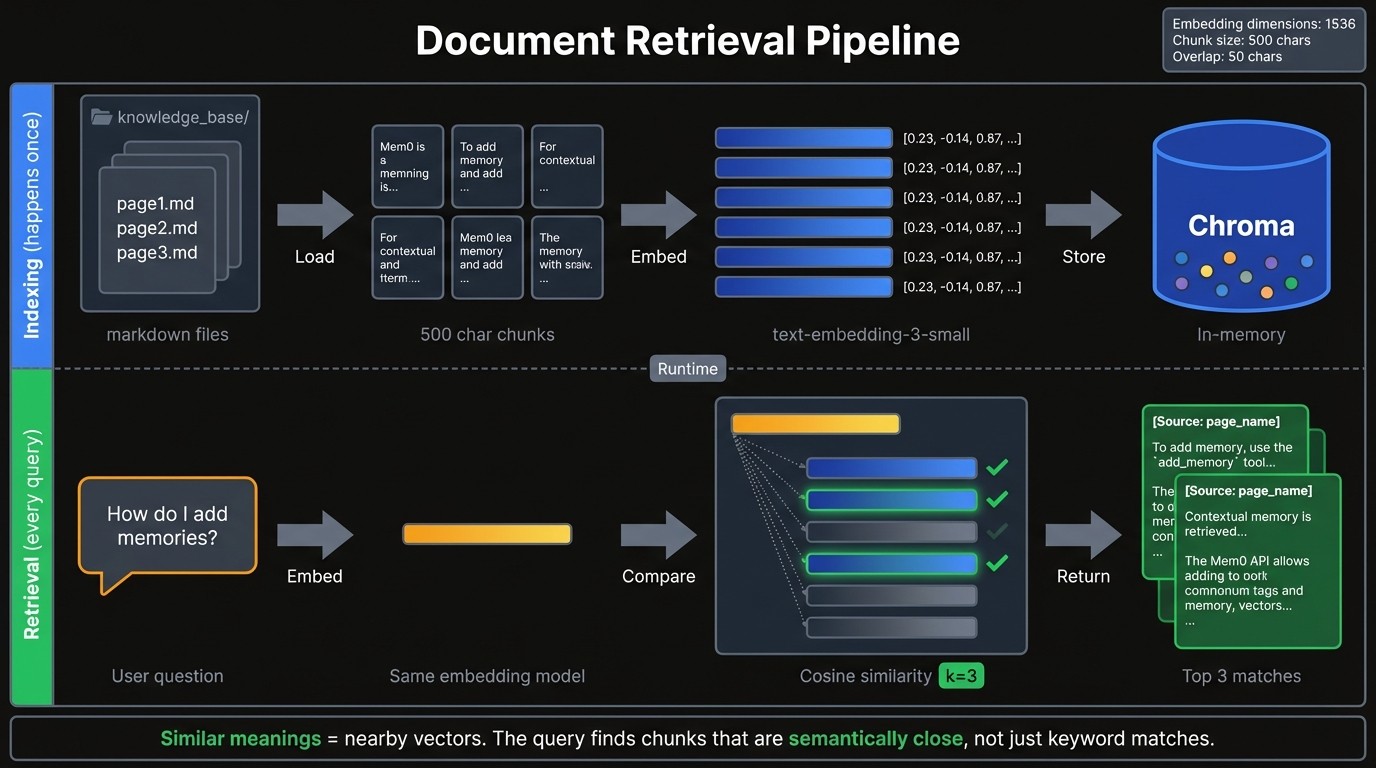
The `get_vectorstore` function loads markdown files from the `knowledge_base` folder, splits them into chunks, and stores the embeddings in Chroma:
KNOWLEDGE_BASE_DIR = Path(__file__).parent / "knowledge_base"

_vectorstore = None

def get_vectorstore():
	global _vectorstore
	if _vectorstore is not None:
    	return _vectorstore

	loader = DirectoryLoader(
    	str(KNOWLEDGE_BASE_DIR),
    	glob="*.md",
    	loader_cls=TextLoader,
    	loader_kwargs={"encoding": "utf-8"},
	)
	docs = loader.load()

	splitter = RecursiveCharacterTextSplitter(chunk_size=500, chunk_overlap=50)
	splits = splitter.split_documents(docs)

	embeddings = OpenAIEmbeddings(model="text-embedding-3-small")
	_vectorstore = Chroma.from_documents(splits, embeddings)
	return _vectorstore
KNOWLEDGE_BASE_DIR = Path(__file__).parent / "knowledge_base"
_vectorstore = None
def get_vectorstore():
global _vectorstore
if _vectorstore is not None:
return _vectorstore
loader = DirectoryLoader(
str(KNOWLEDGE_BASE_DIR),
glob="*.md",
loader_cls=TextLoader,
loader_kwargs={"encoding": "utf-8"},
)
docs = loader.load()
splitter = RecursiveCharacterTextSplitter(chunk_size=500, chunk_overlap=50)
splits = splitter.split_documents(docs)
embeddings = OpenAIEmbeddings(model="text-embedding-3-small")
_vectorstore = Chroma.from_documents(splits, embeddings)
return _vectorstoreKNOWLEDGE_BASE_DIR = Path(__file__).parent / "knowledge_base"
_vectorstore = None
def get_vectorstore():
global _vectorstore
if _vectorstore is not None:
return _vectorstore
loader = DirectoryLoader(
str(KNOWLEDGE_BASE_DIR),
glob="*.md",
loader_cls=TextLoader,
loader_kwargs={"encoding": "utf-8"},
)
docs = loader.load()
splitter = RecursiveCharacterTextSplitter(chunk_size=500, chunk_overlap=50)
splits = splitter.split_documents(docs)
embeddings = OpenAIEmbeddings(model="text-embedding-3-small")
_vectorstore = Chroma.from_documents(splits, embeddings)
return _vectorstoreThe chunk size of 500 characters balances context and relevance. Smaller chunks fragment ideas across multiple pieces. Larger chunks dilute the match quality and waste tokens. The 50-character overlap prevents cutting sentences at boundaries, so context flows across chunk edges.
The global `_vectorstore` variable caches the loaded database. Without this cache, every function call would reload and re-embed all documents. The first query takes a few seconds while embeddings generate; subsequent queries return almost instantly.
@tool
def search_docs(query: str) -> str:
	"""Search Mem0 documentation for technical information and code examples."""
	vectorstore = get_vectorstore()
	results = vectorstore.similarity_search(query, k=3)

	if not results:
    	return "No relevant documentation found."

	formatted = []
	for doc in results:
    	source = Path(doc.metadata.get("source", "unknown")).stem.replace("_", " ")
    	formatted.append(f"[Source: {source}]\n{doc.page_content}")
return "\n\n---\n\n".join(formatted)@tool
def search_docs(query: str) -> str:
"""Search Mem0 documentation for technical information and code examples."""
vectorstore = get_vectorstore()
results = vectorstore.similarity_search(query, k=3)
if not results:
return "No relevant documentation found."
formatted = []
for doc in results:
source = Path(doc.metadata.get("source", "unknown")).stem.replace("_", " ")
formatted.append(f"[Source: {source}]\n{doc.page_content}")
return "\n\n---\n\n".join(formatted)@tool
def search_docs(query: str) -> str:
"""Search Mem0 documentation for technical information and code examples."""
vectorstore = get_vectorstore()
results = vectorstore.similarity_search(query, k=3)
if not results:
return "No relevant documentation found."
formatted = []
for doc in results:
source = Path(doc.metadata.get("source", "unknown")).stem.replace("_", " ")
formatted.append(f"[Source: {source}]\n{doc.page_content}")
return "\n\n---\n\n".join(formatted)The docstring becomes the description the LLM sees when deciding whether to call it, so write something that helps the model understand when this tool applies.
The `k=3` parameter returns the top 3 matching chunks. More results mean better coverage but also more tokens consumed and potential noise from less relevant matches. Start with 3 and adjust based on how your documents are structured.
Building the memory tools
Rather than passing user IDs as arguments the LLM might guess wrong, you create the tools with the ID already baked in:
def create_memory_tools(user_id: str):
	mem0_client = MemoryClient(api_key=os.getenv("MEM0_API_KEY"))

	@tool
	def search_memory(query: str) -> str:
    	"""Search user's stored preferences and past interactions."""
    	try:
        	results = mem0_client.search(query, filters={"user_id": user_id}, limit=5)
        	if not results.get("results"):
            	return "No relevant memories found for this user."
        	memories = [m["memory"] for m in results["results"]]
        	return "User context:\n- " + "\n- ".join(memories)
    	except Exception as e:
        	return f"Error searching memory: {str(e)}"

	@tool
	def add_memory(content: str) -> str:
    	"""Store new information about the user for future reference."""
    	try:
        	mem0_client.add(
            	messages=[{"role": "user", "content": content}], user_id=user_id
        	)
        	return "Noted. I'll remember this for future conversations."
    	except Exception as e:
        	return f"Error saving memory: {str(e)}"

	return search_memory, add_memory
def create_memory_tools(user_id: str):
mem0_client = MemoryClient(api_key=os.getenv("MEM0_API_KEY"))
@tool
def search_memory(query: str) -> str:
"""Search user's stored preferences and past interactions."""
try:
results = mem0_client.search(query, filters={"user_id": user_id}, limit=5)
if not results.get("results"):
return "No relevant memories found for this user."
memories = [m["memory"] for m in results["results"]]
return "User context:\n- " + "\n- ".join(memories)
except Exception as e:
return f"Error searching memory: {str(e)}"
@tool
def add_memory(content: str) -> str:
"""Store new information about the user for future reference."""
try:
mem0_client.add(
messages=[{"role": "user", "content": content}], user_id=user_id
)
return "Noted. I'll remember this for future conversations."
except Exception as e:
return f"Error saving memory: {str(e)}"
return search_memory, add_memorydef create_memory_tools(user_id: str):
mem0_client = MemoryClient(api_key=os.getenv("MEM0_API_KEY"))
@tool
def search_memory(query: str) -> str:
"""Search user's stored preferences and past interactions."""
try:
results = mem0_client.search(query, filters={"user_id": user_id}, limit=5)
if not results.get("results"):
return "No relevant memories found for this user."
memories = [m["memory"] for m in results["results"]]
return "User context:\n- " + "\n- ".join(memories)
except Exception as e:
return f"Error searching memory: {str(e)}"
@tool
def add_memory(content: str) -> str:
"""Store new information about the user for future reference."""
try:
mem0_client.add(
messages=[{"role": "user", "content": content}], user_id=user_id
)
return "Noted. I'll remember this for future conversations."
except Exception as e:
return f"Error saving memory: {str(e)}"
return search_memory, add_memoryThe user ID gets captured in the closure, so each tool instance is permanently bound to one user. The LLM never sees or guesses the ID.
The API expects `filters={"user_id": user_id}` as a dictionary rather than a direct keyword argument, a common stumbling point when first using the SDK. The Mem0 docs cover additional filtering options.
You pass raw content in a messages format, and Mem0 extracts what's worth remembering. If a user says "I'm new to LangChain and working on a FAQ bot," Mem0 might store two separate facts: one about the experience level and one about the project type. This extraction happens on their end, so you don't need to parse the content yourself.
Good memories include preferences, experience levels, and goals. Ephemeral facts like "what time is it" shouldn't be stored, and the LLM generally handles this distinction through the system prompt guidance.
Building the LangGraph agent
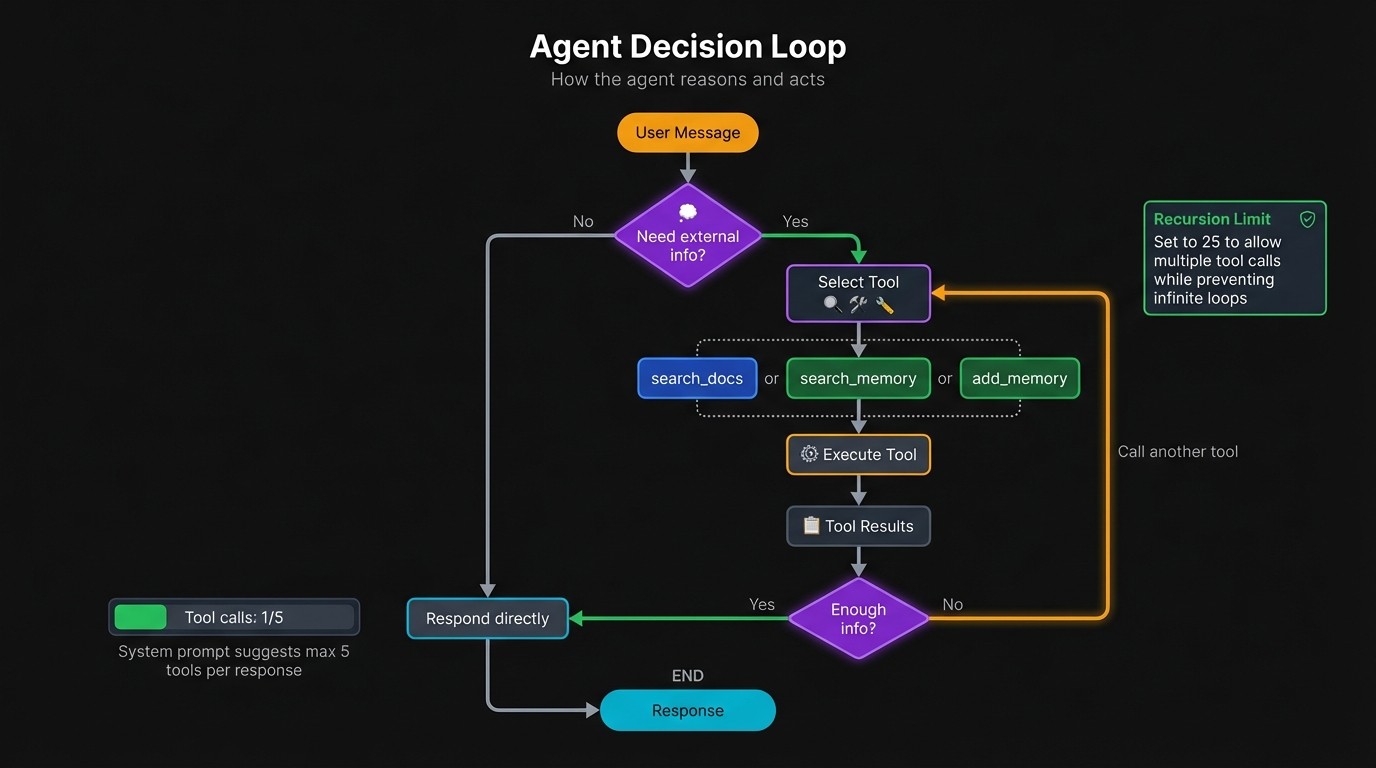
The system prompt guides tool selection:
SYSTEM_PROMPT = """You are a Mem0 documentation assistant with access to docs and user memory.

Tools:
- search_docs: Technical questions, how-to, features, troubleshooting
- search_memory: When user references past context or needs personalization
- add_memory: When user shares preferences, goals, experience level, or asks you to remember

You may call up to 5 tools total per response. After gathering enough context, provide your final answer. Don't keep searching indefinitely - synthesize what you have."""
SYSTEM_PROMPT = """You are a Mem0 documentation assistant with access to docs and user memory.

Tools:
- search_docs: Technical questions, how-to, features, troubleshooting
- search_memory: When user references past context or needs personalization
- add_memory: When user shares preferences, goals, experience level, or asks you to remember

You may call up to 5 tools total per response. After gathering enough context, provide your final answer. Don't keep searching indefinitely - synthesize what you have."""
SYSTEM_PROMPT = """You are a Mem0 documentation assistant with access to docs and user memory.

Tools:
- search_docs: Technical questions, how-to, features, troubleshooting
- search_memory: When user references past context or needs personalization
- add_memory: When user shares preferences, goals, experience level, or asks you to remember

You may call up to 5 tools total per response. After gathering enough context, provide your final answer. Don't keep searching indefinitely - synthesize what you have."""
The tool descriptions in the prompt might seem redundant since each tool already has a docstring. But the system prompt provides context the docstrings alone don't convey. It tells the model when to pick memory over docs, and when to store new information versus just acknowledging it.
The "up to 5 tools" instruction matters more than it looks. Without a budget, the model can loop indefinitely calling `search_docs` with slightly different queries, hoping for better results. The cap pushes it to synthesize what it has.
def create_chatbot(user_id: str):
	search_memory, add_memory = create_memory_tools(user_id)
	tools = [search_docs, search_memory, add_memory]

	return create_agent(
    	model="openai:gpt-5-mini", tools=tools, system_prompt=SYSTEM_PROMPT
	)
def create_chatbot(user_id: str):
	search_memory, add_memory = create_memory_tools(user_id)
	tools = [search_docs, search_memory, add_memory]

	return create_agent(
    	model="openai:gpt-5-mini", tools=tools, system_prompt=SYSTEM_PROMPT
	)
def create_chatbot(user_id: str):
	search_memory, add_memory = create_memory_tools(user_id)
	tools = [search_docs, search_memory, add_memory]

	return create_agent(
    	model="openai:gpt-5-mini", tools=tools, system_prompt=SYSTEM_PROMPT
	)
GPT-5-mini handles tool-calling well and costs less than the full GPT-5, which makes it reasonable for a chatbot that might make multiple tool calls per response.
Building the Streamlit chat interface
Session state initialization sets up the conversation history, agent instance, user ID, and a toggle for showing tool calls:
def initialize_session_state():
	defaults = {"messages": [], "agent": None, "user_id": "", "show_tools": True}
	for key, value in defaults.items():
    	if key not in st.session_state:
        	st.session_state[key] = value
def initialize_session_state():
defaults = {"messages": [], "agent": None, "user_id": "", "show_tools": True}
for key, value in defaults.items():
if key not in st.session_state:
st.session_state[key] = valuedef initialize_session_state():
defaults = {"messages": [], "agent": None, "user_id": "", "show_tools": True}
for key, value in defaults.items():
if key not in st.session_state:
st.session_state[key] = valueWhen someone enters a new user ID, the agent gets recreated with fresh memory tools bound to that ID. The message history also clears since the previous conversation belonged to someone else.
def render_sidebar():
	with st.sidebar:
    	st.title("Configuration")
    	user_id = st.text_input(
        	"User ID",
        	value=st.session_state.user_id,
        	placeholder="Enter your user ID...",
    	)

    	if user_id and user_id != st.session_state.user_id:
        	st.session_state.user_id = user_id
        	st.session_state.agent = create_chatbot(user_id)
        	st.session_state.messages = []
        	st.rerun()

    	if st.session_state.user_id:
        	st.success(f"Active user: {st.session_state.user_id}")

    	st.session_state.show_tools = st.checkbox(
        	"Show tool calls", value=st.session_state.show_tools
    	)

    	if st.button("Clear Chat", use_container_width=True):
        	st.session_state.messages = []
        	st.rerun()
def render_sidebar():
with st.sidebar:
st.title("Configuration")
user_id = st.text_input(
"User ID",
value=st.session_state.user_id,
placeholder="Enter your user ID...",
)
if user_id and user_id != st.session_state.user_id:
st.session_state.user_id = user_id
st.session_state.agent = create_chatbot(user_id)
st.session_state.messages = []
st.rerun()
if st.session_state.user_id:
st.success(f"Active user: {st.session_state.user_id}")
st.session_state.show_tools = st.checkbox(
"Show tool calls", value=st.session_state.show_tools
)
if st.button("Clear Chat", use_container_width=True):
st.session_state.messages = []
st.rerun()def render_sidebar():
with st.sidebar:
st.title("Configuration")
user_id = st.text_input(
"User ID",
value=st.session_state.user_id,
placeholder="Enter your user ID...",
)
if user_id and user_id != st.session_state.user_id:
st.session_state.user_id = user_id
st.session_state.agent = create_chatbot(user_id)
st.session_state.messages = []
st.rerun()
if st.session_state.user_id:
st.success(f"Active user: {st.session_state.user_id}")
st.session_state.show_tools = st.checkbox(
"Show tool calls", value=st.session_state.show_tools
)
if st.button("Clear Chat", use_container_width=True):
st.session_state.messages = []
st.rerun()A helper function handles rendering both regular messages and tool calls from the conversation history:
def render_message(msg: dict):
	if msg["role"] in ("user", "assistant"):
    	with st.chat_message(msg["role"]):
        	st.write(msg["content"])
	elif msg["role"] == "tool" and st.session_state.show_tools:
    	with st.expander(f"Tool: {msg['tool_name']}", expanded=False):
            st.code(msg["content"][:1000] + ("..." if len(msg["content"]) > 1000 else ""))
def render_message(msg: dict):
if msg["role"] in ("user", "assistant"):
with st.chat_message(msg["role"]):
st.write(msg["content"])
elif msg["role"] == "tool" and st.session_state.show_tools:
with st.expander(f"Tool: {msg['tool_name']}", expanded=False):
st.code(msg["content"][:1000] + ("..." if len(msg["content"]) > 1000 else ""))def render_message(msg: dict):
if msg["role"] in ("user", "assistant"):
with st.chat_message(msg["role"]):
st.write(msg["content"])
elif msg["role"] == "tool" and st.session_state.show_tools:
with st.expander(f"Tool: {msg['tool_name']}", expanded=False):
st.code(msg["content"][:1000] + ("..." if len(msg["content"]) > 1000 else ""))The `stream_mode="messages"` setting provides token-level updates rather than waiting for complete responses.
def process_user_input(prompt: str):
    st.session_state.messages.append({"role": "user", "content": prompt})
	with st.chat_message("user"):
    	st.write(prompt)

	with st.chat_message("assistant"):
    	response_placeholder = st.empty()
    	response_text = ""
    	tool_results = {}

    	for chunk, metadata in st.session_state.agent.stream(
        	{"messages": [{"role": "user", "content": prompt}]},
        	stream_mode="messages",
            config={"recursion_limit": 25},
    	):
        	node = metadata.get("langgraph_node")

        	if node == "model":
            	if hasattr(chunk, "content") and chunk.content:
                	response_text += chunk.content
                    response_placeholder.markdown(response_text + "▌")

        	elif node == "tools":
            	if hasattr(chunk, "name") and hasattr(chunk, "content"):
                	tool_results[chunk.name] = chunk.content
                    st.session_state.messages.append({
                    	"role": "tool",
                    	"tool_name": chunk.name,
                    	"content": chunk.content,
                	})

    	if response_text:
            response_placeholder.markdown(response_text)
        	st.session_state.messages.append(
            	{"role": "assistant", "content": response_text}
        	)

    	if st.session_state.show_tools:
        	for name, content in tool_results.items():
            	with st.expander(f"Tool: {name}", expanded=False):
                	st.code(content[:1000] + ("..." if len(content) > 1000 else ""))
def process_user_input(prompt: str):
st.session_state.messages.append({"role": "user", "content": prompt})
with st.chat_message("user"):
st.write(prompt)
with st.chat_message("assistant"):
response_placeholder = st.empty()
response_text = ""
tool_results = {}
for chunk, metadata in st.session_state.agent.stream(
{"messages": [{"role": "user", "content": prompt}]},
stream_mode="messages",
config={"recursion_limit": 25},
):
node = metadata.get("langgraph_node")
if node == "model":
if hasattr(chunk, "content") and chunk.content:
response_text += chunk.content
response_placeholder.markdown(response_text + "▌")
elif node == "tools":
if hasattr(chunk, "name") and hasattr(chunk, "content"):
tool_results[chunk.name] = chunk.content
st.session_state.messages.append({
"role": "tool",
"tool_name": chunk.name,
"content": chunk.content,
})
if response_text:
response_placeholder.markdown(response_text)
st.session_state.messages.append(
{"role": "assistant", "content": response_text}
)
if st.session_state.show_tools:
for name, content in tool_results.items():
with st.expander(f"Tool: {name}", expanded=False):
st.code(content[:1000] + ("..." if len(content) > 1000 else ""))def process_user_input(prompt: str):
st.session_state.messages.append({"role": "user", "content": prompt})
with st.chat_message("user"):
st.write(prompt)
with st.chat_message("assistant"):
response_placeholder = st.empty()
response_text = ""
tool_results = {}
for chunk, metadata in st.session_state.agent.stream(
{"messages": [{"role": "user", "content": prompt}]},
stream_mode="messages",
config={"recursion_limit": 25},
):
node = metadata.get("langgraph_node")
if node == "model":
if hasattr(chunk, "content") and chunk.content:
response_text += chunk.content
response_placeholder.markdown(response_text + "▌")
elif node == "tools":
if hasattr(chunk, "name") and hasattr(chunk, "content"):
tool_results[chunk.name] = chunk.content
st.session_state.messages.append({
"role": "tool",
"tool_name": chunk.name,
"content": chunk.content,
})
if response_text:
response_placeholder.markdown(response_text)
st.session_state.messages.append(
{"role": "assistant", "content": response_text}
)
if st.session_state.show_tools:
for name, content in tool_results.items():
with st.expander(f"Tool: {name}", expanded=False):
st.code(content[:1000] + ("..." if len(content) > 1000 else ""))The `langgraph_node` metadata field tells you which part of the agent graph emitted each chunk. LangGraph structures the agent as nodes connected by edges: a "model" node runs the LLM, and a "tools" node executes tool calls.
The `recursion_limit` caps how many times the agent loop can iterate. Each iteration includes an LLM call and potentially a tool call. Twenty-five iterations accommodates complex queries that need multiple tool calls while preventing runaway API costs if something goes wrong.
The main function wires everything together:
def main():
	st.set_page_config(page_title="Mem0 Docs Assistant", page_icon="🧠", layout="wide")
	initialize_session_state()
	render_sidebar()

	st.title("Mem0 Documentation Assistant")
	st.caption("Ask questions about Mem0. I'll search the docs and remember your preferences.")

	if not os.getenv("OPENAI_API_KEY"):
    	st.error("Please set OPENAI_API_KEY environment variable.")
    	return
	if not os.getenv("MEM0_API_KEY"):
    	st.error("Please set MEM0_API_KEY environment variable.")
    	return
	if not st.session_state.user_id:
    	st.info("Enter a User ID in the sidebar to start chatting.")
    	return

	if st.session_state.agent is None:
    	st.session_state.agent = create_chatbot(st.session_state.user_id)

	for msg in st.session_state.messages:
    	render_message(msg)

	if prompt := st.chat_input("Ask about Mem0 or tell me about yourself..."):
    	process_user_input(prompt)

if __name__ == "__main__":
	main()
def main():
st.set_page_config(page_title="Mem0 Docs Assistant", page_icon="🧠", layout="wide")
initialize_session_state()
render_sidebar()
st.title("Mem0 Documentation Assistant")
st.caption("Ask questions about Mem0. I'll search the docs and remember your preferences.")
if not os.getenv("OPENAI_API_KEY"):
st.error("Please set OPENAI_API_KEY environment variable.")
return
if not os.getenv("MEM0_API_KEY"):
st.error("Please set MEM0_API_KEY environment variable.")
return
if not st.session_state.user_id:
st.info("Enter a User ID in the sidebar to start chatting.")
return
if st.session_state.agent is None:
st.session_state.agent = create_chatbot(st.session_state.user_id)
for msg in st.session_state.messages:
render_message(msg)
if prompt := st.chat_input("Ask about Mem0 or tell me about yourself..."):
process_user_input(prompt)
if __name__ == "__main__":
main()def main():
st.set_page_config(page_title="Mem0 Docs Assistant", page_icon="🧠", layout="wide")
initialize_session_state()
render_sidebar()
st.title("Mem0 Documentation Assistant")
st.caption("Ask questions about Mem0. I'll search the docs and remember your preferences.")
if not os.getenv("OPENAI_API_KEY"):
st.error("Please set OPENAI_API_KEY environment variable.")
return
if not os.getenv("MEM0_API_KEY"):
st.error("Please set MEM0_API_KEY environment variable.")
return
if not st.session_state.user_id:
st.info("Enter a User ID in the sidebar to start chatting.")
return
if st.session_state.agent is None:
st.session_state.agent = create_chatbot(st.session_state.user_id)
for msg in st.session_state.messages:
render_message(msg)
if prompt := st.chat_input("Ask about Mem0 or tell me about yourself..."):
process_user_input(prompt)
if __name__ == "__main__":
main()Run the app with `streamlit run app.py`, enter a user ID, and start chatting.
Example conversation
Asking "How do I add memories in Mem0?" triggers a `search_docs` call. The chatbot pulls the relevant documentation and walks through the three methods: dashboard UI, SDKs, and HTTP API.
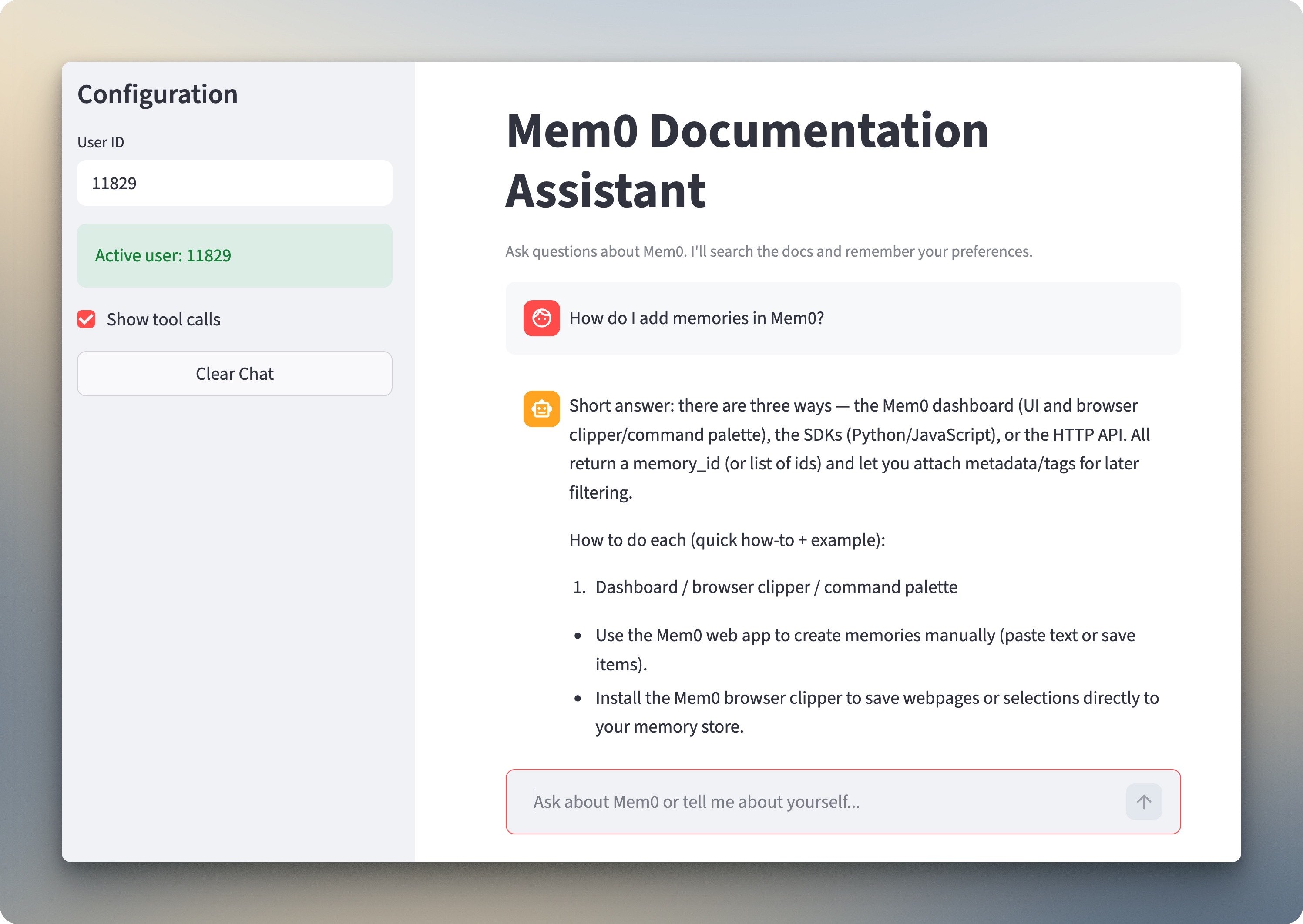
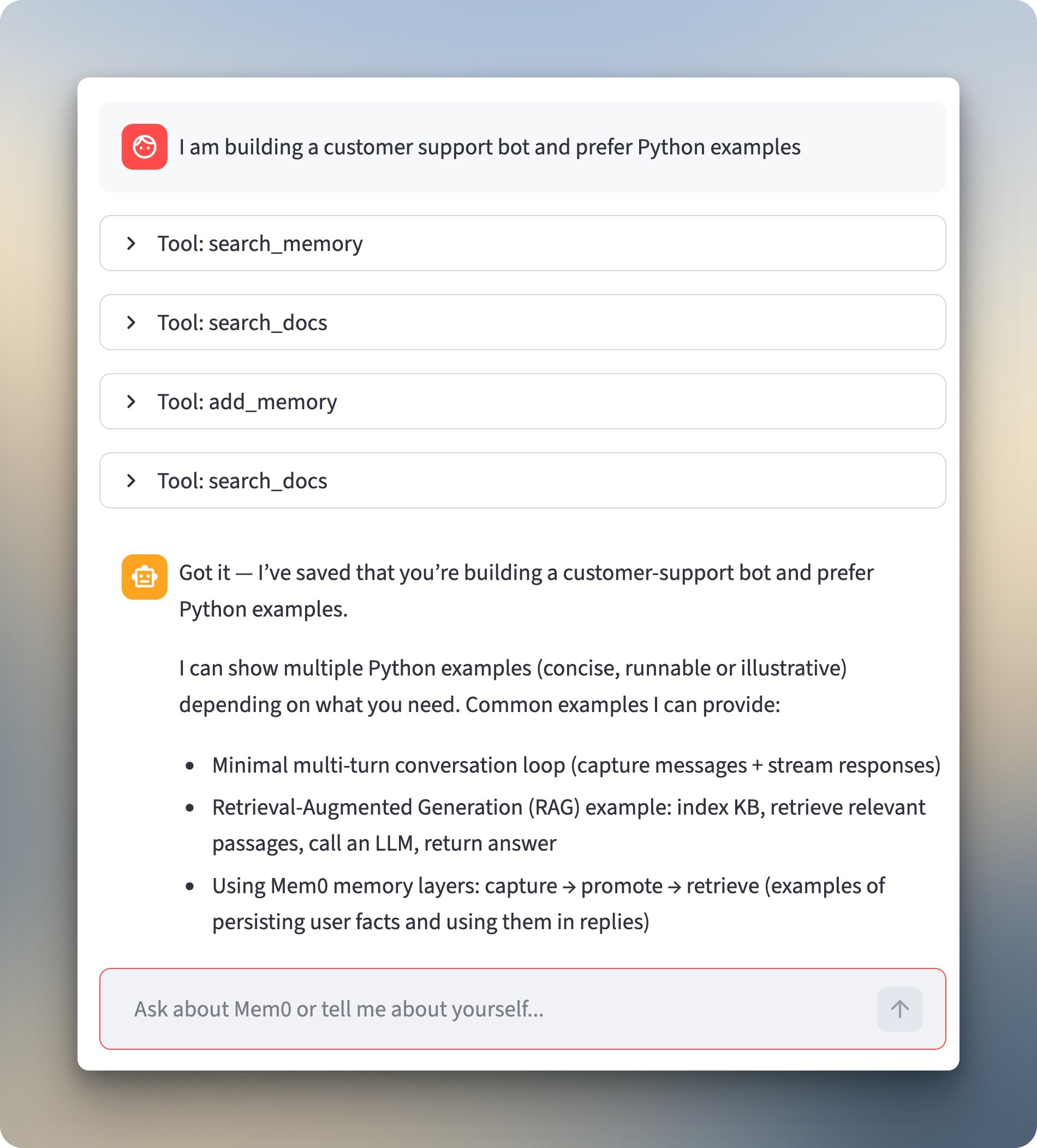
Telling the chatbot "I am building a customer support bot and prefer Python examples" changes things. It calls `add_memory` to store both facts. The expandable sections show it searched memory first (empty for a new user), then saved the preferences.
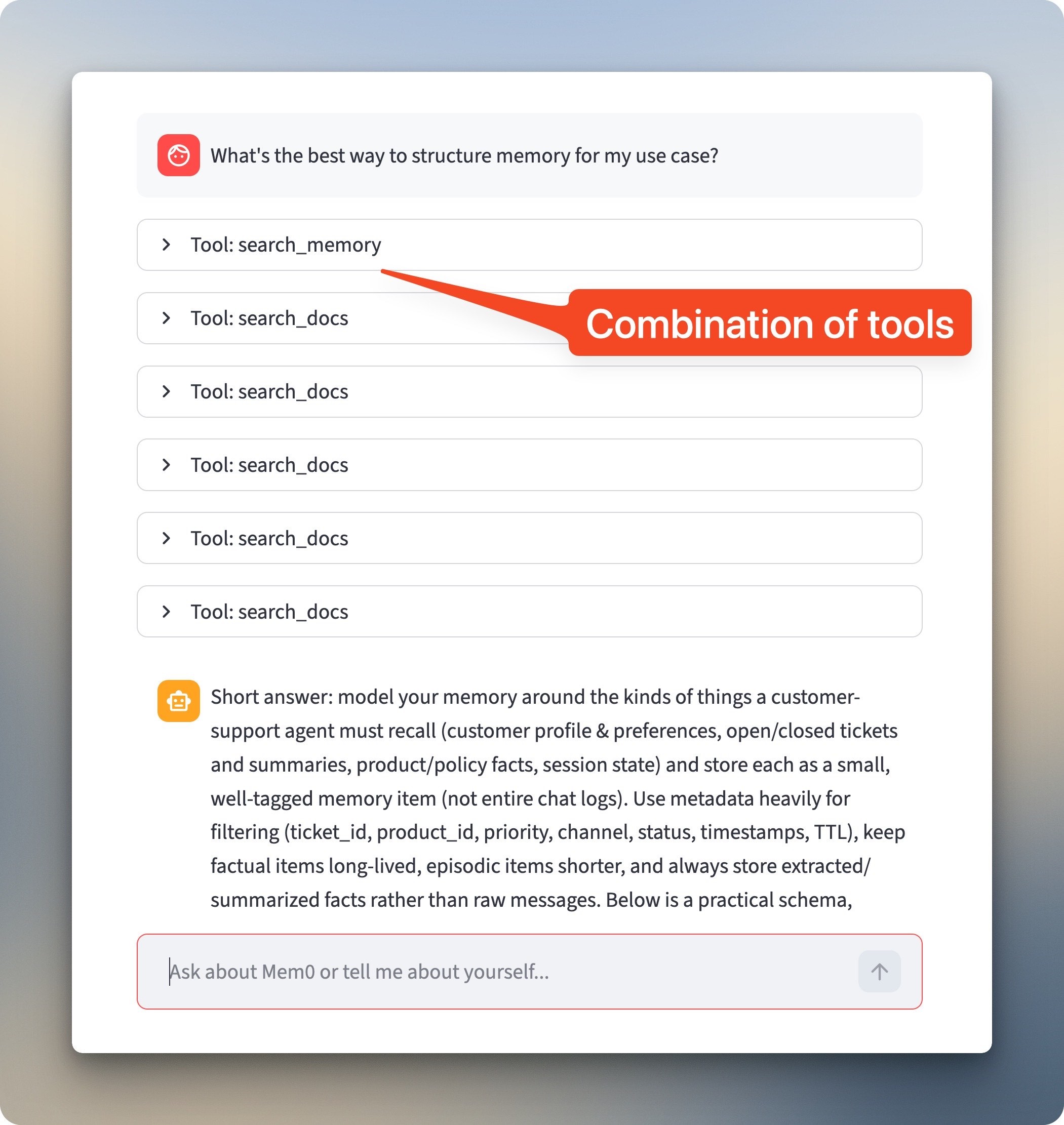
"What's the best way to structure memory for my use case?" requires both memory and docs. The chatbot pulls the stored context with `search_memory`, then hits `search_docs` multiple times for information about memory organization. The response talks specifically about customer support bots and sticks to Python.
A different user ID asking the same questions would get the same doc results but no stored preferences. Return with the same ID in a new session, and the preferences carry over.
Taking it to production
The tutorial kept things simple with a single file, in-memory storage, no auth, on purpose. That's the right call for learning, but deploying to real users means addressing what we skipped.
1. Persistent storage
The in-memory Chroma vectorstore won't survive a server restart. Add a `persist_directory` parameter to write to disk:
_vectorstore = Chroma.from_documents(
	splits,
	embeddings,
	persist_directory="./chroma_db"
)
_vectorstore = Chroma.from_documents(
	splits,
	embeddings,
	persist_directory="./chroma_db"
)
_vectorstore = Chroma.from_documents(
	splits,
	embeddings,
	persist_directory="./chroma_db"
)
For managed backups and scaling without touching infrastructure, swap in a hosted vector database like Pinecone or Weaviate.
2. Authentication
User identity needs to come from somewhere trustworthy. The text input in the sidebar works for testing, but production apps should pull user IDs from an auth system—Streamlit Authenticator for simple cases, OAuth for existing identity providers, or an authentication proxy if you're deploying behind one.
3. Secrets management
Move API keys out of `.env` files and into a secrets manager. AWS Secrets Manager, GCP Secret Manager, and HashiCorp Vault all integrate with Python and handle rotation, access control, and audit logs that flat files can't provide.
4. Observability
Visibility into what the agent is doing becomes important once you can't watch every request. LangSmith gives you tracing for each tool call and LLM invocation with two environment variables:
export LANGCHAIN_TRACING_V2=true
export LANGCHAIN_API_KEY=your-langsmith-api-key
export LANGCHAIN_TRACING_V2=true
export LANGCHAIN_API_KEY=your-langsmith-api-key
export LANGCHAIN_TRACING_V2=true
export LANGCHAIN_API_KEY=your-langsmith-api-key
Pair it with structured logging and an error tracker like Sentry so failures surface instead of vanishing into generic exception strings.
5. Rate limiting
Traffic from multiple users hitting the agent simultaneously can rack up API costs fast. Per-user rate limits keep any single person from burning through your OpenAI budget, and request queuing smooths out spikes instead of letting them cascade into timeouts.
6. Code organization
The single-file structure served the tutorial, but larger teams benefit from splitting things up. A `tools/` module for tool definitions, `agents/` for configuration, and `ui/` for Streamlit components makes testing easier and keeps pull requests focused.
Give your AI chatbot a memory with Mem0
You've built a chatbot that searches documentation and remembers who it's talking to. Users get personalized responses without repeating themselves every session.
The approach has trade-offs. Memory accumulates over time, and not everything stored stays relevant. The agentic loop adds latency and cost compared to a fixed RAG pipeline since each tool call is another API round-trip. Storing preferences also means storing user data, so think through what you're collecting before shipping.
The starter repo gives you a working foundation. Swap in your own documents, adjust the system prompt, and see how memory changes the conversation. Start with the basics, watch how people actually use it, and iterate from there.
FAQs
How much does this cost to run?
Costs come from three sources: OpenAI API calls for the LLM and embeddings, Mem0 API calls for memory operations, and Chroma (free when running locally). A typical conversation with 2-3 tool calls costs a few cents. The agentic loop can multiply costs if the model makes many tool calls, which is why the recursion limit matters.
Can I use a different LLM?
Yes. LangChain supports multiple providers. Replace the model string in `create_agent` with another supported model like `"anthropic:claude-3-sonnet"` or `"ollama:llama3.2"`. Local models work but may struggle with reliable tool calling.
How do I delete or update stored memories?
Mem0's API includes methods for listing, updating, and deleting memories. Use `mem0_client.get_all(user_id=user_id)` to list memories and `mem0_client.delete(memory_id)` to remove specific ones. You could add a "forget this" tool that lets users request deletion through the chat interface.
What happens if Mem0's servers are down?
The memory tools will return errors, but the chatbot stays functional. Document search still works, and the LLM can respond to general questions. Wrapping memory calls in try/except (already done in the tutorial code) prevents crashes.
Can I self-host the memory layer instead of using Mem0's API?
Mem0 offers an open-source version you can run locally with your own database backend. The API differs slightly from the hosted version. Check their GitHub repo for self-hosting instructions and the Mem0 blog for deployment guides.
How do I handle multiple users in production?
The tutorial creates per-user tools by passing the user ID into the factory function. In production, pull the user ID from your authentication system rather than a text input. Each user's memories stay isolated through the `user_id` filter in API calls.
Why does the agent sometimes call search_docs multiple times?
The model searches iteratively when initial results don't fully answer the question. This is normal behavior for agentic systems. The recursion limit prevents infinite loops, and the system prompt's "up to 5 tools" guidance encourages synthesis over endless searching.
Can I add more tools?
Yes. Define new functions with the `@tool` decorator and add them to the tools list in `create_chatbot`. Common additions include web search, database queries, or API calls to external services. Update the system prompt to explain when each tool applies.