Quick Takeaways
What you’ll build: A Next.js 14 App Router support chatbot that remembers users across sessions
Stack: Next.js 14, TypeScript, OpenAI, Mem0
Time: ~25 minutes
Outcome: Your agent remembers a user’s order issue from Session 1 when they return in Session 2
Prerequisite: Free Mem0 API key (app.mem0.ai)
Your support chatbot forgets every user the moment they close the tab.
They described their order number and issue. They waited through the whole conversation. Then they came back the next day and had to start from scratch.
This tutorial shows you how to build a Next.js support agent that actually remembers. Not with session cookies. Not by stuffing a 20,000-token conversation history into every prompt. With persistent memory infrastructure that retrieves exactly what’s relevant, per user, per query, in under 200ms.
By the end, your agent will do this:
Please enter a valid YouTube, Vimeo, or direct video URL
That second response is where the agent connects “any update” to a specific order number it was never told about, which is what makes the difference between a support tool and a support experience. Let’s build it.
The Problem: Your Support Agent Forgets Everything
Most AI support agents are stateless by design. Every API call to your LLM starts with a blank context window. You can work around this by stuffing the full chat history into each request, but that approach breaks down fast:
Token costs explode as conversation history grows
Retrieval is dumb, i.e., the model gets everything, relevant or not
Cross-session memory is impossible; once the user closes the tab, the history is gone
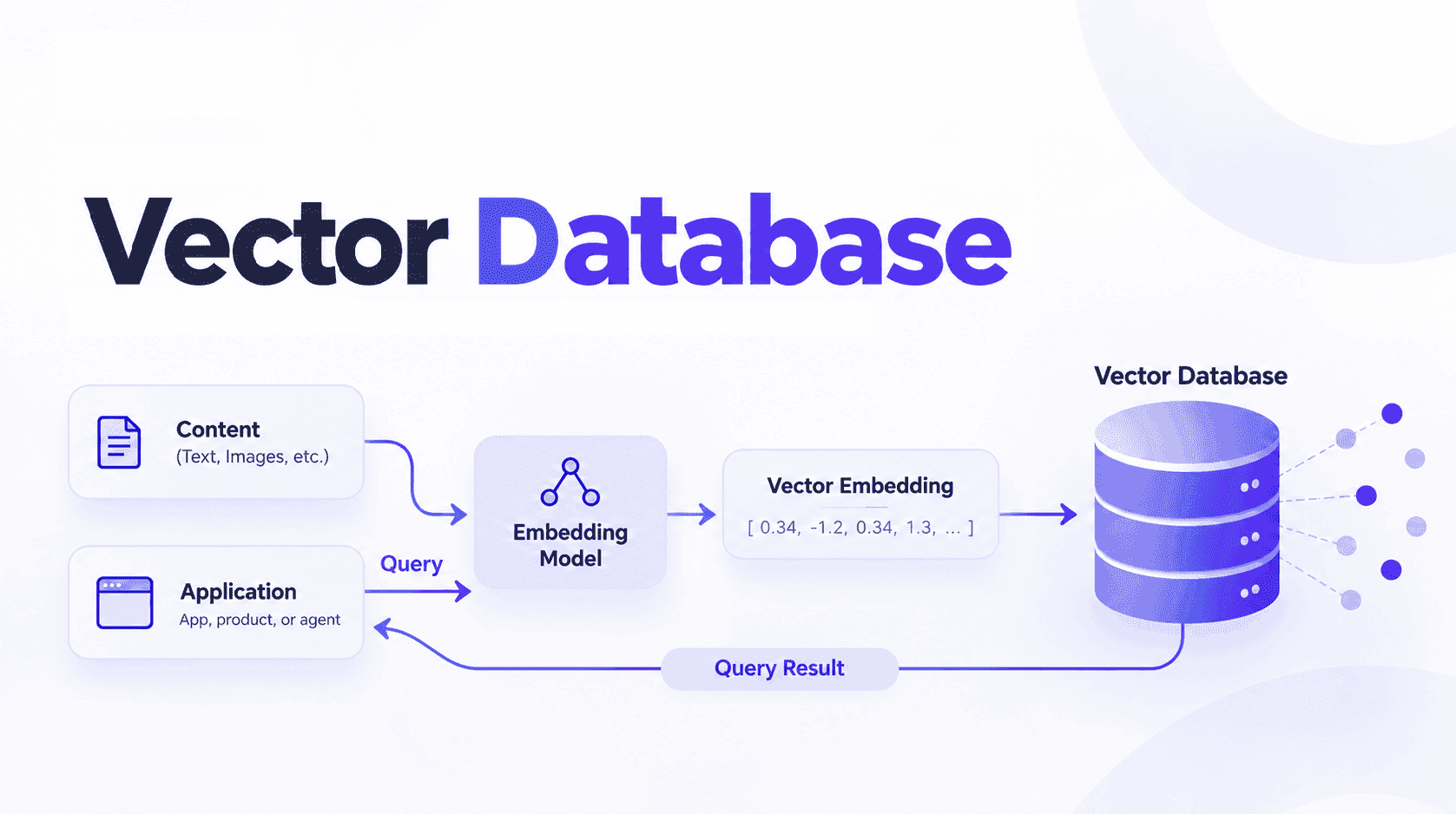
What you actually want is semantic memory: extract the facts that matter, store them, and retrieve only what’s relevant to the current message. That’s exactly what Mem0 does.
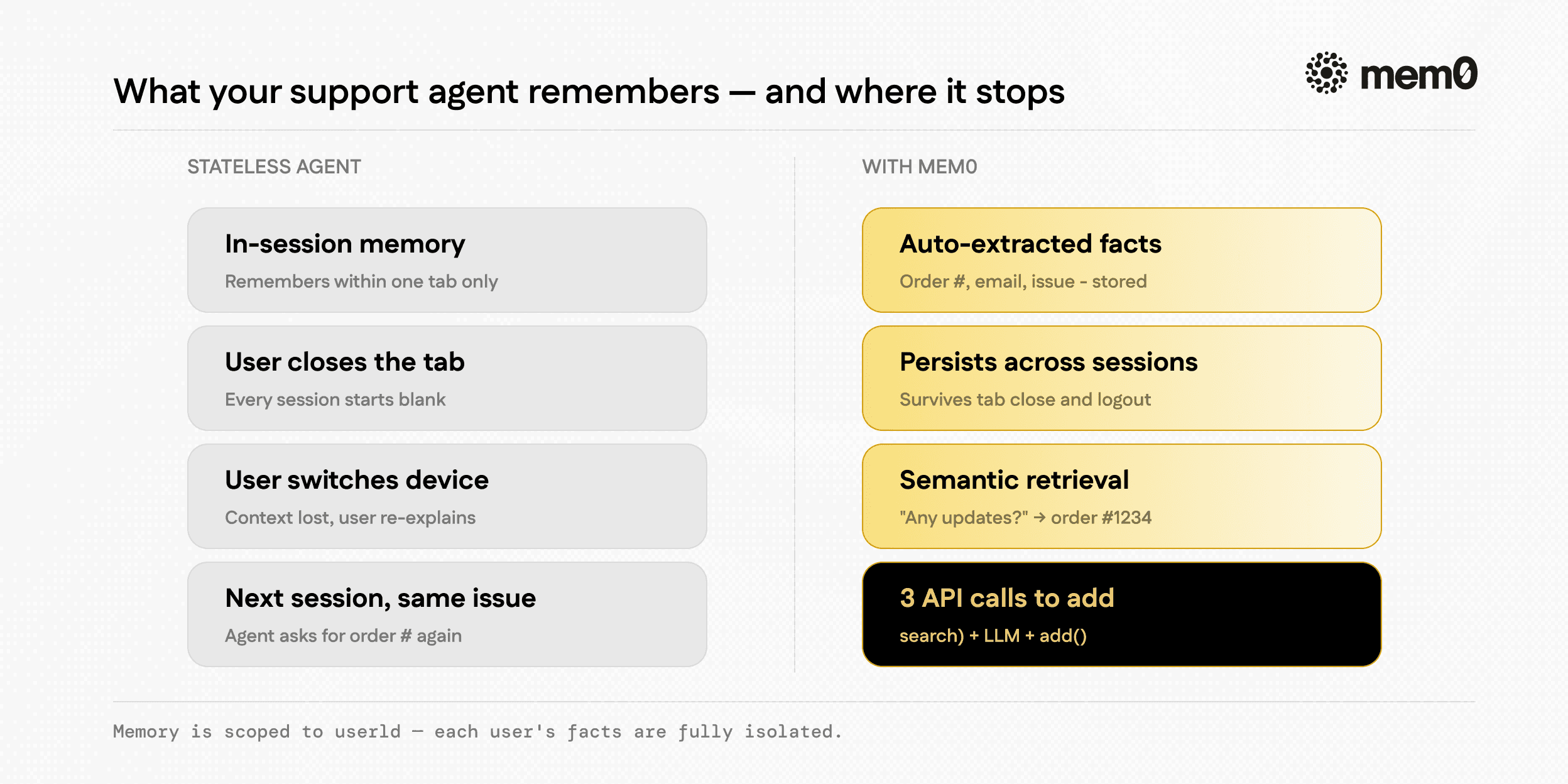
Fig: What does your support agent remembers?
This isn’t a model capability issue. GPT-4o and Claude both have the context retention to remember a conversation perfectly. The problem is architectural; most support agents start each session with an empty context window and zero knowledge of the user. Developers work around this by storing full chat logs and dumping them back in, but that approach hits token limits fast, gets expensive, and still doesn’t help when a user switches from chat to email to chat again.
Mem0 fixes this in 4 lines. It extracts semantic facts from each conversation, stores them against a userId, and retrieves the relevant ones before each LLM call. Your agent gets exactly what it needs to sound like it was paying attention.
What You’ll Build
A Next.js 14 App Router application with:
A /api/chat route that handles messages and manages memory
A clean chat UI with session simulation
Mem0 integration that stores memories after each exchange and retrieves relevant ones before each LLM call
The agent will remember things like order numbers, issue descriptions, user preferences, and escalation history across browser sessions and across days.
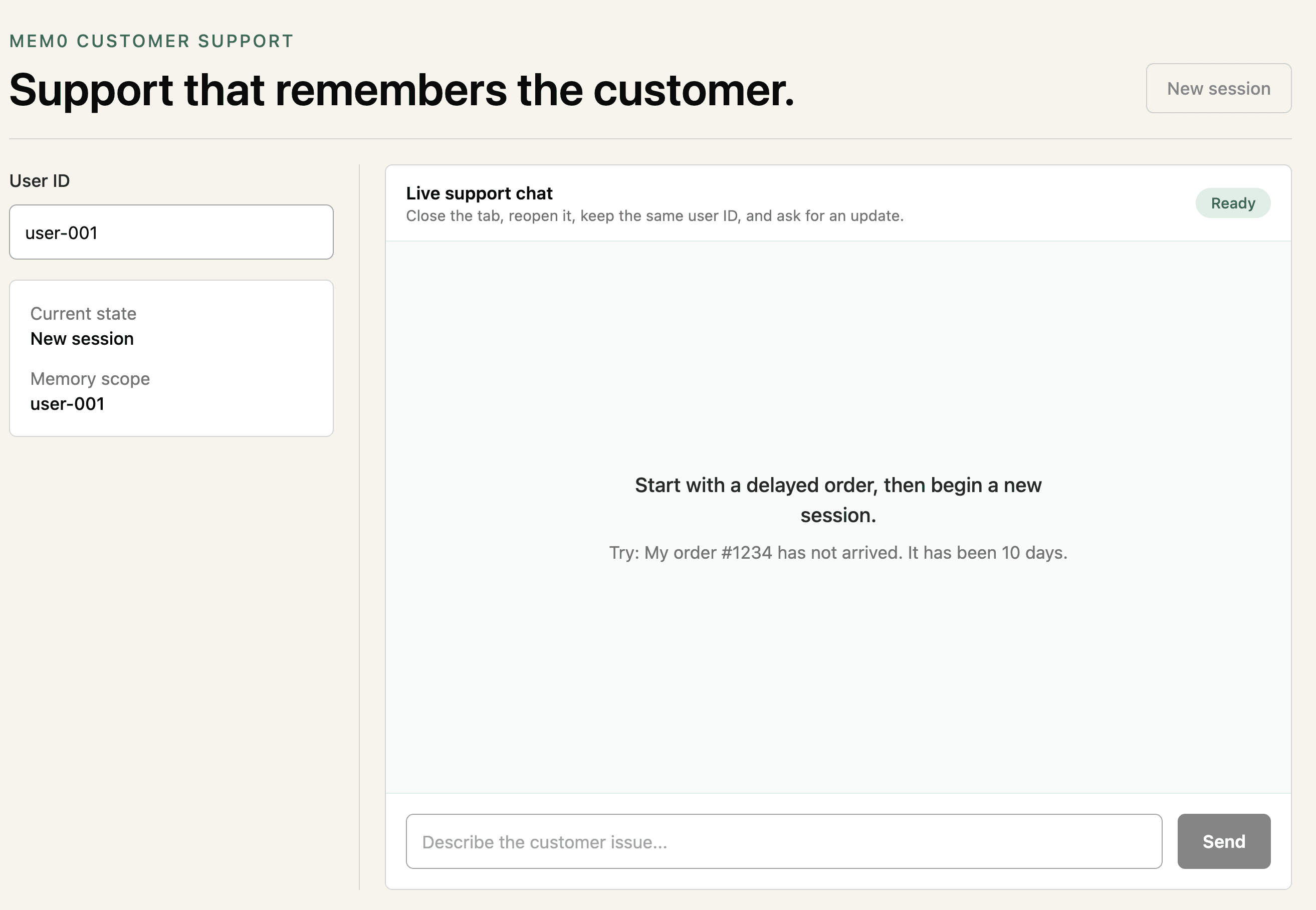
Fig: Customer Support Agent Demo
Every user interaction scopes memory to a userId. When a user sends a message, the API route searches Mem0 for memories tied to that user, injects them as context before the LLM call, and stores new memories after. The user never re-explains. The agent never forgets.
Prerequisites
Node.js 18+
Basic Next.js / App Router familiarity
OpenAI API key
Free Mem0 API key
💡 You’ll need a free Mem0 API key to follow along.
Get one at app.mem0.ai
Step 1: Set up your Next.js project
Create a Next.js app and install the dependencies:
npx create-next-app@latest support-agent --typescript --app --tailwind --no-src-dir
cd support-agent
npm install mem0ai openai
npx create-next-app@latest support-agent --typescript --app --tailwind --no-src-dir
cd support-agent
npm install mem0ai openai
npx create-next-app@latest support-agent --typescript --app --tailwind --no-src-dir
cd support-agent
npm install mem0ai openai
This repo pins Next.js 14:
{
  "dependencies": {
    "mem0ai": "^2.1.40",
    "next": "14.2.35",
    "openai": "^4.104.0",
    "react": "^18.3.1",
    "react-dom": "^18.3.1"
  }
}
{
"dependencies": {
"mem0ai": "^2.1.40",
"next": "14.2.35",
"openai": "^4.104.0",
"react": "^18.3.1",
"react-dom": "^18.3.1"
}
}{
"dependencies": {
"mem0ai": "^2.1.40",
"next": "14.2.35",
"openai": "^4.104.0",
"react": "^18.3.1",
"react-dom": "^18.3.1"
}
}Create .env.local at the project root:
OPENAI_API_KEY=your_openai_key_here
OPENAI_MODEL=gpt-4o-mini
MEM0_API_KEY=your_mem0_key_here
OPENAI_API_KEY=your_openai_key_here
OPENAI_MODEL=gpt-4o-mini
MEM0_API_KEY=your_mem0_key_here
OPENAI_API_KEY=your_openai_key_here
OPENAI_MODEL=gpt-4o-mini
MEM0_API_KEY=your_mem0_key_here
OPENAI_MODEL is optional. The app defaults to gpt-4o-mini if you leave it out.
The full route lives in app/api/chat/route.ts. The important pieces are:
import { NextRequest, NextResponse } from "next/server";
import { MemoryClient, type Memory, type Message as Mem0Message } from "mem0ai";
import OpenAI from "openai";
import type { ChatCompletionMessageParam } from "openai/resources/chat/completions";

type ChatMessage = {
  role: "user" | "assistant";
  content: string;
};

function formatMemories(memories: Memory[]) {
  const memoryText = memories
    .map((memory) => memory.memory ?? memory.data?.memory)
    .filter(Boolean)
    .map((memory) => `- ${memory}`)
    .join("\\n");

  return memoryText
    ? `Relevant context about this user from previous interactions:\\n${memoryText}`
    : "";
}
import { NextRequest, NextResponse } from "next/server";
import { MemoryClient, type Memory, type Message as Mem0Message } from "mem0ai";
import OpenAI from "openai";
import type { ChatCompletionMessageParam } from "openai/resources/chat/completions";
type ChatMessage = {
role: "user" | "assistant";
content: string;
};
function formatMemories(memories: Memory[]) {
const memoryText = memories
.map((memory) => memory.memory ?? memory.data?.memory)
.filter(Boolean)
.map((memory) => `- ${memory}`)
.join("\\n");
return memoryText
? `Relevant context about this user from previous interactions:\\n${memoryText}`
: "";
}import { NextRequest, NextResponse } from "next/server";
import { MemoryClient, type Memory, type Message as Mem0Message } from "mem0ai";
import OpenAI from "openai";
import type { ChatCompletionMessageParam } from "openai/resources/chat/completions";
type ChatMessage = {
role: "user" | "assistant";
content: string;
};
function formatMemories(memories: Memory[]) {
const memoryText = memories
.map((memory) => memory.memory ?? memory.data?.memory)
.filter(Boolean)
.map((memory) => `- ${memory}`)
.join("\\n");
return memoryText
? `Relevant context about this user from previous interactions:\\n${memoryText}`
: "";
}Validate the request and initialize the clients from server-side environment variables:
export async function POST(req: NextRequest) {
const body = await req.json().catch(() => null);
const { messages, userId } = body as {
messages?: unknown;
userId?: unknown;
};
if (typeof userId !== "string" || !userId.trim()) {
return NextResponse.json({ error: "userId is required" }, { status: 400 });
}
if (!Array.isArray(messages)) {
return NextResponse.json(
{ error: "messages must be an array" },
{ status: 400 },
);
}
const openaiApiKey = process.env.OPENAI_API_KEY;
const openaiModel = process.env.OPENAI_MODEL ?? "gpt-4o-mini";
const mem0ApiKey = process.env.MEM0_API_KEY;
if (!openaiApiKey || !mem0ApiKey) {
return NextResponse.json(
{ error: "OPENAI_API_KEY and MEM0_API_KEY must be configured" },
{ status: 500 },
);
}
const openai = new OpenAI({ apiKey: openaiApiKey });
const mem0 = new MemoryClient({ apiKey: mem0ApiKey });
}export async function POST(req: NextRequest) {
const body = await req.json().catch(() => null);
const { messages, userId } = body as {
messages?: unknown;
userId?: unknown;
};
if (typeof userId !== "string" || !userId.trim()) {
return NextResponse.json({ error: "userId is required" }, { status: 400 });
}
if (!Array.isArray(messages)) {
return NextResponse.json(
{ error: "messages must be an array" },
{ status: 400 },
);
}
const openaiApiKey = process.env.OPENAI_API_KEY;
const openaiModel = process.env.OPENAI_MODEL ?? "gpt-4o-mini";
const mem0ApiKey = process.env.MEM0_API_KEY;
if (!openaiApiKey || !mem0ApiKey) {
return NextResponse.json(
{ error: "OPENAI_API_KEY and MEM0_API_KEY must be configured" },
{ status: 500 },
);
}
const openai = new OpenAI({ apiKey: openaiApiKey });
const mem0 = new MemoryClient({ apiKey: mem0ApiKey });
}export async function POST(req: NextRequest) {
const body = await req.json().catch(() => null);
const { messages, userId } = body as {
messages?: unknown;
userId?: unknown;
};
if (typeof userId !== "string" || !userId.trim()) {
return NextResponse.json({ error: "userId is required" }, { status: 400 });
}
if (!Array.isArray(messages)) {
return NextResponse.json(
{ error: "messages must be an array" },
{ status: 400 },
);
}
const openaiApiKey = process.env.OPENAI_API_KEY;
const openaiModel = process.env.OPENAI_MODEL ?? "gpt-4o-mini";
const mem0ApiKey = process.env.MEM0_API_KEY;
if (!openaiApiKey || !mem0ApiKey) {
return NextResponse.json(
{ error: "OPENAI_API_KEY and MEM0_API_KEY must be configured" },
{ status: 500 },
);
}
const openai = new OpenAI({ apiKey: openaiApiKey });
const mem0 = new MemoryClient({ apiKey: mem0ApiKey });
}Search memory before calling OpenAI:
const lastUserMessage =
  [...(messages as ChatMessage[])]
    .reverse()
    .find((message) => message.role === "user")?.content ?? "";

let memoryContext = "";

try {
  const memories = await mem0.search(lastUserMessage, {
    user_id: userId,
    limit: 5,
  });

  memoryContext = formatMemories(memories);
} catch (error) {
  console.error("Memory retrieval failed, continuing stateless:", error);
}

const systemPrompt = [
  "You are a helpful customer support agent. Be concise, friendly, and solution-oriented.",
  "When a user mentions an ongoing issue, acknowledge what you already know about it.",
  memoryContext,
]
  .filter(Boolean)
  .join("\\n\\n");
const lastUserMessage =
[...(messages as ChatMessage[])]
.reverse()
.find((message) => message.role === "user")?.content ?? "";
let memoryContext = "";
try {
const memories = await mem0.search(lastUserMessage, {
user_id: userId,
limit: 5,
});
memoryContext = formatMemories(memories);
} catch (error) {
console.error("Memory retrieval failed, continuing stateless:", error);
}
const systemPrompt = [
"You are a helpful customer support agent. Be concise, friendly, and solution-oriented.",
"When a user mentions an ongoing issue, acknowledge what you already know about it.",
memoryContext,
]
.filter(Boolean)
.join("\\n\\n");const lastUserMessage =
[...(messages as ChatMessage[])]
.reverse()
.find((message) => message.role === "user")?.content ?? "";
let memoryContext = "";
try {
const memories = await mem0.search(lastUserMessage, {
user_id: userId,
limit: 5,
});
memoryContext = formatMemories(memories);
} catch (error) {
console.error("Memory retrieval failed, continuing stateless:", error);
}
const systemPrompt = [
"You are a helpful customer support agent. Be concise, friendly, and solution-oriented.",
"When a user mentions an ongoing issue, acknowledge what you already know about it.",
memoryContext,
]
.filter(Boolean)
.join("\\n\\n");Generate the answer and store the new interaction after the response:
try {
  const openAiMessages: ChatCompletionMessageParam[] = [
    { role: "system", content: systemPrompt },
    ...(messages as ChatMessage[]),
  ];

  const response = await openai.chat.completions.create({
    model: openaiModel,
    messages: openAiMessages,
  });

  const assistantMessage =
    response.choices[0]?.message.content ?? "I couldn't process that.";

  try {
    const interactionToStore: Mem0Message[] = [
      ...(messages as ChatMessage[]),
      { role: "assistant", content: assistantMessage },
    ];

    await mem0.add(interactionToStore, { user_id: userId });
  } catch (error) {
    console.error("Memory storage failed:", error);
  }

  return NextResponse.json({ message: assistantMessage });
} catch (error) {
  console.error("OpenAI response failed:", error);
  return NextResponse.json(
    { error: "The support agent could not respond right now." },
    { status: 500 },
  );
}
try {
const openAiMessages: ChatCompletionMessageParam[] = [
{ role: "system", content: systemPrompt },
...(messages as ChatMessage[]),
];
const response = await openai.chat.completions.create({
model: openaiModel,
messages: openAiMessages,
});
const assistantMessage =
response.choices[0]?.message.content ?? "I couldn't process that.";
try {
const interactionToStore: Mem0Message[] = [
...(messages as ChatMessage[]),
{ role: "assistant", content: assistantMessage },
];
await mem0.add(interactionToStore, { user_id: userId });
} catch (error) {
console.error("Memory storage failed:", error);
}
return NextResponse.json({ message: assistantMessage });
} catch (error) {
console.error("OpenAI response failed:", error);
return NextResponse.json(
{ error: "The support agent could not respond right now." },
{ status: 500 },
);
}try {
const openAiMessages: ChatCompletionMessageParam[] = [
{ role: "system", content: systemPrompt },
...(messages as ChatMessage[]),
];
const response = await openai.chat.completions.create({
model: openaiModel,
messages: openAiMessages,
});
const assistantMessage =
response.choices[0]?.message.content ?? "I couldn't process that.";
try {
const interactionToStore: Mem0Message[] = [
...(messages as ChatMessage[]),
{ role: "assistant", content: assistantMessage },
];
await mem0.add(interactionToStore, { user_id: userId });
} catch (error) {
console.error("Memory storage failed:", error);
}
return NextResponse.json({ message: assistantMessage });
} catch (error) {
console.error("OpenAI response failed:", error);
return NextResponse.json(
{ error: "The support agent could not respond right now." },
{ status: 500 },
);
}Three details make this route work:
Memory search runs before the LLM call: This is the sequence most tutorials get wrong. You need to know what this user has told you before you decide how to respond, not after. mem0.search() Takes the user’s latest message as a query and returns semantically relevant facts from previous sessions. A user asking “any updates?” can trigger the retrieval of memories about their open issue, order number, and email. The model sees the context before it generates a single token.
Memory storage runs after the response: Mem0 processes the interaction, including the user’s message and the assistant’s response, and extracts useful facts. Instead of relying on a giant conversation dump in every prompt, your app can later retrieve memories like “user reported order #1234 delayed” or “user email confirmed as [email protected].” That is what makes retrieval useful weeks later rather than just seconds later.
userId scopes everything: Every mem0.search() and mem0.add() call passes user_id: userId. Mem0 isolates memory per user, so Alice’s order details do not bleed into Bob’s context. In production, this userId should come from your auth layer, never from a hardcoded string or an unvalidated client parameter.
The sequence is the key:
Validate messages and userId
Search Mem0 for relevant memories scoped to user_id
Inject those memories into the system prompt
Generate a response with OpenAI
Store the full interaction back in Mem0
Step 3: Send userId from the UI
The full UI lives in app/page.tsx. The important part is that the frontend sends both the chat history and the stable userId to the API route:
"use client";

import { FormEvent, useState } from "react";

type Message = {
  role: "user" | "assistant";
  content: string;
};

export default function SupportChat() {
  const [messages, setMessages] = useState<Message[]>([]);
  const [input, setInput] = useState("");
  const [userId, setUserId] = useState("user-001");
  const [loading, setLoading] = useState(false);

  async function sendMessage(event?: FormEvent<HTMLFormElement>) {
    event?.preventDefault();

    if (!input.trim() || !userId.trim() || loading) {
      return;
    }

    const userMessage: Message = { role: "user", content: input.trim() };
    const updatedMessages = [...messages, userMessage];

    setMessages(updatedMessages);
    setInput("");
    setLoading(true);

    try {
      const response = await fetch("/api/chat", {
        method: "POST",
        headers: { "Content-Type": "application/json" },
        body: JSON.stringify({
          messages: updatedMessages,
          userId: userId.trim(),
        }),
      });

      const data = (await response.json()) as { message?: string; error?: string };

      if (!response.ok) {
        throw new Error(data.error ?? "The support agent could not respond.");
      }

      setMessages([
        ...updatedMessages,
        { role: "assistant", content: data.message ?? "I couldn't process that." },
      ]);
    } finally {
      setLoading(false)
"use client";

import { FormEvent, useState } from "react";

type Message = {
  role: "user" | "assistant";
  content: string;
};

export default function SupportChat() {
  const [messages, setMessages] = useState<Message[]>([]);
  const [input, setInput] = useState("");
  const [userId, setUserId] = useState("user-001");
  const [loading, setLoading] = useState(false);

  async function sendMessage(event?: FormEvent<HTMLFormElement>) {
    event?.preventDefault();

    if (!input.trim() || !userId.trim() || loading) {
      return;
    }

    const userMessage: Message = { role: "user", content: input.trim() };
    const updatedMessages = [...messages, userMessage];

    setMessages(updatedMessages);
    setInput("");
    setLoading(true);

    try {
      const response = await fetch("/api/chat", {
        method: "POST",
        headers: { "Content-Type": "application/json" },
        body: JSON.stringify({
          messages: updatedMessages,
          userId: userId.trim(),
        }),
      });

      const data = (await response.json()) as { message?: string; error?: string };

      if (!response.ok) {
        throw new Error(data.error ?? "The support agent could not respond.");
      }

      setMessages([
        ...updatedMessages,
        { role: "assistant", content: data.message ?? "I couldn't process that." },
      ]);
    } finally {
      setLoading(false)
"use client";

import { FormEvent, useState } from "react";

type Message = {
  role: "user" | "assistant";
  content: string;
};

export default function SupportChat() {
  const [messages, setMessages] = useState<Message[]>([]);
  const [input, setInput] = useState("");
  const [userId, setUserId] = useState("user-001");
  const [loading, setLoading] = useState(false);

  async function sendMessage(event?: FormEvent<HTMLFormElement>) {
    event?.preventDefault();

    if (!input.trim() || !userId.trim() || loading) {
      return;
    }

    const userMessage: Message = { role: "user", content: input.trim() };
    const updatedMessages = [...messages, userMessage];

    setMessages(updatedMessages);
    setInput("");
    setLoading(true);

    try {
      const response = await fetch("/api/chat", {
        method: "POST",
        headers: { "Content-Type": "application/json" },
        body: JSON.stringify({
          messages: updatedMessages,
          userId: userId.trim(),
        }),
      });

      const data = (await response.json()) as { message?: string; error?: string };

      if (!response.ok) {
        throw new Error(data.error ?? "The support agent could not respond.");
      }

      setMessages([
        ...updatedMessages,
        { role: "assistant", content: data.message ?? "I couldn't process that." },
      ]);
    } finally {
      setLoading(false)
That userId is what ties the browser session to server-side memory. In production, replace the editable input with your auth provider’s stable user ID.
Step 4: Run the App
Run the development server:
If your machine hits a file watcher limit, use polling:
WATCHPACK_POLLING=true npm run dev -- --hostname 127.0.0.1 --port 3000
WATCHPACK_POLLING=true npm run dev -- --hostname 127.0.0.1 --port 3000
WATCHPACK_POLLING=true npm run dev -- --hostname 127.0.0.1 --port 3000
Open http://127.0.0.1:3000.
Step 5: See the memory working
Keep the User ID as:
Send:
Hi, my order #1234 hasn't arrived. It's been 10 days
Hi, my order #1234 hasn't arrived. It's been 10 days
Hi, my order #1234 hasn't arrived. It's been 10 days
Then send:
Click New session. The local React messages state is now empty, but Mem0 still has useful facts stored for user-001.
Now send:
The route searches Mem0 before calling OpenAI:
const memories = await mem0.search(lastUserMessage, {
  user_id: userId,
  limit: 5,
});
const memories = await mem0.search(lastUserMessage, {
user_id: userId,
limit: 5,
});const memories = await mem0.search(lastUserMessage, {
user_id: userId,
limit: 5,
});If Mem0 finds relevant memories, the route injects them into the system prompt. That is how the model can connect “any updates?” to the previous order issue.
Production Considerations
Before you ship this, four things to address:
Auth: Replace the manual userId input with your auth provider. The clerk gives you user.id. NextAuth gives you session.user.id. Supabase Auth gives you session.user.id. Any stable, unique identifier works - the key constraint is that it must be consistent across sessions for the same user.
Error handling: The route already wraps mem0.search() in try/catch and degrades gracefully to stateless if retrieval fails. Do the same for mem0.add(). Memory failures should never block the user from getting a response.
Pricing limits: Review the free tier at mem0.ai/pricing before going to production. If you’re dealing with data residency requirements, self-host Mem0 with Docker - the API surface is identical, the data stays on your infrastructure.
Latency: mem0.search() adds roughly 100-200ms. If you have other async setup work at the start of your route (fetching user records, loading config), run them in parallel with Promise.all(). The memory retrieval overhead becomes negligible compared to the LLM call time, which typically runs 500-2000ms anyway.
What Mem0 Stores Automatically
Mem0 doesn’t store raw transcripts. It extracts semantic facts - the information that will actually be useful to retrieve later - and discards the conversational scaffolding around it.
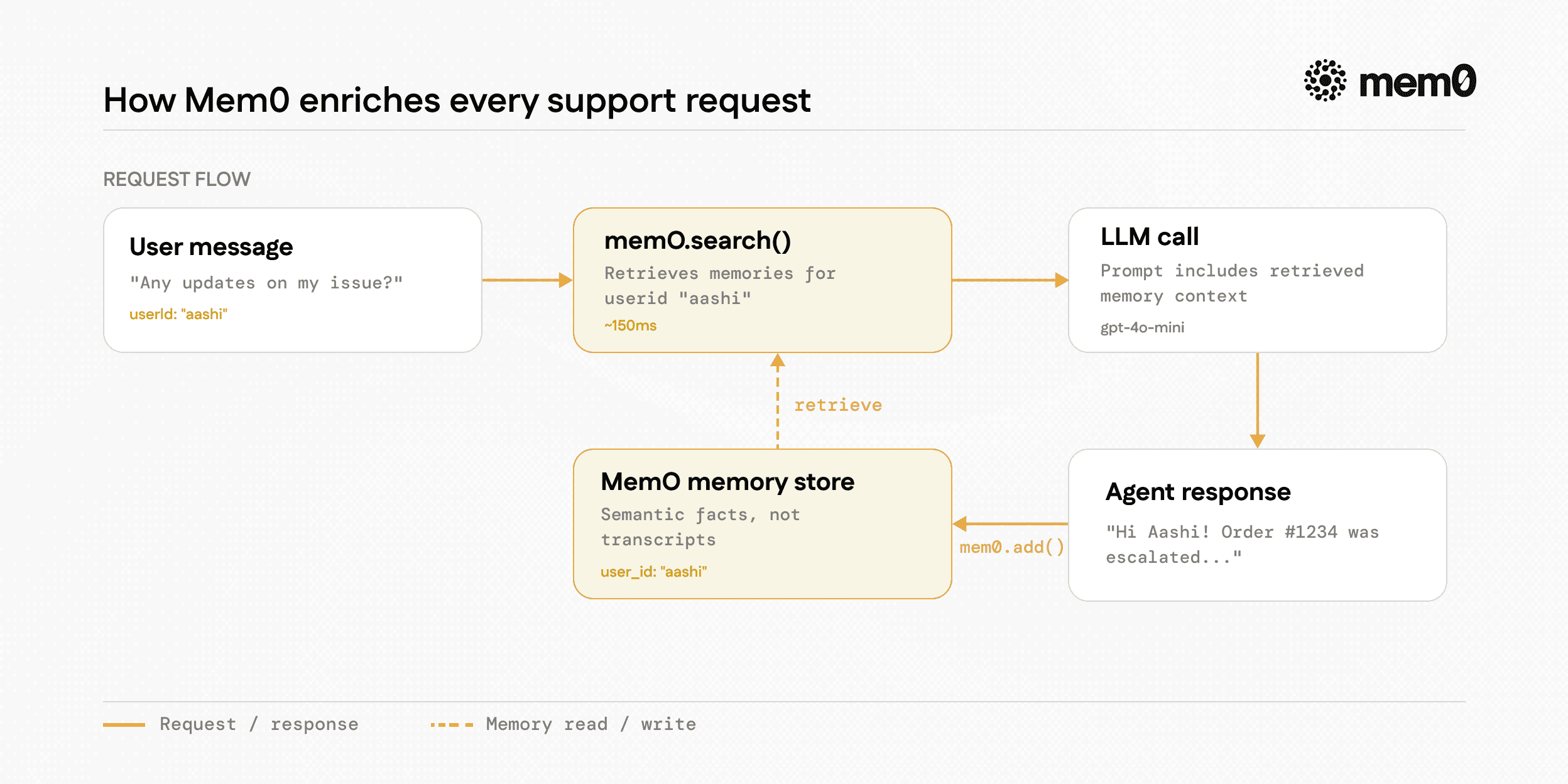
Fig: How Mem0 stores every support request
From a support conversation, Mem0 might extract and store:
“User reported missing order #1234 on [date].”
“User prefers email updates over SMS.”
“Issue was escalated to priority review on [date].”
“User email confirmed as [email protected]”
“User located in California, international shipping not applicable.”
This is what makes retrieval accurate. When a user asks, “Any update on my thing?” three days later, mem0.search() matches “any update” against those structured facts and returns the order and escalation details - not a 2,000-token conversation dump. Learn more about how Mem0 memory extraction works.
💡The full code is on GitHub.
If you’re building in production, Mem0’s managed platform handles memory storage, retrieval, and scaling automatically. Start free at app.mem0.ai.
What’s Next?
You now have a support agent who actually remembers. The userId-scoped memory pattern you built here extends directly into more complex architectures. If you’re building systems where multiple agents share context - a triage agent, a resolution agent, and an escalation agent all working from the same user memory pool - see multi-agent memory patterns for how to structure that.
If you’re doing local AI development and want persistent memory in your IDE or local workflows, OpenMemory MCP is built for exactly that. One integration, memory that follows you across tools.
Your users explained their problem once. Make sure your agent never makes them do it again.
Frequently Asked Questions
Does this work with LLMs other than OpenAI?
Yes. Mem0 is model-agnostic - it handles memory storage and retrieval independently of your generation layer. Swap OpenAI for Anthropic, Mistral, Groq, or any provider that has a chat completions interface. The memory pipeline stays identical. Just replace the openai.chat.completions.create() call with your preferred client.
How do I scope memory to multiple users?
Pass a unique user_id for each user to every mem0.search() and mem0.add() call - which is exactly what this tutorial does. Mem0 keeps each user’s memory fully isolated. For multi-agent architectures where agents share memory pools across users, see multi-agent memory patterns.
Does Mem0 add noticeable latency?
In practice, no. mem0.search() typically runs in 100-200ms. The LLM call itself takes 500-2000ms. If you structure your route to run memory retrieval in parallel with any other async work usingPromise.all(), the net overhead on your route’s total response time is negligible.
Can I use this with the Vercel AI SDK?
Yes. Replace the openai.chat.completions.create() call with the Vercel AI SDK’s streamText() or generateText() functions. Mem0’s search() and add() calls sit outside the generation call, so they slot in cleanly regardless of which client you use for generation. The memory injection pattern - retrieve before LLM, store after response - stays the same.
What if a user clears their browser or switches devices?
Nothing changes. Mem0 stores memory server-side, scoped touserId, not to a browser session or device. A user who reports an issue on their phone, clears their browser cache, and follows up from their laptop will still get context-aware responses - as long as your app resolves to the same userId for that user across all surfaces.