Miscellaneous

Miscellaneous

Programmatic Memory Management for AI Agents with Mem0

Programmatic Memory Management for AI Agents with Mem0

Production AI agents do not fail because they lack a context window. They fail because their memories grow unstructured, stale, and noisy over time.

Mem0 gives agents long term memory that persists across sessions. For teams already using Mem0, the next step is not storing more data, it is managing that data programmatically. That means predictable ways to search, update, and delete memories in response to agent actions and user behavior.

This post focuses on that operational layer. It covers how Mem0 models memories, how search and update work, how to implement soft and hard deletes, and how to keep memories healthy as agents scale.

How Mem0 models memories?
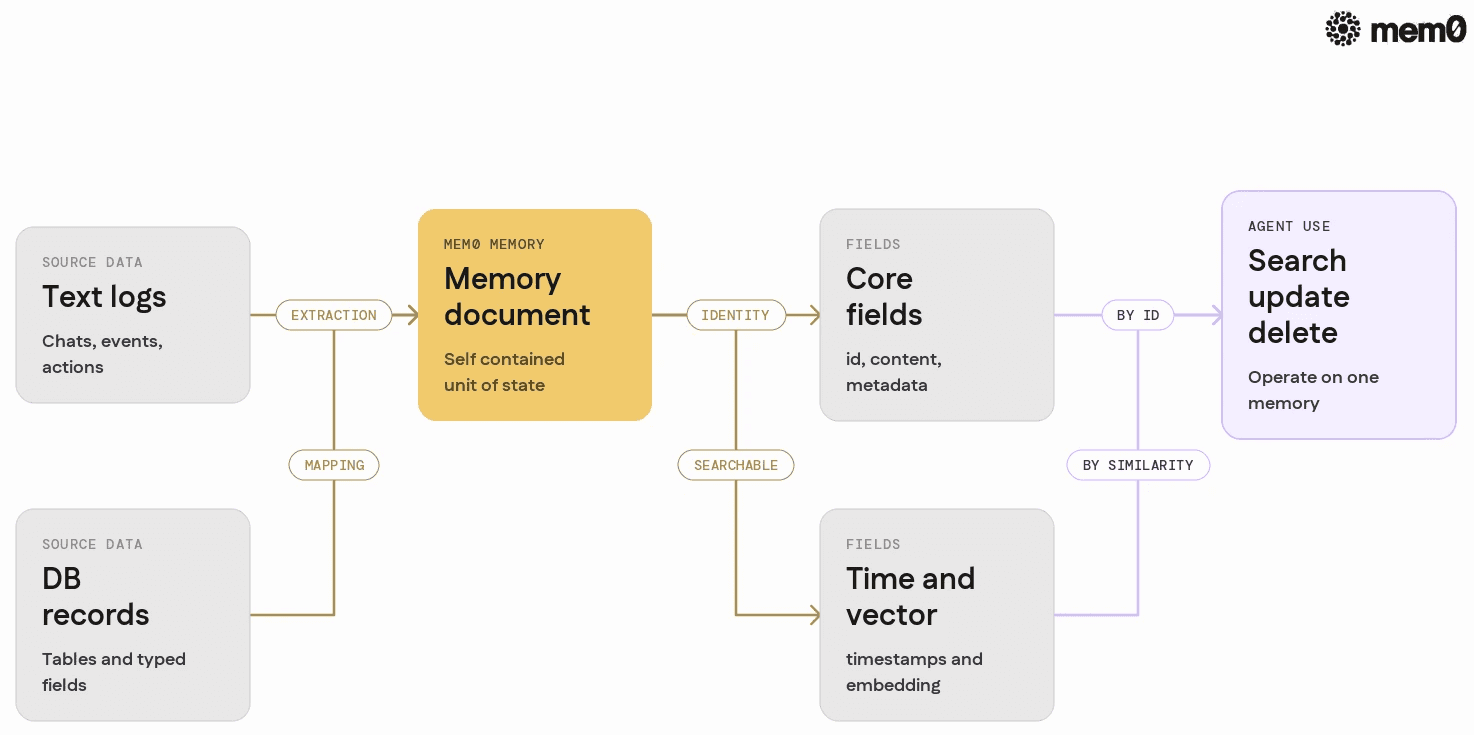
Shows how Mem0 memory documents sit between raw logs and structured records, highlighting fields that support search, update, and delete.

Mem0 stores each memory as a small, self contained document that sits between structured database records and raw text logs. Different providers have slightly different schemas, but the core fields follow a common pattern:

  • id: unique identifier for the memory

  • content: actual text of the memory

  • metadata: JSON object that can include user ID, tags, source, timestamps, and domain specific fields

  • created_at and updated_at: temporal boundaries

  • embedding or vector field: for semantic search

  • score or similarity indicators: returned in search results

Mem0 treats these records as independent units. Each memory can be searched, updated, and deleted without touching others. That matches the way agents think in practice. For example, an agent might store:

  • Preferences: "User prefers to be emailed in the morning"

  • Facts: "User lives in Berlin"

  • Events: "User ordered product X on 2026-06-12"

Programmatic management means the agent can find and modify these units when new information arrives, instead of writing a new global summary every time.

Core operations: search, update, delete
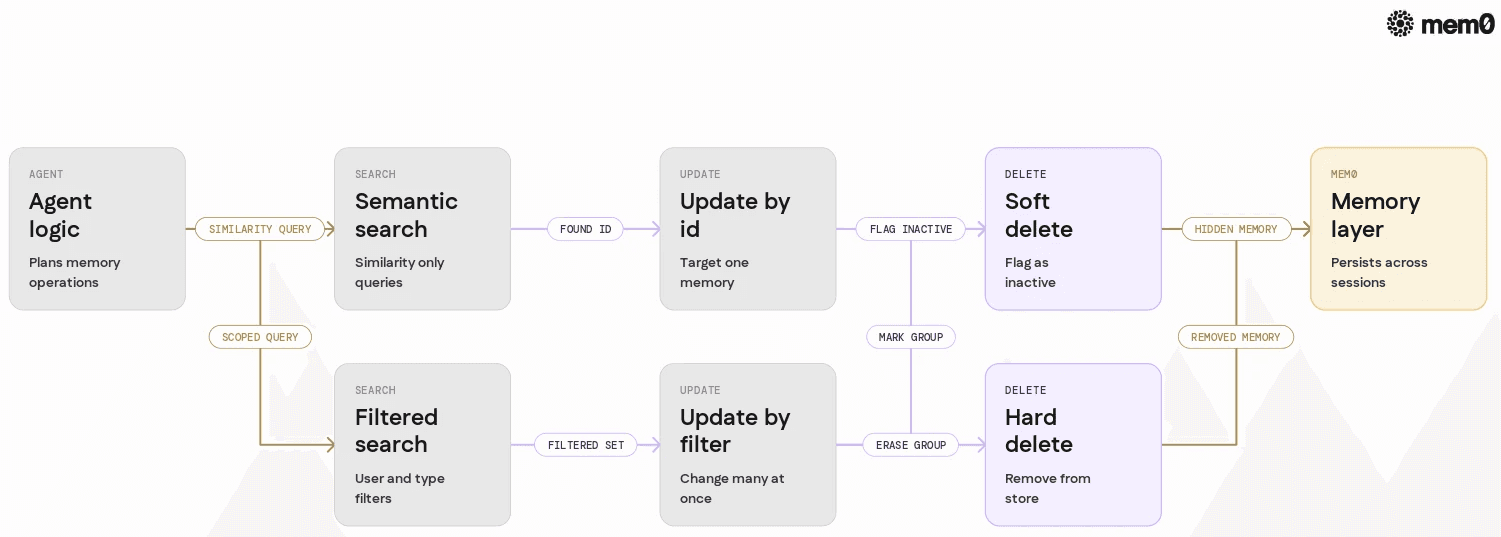
Summarizes the six core behaviors Mem0 exposes for agents and shows how search, update, and delete connect in a single operational flow.

From an API perspective, production agents usually need six concrete behaviors:

  1. Search by semantic similarity

  2. Search with filters (user ID, tags, time ranges)

  3. Update a single memory by ID

  4. Update a group of memories by filter criteria

  5. Soft delete so the memory stops influencing the agent but remains recoverable

  6. Hard delete for compliance and data minimization

Mem0 exposes these behaviors through its Python client and REST API. The core design is intentionally simple so agents can do memory management inside normal control flows, not as a separate subsystem.

The rest of this post uses Python examples, but the same patterns apply in other languages as long as you follow the same API surfaces.

Setting up Mem0 for programmatic control

Mem0 already supports automatic memory extraction from conversations. To manage memories, agents need slightly more explicit control over the client.

A minimal Python setup looks like this:

👉Wanna give it a try? Get a Mem0 API Key and try it yourself.

import os
from mem0 import MemoryClient

# Configure your Mem0 API key
os.environ["MEM0_API_KEY"] = "YOUR_API_KEY"

# Initialize the client
mem_client = MemoryClient()
import os
from mem0 import MemoryClient

# Configure your Mem0 API key
os.environ["MEM0_API_KEY"] = "YOUR_API_KEY"

# Initialize the client
mem_client = MemoryClient()
import os
from mem0 import MemoryClient

# Configure your Mem0 API key
os.environ["MEM0_API_KEY"] = "YOUR_API_KEY"

# Initialize the client
mem_client = MemoryClient()

For self hosted deployments, the initialization call can include custom base URLs and authentication. Many teams wrap MemoryClient in their own repository class that enforces domain specific constraints such as tenant separation or allowed metadata keys.

Once initialized, the same client can create, search, update, and delete memories across sessions. That makes it easy to keep memory management logic centralized and testable.

Creating structured memories with metadata

Programmatic management works best when memories carry enough metadata to be filtered later. That means storing user IDs, memory types, and sometimes application specific fields.

A typical pattern:

def store_user_preference(user_id: str, preference_text: str):
    memory = mem_client.add(
        content=preference_text,
        metadata={
            "user_id": user_id,
            "type": "preference",
            "source": "agent_inference",
        }
    )
    return memory["id"]
def store_user_preference(user_id: str, preference_text: str):
    memory = mem_client.add(
        content=preference_text,
        metadata={
            "user_id": user_id,
            "type": "preference",
            "source": "agent_inference",
        }
    )
    return memory["id"]
def store_user_preference(user_id: str, preference_text: str):
    memory = mem_client.add(
        content=preference_text,
        metadata={
            "user_id": user_id,
            "type": "preference",
            "source": "agent_inference",
        }
    )
    return memory["id"]

This gives you a concrete id to work with later and metadata that supports scoped search. The same function can be used inside agents whenever they infer new preferences or facts.

If your agent creates many small memories, consider aligning metadata with your domain model. For example, add topic, importance, or ttl fields that will inform later cleanup and search strategies.

Searching memories with semantic and structured filters

Search is the primary tool for operational memory control. Mem0 combines embedding search with filters so agents can retrieve only relevant memories for a specific user or task.

A typical query pattern:

def search_user_memories(user_id: str, query: str, limit: int = 5):
    results = mem_client.search(
        query=query,
        filters={
            "user_id": user_id,
        },
        limit=limit,
    )
    return results
def search_user_memories(user_id: str, query: str, limit: int = 5):
    results = mem_client.search(
        query=query,
        filters={
            "user_id": user_id,
        },
        limit=limit,
    )
    return results
def search_user_memories(user_id: str, query: str, limit: int = 5):
    results = mem_client.search(
        query=query,
        filters={
            "user_id": user_id,
        },
        limit=limit,
    )
    return results

This function gives an agent access to user specific memories that match the semantic query. For example, if the query is "contact preferences", the search may return previous statements such as "User prefers SMS over email."

You can layer more filters:

results = mem_client.search(
    query="payment method",
    filters={
        "user_id": user_id,
        "type": "preference",
    },
    limit=10,
)
results = mem_client.search(
    query="payment method",
    filters={
        "user_id": user_id,
        "type": "preference",
    },
    limit=10,
)
results = mem_client.search(
    query="payment method",
    filters={
        "user_id": user_id,
        "type": "preference",
    },
    limit=10,
)

Combining semantic and metadata filters lets agents reason with precise subsets of memories. It also prevents cross user contamination in multi tenant systems and supports targeted updates.

Updating memories in response to new information

Memories are not static. Agents should adjust them when user behavior changes or new information conflicts with old state.

Mem0 supports updates by memory ID, which is the most reliable way to modify a specific record. A basic pattern:

def update_memory_content(memory_id: str, new_content: str):
    updated = mem_client.update(
        id=memory_id,
        content=new_content,
    )
    return updated
def update_memory_content(memory_id: str, new_content: str):
    updated = mem_client.update(
        id=memory_id,
        content=new_content,
    )
    return updated
def update_memory_content(memory_id: str, new_content: str):
    updated = mem_client.update(
        id=memory_id,
        content=new_content,
    )
    return updated

This works when the agent already knows which memory to change. In practice, agents often need to search first, then update. For example, to update a user's contact preference:

def upsert_contact_preference(user_id: str, new_preference: str):
    # Step 1: search existing preference memories
    existing = mem_client.search(
        query="contact preference",
        filters={
            "user_id": user_id,
            "type": "preference",
        },
        limit=1,
    )

    if existing:
        # Step 2: update the first matching memory
        memory_id = existing[0]["id"]
        return mem_client.update(
            id=memory_id,
            content=new_preference,
            metadata={
                **existing[0]["metadata"],
                "updated_by": "agent",
            },
        )
    else:
        # Step 3: create a new memory
        return mem_client.add(
            content=new_preference,
            metadata={
                "user_id": user_id,
                "type": "preference",
                "source": "agent_inference",
            },
        )
def upsert_contact_preference(user_id: str, new_preference: str):
    # Step 1: search existing preference memories
    existing = mem_client.search(
        query="contact preference",
        filters={
            "user_id": user_id,
            "type": "preference",
        },
        limit=1,
    )

    if existing:
        # Step 2: update the first matching memory
        memory_id = existing[0]["id"]
        return mem_client.update(
            id=memory_id,
            content=new_preference,
            metadata={
                **existing[0]["metadata"],
                "updated_by": "agent",
            },
        )
    else:
        # Step 3: create a new memory
        return mem_client.add(
            content=new_preference,
            metadata={
                "user_id": user_id,
                "type": "preference",
                "source": "agent_inference",
            },
        )
def upsert_contact_preference(user_id: str, new_preference: str):
    # Step 1: search existing preference memories
    existing = mem_client.search(
        query="contact preference",
        filters={
            "user_id": user_id,
            "type": "preference",
        },
        limit=1,
    )

    if existing:
        # Step 2: update the first matching memory
        memory_id = existing[0]["id"]
        return mem_client.update(
            id=memory_id,
            content=new_preference,
            metadata={
                **existing[0]["metadata"],
                "updated_by": "agent",
            },
        )
    else:
        # Step 3: create a new memory
        return mem_client.add(
            content=new_preference,
            metadata={
                "user_id": user_id,
                "type": "preference",
                "source": "agent_inference",
            },
        )

This upsert pattern keeps one authoritative record for each preference. It prevents duplication and reduces the risk of conflicting memories in later search calls.

For more complex domains, consider versioning inside metadata. For instance, store version, confidence, or last_confirmed_at so agents can control how they treat older data.

Soft delete and hard delete patterns
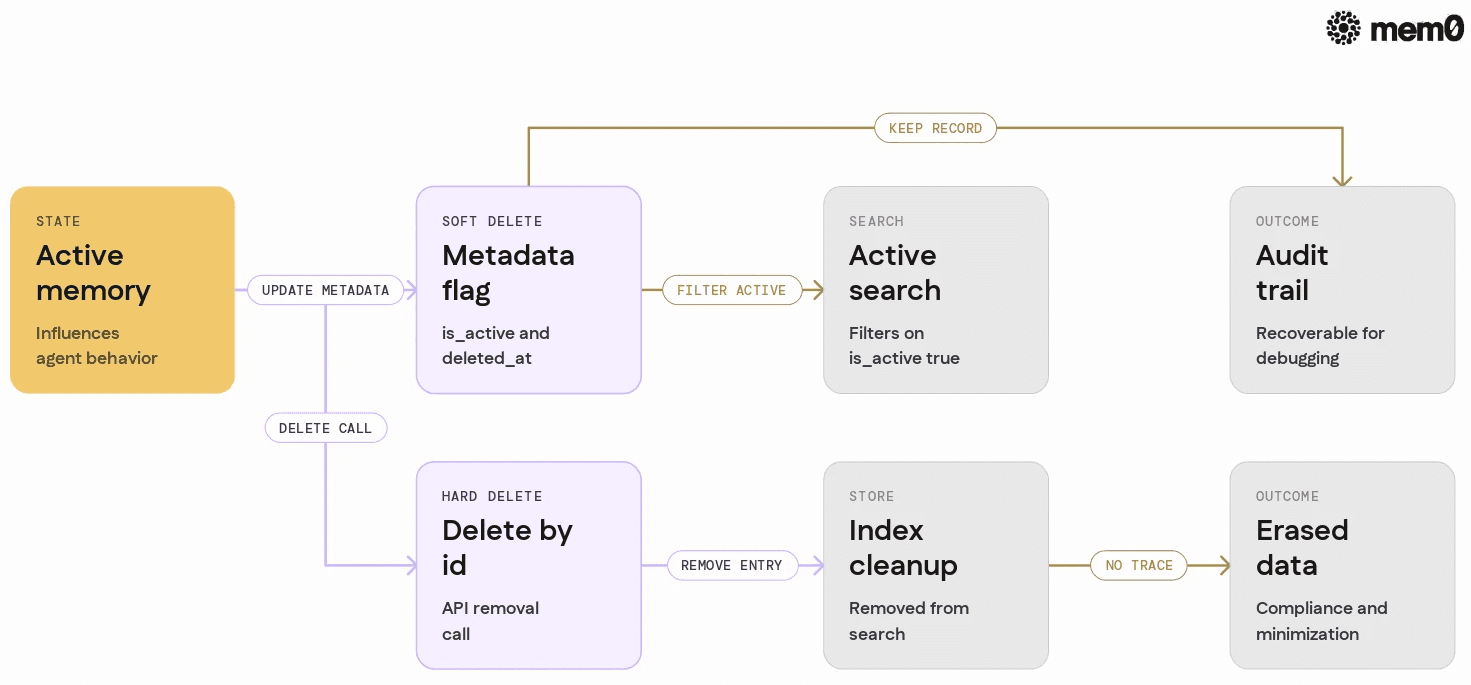
Compares soft delete and hard delete as two parallel paths from the same memory, clarifying flags, search behavior, and compliance outcomes.

Delete is where memory management intersects with security and compliance. Most teams need both soft and hard delete patterns.

Soft delete means stopping the memory from affecting the agent while keeping it available for audit or recovery. Hard delete removes the record entirely.

Mem0 does not enforce a single delete strategy. Instead, teams implement soft delete at the application layer using metadata and filters, and use the API to hard delete when required.

Soft delete with metadata flags

Soft delete is usually a metadata field such as is_active or deleted_at. The agent then filters out inactive memories in search calls.

For example:

def soft_delete_memory(memory_id: str):
    # Retrieve existing memory details
    existing = mem_client.get(id=memory_id)

    if not existing:
        return None

    return mem_client.update(
        id=memory_id,
        metadata={
            **existing["metadata"],
            "is_active": False,
            "deleted_at": existing.get("deleted_at") or existing["updated_at"],
        },
    )
def soft_delete_memory(memory_id: str):
    # Retrieve existing memory details
    existing = mem_client.get(id=memory_id)

    if not existing:
        return None

    return mem_client.update(
        id=memory_id,
        metadata={
            **existing["metadata"],
            "is_active": False,
            "deleted_at": existing.get("deleted_at") or existing["updated_at"],
        },
    )
def soft_delete_memory(memory_id: str):
    # Retrieve existing memory details
    existing = mem_client.get(id=memory_id)

    if not existing:
        return None

    return mem_client.update(
        id=memory_id,
        metadata={
            **existing["metadata"],
            "is_active": False,
            "deleted_at": existing.get("deleted_at") or existing["updated_at"],
        },
    )

Then ensure search functions respect this flag:

def search_active_user_memories(user_id: str, query: str, limit: int = 5):
    results = mem_client.search(
        query=query,
        filters={
            "user_id": user_id,
            "is_active": True,
        },
        limit=limit,
    )
    return results
def search_active_user_memories(user_id: str, query: str, limit: int = 5):
    results = mem_client.search(
        query=query,
        filters={
            "user_id": user_id,
            "is_active": True,
        },
        limit=limit,
    )
    return results
def search_active_user_memories(user_id: str, query: str, limit: int = 5):
    results = mem_client.search(
        query=query,
        filters={
            "user_id": user_id,
            "is_active": True,
        },
        limit=limit,
    )
    return results

This keeps soft deleted memories out of the live agent context while retaining them for debugging or analytics where appropriate.

Hard delete for irrecoverable removal

Hard delete is needed for regulatory compliance, user requests to erase data, or internal data minimization. Mem0 supports deletion by ID.

A simple pattern:

def hard_delete_memory(memory_id: str):
    # Permanently remove the memory
    response = mem_client.delete(id=memory_id)
    return response
def hard_delete_memory(memory_id: str):
    # Permanently remove the memory
    response = mem_client.delete(id=memory_id)
    return response
def hard_delete_memory(memory_id: str):
    # Permanently remove the memory
    response = mem_client.delete(id=memory_id)
    return response

To handle many memories at once, search first then delete in a loop. For example, remove all memories associated with a user:

def hard_delete_user_memories(user_id: str, batch_size: int = 100):
    while True:
        memories = mem_client.search(
            query="*",
            filters={"user_id": user_id},
            limit=batch_size,
        )
        if not memories:
            break

        for m in memories:
            mem_client.delete(id=m["id"])
def hard_delete_user_memories(user_id: str, batch_size: int = 100):
    while True:
        memories = mem_client.search(
            query="*",
            filters={"user_id": user_id},
            limit=batch_size,
        )
        if not memories:
            break

        for m in memories:
            mem_client.delete(id=m["id"])
def hard_delete_user_memories(user_id: str, batch_size: int = 100):
    while True:
        memories = mem_client.search(
            query="*",
            filters={"user_id": user_id},
            limit=batch_size,
        )
        if not memories:
            break

        for m in memories:
            mem_client.delete(id=m["id"])

This pattern gives agents fine grained control over what data remains in the system, which is critical for long running agent deployments.

Comparison of search, update, and delete strategies

Different teams adopt different patterns for memory management. The table below compares common strategies and how Mem0 fits into each.

Pattern

Description

Mem0 support level

Recommended use case

Semantic search only

Retrieve memories by embedding similarity

Native API support

Quick prototyping, low metadata needs

Search with metadata filters

Combine semantic search with JSON filters

Native API support

Multi tenant apps, scoped retrieval

Direct update by ID

Modify content or metadata for a single record

Native API support

Deterministic updates, specific fixes

Upsert via search then update/add

Search for existing record, update or create

Implemented in client code

Preference and fact management

Soft delete via metadata flags

Mark memory inactive, exclude from future search

Implemented in client code

Reversible removal, audit trails

Hard delete via ID

Permanently remove memory

Native API support

Compliance, data minimization

Mem0 is intentionally opinionated about search and basic update, and flexible about higher level patterns. That lets teams control memory lifecycles without fighting a rigid abstraction.

Putting it together in a production agent workflow

To illustrate how these pieces fit, consider a support agent that builds a profile of each user. The agent needs to:

  • Store user preferences inferred from chats

  • Update preferences when users correct it

  • Ignore outdated or user revoked preferences

  • Completely erase user data on request

A cohesive implementation might look like this:

class UserMemoryManager:
    def __init__(self, mem_client: MemoryClient):
        self.mem_client = mem_client

    def _search_preference(self, user_id: str, topic: str):
        return self.mem_client.search(
            query=topic,
            filters={"user_id": user_id, "type": "preference", "is_active": True},
            limit=1,
        )

    def upsert_preference(self, user_id: str, topic: str, value: str):
        existing = self._search_preference(user_id, topic)

        content = f"{topic}: {value}"

        if existing:
            memory = existing[0]
            return self.mem_client.update(
                id=memory["id"],
                content=content,
                metadata={
                    **memory["metadata"],
                    "updated_by": "agent",
                },
            )

        return self.mem_client.add(
            content=content,
            metadata={
                "user_id": user_id,
                "type": "preference",
                "topic": topic,
                "is_active": True,
                "source": "agent_inference",
            },
        )

    def deactivate_preference(self, user_id: str, topic: str):
        existing = self._search_preference(user_id, topic)
        if not existing:
            return None

        memory = existing[0]
        return self.mem_client.update(
            id=memory["id"],
            metadata={
                **memory["metadata"],
                "is_active": False,
                "deleted_by": "user_request",
            },
        )

    def erase_user(self, user_id: str):
        # Hard delete all memories for a user
        while True:
            batch = self.mem_client.search(
                query="*",
                filters={"user_id": user_id},
                limit=100,
            )
            if not batch:
                break

            for m in batch:
                self.mem_client.delete(id=m["id"])
class UserMemoryManager:
    def __init__(self, mem_client: MemoryClient):
        self.mem_client = mem_client

    def _search_preference(self, user_id: str, topic: str):
        return self.mem_client.search(
            query=topic,
            filters={"user_id": user_id, "type": "preference", "is_active": True},
            limit=1,
        )

    def upsert_preference(self, user_id: str, topic: str, value: str):
        existing = self._search_preference(user_id, topic)

        content = f"{topic}: {value}"

        if existing:
            memory = existing[0]
            return self.mem_client.update(
                id=memory["id"],
                content=content,
                metadata={
                    **memory["metadata"],
                    "updated_by": "agent",
                },
            )

        return self.mem_client.add(
            content=content,
            metadata={
                "user_id": user_id,
                "type": "preference",
                "topic": topic,
                "is_active": True,
                "source": "agent_inference",
            },
        )

    def deactivate_preference(self, user_id: str, topic: str):
        existing = self._search_preference(user_id, topic)
        if not existing:
            return None

        memory = existing[0]
        return self.mem_client.update(
            id=memory["id"],
            metadata={
                **memory["metadata"],
                "is_active": False,
                "deleted_by": "user_request",
            },
        )

    def erase_user(self, user_id: str):
        # Hard delete all memories for a user
        while True:
            batch = self.mem_client.search(
                query="*",
                filters={"user_id": user_id},
                limit=100,
            )
            if not batch:
                break

            for m in batch:
                self.mem_client.delete(id=m["id"])
class UserMemoryManager:
    def __init__(self, mem_client: MemoryClient):
        self.mem_client = mem_client

    def _search_preference(self, user_id: str, topic: str):
        return self.mem_client.search(
            query=topic,
            filters={"user_id": user_id, "type": "preference", "is_active": True},
            limit=1,
        )

    def upsert_preference(self, user_id: str, topic: str, value: str):
        existing = self._search_preference(user_id, topic)

        content = f"{topic}: {value}"

        if existing:
            memory = existing[0]
            return self.mem_client.update(
                id=memory["id"],
                content=content,
                metadata={
                    **memory["metadata"],
                    "updated_by": "agent",
                },
            )

        return self.mem_client.add(
            content=content,
            metadata={
                "user_id": user_id,
                "type": "preference",
                "topic": topic,
                "is_active": True,
                "source": "agent_inference",
            },
        )

    def deactivate_preference(self, user_id: str, topic: str):
        existing = self._search_preference(user_id, topic)
        if not existing:
            return None

        memory = existing[0]
        return self.mem_client.update(
            id=memory["id"],
            metadata={
                **memory["metadata"],
                "is_active": False,
                "deleted_by": "user_request",
            },
        )

    def erase_user(self, user_id: str):
        # Hard delete all memories for a user
        while True:
            batch = self.mem_client.search(
                query="*",
                filters={"user_id": user_id},
                limit=100,
            )
            if not batch:
                break

            for m in batch:
                self.mem_client.delete(id=m["id"])

This class encapsulates programmatic memory management for one domain. Agents can call into it during conversation flows. For example, when a user says "Stop emailing me," the agent calls deactivate_preference. When a user invokes a data deletion right, the agent calls erase_user.

Mem0 functions as the memory substrate behind this logic. It handles storage, search, and basic operations, while the application layer handles semantics and user specific policies.

Limitations of programmatic memory management patterns

Programmatic memory management solves operational problems but it does not remove every challenge. There are several limitations to be aware of.

  • Search and update logic can become complex as domains grow. If an agent stores unstructured or inconsistent metadata, filters may miss relevant memories or include the wrong ones. The patterns described here assume a disciplined schema that is enforced at write time.

  • Update by semantic search only works when queries and stored content are aligned. If the agent uses vague or overloaded topics, it may update the wrong memory. For critical domains, consider adding explicit keys or IDs in metadata instead of relying solely on embeddings.

  • Soft delete patterns are only effective if every search function respects the flags. In larger codebases, it is easy to introduce a new search path that ignores is_active or similar markers. That can expose revoked memories to agent context.

  • Hard delete operations must be consistent with your storage configuration. In distributed or self hosted deployments, deletion may have lag due to indexing or replication. For compliance scenarios, it is important to understand the actual data path and retention behavior.

  • Programmatic management assumes that agents can reliably infer when to update or delete. LLMs sometimes overcorrect or misinterpret user intent. Production deployments should include guardrails, confirmation prompts, or rule based triggers for sensitive memory changes.

Frequently Asked Questions

Q. How should existing Mem0 users start adding programmatic memory management?

The fastest path is to wrap Mem0 operations in a small repository or manager class for your domain. Start with search functions that include filters for user ID and memory type, then add update and delete methods that your agents can call. This keeps memory logic centralized and easier to audit.

Q. When should an agent use soft delete instead of hard delete?

Soft delete is best when information might be useful for internal analytics or debugging, but should not influence live agent behavior. Hard delete is necessary when users request erasure, policies require removal, or the data is sensitive enough that retention has no justified use. Many teams default to soft delete and reserve hard delete for explicit triggers.

Q. How does Mem0 help avoid conflicting or duplicated memories?

Mem0 provides fast search and targeted updates so agents can implement upsert patterns. By searching for existing memories on a topic and updating them instead of creating new ones, you can keep a single authoritative record for key facts and preferences. This reduces noise and improves retrieval quality over time.

Q. What filters should agents use for reliable scoped search?

At minimum, agents should filter by user ID or tenant and by an application specific type such as preference, fact, or event. Additional fields such as is_active, topic, or source help control which memories enter the context. Align filters with the metadata you store so each search call retrieves a predictable subset.

Q. How often should teams clean up or delete old memories?

Cleanup frequency depends on regulatory constraints and application behavior. Some teams run periodic jobs that soft delete or hard delete low value memories based on age, importance, or TTL metadata. Others rely on user actions and explicit agent triggers. Whatever schedule you choose, make sure it is implemented as code rather than manual operations.

Further Reading

Mem0 is an intelligent, open-source memory layer designed for LLMs and AI agents to provide long-term, personalized, and context-aware interactions across sessions.

Get your free API Key here: app.mem0.ai or self-host mem0 from our open source github repository.

GET TLDR from:

Summarize

Website/Footer

Summarize

Website/Footer

Summarize

Website/Footer

Summarize

Website/Footer