

·
12 min read
DiffusionGemma brings the Gemma family into the diffusion space, which means it pairs a text model with a diffusion image generator. For AI engineers building agents, this opens up a new class of workflows that mix reasoning and image synthesis.
In production settings, these agents rarely run single prompts. Instead, they coordinate multi-step pipelines. They need to remember user preferences, image histories, and system constraints across sessions. DiffusionGemma handles the modeling side. Mem0 provides the missing persistent memory layer.
This article explains how DiffusionGemma fits into agent architectures, how to wire it into a practical stack, where the pattern breaks, and how Mem0 helps maintain context across long-lived image workflows.
What is DiffusionGemma?
DiffusionGemma is a diffusion model stack tied to the Gemma ecosystem. At a high level, there are three main pieces:
A text encoder or LLM, often Gemma itself, that interprets prompts and instructions.
A diffusion backbone that produces images from text or conditional embeddings.
Utilities for guidance, conditioning, and control, such as classifier-free guidance or control hints.
This combination makes DiffusionGemma useful for:
Interactive image agents that refine outputs over multiple messages.
Design and marketing assistants that generate consistent assets.
Tools that reason about an image before or after generation.
To make this practical in production, agents must treat DiffusionGemma as one tool in a larger toolbox. The agent orchestrates user intent, constraints, and historical context. The model only handles a single generation step at a time.
How DiffusionGemma works in an agent loop
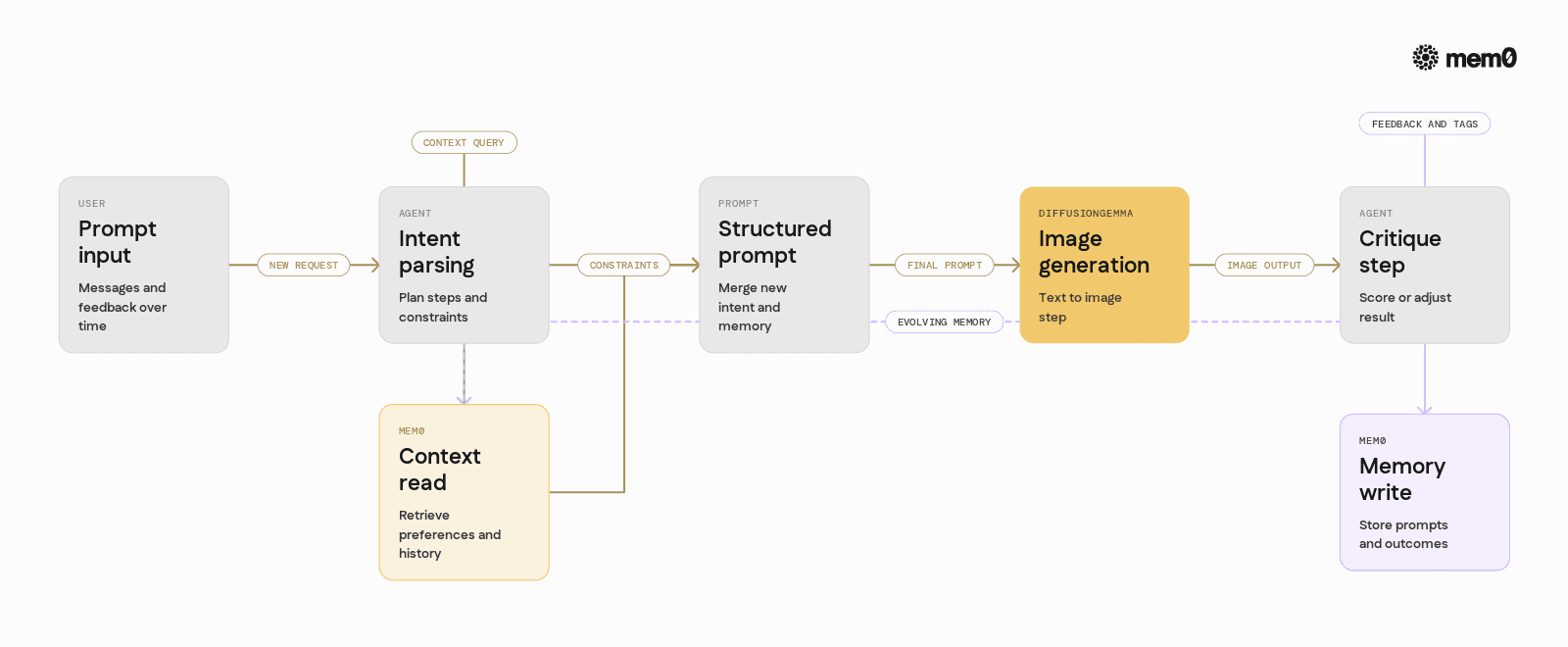
At inference time, a DiffusionGemma-powered agent follows a loop like this:
Parse user input and convert it to a structured prompt.
Combine user prompt with internal constraints, such as style or aspect ratio.
Encode text into embeddings using the text encoder.
Run the diffusion process to generate an image.
Evaluate or critique the image, either via another model or rules.
Store metadata about the generation and feedback for future steps.
This loop can run many times in a single session. For example, a user might say:
"Make a logo for my bakery, pastel colors"
"Now make it more minimal."
"Use the same style for a business card."
Each step relies on implicit context. The agent needs to remember what "same style" means, what image was generated previously, and what feedback the user gave.
Models like DiffusionGemma do not carry that context across calls. They treat each generation as a fresh request. To maintain continuity, the agent must store and retrieve context from an external memory system.
The core memory problem in diffusion agents
Diffusion agents face three distinct memory problems:
User preference memory: An agent should learn that a specific user likes certain colors, layouts, or levels of detail. Re-asking for preferences every session hurts experience and wastes tokens.
Asset lineage memory: Each image is part of a chain of edits. To support "revert to version 3" or "apply the changes from step 2 to a new product", the agent must know which prompt and parameters produced each image.
Cross-session project memory: Many visual projects span days or weeks. The agent must remember that a user is working on the "Summer Campaign" and that this involves particular brand rules and assets.
Traditional prompt engineering can only address memory within a single request. Storing everything in a database solves the persistence problem but introduces a retrieval problem. The agent must find the right piece of history without manual query design.
Mem0 focuses on this retrieval and organization problem, so diffusion agents can treat memory as a first-class component instead of a bolt-on.
Where DiffusionGemma stops, and the agent begins
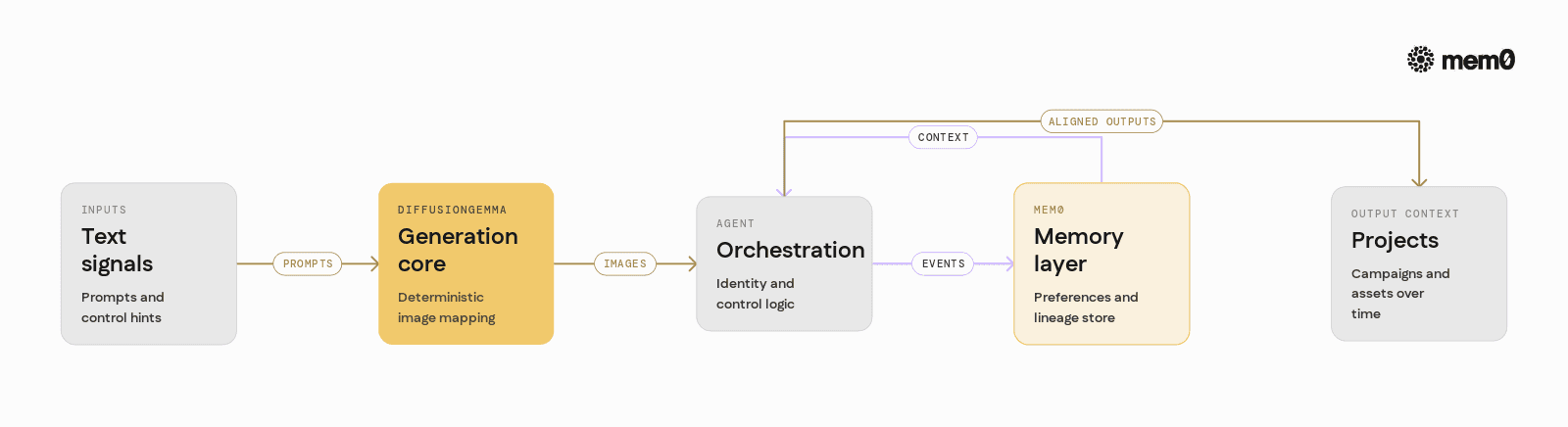
It is important to separate what DiffusionGemma handles from what the agent handles.
DiffusionGemma is responsible for:
Mapping conditioning text and optional image hints to an image.
Supporting fine-grained control through guidance scales and control signals.
Providing a repeatable, deterministic process for a given seed and prompt.
It is not responsible for:
Identifying user identities across sessions.
Aggregating feedback such as "too dark" or "more minimal" over time.
Tracking which combinations of prompts and parameters worked best for a specific user or project.
The agent wraps DiffusionGemma with:
Identity and session management.
Orchestration logic, such as when to regenerate versus refine.
Memory management, including storing prompts, parameters, and preferences.
Mem0 fits into this wrapping layer. It provides an abstraction around "memory" that lets the agent write in high-level events and then query them later based on semantic similarity, metadata, and context.
Mem0 for DiffusionGemma workflows
Mem0 is an open-source memory layer for LLMs and AI agents. For DiffusionGemma workflows, it covers three main needs:
Semantic storage of prompts and feedback: Every generation can store a compact record of user intent, model parameters, results, and feedback. Mem0 indexes these for semantic retrieval.
User-scoped memory: Each user or project can have isolated or shared memory spaces. The agent can query "what does this user usually ask for" without scanning raw logs.
Cross-tool consistency: If the same agent uses Gemma for reasoning and DiffusionGemma for images, Mem0 stores a unified memory that both tools can access. Text and image interactions share the same long-term context.
This lets the agent move from single-shot generation to continuous improvement. The first generation for a new user might be generic, but after five or ten interactions, Mem0 can surface preferences that drive more aligned images.
Example architecture for a DiffusionGemma and Mem0 agent
A typical production architecture might look like this:
Frontend sends user message and metadata to a backend agent service.
The agent:
Identifies the user and project.
Loads relevant memory from Mem0 based on that identity and current prompt.
Synthesizes a final prompt for DiffusionGemma that combines new intent and stored preferences.
The agent calls DiffusionGemma to generate an image.
The agent stores:
The prompt and parameters used.
The output image ID or URL.
Any explicit user feedback.
Derived tags such as detected style or palette.
Mem0 indexes these records for future retrieval.
This pattern keeps DiffusionGemma focused on generation, and it lets Mem0 act as a specialized log of "what has worked for this context before".
Below is a simplified Python example that shows how to wire Mem0 into such an agent loop.
Python example integrating Mem0 with DiffusionGemma
This example assumes:
DiffusionGemma is accessible as a pipeline, similar to other diffusion models.
Mem0 is installed and configured via API key or self-hosted URL.
So, go to app.mem0.ai, sign up for free, and copy your API key from the dashboard.
This script shows a simple pipeline:
Load relevant memories for a user.
Merge them into a new prompt.
Generate with DiffusionGemma.
Store the event for future retrieval.
In a real agent, the memory write step would also include user feedback, evaluation scores, and pointers to the stored image asset.
Comparing naive prompt history vs Mem0 backed memory
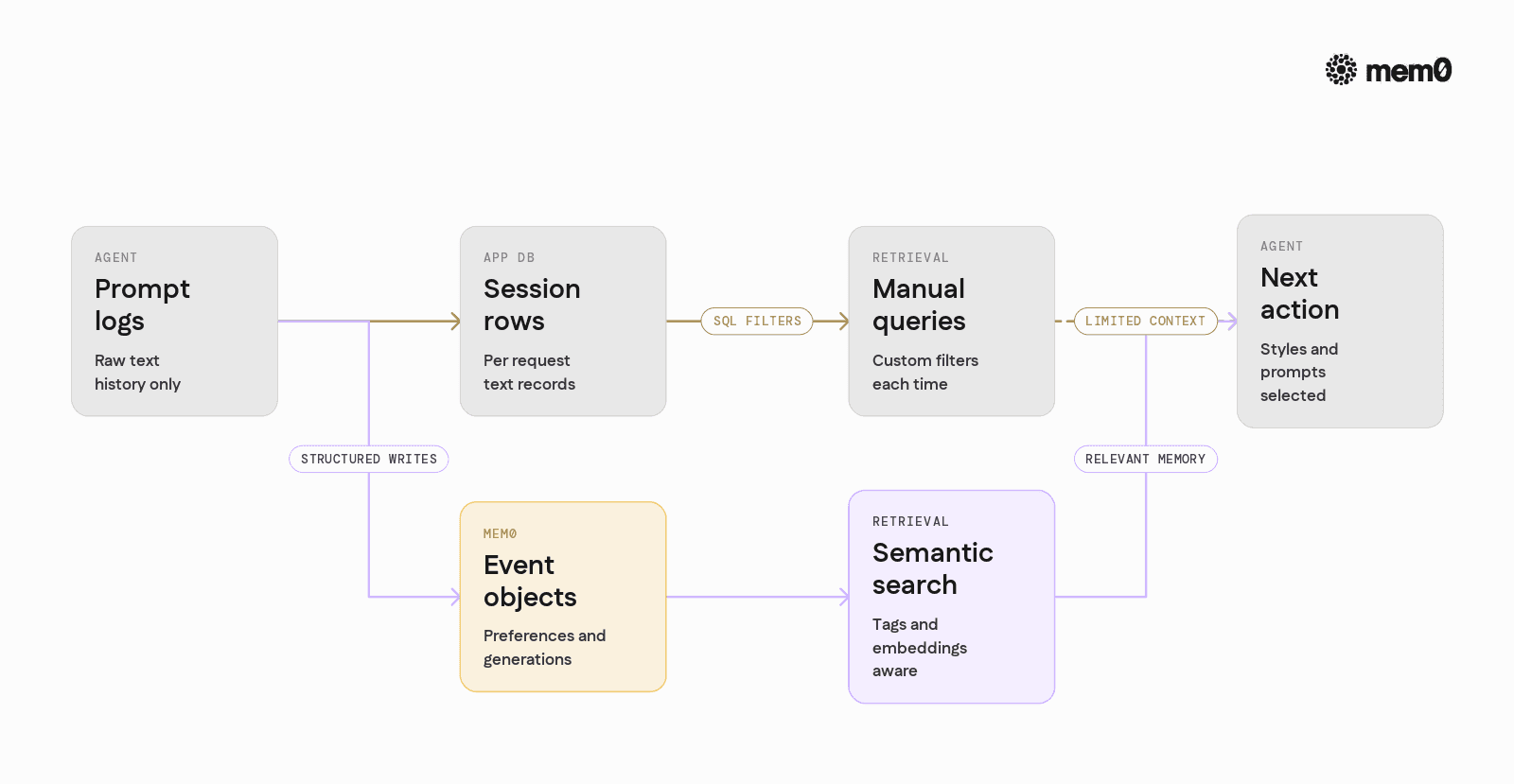
Many agents start with naive approaches for context. The table below compares a simple prompt history strategy with a Mem0-based memory layer for DiffusionGemma agents.
Aspect | Naive prompt history in app DB | Mem0 memory layer |
|---|---|---|
Storage schema | Raw text logs per session | Structured events with semantic indexing |
Retrieval | Manual SQL queries or simple filters | Semantic search with tags and metadata |
Cross-session awareness | Hard to link sessions | User and project level memory scopes |
Integration with LLMs | Need custom embedding logic | Built-in embeddings and retrieval tuned for LLMs |
Preference synthesis | Agent must parse logs manually | Agent queries "preferences" and gets structured data |
Multi-tool consistency | Each tool has separate logs | Shared memory across text, image, and other tools |
Mem0 does not replace the primary database. It sits beside it as a specialized store for semantically rich context that agents can query in natural language terms.
Patterns for user and project memory with DiffusionGemma
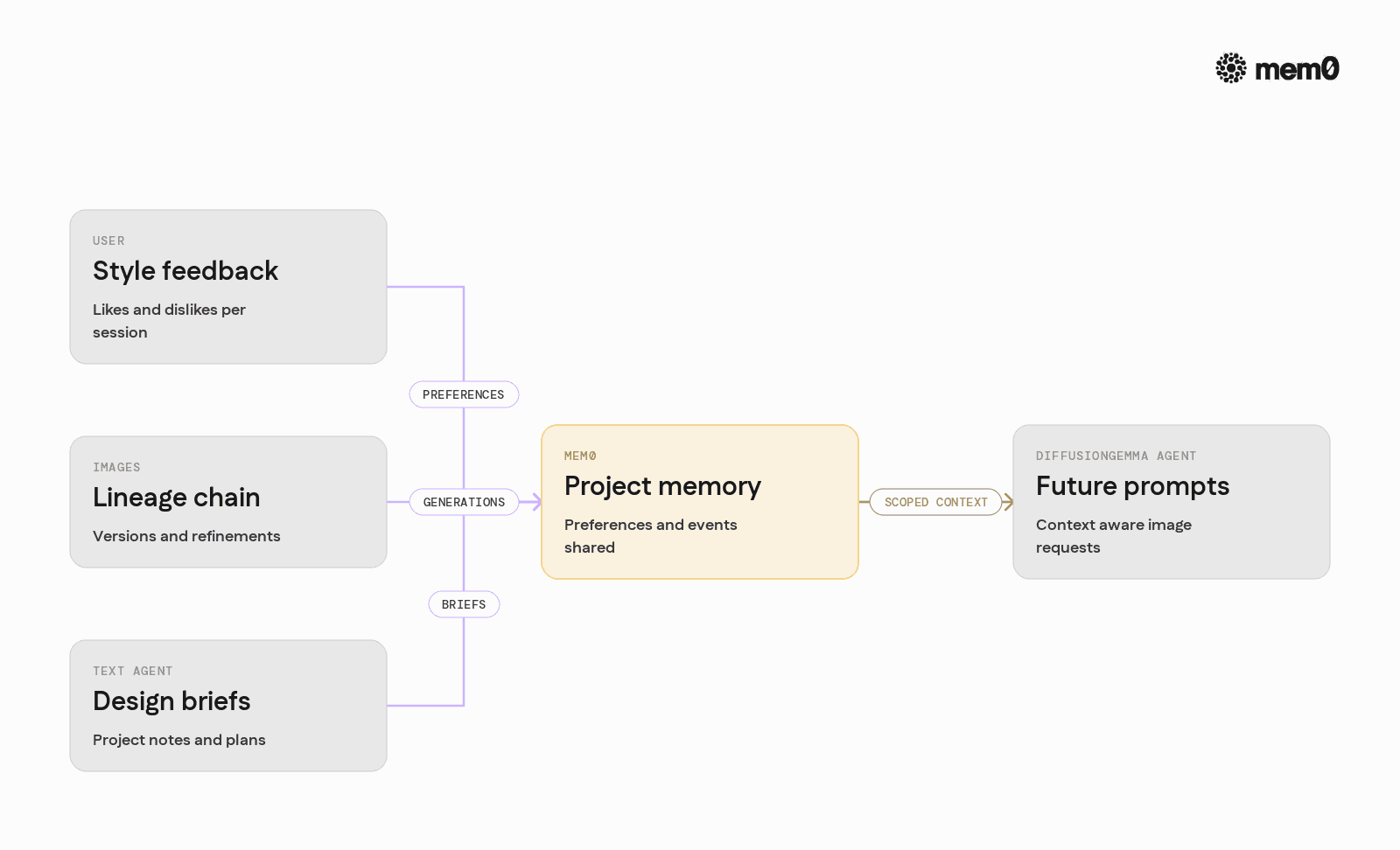
Mem0 supports multiple patterns that map well to diffusion agents.
User style profiles: Each time a user provides feedback like "too dark" or "more playful", the agent stores a preference memory:
Later, the agent queries for preferences by user and project and injects them into prompts.
Image lineage chains: When the agent generates an image, it stores a generation event with:
Prompt and final prompt.
Model version and parameters.
Parent image ID if it is a refinement.
Mem0 can then answer "what did we do two steps ago in this chain" or "find the last generation with a similar description".
Cross-channel memory: If a Gemma reasoning agent writes a text design brief and a DiffusionGemma tool generates images, both can store and retrieve from the same Mem0 space. This reduces duplication and keeps the concept of "project memory" unified.
These patterns let engineers move beyond simple prompt templates toward agents that adapt to each user over time.
Limitations of DiffusionGemma-based memory patterns
While this pattern is powerful, there are important limits and tradeoffs.
Prompt drift risk: Automatically injecting many preferences into prompts can cause unintended style drift. Engineers must design clear rules for when to apply preferences and how to weight them.
Evaluation bottlenecks: Agents that rely on automatic feedback or scoring to improve images over time need a reliable evaluator. If evaluation is slow or noisy, stored memory may encode poor signals.
Storage growth: Image workflows can produce many events per session. Without pruning or summarization, memory stores will grow quickly. Agents need retention and summarization policies.
Cold start behavior: New users and projects have no history. Agents must fall back to default prompts and only layer in memory once a basic preference profile exists. Handling this transition requires explicit design.
Latency sensitivity: Each memory search introduces latency. For real-time image previews, engineers may need to use cached preferences or local copies instead of full semantic searches on every step.
These limits are properties of the overall pattern, not of Mem0 or DiffusionGemma specifically. They apply to any architecture that uses persistent context to shape generative image behavior.
Frequently Asked Questions
Q. What is DiffusionGemma in the context of production agents?
DiffusionGemma refers to diffusion-based image models integrated with the Gemma ecosystem, typically paired with a text encoder or LLM. In production agents, it acts as the image generation tool that receives structured prompts and returns images, while the agent handles orchestration and memory.
Q. How does Mem0 help DiffusionGemma-based agents in practice?
Mem0 stores and retrieves structured memories about user preferences, past prompts, and generation outcomes. Agents can query Mem0 for relevant context before calling DiffusionGemma, which allows image generation behavior to adapt over time without manually engineered prompt rules for every scenario.
Q. When should an engineer introduce Mem0 into a DiffusionGemma workflow?
Mem0 becomes valuable once the agent needs to maintain consistency across sessions, users, or projects. If users expect the system to remember styles, campaigns, or feedback over multiple days, or if multiple tools share the same context, then a dedicated memory layer like Mem0 is appropriate.
Q. How does Mem0 differ from using a simple database for prompt history?
A simple database can store logs but does not provide semantic search and retrieval tuned for LLM and agent workflows. Mem0 focuses on representing memories as semantically searchable objects, with tags, metadata, and embeddings, which allows agents to query "what matters now" instead of manually crafting database queries.
Q. Can Mem0 store image data generated by DiffusionGemma?
Mem0 is best used to store structured metadata and references to images, such as URLs, IDs, prompts, and parameters. The actual image binaries typically live in object storage or a CDN, while Mem0 tracks how and why each image was created so agents can reason about them later.
Q. How should engineers handle latency when querying Mem0 before each generation?
For low-latency use cases, engineers can cache recent memories or user profiles on the application side and only refresh them from Mem0 periodically. Another strategy is to separate fast path generation, which uses cached preferences, from slower refinement flows that run full semantic queries against Mem0.
Further Reading
—
Mem0 is an intelligent, open-source memory layer designed for LLMs and AI agents to provide long-term, personalized, and context-aware interactions across sessions.
Get your free API Key here: app.mem0.ai, or
Self-host mem0 from our open-source GitHub repository.
—







Aashi Dutt
She is a senior technical content writer at Mem0. She covers agent memory architecture and the engineering decisions behind building agents that actually remember. She experiments with new features and turns research into posts developers can put straight to use.
Start building with memory
Free tier, no card