

·
14 min read
On this page
Quick Takeaways:
73% of customers expect to move between channels without having to repeat themselves. 53% of consumers say they always have to repeat their issue when transferred between agents.
The fix is one shared
user_idin Mem0 that all channel endpoints write to and read from. Channel identity is a routing concern. Memory identity is unified.Mem0’s scoping model (
user_id,agent_id,run_id) gives you precise control: cross-channel facts live atuser_idscope, session state lives atrun_idscope, and per-channel behavior tuning lives atagent_idscope.The demo in this post is a FastAPI backend with three endpoints (
POST /call,POST /email,POST /chat) and a Streamlit UI, all reading and writing the same memory store, with the customer’s email as the shared key.Memory extracted from a phone transcript is available in the next chat session automatically.
💡 You’ll need a free Mem0 API key to follow along. Get one at app.mem0.ai
Here is the scenario: A customer calls your support line, explains their billing issue for four minutes, and resolves the call. Three days later, they email about a receipt. The agent asks them to describe the issue again. That is what happens when your channels don’t share memory.
73% of customers expect to start on one channel and finish on another without repeating themselves(survey). 53% of consumers say they always have to repeat their issue when transferred between agents. Only 13% of companies report that customer data, history, and context carry over fully across interactions and channels (Deloitte’s 2024 GCS survey). The standard response is to invest in a unified CRM dashboard, give agents a better inbox, and call it omnichannel. This kind of system does nothing for the AI agent generating the response in real time.
In this blog, we’ll understand that whether you’re building an AI customer service bot or a full agent pipeline, you’ll end up with a FastAPI backend, three or more channel endpoints, and a Streamlit UI that all read and write the same Mem0 memory store.
Here is a glimpse of what we’ll build:
💡 You can review the full code on the GitHub repository.
Why siloed channels produce bad AI customer support agents
Most support architectures are multichannel, not omnichannel customer support. They’re available on multiple platforms (email, chat, phone), but each channel runs its own stack. Its own queue, its own agent prompt, and its own history store. When a customer switches, they’re starting over.
The difference between multichannel and omnichannel is whether context moves with the customer. In 2026, the main failure point is no longer channel access. It’s channel switching. Customers can usually find a way in. The problem is what happens when they move from a phone call to an email to a chat. If the AI agent only sees the current channel and not the customer’s history across all channels, it asks redundant questions, misses prior resolutions, and starts fresh every time.
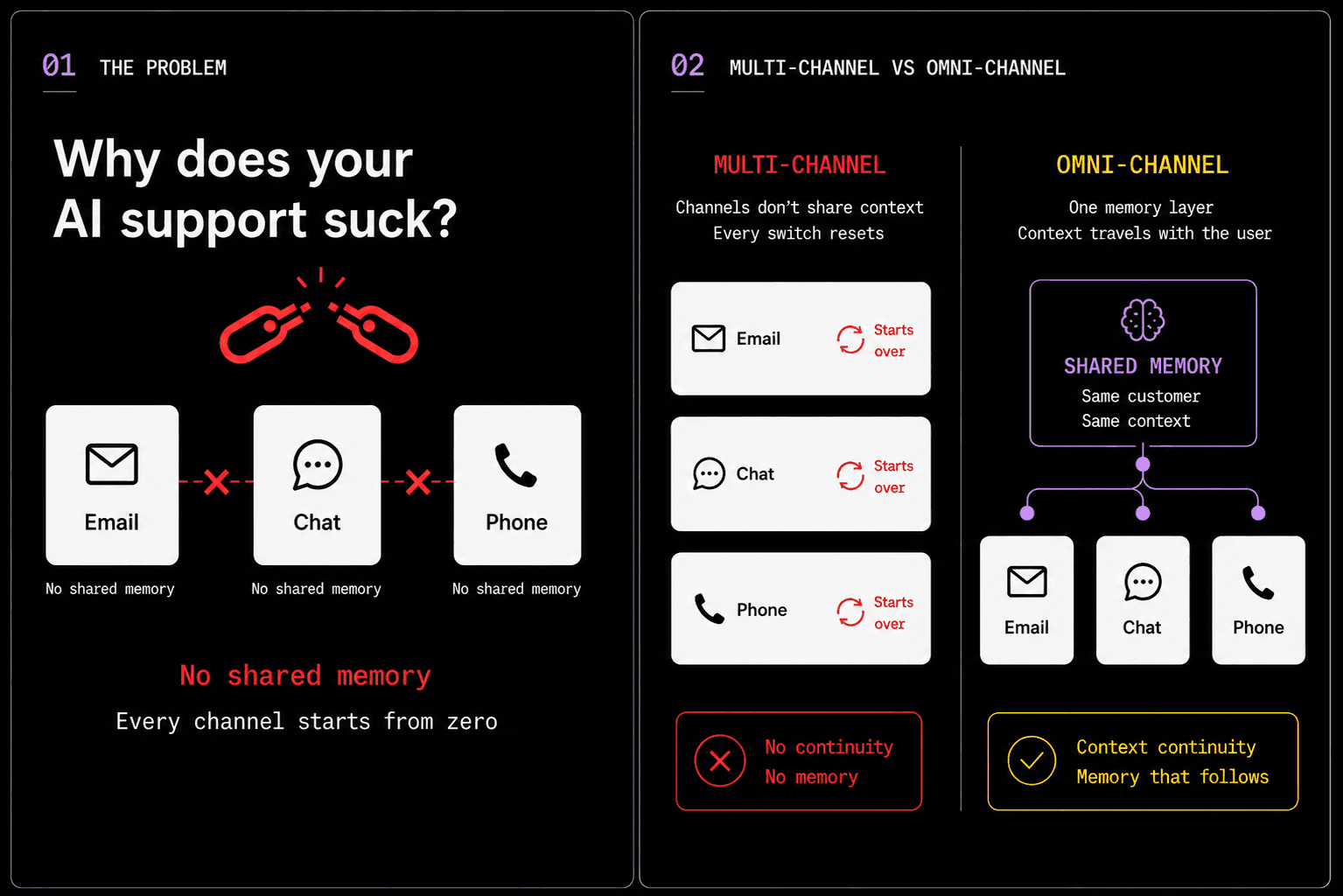
This is a memory architecture problem. A bigger context window doesn’t solve the cross-session problem: even 1M tokens only helps if the right history is in the window. When a customer switches channels, there’s no guarantee any prior history is present at all.
Four specific things break when channels are siloed:
Re-asking: The agent asks for information the customer already gave on another channel. This is the 53% problem.
Context mismatch: The email agent refers to a billing status the phone agent already resolved.
Tone drift: The phone call was urgent and empathetic. The chatbot reply is formal and generic. The customer feels like they’re talking to a different company.
Duplicate escalations: The chat agent escalates an issue the phone agent already escalated. Engineering gets two tickets about the same problem.
The fix is conceptually simple: Give every channel endpoint the same identity key and the same memory store. When the phone call ends, extract the facts. When the email comes in, extract more. When the chat opens, retrieve everything relevant. One user_id, all channels, shared retrieval.
How does Mem0 scope memory across channels?
Mem0‘s scoping model maps onto a multi-channel support use case. There are four identity dimensions available on every add() and search() call.
user_idis the cross-channel with cross-session scope. Facts stored here persist across every channel and every session for the user. This is where cross-channel support memory lives: “user is on the annual plan,” “payment failed on May 14,” “needs receipt for expense report.” Use the customer’s email as theuser_idso it resolves naturally across channels regardless of which one the customer used to contact you.agent_idis the per-channel-agent scope. The phone agent, email agent, and chat agent each get their ownagent_id. We pass it for agent-level provenance, but note that combininguser_idandagent_idfilters in a singlesearch()call can be tricky. For the practical channel audit trail,metadata={"channel": channel}is the more reliable tag.run_idis the session scope. It is useful for scoping a single conversation in-progress state, or for cleaning up a session’s temporary context after it closes. Pass arun_idper session if you need to isolate or expire session-level facts.app_idis the application-level scope. It is used ****for shared organizational context like product catalog, policy documents, and known bugs. Not used in this demo but useful in production when you want all agents to share institutional knowledge.
For a multi-channel support agent, the practical mapping looks like this:
Scope | What you store | Example |
|---|---|---|
| Cross-channel facts | “Annual plan, card 4821, $199 charge, May 14” |
| Agent-level provenance | Phone vs email vs chat agent. Use |
| In-session ephemeral state | Current chat session, this call’s draft response |
| Org-wide shared knowledge | Refund policy, known billing bugs, escalation paths |
One important constraint to know before writing any queries: Mem0’s search() requires entity parameters inside a filters={} dict, not as top-level keyword arguments. For cross-channel retrieval, always query at user_id scope.
💡 The multi-agent memory systems post documents the scoping model in full detail. Worth reading before you build anything beyond a single-agent setup.
The Architecture
The architecture has two layers. A FastAPI backend exposes three endpoints. A Streamlit UI runs the demo with a tab per channel. All three endpoints share the same user_id (the customer’s email) and the same Mem0 memory store.
The customer’s email is the shared memory key. The phone agent extracts it from the call transcript. The email agent reads it from the From: header. The chat agent asks for it on first contact, then uses it for all subsequent memory reads and writes.
Project structure
Setup
Fill in .env:
First, go to app.mem0.ai, sign up for free, and copy your API key from the dashboard.
Run the Streamlit demo:
💡The full code can be accessed on the GitHub repository.
Inside the FastAPI backend
The backend has three endpoints and a set of shared helpers. All memory reads and writes flow through two functions: store_memories() and retrieve_memories().
The shared memory helpers
Note: This is the retrieval step. In production, this runs before every agent response across every channel. Start free on Mem0 and store your first memories for free.
The metadata={"channel": channel} tag on every write is worth noting. It doesn’t affect retrieval (search() ignores metadata by default), but it lets you audit which channel contributed which facts in the Mem0 dashboard.
One note on the V3 API: add() can return an async queued response with status and event_id rather than a results list. The demo uses result.get("results", []) as a safe fallback, but don’t rely on a memory count for production logic.
POST /call - Ingest a voice transcript
The handle_call function receives a voice call transcript (as plain text) and stores extracted facts under the user’s cross-channel memory. The email is extracted from the transcript using a regex, then used as user_id.
Two things happen here:
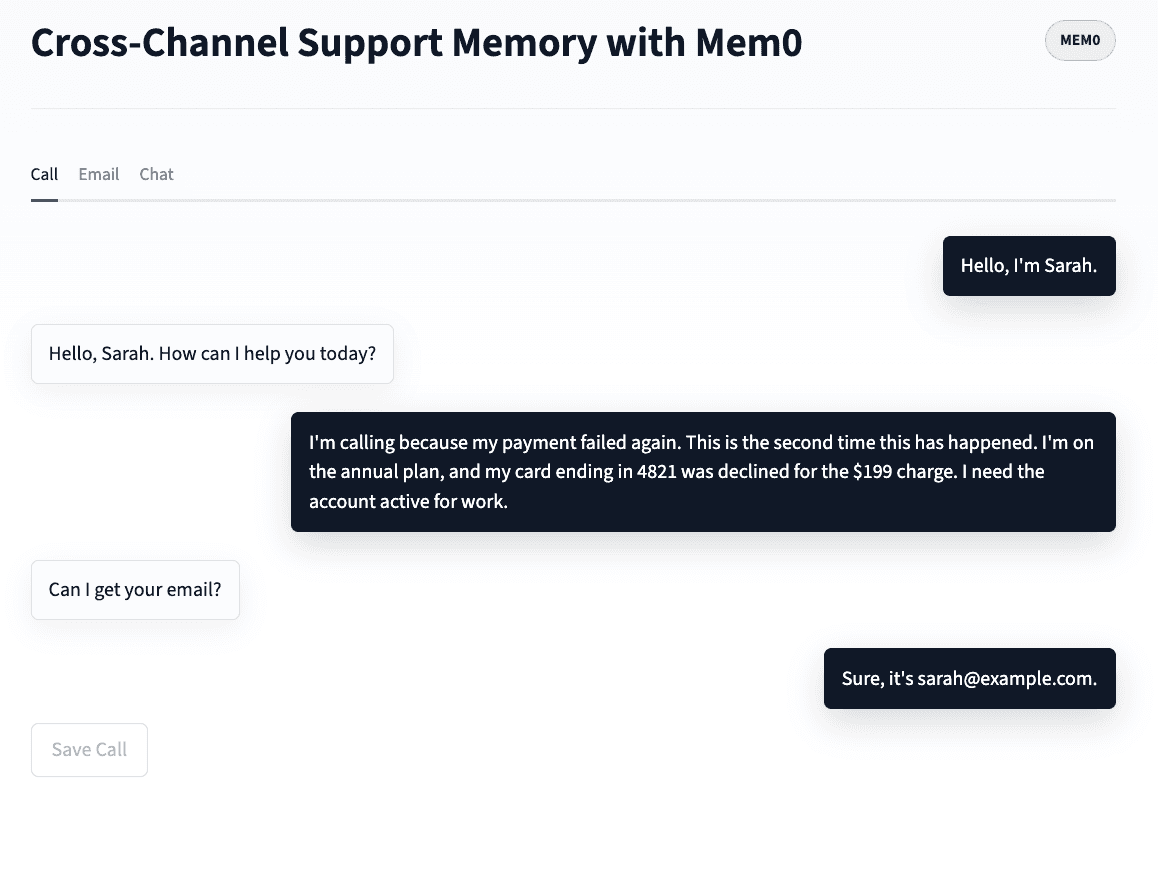
First,
require_customer_email()runs a regex over the transcript to pull out the customer’s email.Second, Mem0 runs its own extraction over the message content and stores the facts worth keeping: plan type, payment amounts, card details, stated constraints, emotional context.
The distinction matters: Your app resolves identity, Mem0 extracts memory facts. You don’t write extraction rules for either.
POST /email - Ingest an inbound support email
This step receives an inbound support email where the subject and body are combined, so Mem0 extracts intent from both. The customer_email is used as user_id for cross-channel memory.
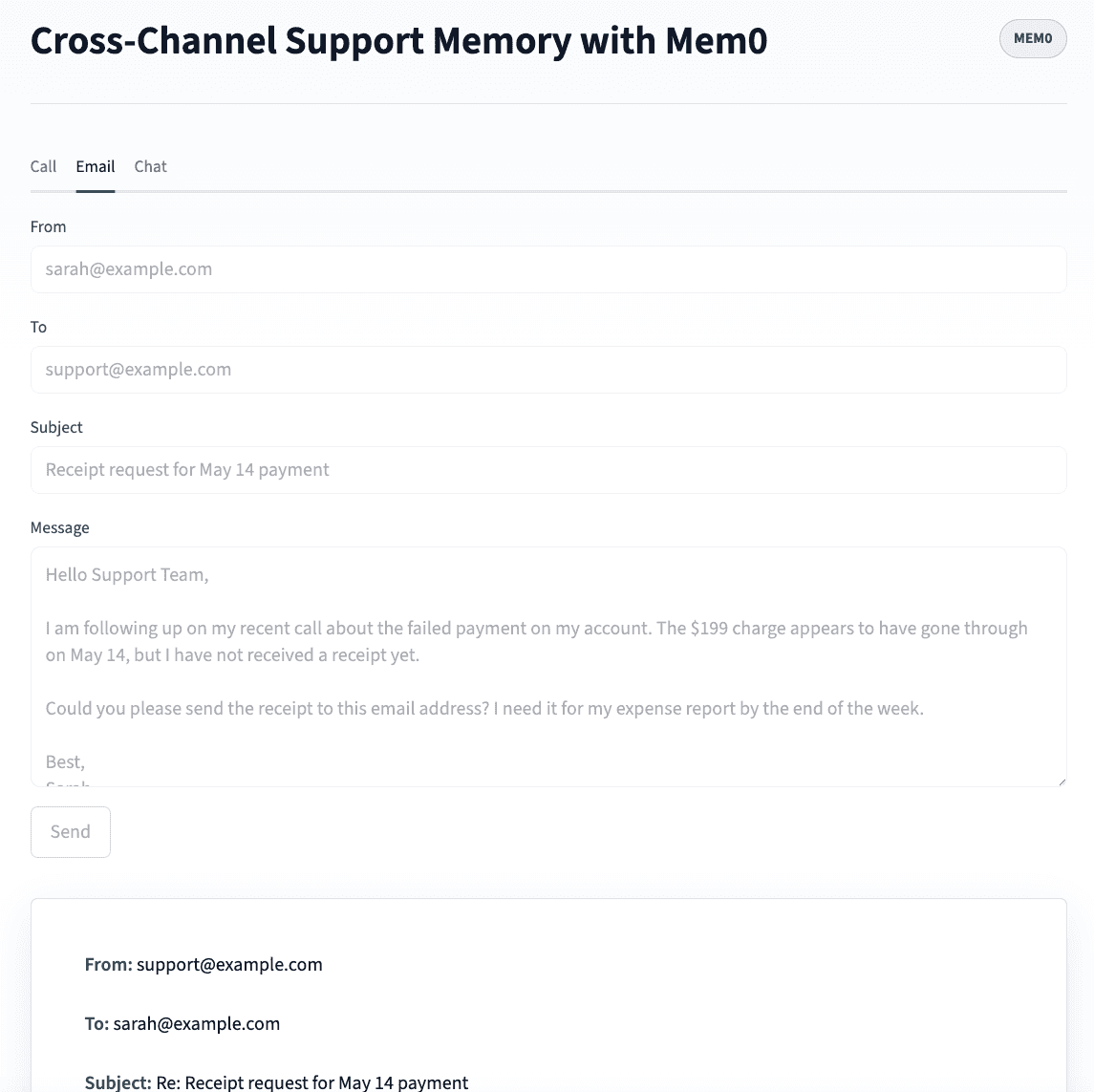
The customer_email.lower() normalization matters. [email protected] and [email protected] would resolve to different user_ids in Mem0 without it. Thus, we lowercase everything before storing.
POST /chat - Memory-augmented real-time chat
The chat endpoint is where the cross-channel payoff is visible. It retrieves all prior memory across channels before generating a response, then stores the new turn for future channels to see.
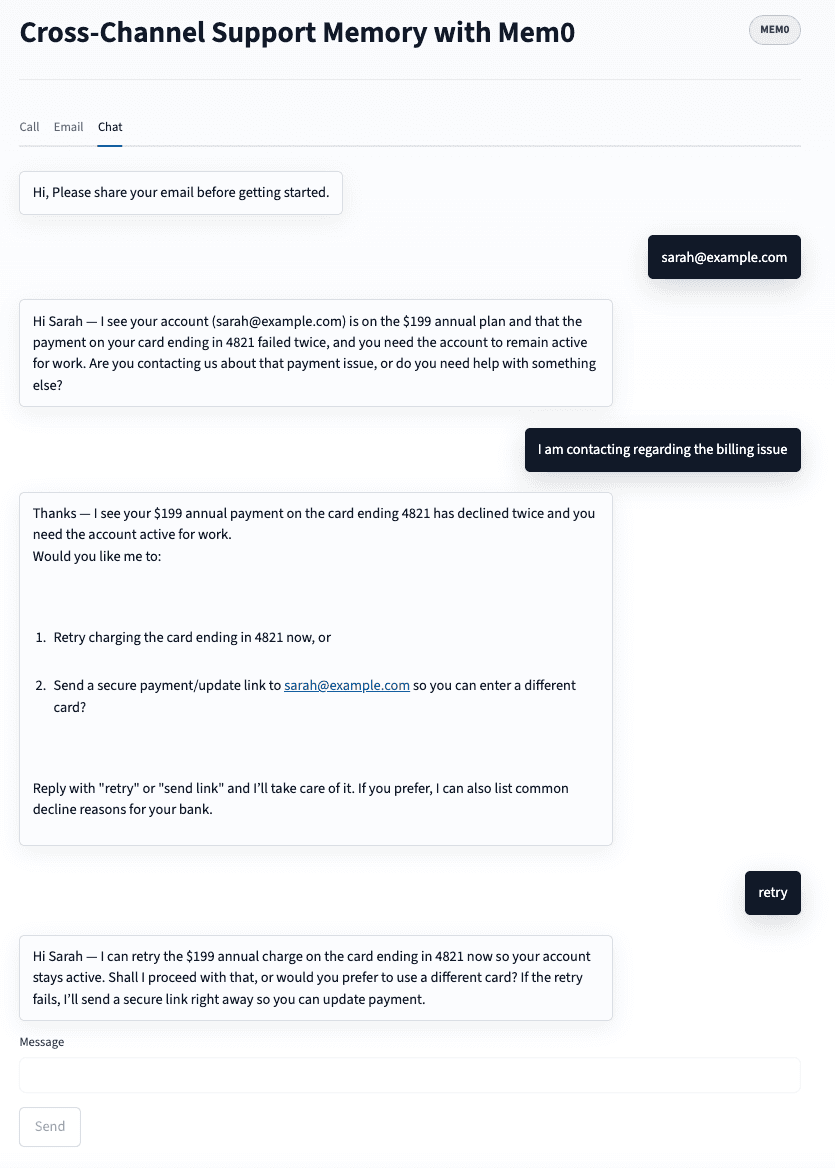
Here is how we implement real-time chat turn: 1. Ask for email on first turn if not already known. 2. Retrieve cross-channel memories scoped to this user. 3. Build memory-augmented system prompt. 4. Generate response. 5. Store new facts from this turn.
The system prompt injected at Step 3 is what separates the memory-aware agent from the naive chatbot. Here’s what it looks like when memories are present:
When Sarah opens the chat on Day 5, the memory_block looks like this:
The agent’s opening line: “Hi Sarah, I can see you’ve had a payment issue with your annual plan and you’re waiting on a receipt for the May 14 charge. Has the payment gone through, or is the account still blocked?”
Without shared memory (anonymous user, no prior context), the agent’s opening line: “Hi, how can I help you today?”
That difference is the entire value proposition of this architecture.
💡Ready to add cross-channel memory to your support AI agent?
Conclusion
The reason most support agents have channel amnesia is not that memory is hard. It’s that most architectures treat channels as independent systems with independent history stores. The fix is architectural i.e, one user_id, shared across every channel, reading and writing to the same Mem0 store.
The FastAPI backend in this post has three endpoints in a compact single-file backend (multichannel_support.py). The Streamlit UI makes the before/after visible in a way you can demo in 60 seconds. If you want to move beyond the demo layer, the Next.js + Mem0 customer support agent walkthrough covers building a production-ready frontend on top of the same memory architecture.
For anything more than a demo (multi-tenant deployments, high-volume ingestion, compliance-grade audit trails), the Mem0’s platform handles the memory store, fact extraction, retrieval ranking, and entity scoping. You bring the channel endpoints.
Frequently Asked Questions
Q. What is the best way to add memory to an AI customer support agent?
The most reliable pattern is a shared external memory store keyed by a stable customer identifier (email or account ID). Every channel endpoint (phone, email, chat) reads from and writes to the same store before and after each interaction. Mem0 handles memory extraction, retrieval ranking, and user-scoped isolation, so the agent always has the right context regardless of which channel the customer used last.
Q. How does Mem0 keep memories separate per customer?
Every mem0.add() and mem0.search() call is scoped by user_id. Memories stored under user_id="[email protected]" are only returned when you query with filters={"user_id": "[email protected]"}. There is no cross-user leakage in retrieval. In multi-tenant deployments, app_id adds an additional isolation layer at the organization level.
Q. What is the difference between multichannel and omnichannel support?
Multichannel means you’re available on multiple platforms. Omnichannel means context moves with the customer across those platforms. Most support teams are multichannel: phone, email, chat all work, but they don’t share history. Omnichannel requires a shared memory layer so the agent on channel 3 knows what happened on channels 1 and 2.
Q. Do I need a Streamlit frontend to use this architecture?
No. The FastAPI backend works independently. The Streamlit app is a demo layer that makes the cross-channel memory flow visible. In production, you’d connect your existing telephony provider (Twilio, Vonage) to POST /call, your email webhook to POST /email, and your chat widget to POST /chat. The Mem0 memory layer is the same regardless of what’s on top.
Q. What happens to memory if a customer uses a different email on each channel?
Memory is keyed by user_id, so two different emails resolve to two separate memory stores. To handle this, extract the customer’s canonical identifier (account ID, phone number, verified email) at the start of each channel interaction and use that as the user_id rather than whatever the customer typed. The demo uses email because it’s the lowest-friction identifier for a B2C support flow, but any stable identifier works.
Q. How does cross-channel AI memory differ from a CRM?
A CRM stores structured records for human agents to read. Cross-channel AI memory stores semantic facts that an AI agent retrieves in real time before generating a response. The difference is that the AI agent doesn’t read a dashboard. It reads a context window. Mem0 formats retrieved memories as a compact prompt block so the model can use them immediately, without any manual lookup.
Q. What is omnichannel customer support in 2026?
Omnichannel customer support means every channel (phone, email, chat, SMS) shares the same customer history so context moves with the customer across touchpoints. In 2026, the gap between multichannel (available on multiple platforms) and omnichannel (context-continuous across all of them) is where AI agents fail most visibly. The architecture in this post closes that gap at the memory layer: one user_id in Mem0, shared across every channel endpoint.
More on Agent Memory

How to Read Memory Benchmarks
How to read AI memory benchmarks: what LoCoMo, LongMemEval, BEAM, and agentic tests measure, where scores go wrong, and how to find the correct benchmark for your use case.
20 min read

The Problem After Retrieval: Why Agents Misuse the Memories They're Given
Five papers show LLM agents often misuse the memories they retrieve. What the research says, how much to trust it, and what builders can do.
13 min read

What Is Memory Staleness in AI? Causes, Risks & Solutions
Understand memory staleness in AI agents, why outdated information leads to errors, and the best techniques to maintain accurate long-term memory.
9 min read





Aashi Dutt
She is a senior technical content writer at Mem0. She covers agent memory architecture and the engineering decisions behind building agents that actually remember. She experiments with new features and turns research into posts developers can put straight to use.
Start building with memory
Free tier, no card