

·
12 min read
On this page
OpenAI Agents SDK makes it easy to define tools, routes, and workflows. It handles function calling, multi-step reasoning, and orchestration. What it does not handle by default is persistent, durable memory about users and past interactions.
Most production agents need to:
Remember user preferences across sessions
Track long-term tasks and projects
Reference prior conversations and files
Adapt responses based on user history
Stateless prompts and short context windows are not enough. Once a conversation exceeds the model context or the session ends, the default agent forgets everything. This breaks user expectations for assistants that should "remember" them.
Mem0 provides a memory layer that plugs into OpenAI Agents. It stores, retrieves, and updates user-specific memory across sessions, so agents can behave consistently over time.
The rest of this article walks through how memory works in the OpenAI Agents SDK, where it falls short, and how to integrate Mem0 step by step.
What memory means in the OpenAI Agents SDK context
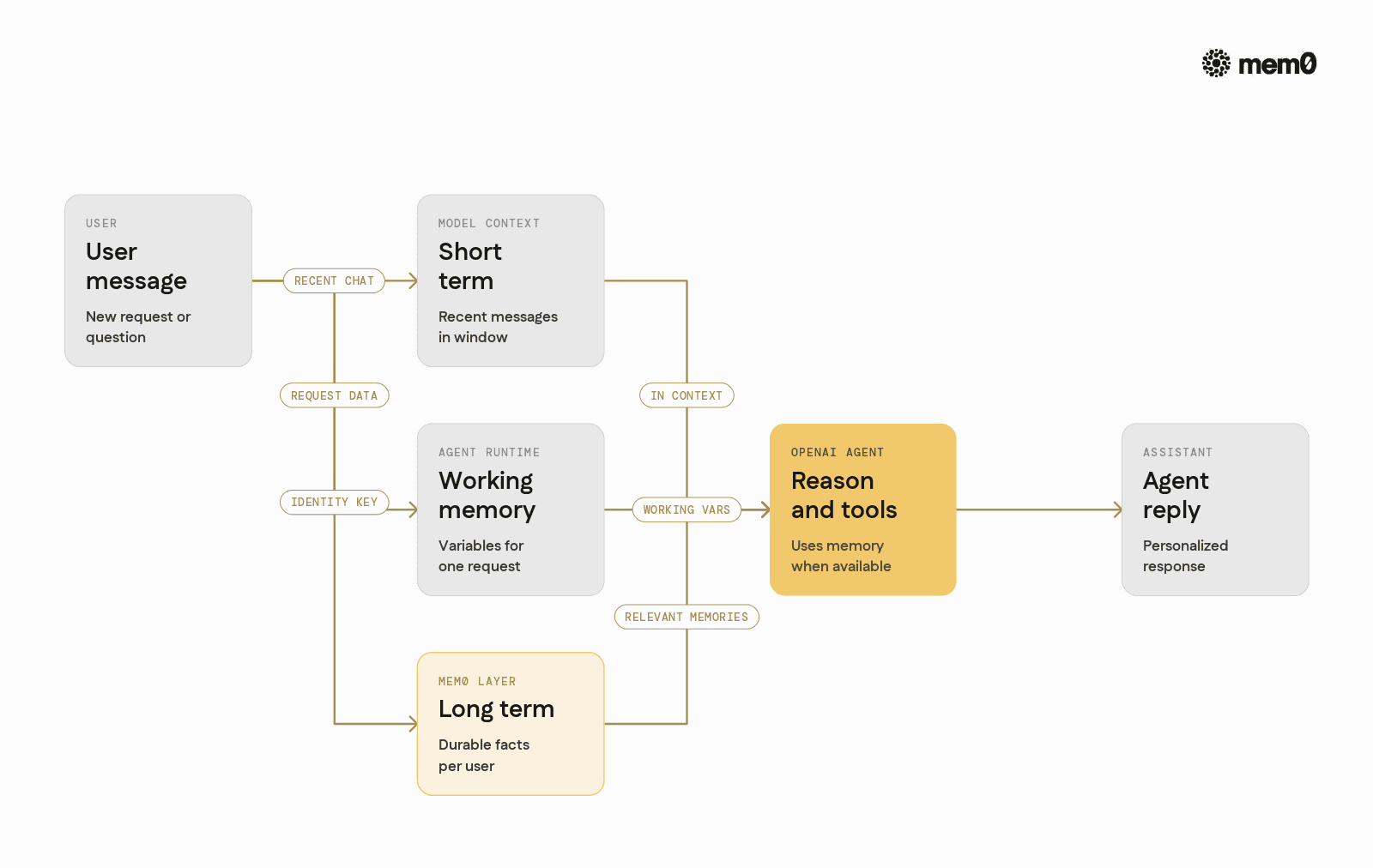
OpenAI Agents SDK gives a structured way to define agents, their tools, and how they interact. Conceptually, there are three types of "memory" patterns developers often try:
In-conversation context only: Keep the last N messages in the
conversation. This uses the model context window as a short-term memory buffer.
Local scratchpads in tools: Maintain temporary variables inside tools or middleware that persist during a single request or workflow execution.
External storage: Persist data in external databases or vector stores and retrieve it on each new interaction.
The SDK itself focuses on the first two. Developers are expected to implement the third pattern for any durable memory. That is where a dedicated memory layer like Mem0 fits.
A useful mental model is:
The model context is short-term memory
The agent runtime is working memory for a single request
Mem0 is long-term memory across requests and sessions
Mem0 stores structured memories per user, makes them queryable, and returns only what is relevant for a given interaction.
Why stateless prompts are not enough
Without an external memory layer, an OpenAI Agent typically works like this:
User sends a message
Agent builds a prompt, including some recent messages
Model responds
Conversation history is kept in memory only for that session
This has several issues in production:
Context window limits: Long-running users exceed the context window, so older messages must be dropped. The agent forgets earlier facts.
Cross-session loss: When a user returns tomorrow, the agent has no built-in way to recall their preferences or past work.
No structured facts: Everything lives as raw conversation text. It is hard to ask, "What are all the projects this user is working on?"
Developers often try to hack around this by:
Storing raw transcripts in a database
Vectorizing all messages and searching them on every request
Stuffing long chunks back into prompts
This pattern becomes slow and noisy. The model gets too much irrelevant context, and prompting costs rise.
Mem0 addresses this by converting interactions into concise, structured memories that can be updated, ranked, and selectively injected into prompts.
How Mem0 models agent memory
Mem0 treats memory as a set of small, focused facts and preferences tied to an identity. Instead of storing entire transcripts, it keeps distilled snippets, for example:
"User prefers metric units."
"User is learning TypeScript and wants beginner-friendly explanations."
"User's current project: AI-powered note-taking app."
Each memory has:
Content
Metadata (user ID, source, timestamps)
Semantic embedding
Relevance scoring and recency signals
When the agent receives a new message, Mem0 can:
Retrieve relevant memories for the current user and query
Let the model update existing memories or create new ones
Deprioritize or archive stale information
The key properties:
Identity-aware: Memory is scoped per user by default.
Long-lived: Survives restarts and new sessions.
Model-agnostic: Works with any LLM accessed through the Agents SDK.
This maps naturally onto the OpenAI Agents lifecycle. Every request involves:
Identifying the user
Fetching relevant memories
Feeding them into the agent context
Updating memory based on the new interaction
Where naive memory approaches break
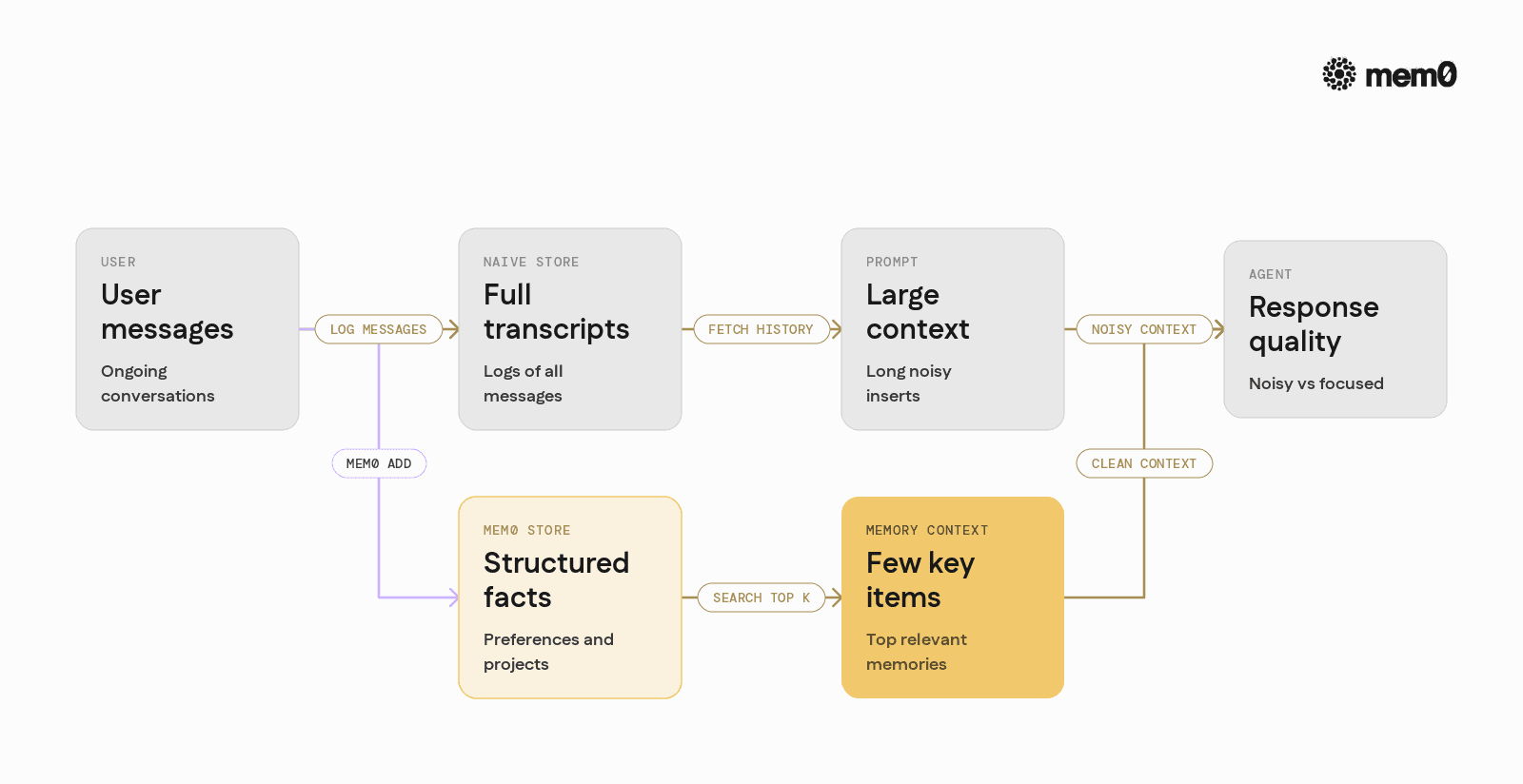
Before plugging in Mem0, it helps to see where basic memory patterns break down when agents move to production.
Using only conversation history
Storing the last N messages in memory can work for very short interactions. Problems:
Older but important facts are discarded as soon as they fall out of the window
Sessions are often ephemeral, so cross-session recall is not possible
It is hard to ask agent-level questions like "What did this user ask about in the past week?"
Storing raw transcripts in a database
A common pattern is to log user and assistant messages into SQL or NoSQL, then:
On each request, fetch some historical messages
Or vectorize all past messages and search them
Issues:
Duplication: Similar facts appear many times in the transcript
Prompt bloat: Large chunks are injected, many of them irrelevant
Latency: Vector search over growing transcripts becomes slow
Hand-rolled vector memory layer
Some teams build custom pipelines:
Extract possible memories from messages
Store them in a vector DB
Manually handle updates, deduplication, and relevance scoring
This is more scalable than raw transcripts, but it takes significant effort to:
Keep memories up to date when user preferences change
Implement per-identity scoping and retention policies
Integrate cleanly with the agent lifecycle
Mem0 packages these responsibilities into a reusable memory layer so OpenAI Agents can stay focused on reasoning and tooling, not storage logic.
Mem0 in an OpenAI Agent architecture
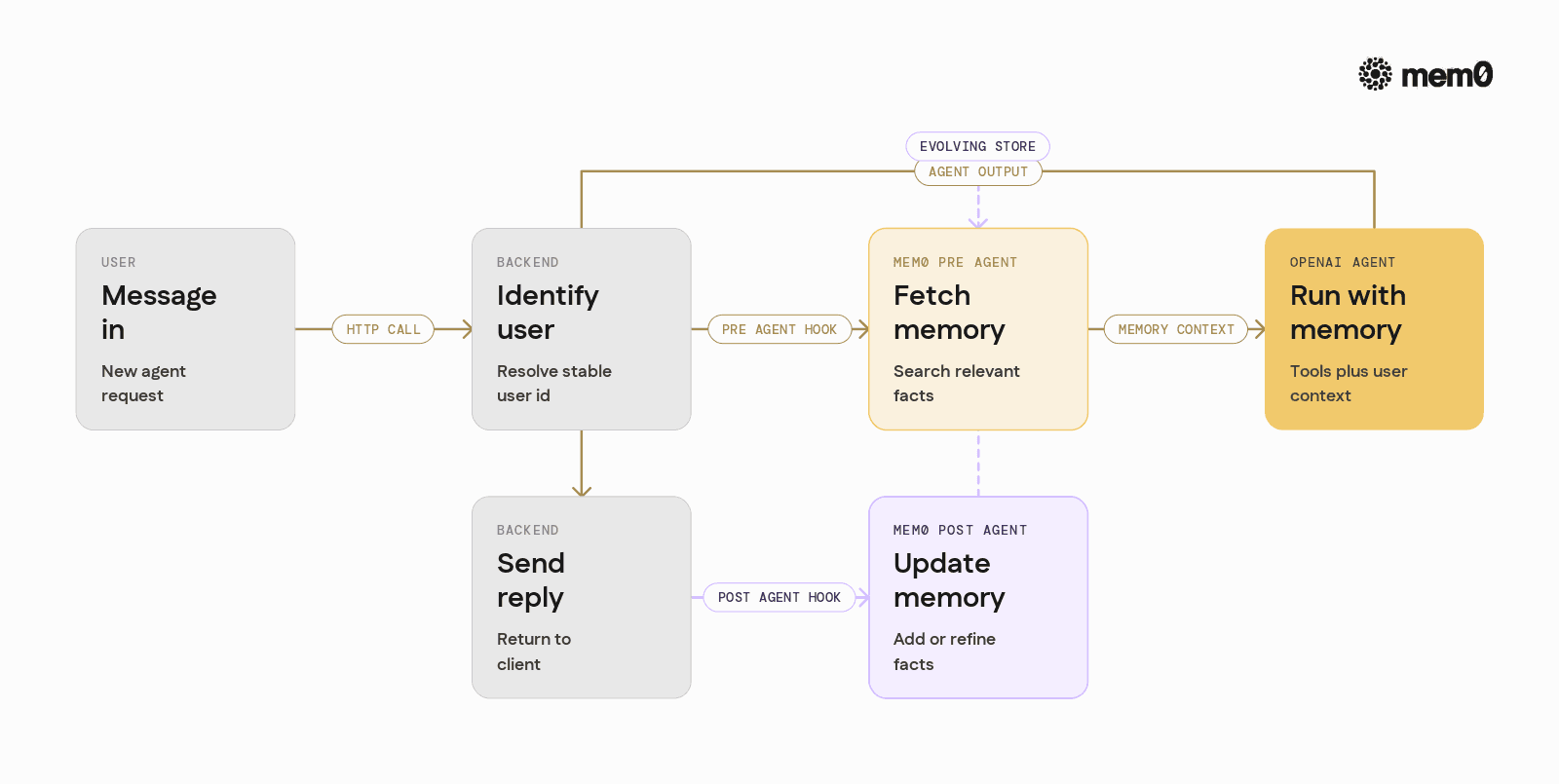
In an OpenAI Agent and Mem0 setup, the request flow usually looks like this:
User sends a message to the agent endpoint
The backend identifies the user (e.g.,
user_id)Mem0 retrieves relevant memories for that user and message
The agent is invoked with:
User message
Retrieved memories
Tools and system instructions
The agent responds, possibly calling tools
The backend sends the full interaction to Mem0 to update or create memories
This pattern works for:
Chat assistants
Multi-step workflows defined via the Agents SDK
Tool-heavy agents that operate on files, calendars, or external APIs
High-level integration points
There are two key integration hooks:
Pre-agent: Fetch memory and inject it into the agent context
Post-agent: Send transcript and output back to Mem0 to refine memory
The next sections show this in Python with the OpenAI Agents SDK.
Setting up Mem0 with the OpenAI Agents SDK
The examples here assume:
Python 3.9+
openaiwith Agents SDK supportmem0aiPython client
Install dependencies:
Set environment variables:
💡 You'll need a free Mem0 API key and OpenAI API key to follow along.
Basic Mem0 client setup
Mem0 can be self-hosted or used as a cloud service. The client abstracts over the underlying storage and embedding details. For a quick start, the default hosted configuration works without extra setup.
Defining an OpenAI Agent
This example uses the new Agents SDK style from OpenAI's Python library.
In a production setup, the agent definition would likely be created once and reused.
Injecting Mem0 memory into an agent run
To integrate Mem0, the backend needs to:
Look up relevant memories based on user ID and the incoming message
Format them for the agent as additional context
Send them as part of the conversation
Fetching memory for a request
Building the agent input
The OpenAI Agents SDK typically works with threads or runs. The following example uses a simple threaded conversation pattern.
Running the agent with injected memory
This function:
Retrieves relevant memories
Adds them as a system-style message
Runs the agent
Streams and captures the reply
Calls a memory update function that is defined next
Updating Mem0 after agent runs
Mem0 needs the conversation and the results to refine or add new memories. Typically:
The user expresses preferences in natural language
The agent paraphrases or confirms those preferences
Mem0 records them as structured memories
A simple update function:
In a more advanced setup, the agent can be asked explicitly to mark statements that should become memory, for example:
"When the user states long-term preferences or goals, repeat them in a bullet list prefixed with 'MEMORY:' at the end of your message."
Then the backend can parse only those "MEMORY:" lines and send them to Mem0. This keeps the memory store clean and focused.
Comparing memory strategies for OpenAI Agents
The table below summarizes common memory strategies for the OpenAI Agents SDK and where Mem0 fits.
Strategy | Scope | Pros | Cons | Best for |
|---|---|---|---|---|
No memory (stateless) | Single request | Simple, easy to maintain | Forgets everything, no personalization | One-off utilities, diagnostics |
Conversation history only | Single session | Easy to implement | Loses old facts, no cross-session persistence | Short-lived chats |
Raw transcript storage | Multi-session | Full audit log | Hard to query, expensive to prompt, noisy | Compliance, logging |
Custom vector search | Multi-session | Basic semantic recall | Manual extraction, updates, scoring, identity logic | Teams with custom infra requirements |
Mem0 as dedicated memory layer | Multi-session, per ID | Structured, queryable, identity-aware | Adds another service to operate | Production agents with user memory needs |
Mem0 sits in the last row. It is optimized for user-centric memory, query relevance, and integration with LLM-based agents.
Limitations of this memory pattern
While a Mem0 and OpenAI Agents integration addresses the core long-term memory problem, the pattern has some limits:
Misaligned identity: If
user_idis not consistent across devices or login states, memories can be fragmented or mixed. A stable identity scheme is required.Over-memory: Storing every interaction without curation can clutter memory. Agents may retrieve low-value facts unless the pipeline is designed to focus on durable preferences and goals.
Ambiguous preferences: Users often change their minds. If the agent does not clearly update or override old preferences, the memory store can contain conflicting data.
Latency budget: Each request introduces a memory search step. For strict latency budgets, memory retrieval must be tuned with appropriate
top_k, caching, or asynchronous patterns.Partial observability: The memory layer sees only what the backend sends. If some important state changes happen in tools or external systems without being reflected to Mem0, the agent cannot recall them later.
These are solvable with good design:
Normalize user identities at the auth layer
Ask the agent to clearly summarize stable facts for memory
Periodically clean or re-summarize memory for heavy users
Treat memory access as part of the performance budget and monitor it
Frequently Asked Questions
How does Mem0 differ from just storing conversation history in a database?
Mem0 focuses on storing distilled memories instead of full transcripts. It extracts and indexes stable facts and preferences per user so that queries return concise, relevant snippets instead of long, noisy message logs.
When should Mem0 be called in the OpenAI Agents workflow?
Mem0 is typically called twice per interaction: once before the agent run to retrieve relevant memories, and once after the agent run to update or create new memories. This pattern keeps the agent context aligned with the user's evolving state.
How many memories should be injected into the agent context?
Most agents perform well with a small number of highly relevant memories, for example 5 to 10 items. The exact number depends on the model context window, but it is better to send fewer, high-quality facts rather than many low-value fragments.
Can Mem0 handle multiple users and shared workspaces?
Yes, memory is scoped by identity, typically auser_id, and can be further organized by namespaces or metadata. This allows agents to support both personal memory per user and shared memory for teams or projects.
How does Mem0 handle updates when a user changes preferences?
Mem0 can store new memories that supersede old ones and adjust relevance over time based on recency and context. Agents can also be instructed to restate updated preferences clearly so that Mem0 can treat them as replacements rather than entirely new facts.
Is Mem0 tied to a specific LLM or agent framework?
Mem0 works at the memory layer and communicates over an API, so it is independent of the underlying LLM and agent runtime. The same memory store can support multiple models and frameworks, including the OpenAI Agents SDK and other tooling layers.
Further Reading
—
Mem0 is an intelligent, open-source memory layer designed for LLMs and AI agents to provide long-term, personalized, and context-aware interactions across sessions.
Get your free API Key here: app.mem0.ai or
Self-host mem0 from our open-source GitHub repository.
—
More on Integrations

OpenClaw vs. Hermes Agent Memory in 2026: Which Should You Choose?
OpenClaw and Hermes take opposite bets on agent memory - live-injected vs. frozen snapshots, file-based vs. structured tools. Here's how each works, where each breaks, and how Mem0 fits both.
12 min read

How Memory works in Hermes Agent (and how to improve it)
How Hermes Agent stores 3,575 characters of memory in two frozen markdown files, and where the design breaks.
11 min read
Hermes AI Agent: How to Add Memory to Your Workflow
Set up Mem0 as a memory provider for Hermes Agent in one command. Covers Platform and OSS modes, the 3 tools it adds, and how prefetch-caching keeps it at zero added latency.
8 min read




Aashi Dutt
She is a senior technical content writer at Mem0. She covers agent memory architecture and the engineering decisions behind building agents that actually remember. She experiments with new features and turns research into posts developers can put straight to use.
Start building with memory
Free tier, no card