

·
11 min read
On this page
Claude connectors give language models direct access to external systems like issue trackers, chat platforms, file storage, CRMs, or custom backends via MCP. They let agents read and write data where work already happens, and they extend Claude with tools that act inside those systems.
For production AI agents, connectors are effectively the I/O layer. They expose real user data, allow transactional updates, and make the model useful inside existing workflows. However, connectors are not a memory system by themselves. They surface state from other systems but do not maintain a stable, agent-centric memory across sessions and tools.
Persistent memory, especially for multi-connector agents, requires a separate layer that can track user-level facts, preferences, decisions, and long-running workflows. This is where Mem0 becomes relevant.
💡New to Mem0? Learn more about us: https://mem0.ai/
What are Claude Connectors?
Connectors wrap external services and expose them to Claude through well-defined tools. Examples include:
SaaS apps like ticketing systems or task managers
Communication tools like Slack or email
Filesystems and document storage
Custom backends exposed through remote MCP servers
They provide authenticated access based on the user’s permissions, and they can be configured to be read-only, write-only, or mixed, depending on organization policy.
However, connectors do not:
Provide long-term, cross-connector memory of user interactions
Normalize data from multiple tools into a coherent, user-centric representation
Track latent context like preferences, habits, or implicit workflows
Automatically persist key facts from conversations across sessions
They are sources of truth and action endpoints, not a dedicated memory substrate. AI engineers need to build that layer explicitly.
The memory problem
When agents rely only on connectors and prompt context, several problems appear in production:
Context fragmentation: A single user might interact via Slack, email, and a ticketing system. Each connector knows only about its own data. The agent loses cross-channel continuity and cannot build a persistent model of the user or project.
Session-bound reasoning: Claude operates within a context window. Without external memory, any knowledge about prior sessions vanishes once the conversation ends. Even with connectors, the agent must re-query large datasets and re-derive the same insights.
No explicit notion of “what matters”: Connectors expose lots of data, but they do not indicate which pieces are important to remember. Agents must decide what to persist as long-term memory, independent of the source system.
Limited personalization: Preferences, patterns, and long-running goals often never exist as first-class objects in connectors. They emerge from repeated interaction. Without a memory layer, the agent cannot accumulate that latent structure.
Inefficient re-fetching and recomputation: Repeatedly querying connectors to reconstruct context increases latency and cost. A dedicated memory can cache distilled facts that are reusable across sessions, tools, and connectors.
The short version: connectors bridge Claude to external systems, but they do not solve persistent, semantic, user- and agent-centric memory.
How Mem0 complements Claude connectors
Mem0 is a memory layer designed specifically to capture, retrieve, and update long-term context for LLM agents. In the context of Claude connectors, it acts as a glue layer that sits between conversations, tools, and external systems.
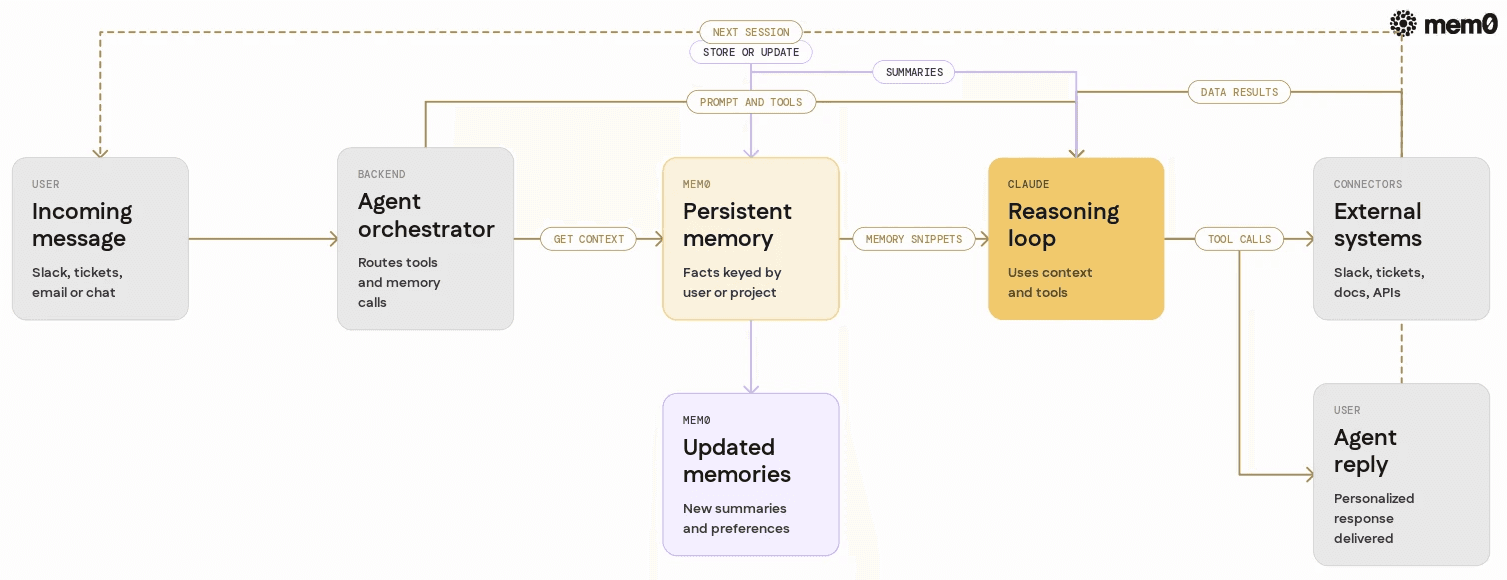
Here are some key roles Mem0 plays:
Agent-centric storage: Mem0 stores facts, events, and preferences keyed by users, projects, or agents, independent of where they were observed (Slack, tickets, docs).
Semantic retrieval: Instead of refetching raw connector data, Mem0 retrieves relevant memories using vector search, metadata filters, or hybrid approaches.
Cross-connector synthesis: Memory entries can reference multiple connectors. For example, “Alice prefers high-level summaries in Slack and detailed tickets in Linear” is a single memory that spans two systems.
Iterative updates: Mem0 can update or consolidate memories as new evidence appears from connectors, improving the agent’s internal model over time.
API-first integration: Mem0 exposes HTTP and Python clients, so it can be easily inserted into MCP servers, custom connectors, and backend services supporting Claude.
The result is an architecture where connectors provide raw capabilities, while Mem0 provides continuity and personalization.
💡Note: We do not add memory to a connector itself. The connector stays a stateless I/O channel. Memory lives in a separate layer that the orchestrator reads before calling Claude and writes after, so the same memory is reusable no matter which connector triggered the interaction.
Architecture pattern Claude connectors with Mem0
Consider a typical production agent that uses Claude with multiple connectors:
Slack connector for conversations
Ticketing connector for issues
Document connector for knowledge base
A custom MCP connector for internal APIs
Mem0 fits into this stack as a shared memory service, usually implemented as a microservice or a managed API.
A typical flow:
User message arrives via a connector: For example, a Slack message is sent to a backend that orchestrates Claude and its tools.
Pre-context augmentation from Mem0: Before calling Claude, the orchestrator queries Mem0 for relevant memories keyed by the user, channel, project, or org. These are turned into system context.
Claude operates with connectors and memory: Within this enriched context, Claude uses connectors as needed, reading from or writing to external systems.
Post-run memory update: After Claude responds and the orchestrator sees tool usage and messages, key facts are extracted and stored in Mem0 as persistent memories.
Future sessions reuse memory: Subsequent interactions, even from different connectors, can reuse the same memory state.
Conceptually, this separates:
Connectors: I/O to external systems
Claude: reasoning and planning
Mem0: persistent semantic state
Python example integrating Mem0 with a Claude MCP connector
Below is a simplified example of how to integrate Mem0 into a Python-based MCP server that acts as a custom connector for Claude. It uses the official mem0 Python SDK, so storage, indexing, and semantic retrieval are handled by the MemoryClient rather than hand-rolled HTTP calls. This pattern works similarly if your server orchestrates multiple existing connectors.
The scenario:
User interacts with Claude via Slack and ticketing connectors
A custom MCP tool
get_user_contextfetches relevant memories from Mem0Another tool
store_interaction_summarywrites a summarized interaction back to Mem0
💡 You'll need a free Mem0 API key to follow along. Get one at app.mem0.ai, free tier, no credit card required.
In this pattern:
Claude can call
/tools/get_user_contextas a tool from within a conversationThe MCP connector searches Mem0 and returns the matching memories as context snippets
After finishing an interaction, Claude or the orchestrator calls
/tools/store_interaction_summaryto persist key information
The MemoryClient does the heavy lifting of extraction, storage, indexing, and semantic retrieval, so the MCP server stays thin. It defines the tool surface Claude calls and delegates everything memory-related to Mem0.
Designing memory schemas for Claude connectors
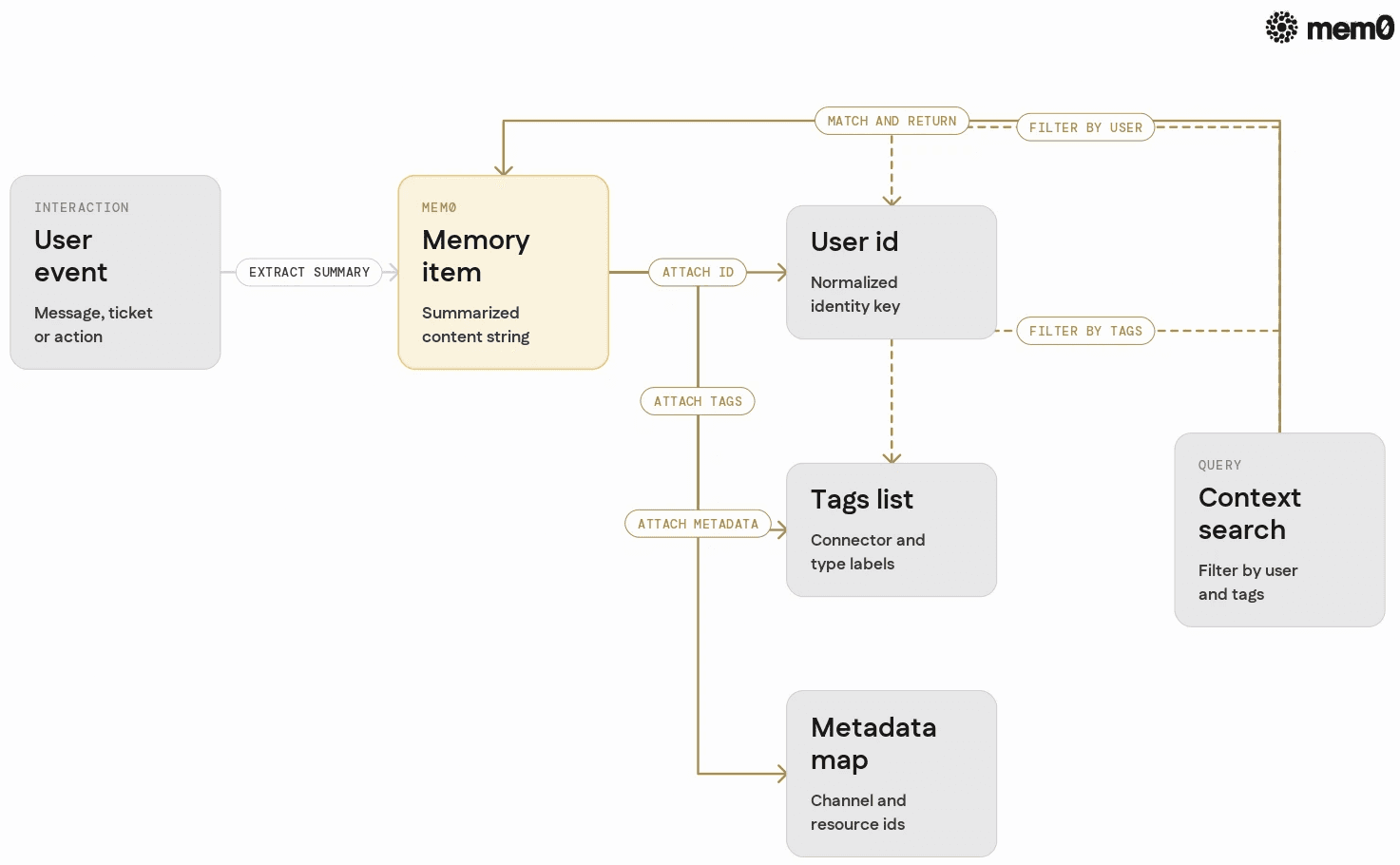
Mem0 is schema-light by default, but well-designed metadata and tagging patterns make retrieval much more effective for multi-connector agents. Typical dimensions for Claude connectors include:
User identifiers: Use normalized IDs, such as an internal user ID, rather than raw email or Slack IDs, to unify identities across connectors.
Connector and channel tags: Tag memories with the connector name (
"slack","linear","drive") and channel ("sales","support") to filter context by source or audience.Interaction type tags: Examples:
"bug_report","feature_request","preference","escalation","decision","summary".Relation metadata: Attach issue IDs, document IDs, or thread IDs so the agent can join connector data with memory entries.
A simple pattern is:
user_id: internal user or account IDtags:[connector_name, interaction_type, "long_term" | "short_term"]metadata:{"connector": "...", "resource_id": "...", "channel": "...", "created_by": "..."}
With these conventions, the orchestrator can query Mem0 for, for example, “recent escalation-related memories for this user across all connectors”.
Comparison: relying on connectors only vs connectors with Mem0
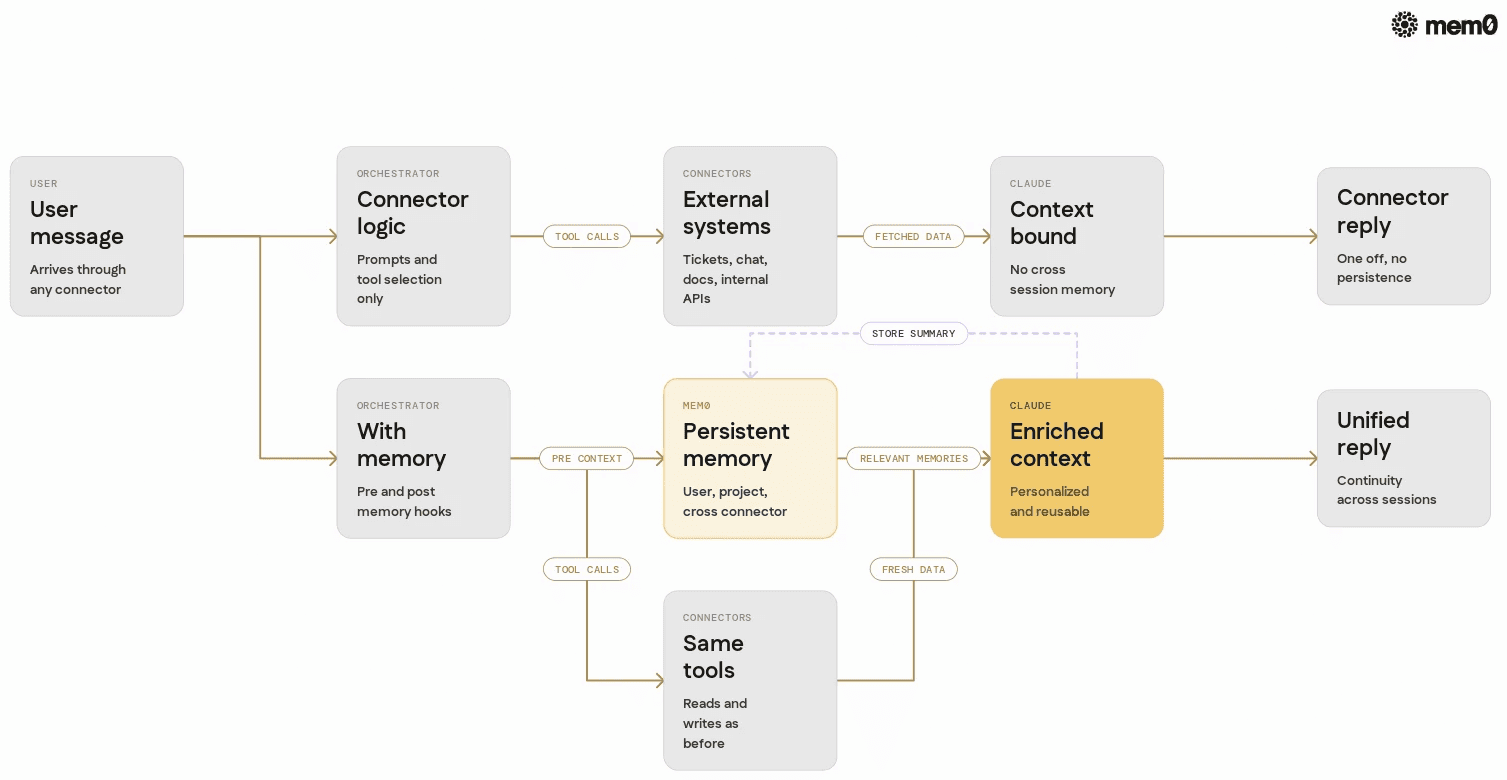
The following table summarizes tradeoffs between two patterns commonly seen in Claude-based agents.
Aspect | Connectors only | Connectors with Mem0 |
|---|---|---|
Long-term personalization | Limited to what external systems store | Persistent, agent-defined memories across sessions |
Cross-connector context | Fragmented per tool | Unified view keyed by user or project |
Session continuity | Bound by context window | Durable over days, weeks, or longer |
Latency for repeated tasks | Repeated connector queries and re-derivation | Cached semantic memories reduce redundant work |
Memory of implicit preferences | Rarely represented in connectors | Stored explicitly as memories |
Complexity of orchestration | Less explicit, but more logic in prompts | Clear separation of tools vs memory responsibilities |
Control over what to remember | Derived from external system data model | Defined by agent’s memory policies |
In practice, production agents often start in the first column and gradually move to the second once they run into personalization, scale, or multi-connector complexity.
Handling organization, security, and compliance concerns
Claude connectors already enforce per-user permissions based on the underlying system and, on Team or Enterprise plans, can be restricted by owners. Integrating Mem0 into this environment requires similar attention to access control and governance.
Common patterns for secure integration:
Tenant-aware memories: Partition Mem0 data by organization or workspace ID. Enforce that each tenant has a separate namespace or index.
User-scoped access: Only allow Mem0 queries with user identifiers that match the authenticated connector request. If Claude is acting as a system agent, include the acting user explicitly in the tool call.
Connector-aware metadata: Log which connector source led to a particular memory. This helps in audit trails and supports deletion if that connector is removed.
Retention policies: Apply time-based retention on certain memory types, such as temporary summaries, while keeping long-term preferences.
Mem0 can be deployed as a managed service or self-hosted within a private VPC for stricter compliance or data residency requirements. For Claude custom connectors using remote MCP, ensure Mem0 is reachable from where the MCP server runs or co-host Mem0 alongside that server.
Mem0 addresses storage and retrieval, but engineers still need to define good memory policies, extraction strategies, and orchestration flows.
Frequently Asked Questions
Q. What are Claude connectors in the context of production agents?
Claude connectors are integrations that let the model access external services, such as SaaS tools, file systems, or custom backends via MCP. They provide authenticated read and write capabilities based on user permissions, and are the primary way Claude acts on real-world systems.
Q. Why is a separate memory layer needed if connectors already expose data?
Connectors expose external state, but they do not maintain agent-centric, long-term memory of interactions, preferences, and decisions. A memory layer like Mem0 stores distilled context across sessions and connectors, so agents can reuse knowledge instead of recomputing it every time.
Q. How does Mem0 integrate with Claude connectors in practice?
Mem0 typically runs as a service that your MCP server or backend calls as a tool. Claude invokes tools like get_user_context or store_interaction_summary, which internally read from or write to Mem0, and the retrieved memories are injected into the prompt as additional context.
Q. When should an AI engineer add Mem0 to a Claude connector setup?
Mem0 becomes useful when agents need cross-session personalization, multi-connector continuity, or efficient reuse of previously computed insights. If the agent needs to remember user preferences, long-running projects, or decisions beyond a single conversation, a dedicated memory is usually necessary.
Q. How does Mem0 handle multiple connectors per user?
Mem0 can tag memories with connector and channel metadata, and it uses a consistent user_id or project ID to unify context. This allows the agent to retrieve memories that span Slack, ticketing systems, docs, and custom tools, while still filtering by source when necessary.
Q. Does using Mem0 change how permissions work with Claude connectors?
Mem0 does not override connector permissions. It stores information derived from interactions that already respect those permissions, and orchestration logic must ensure that only authorized users and agents can query relevant memories. In multi-tenant setups, Mem0 is typically partitioned by organization or workspace to match existing access controls.
Further Reading
—
Mem0 is an intelligent, open-source memory layer designed for LLMs and AI agents to provide long-term, personalized, and context-aware interactions across sessions.
Get your free API Key here: app.mem0.ai or
Self-host mem0 from our open source github repository.
—
More on Integrations

OpenClaw vs. Hermes Agent Memory in 2026: Which Should You Choose?
OpenClaw and Hermes take opposite bets on agent memory - live-injected vs. frozen snapshots, file-based vs. structured tools. Here's how each works, where each breaks, and how Mem0 fits both.
12 min read
How Memory works in Hermes Agent (and how to improve it)
How Hermes Agent stores 3,575 characters of memory in two frozen markdown files, and where the design breaks.
11 min read
Hermes AI Agent: How to Add Memory to Your Workflow
Set up Mem0 as a memory provider for Hermes Agent in one command. Covers Platform and OSS modes, the 3 tools it adds, and how prefetch-caching keeps it at zero added latency.
8 min read




Aashi Dutt
She is a senior technical content writer at Mem0. She covers agent memory architecture and the engineering decisions behind building agents that actually remember. She experiments with new features and turns research into posts developers can put straight to use.
Start building with memory
Free tier, no card