

Running OpenClaw in production is a different problem than getting it to work. The first session, everything feels fine. A few weeks in, you notice the agent is missing context it should have, storing things it should not, or behaving inconsistently across sessions. Almost always, the root cause is a memory management problem - not a model quality problem.
This guide covers how to inspect memory state during live sessions, how compaction actually works and where it fails, and the configuration and hygiene practices that keep memory quality high as agents run longer and stores grow larger.
If you are just getting started with the OpenClaw memory architecture, OpenClaw Memory System: How It Works and How to Set It Up covers the foundations. This article picks up from there.
What Is Actually Loaded Right Now
The most common memory debugging mistake is assuming the agent has access to something without verifying it. Before changing any configuration, the first step is checking what is actually in context during a live session.
Run /context list inside your OpenClaw session. This command shows every file currently loaded into the agent's working context - which memory files were read at session start, how much of each file is present, and how close you are to the aggregate limits. This single command diagnoses the majority of "memory isn't sticking" reports.
What you are checking for:
File truncation. Each individual file loaded into context has a cap of 20,000 characters. A MEMORY.md that has grown beyond that threshold gets silently truncated - the agent sees the first 20,000 characters and nothing after. If your memory file has grown through months of usage and the agent is missing context from the older sections, truncation is the likely cause.
Aggregate cap. The combined character count across all bootstrap files (MEMORY.md, daily notes, AGENTS.md, and any other files loaded at session open) caps at 150,000 characters. Once that cap is hit, files later in the load order get dropped. The daily notes file for today loads before older entries, so recent context survives - but a large MEMORY.md can eat enough of the aggregate budget that daily notes stop loading fully.
Daily notes window. Only today's and yesterday's daily notes load automatically. If you are debugging a session where the agent should know something from three days ago, it is not in context unless the agent explicitly retrieved it.
These limits are not bugs. They are the operational reality of file-based memory management. Working with them means keeping MEMORY.md lean and curated rather than treating it as an append-only log.
How OpenClaw Compaction Works
Compaction is OpenClaw's mechanism for handling sessions that run long enough to approach the model's context window limit. For Claude-backed agents, that limit is 200,000 tokens. When the session approaches that limit - or when the model returns a context-overflow error - OpenClaw triggers the compaction sequence.
The sequence has two steps.
Step 1: Pre-compaction memory flush. Before compacting, OpenClaw triggers a silent internal turn. The agent is reminded to write anything important to disk before the context is cleared. This is the system's attempt to give the model a chance to preserve durable facts in MEMORY.md before they disappear.
Step 2: Compaction. The full conversation history is summarized and the message list is cleared to free context space. The summary replaces the detailed history. The session continues from the summary rather than the full record.
The failure mode is in step 1. The pre-compaction flush is a prompt to the model to write something, not a guarantee that everything worth keeping gets written. The model decides what to write under time pressure, without a complete view of everything in context that might matter later. GitHub issue #16984 (context compaction counter shows 0 after pre-compaction flush) documents a related reliability problem: in some sessions, the pre-compaction flush fires but the compaction counter does not register it, meaning the safety net runs but leaves no audit trail.
The practical consequence: agents that run through multiple compaction events over days or weeks accumulate a progressively less accurate MEMORY.md. Not because the model is bad at summarizing - but because each compaction is a lossy compression step with no feedback loop. You cannot tell from MEMORY.md alone what fell through.
The Compaction Problem at Scale
A single compaction event is manageable. Three months of weekly compaction events on a long-running agent is a different problem.
Each flush introduces some loss. The losses compound. By month three, MEMORY.md may contain accurate facts from the most recent session, increasingly sparse facts from sessions two to four weeks ago, and near-nothing from anything older. The agent behaves as if it has a recency bias in memory - and it does, but not by design.
There are two practical responses to this.
Keep MEMORY.md structured and short. The more structured the file, the less the model needs to interpret when writing to it during a flush. Use consistent headings: ## Preferences, ## Projects, ## Technical Stack, ## Decisions. A model writing under compaction pressure is more likely to append a fact in the right place when the structure is obvious. Unstructured prose makes it harder to decide where a new fact belongs - so the model either skips it or appends it at the bottom where it competes for the 20,000 character per-file limit.
Move to turn-level capture with a managed memory plugin. The architectural fix is to stop relying on compaction events to preserve important context. The Mem0 for OpenClaw plugin captures at the turn level - after every exchange, not at the compaction boundary. Nothing depends on the pre-compaction flush because the extraction pipeline has already processed every turn that contained memory-worthy content. Compaction becomes a context management event rather than a memory preservation event.
Inspecting Live Memory With Mem0
If you are running the @mem0/openclaw-mem0 plugin, three CLI commands cover the inspection workflow:
Check memory stats:
This returns total memory count, memory breakdown by scope (session vs. long-term), and the userId the memories are scoped to. Run this when you want to verify that auto-capture is working - if sessions are running and memory count is not growing, check that autoCapture is set to true in your config.
Search memory directly:
You can search your memory right from the openclaw chat or your openclaw CLI
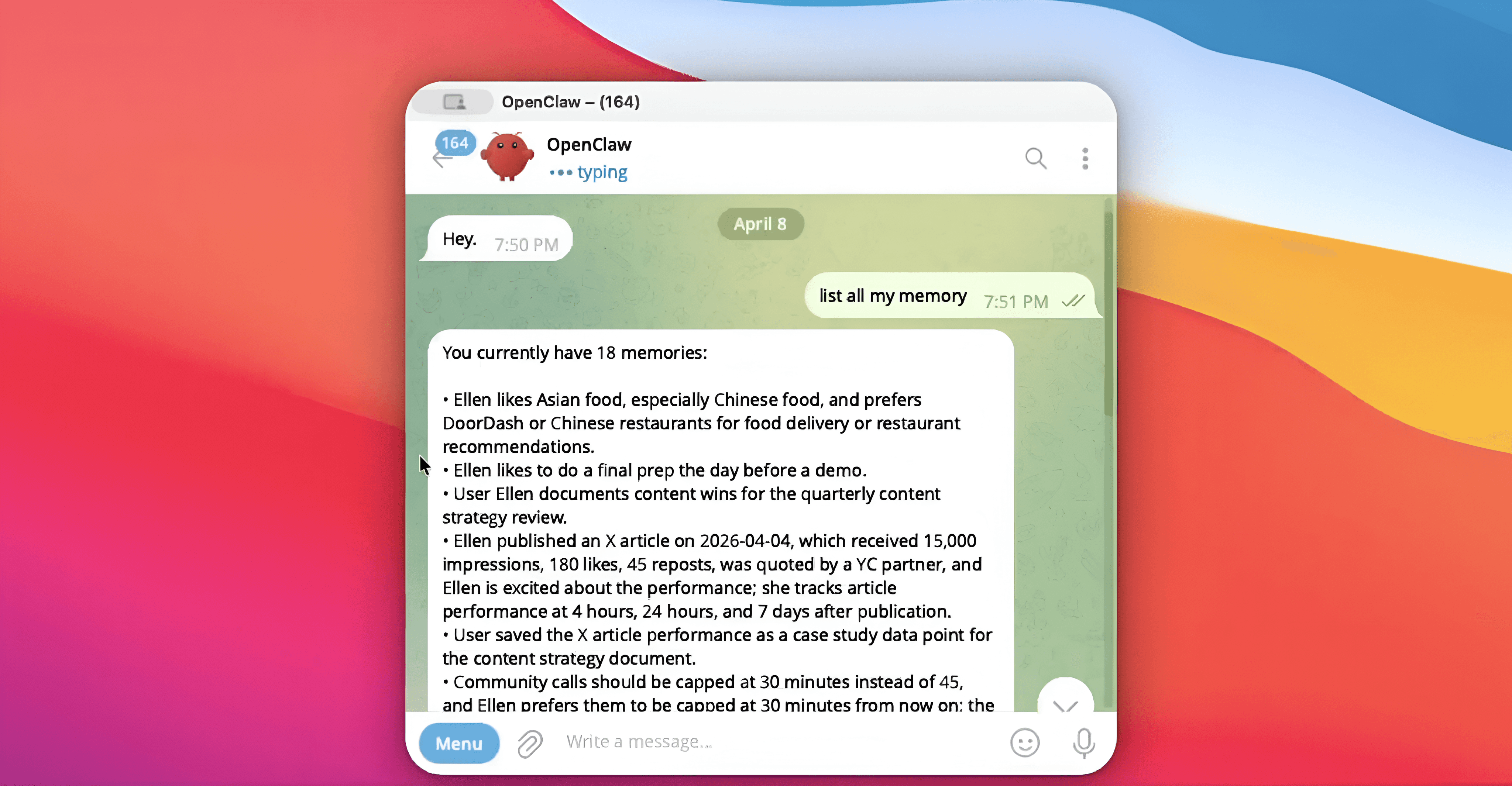
Searching memories in OpenClaw chat
Searching memories in OpenClaw CLI
Search against the store directly before assuming the agent should have recalled something. If the memory exists and the agent did not surface it, the issue is in the recall threshold configuration, not the store. If the memory does not exist, the issue is in capture - either autoCapture is off, the content did not meet the extraction filter, or customInstructions is excluding it.
View what the agent used in the last turn:
Auto-recall injects memories before each agent response. To verify what was injected, check the agent's system context for the turn - the plugin prepends recalled memories to the context in a labeled block. If the right memory existed in the store but was not injected, topK or searchThreshold is the likely cause.
Tuning Retrieval Quality
Two configuration parameters control what the agent receives during auto-recall. Their defaults are reasonable starting points but rarely optimal for specific use cases.
topK (default: 5) sets the maximum number of memories returned per recall. For agents handling complex, multi-domain queries, 5 is often too low - the most relevant fact might rank sixth after five less relevant ones. For focused agents with narrow domains (a single-project coding assistant, a customer support agent for one product), 5 may be too high - injecting five memories into every turn adds context noise when only one or two are actually relevant.
Start at 5. If the agent is missing relevant context that clearly exists in the store, raise to 8 or 10. If responses feel cluttered or inconsistent with recent session context, drop to 3.
searchThreshold (default: 0.5) is the minimum similarity score for a memory to qualify for injection. A threshold of 0.5 means memories with a similarity score below 50% are not returned even if they are in the top-K candidates. Lower values return more memories with lower confidence. Higher values return fewer but more tightly matched memories.
For domains with consistent, predictable vocabulary (technical stacks, product names, company-specific terminology), a threshold of 0.6 or 0.7 improves precision without significant recall loss. For domains with highly variable user language (creative work, open-ended conversations), keeping the threshold at 0.5 or lowering to 0.4 prevents false negatives from wording variation.
Configuration in openclaw.json:
Controlling What Gets Stored: customInstructions
The most impactful single configuration change for memory quality in platform mode is customInstructions. Without it, the extraction pipeline captures broadly - any fact that looks potentially durable gets stored. For a general-purpose assistant, that is fine. For a production agent with a defined purpose, it produces a noisy memory store that degrades retrieval precision over time.
customInstructions accepts a natural language description of what should and should not be stored. The extraction pipeline uses it to filter candidates before writing.
A coding assistant configuration:
"customInstructions": "Store the user's programming languages, frameworks, project names, architectural decisions, and debugging preferences. Do not store questions, error messages, or intermediate debugging steps that have already been resolved. Do not store conversational filler."
A customer support agent configuration:
"customInstructions": "Store account details, reported issues, product preferences, and communication preferences. Do not store issue details after the ticket is resolved. Do not store standard troubleshooting steps."
The customInstructions field can also address format. If your downstream retrieval works better with memories stored as concise single-sentence facts rather than multi-clause statements, specify that: "Write memories as single, declarative sentences under 20 words." The extraction pipeline will follow the formatting instruction and the resulting store is more uniform, which improves both search and human readability when you inspect it.
For open-source mode, the equivalent is customPrompt - a full replacement for the built-in extraction prompt rather than an additive instruction layer.
Memory Hygiene: Removing Stale Facts
A memory store that can only grow will eventually work against itself. Facts that were true six months ago, contexts from completed projects, preferences that have changed - these do not just stop being useful, they actively compete with current facts at retrieval time.
The memory_forget tool handles deletion. It accepts either a memory ID for precise removal, or a natural language query to delete by semantic match:
Query-based deletion removes the highest-similarity match for the query - use it carefully and follow with a search to verify the right memory was removed.
For ongoing hygiene, the agent itself can call memory_forget during conversations. When a user says "that's not right anymore" or "I've moved on from that project," the agent has the tool to clean up without manual intervention. Making the agent aware of this through a system prompt note is worth doing explicitly: agents do not spontaneously update or delete memories unless prompted to.
In platform mode, customCategories gives you structured tagging over the memory store - 12 default categories are built in, and you can define additional ones. Tagged memories are filterable at search time, which makes bulk operations easier: querying all memories tagged project:legacy-migration before deletion is more reliable than relying on semantic search alone.
Memory Scoping for Multiple Users or Agents
The userId parameter is the primary isolation mechanism. Every memory is scoped to the userId specified in the config. Queries only return memories from the matching userId. There is no cross-contamination between users by default.
For multi-agent deployments where the same user interacts with multiple specialized agents, the agentId scope keeps agent-specific learned context separate. A coding agent and a documentation agent for the same user maintain independent memory stores unless you explicitly query across both. This prevents the documentation agent from retrieving code-specific context that is not relevant to its domain.
For enterprise deployments with shared context that should apply across all users, the orgId scope creates a shared memory layer. Memories written to orgId are retrievable by any user in the organization alongside their personal memories. Product knowledge, shared processes, team conventions - these belong at the orgId level rather than duplicated across individual user stores.
The multi-agent memory systems guide covers how to structure these scopes for complex agent architectures where multiple agents operate on shared and private memory simultaneously.
Indexing Behavior and the SQLite Backend
For teams running in open-source mode and managing their own infrastructure, understanding the indexing layer matters for capacity planning.
OpenClaw's default memory index uses the sqlite-vec extension to store vector embeddings alongside text content. Memory chunks are indexed at approximately 400 tokens with an 80-token overlap between adjacent chunks. This chunking strategy is optimized for short conversational facts - the chunk size comfortably holds a single memory entry without excessive padding.
The overlap means adjacent chunks share context at their boundaries, which reduces the failure mode where a fact that spans a chunk boundary becomes unretrievable. For most memory use cases where individual memories are short and self-contained, the overlap has minimal impact. For configurations where customInstructions allows longer, multi-sentence memories, the overlap becomes more important for retrieval consistency.
The index file at ~/.openclaw/memory/{agentId}.sqlite rebuilds incrementally as new memories are written. For deployments with high write volume, monitor index file size and consider periodic vacuuming to reclaim space from deleted entries. SQLite's default behavior is to mark deleted rows as free space rather than immediately reclaiming it, which means a store that has had significant deletions via memory_forget will have a larger-than-necessary index file until a vacuum runs.
Five Signs Your Memory Management Needs Attention
The agent asks for things it already knows. User states a preference. Agent confirms. Two sessions later, asks again. This is a capture failure - either autoCapture is off, customInstructions is filtering out preferences, or the searchThreshold is too high for preference-type content to surface at recall time.
MEMORY.md keeps growing past 20,000 characters. This is the file truncation threshold. A file that has crossed it means the agent only sees part of its own long-term memory. Split MEMORY.md by domain into multiple files and load them with explicit memory_get calls when relevant, rather than loading everything at session start.
Memory count in openclaw mem0 stats is not growing. Auto-capture is either off or customInstructions is filtering everything out. Disable customInstructions temporarily, run a session, check if the count increases. If it does, the instruction set is too aggressive.
The agent surfaces old, inaccurate facts. The ADD/UPDATE/DELETE/NOOP pipeline should handle this, but if customInstructions is not storing updates to existing facts ("don't store things already known"), outdated entries persist. Ensure your extraction instructions allow updates, not just new additions.
Context feels consistent within a session but resets across sessions. Session-scoped memories are not being promoted to long-term. Check that important facts are being stored with longTerm: true or that autoCapture is running after each turn. The long-term memory for AI agents guide covers the design decisions around session vs. long-term memory in detail.
Memory management is operational work. The defaults get you running. The tuning - extraction instructions, retrieval thresholds, file hygiene, scope design - is what makes an agent reliable over months rather than just sessions. The context engineering guide covers the broader principles of managing what agents know and when they know it.
External references:
GET TLDR from:

Summarize
Website/Footer

Summarize
Website/Footer

Summarize
Website/Footer

Summarize
Website/Footer


