

Voice AI pipelines are engineered to make one call feel human. But nothing in them is engineered to remember it.
Quick takeaways
Voice AI platforms don’t remember calls between sessions and every LLM turn is stateless once the call ends.
Mem0 fixes it with two calls:
search()before the call,add()after the call.This demo runs entirely locally with open-source speech models (Whisper and edge-tts); no phone number needed.
The memory shown in the demo persists across sessions, not just within a single demo run.
Picture this after an initial first call:
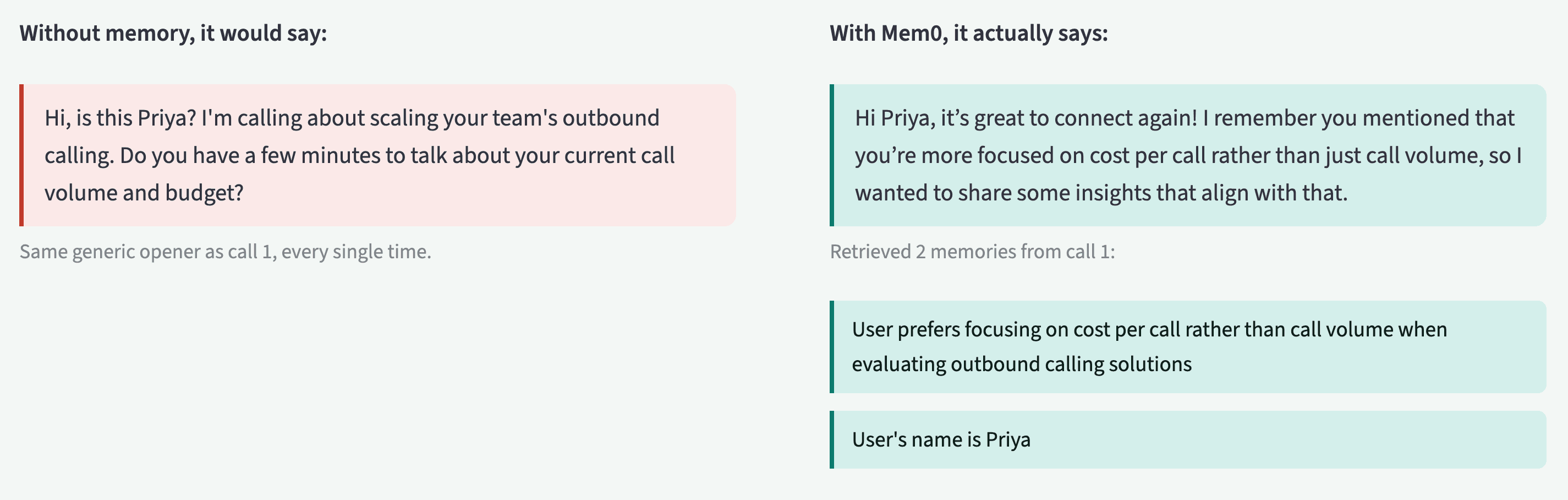
Priya already answered a version of this question in call 1. Now she’s being asked again. On her side, the company she was building a relationship with has no memory of the conversation she had with it three weeks ago. She hangs up, and whatever goodwill call 1 built is gone.
This isn’t a script problem or a prompt problem. It is an architecture problem. Voice AI pipelines like Vapi, Retell, and Bland are built to make a single call feel fluid and human in real time. They are not built to remember that call once it ends. Nothing in the pipeline is responsible for carrying what was learned in call 1 into call 2.
This post builds a small version of that piece you can actually run:
A simulated outbound call, using open-source speech models wired to Mem0 so the second call starts with what the first one learned. You can run end-to-end with a Mem0 key and an Azure OpenAI deployment, without needing a phone number.
Here is a quick look at what you’ll build👇
👉Get a free API key at app.mem0.ai to follow along (free tier, no credit card, includes all the
add()andsearch()calls shown below).
Why does the agent forget?
Every major voice AI platform is solving the same hard problem, i.e., making a phone conversation with an LLM feel like talking to a person, not a chatbot. Vapi’s engineering write-up on this is unusually specific:
Audio is processed in 20ms chunks, streamed through parallel transcription and response stages
A naive sequential pipeline (wait -> transcribe -> LLM -> synthesize -> play) stacks up to 4+ seconds of dead air between turns
On top of the core STT-LLM-TTS stack, Vapi runs real-time models for endpointing, interruption handling, emotion detection, and backchanneling.
That’s aimed entirely at making one call feel good while it’s happening. However, each turn is one independent LLM inference call with no awareness beyond what’s in that request’s prompt. Once the call ends, the prompt disappears, and call 2 starts blank.
The obvious patch to this problem was to paste the whole prior transcript into the next call’s system prompt, but that breaks down fast:
It gets expensive and lossy as call histories grow
Forces the model to re-read and re-reason over everything already said, every time, to find the two sentences that matter
Mem0’s own benchmarks size that gap:
Retrieval-based approach: ~6,719–6,956 tokens/query across LoCoMo, LongMemEval, and BEAM vs. 25,000+ for full-context stuffing
Peer-reviewed LOCOMO evaluation: 26% relative improvement in LLM-as-Judge scoring over full-context OpenAI baseline, with 91% lower p95 latency
Less context, higher judged accuracy, and faster responses. That’s a strong case for a dedicated memory layer over stuffing a bigger prompt. The results won’t be identical for every workload, and retrieval has its own tradeoff: search() only surfaces what it judges relevant to the current query, so a fact that matters but doesn’t match the query’s wording can get missed in a way full-transcript dumping wouldn’t. Mem0’s multi-signal retrieval (semantic, keyword, and entity matching run in parallel) is built specifically to shrink that gap.
This isn’t just a voice AI problem:
Salesforce’s State of the Connected Customer research survey says of ~11,000 consumers and 3,300 business buyers: 56% of customers say they have to repeat or re-explain information to different representatives. Buyers already expect continuity; a voice agent that can’t deliver it is walking straight into that expectation.
The memory layer
Mem0 is a memory layer that sits between your application and your LLM calls. You write to it after something worth remembering happens, and you read from it before you need that context again. Two calls do almost all the work.
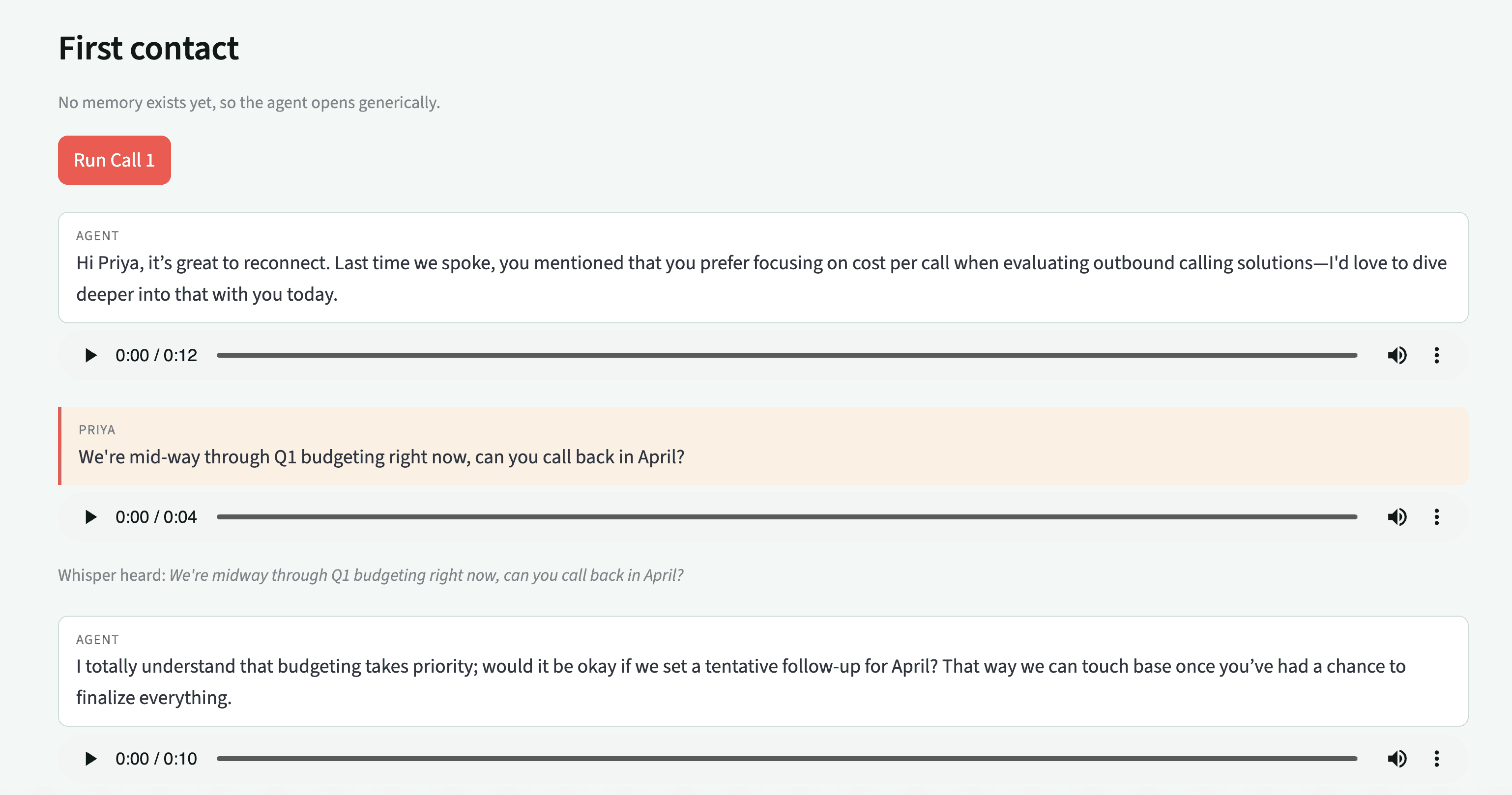
Let’s understand how memory works at first contact:
add()writes a memory, scoped to whoever it belongs to:
search()retrieves what’s relevant to a query, filtered to that same scope:
The scoping model is what makes this fit for an outbound sales use case. Mem0 identifies memories by user_id, agent_id, and run_id.
Here’s how that maps onto a sales floor:
user_id: Their history follows them across every call, regardless of which assistant or campaign handled it.run_id: It is naturally a single call, useful if you want to reason about “what happened in that specific conversation” rather than the lead’s whole history.agent_id: It comes in if you’re running more than one assistant persona, say a cold-outreach bot and a renewal bot, and want their memories kept separate even for the same lead.
Since search() only pulls back the handful of memories relevant to the current query, rather than every message a lead has ever sent. You’re paying for a few dozen tokens per call instead of a growing transcript archive.
The architecture
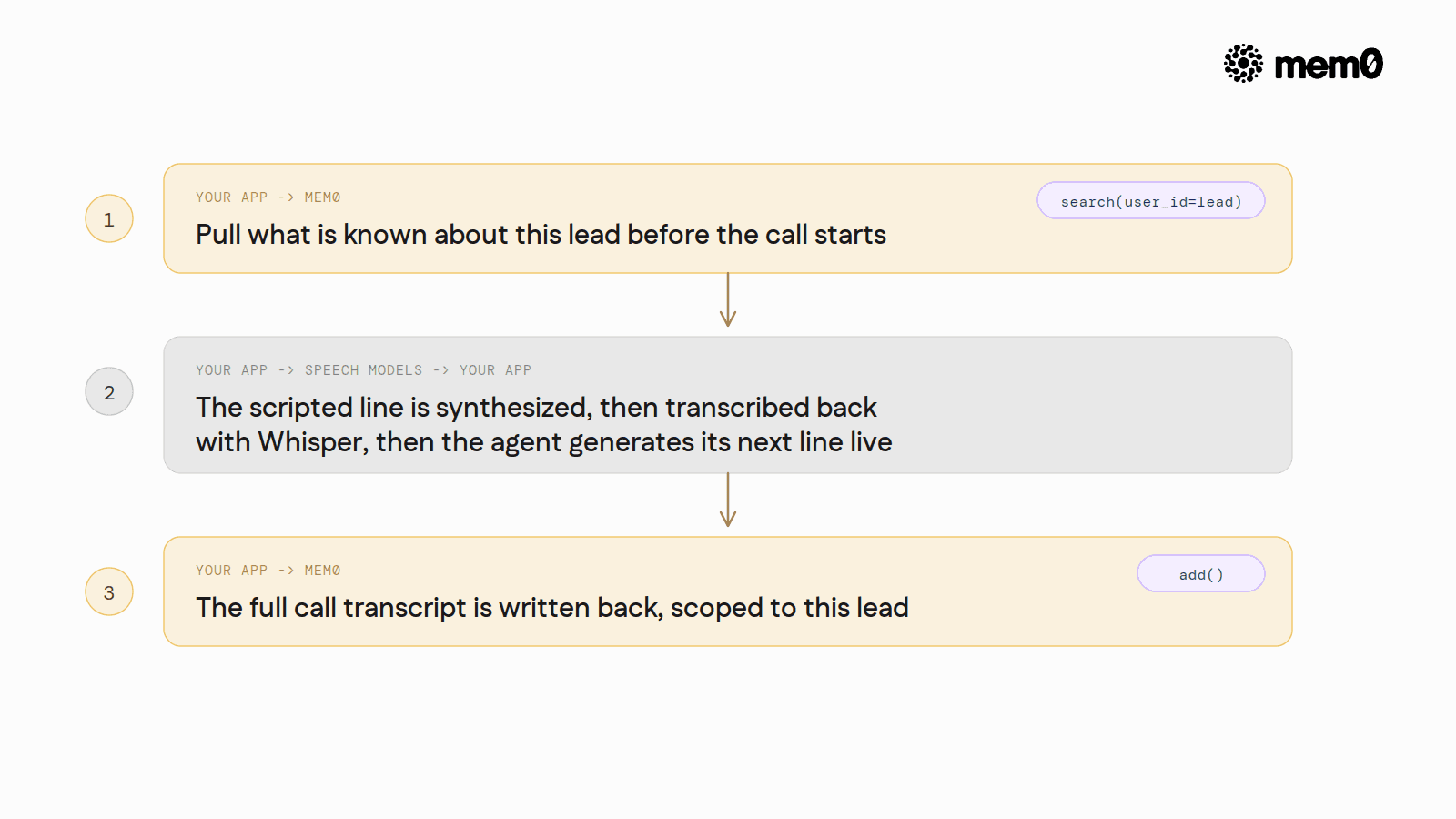
Two integration points, same as a real telephony setup would need, just without the telephony. search() before the call decides how it opens. add() after the call, decide what’s remembered next time. In between, open-source speech models stand in for the phone line: edge-tts speaks Priya’s scripted side, faster-whisper transcribes it back, and the agent responds to that transcription, not to the original script text.
Setup
Before we run the demo, we need to set up some required libraries:
👉Wanna give it a try? Get a Mem0 API Key and try it yourself.
You’ll need a Mem0 API key (from app.mem0.ai) and an Azure OpenAI deployment; swap in any OpenAI-compatible client if you’re not on Azure.
Now, you are all set to build the demo.
⭐️ Check out the complete project on GitHub
Before the call: search, then open
This is where memory actually earns its keep. Instead of starting every call with the same script, the agent queries Mem0 for anything relevant to this specific lead before it says a word, then builds its opening line around what comes back. The logic is simple: search first, and let the presence or absence of results decide how the call starts.
No memory yet, no context to build the sentence from, so it falls back to GENERIC_OPENER. That’s the whole comparison this demo makes visible:, call build_opening_line() once against an empty memory store, then again after a call has been logged, and read the two outputs side by side.
Simulating the lead’s side
We just mimicked a phone call in this demo, so Priya’s side of the call is scripted rather than live, but it still goes through a real speech-to-text step, not a hardcoded string handed straight to the model:
Priya’s script gets synthesized with edge-tts, written to a temp file, then run back through Whisper before the agent ever sees it. The agent’s next line is generated from Whisper’s transcription of that audio, the same as it would be on a live call.
After the call: writing it back
The other half of the loop is just as important as the search: once the call ends, the transcript has to actually become memory, not just get discarded. This is the single line that closes the gap between call 1 and call 2.
turns is the full back-and-forth for this call, role-tagged. infer=True, Mem0’s default, means the call runs its own extraction: it pulls out the facts worth keeping (the budget timeline, the pricing concern) rather than storing the raw transcript verbatim, which is what keeps the next call search() cheap. Mem0’s cloud API processes this asynchronously, so the call returns immediately {"status": "PENDING", "event_id": ...} while extraction finishes in the background; a search() a few seconds later picks it up.
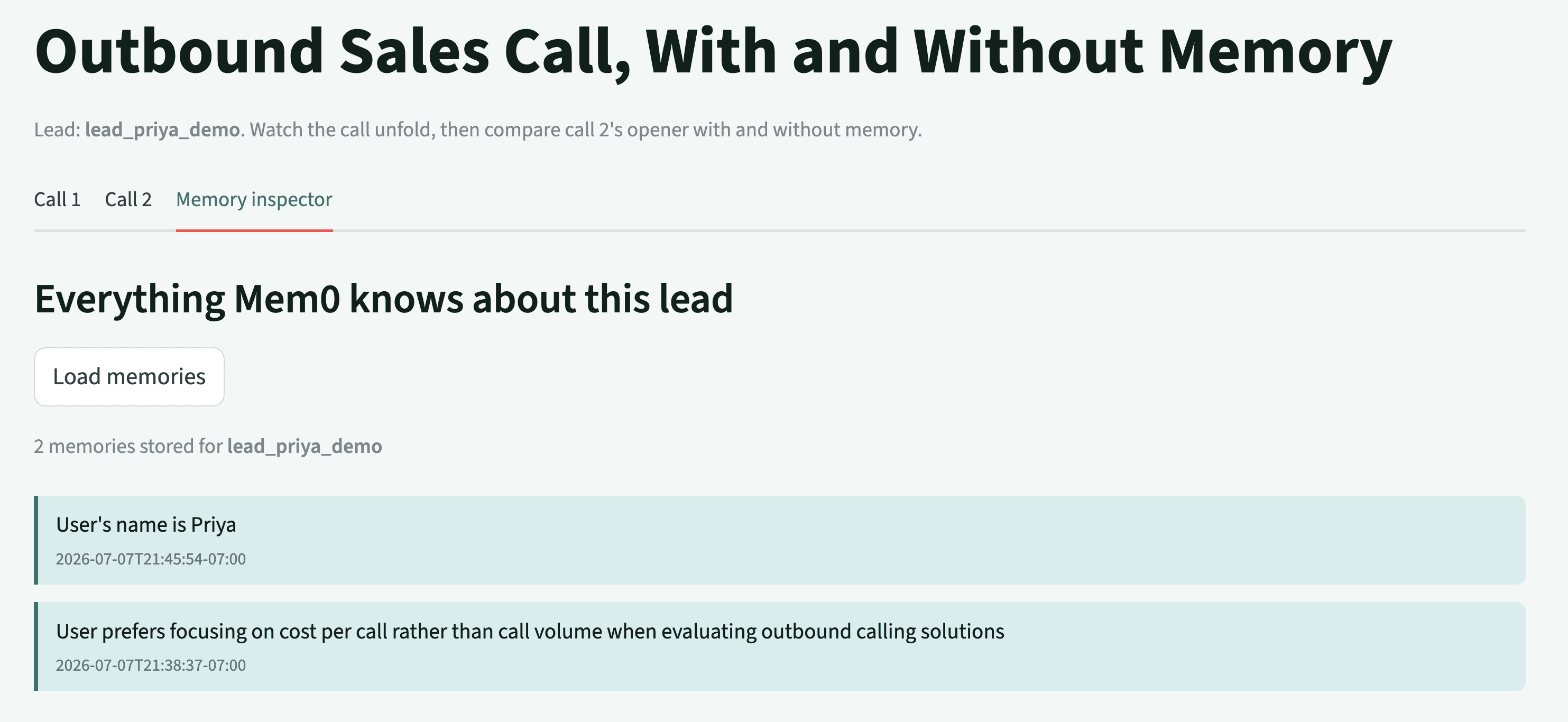
Two real calls, two distinct event IDs: d5734b82-ab0f-4b97-85ef-28286d1eba49 for call 1, 005ac91e-4419-4c28-83c8-07589d93afea for call 2, both returned with status: "PENDING". The memories that opener above drew on are timestamped the evening before either of these calls ran — this lead’s history had already survived an actual day boundary, not just two clicks in the same browser tab, which is the entire point of writing it to Mem0 instead of keeping it in a variable.
Going further
Three things come up fast once you push this past a single scripted call:
This demo proves the mechanic, not a phone line. Wiring it into an actual outbound call means putting a real voice platform in the loop using Vapi, LiveKit, or a similar agent. But the same two integration points still apply:
search()before the call to build the opener,add()after the call, write back the transcript. The synthesize-then-transcribe round trip goes away entirely once real audio is on a real line, since a live platform hands you a transcript directly.If you run more than one assistant, say a cold-outreach bot and a separate renewal-calls bot, tag memories with
agent_idso each persona sees only what’s relevant to its role, even for the same lead. Hence, separate personas with agent_id.Sales data includes real people who can ask to have their data deleted. Mem0 exposes
delete(),batch_delete(), anddelete_all(user_id=...)for exactly this, anddelete_allnow requires an explicit filter rather than defaulting to a bulk wipe. That’s the deletion side. The recording side comes first, once this stops being a scripted simulation and starts recording real people: call-recording consent rules vary by jurisdiction, and many require two-party consent, and that’s a legal question to close before a real deployment runs, not one this pattern solves for you.
Run it yourself!
Clone the repo, install the packages, and run two calls against the same lead. The full source for everything shown above is in the demo repository.
01 Get a free Mem0 API key at app.mem0.ai and set MEM0_API_KEY in your environment
02 Set up an Azure OpenAI deployment and export AZURE_OPENAI_API_KEY and AZURE_OPENAI_ENDPOINT (swap in any OpenAI-compatible client if you’re not on Azure)
03 pip install streamlit mem0ai openai edge-tts faster-whisper python-dotenv
04 Clone the GitHub repo and run
05 Run the first call
Everything above runs on Mem0’s free tier.
Further Reading
GET TLDR from:

Summarize
Website/Footer

Summarize
Website/Footer

Summarize
Website/Footer

Summarize
Website/Footer


